2026.08.11.
memoQ 12.4.53
Supported

Redesigned navigation that’s more intuitive and works better on all devices.
The ICR tool has been redesigned with a collapsible side panel and streamlined layout to offer more screen space for your content. New features include advanced find-and-replace, filtering and commenting, and navigation tools for tracked changes.
Stop scrolling through locked rows or segments you’ve already reviewed. Customize how memoQ editor moves between segments based on what matters for your role: skip locked rows as a translator, find unconfirmed segments as a reviewer, focus on pre-translated content as a PM. Set your preference in Settings, change it anytime as your work shifts, and jump directly to what you need without scrolling.
Select a single word or phrase on the source side and get instant suggestions from your configured MT services. No need to leave the application and search online. It’s like having a dictionary right at your fingertips.
Some segments don’t belong in your TM: placeholder text, numbers-only content, temporary fixes. Now you can confirm them as done without polluting your translation memory. Better matches on future projects, faster work.
Need to fix incorrectly translated terms across multiple segments, but only in certain rows? Select the rows you want to update, then replace all occurrences in the selection at once instead of clicking through each one. memoQ warns you before executing so you stay in control.
New memoQ TMS installations now use port 443 for communication between the desktop client and the server. Previously, this defaulted to port 8086. Existing installations are not affected. Servers already running on port 8086 keep their current configuration after upgrading.
Stop numbers from breaking awkwardly across lines in your translations. Now one keyboard shortcut (Ctrl + Shift + Space) keeps them together.
Use Lara Translate, an adaptive machine translation engine that improves automatically with every confirmed segment. Want to use it? Consult Lara’s installation guide to learn more.
12.4.53
August 11, 2026
Improved performance and speed for project creation and processing. (BUG-17191)
12.4.45
July 27, 2026
12.4.36
July 16, 2026
Create, preview, and download LQA statistics and LQA error lists for projects or specific files on memoQweb, with reports stored on the server, always available from the Reports tab, and exportable in all supported formats.
Project managers can export post-translation analysis reports separately for each language on memoQweb.
Open Analysis reports in a separate browser window to review the complete report content.
Create and edit Microsoft Excel import filters directly on memoQweb.
Project managers and server administrators can control whether translators and reviewers are allowed to lock or unlock segments in a project.
The Views feature has arrived in memoQ editor, allowing users to combine multiple project documents on the My tasks page into a single workspace for translation, QA, search, sorting, and filtering across related content while staying fully synchronized with the original files. Ideal for projects with many small documents. Project Managers can also use this powerful feature when preparing projects by temporarily assigning project documents to themselves and creating a view on their own My Tasks page.
Add new term base entries and edit existing ones directly in memoQ editor using a single streamlined interface for memoQ and Qterm term bases.
Select and deliver multiple documents from the same project on the My tasks page in one step instead of handling them one by one.
Qterm entries now display the entry ID, creation date, and creator in the entry header, with an option to show metadata in a clearer structured layout using line breaks.
memoQ now supports new Russian variants for Estonia, Israel, Latvia, and Lithuania; new French variants for Benin, Côte d’Ivoire, Togo, Tunisia, and the Caribbean; new English variants for Ghana, Hong Kong, India, Israel, Kenya, Malaysia, Puerto Rico, Singapore, and Taiwan; plus five Saami languages: North, South, Lule, Skolt, and Inari.
The integration with Custom.MT has been enhanced with an improved user experience and a customizable API endpoint. MatchPatch can now also be used with Custom.MT.
12.3.77
August 11, 2026
12.3.64
July 27, 2026
12.3.55
July 16, 2026
12.3.40
June 2, 2026
<br> tags) in Table DOCX re-import. (BUG-16473)
Create and save LQA statistics for a project and access them anytime under the Reports tab in memoQweb.
Download the LQA Overview report straight from memoQweb. No desktop access is required.
Project managers can select one or more languages and export the analysis report for those languages only.
Download Analysis reports from memoQweb as separate files per target language.
Download a single Analysis report from memoQweb that includes all target languages.
Project managers can create an Analysis report for one or more selected documents directly from the document list.
Create and edit Microsoft Word and PowerPoint import filters directly on memoQweb.
In memoQ 12.2, server administrators can now control who can check out projects to memoQ desktop using a dedicated built-in user group, without changing other permissions or project settings
Replace all occurrences of a search phrase at once, with a clear warning and confirmation, so you stay in control.
Send documents or selected rows to Antidote for review and get updates back automatically in memoQ editor for French and English.
Add, categorize, filter, and clear comments by scope, type, and author, so feedback stays structured and easy to review in one place.
Choose which types of comments to include when exporting translated DOCX files, so reviewers see the right information without extra noise.
Choose how the active row appears in memoQ editor, either freely positioned or always centered to keep full context in view.
Choose and save your preferred tag display format for compare boxes, so translation results are easier to read at a glance.
Project managers and server administrators can decide whether linguists are allowed to edit source content in a project.
The Desktop API serves as the new connection layer between memoQ TMS and the Desktop client. It should be used only when both components run on version 12.2 or newer, as older Desktop clients may experience compatibility issues.
Run memoQ OIDC on the same machine as memoQ TMS under IIS, removing the need for a separate port or extra server and avoiding security and infrastructure hurdles.
Tracked changes reports now generate correctly with Reviewer 2 settings.
Tracked changes reports now calculate data separately by role instead of aggregating it across users.
Reviewer change reports now show all target languages assigned to a user in multi-language projects, both in preview and in exports.
Filter reports by their creator, including system-generated and user-created reports.Filter reports by their creator, including system-generated and user-created reports.
Download all reports as Excel files directly from memoQweb.
12.2.41
March 10, 2026
Improvements:
We added tips for safely storing and moving memoQ projects in OneDrive and Cloud-synced folders
Bugfixes:
CMS improvements: Clearer logging when importing content from the CMS gateway
Compatibility issues: Can’t check out projects on 11.x server using 12.x desktop app
Compatibility issues: Database issue identified during upgrade to memoQ TMS 12.0
Compatibility issues: Server upgrade from 11.5.8 to 12.0.10 doesn’t complete successfully
Deployment tool: Improved stability and memory management during memoQ TMS upgrades
Documentation: DeepL v2 plugin now links to the correct memoQ documentation page
Import, Export: Fixed issue preventing IDML files from exporting in memoQ 10.4 and 11.6
Import, Export: Improved stability during file imports by reducing SQL deadlocks
Import, Export: Multilingual filter keeps inline cell formatting when exporting XLSX files
Import, Export: Resolved export issue with IDML files in memoQ 12.0
Import, Export: Tags now appear correctly when exporting and reimporting bilingual table DOCX files
Machine Translation: A clearer message displayed when DeepL glossary import isn’t possible
Machine Translation: Pre-translation with the DeepL plugin may trigger inline tag errors and block workflows
Markdown: Improved support for MathBlocks during file import
memoQ editor: Preview now correctly displays images with absolute URLs
memoQ TMS: Email settings now keep your sender name on hosted servers
memoQ TMS: Failed login attempts with incorrect passwords are now recorded in the server log
memoQ TMS: Resolved a launch error that occasionally caused memoQ TMS to stop with a null reference
memoQ TMS: Subvendor users now appear as Project Managers and can assign tasks
Performance optimization: Improved speed when loading online TMs, TBs, and Muses in memoQ desktop app
Performance: Public Cloud Server performance is improved and CPU usage stabilized
Plugins: Corrected WebView assembly version in the memoQ TMS
Reports: Statistics and Pretranslate now support Thai with homogeneity feature
Setup improvements: More robust handling of performance counters
TM+: Improved pre-translation for content with spaces, non-breaking spaces, and numbers
Translation memories: Fixed concordance search to better support exact word order and word ending variations
Translation results: View image button now opens term entry images correctly
Upgrade fix: memoQ TMS upgrade from 10.6 to 11.2 backup error fixed
Project managers can now create the following reports in memoQweb via the Reports tab:
A new Scope column on the Reports tab helps project managers quickly assess whether a report meets their needs. The column shows the number of files included in each report, and selecting a cell reveals a detailed list of all documents, making it easy to evaluate the report’s relevance and suitability.
Project managers can now download one or more reports directly from memoQ. Clicking the Download button opens a dialog to choose the report format (HTML or CSV), making it easy to include in purchase orders.
Project managers can now preview reports immediately after creating them, making it easy to check their usefulness before downloading or sharing.
memoQ server administrators can now set weighted word counts (WWCs) directly on the web, ensuring project managers see accurate WWCs when generating analysis reports for their projects.
Import filters are now available in memoQweb, allowing you to import, clone, rename, update descriptions, and delete filter configurations. Support for creating and editing filter settings will be introduced in future releases.
The Find & Replace panel in memoQ editor now goes beyond text. You can search in tags, comments, and context IDs, and use regex in all kinds of searches and the replace function in text. This upgrade delivers powerful precision for language engineers, project managers, translators, and enterprises.
memoQ 12.1 introduces a new tracked changes panel in memoQ editor, offering advanced navigation and the ability to accept or reject changes individually or in bulk. This gives linguists clearer control in projects where documenting edits is essential.
memoQ 12.1 introduces a status bar in memoQ editor, giving linguists role-based progress tracking and detailed segment information, while PMs and administrators see team averages. The update also adds Context ID display, providing valuable metadata for gaming and localization workflows.
memoQ 12.1 adds Join and Split commands to the Segment menu, allowing linguists to fix incorrect segmentation directly in memoQ editor. These tools help maintain translation memory integrity and ensure segments reflect the correct sentence structure before translation.
memoQ 12.1 introduces a more powerful filtering experience in memoQ editor. You can use regular expressions, combine or clear previous filters, choose what to filter (text, tags, comments, context IDs), apply preset or custom criteria, and even filter by changes or specific tag types.
memoQ AGT now skips all “forbidden terms” from your term base or Qterm, keeping translations accurate and compliant.
Public cloud users can now use the new Calculate now button in Server Administrator → Storage to get an immediate, accurate view of their storage usage without waiting for the next daily backup.
memoQ now aligns its Latin American Spanish language codes with DeepL’s new ES-419 code, ensuring smooth integration and accurate language matching when using DeepL for translation.

12.1.33
January 7, 2026
memoQ editor: Preview now correctly displays images with absolute URLs
memoQ editor: Preview now loads CSS files from absolute URLs correctly
memoQ editor: Improved support for larger documents
memoQ editor: Improved preview formatting in memoQ editor
Machine Translation: A clearer message displayed when DeepL glossary import isn’t possible
Deployment tool: Improved stability and memory management during memoQ TMS upgrades
Project managers can now include memoQ’s automation framework, AGT, in template-based automated actions. When configured, translation with AGT runs automatically at key project lifecycle events.
With AGT integrated into automated actions, project managers can create fully automated pre-translation workflows that combine the strengths of TM, AGT, and MT for optimal results.
memoQ 12.0 improves AGT’s tag handling across all formats (from everyday files to complex structured DITA content used in CMS, CCMS, or any other systems) ensuring that formatting is preserved and translations remain accurate.
These updates build on the tag handling introduced in 11.6, further enhancing accuracy and ensuring more precise translations when AGT works with TM matches.
The browser-based memoQ editor now gives linguists and project managers more flexibility, speed, and control, with many improvements coming from user feedback, including requests submitted via the memoQ Users’ Ideas Portal.
For more details on these technical changes, please visit our Pressroom announcement.
12.0.13
December 2, 2025
Bug fixes:
Documentation: DeepL v2 plugin now links to the correct memoQ documentation page
Import, Export: Fixed issue preventing IDML files from exporting in memoQ 10.4 and 11.6
Import, Export: Resolved export issue with IDML files in memoQ 12.0
Import, Export: Tags now appear correctly when exporting and reimporting bilingual table DOCX files
memoQ TMS: Resolved a launch error that occasionally caused memoQ TMS to stop with a null reference
Performance optimization: Improved speed when loading online TMs, TBs, and Muses in memoQ desktop app
Plugins: Corrected WebView assembly version in the memoQ TMS
Regex text filter: Include/exclude tab now shows all rules properly
Translation memories: Fixed concordance search to better support exact word order and word ending variations
Upgrade fix: memoQ TMS upgrade from 10.6 to 11.2 backup error fixed
Usability fix: memoQweb is now accessible on a memoQ TMS, previously connected to Language Terminal
12.0.11
November 3, 2025
Improvement:
BUG-15562 – Translation editor: IME automatically turns on for East Asian languages when using the filter box
Bugfixes:
BUG-15331 – Multilingual Excel filter: Documents with number-only source segments may cause export issues
BUG-15562 – Translation editor: IME automatically turns on for East Asian languages when using the filter box
BUG-15839 – Machine Translation: The Systran MT plugin now correctly detects Chinese language codes (“zh”, “zt”)
BUG-15914 – Translation memories: TM+ temporarily inaccessible on the server
BUG-15933 – Machine Translation: Pre-translation with the DeepL plugin may trigger inline tag errors and block workflows
BUG-16044 – Compatibility issues: Can’t check out projects on 11.x server using 12.x desktop app
BUG-16047 – Compatibility issues: Server upgrade from 11.5.8 to 12.0.10 doesn’t complete successfully
BUG-16070 – Compatibility issues: Database issue identified during upgrade to memoQ TMS 12.0
12.0.10
October 7, 2025
Improvements:
BUG-15442 – CMS API: Implement callback URL signing in memoQ TMS 11.2
Bugfixes:
BUG-12278 – The built-in memoQ TM Search tool cannot handle TM+ resources
BUG-12389 – QA: Longer terms are not recognized when there is a matching shorter one in the TB
BUG-12699 – SDLXLIFF filter: ‘NMT-origin’ status mapping is missing from the default SDLXLIFF filter
BUG-12913 – memoQ can’t restore a document to its earlier state if the document was sliced
BUG-12949 – TB: Fuzzy or Custom matching can’t find slightly different TB entries when a segment only contains a term
BUG-13888 – TB: Fuzzy term matching doesn’t recognize terms when accents are different
BUG-14621 – Resources API: create entry endpoint returns 404 not found error if invalid value is passed to a custom meta property
BUG-15191 – Cannot pre-translate document slices in the project’s Translations pane when statistics is turned on
BUG-15533 – Statistics fails on sliced X-translated document
BUG-15595 – DOCX filter: Cannot export document if it has segments containing only inline tags
BUG-15601 – memoQ desktop app: Edit distance reports between generated in the History and Reports window and the Reports tab show different results
BUG-15619 – Edit distance report shows 0 values when the Reports page’s language selector is set to All languages
BUG-15631 – Business Analytics: of The Analytics service cannot process projects where the list of target languages is longer than 1200 characters
BUG-15639 – QA: Symbols immediately after numbers might cause false positive warnings
BUG-15659 – TM+: memoQ might copy the value of tag attributes incorrectly
BUG-15705 – Machine translation: Google Advanced MT: Can’t add Google Advanced MT plugin to a project if Tigrinya or Oromo is among its languages
BUG-15714 – QA: Custom punctuation mark (rule) remains in the QA settings even after deletion
BUG-15748 – PPTX filter: memoQ can’t import PPTX document if it contains certain Table Design elements
BUG-15768 – memoQ editor: Pressing the TAB key doesn’t work as expected when using an IME for East Asian languages
BUG-15780 – QA: Certain measurements after numbers might cause false positive warnings
BUG-15785 – Markdown filter: memoQ doesn’t import math formulas
BUG-15836 – Machine Translation: DeepL plugin: Cannot select glossary if the previously selected glossary is deleted
BUG-15851 – Machine translation: MT plugins might return an error when processing invalid HTML
BUG-15903 – memoQ editor: Popped-out panes might stay behind other app windows
BUG-15936 – memoQ editor: When showing non-printable characters, spaces and middle points look the same
BUG-15948 – memoQ 11.6 can’t import TBX files
memoQ 11.6.10.
August 28, 2025
Bugfixes
BUG-12389 – QA: Longer terms are not recognized when there is a matching shorter one in the TB
BUG-12913 – memoQ can’t restore a document to its earlier state if the document was sliced
BUG-12949 – TB: Fuzzy or Custom matching can’t find slightly different TB entries when a segment only contains a term
BUG-15191 – Cannot pre-translate document slices in the project’s Translations pane when statistics is turned on
BUG-15595 – DOCX filter: Cannot export document if it has segments containing only inline tags
BUG-15631 – Business Analytics: of The Analytics service cannot process projects where the list of target languages is longer than 1200 characters
BUG-15705 – Machine translation: Google Advanced MT: Can’t add Google Advanced MT plugin to a project if Tigrinya or Oromo is among its languages
BUG-15714 – QA: Custom punctuation mark (rule) remains in the QA settings even after deletion
BUG-15748 – PPTX filter: memoQ can’t import PPTX document if it contains certain Table Design elements
memoQ 11.6.8
August 8, 2025
BUG-11501 – Microsoft PowerPoint filter: A specific .pptx document loses formatting during import
BUG-14373 – Microsoft Excel filter: In a project with a CCJK source and a non-CCJK target language, an extra space might appear after line breaks in Excel cells when exporting a document
BUG-14393 – TM+: Creator metadata is overwritten when modifying an existing TM entry
BUG-14459 – Translation editor: Concordance doesn’t return results in rare cases when search phrase contains wildcards
BUG-14820 – Translation editor: Translation result’s metadata are not visible in inverted color scheme until turning inverted colors off and on again
BUG-15050 – MQXLIFF filter: Importing a renamed MQXLIFF file into memoQ gives different results in version 11.2 than in earlier versions
BUG-15128 – TM+: Cannot import a TMX with very long (100k+ characters) segments
BUG-15131 – TM+: A 100% match isn’t shown in pre-translation when a 101% match is penalized
BUG-15185 – After checking out an online project, translators don’t have template-based LiveDocs corpora in the local copy
BUG-15190 – Markdown filter: Unescaped right square bracket (“]”) in the exported file might break Markdown links
BUG-15209 – memoQweb: webtrans returns an error if no hit type is enabled in Translation results settings
BUG-15264- memoQweb: Confirming segments in webtrans might produce errors
BUG-15269 – Java .properties filter: “Treat placeholder <ph> tags as required” checkbox resets to enabled state
BUG-15319 – TM+: Large numbers ending in 0s and using thousands separators are not substituted correctly
BUG-15320 – Qterm: When selecting an entry in a Qterm TB, the entry list jumps
BUG-15334 – memoQweb: Chinese IME causes issues with project language selectors
BUG-15373 – XLIFF 2 filter: Export might fail if <unit> element’s “id” attribute contains a comma
BUG-15384 – RTF filter: Formatting (bold, italics) lost during export from version 11.x
BUG-15439 – XLIFF 1 filter: memoQ might skip segmentation if there is content in a target segment
BUG-15445 – Multilingual Excel filter: memoQ might not import the document if a target cell contains a “zero-width whitespace” character
memoQ 11.5 brings major improvements to the memoQ editor, our new web-based translation application for linguists working with organization licenses.
DeepL speeds up pre-translation for larger volumes, helping you move through big projects more efficiently.
Project managers can now export all project files in multiple formats directly from the Projects list:
Spelling can now be selected as a separate QA category in ICR configurations, offering more detailed quality assurance settings.
11.5.8
June 3, 2025
Bugfixes:
BUG-12699 – SDLXLIFF filter: ‘NMT-origin’ status mapping is missing from the default SDLXLIFF filter
BUG-12880 – TM Editor: Merging or removing duplicate entries does not work in TM+ memories
BUG-14136 – TM editor: When editing a TM+, an unnecessary warning message appears
BUG-14565 – IDML filter: memoQ cannot import the document if it contains processing instructions
BUG-14581 – Microsoft Office filters: The anchor at the end of hyperlink is not imported
BUG-14620 – Multilingual Excel filter: When importing a multi-sheet Excel file, some sheets might be missing if some resources are corrupt in the file
BUG-14740 – Multilingual XML filter: memoQ shows a “directory not found” exception when trying to save an XPath rule if the preview document doesn’t exist anymore
BUG-14962 – memoQ TM Search Tool starts with an error
BUG-15076 – memoQweb: webtrans might show an “Invalid Operation” exception when joining segments in a sliced document
BUG-15118 – Improved Purge TB functionality on WS API
BUG-15148 – Fix public documentation for WS API endpoints PretranslateProject and PretranslateDocuments
BUG-15186 – Dashboard: Filter conditions containing “Reviewer 1” or “Reviewer 2” don’t work on the French UI
BUG-15211 – Translation memories: Optimization: TM listing now reads a memory cache, not directly the TM database
BUG-15214 – WS API: Fix in ExportTranslationDocumentAsXliffBilingual minor version export
BUG-15223 – IDML filter: memoQ might show a “Collection was modified” exception when trying to import the IDML file
BUG-15253 – Resources API: TBs might get corrupted if invalid value is passed for PrefixBoundaries
BUG-15279 – memoQweb: memoQ editor doesn’t open if the user is a PM in another project
BUG-15284 – QA: Arabic comma character after a number might cause false positive warnings
BUG-15289 – TM+: Statistics might fail when a project has translatable tags and reverse TM lookup is enabled
BUG-15294 – Translation memories: Optimization: TM listing now reads a memory cache, not directly the TM database
BUG-15297 – Multilingual Excel filter: memoQ doesn’t import ending whitespaces correctly when language-based segmentation is turned on
BUG-15324 – Multilingual Excel filter: HTML preview is not generated correctly when the Excel file has multiple sheets
BUG-15381 – QA: Number check might show false positive “missing number” and “extra number” warnings for CCJK languages
BUG-15402 – Translation memories: Optimization: TM listing now reads a memory cache, not directly the TM database
BUG-15405 – Qterm: When adding/editing a term to a term base in the translation editor, the Qterm window opens as blank
BUG-15410 – XLIFF 2 filter: memoQ might not apply XLIFF states settings when exporting the document
BUG-15419 – QA: Full-width (two-byte) comma between numbers might cause false positive warnings
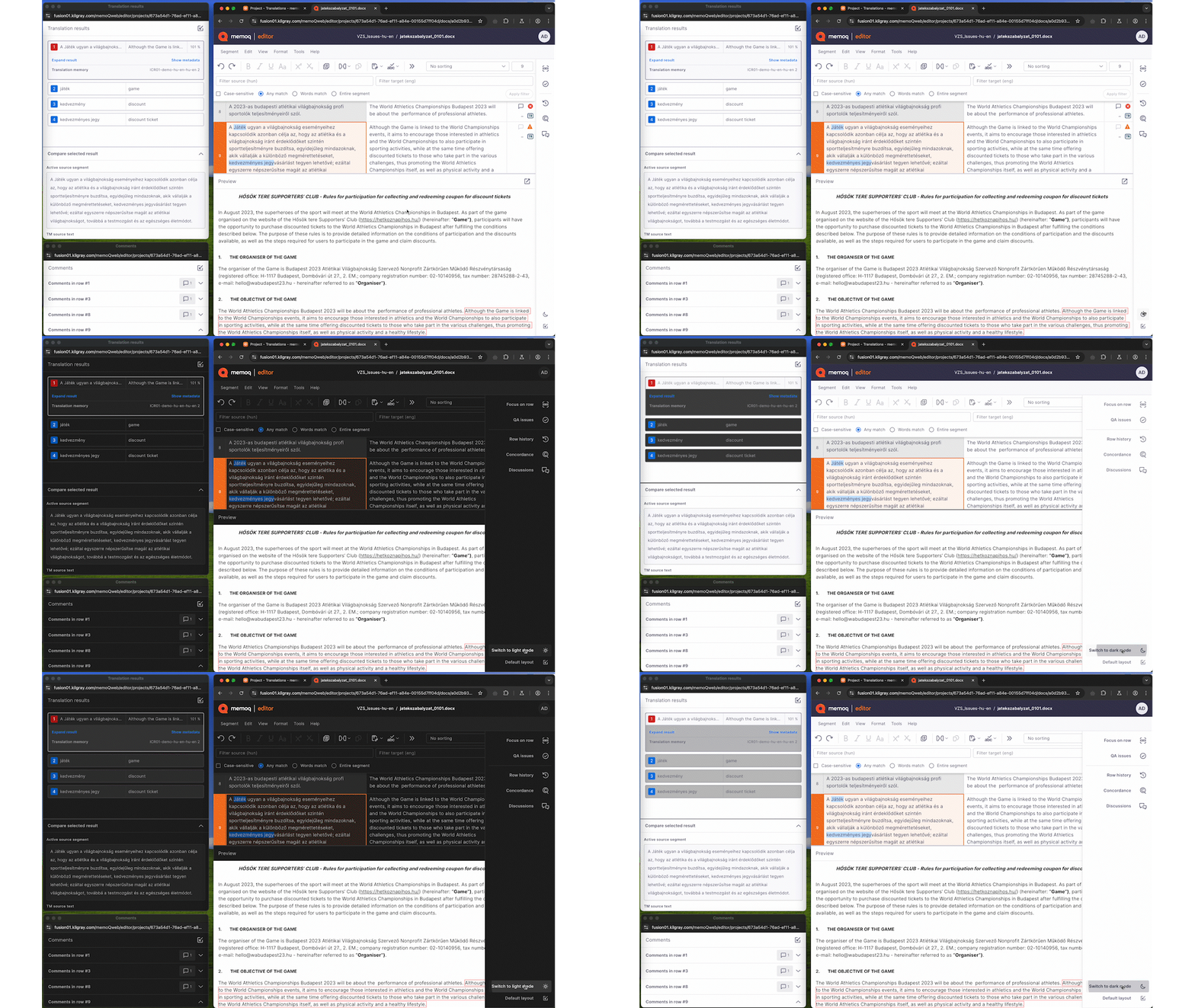
In this release, we are excited to introduce memoQ editor, our new web translation interface designed for linguists working with a license provided by an organization. memoQ editor is set to gradually replace webtrans as new features are added in each new release.
To explore memoQ editor’s features, benefits, and future developments in more detail, check out our in-depth blog post.
11.4.11
April 22, 2025
Bugfixes
BUG-14435 – TM+: Inline tags are saved in correct order when confirming a segment, but appear in wrong order in the Translation results pane
BUG-14665 – Cascading filters: Using a HTML filter after the Excel filter the “Import markup as memoQ {tags}” option might fail with an error
BUG-15117 – memoQ AGT: In certain cases, image “alt” texts are skipped or truncated
BUG-15130 – Powerpoint filter: Bold text does not import or export correctly if it is defined in Slide Master
BUG-15149 – memoQ AGT: When you add new target languages to a project, memoQ AGT does not translate to those
BUG-15151 – memoQ editor: When ‘Long’ tag format is selected in the View menu, long inline tags in the source text might break the translation grid layout
BUG-15175 – memoQweb: The “Apply changes” button on the “Edit user” page does not save changes if the “Email address” field is empty.
BUG-15177 – Markdown filter: memoQ tags double colons in Markdown files as formatting
BUG-15182 – memoQ doesn’t split oversized segments correctly when the source part is longer than the target part
BUG-15184 – Retry DocumentAdder instantiation logic in DocumentImportController on deadlock
BUG-15186 – Dashboard: Filter conditions containing “Reviewer 1” or “Reviewer 2” don’t work on the French UI
BUG-15224 – memoQ AGT: When an inline tag’s attribute value contains quotes, tags might be missing from the translation
BUG-15247 – memoQ AGT: Pre-translation skips segments containing specific tags
BUG-15272 – memoQ AGT: Pre-translation skips segments that have TM hits
11.4.9
April 2, 2025
Bugfixes:
BBUG-11295 – Term bases: Creating more than 1791 entries in a Qterm TB via Resources API makes the TB corrupted
BUG-13407 – Translation editor: In a filtered document or a view, ignoring all QA warnings might not always be available
BUG-13689 – PowerPoint filter: Can’t export document when modern comments are added to a hidden slide or empty textbox
BUG-14537 – Multilingual Excel filter: In CSV files, memoQ could not import length limit information between quotes
BUG-14561 – Multilingual Excel filter: memoQ might ignores import color settings when multiple cell styles contain an indexed color
BUG-14647 – QA: Extra warnings might appear when target and source uses whitespace between number and measurement inconsistently
BUG-14691 – When importing a package with an empty LiveDocs corpus, “Import failed” warning appears
BUG-14707 – QA: Source containing alphanumeric code and target containing number (or vice versa) might cause false positive “extra number” and “missing number” warnings
BUG-14741 – WorldServer filter: New checkboxes for segmentation and formatting
BUG-14797 – memoQweb: Documents with subvendor assignments might not save deadline changes correctly
BUG-14830 – Regex text filter: In a rare case, memoQ cannot import a regex text filter as online resource and cannot import files into online project with a re-created online version of the filter
BUG-14844 – Machine translation: DeepL: Logging in with an API key might result in a “Quota Exceeded (456)” error message
BUG-14892 – memoQweb: Sorting by deadline might not work properly
BUG-14914 – QA: Words contaning numbers and dashes might cause false positive warnings
BUG-14931 – memoQ TMS: Timeout error might occur during automated memoQ TMS backup
BUG-14939 – QA: Having numbers and alphanumeric codes in the same segment might lead to false positive QA hits
BUG-14940 – Customer portal: Maximum upload file size needs to be configurable (CustomerPortalConfig.json)
BUG-14945 – Content connector: A “nullref” error might occur when importing memoQ bilingual documents
BUG-14948 – TM+: Under rare conditions, items might disappear from the list of TMs
BUG-14958 – Language handing concurrency issue
BUG-14960 – Customer portal: Users can’t upload files larger than 128 MB
BUG-14971 – Markdown filter: Fenced code block content under a list item is not exported correctly
BUG-14978 – QA: Superscript numbers might cause false positive warnings
BUG-14986 – Qterm: Users with Lookup access can print the whole TB
BUG-14993 – Deliver/Return button does not work on slices
BUG-14998 – memoQ editor: “Spell check” option in menu does not always change
BUG-15006 – Cascading filters: If a bilingual filter in the chain requests locking segments, the filters after it ignore the request
BUG-15007 – XLIFF 1 filter: Target’s state value might be lost at export if the trans-unit with translate=”no” attribute has not been imported
BUG-15008 – memoQweb: Loading a translation result from the Tilde MT plugin might crash webtrans
BUG-15019 – WS API: Security issue related to passwords and logging
BUG-15039 – WorldServer filter: New checkboxes for importing empty and whitespace-only segments
BUG-15068 – memoQ TMS: Timeouts might happen in the communication with the custom code execution service
BUG-15095 – Listing a large number of online TMs might happen slower than expected
BUG-15099 – QA: Mathematical symbols next to numbers might cause false positive warnings
BUG-15113 – Markdown filter: Export may be incorrect when there is text after a link
The Inverted Color Scheme introduced in memoQ 11.2 has received major updates. For a detailed overview, check out our blog post.
11.3.9
February 25, 2025
Bugfixes:
BUG-10944 – Business Analytics: Cannot install/enable Business Analytics API on memoQ TMS
BUG-13724 – Project templates: When a TM is missing, editing a project template's Translation memories tab results in an unhandled exception
BUG-14001 – Translation memory: In certain cases, pre-translation/statistics memory usage can go very high when using TM+ resources
BUG-14472 – Exporting segmented XLIFF 1 files might omit translations of certain "trans-unit" elements if there is a space before a line break tag
BUG-14623 – TM: Cannot create projects from templates where Thai is a target language and the template should create a classic TM
BUG-14624 – ICML: Tabs might be missing in exported ICML files
BUG-14647 – QA: Extra warnings might appear when target and source uses whitespace between number and measurement inconsistently
BUG-14676 – QA: Extra warnings might appear when target and source uses different punctuation before of after an alphanumeric code
BUG-14682 – MXLIFF filter: memoQ might not recognize Phrase-specific inline tags if Phrase inline tag markers (<,>,{,}) are used right before the actual inline tag
BUG-14683 – WS API: FirstAccept users cannot preview documents that were assigned via WS API
BUG-14689 – memoQWeb: Access issue when FirstAccept user can only take project manager license from memoQ TMS
BUG-14718 – SDLXLIFF filter: After translating an SDLXLIFF file in memoQ, the final DOCX file exported from Trados Studio may lose all text formatting (italics, underline, superscript, etc.)
BUG-14789 – Markdown filter: Content in a Markdown file might be messed up if the file contains a Markdown table right after a multi-line HTML comment
BUG-14819 – Translation editor: Locked row icon not visible in inverted color scheme
BUG-14820 – Translation editor: Translation result's metadata are not visible in inverted color scheme until turning inverted colors off and on againp
BUG-14857 – QA: Running QA on a document containing special numeric characters might cause unhandled exceptions
BUG-14877 – memoQ wrongly mentions MT pre-translation during pre-translate and statistics
BUG-14878 – TM+: When upgrading memoQ TMS from version 10.2 to 11.2, some TM+ resources might become corrupted
BUG-14881 – Qterm: Issue with TBX import when picklist values contain spaces or underscores
BUG-14888 – Machine translation: memoQ AGT: Only users with admin rights can access online MT settings resources where the AGT plugin is configured
BUG-14902 – In very rare cases, some projects show negative progress values
11.3.6
February 4, 2025
Bugfixes
BUG-14339 – memoQweb: Loading a document list page might lead to internal server error
memoQ 10.2 (LTS) retires on January 31, 2025
Support for memoQ 10.2 (LTS) will end on January 31, 2025. The new LTS version, memoQ 11.2, will be supported until at least January 31, 2026. Users of memoQ 10.2 are advised to upgrade as soon as possible to ensure a smooth transition.
11.2.79
June 3, 2026
Export: Fixed issue preventing export of files imported with cascading XLIFF2 filter.
Import: Improved handling of Track Changes during DOCX import.
Import: Fixed import issue for XLIFF2 files when “Reflect segmentation changes in export” is used.
memoQ TMS: Improved stability of memoQ TMS 11.2.
WS API: memoQ now correctly handles the project’s source language in target language assignments.
WS API: Project creation via API now completes successfully without delays.
TM+: Document name is now stored correctly in TMs with custom fields.
memoQweb: Improved performance of the project list loading.
ICR tool: Improved handling of empty documents in the In-country review tool.
Import: XLIFF2 files can now be imported correctly when all tags include XML prefixes.
Import: Formatting is now correctly imported when Excel (XLSX) files contain leading spaces.
Import: Improved reimport behavior using “Import as new” in online projects.
MT: Improved consistency of machine translation usage when MT settings are added via WS API.
Translation editor: Fixed unintended multiple project selection after switching between windows using the Alt+Tab key combination.
WS API: Improved synchronization of project user updates between API and memoQ desktop app.
QA issues: Improved consistency of QA warnings for missing terminology.
QA issues: QA checks no longer show false warnings for numbers in French text with non-breaking spaces.
memoQ TMS: The Statistics window now remembers your selected options.
Windows SSO: Fixed error when using Windows Single Sign-On in Server Administrator.
memoQ TMS: Faster template-based project creation on servers with many translation memories available.
memoQ backup wizard: Improved accuracy of “Last accessed” times in local projects.
Export: Improved handling of trailing spaces when exporting XLIFF1 files.
memoQ TMS: Local copies of online projects now open correctly after users log in to memoQ using OIDC for the first time.
11.2.65
March 18, 2026
Installer: Improved version visibility in Control Panel
Machine translation: DeepL authentication now works reliably in memoQ
memoQ TMS: Email settings now keep your sender name on hosted servers
memoQ TMS: Subvendor users now appear as Project Managers and can assign tasks
memoQweb: All assigned MT languages are now visible in memoQWeb project templates
11.2.45
January 15, 2026
CMS improvements: Clearer logging when importing content from the CMS gateway
Import, Export: Improved stability during file imports by reducing SQL deadlocks
Machine Translation: A clearer message displayed when DeepL glossary import isn’t possible
Markdown: Improved support for MathBlocks during file import
memoQ TMS: Resolved a launch error that occasionally caused memoQ TMS to stop with a null reference
Setup improvements: More robust handling of performance counters
TM+: Improved pre-translation for content with spaces, non-breaking spaces, and numbers
11.2.38
November 13, 2025
Bugfixes:
BUG-15639 – QA: Symbols immediately after numbers might cause false positive warnings
BUG-15933 – Machine Translation: Pre-translation with the DeepL plugin may trigger inline tag errors and block workflows
BUG-15331 – Multilingual Excel filter: Documents with number-only source segments may cause export issues
BUG-15619 – Edit distance report shows 0 values when the Reports page’s language selector is set to All languages
BUG-16114 – Performance optimization: Improved speed when loading online TMs, TBs, and Muses in memoQ desktop app
BUG-15839 – Machine Translation: The Systran MT plugin now correctly detects Chinese language codes (“zh”, “zt”)
BUG-16109 – Upgrade fix: memoQ TMS upgrade from 10.6 to 11.2 backup error fixed
BUG-16127 – Usability fix: memoQweb is now accessible on a memoQ TMS, previously connected to Language Terminal
BUG-15941 – memoQ TMS now loads TM lists properly and restores TM+ access
BUG-15659 – TM+: memoQ might copy the value of tag attributes incorrectly
BUG-16036 – Translation editor: Corrected QA warning message translation in Hungarian interface
BUG-15914 – Translation memories: TM+ temporarily inaccessible on the server
11.2.37
September 22, 2025
Improvements:
BUG-14621 – Resources API: create entry endpoint returns 404 not found error if invalid value is passed to a custom meta property
BUG-15785 – Markdown filter: memoQ doesn’t import math formulas
Bugfixes:
BUG-12389 QA: Longer terms are not recognized when there is a matching shorter one in the TB
BUG-12913 memoQ can’t restore a document to its earlier state if the document was sliced
BUG-12949 TB: Fuzzy or Custom matching can’t find slightly different TB entries when a segment only contains a term
BUG-13888 TB: Fuzzy term matching doesn’t recognize terms when accents are different
BUG-14621 Resources API: create entry endpoint returns 404 not found error if invalid value is passed to a custom meta property
BUG-15131 TM+: A 100% match isn’t shown in pre-translation when a 101% match is penalized
BUG-15191 Cannot pre-translate document slices in the project’s Translations pane when statistics is turned on
BUG-15510 QA: Number checks might give a different number of results than in earlier versions
BUG-15533 Statistics fails on sliced X-translated document
BUG-15595 DOCX filter: Cannot export document if it has segments containing only inline tags
BUG-15601 memoQ desktop app: Edit distance reports between generated in the History and Reports window and the Reports tab show different results
BUG-15620 Custom code execution times out after 10 minutes regardless of settings
BUG-15631 Business Analytics: of The Analytics service cannot process projects where the list of target languages is longer than 1200 characters
BUG-15648 Qterm: Import from Acrolinx TBX misses fields and merges entries
BUG-15675 memoQweb: When assigning different slices of a document to a user in different roles, they might access all slices in either role in webtrans
BUG-15705 Machine translation: Google Advanced MT: Can’t add Google Advanced MT plugin to a project if Tigrinya or Oromo is among its languages
BUG-15714 QA: Custom punctuation mark (rule) remains in the QA settings even after deletion
BUG-15748 PPTX filter: memoQ can’t import PPTX document if it contains certain Table Design elements
BUG-15785 Markdown filter: memoQ doesn’t import math formulas
BUG-15836 Machine Translation: DeepL plugin: Cannot select glossary if the previously selected glossary is deleted
BUG-15889 memoQ TMS doesn’t start after updating to 11.2.36 if Custom Code Execution is configured
11.2.34
July 29, 2025
Improvement:
BUG-15617 – Alexa plugin – Adaptive translation
Bugfixes:
BUG-11501 – Microsoft PowerPoint filter: A specific .pptx document loses formatting during import
BUG-14393 – TM+: Creator metadata is overwritten when modifying an existing TM entry
BUG-15050 – MQXLIFF filter: Importing a renamed MQXLIFF file into memoQ gives different results in version 11.2 than in earlier versions
BUG-15209 – memoQweb: webtrans returns an error if no hit type is enabled in Translation results settings
BUG-15264 – memoQweb: Confirming segments in webtrans might produce errors
BUG-15320 – Qterm: When selecting an entry in a Qterm TB, the entry list jumps
BUG-15384 – RTF filter: Formatting (bold, italics) lost during export from version 11.x
BUG-15470 – Translation editor: When changes made in Track Changes are covered by a comment, the change is applied to the following character in the exported document
BUG-15500 – TM+: In the Translation results, capitalization of 101% and 100% TM matches might change
BUG-15529 – memoQweb: Chinese IME causes issues with project language selectors
BUG-15589 – memoQ.AutoUpdate.exe is flagged by Windows Defender
BUG-15590 – Machine translation: Google Basic, Microsoft MT: Uzbek (Latin) not supported as target language
BUG-15603 – Machine translation: Google Advanced MT: Uzbek (Latin) not supported as target language
BUG-15661 – When pre-translating with versioning enabled, memoQ saves the “before” state into the “after” snapshot, losing the pre-translation results
BUG-15676 – Machine translation: Google Advanced MT plugin: Plugin doesn’t support the Tigrinya language
11.2.32
June 26, 2025
Bugfixes:
BUG-12699 – SDLXLIFF filter: ‘NMT-origin’ status mapping is missing from the default SDLXLIFF filter
BUG-15297 – Multilingual Excel filter: memoQ doesn’t import ending whitespaces correctly when language-based segmentation is turned on
BUG-15373 – XLIFF 2 filter: Export might fail if <unit> element’s “id” attribute contains a comma
BUG-14459 – Translation editor: Concordance doesn’t return results in rare cases when search phrase contains wildcards
BUG-15528 – QA: memoQ returns spelling suggestions even if the QA setting “Skip spelling suggestions” is on
BUG-15445 – Multilingual Excel filter: memoQ might not import the document if a target cell contains a “zero-width whitespace” character
BUG-14373 – Microsoft Excel filter: In a project with a CCJK source and a non-CCJK target language, an extra space might appear after line breaks in Excel cells when exporting a document
BUG-15410 – XLIFF 2 filter: memoQ might not apply XLIFF states settings when exporting the document
BUG-15118 – Qterm: Term base synchronization with Kalcium terminology system might lead to “500 Internal server error”
BUG-15190 – Markdown filter: Unescaped right square bracket (“]”) in the exported file might break Markdown links
BUG-15507 – memoQWeb: Confirming segments in webtrans might lead to an unhandled exception
BUG-15185 – After checking out an online project, translators don’t have template-based LiveDocs corpora in the local copy
BUG-15405 – Qterm: When adding/editing a term to a term base in the translation editor, the Qterm window opens as blank
BUG-15461 – memoQweb: Random code execution vulnerability
BUG-15449 – Microsoft Excel filter: memoQ can’t import document when a cell’s content starts with a line break
BUG-15269 – Java .properties filter: “Treat placeholder <ph> tags as required” checkbox resets to enabled state
BUG-15128 – TM+: Cannot import a TMX with very long (100k+ characters) segments
BUG-15319 – TM+: Large numbers ending in 0s and using thousands separators are not substituted correctly
BUG-14028 – Tweak: Optimized TM listing to access a memory cache and not to the TM database directly.
BUG-14820 – Translation editor: Translation result’s metadata are not visible in inverted color scheme until turning inverted colors off and on again
BUG-15439 – XLIFF 1 filter: memoQ might skip segmentation if there is content in a target segment
BUG-15502 – memoQ backup wizard cannot be started while memoQ is still running
11.2.31
May 27, 2025
Bugfixes:
BUG-14565 – IDML filter: memoQ cannot import the document if it contains processing instructions
BUG-14581 – Microsoft Office filters: The anchor at the end of hyperlink is not imported
BUG-14620 – Multilingual Excel filter: When importing a multi-sheet Excel file, some sheets might be missing if some resources are corrupt in the file
BUG-14740 – Multilingual XML filter: memoQ shows a “directory not found” exception when trying to save an XPath rule if the preview document doesn’t exist anymore
BUG-15076 – memoQweb: webtrans might show an “Invalid Operation” exception when joining segments in a sliced document
BUG-15186 – Dashboard: Filter conditions containing “Reviewer 1” or “Reviewer 2” don’t work on the French UI
BUG-15211 – Translation memories: Optimization: TM listing now reads a memory cache, not directly the TM database
BUG-15223 – IDML filter: memoQ might show a “Collection was modified” exception when trying to import the IDML file
BUG-15289 – TM+: Statistics might fail when a project has translatable tags and reverse TM lookup is enabled
BUG-15381 – QA: Number check might show false positive “missing number” and “extra number” warnings for CCJK languages
BUG-15410 – XLIFF 2 filter: memoQ might not apply XLIFF states settings when exporting the document
BUG-15419 – QA: Full-width (two-byte) comma between numbers might cause false positive warnings
11.2.30
May 7, 2025
Improvements
BUG-15254 – Backport Globalese MT plugin fixes and enhancements to current LTS
Bugfixes:
BUG-12880 – TM Editor: Merging or removing duplicate entries does not work in TM+ memories
BUG-14136 – TM editor: When editing a TM+, an unnecessary warning message appears
BUG-14435 – TM+: Inline tags are saved in correct order when confirming a segment, but appear in wrong order in the Translation results pane
BUG-15130 – Powerpoint filter: Bold text does not import or export correctly if it is defined in Slide Master
BUG-15149 – memoQ AGT: When you add new target languages to a project, memoQ AGT does not translate to those
BUG-15175 – memoQweb: The "Apply changes" button on the "Edit user" page does not save changes if the "Email address" field is empty.
BUG-15177 – Markdown filter: memoQ tags double colons in Markdown files as formatting
BUG-15182 – memoQ doesn't split oversized segments correctly when the source part is longer than the target part
BUG-15184 – Retry DocumentAdder instantiation logic in DocumentImportController on deadlock
BUG-15186 – Dashboard: Filter conditions containing "Reviewer 1" or "Reviewer 2" don't work on the French UI
BUG-15214 – WS API: Fix in ExportTranslationDocumentAsXliffBilingual minor version export
BUG-15253 – Resources API: TBs might get corrupted if invalid value is passed for PrefixBoundaries
BUG-15284 – QA: Arabic comma character after a number might cause false positive warnings
BUG-15313 – Multilingual Excel filter: HTML preview is not generated correctly when the Excel file has multiple sheets
11.2.15.
April 7, 2025
Improvements
BUG-14891 – New option in the QA rule: check units with numbers (caused by the high volume of false warnings related to measurement units)
Bugfixes
BUG-13407 – Translation editor: In a filtered document or a view, ignoring all QA warnings might not always be available
BUG-13689 – PowerPoint filter: Can’t export document when modern comments are added to a hidden slide or empty textbox
BUG-14537 – Multilingual Excel filter: In CSV files, memoQ could not import length limit information between quotes
BUG-14561 – Multilingual Excel filter: memoQ might ignores import color settings when multiple cell styles contain an indexed color
BUG-14647 – QA: Extra warnings might appear when target and source uses whitespace between number and measurement inconsistently
BUG-14665 – Cascading filters: Using a HTML filter after the Excel filter the “Import markup as memoQ {tags}” option might fail with an error
BUG-14707 – QA: Source containing alphanumeric code and target containing number (or vice versa) might cause false positive “extra number” and “missing number” warnings
BUG-14741 – WorldServer filter: New checkboxes for segmentation and formatting
BUG-14797 – memoQweb: Documents with subvendor assignments might not save deadline changes correctly
BUG-14844 – Machine translation: DeepL: Logging in with an API key might result in a “Quota Exceeded (456)” error message
BUG-14914 – QA: Words contaning numbers and dashes might cause false positive warnings
BUG-14958 – Language handing concurrency issue
BUG-14971 – Markdown filter: Fenced code block content under a list item is not exported correctly
BUG-14978 – QA: Superscript numbers might cause false positive warnings
BUG-14993 – Deliver/Return button does not work on slices
BUG-15006 – Cascading filters: If a bilingual filter in the chain requests locking segments, the filters after it ignore the request
BUG-15007 – XLIFF 1 filter: Target’s state value might be lost at export if the trans-unit with translate=”no” attribute has not been imported
BUG-15008 – memoQweb: Loading a translation result from the Tilde MT plugin might crash webtrans
BUG-15019 – WS API: Security issue related to passwords and logging
BUG-15039 – WorldServer filter: New checkboxes for importing empty and whitespace-only segments
BUG-15068 – memoQ TMS: Timeouts might happen in the communication with the custom code execution service
BUG-15095 – Listing a large number of online TMs might happen slower than expected
BUG-15099 – QA: Mathematical symbols next to numbers might cause false positive warnings
BUG-15113 – Markdown filter: Export may be incorrect when there is text after a link
11.2.14
March 5, 2025
Bugfixes:
BUG-10944 – Business Analytics: Cannot install/enable Business Analytics API on memoQ TMS
BUG-11295 – Term bases: Creating more than 1791 entries in a Qterm TB via Resources API makes the TB corrupted
BUG-13724 – Project templates: When a TM is missing, editing a project template's Translation memories tab results in an unhandled exception
BUG-14001 – Translation memory: In certain cases, pre-translation/statistics memory usage can go very high when using TM+ resources
BUG-14472 – Exporting segmented XLIFF 1 files might omit translations of certain "trans-unit" elements if there is a space before a line break tag
BUG-14623 – TM: Cannot create projects from templates where Thai is a target language and the template should create a classic TM
BUG-14624 – ICML: Tabs might be missing in exported ICML files
BUG-14676 – QA: Extra warnings might appear when target and source uses different punctuation before of after an alphanumeric code
BUG-14682 – MXLIFF filter: memoQ might not recognize Phrase-specific inline tags if Phrase inline tag markers (<,>,{,}) are used right before the actual inline tag
BUG-14683 – WS API: FirstAccept users cannot preview documents that were assigned via WS API
BUG-14689 – memoQWeb: Access issue when FirstAccept user can only take project manager license from memoQ TMS
BUG-14718 – SDLXLIFF filter: After translating an SDLXLIFF file in memoQ, the final DOCX file exported from Trados Studio may lose all text formatting (italics, underline, superscript, etc.)
BUG-14789 – Markdown filter: Content in a Markdown file might be messed up if the file contains a Markdown table right after a multi-line HTML comment
BUG-14815 – memoQweb: The Active projects list loads slowly
BUG-14819 – Translation editor: Locked row icon not visible in inverted color scheme
BUG-14820 – Translation editor: Translation result's metadata are not visible in inverted color scheme until turning inverted colors off and on again
BUG-14830 – Regex text filter: In a rare case, memoQ cannot import a regex text filter as online resource and cannot import files into online project with a re-created online version of the filter
BUG-14845 – memoQ TMS: Windows SSO synchronization might fail when deleting an external user
BUG-14857 – QA: Running QA on a document containing special numeric characters might cause unhandled exceptions
BUG-14877 – memoQ wrongly mentions MT pre-translation during pre-translate and statistics
BUG-14878 – TM+: When upgrading memoQ TMS from version 10.2 to 11.2, some TM+ resources might become corrupted
BUG-14881 – Qterm: Issue with TBX import when picklist values contain spaces or underscores
BUG-14888 – Machine translation: memoQ AGT: Only users with admin rights can access online MT settings resources where the AGT plugin is configured
BUG-14889 – memoQweb: The My online tasks list loads slowly
BUG-14892 – memoQweb: Sorting by deadline might not work properly
BUG-14902 – In very rare cases, some projects show negative progress values
BUG-14931 – memoQ TMS: Timeout error might occur during automated memoQ TMS backup
BUG-14939 – QA: Having numbers and alphanumeric codes in the same segment might lead to false positive QA hits
BUG-14945 – Content connector: A "nullref" error might occur when importing memoQ bilingual documents
BUG-14948 – TM+: Under rare conditions, items might disappear from the list of TMs
BUG-14986 – Qterm: Users with Lookup access can print the whole TB
11.2.12
January 28, 2025
Improvements
BUG-14464 – Improvements to the “Inverted color scheme” appearance option in the desktop: inversion is now limited to the memoQ window’s screen area, updated colors for the “Inverted” scheme (click “Reset these settings” on UI tabs to apply), Alt+Shift+I keyboard shortcut to switch between color schemes.
Bugfixes
BUG-13339 – Document might not be exported when inline tags are present in both inserted and deleted ranges and track changes is active
BUG-13833 – Translation memory: In certain cases, pre-translation/statistics memory usage can go very high when using classic TMs
BUG-14237 – TM+: Under rare conditions, items might disappear from the list of TMs
BUG-14391 – QA Fails to Detect Number Mismatch in Korean target When No Space is Present After the Number
BUG-14409 – QA: Different hyphen delimiters cause false positive warnings
BUG-14441 – Project templates: TMs with sublanguages cannot be configured as reference translation memories for all sublanguages of a target language
BUG-14463 – QA: Narrow non-breaking space characters next to numbers might cause false positive “extra number” and “missing number” warnings
BUG-14501 – WorldServer filter: memoQ might export WSXZ file with incorrect SDL tag definitions
BUG-14515 – Cascading filter: Segment status values might be wrong when a bilingual filter is the first one in a cascading filter
BUG-14527 – QA: Numbers followed by a measurement unit cause false positive “extra number” and “invalid format” warnings.
BUG-14538 – Creating a view with advanced options might result an error message
BUG-14540 – [QTerm]: Terms being incorrectly set to “Forbidden” upon import into QTerm
BUG-14545 – SDLXLIFF filter: When importing an SDLXLIFF file, memoQ might not read a trans-unit’s “maxlengthchars” attribute value correctly
BUG-14546 – [WS API]: It is possible to bypass certain restrictions in memoQ through WS API scripts
BUG-14548 – The “sent e-mail cleanup” background task can crash memoQ TMS (e.g. when database access times out)
BUG-14549 – Markdown filter: embedded files might not be imported through memoQWeb
BUG-14551 – memoQweb: QA fails in webtrans if project-level split/join is allowed but the document format does not allow it (e.g. Table RTF documents)
BUG-14566 – QA: Full-width Hyphen-Minus (U+FF0D) character is not recognized as a number separator
BUG-14569 – QA false positives for Qterm terms with case insensitivity enabled
BUG-14572 – QA: Numbers separated with a slash are not recognized
BUG-14603 – QA: Different date separator characters cause a false positive “Extra number” warning
BUG-14609 – Regex text filter: Cannot edit local regex text filter if it contains a rule without a content group
BUG-14610 – Machine Translation: Google Cloud Translation Advanced plugin: In online resources, clicking the Regex Assistant button causes an error.
BUG-14633 – memoQweb: The “Try the new editor” is visible in webtrans version 11.2 while it should not be
BUG-14635 – Translation editor: Regex replacement does not work in the Find and Replace dialog when the regex has both lookaround rules and replacement groups
BUG-14636 – memoQweb: User cannot deliver FirstAccept assignment if later workflow steps are not yet accepted
BUG-14655 – QA: Different number separator characters cause a false positive “Extra number” warning
BUG-14656 – Translation editor: Three-digit numbers separated by a comma are auto-populated differently than other numbers when the target language is Arabic
BUG-14661 – QA: Letter case difference in measurement units causes a false positive “Extra number” warning
BUG-14664 – Translation editor: Spell check does not underline duplicate misspelled words
BUG-14698 – Add missing index to the table CgTranslationJob
BUG-14709 – Eliminate the unnecessary call to list the events when displaying the CMS dashboard form
BUG-14725 – System.NullReferenceException occurs when creating Change-tracked document report.
BUG-14746 – [WebTrans] Locked segments can be modifed via Spellchecker
BUG-14788 – QA: QA report creation fails with special number characters
11.2.9
December 11, 2024
Bugfixes
BUG-13847 – Missing TMX import related members in WS API demo client
BUG-14045 – Content connector: Pre-import custom code does not run when re-importing updated files
BUG-14260 – Translation editor: When Track changes is turned on, comments on deleted text disappear after being modified in Final display mode
BUG-14261 – Machine Translation: TexTra MT: Plugin update
BUG-14310 – memoQweb: Under rare circumstances, concordance in webtrans might lead to timeouts
BUG-14348 – TM+: Some TMs might get corrupted when upgrading from version 10.2 to 11.1
BUG-14394 – Microsoft Word (DOC, DOCX) filter: Visible text inside hidden paragraph could be not picked up for translation
BUG-14398 – TB: Hebrew terms are missing after importing specific SDL Trados Studio packages
BUG-14399 – QA: When memoQ is run as administrator, clicking the Antidote Corrector button crashes memoQ
BUG-14403 – Machine Translation: Microsoft MT: Incorrect language code mapping leads to the MT plugin falsely saying some languages are not supported
BUG-14411 – QA: In rare cases in multilingual projects, memoQ might give false QA warnings about number formats
BUG-14426 – Machine Translation: Crosslang MT: Plugin’s configuration might be partially incorrect
BUG-14429 – Microsoft Word (DOC, DOCX) filter: Import might mail due to wrong handling of hidden text
BUG-14432 – Regex text filter: Cannot export specific documents imported with Western European (Windows) code page
BUG-14444 – ICR – WS API – The “Default” value is not shown in the “Select ICR configuration” dropdown in fallback scenario
BUG-14445 – Idiom WorldServer packages: Oversized segments in WSXZ packages lose status after export
BUG-14460 – Translation editor: When MatchPatch is enabled, translation results for some segments might not finish loading
BUG-14471 – Lack of file access in the server’s file system might cause repeated memoQ TMS crashes after backup starts
BUG-14481 – Translation editor: When using Track changes, “Accept/Reject all” skips the very last segment
BUG-14483 – Machine Translation: DeepL MT: Glossary might not be used via the plugin
BUG-14511 – During memoQ TMS’s shutdown, the “memoQ Server” Windows service might get stuck due to unexpected errors, preventing memoQ TMS from starting again
BUG-14568 – QA: Narrow non-breaking space is not recognized as a whitespace character
11.2.8
November 7, 2024
Buxfixes:
BUG-10177 – LiveDocs: Importing content from one LiveDocs corpus into another does not retain metadata
BUG-12252 – QA give false positive results about numbers both being and missing in the same entry if numbers are after a slash or before a full stop.
BUG-13578 – Multilingual XLSX: Import may fail if the source side’s ending/starting whitespace is different from the target side’s ending/starting whitespace
BUG-13622 – Preview: Links that open a new window in the preview pane were not working
BUG-13753 – Multilingual XML filter: XPath is not working if the path elements contain namespace specification
BUG-13773 – TM+: Adding an entry to a TM+ may fail when the translatable document has non-Latin characters and the Store document name option is turned on
BUG-13821 – Phrase XLIFF filter: memoQ could not import .mxliff files that had empty “group” elements
BUG-13840 – Issues with installing memoQ 11.0 on Mac using Parallels
BUG-13846 – Translation editor: The preview pane’s WebView2 plugin might cause memoQ 11 to crash at startup or during translation
BUG-13857 – Improve memoQ AGT’s warning text for “no translation returned”
BUG-13858 – When a document is opened for translation, locking segments during pre-translation might cause an error
BUG-13859 – Translation editor: filtering with the “Only whole words” option does not return results when a word is next to a memoQ tag
BUG-13874 – LiveDocs: Alignment might merge additional lines
BUG-13885 – In some cases, memoQ Terminal Server Configuration Tool fails to install
BUG-13892 – Transit package import may fail with cultureID-related message
BUG-13942 – PowerPoint filter: Import may fail if there are elements in the file which are not in memoQ’s schema validator files
BUG-13986 – Translation editor: Document progress might not appear correctly when working in views
BUG-14023 – memooQweb: For security reasons, AutoComplete is now turned off by default in webtrans
BUG-14057 – In some cases, memoQ Terminal Server Configuration Tool fails to install
BUG-14078 – memoQWeb doesn’t start if the memoQ TMS server is not connected to the internet
BUG-14092 – Automated actions: Sequenced automated actions may not wait for each other to finish
BUG-14098 – Under rare conditions, statistics creation can take significantly more time than expected
BUG-14154 – memoQweb: webtrans shows extra tags on the target side as “*”
BUG-14281 – Machine translation: Cannot edit an online MT resource which configures a plugin that is unavailable in the memoQ TMS
BUG-14326 – XLIFF1 filter: memoQ-specific extra tag (<mmq-notelocation>) inserted when exporting an XLIFF 1 document
BUG-14354 – Business Analytics: Configuration might fail with error while collecting reports
BUG-14365 – WebTrans: Terminology-related QA issues might not appear for specific change-tracked target segments
BUG-14371 – Pre-translate: TM crashes for some entries with unusual characters like “³” when followed by numbers.
BUG-14386 – memoQweb: webtrans might not show formatting and track changes correctly after scrolling
BUG-14395 – memoQweb: Copy next tag sequence in webtrans keeps inserting the first tag in the segment
BUG-14402 – Unable to create new TBs if the UI language is Traditional Chinese
memoQ AGT can now be configured as an online resource, enabling the central management of the API key. Linguistic teams can access the same MT settings, with the AGT API key configured by a PM. This streamlined approach enhances security and simplifies project management, ensuring a more efficient workflow.
memoQ AGT now supports online projects. Previously, memoQ AGT could only be used in local projects or in checked-out online projects. Translations can be initiated directly in WebPM, eliminating the need to check out the project manually. Project managers can now use AGT for pre-translation before handing projects over to linguists for post-editing.
Atikamekw, Babine-Witsuwit’en, Blackfoot, Dene, Dogrib, Innu, Michif, Mohawk, Plautdietsch, Stoney, Apache (Western), Hopi, Lakota
In-Country Review Tool Improvements
Delete memoQ Term Base Entry with One Click
Efficient Email Cleanup
LQA reports via API
TM Creation
11.1.16
October 22, 2024
We have made changes to logging in this version. Setting the memoQ TMS logging level to Verbose can cause excess logs to be created. Please make sure you only use Verbose logging if necessary, and clean up the log files frequently if needed.
Improvements
BUG-14291 – Performance optimization for importing Word documents having large number of hyperlinks
Bugfixes
BUG-11405 – Formatting of tagged text at the end of segments might be lost upon export if segments are copied/inserted one by one
BUG-12955 – Customer Portal: In certain cases, downloading files for requests/quotes is not possible
BUG-13514 – Translation Editor: When both Smart quotes and Track Changes are turned on, words might get duplicated.
BUG-13700 – Machine Translation: Intento MT: Update Intento MT plugin to new version
BUG-14107 – Limit password reset requests at 5 per 30 minutes
BUG-14110 – Terminate all active sessions of the given user if their password is changed
BUG-14185 – memoQweb: Projects’ deadline warning message is not be visible if the project is empty, wrapped up, archived, in the trash, or all translations in the project are in Completed workflow status
BUG-14197 – New data is not being added to the Business Analytics reports on a specific memoQ TMS (private cloud)
BUG-14203 – XLIFF filter: Importing specific files where source contains only whitespaces and target is not empty leads to “Invalid structural labels” error
BUG-14259 – Content connector: Fixed XLIFF import into content connected project
BUG-14268 – Project check-out can be slow if there are a lot of corpora published in memoQ TMS
BUG-14281 – Machine translation: Cannot edit an online MT resource which configures a plugin that is unavailable in the memoQ TMS
BUG-14303 – Customer Portal: Include Customer Portal disk usage in total count in Server Manager
BUG-14304 – Multilingual Delimited Text filter: Target text might not appear in the exported file
BUG-14305 – Translation editor: The color of length limit warnings is not updated properly in the status bar
BUG-14307 – DOCX filter: Word document cannot be exported if it contains a hidden table full of hyperlinks
BUG-14317 – Translation memory: Under rare circumstances, pre-translate fails with an exception (both classic and TM+)
BUG-14321 – memoQweb: Validation of users’ language pairs prevents the Administration/Users page from loading fully
BUG-14324 – Multilingual Delimited Text filter: Target text might not appear in the exported file
BUG-14326 – XLIFF1 filter: memoQ-specific extra tag () inserted when exporting an XLIFF 1 document
BUG-14327 – WS API: Issues with minor version export in the ExportTranslationDocumentAsXliffBilingual API function when FullVersionHistory is used
BUG-14339 – memoQweb: Loading a document list page might lead to internal server error
BUG-14354 – Business Analytics: Configuration might fail with error while collecting reports
11.1.15
September 24, 2024
Bugfixes
BUG-13248 – WSAPI: Import via API deletes history of the file
BUG-13546 – Multilingual delimited text filter: Exported document may have different translation than the translation grid
BUG-13942 – PowerPoint filter: Import may fail if there are elements in the file which are not in memoQ’s schema validator files
BUG-13992 – Java Properties filter: Backslashes after equal signs at the end of the first line vanish upon importing and exporting Java Properties files
BUG-13994 – Machine Translation: DeepL MT: After specific segments, tag whitespace normalization results in an exception
BUG-14046 – Potential NGTM concordance crash fixed.
BUG-14070 – XLIFF 2 filter: Empty source or target element tags throw an Object reference not set to an instance of an object exception
BUG-14071 – IDML filter: Hyperlinks disappear in the translated InDesign .idml file if a link contains multiple character styles
BUG-14106 – Version history may break after importing an MQXLZ into memoQ
BUG-14165 – JSON filter: Selecting multiple attributes as comment will only import one attribute as comment
BUG-14168 – Phrase filter: Machine-translation percentages coming from Phrase mxliff are imported as pre-translation match rates
BUG-14204 – SDLXLIFF filter: Machine-translation percentages coming from Trados files are imported as pre-translation match rates
BUG-14207 – SDLXLIFF filter: Upon export, formatting may generate extra tags which are not recognized by WorldServer
BUG-14247 – Java Properties filter: Line endings are changed from LF to CRLF in exported document
11.1.13
September 5, 2024
Bugfixes
BUG-13259 – Export: Under rare circumstances, a previously translated and exported file cannot be exported from a new project
BUG-13325 – memoQweb: Deadline date might appear as overdue for completed documents
BUG-13469 – Preview: HTML content in the second target language in a Multilingual XML file was not visible in the preview pane
BUG-13578 – Multilingual XLSX: Import may fail if the source side’s ending/starting whitespace is different from the target side’s ending/starting whitespace
BUG-13609 – Online projects: Mixed up labels in the Notes window’s Discussion tab
BUG-13622 – Preview: Links that open a new window in the preview pane were not working in the preview pane
BUG-13753 – Multilingual XML filter: XPath is not working if the path elements contain namespace specification
BUG-13807 – Machine Translation: Systran MT plugin: Warning about language support when using Systran MT with the Serbian language
BUG-13814 – XLSX filter: Import of Excel files with hidden sheets and big images might be very slow
BUG-13986 – Translation editor: Document progress might not appear correctly when working in views
BUG-14030 – User without Admin permission can delete translation memory entries through TM concordance
BUG-14038 – Multilingual Delimited Text filter: Import of a document may fail with “There was no XML start tag open”
BUG-14057 – memoQ Terminal server configuration tool didn’t install correctly
BUG-14078 – memoQWeb doesn’t start if the server is in an environment without internet
BUG-14081 – Machine Translation: DeepL MT plugin: Glossary terms appear in quotation marks
BUG-14092 – Automated actions: Sequenced automated actions may not wait for each other to finish
BUG-14098 – Under rare conditions, statistics creation can take significantly more time than expected
BUG-14151 – Keyboard shortcuts: LF line breaks entered by user become CRLF
Until now, the In-country Review tool had certain limitations that prevented project managers from adding ICR users in certain workflows and assignment types. To address this, we implemented several fundamental changes to ICR in memoQ 11.0.
ICR users can now be assigned both to reviewer 1 and reviewer 2 roles in an assignment, not just one or the other ICR users can now be assigned using Advanced Assignment types such as FirstAccept, GroupSourcing, distribute documents, and even auto-assign ICR configurations are no longer assignment-specific but are managed via the ICR configurations page in memoQweb/Resources. Instead specifying all settings when assigning an ICR user, project managers can now select an ICR configuration from those available on the server to speed up work.
While ICR configurations can only be managed in memoQweb, they can now be used in the desktop client to provide an end-to-end project management workflow for desktop-only customers Project managers can now assign multiple documents to the same ICR user in one go and select the desired ICR configuration for the role the user is assigned to
Project managers can change the ICR configurations (reviewer 1, reviewer 2, or both) of multiple document assignments in one go.
Due to their reusability, the new ICR configurations no longer include project-specific resources (e.g. a specific TB), but metadata (e.g. Rank 1 TB only) instead.
Old ICR configurations will continue to work in their respective assignments even in memoQ 11.0, as they are automatically migrated during the memoQ TMS update; they will be listed with unique names under ICR configurations ICR configurations appear in project templates to support automation ICR configurations appear in WS API calls to support integration with BMS systems.
TAUS provides both generic and custom models for AIQE (Artificial Intelligence-based Quality Estimate). From now on, users can access their custom models trained by TAUS in memoQ. Using custom models can increase the accuracy of AIQE.
Markdown is a lightweight markup language with plain text formatting syntax. It’s designed to be easy to write and read and it can be converted into HTML for web pages. Markdown is widely used for documentation pages as well as blogging and collaborative software.
The new Markdown filter, available as of memoQ 11.0, supports the core functionality of the Markdown file format, with more features to be added in later memoQ releases.
The Hunspell spellchecker and its built-in dictionaries required updating. Therefore, Hunspell has been updated from 1.3.2 to 1.7.2, and we automated future Hunspell updates in memoQ TMS.
Previously, in the desktop client, the status bar in the translation editor only showed project/document % values for any confirmation. For example, for a user with R1 status, a 100% TR confirmed document was displayed as 100%.
We are now addressing this issue to display role-based progress info, and not only the % value but also the actual numbers (e.g. 20/200 (10%)) by segment/word/character count, as selected by the user. In addition, memoQ now shows the total number of rows in the document as well as the number of locked rows to provide a complete list, thereby clearly communicating the user’s actual progress in the specific role while working on the document. Both document and project progress are displayed.
Users now have the option to choose Chinese or Chinese (Taiwan) language when installing the memoQ desktop app.
LQA reports (statistics & error lists) are now available through the API.
We introduced a UX improvement to clearly communicate project/document progress in both the desktop client and memoQweb. Users can immediately see progress in the specific roles without having to hover over the respective progress bars.
The fragment assembly option will be unchecked by default from now on in both memoQweb and the desktop client during pretranslation.
A new update of the TexTra MT plugin is available in memoQ.
11.0.21
August 22, 2024
Bugfixes
BUG-12950 – Document import: In certain cases, segmentation is inconsistent between versions 9.10 and 10.3
BUG-13733 – XLIFF2 filter: ‘<‘ and ‘>’ entities inside <mrk> elements may not be converted properly to XML format on export
BUG-13857 – Improve memoQ AGT’s warning text for “no translation returned”
BUG-13858 – When a document is opened for translation, locking segments during pre-translation might cause an error
BUG-13884 – memoQ backup wizard: Wizard throws an exception instead of the proper error message when trying to restore a corrupt backup file
11.0.20
July 18, 2024
Bugfixes:
BUG-13641 – Machine Translation: Google Cloud Translation Advanced MT: Unexpected error might happen when using the plugin from an online MT settings resource
BUG-13801 – Multilingual Excel filter: Import can fail when certain row styles (especially background colors) are used in the XLSX file
BUG-13859 – Translation editor: Filtering with the “Only whole words” option does not return results when a word is next to a memoQ tag
BUG-13931 – Restoring a project from an archive package can fail with “Version storage size limit exceeded.” error message if version storage info is larger than the limit
BUG-13966 – Machine Translation: DeepL MT: Update plugin to handle service provider’s unexpected API changes
11.0.17
July 11, 2024
Bugfixes
BUG-13547 – Cannot import glossary file trough DeepL with quoted entries which have starting or trailing whitespaces
BUG-13925 – XLIFF2 filter does not handle the case when the source contained whitespaces surrounded by XLIFF tags
BUG-13532 – Amazon MT: disabling “Send formatting and tags” setting does not result in tag-free result
BUG-13821 – Phrase Xliff: Specific *mxliff file cannot be imported into memoQ.
BUG-13846 – memoQ 11.0 client crashes at startup or in the middle of translation because of the WebView2 used in the memoQ preview
BUG-13518 – Failing to retrieve Chinese Systran MT profiles after updating to 10.X
BUG-13885 – memoQ Terminal Server Configuration Tool fails to install in some cases.
BUG-13670 – WebTrans licence revoked after switching back from other browser tabs
BUG-13856 – MT plugin | Systran plugin | Language pairs with Chinese
11.0.16
June 27, 2024
Bugfixes
BUG-13144 – TM+: Inline tag attribute differences are not adjusted correctly from TM+ matches
BUG-13688 – PM Workflow: Cannot restore an archived project if it contains empty documents with version history
BUG-13708 – XLIFF1 filter: memoQ may be unable to export an XLIFF1 file if it has more than two <sub> elements inside a <ph> element
BUG-13710 – Term bases: When filtering for duplicate entries, the setting “more metadata” is ignored
BUG-13797 – Content Connector: Cannot import XLF files into content-connected online projects
BUG-13812 – WS API: In certain cases, Plunet might not be able to export a translated document from memoQ TMS
BUG-13818 – TM+: Cannot rename a TM+ if its name contains Japanese or Chinese characters
BUG-13840 – Issues with installing memoQ 11.0 on Mac using Parallels
11.0.13
June 18, 2024
Improvements
BUG-13522: The UI language selector in memoQ and memoQweb now shows each language in that language
Bugfixes
BUG-12616: WebTrans: “This is a duplicate (repeated) error” checkbox is missing from the LQA error dialog
BUG-13151: WS API: Document import might fail with SQL transaction error message
BUG-13231: OIDC SSO: Could not sign in to memoQ TMS with the OKTA Org ID Provider
BUG-13451: In-country review: Renamed Settings to Options in the ICR tool
BUG-13480: DeepL MT plugin: After MT pre-translation, spaces might be missing before or after tags
BUG-13507: Microsoft Word (DOC, DOCX) filter: Cannot export DOCX files that have memoQ comments on segments from SmartArt texts
BUG-13508: TM+ / TM Editor: The ‘Only whole words’ setting on the Advanced find and replace dialog might not work correctly
BUG-13548: Statistics might not finish on a document slice in an online project
BUG-13663: TM+ / TM Editor: Advanced find and replace might incorrectly highlight the expression that would be replaced
BUG-13712: XML filter: memoQ may be unable to create preview if there is an XSLT and a DTD file specified for visualizing data
BUG-13732: Statistics might show incorrect counts on a document slice in an online project
A diverse array of Indigenous languages is spoken in Canada. We’ve added four of them into memoQ: Inuktitut, Cree, Ojibwe, and Mi’kmaq. In addition to the Latin script versions, we included the syllabic versions for the Inuktitut, Cree, and Ojibwe languages.
memoQ AGT now supports changing or clarifying the expected tone of translation. Languages differ in how formality is handled. Some have no differentiation, while others have many levels of formality. As a result, the source language might reflect your intended target language tone.
The formality setting helps you match precisely your expected formality level, and thanks to using LLM and MT technology, memoQ AGT is especially adept at following your instructions concerning the tone of the target text.
When it comes to memoQ AGT, instant domain adaptation provides unmatched quality to your machine-translated texts. memoQ AGT works with the latest domain data generated by a linguistic operation. For example, it utilizes premium quality translations verified in memoQ to provide the machine translation results.
Occasionally linguistic data (term bases, translation memories, and LiveDocs) are not in sync. One may be more up-to-date than the other, and sometimes, they may even contradict each other.
Furthermore, LLMs tend to respect the weight of data. If a term appears in both a TB hit and a TM hit, it is the TM hit that eventually affects the outcome. From now on, we are providing a way to control which source of information will take priority when memoQ AGT works with a translation. You can rank TB hits higher than TM or LiveDocs hits through TB prioritization.
Amazon now supports changing the expected tone of translation. Some languages have varying levels of formality, so, the source language might not match the exact tone you intended to use in your target language. The formality setting helps you match precisely your expected level of formality for Amazon MT translations.
In addition to improving machine translation performance during pre-translation, we have also made Chinese (Taiwan) available as a UI language in the desktop app, memoQweb, Customer Portal, and the ICR tool.
10.6.12
May 22, 2024
Bugfixes
BUG-13326: webtrans does not work with Antidote Corrector’s updated plugin
BUG-13380: Java properties filter: Wrong unicode character may appear in the exported document
BUG-13425: memoQWeb: WebTrans licence revoked after switching back from other browser tabs
BUG-13586: memoQ may crash when trying to run Regex tagger with a specific rule
BUG-13687: Pre-translation fails if the scope contains segments that are not to be pre-translated
10.6
May 8, 2024
Bugfixes
BUG-12644: XLIFF 2 filter: Whitespaces between XML tags don’t appear correctly in memoQ
BUG-12722: TM+: In some cases, ID-based context information was stored incorrectly, TM offered no 101% matches
BUG-13044: XLIFF filter: Cannot import specific files where source is empty and target is not (error message: Invalid structural labels)
BUG-13152: XLIFF 2 Filter: Exporting specific XML files leads to a “Nullable object” error message
BUG-13228: XLIFF2 filter: Specific XLF files do not export correctly
BUG-13264: Multilingual Excel filter: Segments missing after import when color scheme configuration contains more than 4 colors to import
BUG-13383: webtrans might freeze when quickly saving translations to an attached TM in a specific project with auto-propagation turned on
BUG-13420: XLIFF 2 filter: Exporting specific XLF files leads to an “Index out of range” error
BUG-13464: memoQ TMS private cloud: Timeout of the DatabaseCleanup function allows the PerfMeasurement database table grow large
BUG-13486: Content connector: Temporary folder’s path was too long
BUG-13501: Multilingual Excel filter: Certain line break tags are not visible in the translator editor
BUG-13531: QA: False positive warnings appear for term base entries
BUG-13551: Qterm: Performing a terminology QA check on a specific document using a Qterm TB leads to an “IndexOutOfRangeException” error message
BUG-9697: XLIFF 2 filter: Cannot import a specific document import if the “Segment source based on language rules when there is no target” option is enabled
10.6
April 17, 2024
Bugfixes:
BUG-12991: Machine Translation: DeepL MT: When translating from Korean, DeepL returns sentences that begin with a lowercase letter.
BUG-13158: Exporting a Transit package containing specific inline tags may fail
BUG-13349: Multilingual Delimited Text (CSV, XLSX) filter: When importing a file, an incorrectly worded warning message might appear
BUG-13445: When a project template has 2 or more ignore lists for the same language, you cannot edit those ignore lists
10.6
April 3, 2024
Improvements
BUG-12441: Storage space occupied by Customer Portal is not shown in the Storage window of Server Administrator
BUG-12999: Improved error message about failed lookup attempts in a TB that is being edited
BUG-13124: Improvement: Decreased memory consumption of TM+
BUG-13137: Improvement: You can disable spellcheck suggestions in QA to increase performance
Bugfixes:
BUG-10969: DOCX filter: Track changes causes additional tags to appear when importing with the Accept all changes option
BUG-12349: In some cases, pre-translating a local project or a checked-out online project with TM-driven segmentation enabled might result in “Refining split/joins regions failed” error
BUG-12631: TM+: In some cases, full file path is stored in the TM+ even if the TM is set to store only document names
BUG-12889: TM+: Lookup/Pre-translate might encounter errors due to hits’ format adjustment
BUG-12903: Pressing Insert on the Concordance dialog may delete the segment and replace it with the selected text
BUG-12976: TM+: The memoQ desktop app might not be able to start if a TM is corrupted
BUG-12999: Improved error message about failed lookup attempts in a TB that is being edited
BUG-13078: QA: memoQ doesn’t warn about missing or incorrect target term if it is between text or space.
BUG-13089: The Pre-translate automated action does not generate weighted word counts
BUG-13090: TM+: TM configured with double context or simple context doesn’t return 102% or 101% matches
BUG-13129: Server outages caused by failed server update
BUG-13139: TM+: In some cases, formatting information is shifted three characters to the right
BUG-13187: Business Analytics: In rare cases, the exported CSV file doesn’t include recent changes
BUG-13201: MXLIFF import fails when the segment length limit is not a number
BUG-13220: Qterm: Clicking the Import button resets term base filtering
BUG-13230: Qterm: Exporting a moderated term base into TBX format might lead to an error
BUG-13248: WSAPI: Import via API deletes history of the file
BUG-13251: Translation editor: Keyboard shortcuts don’t work in the preview pane
BUG-13273: TM+: Importing a Transit package may fail if the project’s translation memory is a TM+
BUG-13287: XLSX filter: Japanese text encoding may become corrupted in the Preview pane
BUG-13295: webtrans: Translation results does not highlight differences in the compare box
BUG-13297: Cannot assign users to views imported into online projects
BUG-13308: Resources: Minimum threshold in LiveDocs settings resources does not work
BUG-13324: Machine Translation: Custom.MT plugin: bugfix update
BUG-13326: Antidote Corrector does not work with webtrans
BUG-13337: TM+: When converting a batch of classic TMs to TM+, memoQ does not properly warn about read-only TMs
BUG-13355: memoQ does not import files without translatable characters into projects created in earlier versions
BUG-13375: In some cases memoQ does not find strings inside longer words
BUG-13386: Machine Translation: Google Advanced plugin: memoQ cannot list legacy models if there are no native models on the account
BUG-13390: Machine Translation: ModernMT plugin: bugfix update (1.9.2)
BUG-13412: ICR: QA hits are shown even when QA is turned off in the ICR configuration
BUG-13413: Creating a templated-based project results in error if the option “Create minor version snapshot after pre-translation” is enabled in the template and the related Note field is empty.
BUG-13442: ICR: Unexpected behavior after pressing Enter when the Filter text box is empty
BUG-4794: MSG filter: Importing with default filter may result in ‘Object reference not set to an instance of an object’ error
Previously, users could only rely on the browser’s built-in spell checker, if properly configured. Now, the In-country review (ICR) tool includes a ‘Check spelling and get suggestions’ toggle on the toolbar. With this option enabled by default, the ICR tool highlights spelling errors on the translation grid with a curly underline. Hovering over this underline provides correction suggestions and allows users to ‘Skip all’ occurrences of that word in the document if needed. This spellcheck feature uses the Hunspell service configured for memoQWeb in the Server Administrator.
When users utilize the filter option in the app, not only are the relevant rows filtered, but the searched-for text is now also highlighted in each row for better focus.
We’ve added a ‘Jump to row’ button on the toolbar, allowing the reviewer to directly enter the row number they want to navigate to. This eliminates the need for manual scrolling to find a specific row. Additionally, a dedicated keyboard shortcut allows you to refocus on the currently active target segment from anywhere in the app.
These enhancements are particularly beneficial for users with accessibility issues, as visually scrolling and refocusing can be more challenging regardless as to if they use a screen reader software.
We began with a user idea, namely the need for a view where users don’t have to switch between the three tabs (Terms/Comments/Issues) to access all relevant information for a specific row. As a result:
To achieve a cleaner appearance, only the comment/issue of the selected card is highlighted in the active edit box.
Adding comments to a selected piece of text is now facilitated by displaying an ‘Add comment’ tooltip above.
To enhance accessibility, tooltips and ARIA labels are added to tab header items, comment cards, and issue cards.
So far, the TM+ feature has not been the default choice for creating a new Translation Memory (TM) or executing a TM batch import. From memoQ 10.5 on, the TM+ checkbox will be pre-selected as the default option for both these use cases within the user interface. This enhancement ensures that new TMs will automatically be created as TM+, unless the user opts to uncheck the checkbox on the UI. We believe this adjustment will streamline and optimize your workflow for an improved user experience.
For those highly concerned about security and data privacy, working with MT no longer entails being exposed to travel-sensitive data on the public internet. Azure & Microsoft MT provide access to MT service via private network and now memoQ MS MT plugin can work with it. Users having access to the custom endpoints of MS MT now can configure it in the MT plugin and can work with it just as smoothly as with the general MS MT service.
From memoQ 10.5 on, users can track the actual source of MT translations coming from Intento. This allows users to analyze their actual MT use including which engine had been used through Intento.
LiveDocs features on memoQweb have been improved. From memoQ 10.5 on, you can create and delete LiveDocs on memoQweb as a project manager. In addition, you can also edit LiveDocs properties. The new functionality is available on the Resources tab in the project view, as well as under Resources
When clicking on a link in a document preview, memoQ will now open Microsoft Edge as the default browser instead of Internet Explorer.
The commands Split and Join are visible in the context menu and also in the memoQ ribbon’s Alignment tab for better visibility. This is to make sure that the context menu and the memoQ ribbon have the same items relevant to the LiveDocs Alignment screen:
10.5.7
February 26, 2024
Bugfixes
BUG-11457 QA: The “Verify well-formedness against source” check might falsely report segments
BUG-12839 TMX import: When trying to import multiple TMX files to a TM with a different language code, Resource Console closes
BUG-12959 TM+: In some cases, analysis fails when using a TM+
BUG-12981 Templates: If defined in the import filter settings, the “*.*” expression doesn’t appear in the Include files field when importing a folder structure
BUG-13054 Project management: Error when using the Assign window as a lightweight PM
BUG-13067 Deployment Tool: Scheduled backup may not work on a remote database with SQL authentication
BUG-13072 ICML import may fail with “Base style not found” message
BUG-13154 TM+: Engine crashes when TM contains special characters like ⓪ ① ②
BUG-13157 Term extraction: memoQ may crash when adding extracted terms to a stop word list
BUG-13160 Online projects: Misleading text in the Settings – Ignore lists window
BUG-13162 Importing packages into existing template-based projects fails with an error message.
BUG-13198 Translation editor: In very rare cases, typing a hyphen on the translation grid or in the term base entry dialog may result in an error message
BUG-13232 TM: Increase the maximum number of opened legacy TM from 4096 to 16384
BUG-13279 Multilingual Delimited Text (CSV, XLSX) filter: When source is segmented on line breaks, line break characters may be duplicated on export
BUG-13280 Multilingual Delimited Text (CSV, XLSX) filter: export may fail in memoQ 10.2 if you used a filter configuration created in memoQ 10.4 or newer
BUG-13281 Systran MT plugin’s NFA feature may cause memoQ TMS cloud to crash if used translation memories are removed.
BUG-13341 Language lists appear in English on non-English UI
10.5.5
January 31, 2024
Improvements:
BUG-13124: Improvement: Decreased memory consumption of TM+
BUG-13137: Improvement: You can disable spellcheck suggestions in QA to increase performance
Bugfixes
BUG-13107 Cascading filter: Tabulator characters may be imported as tags and may be lost upon export
BUG-12986 Machine Translation: Systran MT: Quotes may by replaced with ” HTML entities during pre-translation
BUG-13161 Machine Translation: Google Cloud Translation Advanced plugin: You may receive an error about unsupported language for the Serbian (Latin) and English (United States) language pair
BUG-11254 Multilingual Delimited Text (CSV, XLSX) filter: When such a filter is combined with a regex filter, some translations may not appear in exported documents under rare circumstances
BUG-12940 You may not be able to open the Admin menu through the legacy memoQWeb interface after applying certain vulnerability fixes
BUG-13088 [TM+]: Converting a Translation Memory to TM+ removes Tags from Fuzzy matches
BUG-12938 Error saving rows and failed translation lookups if certain types of translation results are enabled on memoQWeb
BUG-13132 Microsoft Excel (XLS, XLSX) filter: Under rare circumstances some source text may remain in exported documents when you apply in-place translation
BUG-13053 Machine Translation: Google Cloud Translation Advanced plugin: Custom model settings may not be retained
BUG-12441 Storage space occupied by Customer Portal is not shown in the Storage window of Server Administrator
BUG-13081 Microsoft Excel (XLS, XLSX) filter: Some source text may remain in exported documents under rare circumstances
BUG-13068 XLIFF filter: An error in handling whitespaces around comments added in memoQ may cause line breaks and whitespaces to disappear in exported documents
BUG-13059 memoQWeb: You may not be able to view the Concordance window if previously it has been closed in a screen location that is outside the coordinates of your current screen estate
BUG-12232 Phrase (Memsource) XLIFF (MXLIFF) filter: An error with preview creation may prevent importing a document
BUG-13077 Regex text filter: You may be able to save an invalid regular expression, and doing so may result in your existing (correct) part of the regular expression be cleared
BUG-12758 Microsoft Word (DOC, DOCX) filter: Soft line-break characters in text boxes may not ne imported as inline tags
BUG-12988 QTerm: Values may not be added to custom QTerm fields when importing data from a CSV file
BUG-13117 memoQWeb: Only up to 5 translation results originating from TMs are displayed
memoQ AGT is an AI-based translation automation technology that unifies the benefits of machine translation and translation memories. It provides instant domain adaptation so that the translation results are tailored to the customer’s existing language resources (translation memories, terminology, term bases, aligned documents).
This is one of the most important features of AIQE. Thanks to the auto-confirm function, you can simplify and automate your translation workflow and skip unnecessary steps when using machine translation in memoQ. This is similar to how translations are handled through TMs since AIQE provides quality attributes similar to the match rate of the TM.
Implementing the AIQE into the auto-confirm functions of the pre-translate function enables fully automated translations with MT & TM translations having the quality assured.
Until now, the matches during the pre-translation of a document could come from translation memories, LiveDocs, or a selected machine translation engine.
But how to select the right MT engine for your document/project/client? From now on, AIQE can choose the best translation from different engines on the fly during pre-translation. You can run a pre-translation with multiple engines and let AIQE pick the best translation segment-by-segment.
Previously, when working with AIQE within memoQ, match rates of machine translation had only been displayed in the translation results.
With the AIQE improvements in memoQ 10.4, match rates will also be displayed on the translation grid itself. The match rate reflects the accuracy of the translation according to AIQE, and it is shown in parentheses, indicating that the match comes from a machine translation engine.
The match rate will also show up in the .XLIFF file associated with the project. This enables the user to see which MT engines the matches come from, and which one performed better in the given document. This feature is especially useful when evaluating machine translation engines.
The memoQ server backup tool’s performance has been further improved. So far, files and databases could only be backed up separately. From memoQ 10.4 on, you can run your database backup parallel to the file backup.
The project manager can now use the Quality Assurance section of the “Configure in-country review” dialog so that they can enable and configure QA check (i.e., display issues) for the ICR user in the ICR tool, and also prevent the ICR user from delivering the document if it contains errors. With this new functionality, the PM can also define QA categories in which issues are shown to the ICR user.
In addition to the Terms and Comments tabs on the sidebar of the ICR tool, the Issues tab is now visible to the in-country reviewer, displaying warnings and errors and allowing the user to focus on specific issues and correct them in the corresponding row on the translation grid.
Issues are also communicated at the end of each row of the grid, always showing the most severe issue category found in the row. So, if you have warnings and errors in a row, only the error icon is displayed
Using the filter (funnel) icon on the toolbar, the ICR user can filter the document’s rows, allowing them to filter for rows containing the search phrase:
The preview of the translation document can be displayed or hidden using the preview icon in the document header. The preview and the translation grid are in sync, so clicking in a row on the translation grid will frame the same content in the preview and vice versa.
Project managers using the desktop client now have an “In-Country Review (ICR)” context menu for ICR assignments to access the following 3 options:
Extend the {affected_documents} section with placeholders for the number and target language of the affected documents in the E-mail template “Document assigned to subvendor group” and “Project distributed with subvendor group assignments.”
The function has become significantly faster with TM+ (compared to classic translation memories).
Because of the discontinuation of the TransPDF service, it is not supported by memoQ as a PDF import option anymore.
Multilingual XML filter now supports XPath 2.0 when configuring import rules.
This feature is connected to the WPML filter. From now on, you can configure what is interpreted as a short code with a regular expression.
A new IDP is added as a supported provider for SSO. Indeed, we are open to any IDPs working with OIDC, but the template allows for quicker implementation as of memoQ 10.4.
Besides the Excel filter, you can now use in-place translation when using the Multilingual XML filter.
We have added additional filter configuration options to cascade these filters: XLIFF 1, XLIFF 2, Multilingual Delimited Text filter, Multilingual XML filter.
10.4.12
December 12, 2023
Bugfixes:
BUG-12237: Excel file containing a drop-down list may not be imported with the muli filter
BUG-12975: Exceptions can leak out from ServerJobManager.StartJob started threadpool thread causing memoQ Server crashes
BUG-12932: For the Antidote loader dialog remaining open, the corrections you make in Antidote may not be applied in the translation grid of memoQ WebTrans in certain scenarios
BUG-12282: memoQWeb: Having an unpublished online project template may cause the project creation page to get stuck in loading phase
BUG-4794: MGS file import with default filter may fail with ‘Object reference not set to an instance of an object’.
BUG-12921: Microsoft Word (DOC, DOCX) filter: All WordArt segments may be filled with the contents of the first segment in exported documents
BUG-12902: Microsoft Word (DOC, DOCX) filter: You may be unable to import documents with certain empty or hidden hyperlinks in it
BUG-12903: Pressing Insert on the Concordance dialog may delete the segment and replace it with the selected text
BUG-12903: Pressing Insert on the Concordance dialog may delete the segment and replace it with the selected text
BUG-12942: Preview IDs might be lost when reimporting multilingual Excel or CSV file
BUG-12883: Quick confirm and update actions from WebTrans sometimes insert the content of the previous action into the next segment
BUG-12878: Trying to display multiple LSC hits in termbases may cause memoQ to freeze under special circumstances
BUG-12179: WPML: translation is missing from exported file if the target language code of the project is not exactly same as the target language code of the project
BUG-12952: XLIFF filter: An issue in cleaning up superfluous whitespaces may prevent exporting documents
BUG-12867: You may not be able to edit specific TM+ translation memory resources for an error claiming for an unknown metadata field
10.4.11
November 14, 2023
Bugfixes:
BUG-12725: Regex tagger filter: Tagging may behave differently in different memoQ versions
BUG-4773: memoQ reverts to not look for updates automatically after installing and update
BUG-12800: Calls to the CMS API are blocked by CORS policy
BUG-12780: You may be unable to get search results from a termbase if the results would include an entry with an empty target term
BUG-11393: If you insert a concordance search result while tracking changes is turned on, the insertion won’t get tracked
BUG-11187: memoQWeb: If you select and overwrite a word to which a comment has been added, the comment gets deleted rather than staying attached to the first letter of the new word as in memoQ desktop clients
BUG-12888: QTerm: The stemming | character is not displayed in a term when you search for it in QTerm’s Home page
BUG-12784: If track changes is turned off for the translator during project creation, but turned on for Reviewer 1, it will not be available for Reviewer 1 either.
BUG-12845: Regex Tagger filter: You may receive an error when you try to edit a filter configuration and have an example text containing one or more tab characters
BUG-12684: CMS API: For an inconsistency in handling dates and times, local times are converted to the time zone of memoQ TMS, while dates specified as UTC are left intact
BUG-12679: A wrong help topic opens when you click the Help icon in the Image transcriptions page
BUG-12728: memoQWeb: Data stored in meta fields of LiveDocs corpora are not shown for LiveDocs hits in the Concordance window as those of TM hits are
BUG-10758: memoQ may inadvertently keep running in the background even when no windows are left visible
BUG-12714: memoQ TMS: An error reading properties of TM+ translation memories may cause memoQ TMS to crash during pre-translation
BUG-12824: Insufficient amount of RAM may cause the main process of MemoQ TMS to be suspended by Windows
BUG-12719: Machine Translation: ModernMT: An update to the MT provider’s language codes caused a mismatch between memoQ and ModernMT when negotiating Farsi language
BUG-12855: Multilingual Delimited Text (CSV, XLSX) filter: If some text is formatted as bold in a cell, the whole cell may be formatted as bold in the exported document
BUG-12743: You may not receive search results from a termbase for an issue with ordering hits
BUG-12369: HTML filter: When importing PHP strings is turned on, the opening angle bracket is converted to the < HTML entity during export
BUG-12892: An issue with entity substitution exhibited under rare circumstances may cause pre-translation to fail and memoQ TMS to crash
BUG-12851: Preview SDK: A named pipe is closed when the main window is closed, even though memoQ is still running
BUG-12538: Regex Tagger filter: You may receive an error when you try to edit a previously created filter configuration for a faulty change in handling new line constructs
BUG-12707: Regex Tagger filter: An error in saving the values of the Tags and entities filter configuration page may corrupt the filter configuration file
BUG-12767: memoQ TMS: If you have a multilingual project, auto-translation for the same segment for a specific language is invoked as many times as many target languages in your project have an auto-translation rule configured
BUG-12759: An issue with entity substitution exhibited under rare circumstances may cause SQL deadlock issues in the database of memoQ TMS
BUG-12701: Creation of projects and QA reports may fail under heavy load for an error in how strict file exclusion policy the light resource manager employs
BUG-12750: The Customize smart quotes dialog uses a font type different from what is set in Options > Appearance > Editor fonts > Font family and size, and this difference may mislead you to think memoQ applies wrong smart quotes in the translation grid
BUG-12776: memoQWeb: When you add a comment to a segment, the time and date on the dialog is recorded according to your local time, however it is saved using the server’s local time and this value is displayed later
BUG-12634: memoQWeb: You may see an error in the Concordance window if a TM+ translation memory is attached to the project
BUG-12771: You may not be able to activate simplified spectre processing for TM+ translation memories
BUG-12655: memoQ may report a communication issue with memoQ TMS when you try to add new entries to a TM+ translation memory in the Translation Memory Editor
BUG-12715: You may receive a “Range’s end must not be beyond plain text’s end” error when you navigate to a segment and wait for fragments to appear in lookup results
BUG-12392: If you convert a legacy translation memory to TM+ with Korean source, you won’t get expected hits when performing a lookup
BUG-12761: memoQWeb: Confirming a segment into a double-context TM saves the pre-context and post-context to the document
BUG-12617: WPML WordPress XLIFF (XLIFF) filter: Document import may fail for specially crafted documents with multiple part labels
BUG-12848: XLIFF 2 filter: An issue with whitespace management may prevent you from exporting documents to JA, ZH and TW
We are constantly improving and adding new functionality to memoQweb so that project participants can collaborate more effectively online and project managers can take advantage of a full project management workflow. As a next step, we are adding LiveDocs to the available resources for online projects. Project managers can now add or remove LiveDocs corpora that are available on the server to and from the associated projects. Look out for more functionality to come in future releases!
Based on our users’ feedback and suggestions, memoQ project managers and server administrators are now allowed to rename projects on memoQweb.
With the new Guess translation function, concordance can be used to find the translation of a word or expression that’s not included in your term bases. From memoQ 10.3 on, this feature is also available in TM+ as well as classic translation memories.
Storing user roles for TM entries or importing/converting TM entries with user roles has become possible in TM+.
When a user changes an existing TM entry, that existing entry will be overwritten, along with its user role. In the case of a TMX import or TM+ conversion, if there are multiple versions of translations for the same source segment modified by different user roles, then memoQ picks the entry that has the “most valuable” user role.
The ICR tool in memoQ 10.3 will feature the following:
From memoQ 10.3 on, you will have a distinct import option when uploading reference files into LiveDocs rather than needing to check the Import as binary option in the import filter. We have also added a Description field for all LiveDocs documents (including reference files) to make it easier for PMs to communicate the value of each corpus document to linguists without writing a lengthy explanatory email.
Moreover, reference files of any source language can be uploaded to a LiveDocs corpus in a project, thereby allowing a greater variety of reference files (e.g., a Swedish IKEA catalog can now be uploaded to an English-German project). All reference files in a project are available to all project participants, regardless of the document languages and the users’ assignments, thereby allowing for more diversity of reference files.
These improvements were designed while working on the In-country review tool, but they are also available to all users working with LiveDocs documents.
The scope of the backup has become more versatile to reduce disk space, optimize speed, and enhance performance. Users can now freely configure the backup scope by choosing which files to back up and, if your enterprise data warehouse is handling a memoQ database, decide whether the database needs to be backed up. This helps optimize performance and ensures that memoQ is fully aligned with your organization’s data management policies.
Finally, the code has been separated from the Deployment Tool. This eliminates the potential failure of the backup if the Deployment Tool is left running on the server when a scheduled backup is due.
Google’s machine learning infrastructure is changing. The custom models of Google’s machine learning platform (AutoML) have a new shape and form. The former models have become obsolete (called Legacy models), and the new models are now called Native models.
We have upgraded the plugin to enable you to work with the custom models of the renewed AutoML service. The renewed plugin now includes both Legacy and Native models.
For enhanced security, users can now use the Google Advanced MT plugin with their own PEM certificate to encrypt the translation data traveling between memoQ and Google.
Edit distance reports are used to show you how much work has been done by translators and reviewers, and how good your supporting technologies (TMs and MT) are. When generating the edit distance report, memoQ computes the amount of editing required to transform the source text into the target text. Edit distance reports are now available in WebPM.
We renewed the MT plugins’ data communication between the memoQ server and the memoQ desktop client to make it faster and more reliable.
memoQ 10.3.12
October 25, 2023
Bugfixes:
BUG-12679: A wrong help topic opens when you click the Help icon in the Image transcriptions page
BUG-12419: Adobe InDesign (IDML, INDD) filter: memoQ tries to invoke Language Terminal for conversion when importing an IDML file if the file name also contains the INDD extension somewhere before IDML
BUG-12800: Calls to the CMS API are blocked by CORS policy
BUG-12684: CMS API: For an inconsistency in handling dates and times, local times are converted to the time zone of memoQ TMS, while dates specified as UTC are left intact
BUG-12701: Creation of projects and QA reports may fail under heavy load for an error in how strict file exclusion policy the light resource manager employs
BUG-12686: For an issue with managing language settings in project templates, you may not be able to configure translation memories belonging to sublanguages as additional translation memories
BUG-12369: HTML filter: When importing PHP strings is turned on, the opening angle bracket is converted to the < HTML entity during export
BUG-12784: If track changes is turned off for the translator during project creation, but turned on for Reviewer 1, it will not be available for Reviewer 1 either.
BUG-12392: If you convert a legacy translation memory to TM+ with Korean source, you won’t get expected hits when performing a lookup
BUG-11393: If you insert a concordance search result while tracking changes is turned on, the insertion won’t get tracked
BUG-12719: Machine Translation: ModernMT: An update to the MT provider’s language codes caused a mismatch between memoQ and ModernMT when negotiating Farsi language
BUG-12655: memoQ may report a communication issue with memoQ TMS when you try to add new entries to a TM+ translation memory in the Translation Memory Editor
BUG-4773: memoQ reverts to not look for updates automatically after installing and update
BUG-12767: memoQ TMS: If you have a multilingual project, auto-translation for the same segment for a specific language is invoked as many times as many target languages in your project have an auto-translation rule configured
BUG-12761: memoQWeb: Confirming a segment into a double-context TM saves the pre-context and post-context to the document
BUG-12728: memoQWeb: Data stored in meta fields of LiveDocs corpora are not shown for LiveDocs hits in the Concordance window as those of TM hits are
BUG-11187: memoQWeb: If you select and overwrite a word to which a comment has been added, the comment gets deleted rather than staying attached to the first letter of the new word as in memoQ desktop clients
BUG-12776: memoQWeb: When you add a comment to a segment, the time and date on the dialog is recorded according to your local time, however it is saved using the server’s local time and this value is displayed later
BUG-11382: memoQWeb: When you run QA and it finishes without finding any issues, a misleading dialog may appear with a blank issue list
BUG-12594: QTerm: Closed discussions may be displayed in the Translation results pane for the related term when the current source segment contains that term
BUG-11602: Regex tagger built on memoQ considers any character following a {memoQ tag} as a character at the beginning of a line
BUG-12707: Regex Tagger filter: An error in saving the values of the Tags and entities filter configuration page may corrupt the filter configuration file
BUG-12725: Regex tagger filter: Tagging may behave differently in different memoQ versions
BUG-12845: Regex Tagger filter: You may receive an error when you try to edit a filter configuration and have an example text containing one or more tab characters
BUG-12538: Regex Tagger filter: You may receive an error when you try to edit a previously created filter configuration for a faulty change in handling new line constructs
BUG-12750: The Customize smart quotes dialog uses a font type different from what is set in Options > Appearance > Editor fonts > Font family and size, and this difference may mislead you to think memoQ applies wrong smart quotes in the translation grid
BUG-11017: When the operation of editing a LiveDocs corpus times out after an idle time of 5 minutes, you may lose your selection in your alignment pair
BUG-11094: When you resize the Concordance window, the Meta information column is not resized, while the others are
BUG-12848: XLIFF 2 filter: An issue with whitespace management may prevent you from exporting documents to JA, ZH and TW
BUG-12190: XLIFF 2 filter: You may not be able to import a document if multiple note attributes have the same ID
BUG-12038: XLIFF filter: You may be unable to import a document if it contains a trans-unit element with empty source element
BUG-12780: You may be unable to get search results from a termbase if the results would include an entry with an empty target term
BUG-12743: You may not receive search results from a termbase for an issue with ordering hits
BUG-12715: You may receive a “Range’s end must not be beyond plain text’s end” error when you navigate to a segment and wait for fragments to appear in lookup results
10.3.10
September 7, 2023
Improvements:
Improvement: memoQWeb: Enhanced the usability of the Add an LQA Error dialog in WebTrans
Improvement: Microsoft PowerPoint (PPT, PPTX) filter: Added support for extracting translatable contents from lnk-c tags
Bugfixes:
BUG-12025: A custom auto translation rule defined using a regular expression may capture a wrong number group
BUG-12638: Creating an analysis report or running pre-translation may fail for template-based projects with sublanguages if the Details by source or the Create project TM option is turned on
BUG-12527: Customer Portal: Even though your action is confirmed, you may not be able to actually change role of users in the customer role
BUG-12027: If you have a segment starting with a capital letter and your TM+ translation memory contains a very similar match differing only in initial capitalization, memoQ makes the initial letter of the match uppercase
BUG-12238: Localization: memoQWeb: Enhanced German text about allowing using packages for translation and review in parallel when creating a project
BUG-12621: memoQ TMS: Logs may contain duplicate entries about shadow copy operations documenting backup processes
BUG-12269: memoQ XLIFF (MQXLIFF, MQXLZ) filter: You may receive a “The given key was not present in the dictionary” error when trying to import a document
BUG-12595: memoQWeb: The “Show changes” drop-down menu and the “Toggle track changes” button may stay inactive
BUG-12216: Microsoft PowerPoint (PPT, PPTX) filter: If a document contains merged cells in a table, you may find unidentified text in some source segments actually coming from the merged cells other than the first merged cell
BUG-12374: Multilingual Delimited Text (CSV, XLSX) filter: If an Excel document or a CSV file contains a cell or value with an inline line break consisting only of a single \r (CR) character, memoQ may fail to place quotes around the cell’s contents in the exported document
BUG-12635: QTerm: If you convert an online memoQ termbase to a QTerm termbase, local copies of affected projects checked out before the conversion may no longer be able to access the termbase
BUG-12355: Really huge numbers of alerts may cause memoQ TMS to crash and to report database-related errors
BUG-12528: Security: memoQWeb: Users can see all unassigned projects when starting a discussion topic in WebTrans
BUG-12536: When you apply a filter to your translation grid, memoQ does not ignore deleted comments and displays a segment even if only its deleted comments match your filter criteria
BUG-12534: When you perform manual term lookup, memoQ fails to observe the “Treat sublanguages as separate languages in TB lookup” setting and shows sublanguages in alphabetical order
BUG-9895: When you use auto-propagation and confirm a segment, under rare circumstances you may find segments consisting only of a single (yet usually longer) URL marked as 99% to 101% matches, even though the URL inserted by memoQ is completely different
BUG-12617: WPML WordPress XLIFF (XLIFF) filter: Document import may fail for specially crafted documents with multiple part labels
BUG-10912: XLIFF filter: You may find redundant spaces added after line break tags in XLIFF documents with a CCJK source and a non-CCJK target language for an error in how whitespaces are normalized upon export
BUG-12549: You may find TM+ translation memory hits being inconsistent in using lowercase and uppercase letters for the Chinese (PRC) to English language pair
BUG-12271: You may receive an “Object reference not set to an instance of an object” error while creating an analysis report or running pre-translation for a template-based project with sublanguages if the Create project TM option is turned on
Taking a data-driven approach to localization is crucial for businesses who want to optimize their processes and drive a higher ROI. We can get you one step closer to that exact goal via Business Analytics, memoQ’s unparalleled analytics solution for memoQ TMS customers. With Business Analytics, you can build and visualize advanced and highly customizable reports for your localization projects. Understanding how much work has been done in a project and how much work has been saved with memoQ TMS has never been so easy.
When a term base is used by multiple translators in a project, users can add new terms to the term base from the memoQ translation editor. These new terminology items, though, will need to be approved or rejected by a terminologist before they are finalized in the term base. So far, this feature had only been available in memoQ term bases. From memoQ 10.2 on, moderation is also possible in Qterm term bases. To create a moderated term base, simply check the Moderated term base check box. The functionality of moderated Qterm term bases is the same as memoQ term bases, including late disclosure. When the Late disclosure option is enabled, the newly added entries only appear to the other translators after terminologist approval. If the option is disabled, everyone can see the new terms even before moderation takes place. Keep in mind, the terminologist may later decide to reject the term, at which point it disappears from the term base and is no longer visible under the Translation results.
Thanks to the new function, moderated memoQ term bases can also be converted into Qterm term bases.
As a memoQ server administrator or project manager, you can add reverse language TMs to project templates so that they automatically are present in every project you create with the template. When configuring a template, you can select the Include reverse TMs check box, which means that reverse language TMs with the required metadata will also be included in the project.
When working with local projects, you can lock segments (meaning once a segment is locked, you cannot edit or change it further), or have memoQ automatically lock segments based on selected criteria, such as Confirmed by Reviewer 2, etc. With memoQ 10.2, locking and unlocking segments is also possible in online projects, in the desktop version, or in WS-API. This update further facilitates the transition between local and online projects.
Embedded files, such as an Excel file embedded into a PPTX or ZIP files, appear as separate documents in memoQ. In automatic workflows, embedded documents will be handled together with the main document (e.g., they will only be given review status once all embedded documents have been translated).
Light resources (such as filter configurations), which can be abundant if you work with multiple clients and projects, can now be deleted in bulk.
If a segment in another tool’s XLIFF happens to be over the limit that memoQ can handle (4 000 characters), it is no longer omitted during import, but split into smaller chunks and imported with the rest of the segments.
When working with Packages in memoQ TMS, TM+s are no longer converted into classic TMs when exporting, but they keep their TM+ status and can be reimported as such. This way, they can be handled in the same way by all project participants and show up identically in your statistics.
As a project manager, you can now add the placeholder {deadline} in the Project distributed with subvendor group assignments email template so that you can notify subvendors about the deadline.
memoQ’s font substitution settings enable the use of a different font in the translated document—from memoQ 10.2 on, font substitution can also handle changes from one script to another (e.g., from Latin characters to Japanese ones).
Some translations are not only reviewed by linguists but also by subject matter experts typically living in the specific target language market. To further facilitate the life of in-country reviewers, we introduce memoQ’s in-country review tool. With a link, provided by the project manager and/or the memoQ server, in-country reviewers can start reviewing the assigned translation in a browser, without the need for having memoQ installed on their computers or use other options such as WebTrans, which is primarily designed for linguists.
In memoQ 10.1, they can comment on any given part of the translation, see comments made by other project participants, download reference files, find words and expressions, and more. Further features and improvements are expected in the upcoming memoQ releases.
With the introduction of the new online in-country review tool, project managers can benefit from this development just as much as in-country reviewers. Project managers can set what ICRs can see and do, customize their experience by selecting reference files, term bases, and non-translatables from the resources already added to the project, and include a message with instructions, among other features.
They can overall enjoy more sophisticated user management and project setup. Further features and improvements are expected in the upcoming memoQ releases.
With AIQE, language service providers and enterprises can effectively address the risks associated with the unreliable quality of machine translation. memoQ can be integrated with a myriad of machine translation engines and to make sure that our users can exploit them more effectively, we introduce AIQE, artificial intelligence-based quality estimate, available via integrations with TAUS and ModelFront.
In memoQ 10.1, AIQE offers proper guidance on the quality of machine-translated content, enabling language service providers and enterprises to benefit more from machine translation technology while saving costs and time. Through continuous developments, AIQE will eventually be able to provide quality-secured, fully automated localization workflows, enhanced user efficiency via lowering the risks of MT usage, a quick comparison of the effectiveness of various MT engines, and less time spent on post-editing.
Translation management systems should help each and every translator thrive. Therefore, we want to make memoQ available for anyone who needs it, including visually impaired translators. With memoQ 10.1, we are rolling out Accessibility Mode in WebTrans to do just that.
When you switch the Accessibility Mode button to ON, text input fields are superimposed over the translation grid cells with their content included, thus making it possible to read and edit the segments as you go using a screen reading software such as JAWS. Inline tags and formatting tags are displayed in these text input fields as raw text; this allows screen reading software to read aloud these tags and enables the user to separate tags from text.
Currently, DeepL’s glossary function is only available for a limited language list that does not contain language subvariants. This introduced limitations for our users when working with subvariants.
In 10.1, we are introducing a tweak that helps override this problem by having memoQ only forward the major language to the DeepL terminology request. In the meantime, we keep the sublanguage for the translation request (as DeepL handles the sublanguages during the translation).
TM+ is memoQ’s new-generation translation memory engine that works better in a server environment. It offers all major TM features, and memoQ supported languages. It can handle translation memories with more than 10 million segments, and scales well with more CPU cores. Its TMX import performance is much faster than the classic TM engine’s, and it is less sensitive to anti-virus program activity. TM+ is also more stable than the classic TM, as its architecture prevents corruption by design.
Edit distance is a widely used measurement of the translator’s work, especially with machine translation post-editing becoming a more and more widely used method of translation. An edit distance report can be created on completed documents, and after its thorough evaluation, it can provide information on the expected effort for upcoming projects.
Enterprises and LSPs sometimes use Phrase as their primary TMS, so freelancers are prone to encounter with its file format more frequently. By using the new Phrase XLIFF import filter, you can easily work in memoQ on projects where Phrase is your client’s TMS of choice.
There are many potential unexpected challenges one faces while translating. Your computer crashes, you lose data, or you purchase a new computer and want to continue working from where you left off. From this point on, you do not have to worry about these challenges anymore. memoQ will handle it for you.
With memoQ backup wizard, you can back up your local projects and all the local resources registered within them. You can also back up your personalized custom settings, e.g., appearance, hotkeys, etc., and even your entire memoQ desktop application, restore it to a different computer, and resume your work on that device.
In addition to manually backing up content as many times as you want, you can schedule backups so that all the resources you need are automatically and regularly backed up. You can make decisions about the backup schedule, what resources you need, and even whether you want to retain your old backups (and if so, how many of them).
As a part of AutoCorrect, memoQ offers smart quotes where the target language quotation format is automatically detected and used. If your text requires different typography, you can now change the default quotation mark format of any language using the new Customize smart quotes dialog.
Subtitles come in many different file formats—now, TTML is supported by memoQ and can be viewed in the Video Preview Tool. When importing TTML (and similar) files, the start/end timecodes are detected by the software enabling you to watch the related video in real-time through the Video Preview Tool.
When you are exporting a two-column RTF file or a memoQ XLIFF file using the Bilingual export wizard, you must manually change the export settings if you’re not happy with the default. From this point on, memoQ will remember your last settings, and automatically use it the next time the wizard is used. Fewer clicks, faster export!
As in the memoQ desktop client, MT results are displayed among the translation results in WebTrans . Like in the desktop client, you can also prioritize in which order you would like the different types of matches (TM, TB, automatic concordance, etc.) displayed.
Structure and usage behavior often result in memoQ database tables becoming fragmented, causing a dropdown in SQL performance.
The AutoMaintenance Tool’s main function is to create a regularly scheduled job in the SQL Agent to perform defragmentation. Additionally, it can also perform a one-time defragmentation and cleanup of the job and its temporary tables.
As SQL Express edition does not support SQL agent functionality – which is responsible for job scheduling, AutoMaintenance Tool is configured to schedule tasks with the help of Windows Task Scheduler.
The AutoMaintenance tool is available as a separate tool and can be accessed from the Downloads page. It can be used with memoQ regardless of version number.
NiuTrans is a cloud-based machine translation engine. Established in 2012, NiuTrans is used in 300+ language pairs (centered mostly around Chinese). It has recently been supported as a private plugin, but now it has become public.
To set it up, all you need to do is create a profile on the NiuTrans website to receive an API key. Once you start working on your localization project, go to MT settings in memoQ and enter the service URL, your API key, the source and target languages, and the profile name. NiuTrans is then ready to use!
Globalese is not your traditional machine translation plugin. It is not an MT engine, but a platform for building engines. So far, it has only been supported by memoQ as a private plugin, but from memoQ 9.12 on, it is also available as a public plugin (i.e., as part of the installation of memoQ).
You can directly configure Globalese engines from within memoQ. The plugin can be accessed along with all the other available MT plugins directly from memoQ’s UI.
There are two new functionalities to Google Cloud Translation Advanced. First, based on current GDPR requirements, users are now able to select any of the regional endpoints their Google Cloud account uses, including the EU regional endpoint of the Google Translate Advanced API.
Secondly, there have been changes to the glossary functionality of the plugin. To now, you had to configure a glossary on Google Cloud Platform and load it into the MT plugin to be able to access the relevant sources. To use the glossary in memoQ’s Google Advanced MT plugin, you needed some technical knowledge and to perform some background tasks.
In memoQ 9.12, we’ve made the process easier, so even those of you who don’t have an advanced technical background can access your glossaries directly from the plugin by opening the Create Glossary resource dialogue, configuring your settings, and entering your glossary data. Once the proper glossary file is uploaded to Google Cloud, the user can use the memoQ plugin to turn it into a glossary resource, make it available for Google’s MT translation, and enable it to appear in the list of glossaries in the memoQ plugin.
When setting up the SYSTRAN machine translation plugin in a memoQ project, you must choose one profile (similar to a custom MT model). Profiles are usually created for specific language pairs.
In earlier memoQ versions, you only had the opportunity to choose a single profile from a dropdown menu, often not knowing the language pair associated with your profile. You had to know exactly which profile you were looking for to set it up.
In memoQ 9.12, we‘ve made this easier for you by introducing source and target language options in the plugin settings dialogue. Now all you need to do is select the source and the target languages from the lists, and memoQ will only offer those profiles that go with the selected languages—no need to remember the profile name by heart! And, more importantly, you can now associate multiple language pairs with their respective profiles, so you only need a single MT settings resource for SYSTRAN to work in any of your projects whose source and target language combination match any of the language pairs listed in the MT resource.
In the memoQ desktop client, you can choose the default settings for prefix matching and case sensitivity for all new entries in a term base from the New term defaults window. Going forward, you can do the same in QTerm, and users with sufficient permissions can change the term base’s properties (i.e., admin rights for the specific TB can set defaults for new terms).
Auto-propagation of repetitions can prove to be useful and a time-saver for translators. However, sometimes a segment has to be translated differently in one specific place of the text, even though all other instances of the same segment are identical. This can create occurrences of mistranslations which can be overlooked.
In memoQ 9.12, you can choose one or more instances of a specific translation to be excluded from auto-propagation. Once you set an exception, a small label will appear indicating that the segment is excluded from auto-propagation. All project participants working on the same document will see the new label, so you don’t have to worry about using the appropriate translation in that specific instance, and other project participants can remove the exception or add new exceptions for other occurrences.
When you open and run concordance from the translation grid, memoQ now automatically detects whether the specific segment appears in the source or the target text. Moreover, the Search in Target tickbox has been replaced by the Source and Target radio buttons, which also switch automatically when you open concordance from the grid, thereby clearly communicating exactly where concordance is performed.
When you set non-translatables (such as acronyms or brand names) for your translation project, they can still be identified as errors during spellcheck, and you need to skip each one as you perform the quality assurance process. In memoQ 9.12, we are introducing a new feature that lets you ignore non-translatables during spellcheck, thus reducing your translation time. You can find the setting in the QA settings window or the spell-checking dialog.
There are some industries where source files feature long inline tags, which are sometimes also nested into each other. Some of these tags also need to be translated in certain projects (such as in the gaming industry). However, it sometimes poses a problem for the translator to work with the main text because the inline tags break the text and it is hard to see the segments in context.
memoQ already had a short inline tag option, and for 9.12, we tweaked it so that the inline tags would also feature numbers. This allows the user to still see the whole text without the long inline tags disturbing the view, and also allows to see at a glance which opening and closing tags belong together in the text.
The business analytics feature is only available for memoQ server users, and you can create and download the reports through the memoQWeb interface. To create or access your reports, go to the Reports tab on the left side of your screen. If you have already created reports, they will appear here.
When you create a report, you need to set its name, a description, and the date range you want the data from. Then, once the report is finished, it will appear among your reports, and you can download it as a .csv file. Your report will contain information on your memoQ projects, such as:
Once a report is created, it reflects a certain point in time, so if you want an updated report later, you will have to create a new one. On the Business analytics dashboard, you can also see the creation date associated with every report, so you can organize and search them as needed.
Once you download a report from Business analytics, you can then load it into your chosen analytics tool (like Excel or PowerBI) to further work with it and gain the insights that you need.
DeepL just got fancier
Our DeepL plugin gained two new functionalities.
The first one is a formality feature: you can choose to have your translation in a formal or informal tone. This setting is only available for specific languages.
The second one is the glossary function. When setting up your DeepL plugin, your glossaries will be listed in the panel, and can be imported into your project. You can use only one glossary per language pair, and to update a glossary, you have to delete it and import the updated version. memoQ (or other CAT tools) cannot use glossaries created on the DeepL website, and vice versa.
Welcome, eTranslation
When handling cross-border EU projects (e.g. formal documents in the public sector or the legal domain), be it formatted documents or plain text, eTranslation is a machine translation engine that many EU professionals trust. From memoQ 9.10 on, you can find the European Union’s eTranslation among our supported plugins. eTranslation is available in all EU languages, and the number of other supported languages is also increasing.
Term base-related improvements
We are introducing two handy convenience functionalities to term bases.
Inside a TB entry, you find source terms and target terms. Sometimes one source term has multiple target terms or vice versa. In that case, the terms are saved in the order in which you added them. We are now adding the opportunity to modify the order in which these terms are stored. To do so, just click on the term you want to sort, and use the arrows on the right to put it in the position you want.
As reported by one of our users, “During a busy day, it happens that after having used Ctrl+E to add a term, I forget to click on the Add button before closing the pane. The change is then not saved, and I have to do it again.” From now on, memoQ gives you a warning about unsaved changes when closing the pane.
Simplified import of exported LiveDocs corpora
So far, when you exported LiveDocs corpora from memoQ as a .zip file, you could not reimport the .zip file into memoQ without unpacking it first. From 9.10 on, you can import the whole content of the exported .zip file, or select the specific corpus documents you want to include in your import.
Coding is not only for developers anymore: Regexes are an elegant way for translators to save time and resources. memoQ 9.9 offers a wide array of new functionalities in its Regex Assistant: You can now import or export selected regexes, attach labels and descriptions to them, and use smart search with built-in or your own regexes. Keeping track of regexes has never been easier!
Great news for server administrators: OpenID Connect-based SSO just got more secure! When you have a new user signing on to memoQ with SSO, you automatically get a notification, and you can change their status immediately. The user management dashboard also got a makeover, making it easier to keep track of your server users. We also introduced OIDC-based login for the Resources API and added a new provider, OneLogin, to memoQ’s supported IDPs.
For those who rely on both machine translation and translation memories in their localization projects, memoQ 9.9 opens up new opportunities. We updated our built-in TexTra plugin, and XL8 is now available as a private plugin to help you with localization of media and entertainment content. Plus, machine-translated segments are now included in your progress reports.
Small features with big impact: you can now import the alt text of images for translation to aid the visually impaired, track changes in WebTrans using Antidote, and configure your preferred filtering method—just to name a few. Click for more details.
Translation automation is now available for content stored in Jira, one of the world’s most popular issue and project tracking tools. With memoQ and Jira projects connected, teams can submit issues for translation in just a few clicks without leaving the interface they are working in. The result? Fully automated data movement, fewer errors, and more efficient import and export processes.
Highly intuitive and customizable, monday.com is used by 100,000-plus businesses to manage tasks, projects, and teamwork with ease and confidence. Use memoQ’s new connector to create both data and workflow integration between memoQ and monday.com boards and to manage and track complex translation workflows without leaving monday.com.
Benefit from more streamlined content updates and improved collaboration across project teams, roles, and vendors during app and game localization projects. Boost efficiency with pivot language localization; access and preview text, audio, and visual content from the grid; and send strings for translation in memoQ with the help of a built-in add-on.
Connect memoQ to AEM so you can set up and manage the translation of websites and digital assets from Adobe Experience Manager, Adobe’s leading content and digital asset management system. And do so through the very AEM workspace you use for day-to-day asset management activities while keeping the same user experience, thanks to memoQ’s AEM-native plugin.
Without strong tech skills or a background in language engineering, creating and running regexes ( regular expressions) has been out of reach for most of our userbase so far. But not anymore. Say hi to memoQ 9.8’s Regex Assistant, your new fast track to memoQ’s most powerful find-and-replace function for defining segmentation, auto-translation, and Regex Tagger rules—and greater productivity.
A full-fledged alternative to MS Word’s built-in editing capabilities, Antidote runs on a powerful analyzer that first breaks texts into major divisions, then goes through each word to detect mistakes in spelling, grammar, punctuation, and typography. The market-leading writing assistance software suite for English and French can now be integrated with WebTrans, memoQ’s web-based translation environment.
You spoke, we listened: memoQ’s new import filter tackles some of the biggest pain points faced by XLIFF users. Translate segment status information into memoQ statuses with ease, revise XLIFF segmentation and resegment texts as you see fit, and benefit from advanced whitespace and meta tag handling options when importing content from XLIFF 2 files.

Google Cloud Translation API Advanced can now be integrated with memoQ for better-quality machine translations. The new plugin allows users to select one custom NMT model per language pair and a glossary to make sure that domain-specific terms and phrases are used correctly and consistently across translated texts.
Read more
Get ready to spend less time managing your term bases and more time being productive. Our latest product version includes a new Toggle case button that allows users to change the letter case of one or multiple term base entries in a selected language with a single click.
Read more
Thanks to memoQ 9.7’s improved single sign-on functionality, enterprise users who were logging in to their memoQ workspace with their Windows Active Directory accounts can now use OpenID Connect and multi-factor authentication for added safety, convenience and flexibility.
Read more
Smoother term base file exports and imports, Git Connector with repository sync and enhanced performance, more control over user access to term base filters, fragment assembly for in-browser translations and more: here are six small improvements coming to memoQ 9.7 with big payoffs.
Read more

You will learn about memoQ 9.7 comes with a set of small improvements that will make the work of memoQ translator pro and server users easier. Our most recent developments cover You will listen to Veronika Pándi – Product Owner at memoQ Veronika has a strong LSP background: she oversaw software localization projects into 40…
Veronika Pándi – Product Owner at memoQ, Zsolt Varga – Product Owner
March 30, 2021 2:00 pm
9.7.28
October 20, 2022
Improvements:
Improvement: Improved memory management in certain scenarios
Improvement: memoQ servers switch to use a server-optimized memory maintenance algorithm to improve server performance
Improvement: Performance improvements made to determining unambiguity of TM hits during pretranslation
Bugfixes:
BUG-10111: Adobe InDesign (IDML, INDD) filter: You may not be able to import IDML documents under specific conditions when two styles could be collapsed to save tags, but an interim element in the middle causes the operation to fail
BUG-9941: Background tasks occasionally may get stuck and complete only after 30 minutes instead of normally completing in just a few minutes.
BUG-10998: CMS API: When delivery to the CMS fails, and the CMS Dashboard shows “Delivery failed” status, API calls may still return “TranslationReady” status
BUG-10931: Default weights for match classes are shown in analysis reports after restoring a project instead of the values currently in effect
BUG-10637: Discovering more than 10,000 QA warnings or errors may cause severe performance issues
BUG-10913: Google Cloud Translation Advanced MT plugin doesn’t support Chinese (PRC) language.
BUG-4800: If network connection is intermittently lost while you are working in an online project, you cannot reopen its documents until you restart memoQ even if network is back
BUG-10889: If the name of your termbase ends in a dot, and you try to rename it by just deleting this last dot, you receive an error that a termbase with this name already exists
BUG-10780: If you assign users assigned to a document in an online project to a subvendor group, they may become unable to open the project
BUG-4553: If you change the deadline of a FirstAccept assignment after expiry for a document already checked out by someone, you may face an invalid FirstAccept assignment status
BUG-10894: If you import a document from and MQXLIFF or MQXLZ file, and your memoQ is switched to a different UI language than that of those who created the document, previously ignored QA warnings becomes non-ignored the first time you run QA
BUG-9397: If you try to import a TMX file to a translation memory on a memoQ server, you get no detailed report on the issues experienced
BUG-9417: If you try to look up a term in a termbase created in a pre-9.7 version of memoQ, a message may wrongly warn you there are uncommitted changes to the term
BUG-11029: If you try to look up a term in a termbase using CTRL+P, you may receive a message about uncommitted changes even if you did not change anything for termbases created in a pre-9.7 version of memoQ
BUG-10804: Incorrectly spelled words may not be underlined right after you open a document, and if you choose Skip All for a word, remaining instances may keep the red underline for a while
BUG-10982: memoQWeb: If you want to insert the required tags in a segment after you deleted wrong tags, memoQ re-inserts the wrong one, and you may be unable to export the document unless you clear all tags and re-insert them all
BUG-4366: Multilingual Delimited Text (CSV, XLSX) filter: Import may experience performance issues for Excel worksheets with extremely large number of rows or columns, even if most of the cells are empty
BUG-10878: Multilingual Delimited Text (CSV, XLSX) filter: Some numbers (like timestamps) are converted to scientific format in exported documents, even if those numbers have not been imported to memoQ
BUG-10022: No file path is displayed in exported HTML and CSV statistics reports even if you select “Reflecting displayed results” and “Per-file, Trados-compatible” options for documents without extension
BUG-10156: SDL Trados Document (SDLXLIFF) filter: You cannot import a document with Punjabi target language for a difference between the language codes of Trados SDL Studio and memoQ
BUG-10729: Server Administrator shows the storage space on the C: drive even if memoQ is installed on another
BUG-10938: Trying to replace text in a view may cause application error
BUG-10161: When someone is editing a translation memory, and you are about to edit it too, you get no warning that the TM is currently locked
BUG-10959: Wrong text may be highlighted for terms with fuzzy matching set
BUG-4153: You may receive a System.ObjectDisposedException during pre-translation when memoQ needs to check a high number of TM hits to judge unambiguity
9.7.27
August 23, 2022
Improvement: The “Verify well-formedness against source” QA option for inline tags catches … situations (closing tags before opening tags)
Bugfixes:
BUG-9349: As a consequence of some user preference and GUI layout files becoming corrupt, you may see a red X symbol in the translation grid and cannot work
BUG-10736: Automatic lookup and insertion may not fill all subsequent repetition segments if automatic jump is enabled in “Go to next settings”
BUG-9796: Bilingual Table RTF filter: If you export a document with superscripts to a bilingual Table RTF, the table may become corrupt
BUG-10625: Bilingual Table RTF filter: If you export a document with track changes to a bilingual Table RTF, the table may become corrupt
BUG-10585: Creating a view in a local copy of a project for both unlocked segments and non-repetitions includes the repetitions
BUG-10490: If saving a document during import takes longer time than expected multiple times, a deadlock may prevent completing document import tasks
BUG-10607: If you ignore a word marked by the spell checker in the translation grid via the context menu, the red underline will not be removed
BUG-10760: Machine Translation: DeepL MT: You may receive tag errors when the engine splits a phrase surrounded by a pair of specific tags into multiple parts, all surrounded with copies of the original tag pair
BUG-10708: Machine Translation: Google Cloud Translation Advanced plugin: After implementing regional endpoints, some custom models may not be visible
BUG-10295: Machine Translation: If you add languages to a project after selecting a specific MT plugin for the project or for pre-translation, the plugin won’t automatically be turned on for these additional languages even if you choose to turn it on for all languages
BUG-10547: Machine Translation: Microsoft MT: Tigrigna and Tatar may be reported as unsupported languages
BUG-10674: Machine Translation: ModernMT: Various tag issues fixed by the plugin’s provider
BUG-10762: Machine Translation: Systran MT: The plugin does not support the EN to ZH (TW) language pair
BUG-10606: memoQWeb: Calculation of 0% and 100% progress of work done on documents and projects is not always consistent with progress figures shown in memoQ desktop
BUG-10818: memoQWeb: Inline tags may become corrupted, preventing you to export documents until you fix the tags in a local copy of a project using memoQ desktop clients
BUG-10623: memoQWeb: Marked text with comment disappears from the source segment when you edit the target segment in WebTrans
BUG-10618: memoQWeb: Row history may display wrong author and timestamp for segments the current user did not edit, as well as ordering of changes may be reversed
BUG-10507: Microsoft PowerPoint (PPT, PPTX) filter: You may be unable to import documents containing the new type of comments introduced in presentations
BUG-9664: Microsoft Word (DOC, DOCX) filter: The translation of the first comment from the original document may be missing from the translated document
BUG-4246: Microsoft Word (DOC, DOCX) filter: Under some circumstances you may not be able to import a document if you select to import comments as well
BUG-10764: Microsoft Word (DOC, DOCX) filter: You may be unable to export a document if it contains tracked changes and you choose to import markups as memoQ tags during import
BUG-9957: Microsoft Word (DOC, DOCX) filter: You may not be able to import a document if it contains hidden text unless you choose to import hidden text, too
BUG-10665: Microsoft Word (DOC, DOCX) filter: You may not be able to import a document if the author inserted a hyperlink and they afterwards formatted the paragraph containing the hyperlink with a style in which text is set to hidden
BUG-10698: Microsoft Word (DOC, DOCX) filter: You may not be able to import documents with the Import index entries option under specific circumstances
BUG-10049: Microsoft Word (DOC, DOCX) filter: You may not receive a warning during document import if memoQ cannot create a preview for your document as its size would exceed the 10 MB limit
BUG-2472: QTerm: If memoQWeb’s language is set to German and you try to save a QTerm filter specifying dates, dates are not saved
BUG-10692: QTerm: If you import terms to a termbase which has a previous version of entries, the wildcards (asterisk and stem pipe) are kept even if they are not present in the file to import, and match type is also kept
BUG-9323: The label of the Ctrl+Shift+F shortcut mentions searching instead of filtering
BUG-10570: The Web search window may not respond when you invoke it from the translation grid
BUG-10650: Track changes in sliced documents may be reported as not enabled even though it actually is enabled
BUG-10699: WorldServer Project Package (WSXZ) filter: You may receive a “WorldServer extension architecture was missing for a trans-unit” error during export under specific circumstances
BUG-9691: XLIFF 2 filter: You may be unable to import a document if it contains trailing spaces
BUG-10756: XLIFF 2 filter: You may be unable to import a document if it contains trailing spaces
BUG-3741: XLIFF filter: The exported document may miss the state and state-qualifier attributes of trans-unit tags
BUG-10576: You cannot edit confirmed segments under rare circumstances in a view created from a sliced document
BUG-10600: You may not be able to create an online project using a template unless all target sublanguages matches the languages in the manually added termbases
BUG-10465: You may not be able to create an online project using a template unless all target sublanguages matches the sublanguages in the manually added termbases
“BUG-9911: You may receive “”Range’s end must not be beyond plain text’s end”” and “”Value must be non-negative and < the length of the segment’s plain text”” errors when you
try to type in a segment if you received a hit from certain sources, such as the EuroTermBank plugin”
BUG-9733: You may receive a “Value cannot be null” error when you try to launch an online project equipped with multiple translation memories having different meta fields
9.7.25
May 19, 2022
Improvements:
Improvement: Performance improved for listing projects in memoQ desktop clients
Bugfixes:
BUG-10337: A memory leak occurs when creating statistics with homogeneity in online projects
BUG-9723: memoQWeb: You may be unable to change deadline for parts of sliced documents
BUG-9966: Microsoft PowerPoint (PPT, PPTX) filter: You may be unable to import a document along with master slides
BUG-10559: Normalized edit distance is accidentally called average edit distance in Edit distance reports made via Statistics
BUG-10504: QTerm: You cannot properly import SDL Multiterm termbases with multiple images added to a single term
BUG-10469: When you import a project package with embedded termbases containing entries with empty Creator field, memoQ may end up in creating empty termbases
9.7.24
April 20, 2022
Improvements:
Improvement: Machine Translation: Google Cloud Translation Advanced plugin: You can now configure which regional service endpoint to use
Improvement: SRT filter: You can specify a custom shortcut to insert a line break in a segment when you need a multiline translation
Improvement: memoQWeb: Performance improvement for listing projects
Improvement: Performance and reliability improved for auto-translation features
Improvement: memoQ remembers the options you select on the Bilingual export wizard dialog to streamline subsequent exports with the same settings
Improvement: If you click a link shown for an entry in a QTerm termbase, memoQ opens the default browser instead of forcing Microsoft Internet Explorer to launch
Improvement: The preview of the Web search feature uses the same web browser technology that the document preview uses instead of Microsoft Internet Explorer
Bugfixes:
BUG-10266: Machine Translation: DeepL MT: An issue in the MT provider service may cause pre-translation or lookup to fail for certain segments
BUG-10198: XLIFF filter: You may not be able to import XLIFF documents with sublanguage codes not supported and not recognized by memoQ
BUG-10326: Machine Translation: DeepL MT: You may receive incomplete translations for long segments
BUG-10166: You may receive an error if you add an abbreviation and then re-segment the document while a filter is in effect
BUG-10247: Content Connector: Git connector: You may receive an error claiming that the remote branch called ‘translation’ specified in the localBranchName parameter cannot be found
BUG-9973: Customer Portal: memoQ may ignore the “Include spaces” setting specified for an analysis reports as automated actions in project templates to be used by Customer Portal, and the default “Yes” value is assumed
BUG-10258: You may not be able to import Outlook Mail (msg) files for alignment to a LiveDocs resource
BUG-10218: Multilingual Delimited Text (CSV, XLSX) filter: If a field value starts with a space and a newline (” \n”), the new-line tags are moved to the end of the fields or are removed
BUG-4541: If a top-level domain (TLD) consists of 4 or more characters, the “Populate number-only segments” feature will only insert part of the TLD to the target segment
BUG-10144: TM-driven segmentation in pre-translation may cause an error if statistics is disabled
BUG-10214: memoQ Server WS-API: Project history does not show document history in the History panel if the project has been created via WS-API using a template, and the document name contains special characters
BUG-3490: A project manager holding membership in the “Project managers” group may be unable to clone a package-based online project for access denial, even if the project has been created by that user
BUG-10288: You may run into an error when trying to perform a QA check, and an item in the active non-translatables list contains an “ß” character, and the same word is written with “ss” characters in the document
BUG-10392: QTerm: If you try to search and replace metadata, memoQ may ignore some meta-fields, such as the entry-level Note and the term-level Example field
BUG-10216: Some sublanguages are not recognized or are wrongly mapped when you try to import an SDL Multiterm XML file into a memoQ or QTerm termbase
BUG-10178: memoQ may keep the red underline under a previously unrecognized word even after you add it to your ignore list
BUG-10273: Web search uses a deprecated version of the web browser control, which may be refused by some IT Security departments
BUG-10117: memoQWeb: You cannot open a document for translation from the memoQ PM desktop client if the connected memoQ server has only PM licenses available, and does not have available Translator Pro or Web licenses
9.7.22
February 23, 2022
Improvements:
Improvement: ModernMT plugin upgraded from version 1.7.4 to 1.7.6
Improvement: The auto-pick list observes term sorting settings
Bugfixes:
BUG-9877: Help: The Help button in Content Connector client takes you to a wrong page
BUG-10114: If a user is not member of the Project Managers group, but is set as project manager in a specific project, the user is not able to assign documents within that project to project members in the desktop client
BUG-10140: memoQWeb: An obsolete compatibility error message suggests using legacy browsers
BUG-10174: memoQWeb: Copying source tags to the target may result in wrong or seemingly wrong tag order
BUG-10172: QTerm: You cannot add a termbase to a project unless it contains all of the project’s languages
BUG-10153: Regex text filter: You may be unable to export exceptionally large (100+ MB) files
BUG-10167: RTL/LTR markers cannot be inserted with shortcut or from custom ribbon group
BUG-10176: Security: Members of the Project Managers group may change the password of the admin user
BUG-10123: Translated segments may not be auto-propagated properly to segments with different formatting
BUG-10128: Words you’ve just added to an ignore list may keep the red underline suggesting they contain an error for a while
BUG-10142: XLIFF 2 filter: You may fail to import documents with segments containing only non-breaking spaces
BUG-10165: You can inadvertently update a project’s translation memory if you confirm changes made to the local copy of an already archived or deleted online project
BUG-9386: Your license file may render invalid even if you don’t change or don’t significantly change your computer’s hardware
9.7.21
January 26, 2022
Improvment:If you have a non-translatable term and a source segment contains a word beginning with that term and some numbers, the “Populate number-only segments” command considers it as a number-only segment and inserts the non-translatable in the target segment.
Bugfixes:
BUG-10031: Microsoft Word (DOC, DOCX) filter: Some special characters may cause the export to fail when tracked changes is enabled
BUG-10075: Inconsistent warning shown in the Advanced find and replace dialog concerning case sensitivity and regular expression status
BUG-9981: Content Connector: CC may be unable to deliver translations to GitHub after the repository changed
BUG-9856: memoQ may become unresponsive when you display the View pane and switch to preview
BUG-10025: If you import documents via Customer Portal with default settings, embedded images are also imported
BUG-4083: You may receive unexpected results when importing terms to a termbase from an Excel file containing forbidden terms if the term separator is formatted red just like the forbidden terms themselves
BUG-10098: Content Connector: You may receive a “Failed to store translation. Cannot push non-fastforwardable reference” error when memoQ tries to delete a file via the Git Connector
BUG-4791: Terminal Server Config Tool: You may receive an error when you try to change the spell-checker from Hunspell to Word, or when you visit the Auto-update tab in the Terminal Server Configuration Tool
BUG-9468: Content Connector: Files may not arrive back to the GitHub content source after delivering them in memoQ
BUG-9956: The “Longest source term hides shorter matches” option hides the longer matches in favor of shorter ones
BUG-10029: Language Terminal: You may be unable to synchronize LT users to memoQ server
BUG-10070: memoQWeb: Update may fail if .NET Core Hosting Bundle v3.1 is installed and v2.2 is not installed
BUG-9600: memoQWeb: You cannot define different Hunspell dictionaries for different sublanguages and have memoQ remember your choices
BUG-9726: memoQWeb: A short timeout in WebTrans may cause the user to lose some translations
BUG-9963: Wrong target text is highlighted for warnings on non-translatables missing in the HTML version of the QA report
BUG-9919: Microsoft Excel (XLS, XLSX) filter: New line tags may become x000D characters in exported Excel documents
BUG-10046: memoQWeb: For an incorrect time zone handling, you may not be able to open and deliver a document shortly before the deadline
9.7.20
December 13, 2021
Improvement: Optimized how package task lists are read from the database
Bugfixes:
BUG-9875: Cannot resize all grid columns in the “TM settings” dialog
BUG-9970: Some of the settings for find and replace operations were not saved and were therefore reset to their defaults when you closed memoQ
BUG-9891: The filter named “Projects that need your attention” for online projects failed to show active projects
BUG-9881: Figures in statistics reports/tables fail to exhibit proper local decimal separator, and always use the dot
BUG-10005: memoQWeb: If you click a link in a discussion, you are taken to a wrong segment in the translation grid
BUG-9883: Documents exported to Table RTF format may become corrupted under special circumstances
BUG-9913: Microsoft Word (DOC, DOCX) filter: You may find Microsoft Office Word struggling to open a document exported from memoQ if it contained imported charts and alternate chart text
BUG-9724: You may be unable to import an update package for a language added to the project later for missing segmentation rules
BUG-9916: You may be unable to open a project created using Customer Portal in memoQ TPro or PM
BUG-9695: You may receive an NGTM initialization error missing an NGTM folder upon launching memoQ
BUG-9823: memoQ fails to export an MQXLIFF document from an online project to a location in the course of an automated action defined in a project template if the same document has already been exported there previously
BUG-9978: memoQWeb: The URL to a segment in a translation document associated with a link in a discussion is wrong
BUG-9940: QTerm: If you export a multilingual termbase to Multiterm format, the exported file may miss some languages and the corresponding terms
BUG-4219: memoQ server may report timeout while looking up translation memory entries
BUG-9747: SDL Trados Document (SDLXLIFF) filter: memoQ may fail to import groups of translation units if more than one of them at the same level are non-empty
9.7.18.
November 12, 2021
Improvement: Optimized project listing performance
Bugfixes:
BUG-9852: Extremely high CPU usage by memoQ Server.exe on Nintendo’s UAT server
BUG-9855: Filter configured in a template won’t apply if the project was created through Customer Portal.
BUG-9820: Hunspell dictionaries for Norwegian do not appear in Server Administrator
BUG-9774: If you export a termbase from memoQ with Spanish (Latin America) in MultiTerm format, SDL MultiTerm may not see terms in this language
BUG-9806: If you try to enter a non-breaking space into the filter bar on top of the translation grid, it gets inserted in the target segment
BUG-9720: Improvement: Some database queries on project and document data for alert generation have been optimized to avoid timeouts
BUG-9811: Machine Translation: Kantan MT: The plugin may not work in the English to Chinese (Singapore) language pair
BUG-4433: memoQ Server does not recognize Hunspell dictionaries for Norwegian
BUG-9754: Microsoft PowerPoint (PPT, PPTX) filter: Some characters may change to Wingdings in preview and in the exported documents
BUG-9470: Microsoft PowerPoint (PPT, PPTX) filter: Some characters may change to Wingdings in preview and in the exported documents for PPTM files
BUG-9767: Multilingual Delimited Text (CSV, XLSX) filter: If you import an Excel document using a cascading filter composed of a Multilingual Delimited Text filter and a Regex tagger filter, the exported document may lose some of the inline (in-cell) formattings
BUG-9799: New secure HTTP headers in memoQWeb
BUG-2470: PDF Preview tool: An error in an external component may cause specific PDF files to fail to be opened
BUG-9778: Project progress indicator may not be correct for empty projects
BUG-9786: QTerm: Trying to delete multiple terms in an entry, all displayed on the same page, may result in an error
BUG-9809: QTerm: You may receive an error when you try to add a term to a termbase with custom date fields
BUG-9731: Some keyboard shortcuts, like CTRL+C and CTRL+E do not work in the Concordance window
BUG-9737: The Add term command’s shortcut, CTRL+E does not work in the Concordance window
BUG-9804: The copy command’s shortcut, CTRL+C does not work in the Concordance window
BUG-9467: XLIFF2 filter: Document export may fail if some tu elements have different number of source and target rows
BUG-9849: XLIFF2: Export throws index out of reach error, but still generates exported file
BUG-9755: You may not be able to restore a project archive for an error in handling dates
BUG-9410: You may not be able to restore a project archive for an error in handling special date values
BUG-9846: You may receive an out of memory export when you try to export a document and font substitution was applied previously
9.7.17
October 12, 2021
Improvement: memoQWeb: Track changes are also displayed on tags, and support is added for nested changes within tags
Bugfixes:
BUG-9725: A superfluous scrollbar may appear in the Sort dropdown above the translation grid, even though all items are visible
BUG-9684: If a user is not member of the Project Managers group, but is set as project manager in a specific project is not able to assign documents within that project to project members
BUG-9624: Machine Translation: MT SDK: Fixed HTML entity conversions
BUG-9610: Machine Translation: Tilde MT: You may receive a false warning about a network error or an improper source string if the MT produces a translation with extra space within a tag
BUG-2897: Microsoft Excel (XLS, XLSX) + Multilingual Delimited Text (CSV, XLSX) filters: Unicode characters stored as text in an Excel file (cell) are not escaped and unescaped correctly
BUG-4826: Multilingual Delimited Text (CSV, XLSX) filter: Adjacent line breaks appear as one in the Preview pane
BUG-9550: Multilingual Delimited Text (CSV, XLSX) filter: Adjacent
tags are merged into one
BUG-9734: QTerm: Clicking on the Related entries link takes you to the login page
BUG-4458: QTerm: Translators may be able to change QTerm filters in their local copies of online projects
BUG-9716: Restoring a project archive may fail for an error importing a bilingual document from the archived project
BUG-9638: SDL Trados Document (SDLXLIFF) filter: You may not be able to import a document into SDL Trados Studio if it contains cascaded locked translation units
BUG-9504: The progress indicator of a project displays incorrect (lower) values if all of the segments in a document within that project are locked
BUG-9455: TM hits for segments consisting of a # character and a number show up as 100% matches instead of 101% matches as they used to
BUG-9611: You cannot change whether to use TM-driven segmentation and machine translation or not when pre-translating a view, and you are stick to the settings you used the last time you performed pre-translation on a document
BUG-9454: You may be unable to change filter and configuration settings at document import with certain regional settings applied in Windows
BUG-9479: You may receive a timeout error if you try to launch a project with a large number of documents and role assignments
BUG-9651: You may receive an error if you try to launch a project with a large number of documents and role assignments
9.7.15
September 9, 2021
Bugfixes:
BUG-9445: Adobe InDesign (IDML, INDD) filter: You may be unable to import certain documents for an error related to compressing empty folders within the IDML package
BUG-9520: Adobe Photoshop (PSD) filter: You may be unable to import documents under rare circumstances
BUG-5084: Changing shortcut for the Add new term command doesn’t have any effect in the Concordance window
BUG-9557: Deployment Tool: There’s a typo in a message box
BUG-3579: If you add a note containing a URL to a term’s definition, and if you select the term on the Translation results pane, and if the URL contains a URI element starting with a capital letter (e.g. /Foo), then the link ends at the slash
BUG-9601: Machine Translation: Google Cloud Translation Advanced plugin: You may receive a warning about an unsupported language when adding a valid language
BUG-9594: memoQWeb: Ctrl+NUMBER keyboard shortcuts for inserting translation results have no effect in specific workflow statuses
BUG-5074: memoQWeb: If you copy or select text from a segment with tracked changes to perform some operation like paste or concordance search, deleted text is also copied or selected
BUG-9628: memoQWeb: If you open a document from the new UI, you may be unable to change the unit to measure your progress
BUG-9621: memoQWeb: If you perform a find and replace operation with track changes on, replacements are not marked as changes
BUG-9531: Microsoft Visio (VSD, VSDX) filter: You may fail to import documents under rare circumstances involving formatted lists
BUG-9480: Multilingual Delimited Text (CSV, XLSX) filter: You may have issues exporting documents containing formulas
BUG-5056: The status bar may become empty if you open a memoQ document by clicking a hyperlink that is intended to check out a project and open a specific document
BUG-9499: XLIFF 2 (XLIFF) filter: Some segments may not be exported under rare conditions
BUG-9457: XLIFF filter: memoQ does not save your settings specified in the Tags section of the General tab of the Document import settings dialog
BUG-9553: XLIFF filter: You cannot import documents containing sub elements
BUG-9379: You may be unable to export documents with unaccepted or unrejected tracked changes present in tag values
BUG-5135: You may not be able to delete a subvendor user on a memoQ server for an error in removing them from projects
Improvement: The tooltip to warn you to make sure your tracked changes reflect those in the source side will only be shown once per document when you turn track changes on
9.7.14
August 16, 2021
Bugfixes:
BUG-9478: An error in Microsoft Word’s spell checker may cause communication errors between Microsoft Word and memoQ, potentially leading to generation of many huge log files
BUG-9484: If you lock or unlock a segment in the local copy of an online project, your changes may not be synchronized immediately, potentially causing segments to be reverted to a previous version
BUG-9389: memoQ Server Resources API: memoQ server may crash if you try to search in a termbase for terms in language that is not part of that termbase
BUG-9390: memoQ Server Resources API: memoQ server may crash if you try to perform a concordance or TM search with reverse lookup disabled in that TM
BUG-9513: memoQWeb: If you import a document with WPML WordPress XLIFF (XLIFF) filter, you may receive an img/alt tag error whereas memoQ desktop shows no error
BUG-9418: memoQWeb: You cannot select the “External files” radio button when delivering documents to Customer Portal
BUG-9464: memoQWeb: You may not be able to find spaces using the “Find and replace” dialog
BUG-3462: Microsoft Word (DOC, DOCX) filter: You may receive an error when trying to export a document with a comment at the end
BUG-3685: Microsoft Word (DOC, DOCX) filter: You may receive an error when trying to export a document with a comment at the end
BUG-4630: Microsoft Word (DOC, DOCX) filter: You may receive an error when trying to export a document with a comment at the end
BUG-9447: Microsoft Word (DOC, DOCX) filter: You may receive an error when trying to export a document with a comment at the end
BUG-9486: QTerm: You may be unable to save conditions for multi-value pick list fields
BUG-9498: Subvendor project managers cannot reassign documents to single users if GroupSourcing was previously used
Improvement: The Toggle case button of the Add/Change/Delete term dialog is moved to the far right
9.7.13
July 20, 2021
Bugfixes:
BUG-9336: Adobe InDesign (IDML, INDD) filter: Import may fail for some documents with change elements under rare circumstances
BUG-9376: Displaying certain tracked changes is not consistent across memoQ’s translation grid and two-column RTF files
BUG-5126: Files in project file storage are not archived
BUG-9385: If you press CTRL+A in the filter field on top of the translation grid, memoQ selects the contents of the current segment instead of the field’s contents
BUG-4574: If you want to use Microsoft Word’s spell checker in memoQ, and you don’t currently hold a valid license for Microsoft Word, you cannot switch to using Hunspell for an error
BUG-5150: Machine Translation: You may get a translation from your configured MT plugin as a suggestion even if you have a good/exact match from a translation memory
BUG-5198: memoQWeb: When you edit an inline anchor () tag, the href attribute and its value may be removed
BUG-9343: memoQWeb: You may be unable to change an administrator’s email address
BUG-5124: Microsoft Word (DOC, DOCX) filter: You may be unable to export documents containing emojis
BUG-5160: Microsoft Word (DOC, DOCX) filter: You may be unable to export documents containing emojis
BUG-5173: Microsoft Word (DOC, DOCX) filter: You may be unable to export documents containing emojis
BUG-9327: Segmentation rules may be corrupted after editing, even if you undo your edits before saving
BUG-5014: The Confirm and “Confirm without update” commands of the context menu are unavailable when the translation grid is filtered by the source segments
BUG-9371: WorldServer Project Package (WSXZ) filter: You may be unable to import a document from a WorldServer package to an online project
BUG-5109: XLIFF filter: CDATA tags may not be preserved during export
BUG-5158: XML filter: When part of a cascading filter, you may get an error if you try to select a tag in the filter’s configuration dialog for occurrence checking
BUG-9342: You may be unable to select an item in the Filter configuration dropdown list on the “Language-independent resources” tab of the project template editor, or may not be able to save your changes
BUG-9422: You may receive an error when you try to run QA with a set of settings making use of regular expressions
Improvements:
Improvement: XML filter: You can now protect the xml:lang attribute from changes
Improvement: You can now control how the QA feature checks non-translatables
9.7.12
June 16, 2021
Bugfixes:
BUG-4044: Adobe InDesign (IDML, INDD) filter: You may be unable to import an INDD document with a dash in its file name via Language Terminal
BUG-4950: Adobe InDesign (IDML, INDD) filter: You may not be able to import certain documents with nested paragraph styles
BUG-4922: Customer Portal: You may be unable to upload reference files larger than 4 MB
BUG-5102: Localization: Font styles are not localized in the Appearance tab of the Options dialog
BUG-5100: Localization: Some text in Keyboard shortcuts is left unlocalized
BUG-5101: Localization: The Chinese UI may show English text in the Reports window
BUG-5065: Machine Translation: Intento MT: The plugin may fail to work for an XML conversion error
BUG-5076: Machine Translation: Intento MT: You may not be able to open the plugin’s configuration dialog using 9.6.x or older memoQ clients if the plugin is configured as part of an online resource hosted on a memoQ server newer than 9.7.7
BUG-5153: Machine Translation: Some legacy plugins may not work for XML or HTML conversion errors
BUG-5144: Machine Translation: Some MT plugins don’t support XML format and may report errors
BUG-4873: memoQ disregards subfolders you specify as exclusions in the Import folder structure dialog
BUG-4830: memoQ TM Search Tool: The tool appears to be broken after upgrading to memoQ 9.7.5 client
BUG-5081: memoQ TM Search Tool: The tool may not work in memoQ 9.7 and newer versions
BUG-4809: memoQWeb: If you click “Accept/Reject this change and move to next”, you are taken to the next segment instead of next change
BUG-5067: memoQWeb: Progress information may be inaccurate if you filter the list of documents
BUG-4986: memoQWeb: The project info box may not show the Customer Portal Quote ID
BUG-4909: memoQWeb: You may be falsely advised an export operation succeeded when it actually failed completely or partially
BUG-4943: QTerm: Filters may be missing
BUG-4821: Smart quotes display wrong quote characters for Turkish
BUG-5046: Some post-export scripts run as part of custom code execution may report errors in Task tracker when exporting ZIP files, even though the operation succeeds
BUG-5083: Source segment editing doesn’t support the toggle case feature
BUG-5138: The Add and Remove buttons may be missing on the Assigned groups tab of the Group Properties dialog accessible from Server Administrator
BUG-5023: You may be unable to export a document if all types of comments and tracked changes are enabled
BUG-5119: You may be unable to import a TBX file to memoQ that you created by exporting a QTerm termbase
BUG-4941: You may get an error on the “Create term base entry” window when you try to select multiple termbases with the same name
BUG-4706: You may not be able to convert Language Terminal users to standard memoQ server users
Improvements:
Improvement: memoQ Server Resources API: You can retrieve metadata about images attached to QTerm entries
Improvement: Oversized preview files out of use are removed to save space
Improvement: XML filter: You can now protect the xml:lang attribute from changes
9.7.10
May 6, 2021
Bugfixes:
BUG-4222: Adobe InDesign (IDML, INDD) filter: Language Terminal may be unable to convert Adobe InDesign 16.0+ documents
BUG-3456: An ignore list is always added to online projects
BUG-3274: CMS: If you submit an order from a CMS connector to the CMS Gateway, memoQ may create projects for all workflows defined for the given CMS connection, regardless of specific language pairs
BUG-4540: Contents may be lost if you import edits as track changes from a bilingual RTF file
BUG-4399: Emoji and other special characters may cause the export of a translation memory to a TMX file to fail or succeed only partially
BUG-4769: Help: It is incorrectly stated that lightweight PMs don’t need to have permissions for the resources to be used by the project they are going to create
BUG-4846: If you click the Toggle Case button when adding a new target term to an entry which already has some target terms, memoQ may replace an existing target term with the new instead of adding the new term
BUG-4871: If you sort translations by Translator on the Translations pane in the checked-out local copy of an online project, all translation documents may disappear
BUG-3888: If you split or join segments in a slice of a document, slice boundaries may change, and people working on the same document may suddenly lose some segments or see new segments in their slices
BUG-4916: Localization: The Chinese translation contained an error on the Filter configuration dialog
BUG-4910: Localization: The Spanish version contains a typo in the status bar of the project list
BUG-4874: LQA results (pass/fail) on the Statistics tab contradicts with results shown on the Error lists tab
BUG-4836: Machine Translation: Google Cloud Translation Advanced MT: memoQ may not accept the configuration JSON file you created
BUG-4889: Machine Translation: Kantan MT: An issue with how Chinese language codes are mapped between systems may cause the plugin to not work with Chinese
BUG-4848: Machine Translation: ModernMT: No translations received for Norwegian (Bokmål) to Swedish
BUG-3969: Machine Translation: Systran MT: If your source segment contains a tag, you only receive translation for the part of the segment before the tag
BUG-4501: memoQ may include reference TMs in pre-translation in addition to the master and working TMs even if you request it to not do so
BUG-3749: memoQ Server WS-API: Importing a document may result in SQL deadlock errors
BUG-4845: memoQWeb: You may receive an error if you reject a segment with an LQA error while track changes is enabled
BUG-4626: Microsoft PowerPoint (PPT, PPTX) filter: If you enable both the “Import sections” and the “Import markup as MemoQ {tags}” options, the first won’t be observed
BUG-4712: Microsoft Word (DOC, DOCX) filter: Hidden text may be imported from documents even if the Import hidden text option is disabled
BUG-3597: Pre-translation with TM-driven segmentation may fail in specific rare cases
BUG-4828: QTerm: After upgrading memoQ Server with existing QTerm termbases to memoQ 9.7, you may be unable to edit filter permissions
BUG-4875: QTerm: If you clear the “Available filters” option for a user or group, they must be removed from the termbase and re-added to it in order to grant permission to filters
BUG-4724: The U+FFFF Unicode character may cause memoQ to incorrectly report a pair tagging issue upon document export
BUG-4915: XLIFF 2 filter: You may be unable to export XLIFF 2 documents under rare circumstances
BUG-4891: XLIFF filter: You may be unable to export some documents for a compatibility issue with the XLIFF 2 filter
BUG-4921: You can type a filter configuration name over 50 characters when creating a filter for embedded documents
BUG-4742: You may be unable to restore an archived file
Improvements:
1. memoQ Server WS-API: Information on weighted word and character count is now exposed via the ServerProjectTranslationDocSliceInfo class
2. memoQ will try to apply the export path rule for folders you add in the first step of the project creation wizard if possible, and will let you know if it’s not
9.7.7
April 6, 2021
Bugfixes:
BUG-4836: Machine Translation: Google Cloud Translation Advanced MT: memoQ may not accept the configuration JSON file you created
9.7.6
March 30, 2021
Bugfixes:
BUG-4828: QTerm: After upgrading memoQ Server with existing QTerm termbases to memoQ 9.7, you may be unable to edit filter permissions
9.7.5
March 24, 2021
BUGFIXES
BUG-3370: Content Connector: You may receive a connection termination error when you try to clone a GIT repository
BUG-4746: Customer Portal: The email notification a PM receives about a quote may contain a wrong link
BUG-4595: If you create a project from a project template, the name of a TM created in response to that template’s settings may have a name longer than the allowed 50 characters
BUG-1532: If you import a document after a monolingual review session, segments with no alignment pairs are missing instead of being marked as inserted or deleted segments
BUG-4755: Localization: A label is truncated on the German version of memoQ
BUG-4668: Localization: There’s a translation error in the Chinese version of memoQ
BUG-4564: memoQ Server Resources API: Calls to search terms in moderated termbases don’t return results
BUG-4631: memoQ Server WS-API: You may receive an error when trying to use the Confirm and Update feature through the API
BUG-4638: memoQ XLIFF (MQXLIFF, MQXLZ) filter: If you export multiple files in this format, you may find incorrect file extensions in the file names
BUG-4687: memoQWeb: Email notifications sent for a discussion may contain wrong discussion topic links
BUG-4653: memoQWeb: If preview data of a document exceeds the 10 MB size limit, and the preview therefore becomes disabled, memoQWeb may become unresponsive or may crash when you enter a segment
BUG-4598: memoQWeb: If the target segment contains more tags than the source, tags may look messed up in the web editor even if they look good in memoQ desktop and the exported documents
BUG-4664: memoQWeb: You cannot paste “{” and “<” characters from the Clipboard to the segment editor
BUG-4362: memoQWeb: You don’t have preview for Microsoft PowerPoint (PPT, PPTX) documents
BUG-4090: Multilingual Delimited Text (CSV, XLSX) filter: Emoji characters may prevent exporting documents
BUG-4504: QTerm: You may be unable to export termbases if you have previously created and also deleted custom meta fields
BUG-4691: Scripts running as part of custom code execution after export may fail if documents are exported using the “Export (choose path)” command
BUG-4340: SDL Trados Document (SDLXLIFF) filter: You may receive an error if you try to export a document with track changes and special whitespace characters
BUG-4431: The terminology checker QA feature may return an error if there are no termbases specified
BUG-4528: XLIFF filter: You may be unable to import documents with processing instructions included
BUG-4758: You may be unable to change the default settings for a server-based online termbase
BUG-4792: You may be unable to update an online project with an update package for a synchronization error
BUG-3276: You may not receive a warning about a conflict if you confirm a segment that has just been confirmed by someone else
IMPROVEMENTS
BUG-2944: Improvement: Added clearer message that you cannot launch a project while one of the project’s termbases is open for editing
BUG-4761: Improvement: If you click a column header to sort a table by date, you’ll see the most recent items on top
Top-rated machine translation engine ModernMT is now part of memoQ’s MT plugin family! The engine supports 2,000-plus language combinations and comes with self-learning technology for more accurate translation. But that’s not all. Some of our long-time members, such as Amazon Translate, Tilde MT and Kantan MT, offer faster workflows, added safety and better tag handling.

In memoQ 9.6, our browser-based translation environment is able to run QA checks across the entire document and comes with advanced filters and smart sorting options. Not to mention some powerful productivity boosters, such as auto-propagation and status bar insights, which have only been available for desktop users so far. It also allows better tag management and offers full-fledged support to Mac users.
Read more
Enabling PMs to translate or partially translate segments in preparation for a project, memoQ’s pre-translation feature is an indispensable asset. Starting with memoQ 9.6, it’s also part of memoQWeb! Get accurate, in-depth information on project scopes and what linguistic resources to pick and share with translators without ever having to leave your browser. Plus, benefit from more accurate quoting and efficient resource management.
Read more
Who says safety and efficiency can’t go hand in hand? For companies with sophisticated security protocols, registering and managing external users can be quite a time-drain – and a huge security threat. Our new product version lets vendors, subvendors and freelancers sign in to their memoQ workspace using their Google or Microsoft credentials and multi-factor authentication for added safety.
Read more
As the latest addition to our BMS integration offering, FlowFit allows users to benefit from the power of automation and enhance project team efficiency. Boasting a virtual coordinator feature, the web-based business management system delivers value in all areas of translation project management, from automated project creation through workflow organization to performance analysis.
Read more

Veronika Pándi – Product Owner, Zsolt Varga – Product Owner
December 14, 2020 4:00 pm
9.6.16
March 4, 2021
Bugfixes:
BUG-4531: As a Project Manager, you may be unable to edit the email address of users holding membership in a custom group
BUG-4549: Auto-assignment may calculate wrong deadlines if deadlines are tied to executing an action, and the execution occurs out of business hours
BUG-3335: If you add a new term, memoQ may ignore the default Matching setting configured for the termbase
BUG-3322: If you have multiple subvendors configured in a project, each may receive an instance of communication intended to be delivered to only one
BUG-3048: Localization: Some text overlap in French and German UIs
BUG-4607: Machine Translation: Microsoft MT: The plugin running on memoQ server may crash when trying to get translation for segments containing non-breaking spaces
BUG-4341: memoQ Server WS-API: The SetProjectTranslationDocumentUserAssignments method may change the status of other documents to “Not started”
BUG-4533: memoQ Server WS-API: You may be able to create a project with a source language that can only appear as a target language
BUG-4509: memoQWeb: You may experience renumbered tags and QA errors if you change tag order in target segments
BUG-4617: memoQWeb: You may receive an error when confirming a segment in documents with multiple translatable attributes present in the same paragraph
BUG-4432: memoQWeb: You may see a strange tag on the target side if you try to insert a tag from the source
BUG-4633: SDL Trados Document (SDLXLIFF) filter: You may experience import errors if a document contains range comments with the same ID on both the source and target sides
BUG-3656: The pre-set URL for Termium Plus Canadian web search resource is not well-formed
BUG-3624: When you double-click “The Eye” on top of the Translation results pane to open the Translation results settings dialog, memoQ also invokes the action that you can activate by single-clicking the eye
BUG-4685: XLIFF filter: You may not be able to export documents with a re-defined namespace in the source file
BUG-4476: You may fail to restore a project archive if there’s a missing RowID in one of the archived documents
BUG-4704: You may not be able to access translation memories after upgrading to memoQ 9.6.14 if you previously enabled hybrid TMs
BUG-4437: You may not be able to open specific projects under rare circumstances for a corpus-related discrepancy
BUG-4616: You may receive an error if you want to undo a change right after switching to another segment
Improvements:
BUG-4149: Documentation: A warning was added to let you know the new memoQWeb requires an HTTPS connection
BUG-3819: Improvement: Forbidden terms are exported at term level instead of language level into SDL MultiTerm from now on for increased compatibility
9.6.14
February 8, 2021
Bugfixes:
BUG-4205: You cannot filter for empty target segments using regular expressions
BUG-3194: You may not be able to import term definitions downloaded from Microsoft Language Portal as a TBX file to memoQ
BUG-4373: You may receive an error if you try to attach a TM settings resource to a translation memory
BUG-4298: You may receive an error if you try to close a LiveDocs document you previously opened for editing in a project
BUG-3647: You may see different results in analysis reports created on a server and on a memoQ client for an inconsistency in how fragment assembly is calculated when running Statistics without pre-translation in memoQ and on a server
Improvements:
BUG-4401: Improvement: memoQWeb: You can now resize the Translation results pane to reveal more results without scrolling
BUG-4474: Improvement: Microsoft Word (DOC, DOCX) filter: The DOTM extension is added to the list of known file types
BUG-3724: Improvement: Resources API: You can now enforce memoQ to only grant those members of the “Resource lookup/update via API/plugins” groups access to TM and TB resources who were explicitly granted permissions to access or update those resources
9.6.10
January 11, 2021
Bugfixes:
BUG-4015: An error in managing access to online resources in checked out local copies of online projects may prevent you from having your local copy synchronized automatically
BUG-2852: An interference between the predictive typing feature and the Input Method Editor (IME) used for CCJK target languages could cause an exception to appear while you try to enter translations
BUG-4124: Archiving large projects may fail under rare circumstances in case of exceeding some numeric ranges for different parameters or for timeout in some operations
BUG-4282: Having the “Create offline copies of TMs and TBs at checkout” option turned on may prevent you from checking out a project if the name of an online TM to make available offline matches the name of a local TM
BUG-3896: If you set up simultaneous workflow for a translator and a reviewer for a document, and the translator is still working, memoQ may incorrectly inform the reviewer they can not yet start working on the document
BUG-4243: Machine Translation: Amazon MT, Google MT, Microsoft MT, Modern MT: Machine translation may not work as expected for Serbian for the ambiguity in providers’ documentation as to which script(s) they support and by what language codes
BUG-4117: Machine Translation: Amazon MT: You may receive a “Translation error” message with the Chinese (PRC) target language
BUG-3726: Machine Translation: DeepL MT: Obsolete language code is used for non-Brazilian Portuguese target language
BUG-4121: Machine Translation: Microsoft MT: The plugin may report it does not support Serbian with Latin script, while actually it does, because of unaligned communication of Serbian sublanguages
BUG-4158: Machine Translation: MT SDK: memoQ does not convert special characters to HTML entities when submitting source contents for machine translation, and this may cause problems in some MT providers
BUG-4405: memoQ may crash during TM lookup if a source segment only contains tracked-changed text
BUG-4050: memoQ Server Deployment Tool: You may not receive a warning if the required version of the Microsoft .NET Framework is not installed
BUG-4380: memoQWeb: If track changes is turned on in a document, non-printing characters, such as space or tab indicators, may be converted to printing ones and may appear in exported documents
BUG-4151: memoQWeb: You may run into export issues if you add extra tags to a target segment which do not exist in the source segment
BUG-3993: memoQWeb: Your custom logo of your translation agency may appear distorted
BUG-4002: Multilingual Delimited Text (CSV, XLSX) filter: You may be unable to export documents with wrongly edited tags and memoQ may not warn you of detecting such tags
BUG-4225: QTerm: Performing fragment assembly during pre-translation may result in the appearance of “Session is not available” errors in memoQ server logs with regards to QTerm
BUG-3633: Regex Tagger filter: You may lose formatting like subscript and superscript in the exported document if you import a Word document using the combination of a Word filter configuration and a Regex Tagger filter configuration as a cascading filter
BUG-4266: Searching for dates in memoQ is not working as expected, because of the date format.
BUG-3586: XLIFF filter: You may create a custom filter configuration that inadvertently changes statuses of x-machine-translated segments to x-leveraged in the exported XLIFF documents
BUG-4358: You may be unable to launch memoQ TM search tool
BUG-4363: You may receive an error if you try to invoke the Find and replace dialog from the Translations list with no documents opened
BUG-4357: You may receive an error if you try to select specific items from the floating drop-down list of the auto-pick feature
BUG-4361: You may receive an error if you try to select specific items other than terms from the floating drop-down list of the auto-pick feature
Improvements:
BUG-3275: Improvement: Adobe FrameMaker (MIF) filter: Underlines are removed when exporting the document
BUG-3897: Improvement: Content Connector: Option added to configure request timeout
BUG-4011: Improvement: Project archives are saved to the server’s default archive location to protect from download issues even if you choose the option to download them instantly in the “memoQ archive projects wizard”
9.6.9
December 14, 2020
Bugfixes:
BUG-4380: memoQWeb: If track changes is turned on in a document, non-printing characters, such as space or tab indicators, may be converted to printing ones and may appear in exported documents
BUG-4358: You may be unable to launch memoQ TM search tool
BUG-4363: You may receive an error if you try to invoke the Find and replace dialog from the Translations list with no documents opened
BUG-4357: You may receive an error if you try to select specific items from the floating drop-down list of the auto-pick feature
BUG-4361: You may receive an error if you try to select specific items other than terms from the floating drop-down list of the auto-pick feature
9.6.6
December 2, 2020
Bugfixes:
BUG-4015: An error in managing access to online resources in checked out local copies of online projects may prevent you from having your local copy synchronized automatically
BUG-2852: An interference between the predictive typing feature and the Input Method Editor (IME) used for CCJK target languages could cause an exception to appear while you try to enter translations
BUG-4124: Archiving large projects may fail under rare circumstances in case of exceeding some numeric ranges for different parameters or for timeout in some operations
BUG-4282: Having the “Create offline copies of TMs and TBs at checkout” option turned on may prevent you from checking out a project if the name of an online TM to make available offline matches the name of a local TM
BUG-3896: If you set up simultaneous workflow for a translator and a reviewer for a document, and the translator is still working, memoQ may incorrectly inform the reviewer they can not yet start working on the document
BUG-4243: Machine Translation: Amazon MT, Google MT, Microsoft MT, Modern MT: Machine translation may not work as expected for Serbian for the ambiguity in providers’ documentation as to which script(s) they support and by what language codes
BUG-4117: Machine Translation: Amazon MT: You may receive a “Translation error” message with the Chinese (PRC) target language
BUG-3726: Machine Translation: DeepL MT: Obsolete language code is used for non-Brazilian Portuguese target language
BUG-4121: Machine Translation: Microsoft MT: The plugin may report it does not support Serbian with Latin script, while actually it does, because of unaligned communication of Serbian sublanguages
BUG-4158: Machine Translation: MT SDK: memoQ does not convert special characters to HTML entities when submitting source contents for machine translation, and this may cause problems in some MT providers
BUG-4050: memoQ Server Deployment Tool: You may not receive a warning if the required version of the Microsoft .NET Framework is not installed
BUG-4151: memoQWeb: You may run into export issues if you add extra tags to a target segment which do not exist in the source segment
BUG-3993: memoQWeb: Your custom logo of your translation agency may appear distorted
BUG-4002: Multilingual Delimited Text (CSV, XLSX) filter: You may be unable to export documents with wrongly edited tags and memoQ may not warn you of detecting such tags
BUG-4225: QTerm: Performing fragment assembly during pre-translation may result in the appearance of “Session is not available” errors in memoQ server logs with regards to QTerm
BUG-3633: Regex Tagger filter: You may lose formatting like subscript and superscript in the exported document if you import a Word document using the combination of a Word filter configuration and a Regex Tagger filter configuration as a cascading filter
BUG-4266: Searching for dates in memoQ is not working as expected, because of the date format.
BUG-3586: XLIFF filter: You may create a custom filter configuration that inadvertently changes statuses of x-machine-translated segments to x-leveraged in the exported XLIFF documents
Improvements:
BUG-3275: Improvement: Adobe FrameMaker (MIF) filter: Underlines are removed when exporting the document
BUG-3897: Improvement: Content Connector: Option added to configure request timeout
BUG-4011: Improvement: Project archives are saved to the server’s default archive location to protect from download issues even if you choose the option to download them instantly in the “memoQ archive projects wizard”
Log in faster and safer using our new single sign-on solution. Say hello to better user management and super-fast, super-safe login! Safeguarding linguistic assets is a top priority for our clients so it’s a top priority for us. This is why our latest product release offers integration with corporate identity management solutions that use the OpenID Connect (OIDC) protocol. Users can now enter their Microsoft Azure or Okta credentials for single-point authentication and enjoy hassle-free, worry-free access to their memoQ workspace.

Need to distribute documents for translation fast? Consider it done. In memoQ 9.5, memoQWeb comes with advanced assign functions to help translation project managers stay on top of project details at all times.
Learn more
Our MT plugin offering has just got bigger – and smarter!
Specifically trained for the Canadian legal and financial markets, Alexa Translations A.I.’s brand new machine translation plugin helps English and Canadian French translators who specialize in legal, business and government translations get more done faster. In other news, TexTra, the go-to neural machine translation engine for translators of Asian languages, has just been given a makeover. Think more polished UI, enhanced security and more functions to love.
Learn more
Localization project managers are increasingly interested in using memoQ in the browser. So we’ve been busy working on making your experience better and better.
User-friendly interface and functionality, improved file management features, more opportunities for terminology and knowledge sharing and a full-fledged project management toolset for more efficient task distribution – check out what’s coming to your browser in memoQ 9.5 and some of the biggest hits in memoQWeb in recent releases.
Learn more
Say goodbye to false warnings or combing through exported docs for spelling mistakes.
memoQ 9.5 allows you to choose the MS Word dictionary for the exact language variant you need for more thorough spellchecks and smarter suggestions. Plus, you can save time exporting files with the updated Export (Choose Path) feature and join 2–5 segments, both in online and local projects, for increased pre-translation accuracy and efficiency. And that’s still not all.
Learn more
Get to know the new features and improvements of memoQ 9.5 right from the Production team!
Veronika Pándi – Product Owner, Zsolt Varga – Product Owner
September 23, 2020 5:00 pm
9.5.11
November 18, 2020
Bugfixes:
BUG-3463: Adobe InDesign (IDML, INDD) filter: InDesign thinks the text in the translated file is written in the source language
BUG-3568: Adobe InDesign (IDML, INDD) filter: The exported document may not reflect the formatting of the source accurately in some cases
BUG-3822: Cascading filters: The combination of a JSON and a Regex Text filter may produce corrupted structure in the exported documents in special cases, when one produces a segment, and the other does not
BUG-3688: Content Connector: Documents completed for a single language out of multiple ones may inadvertently be delivered to the content source before the document is completed for all languages in template-based content connected projects
BUG-3921: Customer Portal: Relative path values are not retained for files when importing a ZIP file with embedded folder structure
BUG-3225: If you add a new value to the set of predefined values for the Subject field configured with predefined values in a project template by hitting Enter, it may not be highlighted in the list of items you added so far
BUG-3652: If you change a target language in a project template and save your changes, memoQ incorrectly states the source language has been changed
BUG-4113: If you delete the user who is the manager of a subvendor group that is assigned to some documents in a project, you may not be able to make any assignment changes in the given project
BUG-4036: If you turn on track changes, memoQ may skip warning you the target term is missing from a segment if it’s only present in the deleted part of a segment
BUG-3694: If you want to ignore just one instance of a QA warning related to non-translatables, memoQ sets them all to ignored in the Resolve errors and warnings tab
BUG-3722: Machine Translation: DeepL MT: Whitespaces around tags may be wrong in inserted translations
BUG-4172: memoQ may perform fragment assembly in the course of pre-translation configured in project templates even if you choose to not perform it
BUG-4092: memoQ XLIFF (MQXLIFF, MQXLZ) filter: Empty matches inserted during import may cause the bilingual export to fail
BUG-4106: memoQWeb: If you want to reimport a document, and the file you choose has a different file name than that on which you want to perform the reimport, memoQ imports it as a new document
BUG-2337: memoQWeb: You may find changed tags in a source segment of a document after you edit its target segment in memoQWeb, and open the project’s local copy
BUG-3952: memoQWeb: You may not be able to see images linked from a URL in the Preview pane
BUG-4027: memoQWeb: You may see different progress for a document in memoQWeb and in memoQ TPro/PM due to differences in how locked segments are taken into account when determining progress
BUG-4018: Microsoft Word (DOC, DOCX) filter: Macro buttons with formatting not spanning from their starting tag to their closing tag may cause export to fail with an error claiming for improperly paired inline tags
BUG-2441: Multilingual Delimited Text (CSV, XLSX) filter: Cannot import 3rd-party XLSX documents missing cell location information
BUG-2946: Multilingual Delimited Text (CSV, XLSX) filter: You may be unable to import CSV files containing values separated with line breaks if the last part contains only whitespaces
BUG-3670: Multilingual XML filter: memoQ may incorrectly lock empty segments in CDATA sections
BUG-3742: Multilingual XML filter: Translatable contents in CDATA sections are saved as escaped non-CDATA contents in target documents
BUG-4017: QTerm: The French localization of QTerm’s TB definition window contains some poor translations
BUG-3991: Regex Tagger: You can select this filter in the Filter & configuration column of the Document import options window, and doing so returns an error
BUG-3293: SDL Trados Document (SDLXLIFF) filter: If track changes is turned on and you only delete contents from a segment without modifying it any other way, this deletion is not recognized and shown in the exported document
BUG-4022: Security: memoQ Server WS-API: A vulnerability may allow attackers to gain access to system resources by exploiting the mechanism how asynchronous WS-API operations are run
BUG-3705: The Help button on the Edit font list dialog of the Font substitution dialog leads to a wrong page
BUG-3054: The Populate number-only segments feature may yield in duplicated numbers
BUG-3838: TIPP Package (TIP) filter: You may be unable to import XLIFF files from a package if they contain UTF-16 surrogate characters, such as emojis
BUG-3970: Users can change MT settings even if doing so is disabled in the project’s workflow settings
BUG-3828: When you want to assign a subvendor to all roles at once in a workflow, the assignment may be set only for the Translator role
BUG-3878: XLIFF filter: You may be unable to export improperly formatted XLIFF documents with target tags placed before seg-source tags in the source document
BUG-4030: You cannot invoke the Find abbreviations feature in document views
BUG-3327: You may be unable to backup a LiveDocs resource if you renamed it and added a special character to its name
BUG-4016: You may be unable to open documents for translation in memoQWeb PM running on a pre-9.5 memoQ Server
BUG-4130: You may be unable to perform X-Translation on documents with tracked changes and segments applied on each other in a previous major version of that document
BUG-3424: You may not be able to download project archives after a couple of hours from its creation
BUG-3857: You may receive an error when you click the “WorldServer filter” command in the online project management window
BUG-3946: You may receive false positive QA warnings regarding spaces for rules phrased in forms of regular expressions
Improvements:
BUG-3690: Improvement: Added support for SRX 2.0 used to import segmentation rules
BUG-3938: Improvement: Machine Translation: IQVIA MT: The plugin is not properly configured for the supported memoQ versions
9.5.8
September 22, 2020
Bugfixes:
BUG-3555: An extra hotkey indicator & character is displayed in front of the “Tovább” button of the TM import wizard in Hungarian
BUG-1407: Archiving online projects may fail silently
BUG-3933: CMS: Job creation fails if the content type of the file in the job is not specified
BUG-3482: Content Connector: You may be unable to configure certain export paths in an export path rule due to a faulty validation not properly handling path separator characters
BUG-3906: Content Connector: You may receive a “Failed to store translation” error when you attempt to send a file to an SVN content source
BUG-3894: Corrupted setting files may prevent you from removing duplicates in a translation memory
BUG-3727: If you assign someone to Reviewer 2 role before assigning someone to Translator role for a document, it may get stuck in Review 2 step instead of reverting to the Translation step in the workflow
BUG-3941: JSON filter: You may be unable to add new keys to a filter configuration after populating the list of keys from a sample file
BUG-3797: Localization error in the German version: The telemetry setup dialog reads “Speicherort” instead of “Region”
BUG-3748: Machine Translation: Amazon MT: You may be unable to add the MT provider to projects with a Chinese source language
BUG-3765: Machine Translation: The dynamic learning (self-learning) feature may not work for supporting plugins with no translation memory attached to the project
BUG-3559: Machine Translation: You may be warned that an MT plugin is busy even if you did not add any to your project
BUG-3794: memoQWeb: A security issue may enable users with insufficient privileges to see properties of a TM
BUG-3762: Microsoft Excel (XLS, XLSX) filter: You may be unable to export some documents with Vietnamese target language under rare circumstances
BUG-3813: Microsoft PowerPoint (PPT, PPTX) filter: Export might take too long making the user to think it won’t succeed if the document contains lots of images and textboxes nested in each other
BUG-3608: Microsoft Word (DOC, DOCX) filter: Tracked change may not be exported if a word in the range has a comment added to it
BUG-3575: Microsoft Word (DOC, DOCX) filter: You may be unable to export documents with track changes under rare conditions
BUG-3942: Microsoft Word (DOC, DOCX) filter: You may see different formatting in exported files at around locations with a lots of different formatting and other tags
BUG-3755: Multilingual Delimited Text (CSV, XLSX) filter: An error in import may prevent you from exporting documents under rare circumstances
BUG-3763: QTerm: If you try to import a MultiTerm termbase to a read-only QTerm termbase, its entries may all get deleted
BUG-3900: Unclear help page about the project overview panes
BUG-3785: When a member of the memoQ server administrators group does not have explicit permission (at least lookup permission) to a TM/TB, then the resource cannot be added to an online project
BUG-3758: WPML WordPress XLIFF (XLIFF) filter: QA error 02009 may prevent you from delivering or exporting a translation if the document contains img tags with translatable alt attribute
Improvements:
BUG-3744: Improvement: Document name metadata is now available for the Concordance Search API
BUG-3934: Improvement: EntryId, Modified and Modifier metadata are now available for the Concordance Search API
BUG-3791: Improvement: The “Last modified”, “Last used” and “Used in project” properties of TMs, TBs and LiveDocs are now available through the memoQ Server WS-API and Resources API

Translation memories (TMs), term bases (TBs), LiveDocs – these resources are truly the lifeblood of localization teams. Every day, memoQ users access, create, exchange, import, archive and/or delete hundreds, even thousands, of these resources. Keeping track of them all can be tricky. Now, thanks to the latest enhancements, those resources can be batched to make life a little easier.
With memoQ 9.4, you can:
Enterprises and language service providers are increasingly relying on machine translation (MT), especially for large projects. That’s why memoQ is always looking for ways to improve the performance and reliability of MT plugins.
Here are some of the enhancements in memoQ 9.4:
Microsoft MT plugin. Segment exclusion is now possible.
Intento MT plugin. Not only have issues with translating tagged documents been fixed, but glitches with Smart Routing have also been eliminated. Plus, this plugin now supports of HTTP proxies for those users with specific security requirements or network restrictions.
Integrating private MT plugins has been made much easier.
Tilde. A small but important update has been made in code handling, mostly related to Norwegian.

Maintaining and keeping track of resources can be exhausting. Is that translation memory (TM) still in use? Has that term base (TB) been modified recently? Which ones are “zombies”, no longer used and just taking up valuable server space?
Questions like these are now a thing of the past, thanks to a revamped Resource Console. Everything’s cleaner, crisper, smarter.
New filter fields, new sorting options and new columns for displaying metadata mean you always have an overview of your resources.
Your project deadline just got changed. Again.
But fear not – with memoQ 9.4, you’re prepared for the unexpected. You can now select multiple documents on the Translations page in memoQWeb and change the assignees, deadlines and statuses all in one go. Easy.

Content Connector is all about integration. What is more, it can be customizable integration. The list of what can be integrated is almost endless: Content Management Systems (CMS), Product Information Systems (PIMS), Component Content Management Systems (CCMS), Marketing Automatic Systems, among many, many others. With the proficient help of memoQ’s Business Service Team, we can custom tailor integrations to your specific needs.
In memoQ 9.4, we are making changes to Content Connector in order to further enhance the work of memoQ’s Business Service Team. These modifications aim to empower the team to provide our customers with the right solutions for their industry or team specific, unique requirements. The modified Content Connector will enable easier development and wider functionality for automated integrations with Content Management Systems.
To this end, the deployment of Content Connector connectors will be independent of the memoQ release cycle and its licensing protocols. What that means is the memoQ Business Services team will have a lot more options at its fingertips to help users looking for integrations.

We are excited to share the news that Protemos and memoQ are now integrated.
This is something that many users have requested and it will ensure the smooth transfer of projects between the two systems. Whereas users used to have to spend a lot of time and effort on manual copy-and-pasting, this new integration streamlines the whole process.
With one click, Protemos projects can be reproduced with the details about language pairs, deadlines, client info and files from memoQ. It works the other way, too, with users able to pull Protemos projects into memoQ simply and seamlessly.
What’s even more compelling about this integration is just how easy it is to use and to set up. It takes just a few minutes, and no special training is required.

Here are a couple of additional enhancements you’ll find in memoQ 9.4:
Grammar check: ignore once. Previously, this feature skipped an entire segment, not just a single instance of an error. This update is surely going to be a major help to anyone who needs to run grammar checker in memoQ.
Trados Studio TM direct import. SDLTM files can now be directly imported into memoQ TMs even outside packages, making life a little easier for users collaborating with partners who use SDL Trados.

Get to know the new features and improvements of memoQ 9.4 right from the Production team!
Veronika Pándi – Product Owner, Zsolt Varga – Product Owner
June 17, 2020 3:00 pm
9.4.11
July 29, 2020
Bugfixes:
BUG-813: Adobe PDF filter: An error in the Aspose library causes out of memory exception when importing a document
BUG-3660: An incorrectly formatted currency code can make quotes on Customer Portal unreachable
BUG-3697: An issue related to the login process of Active Directory users may cause memoQ Server to not provide CAL licenses to such users for the false reason of unsuccessful login attempt
BUG-3443: Machine Translation: Amazon MT: Poor information on terminology import failures
BUG-3619: Machine Translation: DeepL MT: Pre-translation may not work for Japanese
BUG-3646: Machine Translation: Kantan MT: The plugin may not work because of unaligned communication of supported languages
BUG-3631: memoQ Server WS-API: If you add a segment to a translation memory using the WSTM API, you may find its contained tags appearing in different order in the result of a corresponding lookup operation
BUG-3424: memoQ Server WS-API: Online projects created in Plunet may disappear in memoQ in rare errors related to document delivery
BUG-3686: memoQWeb: The status of a Customer Portal customer may be different in the new and the legacy PM application
BUG-3684: memoQWeb: The telemetry opt-in dialog contains a typo
BUG-3682: memoQWeb: The translation of “Admin” button is incorrect in German
BUG-3452: memoQWeb: You cannot log in to memoQ using your Active Directory or Windows credentials
BUG-3532: memoQWeb: You may see undefined language pairs in discussions under rare circumstances
BUG-2497: Microsoft Word (DOC, DOCX) filter: You may be unable to export a document for said incorrectly paired inline tags, though QA check doesn’t indicate any such issues
BUG-3297: Multilingual Delimited Text (CSV, XLSX) filter: A bug in the Aspose library results in the corruption of exported Excel XLSX workbooks
BUG-3745: Multilingual Delimited Text (CSV, XLSX) filter: The Unicode BOM marker may be changed in exported documents even if the option to keep the value found in the source document is turned on
BUG-3667: PHP filter: You may not be able to import documents containing comments inside arrays or text mixed with values in arrays as expected
BUG-3577: QTerm: If you click “Related topics” for a QTerm term in the legacy memoQWeb, you are taken to your project dashboard instead of the related discussion topic(s)
BUG-3522: QTerm: If you create or edit a filter, you cannot apply it straight, since results of the default filter are shown first
BUG-3696: QTerm: The icon of the “View/add/remove related entries” command may disappear
BUG-3548: Quotes are displayed instead of apostrophes in HTML QA reports with the “Check translation memory” option selected
BUG-3565: SDL Trados Document (SDLXLIFF) filter: Exporting a document may fail if a segment contains unpaired closing tags in a track change range
BUG-2727: SDL Trados Document (SDLXLIFF) filter: The status of a segment which was populated using machine translation may change to suggest it’s a manual translation, instead of preserving the MT origin
BUG-3545: The “Custom” label is shown instead of the custom filter’s real name on the “Document import options” dialog
BUG-3501: The “Store full path” translation memory option is not observed for Confirm and Update operations performed on memoQ servers
BUG-3677: The telemetry opt-in dialog contains a typo
BUG-3651: XLIFF filter: An error in state mapping logic might prevent you from successfully configuring xliff:doc filter configurations
BUG-2651: XLIFF filter: If you export a document right after importing it, you may receive warnings about empty trans-unit elements, and the exported document may become corrupted
BUG-3553: You can create projects from templates with duplicate target languages, rendering those projects unable to be opened
BUG-3661: You cannot add new target languages to online projects running on memoQ 9.0 or 9.3 servers using memoQ 9.4 clients
BUG-3525: You may be unable to edit a remote MT settings resource under rare circumstances
BUG-768: You may receive a false QA warning claiming for missing numbers when only the order of date parts is different
BUG-3643: You may receive an error when you try to export the results of a term extraction session to a termbase in a scenario where two memoQ Servers are connected and the vendor’s child server only has a reference to a termbase instead of having a full copy of it
BUG-3596: You may receive an error when you try to perform term extraction in a scenario where two memoQ Servers are connected, and the vendor’s child server only has a reference to a termbase instead of having a full copy of it
BUG-3589: You may spot negative values for database size in the Storage tab of Server Administrator
Improvements:
BUG-3290: Improvement: Damaged version histories of documents might have caused memoQ servers to become unresponsive or unreachable
BUG-3472: Improvement: Machine Translation: Microsoft MT: You can configure your service location (region) when configuring the plugin
94.8
June 30, 2020
BUG-3617: memoQ crashes to desktop on specific segments when both the EuroTermBank and MyMemory plugins are enabled
BUG-3609: DeepL: memoQ returns MT match with Unicode decimal code
BUG-3588: Statistics: Cannot run statistics in an online project on server 9.3 with 9.4 client
BUG-3587: Deepl MT throws back unsupported language error although DeepL supports the language pair.
BUG-3570: Cannot synchronize offline TM nor creating an offline TM from an online TM when using 9.4 client on a 9.3 server.
9.4.7
June 15, 2020
Bugfixes:
BUG-3236: Custom code execution performed at export in API-generated projects may cause crash
BUG-3367: FindAndReplace utility: Running the FindAndReplace script causes the encoding of the processed files to change to UTF-8-BOM
BUG-886: Importing the same TMX file to a local and an online translation memory may result in different number of imported segments containing no text or containing only a single entity with identical source and translation
BUG-3164: Machine Translation: DeepL MT: You may not be able to connect to the MT provider using a TLS security protocol older than TLS 1.2
BUG-3300: memoQWeb: If you want to edit a term via the context menu of the term in WebTrans, you are redirected to your home page
BUG-3420: memoQWeb: The “Deliver to Customer Portal” command may be missing
BUG-3308: Microsoft Outlook (MSG) filter: An error in the Aspose code library may cause an error when you try to import an email message file
BUG-3120: Pre-translation may fail for specific segments in Korean to Russian projects
BUG-3481: QTerm: If you generate a PDF document from the glossary or the pretty print view of a termbase, you may be able unable to download the file if the name of the termbase contains characters with umlauts
BUG-3492: QTerm: You may be unable to open a termbase as an admin user if there is no permission granted for the admin user explicitly
BUG-2902: The message informing the user about the expected length of the server administrator’s password contains an invalid condition on the maximum length
BUG-3267: Whitespaces may be displayed incorrectly when you view compared document versions with tracked changes
BUG-3183: YAML filter: “\n” characters may be exported as actual line breaks instead of “\n” strings
BUG-3471: You may not be able to configure project templates to use LiveDocs and TMs, as well as MT plugins in the course of pre-translation auto actions
Improvements:
BUG-3489: Improvement: If you reassign a document previously assigned with FirstAccept to a specific user, that user won’t be invited for FirstAccept automatically
BUG-3256: Improvement: If you select multiple translation memories or termbases in a project, you can quickly add/remove all of them by clicking one of the Use/Remove checkboxes
BUG-2779: Improvement: memoQ Server Resources API: The Created, Creator, Modified and Modifier fields required for term creation are observed
BUG-2643: Improvement: memoQWeb: Manual changes to the document filter configurations of documents for which template-based filter configurations apply are observed
BUG-3255: Improvement: Supported languages for Google, DeepL and Amazon MT plugins can change dynamically
BUG-3259: Improvement: Use/Remove All checkbox added for adding/removing all translation memories or termbases to/from a project
BUG-3126: Improvement: User-specific unsigned private MT plugins can be deployed on memoQ server instances
BUG-3484: Improvement: You can add QTerm termbases to projects even if the set of languages are not exactly the same in the two

Feature requests, direct communication, and the ever popular User Strikes back sessions at memoQfests are just some examples of how we learn about features our users want. This time we responded to a frequent request for a more streamlined workflow for selecting resources for pre-translation. In memoQ 9.2, you will have a separate option to select which TMs/LiveDocs to be used for pre-translation without having to deselect and re-add them all prior to translation.

Until now, if the grammar checker detected a mistake in a segment, it underlined the whole segment. Not anymore! In memoQ 9.2, the grammar checker works like a charm, highlighting all the words involved in the grammatical error, rather than the whole segment. This feature will significantly facilitate your work as the highlighted range will provide hints about the nature of the grammatical errors.

Integration with Git and Git-based repositories, machine translation related improvements, and enhanced password security are also featured in memoQ 9.2.

Get to know the new features and improvements of memoQ 9.2 right from the Production team!
Veronika Pándi – Product owner, Zsolt Varga – Product owner
December 5, 2019 5:00 pm
9.2.7
February 10, 2020
BUG-2774: Adobe FrameMaker (MIF) filter: Some text contents are not imported from a specific document even if they are not hidden
BUG-2888: Adobe InDesign (IDML, INDD) filter: Could not import a specific IDML file
BUG-2968: Language Terminal: Cannot create LT-connected online project if your source/target language is “Spanish (Latin America)”
BUG-2403: Listing TMs in Resource Console, the online project management window and template editor may take too long if you have thousands of TMs even if the list will contain a few items
BUG-2820: memoQ Server WS-API: TranslationDocumentUserRoleAssignmentDetails returns “multiple” for accepted documents instead of assignee’s name
BUG-2585: memoQ shows the “No period. Are you sure?” message under the Abbreviation field in projects with German source language when you select the “Word after number” option in the “Add abbreviation” window
BUG-2912: Multilingual Delimited Text (CSV, XLSX) filter: Can not export Excel file with one member of an rpr tag pair missing in the target
BUG-2938: Some mistakes in help
BUG-2454: SSO: Synchronization of Active Directory groups with no members or with only one member may fail
BUG-3018: SSO: Synchronization of Active Directory groups with no members or with only one member may fail
BUG-2967: SSO: Synchronization of Active Directory groups with only one member may fail
BUG-1386: Under very rare circumstances, including specially crafted segment content, you may be unable to run Statistics with homogeneity on some documents
BUG-2949: WPML WordPress XLIFF (XLIFF) filter: Line breaks aren’t preserved when translating between language pairs with different LTR-RTL property
BUG-2168: You may receive 101% matches for number-only segments when you expect a lower match rate
9.2.6
January 15, 2020
BUG-2656: Adobe InDesign (IDML, INDD) filter: memoQ changes hyphenation language of contents placed on hidden InDesign layers and not imported to memoQ
BUG-2822: Help button for the Edit search provider dialog not working
BUG-2854: memoQ doesn’t recognize installed MS Word Romanian dictionary
BUG-2654: memoQ handback package can’t be returned if some actors used external preview tools while working on the included documents
BUG-2737: memoQWeb: Pre/post context information may be saved into double-context TMs even when they should not be
BUG-2650: Microsoft PowerPoint (PPT, PPTX) filter: Chart labels may be imported from hidden slides even if you don’t want hidden contents to be imported
BUG-2787: Microsoft PowerPoint (PPT, PPTX) filter: Files where the layout masters already contain drawings can not be imported
BUG-2910: More memoQ server crashes due to TM Engine exceptions
BUG-2877: specific PPT fails to upload to memoQWeb
BUG-2485: The Advanced Find and replace dialog shows unlocalized items
BUG-2780: The Japanese version of the Auto Pick menu contains a mistranslation
BUG-2335: Unable to get match in the Concordance window for Hebrew
BUG-2295: You may receive a false QA error for CCJK target languages claiming for the absence of non-translatable words if they are written using a different alphabet and are not surrounded by spaces
9.2.5
December 5, 2019
BUG-2364: Help improperly states it’s possible to chain an HTML filter after a Multilingual Delimited Text filter in cascading filters
BUG-2741: Microsoft Excel (XLS, XLSX) filter: You may be unable to import documents with cells containing invisible values
BUG-2696: Microsoft PowerPoint (PPT, PPTX) filter: You may not be able to export documents with XML namespaces not defined in the root node
BUG-2681: Microsoft Word (DOC, DOCX) filter: You may be unable to import documents under rare circumstances if styles to exclude are specified

To answer various user needs and to celebrate our newly opened North American HQ in Toronto, we are delighted to announce that memoQ 9.1 features an integration with Antidote.
Antidote is a market leader writing assistance software for French and English languages. You no longer need to export your documents from memoQ, import them to Word to run Antidote and then reimport to memoQ. In memoQ 9.1, Antidote’s corrector is available at a press of a button.
memoQ 9.1 introduces an integration with Intento, the first machine translation gateway in memoQ, a single plugin that enables access to 20+ MT providers.
Intento is an Information Technology company that provides access to multiple vendors via a single API. The new plugin works the same way as a single machine translation plugin. Enjoy access to MT engines such as Google Cloud AutoML, Amazon Translate, and Baidu Translate.

With every new memoQ release, we are introducing new and updated features to further facilitate our user’s work. Do you have a nicely edited and designed PDF that you would like to translate in memoQ? To answer the needs of our users, we introduce the PDF Preview Tool in memoQ 9.1.
When you translate a specific sentence in the source file in memoQ, the PDF Preview Tool locates that sentence and highlights it in the PDF file, in a separate window, simultaneously.

memoQ 9.1 brings an integration with Antidote for quality assurance, a new Intento machine translation gateway that provides access to 20+ MT engines, as well as a new PDF preview tool, among many other features!
Veronika Pandí – Product Owner at memoQ, Zsolt Varga – Product Owner at memoQ
September 19, 2019 5:00 pm
9.1.9
November 21, 2019
BUG-2050: An issue with a performance counter for memoQ Server might render it inaccessible for some time
BUG-2445: Content Connector: You may find intermittent errors when trying to deliver documents to an SVN source
BUG-2226: Filtering for a specific file format in a project’s Translations list may show non-matching or hide matching items
BUG-2411: If you delete a user in subvendor manager role from memoQ Server, email notifications keep going to their email address
BUG-1964: Links may be extended beyond what is actually intended to be the text of that particular link in the Preview pane under special circumstances
BUG-1399: memoQ may not recognize all types of Chinese colons
BUG-2475: memoQ Server WS-API: Documentation of the RunQAGetReportOptions entity is deficient
BUG-2554: memoQWeb: Project name placeholders defined in project templates may not be resolved on the project creation screen
BUG-2400: Microsoft Excel (XLS, XLSX) filter: You may be unable to import a specific file unless you first open and resave it in Microsoft Excel for invalid surrogate characters
BUG-2496: Microsoft Excel (XLS, XLSX) filter: You may be unable to export a document if worksheet labels are translated
BUG-2305: Microsoft Excel (XLS, XLSX) filter: You may not be able to import some specific documents created from macro-enabled Excel 2013+ files (XLSM) with the “Downgrade document to Office 2007” option
BUG-2457: Microsoft Excel (XLS, XLSX) filter: You may not be able to import textbox contents under special conditions
BUG-2509: Microsoft Visio (VSD, VSDX) filter: You may not be able to export corrupted documents with segment breaking tags placed after paragraph markers
BUG-2539: PO Gettext (PO) filter: You may not have preview for documents containing empty segment pairs
BUG-2435: Replace all may not work if you are looking for a regex search term with look-ahead or look-behind construct, and the replacement term contains a capturing group, even though you are informed all occurrences were replaced
BUG-1924: SDL Trados Studio Project Package (SDLPPX) filter: You may not be able to create SDLRPX return packages from SDL packages with specific segmentation logic and containing tracked changes
BUG-2242: Searching in QTerm termbases from memoQ desktop clients may take long under special circumstances
BUG-2325: Star Transit Project (PPF, PXF) filter: If you try to import a package with a source or target language code 1067 (Armenian), you receive an error the language code is not recognized
BUG-2485: The Advanced Find and replace dialog shows unlocalized items
BUG-1620: Video Preview: The font used in preview does not contain Chinese characters
BUG-2499: When you are working in the Regex Tagger’s configuration window and press Alt+O, memoQ selects the “Apply only selected rule” radio button instead of closing the window with the OK button
BUG-2418: XLIFF filter: You may be unable to import files with extremely large segments
BUG-2466: You may be unable to change filter and filter configuration if you import a document with options
BUG-2115: You may not be able to create edit distance report in multilanguage projects for all target languages at once
BUG-2409: You may not be able to import a Word DOCX document to your LiveDocs with the Binary import option
BUG-2552: You may not be able to import TBX files renamed to XML files
9.1.8
October 3, 2019
BUG-2238: An error during archiving a project may cause it to disappear from the list of projects and archives as well
BUG-2408: Cannot launch memoQ when the UI language is set to French
BUG-852: Concordance disregards the “Numeric equivalence” checkbox on the Concordance window
BUG-2059: Concordance search for exact phrases (quoted text) returns non-exact results as well
BUG-2294: File grouping on the “Document import options” dialog is case-sensitive for extensions
BUG-2241: If you try to import a folder structure into a project that contains documents imported from that folder structure, memoQ offers to import these documents as new instead of offering the option to reimport them
BUG-2404: If you try to reload the list of translation memories in the online project management window, you may not get visual indication on how it progresses
BUG-799: Joining two segments may take too long
BUG-2257: Machine Translation: Kantan MT: Applying settings may result in an error
BUG-2281: memoQ Cloud: An error during archiving a project may cause it to disappear from the list of projects and archives as well
BUG-2432: memoQ Server WS-API: The ITMService.CreateAndPublish method does not validate properly the languages of the TM to be created
BUG-2154: memoQWeb: Customer Portal service doesn’t accept decimal symbol in pricing
BUG-2304: memoQWeb: Full names of contributors are revealed in discussion items, conflicting with GDPR policies
BUG-2203: memoQWeb: Images may be missing in the preview of Microsoft PowerPoint (PPTX) documents
BUG-2259: memoQWeb: memoQWeb may hang up while trying to load the project list of the Recycle Bin
BUG-2140: memoQWeb: Only members of the Administrators and Project Managers groups can access the Discussion page, others are redirected to WebTrans
BUG-2262: memoQWeb: Security: memoQWeb is vulnerable to a certain kind of XSS (cross-site scripting) attack
BUG-2396: memoQWeb: You may be unable to export files with names containing characters used in Middle East languages
BUG-2232: memoQWeb: You may be unable to open assigned documents for editing if you log in to memoQ using an Active Directory account
BUG-2185: memoQWeb: You may lose your license after 5 minutes of inactivity after navigating to a document for translation from the new PM interface
BUG-2234: memoQWeb: You may not be able to import a TMX file exported from SDL Trados for unexpected language codes
BUG-1209: Microsoft Excel (XLS, XLSX) filter: memoQ imports some of the contents from the second sheet despite that only one range on the first sheet is specified to import
BUG-2352: Microsoft Excel (XLS, XLSX) filter: memoQ may not download images located on the internet and linked in worksheets, and may, therefore, not show them in the preview
BUG-2019: Microsoft Word (DOC, DOCX) filter: Cannot export a specific document if the source file is missing
BUG-2356: Microsoft Word (DOC, DOCX) filter: You may not be able to export a document from memoQ if it was exported to MQXLIFF and paid a visit to SDL Trados Studio, for an error in SDL Trados Studio making the exported bilingual document corrupt
BUG-1432: Predictive typing suggestions may get stuck on-screen if you use smart quotes and type a quote with the prediction list open
BUG-2324: QTerm: Forbidden terms are not marked as forbidden in Print/Glossary view
BUG-1378: QTerm: Forbidden terms are not shown properly in printed downloadable PDF and RTF documents
BUG-2231: QTerm: If you try to import a TBX file, you may receive an undefined error during file upload
BUG-2075: QTerm: Text direction of the “Term text” text box is right-to-left (RTL) while the selected language is a left-to-right (LTR) language
BUG-2163: QTerm: You may be directed to a non-existing page when clicking on an image attached to a term
BUG-2240: QTerm: You may not be able to import termbases saved to CSV from Microsoft Excel in invalid format
BUG-2291: SDL Trados Document (SDLXLIFF) filter: memoQ may add extra tags to exported SDLXLIFF files if you choose to display formatted text instead of displaying the appropriate tags
BUG-2221: Search keywords “Created by” and “Created on” are left unlocalized in the project filter on the memoQ PM dashboard
BUG-1980: Star Transit Project (PPF, PXF) filter: Cannot export a specific PPF package for wrong path values in the package
BUG-2144: Table RTF filter: You may be unable to export a document to Table RTF format from online projects
BUG-2444: The link in email notifications about changes in discussions may be broken
BUG-866: Transit Package (PPF, PXF) filter: The “Users can join split segments” checkbox gets selected in online projects created from Transit packages even if the setting was not selected during project creation
BUG-1701: XML filter: Choosing the Required value from the Required drop-down list for tag import settings produces multiple QA hits
BUG-2024: YAML (YML) filter: Cannot import files with child elements not sorted alphabetically
BUG-2147: YAML (YML) filter: Multi-line segments are not imported properly
BUG-2012: You may not be able to properly filter for files with names consisting of digits and dashes only in the Translations tab of projects
BUG-2042: You may not receive QA warning when the number of the brackets in the source differs from that in the target
BUG-2274: You may receive a false QA warning if two or more auto-translation rules apply to the same number
BUG-2276: You may receive an error in Antidote if track changes is turned on in memoQ and the Final view is active
BUG-2271: You may receive an error when you try to import documents from a SharePoint location
9.1.7
September 12, 2019
BUG-2238: An error during archiving a project may cause it to disappear from the list of projects and archives as well
BUG-2276: Error in Antidote when Track Changes is on in memoQ and Final TC view is selected
BUG-2257: Machine Translation: Kantan MT: Applying settings may result in an error
BUG-2281: memoQ Cloud: An error during archiving a project may cause it to disappear from the list of projects and archives as well
BUG-2141: memoQWeb: Cannot add new termbase entries to memoQ termbases on cloud servers running in Microsoft Azure
BUG-2081: memoQWeb: Cannot switch to the Discussions page of the new memoQWeb PM app in specific infrastructures involving a combination of HTTP and HTTPS connections
BUG-2154: memoQWeb: Customer Portal service doesn’t accept decimal symbol in pricing
BUG-2304: memoQWeb: Full names of contributors are revealed in discussion items, conflicting with GDPR policies
BUG-2376: memoQWeb: You may be unable to export QTerm termbases from the new memoQWeb
BUG-2232: memoQWeb: You may be unable to open assigned documents for editing if you log in to memoQ using an Active Directory account
BUG-2185: memoQWeb: You may lose your license after 5 minutes of inactivity after navigating to a document for translation from the new PM interface
BUG-2234: memoQWeb: You may not be able to import a TMX file exported from SDL Trados for unexpected language codes
BUG-2163: QTerm: You may be directed to a non-existing page when clicking on an image attached to a term
BUG-2148: The filter “binary” has been replaced with an import option reading “import as is”, and this may be misleading for some users
BUG-2083: The German translation of the label “Cancel” is truncated on the filter selector dialog

Project managers especially will find much to like in the new and improved features in memoQWeb, the browser-based working environment that comes with memoQ server.
The most spectacular change in the 9.0 release is a brand new web interface for the Administration and the Project management modules! You can see how the new interface looks like in the short video below.
memoQ 9.0 now supports the latest version of Microsoft’s machine translation service, Translator Text API v3.0. This version is based solely on neural machine translation, and supports more than three dozen languages
It also includes an additional feature, Custom Translator, that you can use to build your own custom NMT system! You train Microsoft’s MT with your own resources, such as translation memories and term bases. Custom Translator guarantees full privacy. Your training data is shared only with those you choose, and you can revoke sharing at any time.
Do you use DeepL, Kantan, Crosslang or Systran? All their plugins have been updated in memoQ 9.0 so you can enjoy the benefits of their latest releases.
Mirai TranslatorTM is a cloud-based machine translation service integrated with a neural machine translation engine developed in collaboration with the National Institute of Information and Communications Technology (NICT). The available language pairs are Japanese <> English and Japanese <> Chinese (Simplified).
Finally, memoQ 9.0 comes with a painstakingly updated Machine Translation SDK (software development kit). We made requirements more transparent to make it easier for third-party developers to create MT plugins for memoQ. This update also has new content and a more comprehensive, better commented dummy plugin.
New in memoQ 9.0, you can now set severity levels for all QA options, whether they are turned on or off in your current QA settings.
If you are one of those translators who like to use a single QA settings file and tweak it on the go, then you will appreciate the new check box on the Severity tab.
Does your price calculation include extra work that might be needed to resolve problems identified in the translation memory you receive to work with? Is the translation memory in line with the term base? Use the objective information in memoQ’s QA report to start a discussion with your client about pricing based on the scope of work entailed. Exporting QA reports of translation documents is one of the most popular features in memoQ’s Quality Assurance module. In memoQ 9.0, the QA reports are even more useful. Now you can also export QA reports about translation memories!

Streamlined document importing in memoQ 9.0! You have various options when importing documents to memoQ. To reduce the number of clicks when doing so, we have now united “filter” and “configuration” into one column to make it easier for you to find custom filters. “Action” and “languages” are now also in one column.
Learn more about what 9.0 offers in this webinar!
Ágnes Varga
June 12, 2019 5:00 pm
9.0.24
August 5, 2020
Bugfixes:
BUG-3631: memoQ Server WS-API: If you add a segment to a translation memory using the WSTM API, you may find its contained tags appearing in different order in the result of a corresponding lookup operation
BUG-3424: memoQ Server WS-API: Online projects created in Plunet may disappear in memoQ in rare errors related to document delivery
BUG-3686: memoQWeb: The status of a Customer Portal customer may be different in the new and the legacy PM application
BUG-2146: Microsoft Word (DOC, DOCX) filter: An error in the Aspose code library may cause the import to take extremely long
BUG-2497: Microsoft Word (DOC, DOCX) filter: You may be unable to export a document for said incorrectly paired inline tags, though QA check doesn’t indicate any such issues
BUG-3745: Multilingual Delimited Text (CSV, XLSX) filter: The Unicode BOM marker may be changed in exported documents even if the option to keep the value found in the source document is turned on
BUG-3667: PHP filter: You may not be able to import documents containing comments inside arrays or text mixed with values in arrays as expected
BUG-3696: QTerm: The icon of the “View/add/remove related entries” command may disappear
BUG-3548: Quotes are displayed instead of apostrophes in HTML QA reports with the “Check translation memory” option selected
BUG-3565: SDL Trados Document (SDLXLIFF) filter: Exporting a document may fail if a segment contains unpaired closing tags in a track change range
BUG-2727: SDL Trados Document (SDLXLIFF) filter: The status of a segment which was populated using machine translation may change to suggest it’s a manual translation, instead of preserving the MT origin
BUG-3501: The “Store full path” translation memory option is not observed for Confirm and Update operations performed on memoQ servers
BUG-3651: XLIFF filter: An error in state mapping logic might prevent you from successfully configuring xliff:doc filter configurations
BUG-3643: You may receive an error when you try to export the results of a term extraction session to a termbase in a scenario where two memoQ Servers are connected and the vendor’s child server only has a reference to a termbase instead of having a full copy of it
BUG-3596: You may receive an error when you try to perform term extraction in a scenario where two memoQ Servers are connected, and the vendor’s child server only has a reference to a termbase instead of having a full copy of it
BUG-3589: You may spot negative values for database size in the Storage tab of Server Administrator
9.0.23
July 1, 2020
Bugfixes:
BUG-813: Adobe PDF filter: An error in the Aspose library causes out of memory exception when importing a document
BUG-3236: Custom code execution performed at export in API-generated projects may cause crash
BUG-3290: Damaged version histories of documents may cause memoQ servers to become unresponsive or unreachable
BUG-3367: FindAndReplace utility: Running the FindAndReplace script causes the encoding of the processed files to change to UTF-8-BOM
BUG-3619: Machine Translation: DeepL MT: Pre-translation may not work for Japanese
BUG-3587: Machine Translation: DeepL MT: The plugin incorrectly reports it does not support a specific language
BUG-3164: Machine Translation: DeepL MT: You may not be able to connect to the MT provider using a TLS security protocol older than TLS 1.2
BUG-3617: memoQ may crash when you approach specific segments if both the EuroTermBank and the MyMemory TM plugins are enabled
BUG-3300: memoQWeb: If you want to edit a term via the context menu of the term in WebTrans, you are redirected to your home page
BUG-3532: memoQWeb: The language pair may become undefined in discussions
BUG-3452: memoQWeb: You cannot log in to memoQ using your Active Directory or Windows credentials
BUG-3308: Microsoft Outlook (MSG) filter: An error in the Aspose code library may cause an error when you try to import an email message file
BUG-3297: Multilingual Delimited Text (CSV, XLSX) filter: A bug in the Aspose library results in the corruption of exported Excel XLSX workbooks
BUG-3577: QTerm: If you click “Related topics” for a QTerm term in the legacy memoQWeb, you are taken to your project dashboard instead of the related discussion topic(s)
BUG-3522: QTerm: If you create or edit a filter, you cannot apply it straight, since results of the default filter are shown first
BUG-3481: QTerm: If you generate a PDF document from the glossary or the pretty print view of a termbase, you may be able unable to download the file if the name of the termbase contains characters with umlauts
BUG-3492: QTerm: You may be unable to open a termbase as an admin user if there is no permission granted for the admin user explicitly
BUG-3545: The “Custom” label is shown instead of the custom filter’s real name on the “Document import options” dialog
BUG-2869: Too many resources may become open because a TM-related performance counter may cause memoQ to not unload unused TMs if the server is not running low on RAM, yielding in pre-translation errors
BUG-3267: Whitespaces may be displayed incorrectly when you view compared document versions with tracked changes
BUG-2651: XLIFF Filter: If you export a document right after the import, you may receive warnings about empty trans-unit elements and the target document may be corrupted
BUG-3183: YAML filter: “\n” characters may be exported as actual line breaks instead of “\n” strings
BUG-3553: You can create projects from templates with duplicate target languages, rendering those projects unable to be opened
BUG-3525: You may be unable to edit a remote MT settings resource under rare circumstances
Improvements:
BUG-3489: Improvement: If you reassign a document previously assigned with FirstAccept to a specific user, that user won’t be invited for FirstAccept automatically
BUG-3472: Improvement: Machine Translation: Microsoft MT: You can configure your service location (region) when configuring the plugin
BUG-2779: Improvement: memoQ Server Resources API: The Created, Creator, Modified and Modifier fields required for term creation are observed
BUG-3255: Improvement: Supported languages for Google, DeepL and Amazon MT plugins can change dynamically
BUG-3126: Improvement: User-specific unsigned private MT plugins can be deployed on memoQ server instances
BUG-3453: Improvement: You can control whether memoQ should attach QTerm termbases to project packages via API calls when such parameters are not specified
9.0.20
May 6, 2020
BUG-3209 Content Connector: When you try to deliver more than one files to the content source, the confirmation prompt may wrongly state you only selected one document
BUG-2512 Hey memoQ: The Hey MemoQ button cannot be removed from the Quick Access Toolbar
BUG-3296 If you reassign the project manager role to a different user in online memoQ projects, that user may not actually receive permissions to manage that project
BUG-2528 memoQWeb: You may be logged out from WebTrans after 90 minutes for alleged inactivity even if you were continuously working on a translation
BUG-3318 Multilingual Delimited Text (CSV, XLSX) filter: Importing Excel files with hundreds of thousands of formulas may be slow
BUG-3166 Star Transit Project (PPF, PXF) filter: Wrong language is selected for the Finnish LCID language code 1035
BUG-3210 The German UI contains some incorrect terms on the “Filter for duplicates” dialog
BUG-3028 The name of Libya is misspelled in language lists
BUG-3266 YAML filter: The option to import lines from multiline scalar blocks into the same segment may not work
9.0.19
April 8, 2020
BUG-3140: Adobe InDesign (IDML, INDD) filter: Some of the formatting may be lost in exported documents under certain circumstances
BUG-2898: An error in exporting documents to memoQ XLIFF bilingual format with skeleton and preview included may prevent memoQ to archive online projects
BUG-1602: Choosing to use TM-driven segmentation may cause pre-translation to fail
BUG-2810: Customer Portal: You may be unable to reach the translation server when you try to request a quote or a translation
BUG-1679: If you check the “Perform fragment assembling” checkbox on the “Pre-translate” or “Pre-translate and statistics” dialog, pre-translation may take forever and memoQ may deny deleting duplicates from translation memories
BUG-886: Importing the same TMX file to a local and an online translation memory may result in different number of imported segments containing no text or containing only a single entity with identical source and translation
BUG-2251: Joining 100+ documents, with preview generated for all, in a view may cause performance degradation
BUG-3205: JSON filter: memoQ may not populate the Keys list on the “Key options” tab of the “Document import settings” dialog after you add a sample file and click Populate
BUG-3218: JSON filter: memoQ may not populate the Keys list on the “Key options” tab of the “Document import settings” dialog after you add a sample file and click Populate if the file contains arrays based on JSON objects
BUG-3086: Machine Translation: Microsoft MT: You may not receive any translation results for the Chinese (PRC) to English (US) language pair
BUG-3167: memoQ Server WS-API: Importing a document may result in SQL deadlock errors
BUG-2872: memoQWeb: The custom logo you set may not be displayed on the login page
BUG-2933: memoQWeb: The list of projects may not be displayed under rare circumstances
BUG-2900: memoQWeb: You may receive a server error when you try to view the history of a discussion
BUG-3170: Microsoft PowerPoint (PPT, PPTX) filter: memoQ may fail to keep displaying the preview after you split or join some segments
BUG-3237: Microsoft Word (DOC, DOCX) filter: Exporting a document with tracked changes may fail if there is a single-character insertion range preceded by another insertion
BUG-3058: Multilingual Delimited Text (CSV, XLSX) filter: memoQ can not export documents containing emojis with text formatting (such as bold face) applied
BUG-3176: OpenDocument (ODT) filter: memoQ may only import headers and footers from documents with empty change tracking ranges
BUG-3120: Pre-translation may fail for specific segments in Korean to Russian projects
BUG-560: Pre-translation may fail if you check the “Automatically join and split segments for best match” checkbox on the “Pre-translate” or “Pre-translate and statistics” dialog
BUG-3020: QTerm: Deleting entries makes history (ChangeLog) files grow
BUG-2655: QTerm: memoQ may fail to convert specific characters to XML-compliant entities, preventing you from exporting a termbase to SDL MultiTerm or Excel (XLSX) format
BUG-2972: QTerm: You may be unable to export your termbase if its name contains characters considered invalid by the file system according to regional settings
BUG-2871: QTerm: You may not be able to import specific TBX files in memoQWeb, while you can import them via memoQ desktop clients
BUG-3024: SDL Trados Studio Package (SDLPPX) filter: You may be unable to create an SDL return package under rare conditions
BUG-2961: Some labels on the New Online Project window may be heavily truncated on Microsoft Surface Book 2 devices using default display settings (resolution of 3000×2000 with a scaling of 200%)
BUG-3015: SVG filter: You may experience high memory consumption and memoQ may become unresponsive while importing certain SVG files containing unrecognized translatable tags
BUG-1125: The “Treat sublanguages as different languages in TB lookup” and “Show terminology hits that have no target term” options are not observed
BUG-2813: Trying to open a view made of about 1000 or more documents may cause memoQ to go non-responsive and lose CAL licenses
BUG-1277: Typing in the Final view of the change tracking mode when the drop-down list of predictive typing is open may result in text inserted before the cursor
BUG-1422: WPML WordPress XLIFF (XLIFF) filter: Exported documents don’t contain translations in segments which did not have a target element in the original file
BUG-2563: You cannot tell memoQ there’s no digit grouping symbol for a language, and the last set value will be restored upon saving such a QA settings resource
BUG-2951: You may be unable to import TBX files to memoQ under special circumstances
BUG-3049: You may be unable to restore an archived project if the document history of a translation document is corrupted
BUG-3063: You may not use spell and grammar checker for Irish target language since memoQ may not recognize the Irish language pack for Microsoft Word is installed
BUG-728: You may receive an error if you try to run pre-translation with the “Automatically join and split segments for best match” option on the “Pre-translate” or “Pre-translate and statistics” dialog enabled
BUG-2956: You may receive internal application error when trying to open a specific TMX document imported to a LiveDocs corpus by clicking “View/edit”
BUG-2269: You receive an error when you try to create a project from a template in which the working or the master TM name is calculated from placeholders and the value to populate the placeholder includes unsupported characters
9.0.18
February 10, 2020
BUG-2774: Adobe FrameMaker (MIF) filter: Some text contents are not imported from a specific document even if they are not hidden
BUG-2888: Adobe InDesign (IDML, INDD) filter: Could not import a specific IDML file
BUG-2968: Language Terminal: Cannot create LT-connected online project if your source/target language is “Spanish (Latin America)”
BUG-2403: Listing TMs in Resource Console, the online project management window and template editor may take too long if you have thousands of TMs even if the list will contain a few items
BUG-2820: memoQ Server WS-API: TranslationDocumentUserRoleAssignmentDetails returns “multiple” for accepted documents instead of assignee’s name
BUG-2585: memoQ shows the “No period. Are you sure?” message under the Abbreviation field in projects with German source language when you select the “Word after number” option in the “Add abbreviation” window
BUG-2912: Multilingual Delimited Text (CSV, XLSX) filter: Can not export Excel file with one member of an rpr tag pair missing in the target
BUG-1386: Under very rare circumstances, including specially crafted segment content, you may be unable to run Statistics with homogeneity on some documents
BUG-2949: WPML WordPress XLIFF (XLIFF) filter: Line breaks aren’t preserved when translating between language pairs with different LTR-RTL property
BUG-2168: You may receive 101% matches for number-only segments when you expect a lower match rate
9.0.17
January 15, 2020
BUG-2656: Adobe InDesign (IDML, INDD) filter: memoQ changes hyphenation language of contents placed on hidden InDesign layers and not imported to memoQ
BUG-2822: Help button for the Edit search provider dialog not working
BUG-2654: memoQ handback package can’t be returned if some actors used external preview tools while working on the included documents
BUG-2737: memoQWeb: Pre/post context information may be saved into double-context TMs even when they should not be
BUG-2741: Microsoft Excel (XLS, XLSX) filter: You may be unable to import documents with cells containing invisible values
BUG-2650: Microsoft PowerPoint (PPT, PPTX) filter: Chart labels may be imported from hidden slides even if you don’t want hidden contents to be imported
BUG-2787: Microsoft PowerPoint (PPT, PPTX) filter: Files where the layout masters already contain drawings can not be imported
BUG-2696: Microsoft PowerPoint (PPT, PPTX) filter: You may not be able to export documents with XML namespaces not defined in the root node
BUG-2681: Microsoft Word (DOC, DOCX) filter: You may be unable to import documents under rare circumstances if styles to exclude are specified
BUG-2877: specific PPT fails to upload to memoQWeb
BUG-2780: The Japanese version of the Auto Pick menu contains a mistranslation
BUG-1520: The Train Muse dialog is cropped on displays set to high DPI settings
BUG-2335: Unable to get match in the Concordance window for Hebrew
BUG-2295: You may receive a false QA error for CCJK target languages claiming for the absence of non-translatable words if they are written using a different alphabet and are not surrounded by spaces
9.0.16
November 21, 2019
BUG-2554: memoQWeb: Project name placeholders defined in project templates may not be resolved on the project creation screen
BUG-2352: Microsoft Excel (XLS, XLSX) filter: memoQ may not download images located on the internet and linked in worksheets, and may, therefore, not show them in the preview
BUG-2496: Microsoft Excel (XLS, XLSX) filter: You may be unable to export a document if worksheet labels are translated
BUG-2400: Microsoft Excel (XLS, XLSX) filter: You may be unable to import a specific file unless you first open and resave it in Microsoft Excel for invalid surrogate characters
BUG-2305: Microsoft Excel (XLS, XLSX) filter: You may not be able to import some specific documents created from macro-enabled Excel 2013+ files (XLSM) with the “Downgrade document to Office 2007” option
BUG-2457: Microsoft Excel (XLS, XLSX) filter: You may not be able to import textbox contents under special conditions
BUG-2509: Microsoft Visio (VSD, VSDX) filter: You may not be able to export corrupted documents with segment breaking tags placed after paragraph markers
BUG-2019: Microsoft Word (DOC, DOCX) filter: Cannot export a specific document if the source file is missing
BUG-2356: Microsoft Word (DOC, DOCX) filter: You may not be able to export a document from memoQ if it was exported
to MQXLIFF and paid a visit to SDL Trados Studio, for an error in SDL Trados Studio making the exported bilingual document corrupt
BUG-2539: PO Gettext (PO) filter: You may not have preview for documents containing empty segment pairs
BUG-2324: QTerm: Forbidden terms are not marked as forbidden in Print/Glossary view
BUG-2240: QTerm: You may not be able to import termbases saved to CSV from Microsoft Excel in invalid format
BUG-2435: Replace all may not work if you are looking for a regex search term with look-ahead or look-behind construct, and the replacement term contains a capturing group, even though you are informed all occurrences were replaced
BUG-2291: SDL Trados Document (SDLXLIFF) filter: memoQ may add extra tags to exported SDLXLIFF files if you choose to display formatted text instead of displaying the appropriate tags
BUG-1924: SDL Trados Studio Project Package (SDLPPX) filter: You may not be able to create SDLRPX return packages from SDL packages with specific segmentation logic and containing tracked changes
BUG-2242: Searching in QTerm termbases from memoQ desktop clients may take long under special circumstances
BUG-2325: Star Transit Project (PPF, PXF) filter: If you try to import a package with a source or target language code 1067 (Armenian), you receive an error the language code is not recognized
BUG-2485: The Advanced Find and replace dialog shows unlocalized items
BUG-2444: The link in email notifications about changes in discussions may be broken
BUG-1620: Video Preview: The font used in preview does not contain Chinese characters
BUG-2499: When you are working in the Regex Tagger’s configuration window and press Alt+O, memoQ selects the “Apply only selected rule” radio button instead of closing the window with the OK button
BUG-2418: XLIFF filter: You may be unable to import files with extremely large segments
BUG-2466: You may be unable to change filter and filter configuration if you import a document with options
BUG-2115: You may not be able to create edit distance report in multilanguage projects for all target languages at once
BUG-2409: You may not be able to import a Word DOCX document to your LiveDocs with the Binary import option
BUG-2552: You may not be able to import TBX files renamed to XML files
BUG-2274: You may receive a false QA warning if two or more auto-translation rules apply to the same number
9.0.15
September 23, 2019
BUG-2029: Microsoft Word (DOC, DOCX) filter: Cannot export some documents due to misplaced opening or closing track-change tags
BUG-2097: Microsoft Word (DOC, DOCX) filter: You may not be able to exclude content based on style during import if the style is a linked style
BUG-971: Microsoft Word (DOC, DOCX) filter: You may not be able to import a document with the “Import changes as such” option if it contains a textbox inside a track-changed content part
BUG-2028: Multilingual Delimited Text (CSV, XLSX) filter: Cannot import CSV documents with length limit enabled under certain circumstances
BUG-1978: Multilingual Delimited Text (CSV, XLSX) filter: Colors in the preview may be confusing in some situations if you want to tell source, target and other kinds of cells apart
BUG-2040: Multilingual Delimited Text (CSV, XLSX) filter: Under special conditions, Excel may report the exported document is damaged and you lose formatting during recovery
BUG-1569: PO Gettext (PO) filter: Extra line breaks may appear after certain comments, and line wrapping may change in exported files under special circumstances
BUG-1432: Predictive typing suggestions may get stuck on-screen if you use smart quotes and type a quote with the prediction list open
BUG-2231: QTerm: If you try to import a TBX file, you may receive an undefined error during file upload
BUG-2075: QTerm: Text direction of the “Term text” text box is right-to-left (RTL) while the selected language is a left-to-right (LTR) language
BUG-2117: Regex Text filter: Backslash characters next to parts marked for translation by the filter may cause the exported documents to look strange as if they were wrongly encoded, and may miss contents
BUG-2087: RESX filter configuration: Cannot import specific files
BUG-2221: Search keywords “Created by” and “Created on” are left unlocalized in the project filter on the memoQ PM dashboard
BUG-1980: Star Transit Project (PPF, PXF) filter: Cannot export a specific PPF package for wrong path values in the package
BUG-2144: Table RTF filter: You may be unable to export a document to Table RTF format from online projects
BUG-2148: The filter “binary” has been replaced with an import option reading “import as is”, found misleading by some
BUG-2083: The German translation of the label “Cancel” is truncated on the filter selector dialog
BUG-1311: Translation memories with reverse language pairs may be set as Master and Working for template-based projects
BUG-1701: XML filter: Choosing the Required value from the Required drop-down list for tag import settings produces multiple QA hits
BUG-2024: YAML (YML) filter: Cannot import files with child elements not sorted alphabetically
BUG-2147: YAML (YML) filter: Multi-line segments are not imported properly
BUG-2119: You can’t display final version of a document by clicking “Show final” if you turn on track changes
BUG-2042: You may not receive QA warning when the number of the brackets in the source differs from that in the target
BUG-2105: You may receive 100% match from an empty TM for segments containing only punctuation characters
BUG-2271: You may receive an error when you try to import documents from a SharePoint location
9.0.13
July 15, 2019
BUG-2039: memoQWeb: A specific corrupted translation memory could not be added to a project
BUG-1975: memoQWeb: Cannot switch from the PM interface to some legacy pages in specific infrastructures involving a combination of HTTP and HTTPS connections
BUG-2080: memoQWeb: Cannot switch from the PM interface to the Translations or the People page in specific infrastructures involving a combination of HTTP and HTTPS connections
BUG-2005: memoQWeb: Cannot switch from the PM interface to the Translations or the QTerm page in specific infrastructures involving a combination of HTTP and HTTPS connections
BUG-1571: Microsoft Excel (XLS, XLSX) filter: Cannot import a specific file using the default filter
BUG-2066: Microsoft Visio (VSD, VSDX) filter: Cannot import a specific document
BUG-1867: Microsoft Visio (VSD, VSDX) filter: Exporting a document in memoQ 8.7.11+ may fail if it was imported using memoQ 8.7.10
BUG-1979: Microsoft Visio (VSD, VSDX) filter: You could not export certain VSDX files under some specific circumstances
BUG-1567: Microsoft Word (DOC, DOCX) filter: Formatting changes and unexpected double quotes around fields appear in a specific exported document
9.0.10
July 1, 2019
BUG-1912: Adobe InDesign (IDML, INDD) filter: Translation of some segments may be missing from exported files under special circumstances
BUG-1200: Cannot effectively change values of built-in meta fields using only the keyboard when creating an online project from a template
BUG-1184: Cannot jump to the affected segment from the Resolve errors and warnings window if QA was run on a view
BUG-1538: Can’t login to TAUS via the TAUS TM plugin in memoQ
BUG-1913: Can’t login to TAUS via the TAUS TM plugin in memoQ
BUG-1515: Changes in translations made while the Review pane was active instead of the Preview pane are not reflected in the preview
BUG-1276: Customer Portal: Internet Explorer claims for invalid certificate when you try to open the login page
BUG-1609: Deleting an Active Directory user located in an external trusted organizational unit may cause SSO-related synchronization errors in memoQ
BUG-1860: EuroTermBank: Error message during translation
BUG-604: False QA warning about duplicated words received for duplicated numbers
BUG-1902: Having an unfinished monolingual review session may cause error preventing you from opening a project or document
BUG-1197: Hey memoQ: Finnish language unavailable, and Meänkieli language not working
BUG-618: High fuzzy match not shown with default TM settings
BUG-1541: Inserting an ampersand (&) symbol makes the subsequent character underlined in a term field of term editor windows
BUG-1898: JSON filter: Failed to import a file containing syntax errors
BUG-573: Loading the list of many translation memories may take long for non-administrator users
BUG-1517: Local copy of an online project may come with a termbase for users having no assigned documents in that project
BUG-872: Machine Translation: Google MT: Pre-translate and lookup doesn’t work for Uzbek languages
BUG-1616: Machine Translation: Microsoft MT: No translation results received for Chinese (PRC) target
BUG-1589: Machine Translation: Tilde MT: Tilde doesn’t return results for if the source or target language is a sublanguage
BUG-2016: memoQ 9 crashes when it attempts to connect to memoQ Server 8.7.8 (8.7.MR2)
BUG-1976: memoQ Server WS-API: The CreateProjectFromTemplate method does not return detailed error info if the termbase to be assigned is corrupt
BUG-1494: memoQ Server WS-API: The GetAnalysisReportData request returns tag counts instead of source word counts, and does not return the number of repetitions
BUG-1777: memoQ Server WS-API: The ILiveDocsService.ImportReferenceDocuments method returns a misleading error in response to calls with parameters containing 2+2-letter language codes
BUG-1551: memoQ Server WS-API: The ITMService.LookupSegment method does not observe context info when there’s no whitespace between the mq:context-pre and mq:context-post XML tags
BUG-1036: memoQWeb: Some documents with 100% translation progress cannot be delivered for a false warning on existence unconfirmed segments
BUG-1540: memoQWeb: Subvendor managers are unintentionally able to invoke commands of the PM menu by directly navigating to the relevant URL address
BUG-1337: memoQWeb: Translators may not be able to edit translation memory entries
BUG-1513: Microsoft Outlook Email (MSG) filter: Cannot export a specific document
BUG-1530: Microsoft Visio (VSD, VSDX) filter: Importing specific documents may produce empty segments
BUG-1574: Microsoft Visio (VSD, VSDX) filter: Some corrupted documents cannot be imported until re-saving them in Visio
BUG-1403: Microsoft Word (DOC, DOCX) filter: Documents with specific multi-level numbered lists may not be imported
BUG-1885: Microsoft Word (DOC, DOCX) filter: Improper handling of tags inside index markers might cause export errors
BUG-1808: Microsoft Word (DOC, DOCX) filter: You may not be able to export documents containing multiple embedded legacy (binary) Office documents
BUG-1836: Microsoft Word (DOC, DOCX) filter: You may not be able to import DOCX documents containing custom XML files with an encoding other than UTF-8
BUG-1882: Non-translatables do not show up as separate category in QA reports
BUG-1809: PHP filter: Importing huge PHP files may take a lot, making users think the progress get stuck
BUG-1188: Regular expression-based replacements in documents fail to work properly with lookahead and lookbehind constructs
BUG-1524: Searching for a term while a new term is being created, but not yet saved, causes error
BUG-1977: Some labels in the “Import with options dialog” use too small fonts and unfortunate colour
BUG-1688: Some permission options are not saved for online termbases upon closing the resource’s dialog
BUG-1033: Source and target language is switched in the TMX file exported from the project TM created while running statistics
BUG-1321: Subtitles (SRT) filter: The “Base URL for preview” field is not properly saved
BUG-1601: Switching automatically or manually to full synchronization from quick synchronization in memoQWeb while the translation grid has a filter applied on it might cause some content to get lost
BUG-660: Terminologist gets an error instead of access denial message during termbase import
BUG-1984: The splash screen of memoQ 9.0 displays 8.7 as the version number
BUG-1106: TIPP Package (TIP) filter: Export a package to stored path saves files to a path different from what is shown in memoQ
BUG-1592: Track changes doesn’t work for segments containing tags
BUG-1942: Users with Administrator privileges cannot edit documents created by another administrator
BUG-1865: Wrong tooltips appear for Workflow status icons on Japanese UI
BUG-1527: XLIFF Filter: A specific XLIFF file cannot be exported
BUG-1548: XLIFF filter: Leading and trailing whitespaces are added to empty target segments upon export
BUG-1343: XML filter: A specific file can only be imported to one target language in a multilingual online project due to warnings
BUG-1412: XML filter: XML entities may not be converted back correctly upon export when using the “When exporting, restore numeric character references resolved during import” option for importing documents
BUG-1674: YAML (YML) filter: Unable to import corrupted YML files
BUG-1897: You cannot change the size of some columns in the Termbase editor
BUG-1940: ZIP filter: Adobe InDesign INX filter option is available instead of IDML in the “Embedded object filters” section in the “Create new filter configuration” when you select the ZIP filter as the file filter
BUG-1531: ZIP filter: memoQ imports Excel templates (XLTX files) using the ZIP filter by default
9.0.8
June 12, 2019
BUG-1865: Wrong tooltips for Workflow status icons on Japanese UI
BUG-1808: Unable to export DOCX with latest version
BUG-1616: Machine Translation: Microsoft MT: No translation results received for Chinese (PRC) target
BUG-1538: Can’t login to TAUS via its TM plugin
BUG-1531: ZIP filter: memoQ imports Excel templates (XLTX files) using the ZIP filter by default
BUG-1513: Microsoft Outlook Email (MSG) filter: Cannot export a specific document
BUG-1403: Microsoft Word (DOC, DOCX) filter: Documents with specific multi-level numbered lists may not be imported
BUG-1361: Microsoft Word (DOC, DOCX) filter: Can’t export file with all kinds of comments enabled
BUG-1297: Names of default project templates on the Dashboard are not localized
BUG-722: Microsoft Word (DOC, DOCX) filter: Word reports file corruption when trying to open document exported from memoQ

Innovation is one of the cornerstones in our technology roadmap. Here we present you with our latest project.
Hey memoQ is an iOS application developed by memoQ Ltd that relies on Apple’s voice recognition technology so you can easily translate by dictating and giving voice commands in more than 30 languages.
Learn more about what 9.0 offers in this webinar!
Ágnes Varga
June 12, 2019 5:00 pm
8.7.19
January 15, 2020
BUG-2656: Adobe InDesign (IDML, INDD) filter: memoQ changes hyphenation language of contents placed on hidden InDesign layers and not imported to memoQ
BUG-2822: Help button for the Edit search provider dialog not working
BUG-2654: memoQ handback package can’t be returned if some actors used external preview tools while working on the included documents
BUG-2741: Microsoft Excel (XLS, XLSX) filter: You may be unable to import documents with cells containing invisible values
BUG-2650: Microsoft PowerPoint (PPT, PPTX) filter: Chart labels may be imported from hidden slides even if you don’t want hidden contents to be imported
BUG-2787: Microsoft PowerPoint (PPT, PPTX) filter: Files where the layout masters already contain drawings can not be imported
BUG-2696: Microsoft PowerPoint (PPT, PPTX) filter: You may not be able to export documents with XML namespaces not defined in the root node
BUG-2681: Microsoft Word (DOC, DOCX) filter: You may be unable to import documents under rare circumstances if styles to exclude are specified
BUG-2780: The Japanese version of the Auto Pick menu contains a mistranslation
BUG-2335: Unable to get match in the Concordance window for Hebrew
BUG-2295: You may receive a false QA error for CCJK target languages claiming for the absence of non-translatable words if they are written using a different alphabet and are not surrounded by spaces
8.7.18
November 21, 2019
BUG-2050: An issue with a performance counter for memoQ Server might render it inaccessible for some time
BUG-2445: Content Connector: You may find intermittent errors when trying to deliver documents to an SVN source
BUG-2226: Filtering for a specific file format in a project’s Translations list may show non-matching or hide matching items
BUG-1964: Links may be extended beyond what is actually intended to be the text of that particular link in the Preview pane under special circumstances
BUG-1399: memoQ may not recognize all types of Chinese colons
BUG-2496: Microsoft Excel (XLS, XLSX) filter: You may be unable to export a document if worksheet labels are translated
BUG-2305: Microsoft Excel (XLS, XLSX) filter: You may not be able to import some specific documents created from macro-enabled Excel 2013+ files (XLSM) with the “Downgrade document to Office 2007” option
BUG-2509: Microsoft Visio (VSD, VSDX) filter: You may not be able to export corrupted documents with segment breaking tags placed after paragraph markers
BUG-2539: PO Gettext (PO) filter: You may not have preview for documents containing empty segment pairs
BUG-2435: Replace all may not work if you are looking for a regex search term with look-ahead or look-behind construct, and the replacement term contains a capturing group, even though you are informed all occurrences were replaced
BUG-1924: SDL Trados Studio Project Package (SDLPPX) filter: You may not be able to create SDLRPX return packages from SDL packages with specific segmentation logic and containing tracked changes
BUG-2242: Searching in QTerm termbases from memoQ desktop clients may take long under special circumstances
BUG-2325: Star Transit Project (PPF, PXF) filter: If you try to import a package with a source or target language code 1067 (Armenian), you receive an error the language code is not recognized
BUG-2485: The Advanced Find and replace dialog shows unlocalized items
BUG-2499: When you are working in the Regex Tagger’s configuration window and press Alt+O, memoQ selects the “Apply only selected rule” radio button instead of closing the window with the OK button
BUG-2418: XLIFF filter: You may be unable to import files with extremely large segments
BUG-2115: You may not be able to create edit distance report in multilanguage projects for all target languages at once
BUG-2552: You may not be able to import TBX files renamed to XML files
8.7.17
October 21, 2019
BUG-2193: A label in German for cross-file repetitions is truncated
BUG-2238: An error during archiving a project may cause it to disappear from the list of projects and archives as well
BUG-2411: If you delete a user in subvendor manager role from memoQ Server, email notifications keep going to their email address
BUG-2404: If you try to reload the list of translation memories in the online project management window, you may not get visual indication on how it progresses
BUG-799: Joining two segments may take too long
BUG-2281: memoQ Cloud: An error during archiving a project may cause it to disappear from the list of projects and archives as well
BUG-2475: memoQ Server WS-API: Documentation of the RunQAGetReportOptions entity is deficient
BUG-2432: memoQ Server WS-API: The ITMService.CreateAndPublish method does not validate properly the languages of the TM to be created
BUG-2352: Microsoft Excel (XLS, XLSX) filter: memoQ may not download images located on the internet and linked in worksheets, and may, therefore, not show them in the preview
BUG-2400: Microsoft Excel (XLS, XLSX) filter: You may be unable to import a specific file unless you first open and resave it in Microsoft Excel for invalid surrogate characters
BUG-2457: Microsoft Excel (XLS, XLSX) filter: You may not be able to import textbox contents under special conditions
BUG-2019: Microsoft Word (DOC, DOCX) filter: Cannot export a specific document if the source file is missing
BUG-2324: QTerm: Forbidden terms are not marked as forbidden in Print/Glossary view
BUG-1378: QTerm: Forbidden terms are not shown properly in printed downloadable PDF and RTF documents
BUG-2240: QTerm: You may not be able to import termbases saved to CSV from Microsoft Excel in invalid format
BUG-2291: SDL Trados Document (SDLXLIFF) filter: memoQ may add extra tags to exported SDLXLIFF files if you choose to display formatted text instead of displaying the appropriate tags
BUG-1983: The third word of the label “DateiĂĽbergreifende Wiederholungen deaktivieren” on the Statistics window is truncated in the German UI
BUG-866: Transit Package (PPF, PXF) filter: The “Users can join split segments” checkbox gets selected in online projects created from Transit packages even if the setting was not selected during project creation
BUG-1620: Video Preview: The font used in preview does not contain Chinese characters
BUG-2012: You may not be able to properly filter for files with names consisting of digits and dashes only in the Translations tab of projects
BUG-2274: You may receive a false QA warning if two or more auto-translation rules apply to the same number
8.7.16
September 5, 2019
BUG-2114: CMS license name is displayed with legacy term and reads “WordPress Integration” instead of “CMS API” on the “memoQ server activation” dialog
BUG-852: Concordance disregards the “Numeric equivalence” checkbox on the Concordance window
BUG-2059: Concordance search for exact phrases (quoted text) returns non-exact results as well
BUG-1499: Creating Edit distance report with Fuzzy algorithm fails for a specific language for invalid characters (tab or zero) inside a segment
BUG-2110: Java Properties: memoQ tags potential content with curly brackets
BUG-2203: memoQWeb: Images may be missing in the preview of Microsoft PowerPoint (PPTX) documents
BUG-2262: memoQWeb: Security: memoQWeb is vulnerable to a certain kind of XSS (cross-site scripting) attack
BUG-1209: Microsoft Excel (XLS, XLSX) filter: memoQ imports some of the contents from the second sheet despite that only one range on the first sheet is specified to import
BUG-2158: Microsoft Outlook (MSG) filter: Names in the CC, BCC, and To fields may not be properly encoded in exported e-mail messages for Far-East source languages
BUG-2097: Microsoft Word (DOC, DOCX) filter: You may not be able to exclude content based on style during import if the style is a linked style
BUG-971: Microsoft Word (DOC, DOCX) filter: You may not be able to import a document with the “Import changes as such” option if it contains a textbox inside a track-changed content part
BUG-1569: PO Gettext (PO) filter: Extra line breaks after may appear after certain comments, and line wrapping may change in exported files under special circumstances
BUG-1432: Predictive typing suggestions may get stuck on-screen if you use smart quotes and type a quote while the prediction list open
BUG-2231: QTerm: If you try to import a TBX file you may receive an undefined error during file upload
BUG-2075: QTerm: Text direction of Term text box is right-to-left (RTL) while selected language is left-to-right (LTR) language
BUG-2117: Regex Text filter: Backslash characters next to parts marked for translation by the filter may cause the exported documents to look strange as if they were wrongly encoded, and may miss contents
BUG-2221: Search keywords “Created by” and “Created on” are left unlocalized in the project filter on the memoQ PM dashboard
BUG-1980: Star Transit Project (PPF, PXF) filter: Cannot export a specific PPF package for wrong path values in the package
BUG-2144: Table RTF filter: You may be unable to export a document to Table RTF format from online projects
BUG-1311: Translation memories with reverse language pairs may be set as Master and Working for template-based projects
BUG-1701: XML filter: Choosing the Required value from the Required drop-down list for tag import settings produces multiple QA hits
BUG-2024: YAML (YML) filter: Cannot import files with child elements not sorted alphabetically
BUG-2147: YAML (YML) filter: Multi-line segments are not imported properly
BUG-2119: You can’t display final version of a document by clicking “Show final” if you turn on track changes
BUG-2042: You may not receive QA warning when the number of the brackets in the source differs from that in the target
BUG-2105: You may receive 100% match from an empty TM for segments containing only punctuation characters
BUG-2271: You may receive an error when you try to import documents from a SharePoint location
8.7.14
July 29, 2019
BUG-2045: Adobe FrameMaker (MIF) filter: Additional content might be inserted to tags during export
BUG-1912: Adobe InDesign (IDML, INDD) filter: Translation of some segments may be missing from exported files under special circumstances
BUG-2107: Archiving an online project with a target file path longer than the maximum causes the project to be removed from the project list
BUG-1860: EuroTermBank TB plugin: Error message claiming argument error received during translation
BUG-1898: JSON filter: Failed to import a file containing syntax errors
BUG-573: Loading the list of many translation memories may take long for non-administrator users
BUG-1976: memoQ Server WS-API: The CreateProjectFromTemplate method does not return detailed error info if the termbase to be assigned is corrupt
BUG-1571: Microsoft Excel (XLS, XLSX) filter: Cannot import a specific file using the default filter
BUG-2066: Microsoft Visio (VSD, VSDX) filter: Cannot import documents containing shapes with text with leading whitespaces
BUG-1867: Microsoft Visio (VSD, VSDX) filter: Exporting a document in memoQ 8.7.11+ may fail if it was imported using memoQ 8.7.10
BUG-1979: Microsoft Visio (VSD, VSDX) filter: You could not export certain VSDX files under some specific circumstances
BUG-2029: Microsoft Word (DOC, DOCX) filter: Cannot export some documents due to misplaced opening or closing track-change tags
BUG-1567: Microsoft Word (DOC, DOCX) filter: Formatting changes and unexpected double quotes around fields appear in a specific exported document
BUG-1836: Microsoft Word (DOC, DOCX) filter: You may not be able to import DOCX documents containing custom XML files with an encoding other than UTF-8
BUG-2028: Multilingual Delimited Text (CSV, XLSX) filter: Cannot import CSV documents with length limit enabled under certain circumstances
BUG-1978: Multilingual Delimited Text (CSV, XLSX) filter: Colors in the preview may be confusing in some situations if you want to tell source, target and other kinds of cells apart
BUG-2040: Multilingual Delimited Text (CSV, XLSX) filter: Under special conditions, Excel may report the exported document is damaged and you lose formatting during recovery
BUG-1809: PHP filter: Importing huge PHP files may take a lot, making users think the progress get stuck
BUG-2087: RESX filter configuration: Cannot import specific files
BUG-1106: TIPP Package (TIP) filter: Export a package to stored path saves files to a path different from what is shown in memoQ
BUG-1412: XML filter: XML entities may not be converted back correctly upon export when using the “When exporting, restore numeric character references resolved during import” option for importing documents
BUG-1674: YAML (YML) filter: Unable to import corrupted YML files
BUG-1897: You cannot change the size of some columns in the Termbase editor
BUG-1940: ZIP filter: Adobe InDesign INX filter option is available instead of IDML in the “Embedded object filters” section in the “Create new filter configuration” when you select the ZIP filter as the file filter
8.7.12
June 24, 2019
BUG-1490: A specific project manager cannot edit project templates for an error
BUG-1538: Can’t login to TAUS via its TM plugin
BUG-1913: Can’t login to TAUS via its TM plugin
BUG-1601: Content lost from a specific document of a specific online project
BUG-1609: Deleting an Active Directory user located in an external trusted organizational unit causes SSO-related synchronization errors in memoQ
BUG-1902: Having an unfinished monolingual review session may cause error preventing you from opening a project or document
BUG-1197: Hey memoQ: Finnish language unavailable, and Meänkieli language not working
BUG-1541: Inserting an ampersand (&) symbol makes the subsequent character underlined in a term field of term editor windows
BUG-872: Machine Translation: Google MT: Pre-translate and lookup doesn’t work for Uzbek languages
BUG-1616: Machine Translation: Microsoft MT: No translation results received for Chinese (PRC) target
BUG-1777: memoQ Server WS-API: The ILiveDocsService.ImportReferenceDocuments method returns a misleading error in response to calls with paramteres containing 2+2-letter language codes
BUG-1574: Microsoft Visio (VSD, VSDX) filter: Some corrupted document cannot be imported untile re-saving them in Visio
BUG-1403: Microsoft Word (DOC, DOCX) filter: Documents with specific multi-level numbered lists may not be imported
BUG-1885: Microsoft Word (DOC, DOCX) filter: Improper handling of tags inside index markers might cause export errors
BUG-1808: Microsoft Word (DOC, DOCX) filter: You may not be able to export documents containing multiple embedded legacy (binary) Office documents
BUG-1882: Non-translatables do not show up as separate category in QA reports
BUG-1188: Regular expression-based replacements in documents fail to work properly with lookahead and lookbehind constructs
BUG-1524: Searching for a term while a new term is being created, but not yet saved, causes error
BUG-1688: Some permission options are not saved for online termbases upon closing the resource’s dialog
BUG-1033: Source and target language is switched in the TMX file exported from the project TM created while running statistics
BUG-660: Terminologist gets an error instead of access denial message during termbase import
BUG-817: TM lookup error related to meta-data fields and strict filter in TM settings
BUG-1592: Track changes doesn’t work for segments containing tags
BUG-1942: Users with Administrator privileges cannot edit documents created by another administrator
BUG-1865: Wrong tooltips appear for Workflow status icons on Japanese UI
BUG-1548: XLIFF filter: Leading and trailing whitespaces are added to empty target segments upon export
BUG-1880: You can not export empty QA reports when there are no errors/warnings to list
BUG-1531: ZIP filter: memoQ imports Excel templates (XLTX files) using the ZIP filter by default
8.7.11
May 16, 2019
BUG-1231: A “Loading” message appears in the Preview pane each time after you confirm a segment
BUG-1246: An error in number transformation AT rule crashes memoQ when scrolling down in a sliced document
BUG-1468: Cannot create view from XLZ documents, imported either manually or via memoQ Server WS-API
BUG-1200: Cannot effectively change values of built-in meta fields using only the keyboard when creating an online project from a template
BUG-1184: Cannot jump to the affected segment from the Resolve errors and warnings window if QA was run on a view
BUG-1359: Can’t display non-printing characters after using concordance and re-opening the project
BUG-1515: Changes in translations made while the Review pane was active instead of the Preview pane are not reflected in the preview
BUG-1293: Content Connector: Cannot export summary content report for multilingual projects
BUG-1276: Customer Portal: Internet Explorer claims for invalid certificate when you try to open the login page
BUG-974: EuroTermBank plugin: Match highlight shifted by tags
BUG-604: False QA warning about duplicated words produced for duplicated numbers
BUG-618: High fuzzy match not shown with default TM settings
BUG-1426: If you export a changed-track document, or want two view a document’s history, the result may not appear properly in some browsers
BUG-1025: Importing and update package makes light resources used in the project corrupted
BUG-1517: Local copy of an online project may come with a termbase for users having no assigned documents in that project
BUG-1589: Machine Translation: Tilde MT: Tilde doesn’t return results for if the source or target language is a sublanguage
BUG-1494: memoQ Server WS-API: The GetAnalysisReportData request returns tag counts instead of source word counts, and does not return the number of repetitions
BUG-1551: memoQ Server WS-API: The ITMService.LookupSegment method does not observe context info when there’s no whitespace between the mq:context-pre and mq:context-post XML tags
BUG-1437: memoQ Server WS-API: The RunAnalysis method returns unexpected error for empty projects
BUG-1036: memoQWeb: Some documents with 100% translation progress cannot be delivered for a false warning on existence unconfirmed segments
BUG-1540: memoQWeb: Subvendor managers are unintentionally able to invoke commands of the PM menu by directly navigating to the relevant URL address
BUG-1337: memoQWeb: Translators may not be able to edit translation memory entries
BUG-1168: Microsoft PowerPoint (PPT, PPTX) filter: Cannot export a specific document imported via Aspose
BUG-1530: Microsoft Visio (VSD, VSDX) filter: Importing specific documents may produce empty segments
BUG-1409: Microsoft Word (DOC, DOCX) filter: An error in the Aspose code library may prevent importing DOCX files with embedded Visio (VSD) files
BUG-1317: Microsoft Word (DOC, DOCX) filter: VSD Visio objects embedded in a document exported from memoQ don’t open in Visio
BUG-1442: Multilingual Delimited Text (CSV, XLSX) filter: Importing millions of cells from an Excel workbook may take long
BUG-761: New project from template doesn’t resolve the {MuseTrglang} placeholder
BUG-1162: QA SDK: MqXliffRequestVersion is missing from the documentation
BUG-1527: XLIFF Filter: A specific XLIFF file cannot be exported
BUG-1343: XML filter: A specific file can only be imported to one target language in a multilingual online project due to warnings
8.7.10
April 3, 2019
BUG-1273: Adobe InDesign (IDML, INDD) filter: Endnotes are not imported under specific circumstances
BUG-754: Auto-translated items like measuring units translated to Hebrew may generate QA errors and appear in wrong order
BUG-1355: Cannot merge duplicates in moderated termbases
BUG-1358: Can’t launch projects with multiple termbases and empty documents
BUG-1383: Clicking the “Do not press this button” button may open a profiler window
BUG-1274: Concordance may not return results with the “Add wildcards to selected text” option turned off in English to Chinese (Taiwan) projects
BUG-1193: Could not export some documents containing both tracked changes and joined segments
BUG-1094: Dragging-and-dropping a selected word to the next segment hides the caret
BUG-1324: Edit distance report with fuzzy distance measurement option shows 0 segments/words in the “Machine translated” category
BUG-1306: Edit distance statistics created using the Fuzzy and the Levenshtein distance reports yields in different word counts
BUG-1139: Error when running pre-translate on slices in multilingual project
BUG-1041: Error when wrapping up an opened online project
BUG-976: Exporting with version comparison on adds/deletes spaces around edited words
BUG-1259: False QA error “Wrong sequence of punctuation marks” received when a specific punctuation mark is defined both as left and right bracket/quote
BUG-1022: False warning about missing non-translatable word if it was added to a Non-translatable list with a tailing space
BUG-1348: Generating a “Document ready for export” alert twice may cause some documents to fail to export from the online project management window, while you can export them from a local copy
BUG-1275: Importing termbases exported from SDL MultiTerm in XML format may fail for unexpected data in the XML file
BUG-1316: LiveDocs alignment may not store context information, yielding in no 101% matches
BUG-1173: LQA model is not applied to documents upon import, and the availability of the project-level LQA model is not communicated clearly
BUG-1362: Machine Translation: Altlang MT: Credentials are not saved
BUG-1003: memoQ Server Resources API: The TB search method returns exception for missing QTerm license
BUG-1376: memoQ Server WS-API: Cannot set default LiveDocs settings for projects
BUG-1309: memoQ Server WS-API: The ImportTranslationDocumentsWithFilterConfigResource method does not observe filter configuration parameter in a special case
BUG-1191: memoQWeb: Cannot accept and reject sections of tracked changes in documents
BUG-1323: memoQWeb: For Korean target language, if you click another segment while entering Korean text to one, the text appears in this other segment
BUG-830: Microsoft PowerPoint (PPTX) filter: Some contents are imported from hidden slides in spite of the option to import hidden slides is disabled
BUG-1327: Microsoft Visio (VSD, VSDX) filter: Cannot import a particular VSDX file for an error saying “The character we try to remove is not the removable starting whitespace character”
BUG-943: PDF filter: The TransPDF import process incorrectly displays error message for password-protected files claiming storage space run out
BUG-1313: Plain Text filter: Horizontal tab (ASCII 09) is converted to internal memoQ tag {1}
BUG-647: Progress of current action and total progress moves in sync when exporting alignments from a LiveDocs to a TM
BUG-1192: Project creation from template prompts about changed source language even if the template has no language configured
BUG-1194: QTerm: Match type and stemming pipe character lost on TBX import
BUG-1377: QTerm: Some fields may not be imported from XCS files
BUG-960: Reference TMs are selected for only one target language for template-based projects
BUG-1339: Regex Text filter: Horizontal tab (ASCII 09) is converted to internal memoQ tag {1}
BUG-1220: Reimporting many files at once may cause memoQ to freeze before opening the status window
BUG-1330: SDL Trados Document (SDLXLIFF) filter: Cannot import a specific SDLXLIFF document for a missing argument
BUG-1264: SDL Trados Studio Package (SDLPPX) filter: Cannot create an SDL return package because of a corruption
BUG-1310: SDL Trados Studio Package (SDLPPX) filter: Termbases containing a language more than once cannot be imported from SDL packages
BUG-1272: Star Transit Project (PPF, PXF) filter: Target language is set to Meänkieli instead of Finnish
BUG-1314: The “Selected scope” label on the Pre-translate dialog shows all the characters in a document even if a smaller Scope (such as Selection) radio button is selected
BUG-520: The “Users cannot deliver documents with QA errors” project creation option is not observed
BUG-1284: The figures for normalized edit distance are different when running Edit Distance report from the ribbon and when taking a look at the generated report under project overview page
BUG-1204: Unexpected “Index out of range” error returned when running QA on a particular SDL document
BUG-1172: Unit conversion specified in an auto-translation rules setting fails if a non-breaking space separates the number and the unit
BUG-775: You may receive an error when a forbidden term is part of another term in the target segment
8.7.8
February 20, 2019
BUG-1158: A translation memory in a multilingual project ceases to be a working TM if one of the other TMs attached to that project has the same major language
BUG-1196: Cannot restore a specific project archive if LT-connected users worked on it and their data changed
BUG-1126: CMS API: Job status update requests from CMS Connectors could cause incomplete jobs to enter Delivered status
BUG-1109: CMS: memoQ does not list CMS jobs in the “Add CMS jobs to project” dialog if the project’s languages include languages with sublanguages
BUG-1245: Deletion of default MT resource files prevents users from creating template-based online projects relying on those default MT resources
BUG-1216: Exported QA report contains only placeholders for QA warnings/errors raised against segments with insertions or deletions
BUG-597: FirstAccept fails for users synchronized from an Active Directory group if they were later removed from that group in AD
BUG-771: Greek accented characters incorrectly keep accents when capitalized
BUG-773: Inconsistent QA warnings received for all-uppercase words in Greek
BUG-631: Joining consecutive segments in the course of TM-driven segmentation may cause errors in preview
BUG-686: Machine Translation: Tilde MT: Setting up the plugin fails on memoQ Server
BUG-863: memoQ does not handle invalid regular expressions in QA replacement rules gracefully
BUG-1179: memoQ fails to start if the pinned Keyboard shortcut settings is not available
BUG-958: memoQ Server WS-API: Custom weights for weighted counts are not observed in projects created via memoQ Server’s WS-API
BUG-1218: memoQ Server WS-API: The ReimportTranslationDocument method does not remember the previously stored import path
BUG-965: memoQWeb: Cancelling the LQA window rejects the current segment, unlike in desktop memoQ clients
BUG-1170: Microsoft Word (DOC, DOCX) filter: Failed to export a specific document because of an error reporting inline tags are paired incorrectly in the document
BUG-981: Multilingual Delimited Text (MuLi CSV, MuLi XLSX) filter: A cell is imported even if it has a background color that should prevent it from being imported
BUG-1007: Multilingual Delimited Text (MuLi CSV, MuLi XLSX) filter: Cannot import some Excel files with the “Segment on line break” option turned on
BUG-778: Number recognition does not apply superscript and subscript formatting in measurements
BUG-1048: Opening a project or a document after you enable the “Check spelling as you type” option may make memoQ unresponsive for some seconds
BUG-1165: SDL Trados Document (SDLXLIFF) filter: Cannot export some documents if a tag was deleted and then re-inserted
BUG-1185: Segment count may increase in statistics with homogeneity enabled
BUG-1182: Switching back and forth between the “Resolve errors and warnings” window and a filtered translation document may cause memoQ to crash
BUG-612: Switching back to the “QA results and warning” tab from a document after filtering it causes memoQ to crash
BUG-1153: The description of QA warnings are missing from the “Resolve Errors and Warnings” window’s top pane
BUG-1183: The well-formedness tag check of QA settings improperly warns for an extra tag pair for segments with no tags in the source
BUG-1144: Under very rare circumstances, tag definitions may be lost from documents, preventing users from checking out the containing projects
BUG-1129: Upon package creation, TM entries are saved to a TM configured for a different sublanguage in memoQ 8.5 than in 8.7
BUG-961: User assignment is not changed according to settings when reimporting document in a template-based project as part of a workflow using FirstAccept for translation
8.7.6
January 15, 2019
BUG-915: Adobe InDesign (INDD, IDML) filter: Endnote section is not imported from IDML files.
BUG-852: Concordance disregards the “Numeric equivalence” checkbox on the Concordance window.
BUG-844: Confirming segments containing traditional East-Asian numbers recognized by memoQ as numbers might corrupt the target translation memory.
BUG-1029: Content Connector: XLIFF documents are not exported correctly in multilingual content-connected projects.
BUG-983: Customer Portal ID is not shown on the Projects tab of memoQ’s Dashboard.
BUG-1038: If you invoke the “Import with option” command in the French version of memoQ, an error is displayed.
BUG-1012: Improper delimiters appear between components of Context IDs instead of the pipe character.
BUG-742: Inconsistent UI behavior for deletion of TM entries from the translation grid.
BUG-657: Last modified won’t change when confirming a segment in memoQweb.
BUG-1057: Machine Translation: DeepL MT: The plugin doesn’t return any translation for Portuguese and Russian target.
BUG-1040: Machine Translation: Pre-translation using MT fails if you previously run pre-translation without using MT.
BUG-756: MatchPatch causes excessive memory usage in a specific segment.
BUG-987: memoQ fails to create project report if the “Separate lines for each major (reimported) version of documents” option is turned on.
BUG-905: memoQ Package (MQOUT) filter: Unable to import a specific MQOUT package on a memoQ Server for a failure to import light resources.
BUG-1049: memoQ Server Resources API: Documentation is deficient for WildText member.
BUG-831: memoQ Server WS-API: The WS-API documentation for memoQ 8.6 is incomplete.
BUG-903: memoQWeb: Inactivity timeout is disregarded and users stay logged in.
BUG-944: Microsoft Word (DOCX) filter: Cannot import specific document previously exported from memoQ due to duplicate attribute name.
BUG-956: Misleading error message reads there are no segments to show when you run QA on a document with no QA issues.
BUG-1070: No TM matches retrieved from the master TM for certain segments despite there being several
BUG-854: Predictive typing stops working when tag insertion is enabled.
BUG-1005: Pre-translation fails for a specific segment with Latin-based source and target language containing East-Asian characters.
BUG-1072: SDL Trados Studio Package (SDLPPX) filter: Cannot import a specific SDLPPX package if the “Import term bases” option is enabled.
BUG-986: SDL Trados Studio XLIFF (SDLXLIFF) filter: Cannot export files after performing a segment split operation resulting in multiple consecutive empty target segments.
BUG-651: Security: QTerm’s Browse Terms screen is vulnerable to Stored XSS attacks.
BUG-879: Slicing a document makes some previously editable segments non-editable by translators.
BUG-968: Some translation memories with specific conditions cannot be set as Working TM in online projects unless these TMs are synchronized for offline use.
BUG-1075: Subtitles (SRT) filter: If an SRT file contains an empty subtitle, the next one is formatted wrong in the exported file.
BUG-957: Synchronization resets MT settings in online projects.
BUG-1043: TB search is slow through Resources API.
BUG-999: Terms with red formatting in Excel are not imported as forbidden terms while importing the worksheet to a memoQ termbase.
BUG-934: The Assign command doesn’t add the user to the project due to failure to save project settings.
BUG-938: Transit Package (PPF, PXF) filter: Translation memories contained in the packages do not show up in memoQ.
BUG-741: Unnecessary font style applied to spaces inserted by regex replacement.
BUG-998: WS-API: ListProjects is not efficient enough.
8.7.3
December 6, 2018
BUG-914: DeepL MT: If DeepL cannot provide translation for a segment, that of the subsequent segment is inserted.
BUG-905: memoQ Package (MQOUT) filter: Unable to import a specific MQOUT package on a memoQ Server for a failure to import light resources.
BUG-883: Microsoft PowerPoint (PPTX) filter: Specific documents with embedded images cannot be exported.
BUG-939: Microsoft Visio (VSDX) filter: Unable to import specific files containing shapes with empty text block.
BUG-944: Microsoft Word (DOCX) filter: Cannot import specific document previously exported from memoQ due to duplicate attribute name.
BUG-879: Slicing a document makes some previously editable segments non-editable by translators.
BUG-798: Specific documents may cause a memory leak in memoQweb WebTrans.
BUG-957: Synchronization resets MT settings in online projects.
BUG-934: The Assign command doesn’t add the user to the project due to failure to save project settings.
BUG-904: TIPP Package (TIP) filter: Some TIPP packages cannot be exported for an overflow.
BUG-938: Transit Package (PPF, PXF) filter: Translation memories contained in the packages do not show up in memoQ.
BUG-933: WordPress WPML XLIFF (XLIFF) filter: The first meta of a section should start with a strictly bigger label error when importing specific documents.
BUG-857: Wrong telemetry server address is set in memoQ.
BUG-998: WS-API: ListProjects is not efficient enough.
BUG-928: ZIP filter: File extensions of the contained files get duplicated in the Export path field on the Details pane of the Translations list.

By improving our integration with content management systems and other third-party technology, we continue to create a more open and reliable translation environment.
API & SDK improvements
You can now query weighted word counts through the Web Services API, so integrators like Plunet and XTRF can have access to those.
Machine Translation
We are adding two new machine translation (MT) plugins, especially important for those who work with Japanese or Chinese. TMXmall is a Chinese MT “aggregator”. The TMXmall MT Plugin provides convenient access to neural machine translation services such as Google, Baidu, and more. Textra MT is a powerful tool primarily created for Japanese patent translation work. It supports Japanese, English, Chinese and Korean languages.
Integration support for Content Management Systems (CMS)
Until now, the Content Management Systems (CMS) Connector only supported WordPress. From now on, its capable of supporting any CMS brands through custom-developed CMS connectors. How does it work? To take advantage of this new functionality, you will need to develop a CMS connector for the memoQ CMS API. Once developed, you can connect your client’s CMS to memoQ as easy as you do with WordPress.

Proper terminology management is essential to guarantee translation quality. It also affects productivity just as much as translation memory does, and it is equally important.
Missing languages in term bases
When creating a project from a template, you now can decide whether to add the missing project languages to the term bases selected for the project. Up until version 8.6, all missing languages were added automatically to term bases attached to projects via templates. This improvement is another example of how our frequent release policy allows for an incremental evolution of memoQ.
Term extraction improvements
memoQ’s term extraction editor now has a context menu item for adding the selected target-side text on the Occurrences panel directly to the current term candidate as Target term.
Term base improvements
memoQ 8.6 introduces improvements to memoQ term bases: You can now copy term pairs and even full entries from the term base entry details pane to the clipboard and paste them in other applications like Microsoft Word as plain or formatted text. memoQ now supports right-to-left (RTL) languages (like Arabic and Hebrew) when editing terms and when these terms are listed in term term base. This functionality is also available in QTerm.

The items listed below are productivity boosters for translation work and user experience enhancements.
Quality Assurance Improvements
memoQ 8.6 enhances the way you can work with quality assurance (QA). In this version, you will experience the following benefits: Separate control for non-translatables under QA settings. Display suggested translation of auto-translatables on the Resolve Errors and Warnings screen and in the QA report.
Responsive Task Tracker
Improvements to the QA report to provide more relevant and accurate information about the QA process: List the term bases used for QA at the time the QA report was created. List the number and names of documents checked during QA. List target language(s) in the QA report. “Invert selection” options in the Filter section of the QA report. Adjust your task tracker any way you like! Version 8.6 allows resizing the Task Tracker window so now you can adjust the window according to your needs. memoQ will now remember the settings for the next time you open the Task Tracker.
memoQ server backup
memoQ server now also backs up and restores translation files belonging to CMS jobs.

Getting documents into and out of memoQ might not sound like the most exciting topic, but these capabilities are essential and can make or break a translation tool.
Visio files
With Visio 2013, Microsoft introduced a new format, VSDX. We implemented support for VSDX as a new file format filter. memoQ’s composite filters now also handle Visio files, so a Visio chart embedded in a DOCX can be imported just as an embedded Excel sheet.

Improving software performance is one way to make memoQ more user-friendly. The math is simple: the more powerful and faster the software becomes, the better for you.
Usage Data Collection
We launched the Usage Data Collection program earlier this year, with memoQ 8.4, but until now, only memoQ clients could share data. With memoQ 8.6, memoQ server and the deployment tool are now included in the program. This way, we can start gathering metrics on usage data from server environments.
What are we going to measure first?
At first, we aim to gather data regarding memoQ server backups. We want to understand how much storage space and how many files each server uses for different data types like translation projects, translation memories and term bases.
This will allow us to get insights on the required backup time and total backup size, and make fact-based improvements that can lead to faster backups.
Learn more about what 9.0 offers in this webinar!
Ágnes Varga
June 12, 2019 5:00 pm
8.6.6
November 15, 2018
BUG-584: A specific online project fails to open for management.
BUG-630: Adobe Photoshop (PSD) filter: PSD files created with a newer version of Adobe Photoshop and missing an expected internal structural element fail to import.
BUG-856: An issue with custom lists or translation pairs defined in auto-translation rules prevents checking out projects from memoQ Server.
BUG-746: Cannot add entries to a termbase for a language added after pinning the termbase.
BUG-712: Composite filter: Filter configurations cannot be edited.
BUG-637: Customer Portal: Automatic project requests always fail with access denied to project template.
BUG-693: Customer Portal: Quote creation gets stuck when requesting a quote.
BUG-672: Help contains the wrong shortcut for the “Delete to end of segment” command.
BUG-575: Match patch does not work in conjunction with machine translation for CCJK languages, where the difference is shorter than 3 characters.
BUG-665: memoQ misses DTD file while importing a TBX file to a memoQ termbase.
BUG-532: memoQ stops responding while filtering/merging duplicates in a termbase.
BUG-762: memoQWeb: Cannot delete text with track changes enabled.
BUG-690: Microsoft Outlook Email (MSG) filter: Closing inline tag for formatting missing from the source.
BUG-545: Microsoft Outlook Email (MSG) filter: memoQ doesn’t export changes made to the document attached to the email message.
BUG-663: Microsoft Outlook Email (MSG) filter: Question marks appear in the exported message instead of Japanese characters in the address fields of the main email thread.
BUG-909: Microsoft Visio (VSDX) filter: The filter configuration dialog displays some English strings on the German UI.
BUG-602: Microsoft Word (DOCX) filter: Cannot import a specific document with the “Import changes as such (source segments will have change tracking)” option.
MAN-29017: Microsoft Word (DOCX) filter: Comment assigned to multiple paragraphs is lost on export.
MAN-29018: Microsoft Word (DOCX) filter: Comment assigned to multiple paragraphs is skipped on import.
BUG-859: Microsoft Word (DOCX) filter: Comments are not imported as memoQ comments.
BUG-613: Microsoft Word (DOCX) filter: A specific document cannot be exported from memoQ 7.8 if it was imported with memoQ 8.5.
BUG-589: Multilingual Delimited Text (CSV, XLSX) filter: CSV files with variable number of columns fail to import.
BUG-633: Multilingual Delimited Text (CSV, XLSX) filter: In some cases, the exported XLSX file cannot be opened.
BUG-783: Multilingual Delimited Text (CSV, XLSX) filter: Multilingual XML filter does not work as defined in cascading filters.
BUG-608: PO Gettext (PO) filter: Entries not followed by new line were ignored.
BUG-777: QTerm: “Any” language setting not working as expected during a search.
BUG-688: QTerm: Linking behavior is inconsistent in QTerm metadata entries.
BUG-574: Regex text filter: Some files are imported partially only.
BUG-662: Resources API: TermbaseController.Update throws if the entry contains more than one new term.
BUG-557: Rigi preview: In some cases, wrong strings are updated in Rigi.
BUG-739: SDL Trados Studio XLIFF (SDLXLIFF) filter: An error stating “comment is missing from catalog” causes export to fail.
BUG-546: Server Administrator window is not refreshed after switching to a different server.
BUG-675: TIPP Package (TIP) filter: Exporting with “Export (stored path)” causes memoQ to not respond.
BUG-550: Two-column RTF filter: Multiple instances of WINWORD.EXE are kept open until memoQ is closed.
BUG-558: WordPress WPML XLIFF (XLIFF) filter: WPML XLIFF files exported from WPML with Chinese target language fails to import into memoQ.
BUG-611: Working/Master TM reverts to Master role only when adding a TM to a different target language in a multilingual project.
BUG-715: XML filter: Some XML entities embedded in CDATA wrappers are not escaped.
8.6.5
October 31, 2018
BUG-584: A specific online project fails to open for management.
MAN-29122: Additional auto-spaces when using tracked changes.
MAN-29027: Adobe FrameMaker (MIF) filter: Paragraph formatting imported regardless of filter configuration.
BUG-630: Adobe Photoshop (PSD) filter: PSD files created with a newer version of Adobe Photoshop and missing an expected internal structural element fails to import.
MAN-29223: Automated actions defined in project templates do not run when a slice finishes its workflow.
MAN-29138: Cannot synchronize translation memories offline, and offline synchronization permissions are forgotten.
MAN-29267: Changing settings in the Font substitution tab of the Resource Console dialog minimizes the window.
MAN-29340: Concordance search for Korean language results in error.
MAN-29237: Confirming a segment causes error if Compare versions is activated.
MAN-29131: Crash when switching from the filtered view of a document to the Resolve errors and warning window.
MAN-29169: Cummins Allison QA Plugin: Error in XLIFF response validator.
MAN-2560: Customer Portal: Clicking on the scroll bar to select a service closes the pull-down menu in Microsoft Internet Explorer 11.
BUG-530: Customer Portal: Failed to import some specific files.
BUG-693: Customer Portal: Quote creation gets stuck when requesting a quote.
MAN-29253: Date format YYYY/MM/DD is 99% match for any number.
MAN-29276: DeepL: Machine translation does not work with sublanguages (variants).
BUG-280: DLL filter: Context ID is picked up incorrectly.
MAN-29025: Document shows 100% progress when only one slice is completed.
MAN-28997: DTD validation error while importing a TBX file to a memoQ termbase.
MAN-29254: False “Uniform formatting of the source () not matched in target” QA warnings for target segments beginning with an inline tag.
MAN-29246: File paths are case-sensitive.
MAN-29257: Filtering for locked segments doesn’t work in sliced files.
MAN-29055: Find and replace always reports there are 10.000 matches.
BUG-533: Find and replace operation launched from the Project Dashboard throws an error.
MAN-29187: Fragments not always inserted in specific pre-translation configurations.
BUG-672: Help contains the wrong shortcut for the “Delete to end of segment” command.
MAN-29279: HTML filter: Failed to import HTML files with malformed input tags.
MAN-29184: Interference with Hunspell causes segments confirmation to take long in case of large dictionaries.
MAN-29213: Machine translation is disabled when you want to pre-translate a view.
MAN-29159: memoQ crashes if you open an online project’s Overview tab.
MAN-29244: memoQ Pseudo-translation MT plugin: No pseudo-translation is inserted for certain segments.
MAN-29252: memoQ Pseudo-translation MT plugin: Tags are not copied to target during pre-translation.
BUG-239: memoQ server CAL license signing is slow under certain circumstances.
BUG-397: memoQ Server integrations: The Pre-translation and Statistics features cannot use the remote translation memories in the local copy of child projects.
BUG-398: memoQ Server integrations: Trying to view or edit a remote translation memory in the local copy of a child project throws an error.
MAN-29054: memoQ Server reached timeout during delivery.
MAN-2568: memoQWeb: Segments cannot be edited after applying a filter.
MAN-29278: Microsoft Office Word (DOCX) filter: Cannot import documents containing self-closing w:commentRangeStart tags.
MAN-29265: Microsoft Office Word (DOCX) filter: Failed to import documents with tracked changes having no timestamp specified.
MAN-29292: Microsoft Office Word (DOCX) filter: False warning occurs while importing files to a corpus with the Add alignment pair option.
MAN-29222: Microsoft Office Word (DOCX) filter: Font of some of the text in tables changes to Calibri in exported files.
BUG-545: Microsoft Outlook Email (MSG) filter: memoQ doesn’t export changes made to the document attached to the email message.
MAN-29284: Multilingual Delimited Text (CSV, XLSX) filter: An error in how cell formatting is processed causes that workbooks cannot be imported using a cascading filter consisting of a combination of a MuLi filter and a Regex Tagger.
MAN-29185: Multilingual Delimited Text (CSV, XLSX) filter: Bug CELLSNET-46293 in the Aspose library prevents certain Excel workbooks from importing.
MAN-29281: Multilingual Delimited Text (CSV, XLSX) filter: Cannot join segments imported from a specific workbook cell.
BUG-589: Multilingual Delimited Text (CSV, XLSX) filter: CSV files with a variable number of columns fail to import.
MAN-29297: Multilingual Delimited Text (CSV, XLSX) filter: Error when trying to export a document with formatted emoticon character.
MAN-29287: Multilingual Delimited Text (CSV, XLSX) filter: Failed to import Excel workbook with empty sheets.
MAN-29022: Multilingual Delimited Text (CSV, XLSX) filter: Failure to import CSV files with improperly configured tab separator.
MAN-29255: Multilingual Delimited Text (CSV, XLSX) filter: Horizontal alignment of text is changed in the exported Excel workbook.
MAN-29350: Multilingual Delimited Text (CSV, XLSX) filter: Unexpected bold and normal formatting in imported Excel workbooks.
MAN-29238: Online muse is missing from memoQ Server’s backup.
MAN-29220: OpenDocument (ODT) filter: Import fails for some particular files.
BUG-526: Preview may fail to show contents in large blocks of text without a new line.
MAN-29158: Project-level LQA report considers only the first document’s word count for score normalization.
MAN-2561: QTerm: Cannot import a specific Excel file into a QTerm termbase.
MAN-2546: QTerm: Entries contain unexpected wildcard characters.
MAN-2567: QTerm: Entry from CSV import misplaced.
BUG-688: QTerm: Linking behavior is inconsistent in QTerm metadata entries.
MAN-2557: QTerm: The “Browse term base” link generates an error in Safari.
MAN-2562: QTerm: With the “English (Any)” option, QTerm does not return entries from all language variants (sublanguages).
BUG-662: Resources API: TermbaseController.Update throws if the entry contains more than one new term.
BUG-485: Resources API: The tbs method returns all TBs instead of just one.
MAN-29032: Reviewer 2 progress is not updated on the Project Dashboard.
BUG-534: Rigi: Changing translation has no effect in Rigi viewer.
BUG-557: Rigi: In some cases, wrong strings are updated in Rigi.
MAN-29296: SDL Trados Studio Project Package (SDLPPX) filter: Failed to import packages containing corrupted nested termbases.
MAN-29259: SDL Trados Studio Project Package (SDLPPX) filter: Improper white space handling around comments causes exporting SDLXLIFF files from SDLPPX packages to fail.
MAN-29260: SDL Trados Studio XLIFF (SDLXLIFF) filter: Failed to import corrupted files containing comments but lacking the comment catalog.
MAN-29301: SDL Trados Studio XLIFF (SDLXLIFF) filter: Failed to import file with tracked changes.
MAN-2555: Security: memoQWeb is vulnerable to Reflected XSS attacks via maliciously formed filenames.
MAN-2554: Security: memoQWeb PM vulnerable to Stored XSS attacks via Logo URL.
MAN-2573: Security: memoQWeb vulnerable to Stored XSS attacks via payload script.
MAN-2544: Security: memoQWebTrans vulnerable to Stored XSS attacks.
MAN-29214: Security: ZIP file import is vulnerable to Zip Slip attacks.
MAN-29294: Selection in the “Resolve errors and warnings” window jumps back to the first fixed segment when using the “Hide Ignored Items” option.
BUG-546: Server Administrator window is not refreshed after switching to a different server.
MAN-29323: Some translation memories and termbases are lost from the checked-out local copy of an online project.
MAN-29242: Subvendor cannot launch the project.
MAN-29295: Switching back to a filtered document with zero results causes memoQ to crash.
MAN-29304: Task tracker does not open the result of the change-tracked report.
MAN-29020: The Auto-Assign automated action fails if the user did not want to assign anyone to a specific role.
MAN-29023: The Cancel and Finish buttons are misaligned on the “Check for updates” window.
MAN-29256: The Details pane of documents does not show Regex Tagger in the Filter configuration field.
MAN-29245: Timer for editing time doesn’t stop on some PCs when the user moves to the next segment without confirming the current one.
MAN-29012: TM-driven segmentation is not working as expected.
MAN-29258: Two-column RTF filter: Importing edits from Two-column RTF with track changes enabled ignores formatting.
MAN-29338: Unable to restore archived project after deleting one of its termbases.
BUG-455: Unlocking a row on Resolve Errors and Warnings prevents the warning to be ignored.
MAN-2543: With track changes enabled, pressing Backspace always deletes text from the beginning.
MAN-29343: WordPress WPML (XLIFF) filter: HTML entities within segments caused WordPress shortcode contents to be imported.
BUG-611: Working/Master TM reverts to Master role only when adding a TM to a different target language in a multilingual project.
MAN-29251: WorldServer Project Package (WSXZ) filter: No file names in statistics exported to CSV format.
MAN-29262: WS-API: ConfirmAndUpdateResultInfo.DocErrors would be an empty array if there was no error during the C&U.
BUG-580: WS-API: The ExportTranslationDocument method exports the wrong language variant in a special case.
MAN-29275: XLIFF filter: Cannot import memoQ XLIFF files containing version history.
MAN-29016: XLIFF filter: Fail to import files in which split segments belonging together shall be skipped but could be joined.
MAN-29243: XLIFF filter: HTML entities may cause errors and block importing documents.
BUG-562: XLIFF filter: Warning about missing pictures upon export.
MAN-29351: XML filter: Embedded JSON blocks with invalid comment syntax produces error about insufficient memory during import.
MAN-29344: ZIP filter: Composite filters of ZIP and MuLi Text filters shouldn’t be allowed.
By improving our integration with content management systems and other third-party technology, we continue to create a more open and reliable translation environment.
DeepL Machine Translation
You asked for it, you go it! memoQ 8.5 introduces the DeepL plugin, which allows you to connect memoQ to this neural machine translation engine.
You asked for it, you go it! memoQ 8.5 introduces the DeepL plugin, which allows you to connect memoQ to this neural machine translation engine.
The plugin works both for memoQ translator pro and memoQ server, and supports formatting and tags.
Terminology functionality in the Web Service API
We have capitalized on the new Use in QA feature for term bases (see Terminology improvements) and have made this option available through the Web Service API.
SDK for third party translation previews
memoQ 8.5 brings an SDK that enables third parties to develop custom translation previews. This comes handy for those localizing text for devices such as smartphones, smartwatches, screens in cars or any other smart electronic appliance.
This adds up to existing real-time previews offered by memoQ: Microsoft Office formats, XML and HTML.
Proper terminology management is essential to guarantee translation quality. It also affects productivity just as much as translation memory does, and it is equally important.
Overall improvements in the memoQ termbase
memoQ 8.5 features improvements that will facilitate the way you work with terminology while boosting efficiency:
With memoQ 8.4 we introduced a feature that allows you to determine which of the term bases assigned to the project you want to use for quality assurance in a specific project. memoQ 8.5 now extends the use of this functionality to project packages.
Version 8.5 also adds a setting to project packages that was available only for project managers previously: the one that allows treating sub-languages as separate languages during term base lookup. If you do not select this option, term base lookups will come from all sublanguages of the same language as well as the main language.
You can now copy information from the term base entry detail pane and paste it into any document.
The items listed below are productivity boosters for translation work and user experience enhancements.
Toggle Case
First of all, what do we mean by Toggle Case? Actually it is quite simple, it is when you toggle between first cap, all caps and small caps mode for the selected part of the target segment. You usually do this by using the keyboard shortcut “Shift+F3”.
So, what happened with this feature?
The same way it happened with ‘Compare and control’, memoQ 8.5 now allows you to switch between the old and the current toggle case functionality (another improvement requested by many users) at any time.
New video preview for subtitles
memoQ 8.5 features a preview plugin for subtitling videos.
The preview opens the video file exactly at the part that is being translated, and displays the translated text so you can check it live. It can also show the number of words per minute, characters per second or characters per line.
Compare Control
It is a feature that allows comparing source text with results coming from the TM and show where they differ.
Many of you expressed that you found the ‘Compare and control’ feature more user-friendly in the earlier versions of memoQ (before 8.0). Your feedback is very valuable to us and we strive to improve memoQ based on these – this is why memoQ 8.5 now allows you to switch between the old and the current style at any time.
What is more, the current version also introduces a number of improvements in the field of user-experience to enable you to make the most out of this feature.
Getting documents into and out of memoQ might not sound like the most exciting topic, but these capabilities are essential and can make or break a translation tool.
Improvements in the SRT and ZIP filters
You might remember that version 8.4 introduced two new power filters to memoQ. Version 8.5 has just made them even more powerful! Some of the improvements include:
The possibility to import bigger ZIP files
You can import ZIP files that end with a different extension
The ZIP filter now also features two filter configurations to handle COTI packages
New options to handle segmentation when importing SRT filters
Now you have a new import option that gives you full control of encoding for SRT files.

Improving software performance is one way to make memoQ more user-friendly. The math is simple: the more powerful and faster the software becomes, the better for you.
Performance enhancements 8.5
We continue to work in the overall performance of the software. When you download memoQ 8.5, you will experience improvements on:
Project opening,
The TM and TB editor,
The Resolve Errors and Warnings screen,
The translation controls on the grid (scrolling the grid, selecting every row, confirm every row, clearing translations, copying source to segment),
Switching between project settings pages.
Note: The degree of these performance improvements will vary depending on the user’s hardware.

Server-to-server workflows is the start of numerous improvements on the memoQ server.
Lookup in Enterprise TB
With memoQ 8.4, we launched a new effort to improve communication between memoQ servers.
Back then we launched a functionality we named “Look up in parent TM”. This time we introduce “Look in parent TB”: projects created from packages now have direct access to the parent TBs. It is done through the child server, so firewalls can be configured to let the traffic through.
Learn more about what 9.0 offers in this webinar!
Ágnes Varga
June 12, 2019 5:00 pm
8.5.8
September 11, 2018
BUG-239: memoQ server CAL license signing is slow in specific environments
MQ-1159: Toggle case suggestions not showing under rare conditions
MT-0031879: Idiom WorldServer package (WSXZ) filter: File names are not included in statistics exported to CSV format
MT-0032182: Automated action failure message sent by design if you run automatic assignment but did not want to assign users for all roles
MT-0032294: Security: Vulnerability to Reflected XSS via malicious filenames
MT-0032448: Online muses are missing from memoQ Server backups
MT-0032523: QTerm: Entries contain random wildcard characters
MT-0032552: Microsoft Word (DOCX) filter: Table text font sometimes changed to Calibri in exported files
MT-0032563: memoQ sometimes warns that a custom configuration is in use when you select the default configuration for a filter via the [Change filter and configuration] command during document import
MT-0032583: Unclear message shown when subvendors want to launch projects in a Subvendor workflow
MT-0032591: Open Document Format (ODT) filter: Import failure for some particular files
MT-0032593: DTD validation error occurs during TBX file import
MT-0032619: Adobe FrameMaker (MIF) filter: Paragraph formatting is imported regardless of filter configuration
MT-0032626: XML filter: Preview creation fails for some files
MT-0032629: Confusing message is displayed when you add a QTerm termbase to a project, and the termbase contain less languages than the project
MT-0032641: Preview stuck if a document contains a block of text without new lines
MT-0032642: Confirming segments on specific computer takes about 5-10 seconds
MT-0032643: Automated actions do not run when document slices complete their workflow
MT-0032644: XLIFF (XLF) filter: Files imported with EasyLing preview might not be imported if target segments are not properly crafted
MT-0032645: WS-API: ConfirmAndUpdateResultInfo.DocErrors is an empty array if there was no error during the Confirm and Update operation
MT-0032649: Internal application error when importing document for monolingual review
MT-0032656: Security: QTerm Pretty Print is prone to Stored XSS attacks
MT-0032657: Security: memoQWebTrans is prone to Stored XSS attacks
MT-0032661: memoQ crashes if you open an online project’s Overview tab
MT-0032666: TMs with reverse language pair can be set as Working/Master TMs
MT-0032667: Machine translation is disabled when you want to pre-translate a view
MT-0032668: Multilingual Delimited Text (XSLX/CSV) filter: Document import fails when using the multilingual delimited text filter
MT-0032669: Custom lists/translation pairs not working after lookahead/lookbehind in auto translation rule settings
MT-0032671: Server timeout occurs during delivery in a specific case
MT-0032679: Permission denied for exporting XLF file from an online project’s documents
MT-0032680: Reviewer 2 progress is not updated on the Project Dashboard
MT-0032682: memoQ froze when connecting to a specific server
MT-0032683: Extra spaces left in document with tracked changes
MT-0032692: MemoQ crashes when changing from filtered view to QA view
MT-0032696: Multilingual Delimited Text (XSLX/CSV) filter: A bug in Aspose prevents importing some Excel files
MT-0032698: Security: QTerm’s Browse Terms Screen is prone to Stored XSS attacks
MT-0032701: Fragments not always inserted in specific pre-translation configurations
MT-0032702: Project-level LQA report considers only the first document’s word count for score normalization
MT-0032708: WS-API: Online documentation has outdated links and a few typos
MT-0032713: Find and replace always reports there are 10.MT-000 matches
MT-0032717: Localization issue: truncated German text on a UI
MT-0032721: Cannot synchronize TMs offline and offline synchronization permissions are forgotten
MT-0032727: Online project settings are not saved in specific cases
MT-0032728: TM-driven segmentation is not working in some cases
MT-0032734: With track changes enabled, pressing Backspace always deletes text from the beginning
MT-0032742: The [Cancel] and the [Finish] button is misaligned on the auto-update window
8.5.7
August 7, 2018
0031785: Translation memories and termbases might have gone missing from local copies of online projects because of rare synchronization issues
0031878: Reports for statistics run on online projects by the progress hidden by the user displayed default weight figures (WWC) instead of custom ones
0031879: 0031879: Idiom WorldServer package (WSXZ) filter: File names are now included in statistics exported to CSV format
0032250: Combo boxes containing checkboxes could inadvertently minimize some windows to the Taskbar
0032290: Dates in YYYY/MM/DD format yielded in 99% matches
0032291: Security fix: The Logo URL property left room for malicious Stored XSS (cross-site scripting) attacks based on Angular Expression Injection
0032300: Multilingual Delimited Text (MuLi XLSX/CSV) filter: Horizontal alignment of text changed after export in specific cases due to ambiguous definition of default cell style calculation in the standard
0032498: SDL Trados XLIFF (SDLXLIFF) filter: Could not export files with segment comments in specific cases when spaces were inadvertently trimmed from the comments and considered white spaces
0032501: The memoQ Pseudo-translation plugin did not insert anything for certain segments
0032504: memoQ did not stop measuring the editing times of segments if the user moved to the next segment without confirming first
0032505: SDL Trados Studio package (SDLPPX) filter: memoQ failed to import SDLPPX packages with corrupt termbases in them, and will just ignore the corrupted entries from now on
0032507: WS-API: memoQ did not apply configured TM penalties for operations performed via the WS-API
0032510: The Structured view of the Document list in the Translations tab calculated folder names to display in a case-sensitive way, yielding in displaying the same folder name multiple times if they were specified using different lowercase-uppercase combinations during import
0032517: XLIFF filter: Importing reviewed memoQ XLIFF files containing version history using this filter instead of the native one failed
0032520: XLIFF filter: Some characters contained in the XLIFF files were inadvertently exported as HTML entities in memoQ, misleading other CAT tools
0032527: Customer Portal: Clicking on the scroll bar to select a service closed the pull-down menu in Microsoft Internet Explorer 11 due to a bug in the browser
0032532: In LiveDocs, the default sort-by option of the filter was the alphabetically first project name instead of [Show all]
0032536: memoQ Server administration & deployment: Scheduled backups could be configured without specifying a file name
0032537: QTerm: You could not import Excel files into QTerm from specially crafted ZIP packages
0032539: Filtering for locked segments did not work in sliced files
0032540: Analysis with and without the homogeneity option differed in 1 segment
0032543: HTML filter: Improvements made to try to fix errors in invalid HTML markup code to try to not fail with the import
0032545, 0031777: Statistics run on online projects by the progress hidden by the user considered default weight figures (WWC) instead of custom ones
0032548: SDL Trados Studio package (SDLPPX) filter: memoQ failed to import files from Studio packages containing uncatalogued comments instead of ignoring these comments
0032552: Microsoft Word (DOCX) filter: Table text font sometimes changed to Calibri in exported files
0032558: QTerm: The [Browse term base] link generated error in Safari
0032560: Multilingual Delimited Text (MuLi XLSX/CSV) filter: Failed to import files with empty inner sheets
0032563: memoQ sometimes displayed a custom configuration will be in use when you selected the default configuration for a filter via the [Change filter and configuration] command during document import
0032565: False [Uniform formatting of the source () not matched in target] warnings reported by the QA engine for segments starting with an inline tag
0032570: For online projects, not all elements of cascading filters were shown on the Details pane by design, making users to think they used a wrong filter
0032571: Confirming segment with compare versions (such as Against Last Received Version) activated caused a general error in some cases
0032573: An error preventing custom QA plugins to access translation documents to check have been fixed
0032575: Cascading filters: A bug prevented uses to join segments which belong to the same cell in Excel documents imported using the combination of a Multilingual Delimited Text (MuLi XLSX/CSV) filter and a Regex tagger filter
0032578: Security fix: memoQ is now protected against the Zip Slip attack to which it was vulnerable via the ZIP filter
0032580: Rich Text Format (RTF) filter: The [Import edits as track changes] option properly ignored formatting changes from being reported as changed, however, it failed to display the changed formatting
0032581: Remote projects with their names beginning with a dollar sign ($) caused a general error
0032582: Microsoft Word (DOCX) filter: Could not import documents using the [Import changes as such] option if the documents contained comments without a timestamp
0032583: Unclear message is shown when subvendors wanted to launch projects in a Subvendor workflow
0032585: Machine translation: The DeepL MT plugin did not return results for sublanguages (such as en-US)
0032586: Selection jumped back to the first fixed segment after clicking the [Hide ignored items] command in the [Resolve errors and warnings] window
0032590: Cascading filters: The combination of a Multilingual Delimited Text (MuLi XLSX/CSV) filter and a Regex tagger filter failed to import documents with the [Maintain formatting] option
0032595: Spell-checking via Microsoft Word did not always work for the Serbian (Latin) language
0032596: The Assign function was not disabled on the Details pane of the Documents tab when the selection contained both documents and slices
0032597: Microsoft Word (DOCX) filter: memoQ could not export documents containing corrupted code for comments
0032601: memoQ crashed when switching back to a filtered document with the empty result list
0032607, 0032587, 0032604, 0032606: Microsoft Word (DOCX) filter: False warning displayed during the import process in some cases
0032610: Cascading filters: The combination of a Multilingual Delimited Text (MuLi XLSX/CSV) filter and a Regex tagger filter caused the import process to hang up
0032617: memoQ did not copy tags during pseudo-translation with the memoQ Pseudo-translation plug-in to Chinese and Japanese
8.5.6
July 12, 2018
0031902: Fixed a general error that appeared when you invoked concordance search for Korean language
0031939: The Structure button was missing from the toolbar of the Translations list of online projects under specific conditions
0032276: Multilingual Delimited Text (MuLi XLSX/CSV) filter: A specially crafted Microsoft Excel (XLSX) workbook lost its styles on export
0032278: memoQ Server Deployment Tool installed Hunspell files in a wrong folder
0032356: Online projects could not be deleted from the Recycle Bin or be archived on memoQ Server in specific cases
0032359: You received a general error or lost the ribbon in memoQ desktop clients after changing user for a memoQ Server
0032361: Reviewer 1 progress saw no increase while working on slices
0032395: The link for Installation Guide in memoQ’s help pointed to an inexistent web page
0032402: memoQ Cloud: Could not view the latest analysis report in WebTrans of memoQ Cloud instances
0032403: Auto-propagation settings weren’t always saved when exiting memoQ
0032405: Microsoft Outlook Mail Message (MSG) filter: Export failed for files containing tags with translatable attributes
0032409: XLIFF filter: Export failed with a “Closing tag mismatch” error for some files due to a namespace handling issue
0032411: WordPress (WPML) filter: Export failed for files containing HTML entities inside WPML tag attributes
0032413: Multilingual Delimited Text (MuLi XLSX/CSV) filter: Bold and normal formatting was mixed up in imported XLSX files containing escaped new line characters in source or target language cells
0032426: The [Allow multiple translations] option did not have its intended effect when importing TMX files to TMs, yielding in ignored TMX segments
0032431: WS-API: UpdateTranslationDocumentFromBilingual did not take the last Changed timestamp and Modifier user into consideration
0032435: Microsoft Word (DOCX) filter: Import failed for some specially crafted files
0032438: You could not view some change-tracking reports from Task tracker
0032440: Multilingual Delimited Text (MuLi XLSX/CSV) filter: Export failed for documents containing formatted emoticon characters
0032444: memoQWeb: Project templates used by Customer Portal services could not be modified
0032446: Improved behavior to prevent memoQ Translator Pro to try to create an online project, even if you are connected to a memoQ Server, when you double-click a file in Windows Explorer associated with memoQ as a translatable file
0032448: Online muses were missing from memoQ Server backups
0032449: Composite filter: memoQ listed multilingual filters as possible compartments of composite filter combining a ZIP filter and some another one, even though those files could not be imported this way
0032450: ZIP filter: Trying to edit a previously created ZIP filter configuration with a sample file set on a different computer or removed from its original location caused an error
0032452: JSON filter: The Populate command in the filter config dialog to load sample files only loaded the sample files that were currently selected in the list of such files
0032455: Changes were sometimes marked improperly after importing reviewed documents
0032456: The Resolve errors and warnings window did not show target language code of the files listed
0032457: Removing duplicate terms from a termbase could result in an error
0032458: Composite filter: Damaged cascading filters with zero elements located on remote memoQ Servers prevented user from creating new filters on those servers
0032459: SDL Trados Studio package (SDLPPX) filter: Importing corrupted TMs from SDL packages failed; from now on only corrupted entries will be skipped
0032460: ZIP filter: Exported ZIP files had incorrect filenames if the names of the imported files contained non-ASCII characters
0032465: The Import Transit package window of the online project creation process had some resizing glitches
0032468: If you changed the source language in the project creation wizard, you could still use the previously selected template even if it had a different source language
0032469: XML filter: Invalid XML files caused insufficient memory error during import
0032475: QTerm: Performing two searches very quickly could cause QTerm to display the search conditions of the second search, while displaying the results of the first one
0032488: QA: Ambiguous error message displayed for improperly defined regular expressions aimed at capturing length limit for pixel-based length check from source files
0032489: Pressing CTRL+C in the Concordance window when the selection is not visible caused a general error
0032497: Restoring an archived project after deleting one of its termbases failed
0032511: Cascading filters: Import in specific cases completed with 0 imported segments if the filter chain contained a multilingual filter as the first in the chain
0032534: memoQWeb: Segments could not be edited when a filter was in effect
Making good software requires understanding users’ needs, behavior, and challenges.
Customer Insights Program
Customer Insights Program We are happy to announce the new memoQ Customer Insights Program, an effort to collect quantitative and qualitative user feedback to further improve memoQ.
The memoQ Customer Insights program will feature two major initiatives:
Usage Data Collection: When you work with memoQ, you are given the choice to enable sending data about how you use the software.
The Design Lab: A loosely knit community where you can share your insights, opinions and knowledge. In exchange, we will evolve memoQ to be a user-friendly tool that meets your needs and solves your problems.
Comments in online projects
Comments in online projects We have re-worked the way comments work in online projects. To explain the changes in this matter, check the table below:
Previous Comments
memoQ 8.4
From the Comment dialog, Project Managers could only delete their own comments. Project Managers can now delete any comments anywhere. From the View pane and Clear comments, anyone could delete any comments. Non-PM users can only delete their own comments. In the client’s View pane anyone could edit any comments. Users can only edit their own comments.
Task Tracker Progress
Messages In memoQ 8.4, Task Tracker progress messages are shown more consistently. From now on, the Task Tracker will display proper progress messages whenever TMs and TBs are exported. When you export a TM or TB, the message “In progress…” will be displayed as soon as the export begins, and “Done.” when the export completes.
In addition, you will be able to open the location where the export was saved by using the Open folder icon.
Proper terminology management is essential to guarantee translation quality. It also affects productivity just as much as translation memory does, and it is equally important.
Import & export term bases with images
With memoQ 8.4, you can now import and export term bases with images:
Export and import entries with images to/from memoQ term bases.
Export and import entries with images between memoQ and MultiTerm term bases.
memoQ will now remember the user’s last term base export settings, so you do not have to select the specific fields and values each time you run a new TB export.
Note: Importing and exporting term bases with images was already available in QTerm. This new functionality now also makes it easier to export-import TBs between memoQ and QTerm.
Forbidden terms in the spotlight
Forbidden terms in the spotlight memoQ 8.4 adds new functionality to work with forbidden terms more effectively and -transparently:
Forbidden terms are now marked in the term base editor for easy identification.
Forbidden terms will appear in red when you export to xlsx format to warn the non-CAT user which terms not to use in their work.
memoQ will import terms marked in red in an Excel file as forbidden terms, which is ideal when receiving client validated terminology.
There is now a filter option to quickly find and review forbidden terms in your memoQ term base.
Filters & QA settings
memoQ 8.4 features small improvements that will facilitate the way you work with terminology while boosting efficiency:
You can now filter for entries with/without notes or with a specific note.
Users can now view the number of entries in a term base on the TB Properties dialog, without having to open a term base for editing. This behavior is consistent with that of the TM Properties dialog.
You can now determine which of the term bases assigned to the project you want to use for quality assurance in a specific project. Until now, all term bases assigned to a project were used for QA. This new feature allows you to fine-tune your QA options both in manual and template-based projects, even down to the individual language pairs used in a multilingual project.
More effective stop word lists
memoQ 8.4 improves stop word list functionality to make term extraction sessions more productive. By improving your stop word lists you can reduce the number of term candidates you need to process in a term extraction session.
The improved functionality includes:
Adding not only selections as stop words, but also single candidates, multiple candidates or all dropped terms. This should improve the quality of your stop word lists and cut down the processing time of your future term extraction sessions.
Now you can define or even create a new stop word list after you start your term extraction session.
You can now add/export stop words to a stop word list other than the one selected at the beginning of the term extraction session. This might come handy if you want to avoid changing the content of a default stop word list.
If you forgot to add stop words during the term extraction session, memoQ will now offer the chance to add all dropped terms within the session as stop words after you click the Export to Term base option.
Other enhancements to stop word lists include:
Adding default stop words in Spanish, Portuguese, Hungarian, Polish and Russian. Previously memoQ only offered default stop word lists in English, German, French and Italian.
memoQ will prevent you from adding phrases as stop words (this was possible in earlier versions; memoQ did not handle those phrases as stop words). For industry standards, stop words are single words.
Filter field in term extraction
memoQ 8.4 introduces a more user-friendly filter field on the term extraction screen featuring the following:
The term extraction session’s filter history is now automatically displayed (no more drop-down to select from).
Eliminated filter input errors caused by previous application behavior.
A new clear filter icon for quickly changing your filter input.
Smart search settings in QTerm From
now on, when you log into QTerm, you will see the same settings you used the last time on the search page (term bases to search, view, languages, term matching). This is particularly useful if you typically use QTerm for term lookup in a specific language combination and/or with specific term bases.
Entry relationships in QTerm
If you establish a symmetrical (homonym, synonym, antonym, cohyponym) or an anti-symmetrical (hyponym, hypernym) entry relationship in one entry with another, the corresponding relationship is also created in the other entry. This means you no longer need to establish the relationship on the other end as well. Removing a relationship on one end, of course, will also remove it on the other end.
Easy Term Search
memoQ 8.4 now offers memoQWeb external users simple and easy access to QTerm term bases for lookup.
From now on, when members of the memoQWeb external users group without any active memoQ assignment log into memoQWeb, they will start on QTerm’s custom easy term search page, with the same settings as last time.
This is particularly useful for those memoQ users who normally do not work on memoQ projects but still want to use QTerm to look up terms for their various work activities.
Filtering Options
The “Begins with” filter condition and search option has been revamped and it now features a more user-friendly term matching interface.
“Last modified” timestamp in RESAPI TB data
Improving software performance is one way to make memoQ more user-friendly. The math is simple: the more powerful and faster the software becomes, the better for you.
Improvements in responsiveness
When you download memoQ 8.4, you will experience performance improvements in the following areas:
Opening the memoQ dashboard,
Opening projects,
Opening translation documents,
Scrolling through resources,
Faster rendering of various screens.
Note: The degree of improvements in performance you experience depends on your hardware configuration.
memoQ server back-up
Creating a backup of your memoQ Server can take a significant amount of time, especially if your server holds large amounts of data.
With memoQ 8.4, backing up your server should be faster. We have improved the performance of this task by decreasing back-up time by up to 50%.
Note: The improvement in backup duration may not be significant for memoQ Servers running on SSD drives.
Getting documents into and out of memoQ might not sound like the most exciting topic, but these capabilities are essential and can make or break a translation tool.
Import filter for subtitles and dubbing script
The new import filter in memoQ 8.4 can handle two subtitle formats:
.srt files
custom-made .xlsx.
The preview displaying live video will be a plugin based on Preview SDK.
ZIP Filter
There are different format standards that correspond to archives containing different files.
Currently, users have to unpack, translate, and repack the files. The new filter offers a generic option for handling ZIP packages. It will display the files of the archive as embedded documents. It will also be possible to import only some of them.
Server-to-server workflows is the start of numerous improvements on the memoQ server.
Lookup on Enterprise TM
Until now, memoQ servers around the world resemble big powerful giants that are unable of “talking to each other”. This is now going to change.
We are investing effort in developing this new technology that will add significant value to customers using the following workflows:
Client + Vendor
Making use of several memoQ servers.
The projects created from packages now have direct access to the parent TMs. It is done through the child server, so firewalls can be configured to let the traffic through. Project Managers can deliver with one click.
Learn more about what 9.0 offers in this webinar!
Ágnes Varga
June 12, 2019 5:00 pm
8.4.12
July 4, 2018
J:MQ-996: As a security measure, a new configuration switch enables you to control whether memoQWeb shall perform import operations in memoQWeb or on memoQ server.
M:0032482: An issue with the license checker prevented memoQ from being installed under specific conditions.
8.4.10
May 22, 2018
0031957: Cursor jumped to the start of the segment when using AutoCorrect.
0031993: qTerm: General error caused by importing Excel files larger than 28MB to QTerm termbases.
0032039: AutoCorrect exhibited unexpected behaviour in specific cases.
0032104: Selecting too many termbases caused an error.
0032255: For edit distance statistics, 100% was shown in the total row, while all rows below were zero.
0032278: Deployment tool put Hunspell files in the wrong folder.
0032302: Security fix – Authenticated Reflected XSS.
0032311: Pinned resources could not be used locally.
0032313: Regex text filter: Space characters were not preserved in the preview.
0032315: SRT filter: Specially crafted files failed to import.
0032332: Checking out a project with thousands of analysis reports might have taken very long.
0032335: Truncated text appeared in the AutoCorrect window.
0032336: XLIFF filter: Export failure fixed.
0032338: Archiving projects sometimes caused errors.
0032340: Server URL choice was not remembered when memoQ is restarted.
0032341: The CAL activation control caused exception in a special case.
0032342: Pinning a resource broke permissions.
0032343: Could not open a specific document in WebTrans.
0032346: Server migration failed in a specific case.
0032347: QTerm: No such entry warning shown when changing an entry status in qTerm with an active filter.
0032348: SRT filter: Empty source sections were not allowed during import.
0032349: [Store job details in Language Terminal] option was disabled when importing a document.
0032361: Reviewer 1 progress was not increasing in a slice.
0032362: QA error report: Some highlights were at wrong locations.
0032364: Accessing the Finances area of certain LT-connected projects consistently resulted in a general error.
0032365: An ignore list were added to projects by default.
0032367: memoQWeb: A translatable file had a long loading time.
0032372: Incorrect word count was showing up in situations involving sliced files.
0032373: Adobe FrameMaker (MIF) filter: Fixed an export failure.
0032377: Adobe InDesign (IDML) filter: Fixed an import failure.
0032378: Segments confirmed in a sliced document received incorrect segment status.
0032389: QTerm: Reducing initial polling time for server jobs caused performance issue.
0032396: CMS: CMS notification sender and CMS Gateway services for memoQ Server did not dispose of their dependencies.
0032397: The ServerProjectTM->ServerProject foreign key was missing from the database.
0032400: Systran MT module expects language code without locale, while memoQ submitted a locale, causing an error.
0032404: Microsoft Word (ODT) filter: A specific file failed to export.
0032408: The [Confirm and update] command in PM view caused errors.
0032414: Microsoft PowerPoint (PPTX) filter: Unchecking [Import hidden slides] caused an error.
0032415: Different word counts were reported depending on tag weight and scope.
0032416: Could not download the deleted file from a content-connected project.
0032417: RTF Update: Formatting changes after the bilingual update was wrong.
0032419: Multilingual delimited text (MuLi XLSX) filter: Could not export a specially crafted document.
8.4.9
May 2, 2018
SECURITY FIXES
M:0032291: Security fix: The Logo URL property left room for malicious Stored XSS (cross-site scripting) attacks based on Angular Expression Injection
M:0032292: Security fix: Vulnerability to arbitrary file read via XXE (XML External Entities) attacks fixed
M:0032293: Security fix: Forum topic titles left room for malicious Stored XSS (cross-site scripting) attacks based on Angular Expression Injection
M:0032303: Security fix: The Logo tooltip property left room for malicious Stored XSS (cross-site scripting) attacks based on Angular Expression Injection
M:0032304: Security fix: The Profile page left room for malicious Stored XSS (cross-site scripting) attacks based on Angular Expression Injection
M:0032305: Security fix: The Project Management page left room for malicious Stored XSS (cross-site scripting) attacks based on Angular Expression Injection
M:0032324: Security fix: The Username property left room for malicious Stored XSS (cross-site scripting) attacks based on Angular Expression Injection
M:0032325: Security fix: Document names left room for malicious Stored XSS (cross-site scripting) attacks based on Angular Expression Injection
OTHER FIXES
M:0030511: Microsoft Word (DOCX) filter: Hidden text picked up unintentionally by the filter
M:0031030: Resources API: An API call made termbases corrupt on term update
M:0031734: Selecting the default configuration for pseudo-translation caused an error
M:0031835: Space character added after opening quotation mark in version comparison
M:0031992: Adobe FrameMaker (MIF2) filter: Adjusted filter to changes in non-conditional markers inside conditional markers
M:0032025: memoQWeb: The Discussion button exhibited different behavior at different places
M:0032117: Custom metadata lost on publishing local project on memoQ Server
M:0032125: Microsoft Word (DOCX) filter: Export fails for specific files
M:0032144: Selection error on the User management list
M:0032145: The text color in the Connection category of Server Administrator was wrong
M:0032155: Regex comments broke auto-translation rules
M:0032156: General error occurred if you tried to add very long user names in Server Administrator
M:0032157: Invoking a project creation URI closed the opened project without asking the user
M:0032159: The Terminologists group received Administrator rights on newly created online translation memories
M:0032160: Trados-compatible CSV statistics export in multilingual projects did not contain the absolute paths and names of the documents
M:0032161: Clicking on the No button on the Find/replace confirmation dialog caused an error
M:0032164: WordPress WPML filter: The CMS Gateway failed to handle some special characters
M:0032165: Legacy Microsoft Word (DOC) filter: Specially crafted files appeared to be corrupted and could not be exported
M:0032167: HTML filter: Text is segmented along tags
M:0032171: Multilingual Delimited Text (MuLi XLSX/CSV) filter: Some translations were not included in the export of specially crafted Microsoft Excel (XLSX) workbooks
M:0032175: Changes made to documents on the [Find and replace results] dialog were lost if you closed a document without switching over to it first
M:0032176: XML filter: The Populate button of the Tags and attributes tab did not work when selecting UTF-16 BE encoding
M:0032179: Users could not check out a specific online project
M:0032181: Project names exceeding a certain length caused errors
M:0032183: Regex in QA settings produced errors for zero-length matches
M:0032187: Ignoring a QA warning in the [Resolve errors and warnings] window required superfluous mouse clicks
M:0032189: Placeholder displayed instead of [memoQ dashboard] for memoQ’s main window in the Taskbar
M:0032190: Some invalid characters blocked sending email notifications
M:0032191: Fixed an error preventing emails sending in one specific server
M:0032192: Active Directory users removed from memoQ Server are not shown when creating projects from templates
M:0032193: WS-API: Assigning a document with a deadline way into the past could produce errors
M:0032194: YAML+HTML filter: Backslash characters were duplicated in \r\n sequences
M:0032195: Resources API: Documentation regarding translation memory updates missed information on validation check
M:0032198: WS-API: The SetDocumentWorkflowStatus method could get into an SQL deadlock under special circumstances
M:0032199: SDL Trados XLIFF (SDLXLIFF) and SDL Trados Package (SDLPPX) filters: Failed to import a specially crafted document
M:0032200: Assigning thousands of documents in one step could result in SQL error
M:0032206: Idiom WorldServer package (WSXZ) filter: Translation memories were not imported from some packages
M:0032207: Multilingual Delimited Text (MuLi XLSX/CSV) filter: An extra tag appeared in memoQ for some target languages
M:0032254: SDL Trados XLIFF (SDLXLIFF) and SDL Trados Package (SDLPPX) filters: Improperly handled review markers in SDL XLIFF files caused opening errors for the exported files in SDL Trados Studio
M:0032259: Some communication settings were not available in templates
M:0032268: Multilingual package-enabled online projects with qTerm term bases could not be launched
M:0032269: WS-API: The IServerProjectService.Update method ignored the deadline
M:0032270: memoQWeb/webTrans: Split and join operations failed intermittently
M:0032274: An error occurred while importing an SDL Multiterm termbase into a QTerm termbase
M:0032276: Multilingual Delimited Text (MuLi XLSX/CSV) filter: A specially crafted Microsoft Excel (XLSX) workbook lost its styles on export
M:0032278: memoQ Server Deployment Tool installed Hunspell files in a wrong folder
M:0032279: Checking the QA checkbox in a list of online termbases resulted in poor responsiveness
M:0032282: memoQWeb/webTrans: Microsoft Internet Explorer could not open some documents
M:0032285: Multilingual Delimited Text (MuLi XLSX/CSV) filter: Failed to import some Microsoft Excel (XLSX) files not conforming to the XLSX specification
M:0032289: memoQWeb/webTrans: Ignored QA warnings were inadvertently shown as non-ignored ones in the translation grid
M:0032295: Manually clearing the source font list for font substitutions generated an error
M:0032298: Insufficient permissions prevented making statistics
M:0032306: memoQWeb/webTrans: Could not add terms with wildcards without QTerm license
M:0032307: Terms marked as forbidden (red color) in Microsoft Excel were not imported as forbidden terms from cells containing allowed terms, too
M:0032314: memoQ Server Deployment Tool stopped responding under very specific circumstances involving insufficient registry privilege levels coming from Active Directory policies and unsupported SQL Server version
M:0032317: CMS: Only a cancellation confirmation will be sent for CMS jobs after deleting their CMS connection
M:0032320: Failed to check out online project based on a wrongly configured project template
M:0032321: memoQWeb/webTrans: Document comments were not loaded
M:0032322: memoQ failed to save changed LQA settings
M:0032326: An error in track changes caused exported files to contain both the old and new terms
M:0032327: SDL Trados XLIFF (SDLXLIFF) and SDL Trados Package (SDLPPX) filters: Errors related to importing unsegmented files with source range comments and unsegmented translation units caused import failures
M:0032331: Multilingual Delimited Text (MuLi XLSX/CSV) filter: Using this filter resulted in more tags than what the Microsoft Excel (XLSX) filter produced
Proper terminology management is not only essential to guarantee translation quality; it also affects productivity just as much as translation memory does, and it is equally important.
Term base entry details pane
We have redesigned the memoQ term base entry details pane (under the translation results pane) for a better user experience. We have also included new commands that will help you work with your terms more effectively:
• Update term example from active segment
• Update term example from Concordance
These two options will provide a quick and easy way for users to add context to the source and target terms of an entry.
Managing term extraction
memoQ 8.3 improves the way you start and manage term extraction sessions:
• Session start/continue dialog
• Automatic numbering of sessions initiated on the same day
• Clickable and fully visible column headers with tooltips
• Two scrolling options, similar to the ones in the translation grid
• “Go to next” options, just like in the translations editor
Term extraction editor
Improvements to the term extraction editor include:
A new column to arrange candidates by length of characters in a term
Example sentences can be added for both source and target terms directly from the list of occurrences during the term extraction session
Statistics to estimate the amount of work before and during a term extraction session, which can be exported to HTML
Warning users when they are about to accept duplicate terms during a term extraction session
New export option
Easily export all accepted terms and their example sentences to an Excel workbook to enable your clients or terminologists validate terminology outside memoQ.
Exporting to a memoQ term base
You can now export example sentences along with the extracted terms to a memoQ term base.
Editable and customizable QTerm glossary
QTerm now offers a brand new glossary option:
You can select any entry, language or term level metadata to include in your glossary
The results can be downloaded in RTF or PDF format
The RTF glossary is fully editable and customizable, with new QTerm styles defined to speed up your work.
QTerm Terminology management
memoQ 8.3 improves the way you can manage terminology in QTerm: • Delete entries in batch instead of just terms in a specific language pair • Use the pipe characters to indicate the stem of the term on the “browse term base” screen, just like in memoQ term bases
Export & import in QTerm
Import–export is also enhanced in QTerm:
Export QTerm term bases to Excel (including metadata selection)
Import from Excel to QTerm to support external validation processes and facilitate integration with external terminology sources.
All metadata are now retained when you export or import a TBX file.
QTerm – better user experience
QTerm has also improved on user experience
Additional sorting options in the list of term bases: you can sort them by languages and the number of entries
Select/clear all checkboxes for these actions: delete entries, merge, search for text in specific entries etc
Options to display more items on a single page to support batch operations (previously you could only select up to 100 entries)
QTerm term bases can now be renamed
By improving our integration with content management systems and other third-party technology, we continue to create a more open and reliable translation environment.
The memoQ WordPress Connector
Automate localization of WordPress sites using the memoQ WordPress Connector.
The memoQ connector for WordPress offers a fully automated translation workflow between WPML (WordPress Plugin) and memoQ server. It provides an easy way to manage multilingual web content and translation projects within WordPress.
If you have a multilingual WordPress website, you can use this connector to automate your translation workflow. In order to get started, you will need to own a memoQ server license or find a translation agency working with memoQ server.
Note: this solution requires an up-to-date WPML plugin on the WordPress site. WPML is a commercial plugin. See more information about the plugin here.
If you would like to test-drive the WordPress connector, we will help you get started! Contact us clicking the button below.
Getting documents into and out of memoQ might not sound like the most exciting topic, but these capabilities are essential and can make or break a translation tool.
Multilingual Excel: formatting
Enhances the handling of format and content in multilingual files when the source format is XLSX. If an XLSX file has formatting inside cells, the Multilingual Excel filter will now display the formatting as inline tags.
XLIFF: mrk tags
The XLIFF filter can now be configured to import mrk tags inside segments and display them as inline
DOCX, XLSX: ignore local formatting to facilitate chained import
You will be able to chain other filters after DOCX and XLSX files even when the files contain problematic formatting. These two filters can now remove any formatting-related inline tags that do not span a full paragraph. Other inline tags (tables, footnotes, etc…) will remain in the document.
JSON: translatable, comment, context import
Until now, options for the JSON filter were restricted to selecting the encoding and configuring a simple context. With the enhanced JSON filter in memoQ 8.3, you will be able to:
mark content as translatable or non-translatable in a flexible way
import comment and context from the values in the file, not just the key structure
Even though memoQ 8.3 focuses on terminology, we have also been working on some other improvements to boost productivity for translation work.
Online Muse
With memoQ 8.3, Muses can be shared on memoQ servers. A Muse can now be an online heavy resource; it is not restricted to one’s local copy of memoQ. With online Muses, you can do the following:
Manage the list of Muses
Assign Muses to online projects
Assign online Muses to local projects
Search for text in a Muse
Train an online Muse, the same way as in the memoQ desktop program. Training will happen on the memoQ server
Restore selected version button
A new “Restore selected version” button is now available on the Row history window. You can easily restore an earlier version of a row in a document.
Comments on reviews
With memoQ 8.3, translators can now comment on rows confirmed in the “Reviewer 2” role.
This is useful when a translator is a field expert, while the reviewer is a native speaker who is editing the translation only. If the translator notices a factual or technical error in a segment confirmed by “Reviewer 2”, they can warn “Reviewer 2” or the project manager to take corrective action before the translation is delivered to the client.
High DPI for 8.3
We are continually working to ensure that users with very high-resolution displays receive a positive user experience without user interface issues.

We are working to make memoQWeb as competitive as the memoQ desktop application. Check the new functionality and expect more radical improvements for next year!
No more paging in WebTrans
When you edit a large document, you do not need “page” anymore. You can freely scroll through the document, just like in the memoQ desktop program.
Filtering and sorting in WebTrans
Just like memoQ, WebTrans now also features filtering and sorting of translation document segments.
Learn more about what 9.0 offers in this webinar!
Ágnes Varga
June 12, 2019 5:00 pm
8.3.8
March 27, 2018
The installers of memoQ and memoQ server are available from the Downloads section of our website. The latest memoQ client is also available via AutoUpdate.
This new build provides optimal compatibility with the new version, memoQ 8.4.
8.3.7
February 20, 2018
We have fixed a bug that prevented segment filtering and “Go to Next” from working.
8.3.6
February 19, 2018
J/MQ-456: WordPress WPML XLIFF filter: Improved filter to segment along
tags.
J/MQ-226: WS-API: Renamed some asynchronous WS-API operations.
M/0032084: CMS: Fixed an error for what languages with sublanguage codes were not interpreted by the CMS API.
M/0032079: Fixed an error preventing users to type into the Web Search window in some cases.
M/0032077: Fixed an error when synchronization broke and caused inconsistent progress and workflow status between the local copy and online version of a document.
M/0032076: memoQ Server Deployment: memoQWeb installer’s error icon overlapped the Create New Pool command.
M/0032075: Access denied error on Server Administrator’s Configuration and Logging tab.
M/0032069: The Finish button of the New memoQ project wizard had a different color tone.
M/0032067: Advanced filtering: Fixed an inconsistency between “and” and “or” relationship.
M/0032066: Reports were not ordered by creation time on the “Overview” tab of projects.
M/0032063: CMS: Resetting the column layout on the CMS Dashboard yielded in an exception.
M/0032055: WS-API: Added documentation and fixing some bugs with regards to the MTSettings resource type.
M/0032054: Confirm and update in a local project created from a package caused an error.
M/0032053: CMS: Unlocalized column names appeared in the context menu of the CMS Dashboard’s Jobs tab.
M/0032050: Exporting a termbase to XLSX format generated corrupt files in some cases.
M/0032049: Fixed an issue preventing custom code from running on project creation.
M/0032048: X-translate did not properly process specific segments.
M/0032040: WordPress WPML XLIFF filter: Segments were imported in wrong order under special conditions.
M/0032036: CMS: memoQ Server failed to request for delivery of completed jobs.
M/0032029: CMS: Help button on the [Add CMS jobs to CMS project] window pointed to an invalid location.
M/0032027: QA warning icons disappeared in specific cases.
M/0032026: CMS: Fixed layout and overlapping problems affecting some windows.
M/0032023: Removed superfluous QA warning 02012 and 02013 for inline img tags with translatable attribute not present in the source.
M/0032016: memoQWeb: Some locked rows remained editable.
M/0032011: Multilingual Delimited Text (MuLi TXT/Excel) filter: An error caused extra content to be imported.
M/0032009: Could not switch category in Server Administrator using URI commands.
M/0032006: CMS: Trying to sort items by target languages caused an error on the CMS dashboard.
M/0032005: CMS: The tooltip for content connected projects were displayed for CMS projects.
M/0032000: Export to TM command was not available in the management window of LiveDocs.
M/0031999: CMS: Improved user experience for adding multiple workflows for a CMS Connection on the CMS Dashboard.
M/0031998: CMS: Items could not be sorted by date on the [Add CMS jobs to CMS project] window.
M/0031997: CMS: Some new CMS-related placeholders for resource names did not work as expected
M/0031995: CMS: Truncated columns made visible for CMS projects on the [Create new project from template] wizard’s window.
M/0031994: CMS: Help button on the [Add new CMS connection] window pointed to an invalid location.
M/0031991: Comparing two versions of a document in an online project generated an error.
M/0031989: Google MT was not working with the Uzbek language.
M/0031988: WS-API: Fixed a project creation failure.
M/0031984: Custom fields are not selectable in Confirm and update rows window for document slices.
M/0031983: Multilingual Delimited Text (MuLi TXT/Excel) filter: Export failed for XLS files with empty column headers.
M/0031981: Specific segments were not updated from two-column RTF documents due to source difference.
M/0031980: An error caused audit log for TM time to reset after server restart.
M/0031975: A corrupted corpus prevented memoQ server from starting up with performance counters enabled.
M/0031958: XLIFF filter: The [Only import segmented content inside mrk elements] option did not work properly.
M/0031954: SDL Trados Studio XLIFF (SDLXLIFF) filter: SDLXLIFF files processed in memoQ using track-changes were imported incorrectly in SDL Trados Studio in specific cases.
M/0031948: Exported report on tracked changes read placeholders instead of actual data.
M/0031926: Multilingual Delimited Text (MuLi TXT/Excel) filter: Excel displayed cell contents in translated documents without proper line wrapping until double-clicking such cells.
M/0031848: QTerm: A line was missing on the Search page.
M/0031364: MIF filter: Cross-references were not working in exported files.
M/0031353: Filter configuration could not be opened from the details panel of the Translations list in specific cases.
8.3.5
February 5, 2018
0031359: Adobe InDesign (IDML) filter: Some contents were not imported.
0031395: Microsoft Outlook Email (MSG) filter: Incorrect segmentation around email field names (To, Cc, Subject, Sent etc.) in HTML and plain-text email fixed.
0031432: Pseudo-translation: Prefixes and postfixes are nor placed after leading and before trailing tags.
0031741: Fixed an error experienced when exporting specific IDML files.
0031759: Fixed an error during Studio package import in specific cases.
0031762: Handling 1% matches from LiveDocs.
0031767: Fixed an error preventing preview creation for XML files.
0031795: SDL Trados Project Package (SDLPPX) filter: Fixed an error preventing the import.
0031796: QTerm: Microsoft Edge supported for opening QTerm term bases for browsing.
0031808: Fixed an inconsistent behavior around deleting comments.
0031825: Archiving failed for some specific projects.
0031853: QTerm: QTerm did not open TBs with incorrect terms (pipe or asterisk characters at wrong positions).
0031879: Idiom WorldServer package (WSXZ) filter: File names are now included in statistics exported to CSV format.
0031880: Fixed an error yielding memoQ Web Search window to not appear.
0031881: An error rendered text search unavailable in Web Search.
0031887: Fixed wrong timestamps in reports.
0031889: memoQ did not open files after export when no custom name was provided for the export file
0031890: QTerm: Fixed an error preventing deleting QTerm TB entries.
0031891: Missing collapse option fixed in Lookup Term window.
0031893: The “Apply Auto Correction” button/function had improper behavior.
0031894: No QA warning was made for an extra number if the number on one side started with a 0.
0031897: Multilingual Delimited Text (MuLi TXT/Excel) filter: Exported file contained the source instead of translation in a few specific cases.
0031901: Fixed an error preventing the import of monolingual CSV files into LiveDocs.
0031904: Adobe InDesign (IDML) filter: Fixed an error when the exported file could not be opened with adobe InDesign.
0031905: MemoQ Auto Update Helper does not overwrite itself.
0031910: Fixed an error when a Finnish transit package was imported as Meänkieli.
0031913: Terminologist could not open a pinned TB for editing.
0031915: Multilingual Delimited Text (MuLi TXT/Excel) filter: memoQ incorrectly imported inline formatting from Excel cells
0031917: WS-API: ListPostTranslationAnalysisReports returned non-PTA reports, too.
0031923: Fixed an error when quotation marks were not escaped in term base export files.
0031926: Multilingual Delimited Text (MuLi TXT/Excel) filter: Excel displayed cell contents in translated documents without proper line wrapping until double-clicking such cells.
0031928: QTerm: Filters displayed unexpected entries.
0031930: memoQWeb: Fixed a checkbox issue on the Languages and roles page.
0031931: Clicking the Help button closed the Deliver document dialog.
0031934: Wrong user name displayed after editing a discussion.
0031936: QTerm: The “Clear file name from field” button did not work on the Browse term page, full edit view in Firefox.
0031938: WS-API: Some methods on ELM endpoints did not update the cache if CAL licensing model were used.
0031940: An error caused machine-translated segments to appear locked and shown as confirmed by the reviewer
0031943: MadCap Flare: Some incorrectly interpreted tags resulted in incorrect segmentation.
0031945: An error prevented some email notifications to be sent.
0031946: Confirming a segment confirmed the previous one when QA was running on a TM.
0031947: JSON filter: Some JSON files failed to be imported.
0031950: Some projects could not be restored from MQBKF packages on specific computers.
0031951: Fixed an error preventing editing project templates on memoQ Servers greater than 7.8 with memoQ 7.8 client.
0031952: XLIFF filter: Protected mrd tags were not handled properly.
0031953: MQXLIFF: Some tag pairs were not connected with the rid attribute.
0031955: Track changes: Exported files showed deleted changes.
0031956: Single sign-on failed if the admin user could not read an attribute for a user in a group.
0031969: WS-API: Support for marking reviewer changes as with tracked change markers when updating from Bilingual (‘table’) RTF documents.
8.3.4
January 18, 2018
J/MQ-488: MSG filter: plain text snippet markers should be hidden
J/MQ-383: iTranslate4.eu: MT plugin removed since the service has been retired
M/0031904: IDML filter: Exported file cannot be opened in Adobe InDesign
M/0031882: General error at first launch of memoQ in some cases
M/0031875: Suppressing login window closes project
M/0031872: Templates: Reference TMs cause project creating to fail
M/0031866: A very high number of events occurring in a project causes error
M/0031861: memoQWeb: Unexpected error when trying to open projects with LiveDocs
M/0031859: Undo function doesn’t work correctly if ‘Copy source to target’ was used with an entire row selected
M/0031856: WS-API: TMInfo entry count is not always up to date
M/0031847: Excel filter: Text truncated in preview
M/0031843: Confirmed segment status doesn’t change after reverting a row to a previous row version
M/0031841: Templates: Cannot switch QA settings in specific project templates
M/0031837: Long terms appear truncated in the term details pane
M/0031832: In local project creation, deleted metadata is inserted to newly created resources
M/0031830: MQXLZ filter: Error when exporting documents using the [Export (Dialog)] command
M/0031824: PPTX filter: Subscript and superscript in formulas causes export to fail
M/0031822: XML filter: Tag delimiter “<" and ">” characters following CDATA sections ending with ‘]]]>’ are not unescaped by the XML filter
M/0031816: Active Directory groups only synchronize partially with memoQ Server when using Single Sign-On (SSO)
M/0031807: Templates: The project template editor misses the [Do not allow users to change MT settings in their local copies] option
M/0031739: Multilingual Delimited Text filter: Cannot export translation with comma used for the decimal separator
M/0031662: Resizing problem with the Concordance popup window
M/0031640: Reimporting a document three times causes the Online Project Management window to not refresh and to get stuck
M/0031604: Customer Portal: Error message is missing from info pane when a duplicate customer for Customer Portal is created
M/0031510: memoQWeb: [Same as display language] in profile settings does not work as expected

The items listed below are productivity boosters for translation work and user experience enhancements.
X-translate can now detect full blocks of text that have moved around in the source document.
X-translate has traditionally worked segment by segment, and was unable to cope with changes where full paragraphs of text moved around in the source document. The improved algorithm can now cope with this scenario, saving you much extra work when in fact little or no content has actually changed.
Use multiple regex tagger in cascading filters in memoQ! Until now, the regex tagger was a memoQ feature users could only run after importing a file. The user needed to create and apply a single regex tagger to each file. Now, users can create taggers for specific cases and choose which one to use depending on the file.
Imagine you have 3 files with different kind of tags.
FileType1: \r \n and < tags >
FileType2: \r \n and %%TAG_TEXT%%
FileType3: %%TAG_TEXT%% %s %d (these are also sw elements, so would be in the same tagger as \r \n)
Until now, you could only create and apply taggers to files after import this way:
For FT1: Create a single RT with two expressions, 1 for \r \n, the other for < tags >.
For FT2: Create a single RT with two expressions, 1 for \r \n, the other for %%TAG_TEXT%%.
For FT3: Create a single RT with two expressions, 1 for %s %d, the other for %%TAG_TEXT%%.
Now, you can create (and actually name) 3 different taggers you can use as filters before import:
SW elements: \r \n %s %d
Standard tags: < tags >
Double% tags: %%TAG_TEXT%%
Now you will end up with 3 different filters you can apply to different files indistinctively based on the file needs:
FT1: BaseFilter.RT1.RT2
FT2: BaseFilter.RT1.RT3
FT3: BaseFilter.RT1.RT3
You can now re-import multilingual document files (Excel, XML) and X-translate them. We have also made improvements for number and formula handling.
Because it is a special format, until now, re-importing multilingual excel files was not possible in memoQ. We have changed that! You can now re-import updated files and X-translate them.
Until now, if you started a project over memoQ’s web-based project management interface, there was no way to import a TM you received along with the source files. We have now remedied this.
Drop TMX file into memoQ WebTrans.
memoQ detects source documents and TMX files
Review memoQ’s choices and proceed with the import
Until now, the “Confirm and Update” command confirmed the selected rows and immediately updated the ‘Master TM’. memoQ 8.2 allows you to confirm translation segments without updating your TM. Moreover, the new functionality lets you choose which TM you want to update (Working or Master) when confirming a segment with an update.
Select a package on your computer, right click it and select the option “translate with memoQ”. memoQ now automatically reads the source and target languages from the files, and suggests a project name.
This is an improvement to an existing feature in memoQ. This feature did not work effectively for packages, as memoQ opened package files as if they were document files. Additionally, it worked only for creating local projects.
Now memoQ opens package files correctly and can create either an online or a local project (it will automatically choose this based on the previous status of before).
You can now easily categorize quality assurance checks as warnings or errors.
Open the resource console.
Select a QA setting and click edit.
Go to the severity pane in the “Edit QA settings” window.
The display of the relative path of documents is now visible also on memoQ Web.
This can be useful when dealing with projects with many duplicate file names (for example, when localizing large web sites), where the only way to differentiate document files is by their relative path.
We replaced Internet Explorer with Chrome in the popular WebSearch window. Not only does it solve the notorious memory leak with sites like Linguee, but it has become a lot faster too!
When loading a long list of projects or TMs from a server, the user will see a “loading” message instead of a non-responsive user interface.
This is one of the many user experience improvements made in memoQ.
memoQ now features more explanatory tooltips to help you figure out new and existing features.

Here you can check new integrations with memoQ or improvements to existing ones.
Easily localize WordPress-based websites with memoQ’s new filter for the WPML plugin’s XLIFF files.
WPML’s XLIFF files are somewhat peculiar, so until now, if you imported them normally, your text had a lot of HTML code and similar markup in memoQ. With the new, dedicated XLIFF filter, you can enjoy translating clean and properly segmented content.
Localize web applications with a high-quality in-context preview.
The Rigi integration is another improvement that Kilgray makes to further develop memoQ’s live preview. Valuable progress had been made with our previous release, memoQ 8.1. See here.
Find out more on the rigi integration with memoQ here.
Read more about other improvements to the live preview in memoQ in this blog post.
memoQ 8.2 brings about additional functionality to the memoQ server Web Services API. There are new possibilities for existing integrations:

The improvements listed below are specific to online workflows and collaborative projects.
Until now, when you assigned work to a vendor through online project packages, the vendor was limited to the 1, 2 or 3 workflow steps from the originating project. Vendors can now perform a full three-stage workflow in a single step within the master project.
Workflow type: Server to server
memoQ’s powerful project templates have so far only supported direct assignment and FirstAccept. We have now opened up the subvendor workflow and GroupSourcing for full automation.
Workflow: Project templates
You can now manually export a change-tracked document with reviewers’ changes.
The track changes review is a two-column report that includes source and target text as well as tracked-changes notations. Previously it could only be created as an automated action in a template; we have now added a manual command to do the same.
When creating a package for a project that contains a QTerm term base, memoQ will always use a reference to the term base.
In some scenarios, QTerm’s rich metadata was lost when you created project packages for vendors because the offline term base stripped all custom fields. memoQ server now recognizes this situation and always includes a reference to the online QTerm term base instead.
Workflow type: Server to server.
More efficient File export in Content Connected projects
In content connected projects, files can now be exported manually into the same folder structure to the one they were imported from.
Sort online projects by the name of the user who created them.
Imagine a memoQ Server with many projects created by different PMs. You can now easily check who created each project. There are now two columns: one for “(project) Created by” and the other one for “(project) Created on”. This has been an addition to the “Last modified” column introduced with memoQ 8.1.
We continue to bring you improvements on Machine Translation. See the list below!
Tauyou’s MT service will be the first to offer self-learning MT with memoQ.
For online projects, you can control the users that can feed the MT engine. For example, you can allow reviewers and disallow translators.
Project managers now get full control when setting up machine translation in translation projects.
Until now, each user had to configure machine translation (on collaborative projects) individually. With memoQ 8.2, project managers can configure MT for everyone in the project.
Project Managers can choose and control the machine translation provider, adding consistency to a project.
Translators save time, as they do not need to worry about machine translation settings.
It is more realistic to use machine translation on a TM.
Create and save different MT settings for different types of work, just like with QA or segmentation.
1) MT Providers
2) Global options of MT
Choosing a machine translation provider can depend largely on your language pair, domain and content type. You can now centralize and reuse these fine-tuned settings across similar projects.
Microsoft and Google MT services in memoQ now support inline tags and formatting, saving you much tedious manual work to insert them in the right places.
MatchPatch now incorporates machine translation to fix fuzzy matches.
Imagine you are translating a segment and your TM hit on the translation results pane only differs by just a few words, but these are missing from your term base. memoQ can now use the machine translation service to provide/correct the missing part.
You can see that a fuzzy match has been “patched,” but there’s no indication which parts come from the MT.
It is now possible to select a phrase and quickly have it machine translated.
Until now, machine translation worked only on full segments. Now, you can select text within a segment and have only that part machine translated.
Select something on the source text.
Look it up on your MT provider.
The translation shows up in the Translation Results pane, similar to a term base match.
Customer Portal was introduced earlier this year and it keeps evolving. Check out the new functionality!
Customer Portal is now also available for memoQ cloud server. If you would like to get started with Customer Portal on your memoQ cloud server, please click on the button below and fill out the form.
Introduce an external step to your Customer Portal document before delivering the file to your customer (they all take place outside of memoQ). You can now perform QA, editing, and testing on the documents once the translation workflow is finished.
Previously, the customer was delivered the result of the memoQ translation and review. Now, project managers will be able to upload externally finalized files instead.
Whenever a quote is canceled, the associated project on memoQ is moved automatically to the recycle bin.
A quote can also be canceled if the project manager puts the project into the recycle bin. In any case, relevant information about canceled quotes remains available to both the customer and the PM.
Customer Portal now features better notifications around the life cycle of translation jobs.
If by any case the automation of quoting or translation project creation fails, the PM will be notified automatically.
Quote your translation jobs directly from Customer Portal.
Previously, your customer could only receive word counts from the quotes they requested. Now, quotes will feature pricing information.

We keep working on making memoQ a more secure translation environment. The following are enhancements to system security.
When we initially introduced HTTPS for secure client-server communication, that option meant disabling the live chat in online projects. We have now removed this limitation: project participants can chat away again, even over HTTPS.
Communication with content connectors is now more secure. Channels can be encrypted, and we have introduced an API key with authentication for the management of the content connector.
Learn more about what 9.0 offers in this webinar!
Ágnes Varga
June 12, 2019 5:00 pm
8.2.6
November 23, 2017
We have fixed a bug which prevented you from adding Muses to your projects.
We have fixed a bug that prevented you from creating content-connected projects and storing the project details in Language Terminal.
8.2.5
November 6, 2017
0027666: Multilingual delimited text (Excel) filter: Import failed claiming a column was mapped but contains value.
0030214: Weighted counts were off in reports even if corresponding option was set.
0030226: PO filter: formatting issues in exported file.
0030875: “Quote requests” button had display issues in memoQWeb in some cases.
0030877: QTerm: Custom metadata field with date format could not handle wrong dates/time formats correctly.
0030905: WebTrans: no tooltip displayed for rows locked because of mismatch between package role and row status.
0030962: Wrong file name in “Tracked changes in documents” reports.
0031079: QA failed with error when a specific autotrans rule was selected.
0031082: Editing time report truncated editing time above 24 hours.
0031085: Automated actions defined in template were executed in reverse order for content connected projects.
0031091: Document import into online project could result in SQL deadlock in case of many parallel operations on the server.
0031099: MIF: index entries were not exported in some cases. From now, additional information is saved for index entries, with its help memoQ can match index entries to sections exactly.
0031128: Created time appeared with an offset in the Broadcast message history (wrong time zone calculation).
0031176: XLSX: preview creation failed for specific embedded xlsx.
0031189: “Automatic lookup and insertion” was not working on specific projects.
0031190: X-Translate did not work on specific document and major version.
0031198: Error occurred when deleting all the segments in a TM in the TM editor, in specific cases.
0031200: Multilingual delimited text (Excel) filter: Some of the content was not imported in specific cases.
0031204: WebSearch in memoQ: ProZ.com term search did not work anymore (URL needed to be changed to https prefix to work again).
0031218: RTF: Error occurred when updating a document with “Import edits as tracked changes” enabled.
0031223: Deleting a TB did not remove stored image directory.
0031226: Error occurred in number recognizer when comparing number hits, in some cases.
0031234: WebTrans: Document preview did not jump to the first segment after it was selected.
0031240: Changing the user assignment of a slice of a document also changed its deadline in some cases (timezone issue).
0031244: Trying to start a new project using drag and drop led to memOQ trying to create an online project instead of a local one.
0031245: After closing a project with the X next to Project home, reopening the project did not open the last accessed document.
0031247: JSON: additional \ characters were added to the exported file in some cases.
0031248: “Let’s MT” machine translation plugin: “login succeeded” dialog appears without providing any login details.
0031250: Opening a local project copy offline caused error message and no more projects could be opened.
0031254: When viewing the Recycle Bin, the “Create New Project” ribbon item was available.
0031257: WPML filter: specific xliff file failed to import.
0031264: memoQWeb: ‘Clear’ command did not remove subvendors from assigned roles.
0031265: When exporting a bilingual file from a local project, the “Export document” report window did not appear.
0031266: In the “Export document report” window, the long paths and long file names were not wrapped.
0031268: Importing a specific CSV file with a specific cascading filter configuration failed.
0031269: Automatic insertion did not work for MT matches.
0031270: Auto-assigning a subvendor group to a sliced document caused a general error.
0031272: MSG email filter: Japanese text appeared as ? characters in exported file.
0031278: The manually created Track changes report file used the assigned person login name, instead of the server account name.
0031284: Auto-translation did not properly calculate numeric values in some cases.
0031285: In some cases, error occurred after deleting a tag from a source segment.
0031288: Error occurred about missing localization files when clicking on various tabs in memoQWeb GUI or trying to edit QTerm entries in memoQ.
0031289: There was a grammatical error in text shown in the “Package import error” window.
0031292: memoQ became unresponsive after switching to a different project and back, in some cases.
0031295: memoQ produced false positive “Duplicate words” QA warning for hyphenated words.
0031296: SDLXLIFF: tab and line feed character was missing after export in specific cases.
0031301: WorldServer failed to importing WSXZ file exported from memoQ, in specific cases.
0031306: WebTrans: Tags turned into numbers with track changes enabled.
0031309: AuthToken login: do not show login screen if previous server session has expired
0031314: The exported two-column view of changes html file did not contain the major version number, and date.
0031315: Some translated content was not present in an exported .xlsx document (unreadable content).
0031322: XLSX: File containing formulas could not be opened after exporting from memoQ.
0031325: The Deployment tool could not register the certificate for content connector server.
0031327: Template automated action configuration was not reflected in project overview.
0031329: Synchronizing working TM offline added it as reference TM.
0031332: MT services were not receiving TM hits during lookup, so correction (MatchPatch) of close TM matches did not work.
0031335: When reopening the WebSearch window, it did not open the last search page.
0031336: When pressing Space in WebSearch settings, a general error occurred.
0031338: WebSearch: some Search providers were not working anymore: Moneyterms, TAUS, UN Term, Buyers’ Guide, Clusty.
0031346: Multilingual delimited (Excel) filter failed to use the condition column.
0031354: DOCX: Error occurred when importing a specific docx file.
0031362: Terminology hits from a term base shared on Language Terminal were shifted by tags.
0031369: Very large QTerm TB could not be opened for browsing.
0031374: Resources API denied deleting term base entry deletion when only TPro licence was available.
0031380: We’ve fixed some issues in the .svg filter (for files were text was segmented into
0031382: FrameMaker MIF: encoding was wrong in exported files in specific cases.
0031383: For LT-connected online projects, the management window Finances pane contained garbled tooltips for the assigned users.
0031387: In some cases, MT pre-translation inserted wrong translations.
0031390: In the translation document lists of projects, the language nodes were visible even if the project has only a single target language.
0031391: DOCX: some links were not translated in footnotes.
0031392: No non-translatable result was provided when using an imported non-translatable resource.
0031406: Monolingual review: some segments were not connected, manual link resulted in cross-review link.
0031422: FrameMaker MIF files: First element after header comment was exported as part of comment.
J:CP-299 The new quote page does not respect the maximum file size setting
MT plugins on memoQ server: MT plugin icons with transparent background did not display correctly.
8.2.4
October 2, 2017
0027666: [Multilingual delimited text (Excel) filter] Import failed claiming a column is mapped but contains value.
0031189: Automatic lookup and insertion did not work in a specific case.
0031099: [FrameMaker MIF] index entries were not exported in a specific case. From now, additional information is saved for index entries, with its help we can match index entries to sections exactly (matching was string based until now).
0031186: For ALL UPPERCASE SELECTION, Shift+F3 did not bring up “Sentence Case”.
0031192: For pseudo-translation configurations, the “Save As” function did not work as expected.
0031166: Resources API: create TB/TM entry did not return the identifier of the new entry.
0031160: Unable to import TTX file in some cases.
0031199: XLSX: Exported file was corrupt according to Excel in some cases, repairing it could lead to data loss.
0030650: In the “User management” window the tooltip was not displayed.
0031026: Silent installer failed to activate memoQ after installation with “MemoQInstallPath78 key not found” error.
0031184: Multilingual delimited text (Excel) filter: reimporting specific CSV document failed.
0031157: In memoQWebTrans, on “Translation results settings”, the filter settings tabs were not editable in Firefox .
0031175: Opening a view caused memoQ to become unresponsive, and corrupted DockLayoutConfigs.bin file, in specific cases.
0031180: An error occurred in some cases with LT connected account with certain project templates.
0031181: Powerpoint (PPTX) imported from Content Connector left attached images when the PPTX was removed.
0031090: SDLPPX, Transit package import – TB was not added to a project if the locale was different (i.e. UK or US English).
0031177: On the Packages page, the Commands tooltip did not appear.
0031182: Resources API was disabled in memoQ cloud instances by default due to a programming error.
0031159: Resources API: TB term and language metadata command always picked the first items.
0031153: In WebTrans, text selection across rows with Shift + UP key didn’t work as expected.
0031118: In WebTrans, when the user selected text on both sides to add a comment, the information was not correctly added to the comment.
0031172: Multilingual delimited text (Excel) filter: Context was not imported if the Comment column was the same as Context.
0031173: Deployment tool errors occurred after fresh server installation in specific cases.
0030962: Wrong file name in “Tracked changes in documents” reports – add {compared} section.
0031131: LQA update preview failed in specific cases.
0031124: ‘Language selector’ dropdown didn’t work as expected in opened qTerm term base
0030449: PowerPoint PPTX: centered text of SmartArt was left aligned in exported document
0031149: XML comment caused a segment break.
0031139: Multilingual delimited text (Excel) filter: importing specific CSV file failed.
0030719: Server-side import (with content connector or WSAPI) did not work for PPT files (old binary PowerPoint format).
0031123: XLIFF: export failed in specific cases.
0031119: With document versioning disabled, the Review pane did not display the “version history is not available” message.
0030783: QTerm – User with ‘Modify’ permission had only ‘Guest’ permission if inherited to a discussion .
0031096: In Customer Portal, the X button beside the duplicate file on the CP quote creation site deleted the first file by the given name from the list regardless of its status.
0031094: Error occurred when configuring custom code execution in specific cases.
0031106: We have removed the non-functional performance counter “Total KB of data used on disk”.
0031116: On platforms that don’t support websockets, memoQ server didn’t start if HTTPS client <> server communication was enabled.
0031107: Edit distance statistics produced different values on the user interface and in exported csv, in specific cases.
0031112: Document’s content connector timestamp was stored in TM entry’s x-document property.
0031092: Creating a new qTerm TB didn’t show any languages in Firefox.
0030557: General error occurred while importing a WorldServer package in specific cases.
0031105: Exporting difference as change-tracked word file failed in specific cases.
0031097: Content connector: pushing changes from CC to memoQ server did not work in some cases if an API key was configured.
0031098: Content connector: it was impossible to create a connection (close its properties window) without entering an authID.
0031093: .doc files (old binary Word format): specific file failed to import with track changes.
0031086: PowerPoint pot, ppt, pps, pptx, ppsx, potx file formats had no Preview, if Office 2010 was installed.
0031029: WebTrans: there was No text wrapping in the translation results pane.
0030997: QTerm picklist values with spaces of term-level fields imported into other TB incorrectly.
0030751: Find and replace feature malfunctioned in specific cases when user replaced text near tags.
0031087: ‘MT Settings’ tab could be shown if the Resource Console’s window size is the minimum.

The HTML-based preview pane in memoQ has long been one of the software’s strongest assets. We have made it even better! See what is new in the memoQ preview pane here
Limit on the preview’s size is a thing of the past. No matter how big the Word file, memoQ can now handle the preview.
Experience a performance boost for the preview creation phase of translation document imported for Office formats. PowerPoint presentations can be previewed without having to rely on the installation of PowerPoint on your machine.
Are you doing software localization or translating Excel files? From now on, you can jump to the right part of a document by searching for bits of external information that are not imported for translation, but are visible in the preview.

New integrations, increased compatibility with other tools, and much more!
memoQ is now integrated with the state-of-the-art TransPDF service. You can translate PDF files without leaving memoQ, with minimum loss of formatting, and without having to do tedious manual preparation. (You need to have a valid TransPDF subscription).
In the newest version of memoQ you can import and export tracked changes in Studio formats, just like in the case of Word documents. In addition, memoQ is now compatible with the Translation Quality Assurance feature of Studio. Translation errors identified by reviewers will be imported and exported along with quality metrics and scoring.
If you need to quickly find a text, now you can easily get there with a new, simple and clear Quick find window. What’s more, Advanced search has excellent features like comment searching and context identifiers.
Very high-resolution displays are becoming increasingly common. If you are one of these users, you can now experience the same quality that memoQ already provides on a smaller resolution. Translation grid and ribbon icons are just some of the few elements we have made improvements on.
Language Terminal’s pricing strategies now allow the definition of unit rates with the precision of four decimal places.

memoQ 8.1 makes project management easier and provides integration with the neural MT engines from Google and Bing.
From now on memoQ server users can keep track when a memoQ online project was last modified. This enables the sorting of team projects in a way that the most active ones are on the top, and also makes it possible to (even automatically) archive projects that have become inactive by not getting modified for a given number of days.
You can now select the option within memoQ to connect to the neural MT engines of Google and Microsoft. Requirement: You need to have a valid subscription for the 3rd party services to utilize this function.
The powerful scripting framework in memoQ project templates now receives a built-in sample script that you can utilize to convert your nasty file formats into file formats you can easily process with memoQ. In case of “nasty” text based (e.g. UTF8) file formats, this sample pre- and post-processing script can prepare files for translation and when the translation is finished, it can convert files back to their original “unusual” formats.
There are now even more options regarding text length, special or accented characters, etc., to set up pseudo-translation exactly as needed e.g. in complex software localization projects.
With the new memoQ version you can use TBs with fewer languages than your project has.
The memoQ server deployment tool (used for installing, upgrading, or backing up a memoQ server) now has its own shortcut that makes launching and uninstallation much easier.

Customer Portal was introduced earlier this year and is now improved!
Customer Portal now allows company-specific branding by replacing the main logo and the application color scheme.
Deadline handling has been revamped to better serve both customers and project managers: requests with impossible deadlines can now be identified and corrected. Deadline changes by either customers or PMs will result in notifications for the other party.
Learn more about what 9.0 offers in this webinar!
Ágnes Varga
June 12, 2019 5:00 pm
8.1.7
August 14, 2017
0030226: PO: formatting issues in exported file.
0030270: Weighted counts cannot be changed.
0030278: Advanced Find and Replace: “Find All” does not list matches from source if replace text is given.
0030280: Filename is incorrect in statistics result if the import path comes from Content Connector or WSAPI.
0030358: PPT fails to export in memoQ Web in special cases.
0030385: Non-breaking space character is added to empty QTerm fields during CSV import, empty fields are shown in memoQ pretty-print.
0030389: TM Settings: Inline tag strictness setting ignored.
0030397: Pseudo-Translation: Expansion mode shortens the target in some cases.
0030404: Cannot deliver handoff packages via memoQWeb.
0030479: Server Administrator: Clicking on Windows SSO gives error.
0030482: PO: content is missing after export.
0030492: XLF: trans-unit is empty after export.
0030498: Images are not visible in preview in memoQ WebTrans.
0030501: PDF: Prepared TransPDF file shows no text if special characters are in the filename.
0030503: From now on, memoQ client installer will not do the license eligibility check when performing a silent install.
0030506: DOCX: Index markers are not exported correctly.
0030507: DOCX: Error occurs during export with joined, change-tracked segments.
0030510: Export difference as change-tracked Word file always sets the Word file language to Hungarian.
0030517: Issue with opening mqout file while memoQ is closed.
0030518: Sort LiveDocs keyword dropdown alphabetically.
0030520: Advanced Find and Replace: Preview and replace > Replace This – not changing segment status as Edited.
0030523: Advanced Find and Replace: Friendly label for summary of a search scope missing.
0030536: QA: Running QA threw an error message in specific cases under Windows 7.
0030544: SSO: Cannot add/remove users in online projects and cannot assign users to documents after a user is removed from a project.
0030545: LiveDocs: Importing an specific file into Livedocs fails.
0030547: XLIFF: import fails when adjusting states in some cases.
0030567: Advanced Find and Replace: Replacing in a view produces General Error when launched from Find and Replace Results.
0030587: Unable to synchronize offline copy of a resource.
0030593: Non-translatables are recognized within long words, which produces false QA warnings.
0030597: Automated actions defined in a template are executed in reverse order.
0030602: MIF: Text is omitted on export in some cases.
0030607: Cannot publish local project on memoQ server if the same TB is assigned to more than one language.
0030616: Sort projects on the dashboard doesn’t work when using Two-Row View.
0030622: MultiTerm XML: entries are ignored if language code is same but case differs.
0030624: Clarification on the “Preview is not available” page.
0030627: Cannot re-import XLIFF in a multilingual project.
0030630: SSO: not possible to edit AD or SAM user fields from memoQ client 8.1.
0030631: Multilingual delimited text + Regex Tagger: some content is not exported.
0030636: Update package import fails if only document assignment changes.
0030644: DOCX: Export fails with specific document.
0030646: General error when extracting terms to an ENG(US)-GER term base from an ENG-GER project.
0030648: XLF: Unable to export the document.
0030655: Publishing a project with missing resources fails.
0030667: Restoring a project from archive fails.
0030682: No project permission for TB in some cases.
0030689: Visual indication of deadline misses on system time change not updated in some cases.
0030690: Hide deadline spinner in Translations list.
0030691: TB not imported from handoff package.
0030713: WSXZ: Exporting a Trados Studio WSXZ file from memoQ creates two SDLXLIFF files in the package.
0030714: Using pin option on default templates cause General error.
0030720: Filter users arrow points oppositely in availability calendar.
0030723: Error when clicking on the pop-up alert in the manage project window.
0030744: Earlier start date warning while creating an LT connected online project.
0030748: Can’t open the detailed progress in memoQ Web from Language Terminal.
0030752: Project becomes unmanageable after trying to import an older update package.
0030760: Subvendor PM can move an online project into the recycle bin.
0030764: Internal application error when lowering rank of TB.
8.1.5
July 10, 2017
0030462: “New” Find and replace: We’ve added a hotkey for “Replace all”.
0030472: “New” Find and replace: Settings summary disregarded tag search setting.
0030353: “New” Find and replace: We’ve made minor UI changes based on user feedback: tab order, Enter, hotkeys.
0030354: “New” Find and replace: We’ve added a “Replace and next” button.
0030388: “New” Find and replace: We’ve reorganized the “Find and Replace” ribbon group.
0030390: “New” Find and replace: Ribbon always reverted to the “Quick Access” tab after using Find (next).
0030391: “New” Find and replace: We’ve added an option for default “Find where” options.
0030392: “New” Find and replace: When defining custom keyboard shortcuts, the Find/Replace functions were erroneously labeled “Advanced”.
0027518: When upgrading a server, the database changes could time out in some cases.
0028880: TM settings soft filter was not applied in specific case.
0029417: Some Help buttons did not work.
0029761: Trados Studio packages – TM was not visible when importing the package in specific case.
0030074: QA: “Verify segment ends with the same punctuation mark as source” check did not consider full width/half width question marks.
0030102: Searching in Korean TM failed in specific case.
0030140: WorldServer: exported file was different when imported with cascading and non-cascading filters.
0030175: Spellchecker gave false warnings for abbreviations at the end of segments.
0030200: Right-to-left target languages (Arabic, etc): after inserting a suggestion from translation results, it was first aligned to the left instead of right.
0030223: TM Editor: Find and replace did not work for source texts.
0030313: SDLPPX: Import failed in specific case.
0030331: Customer Portal: Translatable document of quote wasn’t imported to the manually PM-created project.
0030345: Exporting Trados-compatible bilingual doc failed in a specific case with a DOCX original file.
0030348: TransPDF: the memoQ user interface was unresponsive while downloading final PDF.
0030350: Disabling a Subvendor group had no effect on user access from the subvendor.
0030352: Reassigning a job from a subvendor did not work in specific case.
0030356: Adding a language pair to a user did not work if the user was in an Active Directory group.
0030363: MuliXML: Export failed for specific file with empty source node.
0030366: QA check failed in specific case when the Target to Source Translation Consistency check was enabled.
0030367: Find replace failed in specific case in a LiveDocs alignment document.
0030369: False grammar check underlining appeared in segments with tags in specific cases.
0030371: Second “Replace all” command failed in LiveDocs if no project was opened.
0030374: DOCX: Cannot export document with Export (Dialog) and Export bilingual.
0030375: Resources API (TM): Lookup always returned fragment hits.
0030386: Hitting Enter after filling Name in “New term base” made the page unresponsive.
0030394: Error occurred when creating LQA report for filtered rows.
0030396: There were two different icons for project checkout at the two locations.
0030399: With more than one occurrence of the same non-translatable in a segment, only the first hit was highlighted.
0030403: DOCX: export failed in some cases with an error saying “Close tags should be structural” .
0030407: WSXZ package: TMs were not imported properly in specific case.
0030411: Clicking on “View result” in Task Tracker closed the window instead of showing the report’s result.
0030414: Dashboard did not show after opening the memoQ client with memoq:// URIs.
0030417: Header width adjusting did not work properly in the recycle bin.
0030419: GUI: Changing the layout to “Results on Top” was not saved.
0030420: Discussions at document level were treated as project level and generated an error.
0030421: Offline help file is available again.
0030423: Automatic project archival scheduling produced an error with certain frequency values.
0030424: With certain settings, the “Save” button remained disabled in the Archiving category in Server administrator.
0030426: Import got stuck when trying import a TM in a specific case.
0030427: Tracked changes were not imported when the “import comments” function was also enabled.
0030429: Term extraction: accepted items did not provide lookup results.
0030430: A custom XML-HTML cascading filter failed with a specific file.
0030434: The new “Last modified” header wasn’t visible by default on the dashboard.
0030438: Server update failed with error in a specific case.
0030442: DOCX: import failed if track changes was enabled and applied to footnotes.
0030443: Toggling spellcheck via installing new dictionary from file did not enable ‘Curly underlines’ feature immediately.
0030445: The highlight got shifted for LSC results in the translation results pane.
0030446: Restoring a server project archive on a different server will from now on work to the extent that it is possible.
0030447: Track changes underlining and strike-through were not properly reflecting the change in the text in some cases.
0030448: In the Advanced Filters window, keyboard shortcuts didn’t work after opening because the window didn’t receive the focus.
0030452: Navigation between textboxes in “Edit project template” window didn’t work as expected with the Tab key.
0030469: Importing terminology into an online term base with different languages caused errors.
0030470: DOCX: Exporting a specific document failed with unnecessary tag in translation.
0030493: Restoring an 8.0 project archive (with TB assignments) failed in specific case.
0030499: Find and replace in the TM editor resulted in an error after clean install.
memoQWeb fixes:
0030290: Graphical glitch at the bottom of the WebTrans grid.
0030306: When assigning documents to translators on the Web PM interface, the bottom part of some characters was not visible.
0030440: “Limit favorite languages” option was not working on Profile page in memoQWeb.
0030467: memoQweb became unresponsive on “loading” status when opening a document to translate, in a specific case.
0030475: We’ve fixed a typo in the “Archive project” confirmation dialogue in memoQweb.
0030245: In place of an Image in a QTerm termbase entry, a part of the memoQWeb user interface was shown.
8.1.4
June 19, 2017
0029697: Customer Portal could not be installed on Windows Server 2008 R2 SP1 even if ASP.NET role service was added for IIS.
0029761: SDLPPX: TM was not visible after importing the package.
0029852: MIF: missing font in variable definition.
0029858: TB could not be created with some newly added languages: Albanian, Spanish (Latin A.), French (Afr, Morocco).
0029914: When deleting a term base, the temporary “Live backup” folders created by a previous repair operation were not deleted.
0029995: memoQ showed extra tags at the start and end of segments in sdlxliff files in some cases.
0030002: Server Administrator, Customer Portal: Adding languages to “Languages to offer” list did not work properly by double click.
0030004: memoQ become unresponsive when confirming segment in large view (“Collection was modified”).
0030057: Customer Portal automatic quote and project creation failed if the project template contained “launch” action for the “project created” trigger.
0030114: For a user working on a memoQ package, permission was not granted for TMs unless the user had explicit permission.
0030122: Customer Portal automatic projects always imported embedded images.
0030167: Upgrading server to 8.x failed with an error in some cases.
0030192: Truncated text in “Add target language” dialog.
0030202: User could not add term after the missing language was added to the TB.
0030203: Saving resource permissions didn’t work when the permission list was empty.
0030211: Picture and formatted text could be pasted to “command line arguments” edit box when editing file pre and post-processing scripts (before import and after export scripts).
0030213: Lookup errors occurred on specific memoQ server.
0030215: SDLXLIFF: import failed with German system locale settings because of some date format issue.
0030216: Missing localized string.
0030217: MQXLZ: Error when importing specific mqxlz file.
0030218: Online project – Using the Refresh button caused general error in some cases.
0030220: QTerm: Date values in filters were decremented by one day whenever a filter was saved.
0030221: Importing bilingual files in corpus failed.
0030222: General error occourred in the TM editor, when closing with unsaved changes.
0030223: TM Editor: Find and replace was not working for source text.
0030225: Filtering added extra empty rows in “Edit project template” window, Term bases tab.
0030228: Server upgrade to 8.1.3 failed in some cases.
0030236: memoQ became unresponsive during pre-translate in a specific case.
0030237: TransPDF files had paragraph based segmentation, from now they’ll be segmented according to project segmentation settings.
0030238: PPTX filter preview generated tag instead of actual text.
0030241: XLF: target trans-units were empty after exporting the document.
0030242: Importing an SDLPPX or Transit package imported term base but did not add it to the project in some cases.
0030243: Column headers shifted in “Resolve errors and warnings” and “Review changes and conflicts” tabs, in some cases.
0030250: Error occurred in QA if a target tag was not in the tag definition of the document
0030251: Layout issue on the “Project From Template” dialog .
0030259: Checking out a project with a 8.1 client from a 7.8 server failed in some cases.
0030261: Storing a term in Term Base failed in some cases.
0030262: Fixes for memoQ and Dragon Naturally Speaking compatibility.
0030263: Custom code executable with dependent files failed to execute in some cases.
0030264: DOCX file failed to export through API in a specific case.
0030266: DOCX: import did not recognize text in bubbles, arrows and WordArts.
0030268: WS-API: ApiKey header element had to have namespace reference.
0030270: Weighted counts could not be changed in a specific case.
0030273: Monolingual review: wrong number of segments were changed and also additional space was added at the beginning of certain segments.
0030278: Find All did not list matches from source if replace text was given.
0030280: Filename was incorrect in statistics result in a specific case.
0030285: General error occurred after opening an empty pdf.
0030287: DOCX: Unable to export specific document.
0030289: Turning off Autopilot in a project resulted in an error in a specific case.
0030291: Spellcheck: replacing a word with a suggestion didn’t respect formatting.
0030294: Displaying preview was slow after switching document tab.
0030295: Progress didn’t move while importing large pptx documents.
0030303: Muli: Import fails if there are more target languages in a project than in the filter.
0030304: Error details during server project archive restore were not preserved.
0030310: We’ve hidden the Scroll left/Scroll right/All open documents buttons when they were not required (not enough documents to require scrolling).
0030311: Error occurred when sorting projects based on last modification on the Dashboard.
0030318: Error occurred when unticking corpus from online project in project management window.
0030325: Import failed in specific case with custom filter set in template.
0030327: memoQ server used up system memory when it could not send email notification.
0030328: Project field in template showed predefined value.
0030330: “The specified path, file name, or both are too long error” occurred when opening specific project in 8.1.
0030342: Error occurred when clicking on filter configuration in specific case.
0030359: Connecting to content connector failed when creating content connected local or online projects.
0030365: Looking up in termbases with Ctrl + P did not return any result in specific case.
0030368: “Review change” report action’s label missing in History.
0030370: INDD: memoQ failed to add converted file to project in specific case.

