2026.09.03.
memoQ 12.5.20
Supported

L’analyse prend désormais également en compte la traduction automatique. Les segments dont le taux de correspondance est inférieur à celui que vous avez configuré (et qui auparavant auraient été classés dans la catégorie « Aucune correspondance ») sont désormais séparés dans leur propre catégorie de traduction automatique. Cela permet aux chefs de projet de visualiser et de planifier l’utilisation de la TA avec la même fiabilité qu’une analyse basée sur la MT, avant même qu’un seul mot ne soit traduit. Vos actions automatisées existantes continuent de fonctionner comme avant et vous pouvez toujours exécuter et enregistrer l’analyse classique en parallèle de la nouvelle.
Vous pouvez maintenant modifier la configuration du filtre Fichiers Excel et texte délimités multilingues (CSV) directement dans memoQweb.
Les administrateurs du serveur peuvent désormais voir si l’outil d’analyse opérationnelle est actif et fonctionne directement depuis memoQweb, sans besoin de vérification isolée.
Les mises à jour qui ont eu lieu dans la version 12.4 ont donné à l’outil de relecture experte (ICR) une interface plus épurée et des outils de révision plus puissants. Deux autres fonctionnalités très demandées s’ajoutent à la liste : la gestion unifiée des tâches et la possibilité de travailler sur plusieurs documents à la fois.
Les utilisateurs de l’outil ICR disposent d’une nouvelle page Mes tâches dans memoQweb, la même que celle que des traducteurs et réviseurs actuellement. Sélectionnez plusieurs documents dans un projet, puis livrez-les en une seule fois, au lieu de traiter un document à la fois. La page met également en avant ce qui compte le plus : l’avancement du projet et un rappel clair de votre rôle de Relecteur 1 ou Relecteur 2, pour chaque document.
Les vues vous permettent de combiner plusieurs documents d’un projet en un seul document virtuel. Vérifiez les avertissements de contrôle qualité et l’orthographe, faites des recherches, triez et filtrez dans un espace unique au lieu d’ouvrir chaque fichier individuellement. Les modifications apportées dans la vue mettent également à jour les documents originaux et la suppression d’une vue ne supprime jamais les documents qui en faisaient partie. Puisque chaque tâche de relecture experte peut avoir sa propre configuration, les segments dans une vue suivent toujours les paramètres du document dont ils proviennent.
En savoir plus sur la relecture experte.
Recherchez n’importe quelle commande ou section d’écran disponible au lieu de naviguer dans les menus. C’est le même menu d’actions rapides désormais disponible dans memoQ editor, limité à l’étendue des besoins des utilisateurs de l’outil ICR.
Appuyez sur Ctrl+Maj+X, tapez une commande, un élément de menu ou une section d’écran, et le tour est joué! Les actions qui ne sont pas disponibles sont grisées. Chaque résultat affiche également le raccourci clavier équivalent et son emplacement dans le menu, afin de vous aider à vous familiariser avec l’interface au fur et à mesure de son utilisation.
Vous travaillez sur un document très volumineux, ou une vue composée de dizaines de documents et vous êtes pressés? Si le contrôle qualité est activé lorsque vous ouvrez un document ou une vue de plus de 100 000 mots, memoQ editor vous demande maintenant si vous souhaitez le désactiver ou attendre la fin de son exécution initiale. Vous préférez décider dès le départ? Désactivez l’affichage automatique et en direct des avertissements de contrôle qualité à tout moment sous le menu Paramètres, afin de vous concentrer d’abord sur le contenu et de vous occuper du contrôle qualité plus tard.
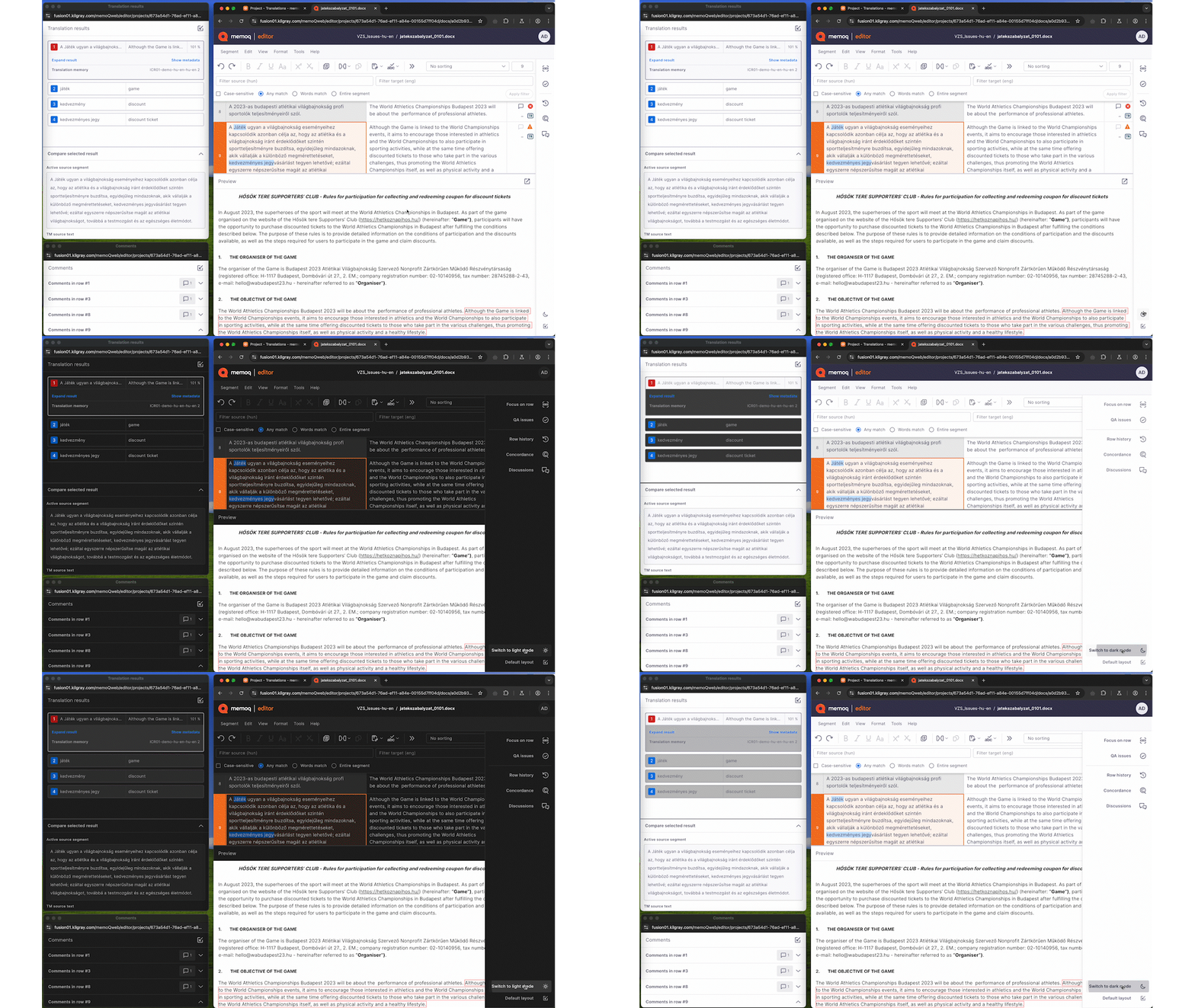
Activez « Aperçu en mode sombre » sous Paramètres et le volet d’aperçu passe lui aussi en mode sombre, au lieu d’apparaître comme une boîte blanche brillante au milieu d’un écran autrement sombre. Ce paramètre s’applique chaque fois que votre mode d’affichage est réglé sur sombre, ou sur Système si votre ordinateur lui-même est configuré sur le mode sombre.
Si un projet contient un dictionnaire personnel, la vérification orthographique ignore désormais automatiquement les mots qui y figurent.
Besoin d’envoyer des journaux au soutien technique? Ouvrez le nouveau menu Journaux sous le logo memoQ, dans le coin supérieur gauche, sélectionnez celui dont vous avez besoin et téléchargez-le. Plus besoin de chercher dans le système de fichiers.
Les zones du segment source et du segment cible dans la fenêtre de résultat du contrôle qualité sont maintenant redimensionnables, ce qui vous permet de voir les segments complets sans avoir à faire défiler le texte.
Les administrateurs peuvent désormais configurer et gérer l’authentification unique OIDC via une interface guidée, sans besoin de modifier manuellement des fichiers ou d’utiliser la ligne de commande. Il prend en charge à la fois l’hébergement Windows Service et IIS, avec un flux de travail simplifié pour ajouter, modifier et gérer les fournisseurs d’identité. Une tâche de configuration répétitive en moins pour votre équipe informatique, sur chaque serveur.
Dans l’application de bureau memoQ, vous pouvez maintenant redimensionner les zones du segment source et du segment cible dans la fenêtre des résultats de contrôle qualité ainsi que dans les fenêtres associées Rechercher & Remplacer, Résolution des conflits et Résoudre les erreurs. Les longs segments restent lisibles sans défilement constant.
L’outil de déploiement memoQ peut désormais vous aider à changer l’instance du serveur SQL derrière votre memoQ TMS et à migrer le contenu de votre base de données par la même occasion.
L’estimation de la qualité basée sur l’IA (AIQE) utilise un réseau neuronal pour attribuer à chaque segment traduit un score de qualité approximatif, sans qu’aucun humain ne le lise jamais. Un score suffisamment élevé signifie que vous pouvez sauter certaines étapes, comme la traduction ou la révision, et suivre un flux de travail rationalisé et plus efficace.
Custom.MT est le plus récent fournisseur AIQE à rejoindre les partenaires d’intégration de memoQ. Cet intergiciel d’IA vous donne accès à plusieurs moteurs et fournisseurs AIQE, y compris le moteur d’estimation de qualité de Lara Translate et TAUS, et il exécute également son propre service en plus de Claude ou GPT.
Hansem et PONS Translate MT sont les derniers moteurs à rejoindre la gamme de plug-ins de TA de memoQ.
12.5.20
September 3, 2026
Import
Percentage values from Excel are now imported correctly. (BUG-17189)
Improved segmentation for text with line breaks in memoQ 12.4. (BUG-17262)
memoQ editor
Vietnamese tone marks are now handled correctly during typing. (BUG-15996)
Alt+F8 now keeps tags in the correct order when adding them to segments with existing tags. (BUG-16059)
Project history now displays the correct user for pretranslation. (BUG-16190)
Fixed overlapping options in the Confirm and Update dialog. (BUG-16626)
Chinese character input in Safari on Mac now matches typed and selected characters. (BUG-16690)
Users can now see all available translation memory and LiveDocs hits when filtering is turned off. (BUG-16897)
Project task lists no longer collapse after accepting or rejecting a task. (BUG-16961)
Preview now updates correctly when navigating between segments. (BUG-17017)
Improved project loading reliability and user experience. (BUG-17034)
Tag numbering is now consistent between source and target segments. (BUG-17065)
Fixed an issue that could prevent rows from being confirmed. (BUG-17145)
memoQ TMS, memoQweb & collaboration
Clarified QA messages for inconsistent translations 3000 and 30001 to make their purpose clearer. (BUG-14745)
Images in online term base entries are now visible by default. (BUG-16693)
Translation now works as expected when source text editing is restricted. (BUG-16707)
Qterm filter now returns results that match the selected criteria. (BUG-16864)
Project reports now show the correct Delivery (R1) column header after the Deadline (R1) column. (BUG-16970)
QA checks now handle language-specific punctuation correctly. (BUG-17032)
Offline packages now support locking and unlocking segments. (BUG-17049)
Processing now completes correctly, with progress windows closing after errors. (BUG-17080)
Improved server responsiveness and stability during high CPU usage. (BUG-17190)
Authentication, licensing & upgrades
Server updates now handle changed SQL configurations correctly. (BUG-16623)
Machine translation
memoQ AGT now handles pretranslation in large projects better when character limits are reached. (BUG-17048)
Plugins
Norwegian language selection now works correctly with the Microsoft Azure AI Translation plugin. (BUG-14760)
Globalese MT now works correctly during pretranslation. (BUG-16963)
Fixed authentication issues in the Google Cloud Translation Advanced plugin (memoQ 12.3). (BUG-16974)
Google Advanced MT plugin can now be configured for online projects. (BUG-17108)
Installation & desktop
License checks during installation now work correctly and more reliably. (BUG-16985)
Navigation repensée, plus intuitive et conviviale sur tous les appareils.
L’outil de relecture experte (ICR) a été repensé avec un volet latéral rétractable et une mise en page simplifiée pour offrir plus d’espace à l’écran pour votre contenu. Les nouvelles fonctionnalités incluent des outils avancés pour la recherche et le remplacement, le filtrage et l’ajout de commentaires, ainsi que des outils de navigation pour le suivi des modifications.
Plus besoin de faire défiler les segments verrouillés ou les segments que vous avez déjà relus. Personnalisez la façon dont memoQ editor se déplace entre les segments en fonction de ce qui est important pour votre rôle : ignorer les segments verrouillés en tant que traducteur, trouver les segments non confirmés en tant que réviseur, filtrez le contenu prétraduit en tant que chef de projet. Définissez vos préférences dans la section Paramètres, modifiez-les à tout moment selon l’évolution de votre travail, et accédez directement à ce dont vous avez besoin sans prendre de temps.
Sélectionnez un terme ou une expression dans la source et obtenez des suggestions instantanées de vos services de TA configurés. Nul besoin de quitter l’application pour faire vos recherches en ligne. C’est comme avoir un dictionnaire à portée de main.
Certains segments n’ont pas nécessairement leur place dans une mémoire : texte d’espace réservé, segments ne contenant que des chiffres, correctifs temporaires… Vous pouvez maintenant les confirmer sans valider en mémoire pour ne pas la polluer. Vous bénéficierez ainsi de meilleures correspondances dans vos projets à venir et pourrez travailler plus efficacement.
Vous avez besoin de corriger des termes incorrectement traduits dans plusieurs segments, mais seulement dans certains segments? Sélectionnez les segments que vous souhaitez modifier, puis remplacez toutes les occurrences dans votre sélection en une seule fois au lieu d’effectuer les remplacements un par un. memoQ vous avertit avant de procéder aux remplacements afin que vous gardiez le contrôle.
Les nouvelles installations de memoQ TMS utilisent désormais le port 443 pour la communication entre le client de bureau et le serveur. Auparavant, le port 8086 était utilisé. Les installations existantes ne sont pas affectées. Les serveurs déjà en fonctionnement sur le port 8086 conservent leur configuration actuelle après la mise à niveau.
Empêchez les nombres de se retrouver coupés sur plusieurs lignes en utilisant des espaces insécables. Le raccourci clavier (Ctrl + Maj + Espace) les maintient ensemble.
Utilisez Lara Translate, un moteur de traduction automatique adaptatif qui s’améliore automatiquement à chaque segment confirmé. Vous souhaitez l’utiliser ? Consultez le guide d’installation de Lara pour en savoir plus.
12.4.53
August 11, 2026
Improved performance and speed for project creation and processing. (BUG-17191)
12.4.45
July 27, 2026
12.4.36
July 16, 2026
Créez, prévisualisez et téléchargez des statistiques de LQA et des listes d’erreurs de LQA pour des projets ou des fichiers spécifiques sur memoQweb, avec des rapports stockés sur le serveur, toujours disponibles dans l’onglet Rapports, et exportables dans tous les formats pris en charge.
Les chefs de projet peuvent exporter des rapports d’analyse post-traduction séparément pour chaque langue sur memoQweb.
Ouvrez les rapports d’analyse dans une fenêtre de navigateur séparée pour examiner le contenu complet du rapport.
Créez et modifiez des filtres d’importation pour les fichiers Microsoft Excel directement sur memoQweb.
Les chefs de projet et les administrateurs de serveur peuvent contrôler si les traducteurs et les réviseurs sont autorisés à verrouiller et déverrouiller des segments dans un projet.
La fonction Vues est arrivée dans memoQ editor, permettant aux utilisateurs de combiner plusieurs documents du projet à partir de la page Mes tâches en un seul pour la traduction, le contrôle qualité, la recherche, le tri et le filtrage tout en restant entièrement synchronisés avec les fichiers originaux. Idéal pour les projets avec de nombreux petits documents. Les chefs de projet peuvent également utiliser cette puissante fonctionnalité lors de la préparation des projets en s’attribuant temporairement les documents du projet et en créant une vue sur leur propre page Mes tâches.
Ajoutez de nouvelles entrées de base terminologique et modifiez les entrées existantes directement dans memoQ editor en utilisant une interface simplifiée pour les bases terminologiques memoQ et Qterm.
Sélectionnez et livrez plusieurs documents du même projet à partir de la page Mes tâches en une seule fois au lieu de les livrer un par un.
Les entrées Qterm affichent maintenant l’ID d’entrée, la date de création et le créateur dans l’en-tête des entrées. Vous avez également l’option d’afficher les métadonnées de façon linéaire (plus dense) ou structurée (plus découpée).
memoQ prend désormais en charge de nouvelles variantes russes pour l’Estonie, Israël, la Lettonie et la Lituanie; de nouvelles variantes françaises pour le Bénin, la Côte d’Ivoire, le Togo, la Tunisie et les Caraïbes; de nouvelles variantes anglaises pour le Ghana, Hong Kong, l’Inde, Israël, le Kenya, la Malaisie, Porto Rico, Singapour et Taïwan; ainsi que cinq langues sames : same du Nord, du Sud, de Lule, skolt, et d’Inari.
12.3.91
September 3, 2026
Import
Percentage values from Excel are now imported correctly. (BUG-17189)
Improved segmentation for text with line breaks in memoQ 12.4. (BUG-17262)
Forbidden terms now have the correct status when importing packages. (BUG-17142)
Export
Translated content can now be put back into the original file (reconsolidated) correctly. (BUG-17134)
memoQ editor
Fixed overlapping options in the Confirm and Update dialog. (BUG-16626)
Filtering before translation results appear no longer causes an error. (BUG-16882)
Fixed the missing Deliver button for PMs working with document slices. (BUG-17139)
Fixed an issue that could prevent rows from being confirmed. (BUG-17145)
Term base entries can now be edited when the entry has a source term but no target term. (BUG-17198)
memoQ TMS, memoQweb & collaboration
Clarified QA messages for inconsistent translations 3000 and 30001 to make their purpose clearer. (BUG-14745)
Images in online term base entries are now visible by default. (BUG-16693)
Online project names no longer have extra spaces at the end when created through memoQweb or the WS API. (BUG-16829)
Improved synchronization performance for views in local copies of online projects. (BUG-17107)
Reduced unnecessary preview generation to improve performance when synchronizing views. (BUG-17135)
Improved server responsiveness and stability during high CPU usage. (BUG-17190)
Authentication, licensing & upgrades
Existing local projects continue to work after changing your OIDC sign-in method. (BUG-14290)
Qterm is now available in memoQweb after upgrading the server to memoQ 12.3. (BUG-17207)
Plugins
Improved MyMemory plugin reliability. (BUG-16213)
Fixed an issue that could cause memoQ to freeze when starting the Juremy plugin. (BUG-16993)
12.3.77
August 11, 2026
12.3.64
July 27, 2026
12.3.55
July 16, 2026
12.3.40
June 2, 2026
<br> tags) in Table DOCX re-import. (BUG-16473)
Créez et sauvegardez des statistiques de LQA pour un projet et accédez-y à tout moment sous l’onglet Rapports dans memoQweb.
Téléchargez le rapport de LQA directement depuis memoQweb. Nul besoin d’accéder à l’application de bureau.
Les chefs de projet peuvent sélectionner une ou plusieurs langues et exporter le rapport d’analyse pour ces langues uniquement.
Téléchargez des rapports d’analyse depuis memoQweb en fichiers distincts par langue cible.
Téléchargez un rapport d’analyse unique depuis memoQweb incluant toutes les langues cibles.
Les chefs de projet peuvent créer un rapport d’analyse pour un ou plusieurs documents sélectionnés directement à partir de la liste des documents.
Créez et modifiez les filtres d’importation Microsoft Word et Microsoft PowerPoint directement dans memoQweb.
Dans memoQ 12.2, les administrateurs de serveur peuvent désormais déterminer quels utilisateurs peuvent récupérer une copie locale dans l’application de bureau de memoQ grâce à un groupe d’utilisateurs prédéfini, sans modifier les droits d’accès ou les paramètres de projet.
Remplacez toutes les occurrences d’un terme ou d’une expression en une seule opération, et gardez le contrôle grâce à des messages d’avertissement et de confirmation clairs.
Envoyez des documents ou une sélection de segments au correcteur Antidote. Les modifications apportées dans le correcteur sont automatiquement reportées dans memoQ editor. Antidote prend en charge le français et l’anglais.
Ajoutez, catégorisez, filtrez et effacez les commentaires par étendue, type et auteur, afin que les commentaires restent structurés et faciles à consulter en un seul endroit.
Choisissez quels types de commentaires inclure lors de l’exportation de fichiers DOCX traduits, afin que les réviseurs ne voient que les commentaires pertinents.
Choisissez l’emplacement du segment actif dans memoQ editor : soit libre, soit toujours au milieu de la grille pour voir le segment en contexte en tout temps.
Choisissez et sauvegardez le format d’affichage des balises que vous préférez pour les zones de comparaison afin que les résultats de traduction soient plus lisibles.
Les chefs de projet et les administrateurs de serveur peuvent choisir si les langagiers sont autorisés à modifier les segments sources dans un projet.
La Desktop API sert de nouvelle couche de connexion entre memoQ TMS et l’application de bureau. Elle ne devrait être utilisée que lorsque les deux composants fonctionnent sur la version 12.2 ou plus récente, car les anciennes versions de l’application de bureau peuvent rencontrer des problèmes de compatibilité.
Exécutez memoQ OIDC sur la même machine que memoQ TMS sur IIS. De cette façon, plus besoin d’un port séparé ou d’un serveur supplémentaire et plus d’obstacles liés à la sécurité et à l’infrastructure.
Les rapports Documents avec suivi des modifications sont maintenant générés correctement avec les paramètres Relecteur 2.
Les rapports Documents avec suivi des modifications calculent désormais séparément par rôle au lieu d’agréger les données pour tous les utilisateurs.
Les rapports sur les modifications apportées par le relecteur affichent désormais toutes les langues cibles attribuées à un utilisateur dans les projets multilingues, à la fois dans l’aperçu et les rapports exportés.
Filtrez les rapports par leur créateur, y compris les rapports générés par le système et créés par des utilisateurs.
Téléchargez tous les rapports sous forme de fichiers Excel directement depuis memoQweb.
12.2.41
March 18, 2026
Improvements:
Compatibility improvement: Storing projects in cloud-synced folders (such as OneDrive) may cause errors
Bugfixes:
CMS improvements: Clearer logging when importing content from the CMS gateway
Compatibility issues: Can’t check out projects on 11.x server using 12.x desktop app
Compatibility issues: Database issue identified during upgrade to memoQ TMS 12.0
Compatibility issues: Server upgrade from 11.5.8 to 12.0.10 doesn’t complete successfully
Deployment tool: Improved stability and memory management during memoQ TMS upgrades
Documentation: DeepL v2 plugin now links to the correct memoQ documentation page
Import, Export: Fixed issue preventing IDML files from exporting in memoQ 10.4 and 11.6
Import, Export: Improved stability during file imports by reducing SQL deadlocks
Import, Export: Multilingual filter keeps inline cell formatting when exporting XLSX files
Import, Export: Resolved export issue with IDML files in memoQ 12.0
Import, Export: Tags now appear correctly when exporting and reimporting bilingual table DOCX files
Machine Translation: A clearer message displayed when DeepL glossary import isn’t possible
Machine Translation: Pre-translation with the DeepL plugin may trigger inline tag errors and block workflows
Markdown: Improved support for MathBlocks during file import
memoQ editor: Preview now correctly displays images with absolute URLs
memoQ TMS: Email settings now keep your sender name on hosted servers
memoQ TMS: Failed login attempts with incorrect passwords are now recorded in the server log
memoQ TMS: Resolved a launch error that occasionally caused memoQ TMS to stop with a null reference
memoQ TMS: Subvendor users now appear as Project Managers and can assign tasks
Performance optimization: Improved speed when loading online TMs, TBs, and Muses in memoQ desktop app
Performance: Public Cloud Server performance is improved and CPU usage stabilized
Plugins: Corrected WebView assembly version in the memoQ TMS
Reports: Statistics and Pretranslate now support Thai with homogeneity feature
Setup improvements: More robust handling of performance counters
TM+: Improved pre-translation for content with spaces, non-breaking spaces, and numbers
Translation memories: Fixed concordance search to better support exact word order and word ending variations
Translation results: View image button now opens term entry images correctly
Upgrade fix: memoQ TMS upgrade from 10.6 to 11.2 backup error fixed
Les chefs de projet peuvent maintenant créer les rapports suivants dans memoQweb via l’onglet Rapports :
Une nouvelle colonne Étendue dans l’onglet Rapports permet aux chefs de projet d’évaluer rapidement si un rapport répond à leurs besoins. La colonne affiche le nombre de fichiers inclus dans chaque rapport. Lorsqu’une cellule est sélectionnée, elle révèle une liste détaillée de tous les documents, ce qui facilite l’évaluation de la pertinence du rapport.
Les chefs de projet peuvent maintenant télécharger un ou plusieurs rapports directement depuis memoQweb. Lorsqu’ils cliquent sur le bouton Télécharger, une boîte de dialogue s’ouvre et leur offre de choisir le format de leur rapport (HTML ou CSV), rapport qu’ils pourront ensuite facilement transmettre à leurs fournisseurs.
Les chefs de projet peuvent maintenant afficher un aperçu de leurs rapports immédiatement après leur création, ce qui leur permet de vérifier efficacement leur utilité avant de les télécharger ou de les partager.
Les administrateurs de serveur memoQ peuvent désormais définir des comptes de mots pondérés directement dans le web. Ils peuvent ainsi les consulter lors de la génération de rapports d’analyse pour leurs projets.
Les filtres d’importation sont maintenant disponibles dans memoQweb, vous permettant d’importer, de cloner, de renommer, de mettre à jour les descriptions et de supprimer des configurations de filtre. La création et la modification des paramètres de filtre seront disponibles dans de futures versions.
Le volet Rechercher et remplacer dans memoQ editor va maintenant au-delà du texte. Vous pouvez chercher et, lorsque cela est pertinent, remplacer du contenu dans les balises, les commentaires et les ID de contexte, y compris au moyen d’expressions régulières. L’amélioration de cette fonction offre des capacités de précision puissantes aux ingénieurs linguistiques, chefs de projet, traducteurs et entreprises.
Dans la version 12.1, memoQ editor contient un nouveau volet dédié au suivi des modifications. Ce volet offre une navigation avancée et la possibilité d’accepter ou de rejeter des modifications une par une ou en lot. Ce développement permet aux langagiers d’avoir un plus grand contrôle dans les projets où il est essentiel de documenter les modifications apportées.
La version 12.1 de memoQ s’accompagne d’une nouvelle barre d’état dans memoQ editor. Elle permet aux langagiers de suivre leur progression et de consulter de l’information détaillée sur les segments. Les chefs de projet et les administrateurs, eux, y trouveront une moyenne de progression pour l’équipe du projet. Cette nouvelle version comporte également l’affichage de l’ID de contexte, fournissant de précieuses métadonnées, notamment pour les projets du domaine des jeux vidéo et la localisation.
Les commandes Fusionner et Diviser sont maintenant disponibles dans memoQ 12.1 sous le menu Segment. Elles permettent aux langagiers de corriger une segmentation incorrecte directement dans memoQ editor. Ces fonctionnalités aident à maintenir l’intégrité de la mémoire de traduction et des segments qui reflètent la bonne structure de phrase avant la traduction.
La version memoQ 12.1 propose une expérience de filtrage plus puissante dans memoQ editor. Vous pouvez utiliser des expressions régulières, combiner ou effacer les filtres précédents, choisir ce que vous souhaitez filtrer (texte, balises, commentaires, ID de contexte), appliquer des critères prédéfinis ou personnalisés, et même filtrer par modifications ou types de balises précises.
memoQ AGT ignore maintenant tous les « termes interdits » de votre base terminologique ou Qterm, pour vous proposer des traductions exactes et conformes.
Les utilisateurs de serveurs en nuage public peuvent maintenant utiliser le nouveau bouton Calculer maintenant dans Administrateur de serveur → Stockage pour obtenir un aperçu immédiat et précis de leur utilisation de stockage sans attendre la prochaine sauvegarde quotidienne.
memoQ aligne maintenant ses codes de langue pour l’espagnol d’Amérique latine avec le nouveau code ES-419 de DeepL, garantissant une intégration fluide et une correspondance précise des langues lors de l’utilisation de DeepL pour la traduction.

12.1.33
January 7, 2026
memoQ editor: Preview now correctly displays images with absolute URLs
memoQ editor: Preview now loads CSS files from absolute URLs correctly
memoQ editor: Improved support for larger documents
memoQ editor: Improved preview formatting in memoQ editor
Machine Translation: A clearer message displayed when DeepL glossary import isn’t possible
Deployment tool: Improved stability and memory management during memoQ TMS upgrades
12.1.33
January 7, 2026
memoQ editor: Preview now correctly displays images with absolute URLs
memoQ editor: Preview now loads CSS files from absolute URLs correctly
memoQ editor: Improved support for larger documents
memoQ editor: Improved preview formatting in memoQ editor
Machine Translation: A clearer message displayed when DeepL glossary import isn’t possible
Deployment tool: Improved stability and memory management during memoQ TMS upgrades
Les chefs de projet peuvent désormais inclure AGT, la technologie d’automatisation de la traduction de memoQ, dans les actions automatisées des modèles de projets. Lorsqu’elle est configurée, la traduction automatique avec memoQ AGT s’exécute automatiquement à des étapes clés du cycle de vie du projet.
Avec AGT intégrée dans les actions automatisées, les chefs de projet peuvent créer des flux de travail de prétraduction entièrement automatisés qui combinent les forces des MT, de memoQ AGT et de la TA pour des résultats optimaux.
memoQ 12.0 améliore le traitement des balises par memoQ AGT dans tous les formats (des fichiers simples aux contenus DITA structurés complexes utilisés dans les CMS, SGCC ou tout autre système), garantissant une mise en forme préservée et des traductions fiables.
Balises en mémoire restaurées dans les correspondances partielles, empêchant les incohérences qui pourraient perturber memoQ AGT.
Ces mises à jour s’appuient sur le traitement des balises introduit dans la version 11.6, améliorant encore la précision et garantissant des traductions plus précises lorsque memoQ AGT travaille avec des correspondances de mémoire.
L’interface web de traduction memoQ editor offre maintenant aux langagiers et aux chefs de projet plus de flexibilité, de rapidité et de contrôle. Ces améliorations sont basées sur les commentaires des utilisateurs, y compris des idées soumises via le Portail d’idées des utilisateurs de memoQ.
Pour plus de détails sur ces changements techniques, veuillez lire notre communiqué dans notre salle de presse.
12.0.13
December 2, 2025
Bug fixes:
Documentation: DeepL v2 plugin now links to the correct memoQ documentation page
Import, Export: Fixed issue preventing IDML files from exporting in memoQ 10.4 and 11.6
Import, Export: Resolved export issue with IDML files in memoQ 12.0
Import, Export: Tags now appear correctly when exporting and reimporting bilingual table DOCX files
memoQ TMS: Resolved a launch error that occasionally caused memoQ TMS to stop with a null reference
Performance optimization: Improved speed when loading online TMs, TBs, and Muses in memoQ desktop app
Plugins: Corrected WebView assembly version in the memoQ TMS
Regex text filter: Include/exclude tab now shows all rules properly
Translation memories: Fixed concordance search to better support exact word order and word ending variations
Upgrade fix: memoQ TMS upgrade from 10.6 to 11.2 backup error fixed
Usability fix: memoQweb is now accessible on a memoQ TMS, previously connected to Language Terminal
12.0.11
November 3, 2025
Improvement:
BUG-15562 – Translation editor: IME automatically turns on for East Asian languages when using the filter box
Bugfixes:
BUG-15331 – Multilingual Excel filter: Documents with number-only source segments may cause export issues
BUG-15562 – Translation editor: IME automatically turns on for East Asian languages when using the filter box
BUG-15839 – Machine Translation: The Systran MT plugin now correctly detects Chinese language codes (“zh”, “zt”)
BUG-15914 – Translation memories: TM+ temporarily inaccessible on the server
BUG-15933 – Machine Translation: Pre-translation with the DeepL plugin may trigger inline tag errors and block workflows
BUG-16044 – Compatibility issues: Can’t check out projects on 11.x server using 12.x desktop app
BUG-16047 – Compatibility issues: Server upgrade from 11.5.8 to 12.0.10 doesn’t complete successfully
BUG-16070 – Compatibility issues: Database issue identified during upgrade to memoQ TMS 12.0
12.0.10
October 7, 2025
Improvements:
BUG-15442 – CMS API: Implement callback URL signing in memoQ TMS 11.2
Bugfixes:
BUG-12278 – The built-in memoQ TM Search tool cannot handle TM+ resources
BUG-12389 – QA: Longer terms are not recognized when there is a matching shorter one in the TB
BUG-12699 – SDLXLIFF filter: ‘NMT-origin’ status mapping is missing from the default SDLXLIFF filter
BUG-12913 – memoQ can’t restore a document to its earlier state if the document was sliced
BUG-12949 – TB: Fuzzy or Custom matching can’t find slightly different TB entries when a segment only contains a term
BUG-13888 – TB: Fuzzy term matching doesn’t recognize terms when accents are different
BUG-14621 – Resources API: create entry endpoint returns 404 not found error if invalid value is passed to a custom meta property
BUG-15191 – Cannot pre-translate document slices in the project’s Translations pane when statistics is turned on
BUG-15533 – Statistics fails on sliced X-translated document
BUG-15595 – DOCX filter: Cannot export document if it has segments containing only inline tags
BUG-15601 – memoQ desktop app: Edit distance reports between generated in the History and Reports window and the Reports tab show different results
BUG-15619 – Edit distance report shows 0 values when the Reports page’s language selector is set to All languages
BUG-15631 – Business Analytics: of The Analytics service cannot process projects where the list of target languages is longer than 1200 characters
BUG-15639 – QA: Symbols immediately after numbers might cause false positive warnings
BUG-15659 – TM+: memoQ might copy the value of tag attributes incorrectly
BUG-15705 – Machine translation: Google Advanced MT: Can’t add Google Advanced MT plugin to a project if Tigrinya or Oromo is among its languages
BUG-15714 – QA: Custom punctuation mark (rule) remains in the QA settings even after deletion
BUG-15748 – PPTX filter: memoQ can’t import PPTX document if it contains certain Table Design elements
BUG-15768 – memoQ editor: Pressing the TAB key doesn’t work as expected when using an IME for East Asian languages
BUG-15780 – QA: Certain measurements after numbers might cause false positive warnings
BUG-15785 – Markdown filter: memoQ doesn’t import math formulas
BUG-15836 – Machine Translation: DeepL plugin: Cannot select glossary if the previously selected glossary is deleted
BUG-15851 – Machine translation: MT plugins might return an error when processing invalid HTML
BUG-15903 – memoQ editor: Popped-out panes might stay behind other app windows
BUG-15936 – memoQ editor: When showing non-printable characters, spaces and middle points look the same
BUG-15948 – memoQ 11.6 can’t import TBX files
11.6.10
September 3, 2025
Bugfixes
BUG-12389 – QA: Longer terms are not recognized when there is a matching shorter one in the TB BUG-12913 – memoQ can’t restore a document to its earlier state if the document was sliced
BUG-12949 – TB: Fuzzy or Custom matching can’t find slightly different TB entries when a segment only contains a term
BUG-15191 – Cannot pre-translate document slices in the project’s Translations pane when statistics is turned on
BUG-15595 – DOCX filter: Cannot export document if it has segments containing only inline tags
BUG-15631 – Business Analytics: of The Analytics service cannot process projects where the list of target languages is longer than 1200 characters
BUG-15705 – Machine translation: Google Advanced MT: Can’t add Google Advanced MT plugin to a project if Tigrinya or Oromo is among its languages
BUG-15714 – QA: Custom punctuation mark (rule) remains in the QA settings even after deletion
BUG-15748 – PPTX filter: memoQ can’t import PPTX document if it contains certain Table Design elements
memoQ 11.6.8
August 8, 2025
BUG-11501 Microsoft PowerPoint filter: A specific .pptx document loses formatting during import
memoQ 11.5 apporte des améliorations majeures à memoQ editor, notre nouvelle application Web de traduction pour les langagiers travaillant avec des licences fournies par une organisation.
La vérification orthographique peut maintenant être sélectionnée comme une catégorie de contrôle qualité distincte dans les configurations ICR, offrant des paramètres de contrôle qualité plus détaillés.
memoQ 11.5.8
June 3, 2025
BUG-12699 – SDLXLIFF filter: ‘NMT-origin’ status mapping is missing from the default SDLXLIFF filter
BUG-12880 – TM Editor: Merging or removing duplicate entries does not work in TM+ memories
BUG-14136 – TM editor: When editing a TM+, an unnecessary warning message appears
BUG-14565 – IDML filter: memoQ cannot import the document if it contains processing instructions
BUG-14581 – Microsoft Office filters: The anchor at the end of hyperlink is not imported
BUG-14620 – Multilingual Excel filter: When importing a multi-sheet Excel file, some sheets might be missing if some resources are corrupt in the file
BUG-14740 – Multilingual XML filter: memoQ shows a “directory not found” exception when trying to save an XPath rule if the preview document doesn’t exist anymore
BUG-14962 – memoQ TM Search Tool starts with an error
BUG-15076 – memoQweb: webtrans might show an “Invalid Operation” exception when joining segments in a sliced document
BUG-15118 – Improved Purge TB functionality on WS API
BUG-15148 – Fix public documentation for WS API endpoints PretranslateProject and PretranslateDocuments
BUG-15186 – Dashboard: Filter conditions containing “Reviewer 1” or “Reviewer 2” don’t work on the French UI
BUG-15211 – Translation memories: Optimization: TM listing now reads a memory cache, not directly the TM database
BUG-15214 – WS API: Fix in ExportTranslationDocumentAsXliffBilingual minor version export
BUG-15223 – IDML filter: memoQ might show a “Collection was modified” exception when trying to import the IDML file
BUG-15253 – Resources API: TBs might get corrupted if invalid value is passed for PrefixBoundaries
BUG-15279 – memoQweb: memoQ editor doesn’t open if the user is a PM in another project
BUG-15284 – QA: Arabic comma character after a number might cause false positive warnings
BUG-15289 – TM+: Statistics might fail when a project has translatable tags and reverse TM lookup is enabled
BUG-15294 – Translation memories: Optimization: TM listing now reads a memory cache, not directly the TM database
BUG-15297 – Multilingual Excel filter: memoQ doesn’t import ending whitespaces correctly when language-based segmentation is turned on
BUG-15313 – Multilingual Excel filter: HTML preview is not generated correctly when the Excel file has multiple sheets
BUG-15324 – Multilingual Excel filter: HTML preview is not generated correctly when the Excel file has multiple sheets
BUG-15349 – Translation memories: Optimization: TM listing now reads a memory cache, not directly the TM database
BUG-15381 – QA: Number check might show false positive “missing number” and “extra number” warnings for CCJK languages
BUG-15385 – Translation memories: Optimization: TM listing now reads a memory cache, not directly the TM database
BUG-15402 – Translation memories: Optimization: TM listing now reads a memory cache, not directly the TM database
BUG-15405 – Qterm: When adding/editing a term to a term base in the translation editor, the Qterm window opens as blank
BUG-15410 – XLIFF 2 filter: memoQ might not apply XLIFF states settings when exporting the document
BUG-15419 – QA: Full-width (two-byte) comma between numbers might cause false positive warnings
BUG-15435 – Translation memories: Optimization: TM listing now reads a memory cache, not directly the TM database
Dans cette version, nous sommes ravis de vous présenter memoQ editor, notre nouvelle interface de traduction Web conçue pour les langagiers utilisant une licence fournie par un serveur (memoQ TMS). memoQ editor est destiné à remplacer progressivement webtrans à mesure que de nouvelles fonctionnalités sont ajoutées avec chaque nouvelle version de memoQ.
Pour explorer davantage les fonctionnalités de memoQ editor, ses avantages et en savoir plus sur les développements à venir, consultez notre article de blogue à ce sujet.
11.4.9
April 2, 2025
Bugfixes:
BUG-11295 – Term bases: Creating more than 1791 entries in a Qterm TB via Resources API makes the TB corrupted
BUG-13407 – Translation editor: In a filtered document or a view, ignoring all QA warnings might not always be available
BUG-13689 – PowerPoint filter: Can't export document when modern comments are added to a hidden slide or empty textbox
BUG-14537 – Multilingual Excel filter: In CSV files, memoQ could not import length limit information between quotes
BUG-14561 – Multilingual Excel filter: memoQ might ignores import color settings when multiple cell styles contain an indexed color
BUG-14647 – QA: Extra warnings might appear when target and source uses whitespace between number and measurement inconsistently
BUG-14691 – When importing a package with an empty LiveDocs corpus, "Import failed" warning appears
BUG-14707 – QA: Source containing alphanumeric code and target containing number (or vice versa) might cause false positive "extra number" and "missing number" warnings
BUG-14741 – WorldServer filter: New checkboxes for segmentation and formatting
BUG-14797 – memoQweb: Documents with subvendor assignments might not save deadline changes correctly
BUG-14830 – Regex text filter: In a rare case, memoQ cannot import a regex text filter as online resource and cannot import files into online project with a re-created online version of the filter
BUG-14844 – Machine translation: DeepL: Logging in with an API key might result in a "Quota Exceeded (456)" error message
BUG-14892 – memoQweb: Sorting by deadline might not work properly
BUG-14914 – QA: Words contaning numbers and dashes might cause false positive warnings
BUG-14931 – memoQ TMS: Timeout error might occur during automated memoQ TMS backup
BUG-14939 – QA: Having numbers and alphanumeric codes in the same segment might lead to false positive QA hits
BUG-14940 – Customer portal: Maximum upload file size needs to be configurable (CustomerPortalConfig.json)
BUG-14945 – Content connector: A "nullref" error might occur when importing memoQ bilingual documents
BUG-14948 – TM+: Under rare conditions, items might disappear from the list of TMs
BUG-14958 – Language handing concurrency issue
BUG-14960 – Customer portal: Users can't upload files larger than 128 MB
BUG-14971 – Markdown filter: Fenced code block content under a list item is not exported correctly
BUG-14978 – QA: Superscript numbers might cause false positive warnings
BUG-14986 – Qterm: Users with Lookup access can print the whole TB
BUG-14993 – Deliver/Return button does not work on slices
BUG-14998 – memoQ editor: "Spell check" option in menu does not always change
BUG-15006 – Cascading filters: If a bilingual filter in the chain requests locking segments, the filters after it ignore the request
BUG-15007 – XLIFF 1 filter: Target's state value might be lost at export if the trans-unit with translate="no" attribute has not been imported
BUG-15008 – memoQweb: Loading a translation result from the Tilde MT plugin might crash webtrans
BUG-15019 – WS API: Security issue related to passwords and logging
BUG-15039 – WorldServer filter: New checkboxes for importing empty and whitespace-only segments
BUG-15068 – memoQ TMS: Timeouts might happen in the communication with the custom code execution service
BUG-15095 – Listing a large number of online TMs might happen slower than expected
BUG-15099 – QA: Mathematical symbols next to numbers might cause false positive warnings
BUG-15113 – Markdown filter: Export may be incorrect when there is text after a link
Mise à jour du schéma de couleurs inversé
Le schéma de couleurs inversé initialement ajouté à la version 11.2 de memoQ a fait l’objet de mises à jour importantes. Pour une présentation détaillée, consultez notre article de blog.
11.3.6
February 4, 2025
Bugfixes
BUG-14339 – memoQweb: Loading a document list page might lead to internal server error
11.2.65
March 18, 2026
Installer: Improved version visibility in Control Panel
Machine translation: DeepL authentication now works reliably in memoQ
memoQ TMS: Email settings now keep your sender name on hosted servers
memoQ TMS: Subvendor users now appear as Project Managers and can assign tasks
memoQweb: All assigned MT languages are now visible in memoQWeb project templates
11.2.45
January 15, 2026
Bug fixes:
CMS improvements: Clearer logging when importing content from the CMS gateway
Import, Export: Improved stability during file imports by reducing SQL deadlocks
Machine Translation: A clearer message displayed when DeepL glossary import isn’t possible
Markdown: Improved support for MathBlocks during file import
memoQ TMS: Resolved a launch error that occasionally caused memoQ TMS to stop with a null reference
Setup improvements: More robust handling of performance counters
TM+: Improved pre-translation for content with spaces, non-breaking spaces, and numbers
11.2.38
November 13, 2025
Bugfixes:
BUG-15639 – QA: Symbols immediately after numbers might cause false positive warnings
BUG-15933 – Machine Translation: Pre-translation with the DeepL plugin may trigger inline tag errors and block workflows
BUG-15331 – Multilingual Excel filter: Documents with number-only source segments may cause export issues
BUG-15619 – Edit distance report shows 0 values when the Reports page’s language selector is set to All languages
BUG-16114 – Performance optimization: Improved speed when loading online TMs, TBs, and Muses in memoQ desktop app
BUG-15839 – Machine Translation: The Systran MT plugin now correctly detects Chinese language codes (“zh”, “zt”)
BUG-16109 – Upgrade fix: memoQ TMS upgrade from 10.6 to 11.2 backup error fixed
BUG-16127 – Usability fix: memoQweb is now accessible on a memoQ TMS, previously connected to Language Terminal
BUG-15941 – memoQ TMS now loads TM lists properly and restores TM+ access
BUG-15659 – TM+: memoQ might copy the value of tag attributes incorrectly
BUG-16036 – Translation editor: Corrected QA warning message translation in Hungarian interface
BUG-15914 – Translation memories: TM+ temporarily inaccessible on the server
11.2.32
June 26, 2025
Bugfixes:
BUG-12699 – SDLXLIFF filter: ‘NMT-origin’ status mapping is missing from the default SDLXLIFF filter
BUG-15297 – Multilingual Excel filter: memoQ doesn’t import ending whitespaces correctly when language-based segmentation is turned on
BUG-15373 – XLIFF 2 filter: Export might fail if <unit> element’s “id” attribute contains a comma
BUG-14459 – Translation editor: Concordance doesn’t return results in rare cases when search phrase contains wildcards
BUG-15528 – QA: memoQ returns spelling suggestions even if the QA setting “Skip spelling suggestions” is on
BUG-15445 – Multilingual Excel filter: memoQ might not import the document if a target cell contains a “zero-width whitespace” character
BUG-14373 – Microsoft Excel filter: In a project with a CCJK source and a non-CCJK target language, an extra space might appear after line breaks in Excel cells when exporting a document
BUG-15410 – XLIFF 2 filter: memoQ might not apply XLIFF states settings when exporting the document
BUG-15118 – Qterm: Term base synchronization with Kalcium terminology system might lead to “500 Internal server error”
BUG-15190 – Markdown filter: Unescaped right square bracket (“]”) in the exported file might break Markdown links
BUG-15507 – memoQWeb: Confirming segments in webtrans might lead to an unhandled exception
BUG-15185 – After checking out an online project, translators don’t have template-based LiveDocs corpora in the local copy
BUG-15405 – Qterm: When adding/editing a term to a term base in the translation editor, the Qterm window opens as blank
BUG-15461 – memoQweb: Random code execution vulnerability
BUG-15449 – Microsoft Excel filter: memoQ can’t import document when a cell’s content starts with a line break
BUG-15269 – Java .properties filter: “Treat placeholder <ph> tags as required” checkbox resets to enabled state
BUG-15128 – TM+: Cannot import a TMX with very long (100k+ characters) segments
BUG-15319 – TM+: Large numbers ending in 0s and using thousands separators are not substituted correctly
BUG-14028 – Tweak: Optimized TM listing to access a memory cache and not to the TM database directly.
BUG-14820 – Translation editor: Translation result’s metadata are not visible in inverted color scheme until turning inverted colors off and on again
BUG-15439 – XLIFF 1 filter: memoQ might skip segmentation if there is content in a target segment
11.2.31
May 27, 2025
Bugfixes:
BUG-14565 – IDML filter: memoQ cannot import the document if it contains processing instructions
BUG-14581 – Microsoft Office filters: The anchor at the end of hyperlink is not imported
BUG-14620 – Multilingual Excel filter: When importing a multi-sheet Excel file, some sheets might be missing if some resources are corrupt in the file
BUG-14740 – Multilingual XML filter: memoQ shows a “directory not found” exception when trying to save an XPath rule if the preview document doesn’t exist anymore
BUG-15076 – memoQweb: webtrans might show an “Invalid Operation” exception when joining segments in a sliced document
BUG-15186 – Dashboard: Filter conditions containing “Reviewer 1” or “Reviewer 2” don’t work on the French UI
BUG-15211 – Translation memories: Optimization: TM listing now reads a memory cache, not directly the TM database
BUG-15223 – IDML filter: memoQ might show a “Collection was modified” exception when trying to import the IDML file
BUG-15289 – TM+: Statistics might fail when a project has translatable tags and reverse TM lookup is enabled
BUG-15294 – Translation memories: Optimization: TM listing now reads a memory cache, not directly the TM database
BUG-15349 – Translation memories: Optimization: TM listing now reads a memory cache, not directly the TM database
BUG-15381 – QA: Number check might show false positive “missing number” and “extra number” warnings for CCJK languages
BUG-15385 – Translation memories: Optimization: TM listing now reads a memory cache, not directly the TM database
BUG-15402 – Translation memories: Optimization: TM listing now reads a memory cache, not directly the TM database
BUG-15410 – XLIFF 2 filter: memoQ might not apply XLIFF states settings when exporting the document
BUG-15419 – QA: Full-width (two-byte) comma between numbers might cause false positive warnings
BUG-15435 – Translation memories: Optimization: TM listing now reads a memory cache, not directly the TM database
11.2.15
April 7, 2025
Bugfixes
BUG-13407 – Translation editor: In a filtered document or a view, ignoring all QA warnings might not always be available
BUG-13689 – PowerPoint filter: Can’t export document when modern comments are added to a hidden slide or empty textbox
BUG-14537 – Multilingual Excel filter: In CSV files, memoQ could not import length limit information between quotes
BUG-14561 – Multilingual Excel filter: memoQ might ignores import color settings when multiple cell styles contain an indexed color
BUG-14647 – QA: Extra warnings might appear when target and source uses whitespace between number and measurement inconsistently
BUG-14665 – Cascading filters: Using a HTML filter after the Excel filter the “Import markup as memoQ {tags}” option might fail with an error
BUG-14707 – QA: Source containing alphanumeric code and target containing number (or vice versa) might cause false positive “extra number” and “missing number” warnings
BUG-14741 – WorldServer filter: New checkboxes for segmentation and formatting
BUG-14797 – memoQweb: Documents with subvendor assignments might not save deadline changes correctly
BUG-14844 – Machine translation: DeepL: Logging in with an API key might result in a “Quota Exceeded (456)” error message
BUG-14914 – QA: Words contaning numbers and dashes might cause false positive warnings
BUG-14958 – Language handing concurrency issue
BUG-14971 – Markdown filter: Fenced code block content under a list item is not exported correctly
BUG-14978 – QA: Superscript numbers might cause false positive warnings
BUG-14993 – Deliver/Return button does not work on slices
BUG-15006 – Cascading filters: If a bilingual filter in the chain requests locking segments, the filters after it ignore the request
BUG-15007 – XLIFF 1 filter: Target’s state value might be lost at export if the trans-unit with translate=”no” attribute has not been imported
BUG-15008 – memoQweb: Loading a translation result from the Tilde MT plugin might crash webtrans
BUG-15019 – WS API: Security issue related to passwords and logging
BUG-15039 – WorldServer filter: New checkboxes for importing empty and whitespace-only segments
BUG-15068 – memoQ TMS: Timeouts might happen in the communication with the custom code execution service
BUG-15095 – Listing a large number of online TMs might happen slower than expected
BUG-15099 – QA: Mathematical symbols next to numbers might cause false positive warnings
BUG-15113 – Markdown filter: Export may be incorrect when there is text after a link
11.2.8
November 7, 2024
Buxfixes:
BUG-10177 – LiveDocs: Importing content from one LiveDocs corpus into another does not retain metadata
BUG-12252 – QA give false positive results about numbers both being and missing in the same entry if numbers are after a slash or before a full stop.
BUG-13578 – Multilingual XLSX: Import may fail if the source side’s ending/starting whitespace is different from the target side’s ending/starting whitespace
BUG-13622 – Preview: Links that open a new window in the preview pane were not working
BUG-13753 – Multilingual XML filter: XPath is not working if the path elements contain namespace specification
BUG-13773 – TM+: Adding an entry to a TM+ may fail when the translatable document has non-Latin characters and the Store document name option is turned on
BUG-13821 – Phrase XLIFF filter: memoQ could not import .mxliff files that had empty “group” elements
BUG-13840 – Issues with installing memoQ 11.0 on Mac using Parallels
BUG-13846 – Translation editor: The preview pane’s WebView2 plugin might cause memoQ 11 to crash at startup or during translation
BUG-13857 – Improve memoQ AGT’s warning text for “no translation returned”
BUG-13858 – When a document is opened for translation, locking segments during pre-translation might cause an error
BUG-13859 – Translation editor: filtering with the “Only whole words” option does not return results when a word is next to a memoQ tag
BUG-13874 – LiveDocs: Alignment might merge additional lines
BUG-13885 – In some cases, memoQ Terminal Server Configuration Tool fails to install
BUG-13892 – Transit package import may fail with cultureID-related message
BUG-13942 – PowerPoint filter: Import may fail if there are elements in the file which are not in memoQ’s schema validator files
BUG-13986 – Translation editor: Document progress might not appear correctly when working in views
BUG-14023 – memooQweb: For security reasons, AutoComplete is now turned off by default in webtrans
BUG-14057 – In some cases, memoQ Terminal Server Configuration Tool fails to install
BUG-14078 – memoQWeb doesn’t start if the memoQ TMS server is not connected to the internet
BUG-14092 – Automated actions: Sequenced automated actions may not wait for each other to finish
BUG-14098 – Under rare conditions, statistics creation can take significantly more time than expected
BUG-14154 – memoQweb: webtrans shows extra tags on the target side as “*”
BUG-14281 – Machine translation: Cannot edit an online MT resource which configures a plugin that is unavailable in the memoQ TMS
BUG-14326 – XLIFF1 filter: memoQ-specific extra tag (<mmq-notelocation>) inserted when exporting an XLIFF 1 document
BUG-14354 – Business Analytics: Configuration might fail with error while collecting reports
BUG-14365 – WebTrans: Terminology-related QA issues might not appear for specific change-tracked target segments
BUG-14371 – Pre-translate: TM crashes for some entries with unusual characters like “³” when followed by numbers.
BUG-14386 – memoQweb: webtrans might not show formatting and track changes correctly after scrolling
BUG-14395 – memoQweb: Copy next tag sequence in webtrans keeps inserting the first tag in the segment
BUG-14402 – Unable to create new TBs if the UI language is Traditional Chinese
11.2.8
November 7, 2024
Buxfixes:
BUG-10177 – LiveDocs: Importing content from one LiveDocs corpus into another does not retain metadata
BUG-12252 – QA give false positive results about numbers both being and missing in the same entry if numbers are after a slash or before a full stop.
BUG-13578 – Multilingual XLSX: Import may fail if the source side’s ending/starting whitespace is different from the target side’s ending/starting whitespace
BUG-13622 – Preview: Links that open a new window in the preview pane were not working
BUG-13753 – Multilingual XML filter: XPath is not working if the path elements contain namespace specification
BUG-13773 – TM+: Adding an entry to a TM+ may fail when the translatable document has non-Latin characters and the Store document name option is turned on
BUG-13821 – Phrase XLIFF filter: memoQ could not import .mxliff files that had empty “group” elements
BUG-13840 – Issues with installing memoQ 11.0 on Mac using Parallels
BUG-13846 – Translation editor: The preview pane’s WebView2 plugin might cause memoQ 11 to crash at startup or during translation
BUG-13857 – Improve memoQ AGT’s warning text for “no translation returned”
BUG-13858 – When a document is opened for translation, locking segments during pre-translation might cause an error
BUG-13859 – Translation editor: filtering with the “Only whole words” option does not return results when a word is next to a memoQ tag
BUG-13874 – LiveDocs: Alignment might merge additional lines
BUG-13885 – In some cases, memoQ Terminal Server Configuration Tool fails to install
BUG-13892 – Transit package import may fail with cultureID-related message
BUG-13942 – PowerPoint filter: Import may fail if there are elements in the file which are not in memoQ’s schema validator files
BUG-13986 – Translation editor: Document progress might not appear correctly when working in views
BUG-14023 – memooQweb: For security reasons, AutoComplete is now turned off by default in webtrans
BUG-14057 – In some cases, memoQ Terminal Server Configuration Tool fails to install
BUG-14078 – memoQWeb doesn’t start if the memoQ TMS server is not connected to the internet
BUG-14092 – Automated actions: Sequenced automated actions may not wait for each other to finish
BUG-14098 – Under rare conditions, statistics creation can take significantly more time than expected
BUG-14154 – memoQweb: webtrans shows extra tags on the target side as “*”
BUG-14281 – Machine translation: Cannot edit an online MT resource which configures a plugin that is unavailable in the memoQ TMS
BUG-14326 – XLIFF1 filter: memoQ-specific extra tag (<mmq-notelocation>) inserted when exporting an XLIFF 1 document
BUG-14354 – Business Analytics: Configuration might fail with error while collecting reports
BUG-14365 – WebTrans: Terminology-related QA issues might not appear for specific change-tracked target segments
BUG-14371 – Pre-translate: TM crashes for some entries with unusual characters like “³” when followed by numbers.
BUG-14386 – memoQweb: webtrans might not show formatting and track changes correctly after scrolling
BUG-14395 – memoQweb: Copy next tag sequence in webtrans keeps inserting the first tag in the segment
BUG-14402 – Unable to create new TBs if the UI language is Traditional Chinese
11.2.8
November 7, 2024
Buxfixes:
BUG-10177 – LiveDocs: Importing content from one LiveDocs corpus into another does not retain metadata
BUG-12252 – QA give false positive results about numbers both being and missing in the same entry if numbers are after a slash or before a full stop.
BUG-13578 – Multilingual XLSX: Import may fail if the source side’s ending/starting whitespace is different from the target side’s ending/starting whitespace
BUG-13622 – Preview: Links that open a new window in the preview pane were not working
BUG-13753 – Multilingual XML filter: XPath is not working if the path elements contain namespace specification
BUG-13773 – TM+: Adding an entry to a TM+ may fail when the translatable document has non-Latin characters and the Store document name option is turned on
BUG-13821 – Phrase XLIFF filter: memoQ could not import .mxliff files that had empty “group” elements
BUG-13840 – Issues with installing memoQ 11.0 on Mac using Parallels
BUG-13846 – Translation editor: The preview pane’s WebView2 plugin might cause memoQ 11 to crash at startup or during translation
BUG-13857 – Improve memoQ AGT’s warning text for “no translation returned”
BUG-13858 – When a document is opened for translation, locking segments during pre-translation might cause an error
BUG-13859 – Translation editor: filtering with the “Only whole words” option does not return results when a word is next to a memoQ tag
BUG-13874 – LiveDocs: Alignment might merge additional lines
BUG-13885 – In some cases, memoQ Terminal Server Configuration Tool fails to install
BUG-13892 – Transit package import may fail with cultureID-related message
BUG-13942 – PowerPoint filter: Import may fail if there are elements in the file which are not in memoQ’s schema validator files
BUG-13986 – Translation editor: Document progress might not appear correctly when working in views
BUG-14023 – memooQweb: For security reasons, AutoComplete is now turned off by default in webtrans
BUG-14057 – In some cases, memoQ Terminal Server Configuration Tool fails to install
BUG-14078 – memoQWeb doesn’t start if the memoQ TMS server is not connected to the internet
BUG-14092 – Automated actions: Sequenced automated actions may not wait for each other to finish
BUG-14098 – Under rare conditions, statistics creation can take significantly more time than expected
BUG-14154 – memoQweb: webtrans shows extra tags on the target side as “*”
BUG-14281 – Machine translation: Cannot edit an online MT resource which configures a plugin that is unavailable in the memoQ TMS
BUG-14326 – XLIFF1 filter: memoQ-specific extra tag (<mmq-notelocation>) inserted when exporting an XLIFF 1 document
BUG-14354 – Business Analytics: Configuration might fail with error while collecting reports
BUG-14365 – WebTrans: Terminology-related QA issues might not appear for specific change-tracked target segments
BUG-14371 – Pre-translate: TM crashes for some entries with unusual characters like “³” when followed by numbers.
BUG-14386 – memoQweb: webtrans might not show formatting and track changes correctly after scrolling
BUG-14395 – memoQweb: Copy next tag sequence in webtrans keeps inserting the first tag in the segment
BUG-14402 – Unable to create new TBs if the UI language is Traditional Chinese
11.1.13
September 5, 2024
Bugfixes
BUG-13259 – Export: Under rare circumstances, a previously translated and exported file cannot be exported from a new project
BUG-13325 – memoQweb: Deadline date might appear as overdue for completed documents
BUG-13469 – Preview: HTML content in the second target language in a Multilingual XML file was not visible in the preview pane
BUG-13578 – Multilingual XLSX: Import may fail if the source side’s ending/starting whitespace is different from the target side’s ending/starting whitespace
BUG-13609 – Online projects: Mixed up labels in the Notes window’s Discussion tab
BUG-13622 – Preview: Links that open a new window in the preview pane were not working in the preview pane
BUG-13753 – Multilingual XML filter: XPath is not working if the path elements contain namespace specification
BUG-13807 – Machine Translation: Systran MT plugin: Warning about language support when using Systran MT with the Serbian language
BUG-13814 – XLSX filter: Import of Excel files with hidden sheets and big images might be very slow
BUG-13986 – Translation editor: Document progress might not appear correctly when working in views
BUG-14030 – User without Admin permission can delete translation memory entries through TM concordance
BUG-14038 – Multilingual Delimited Text filter: Import of a document may fail with “There was no XML start tag open”
BUG-14057 – memoQ Terminal server configuration tool didn’t install correctly
BUG-14078 – memoQWeb doesn’t start if the server is in an environment without internet
BUG-14081 – Machine Translation: DeepL MT plugin: Glossary terms appear in quotation marks
BUG-14092 – Automated actions: Sequenced automated actions may not wait for each other to finish
BUG-14098 – Under rare conditions, statistics creation can take significantly more time than expected
BUG-14151 – Keyboard shortcuts: LF line breaks entered by user become CRLF
11.1.13
September 5, 2024
Bugfixes
BUG-13259 – Export: Under rare circumstances, a previously translated and exported file cannot be exported from a new project
BUG-13325 – memoQweb: Deadline date might appear as overdue for completed documents
BUG-13469 – Preview: HTML content in the second target language in a Multilingual XML file was not visible in the preview pane
BUG-13578 – Multilingual XLSX: Import may fail if the source side’s ending/starting whitespace is different from the target side’s ending/starting whitespace
BUG-13609 – Online projects: Mixed up labels in the Notes window’s Discussion tab
BUG-13622 – Preview: Links that open a new window in the preview pane were not working in the preview pane
BUG-13753 – Multilingual XML filter: XPath is not working if the path elements contain namespace specification
BUG-13807 – Machine Translation: Systran MT plugin: Warning about language support when using Systran MT with the Serbian language
BUG-13814 – XLSX filter: Import of Excel files with hidden sheets and big images might be very slow
BUG-13986 – Translation editor: Document progress might not appear correctly when working in views
BUG-14030 – User without Admin permission can delete translation memory entries through TM concordance
BUG-14038 – Multilingual Delimited Text filter: Import of a document may fail with “There was no XML start tag open”
BUG-14057 – memoQ Terminal server configuration tool didn’t install correctly
BUG-14078 – memoQWeb doesn’t start if the server is in an environment without internet
BUG-14081 – Machine Translation: DeepL MT plugin: Glossary terms appear in quotation marks
BUG-14092 – Automated actions: Sequenced automated actions may not wait for each other to finish
BUG-14098 – Under rare conditions, statistics creation can take significantly more time than expected
BUG-14151 – Keyboard shortcuts: LF line breaks entered by user become CRLF
11.1.13
September 5, 2024
Bugfixes
BUG-13259 – Export: Under rare circumstances, a previously translated and exported file cannot be exported from a new project
BUG-13325 – memoQweb: Deadline date might appear as overdue for completed documents
BUG-13469 – Preview: HTML content in the second target language in a Multilingual XML file was not visible in the preview pane
BUG-13578 – Multilingual XLSX: Import may fail if the source side’s ending/starting whitespace is different from the target side’s ending/starting whitespace
BUG-13609 – Online projects: Mixed up labels in the Notes window’s Discussion tab
BUG-13622 – Preview: Links that open a new window in the preview pane were not working in the preview pane
BUG-13753 – Multilingual XML filter: XPath is not working if the path elements contain namespace specification
BUG-13807 – Machine Translation: Systran MT plugin: Warning about language support when using Systran MT with the Serbian language
BUG-13814 – XLSX filter: Import of Excel files with hidden sheets and big images might be very slow
BUG-13986 – Translation editor: Document progress might not appear correctly when working in views
BUG-14030 – User without Admin permission can delete translation memory entries through TM concordance
BUG-14038 – Multilingual Delimited Text filter: Import of a document may fail with “There was no XML start tag open”
BUG-14057 – memoQ Terminal server configuration tool didn’t install correctly
BUG-14078 – memoQWeb doesn’t start if the server is in an environment without internet
BUG-14081 – Machine Translation: DeepL MT plugin: Glossary terms appear in quotation marks
BUG-14092 – Automated actions: Sequenced automated actions may not wait for each other to finish
BUG-14098 – Under rare conditions, statistics creation can take significantly more time than expected
BUG-14151 – Keyboard shortcuts: LF line breaks entered by user become CRLF

memoQ 11.0 apporte de nombreux changements fondamentaux à l’outil de relecture experte.
Jusqu’à présent, l’outil de relecture experte présentait certaines limitations qui empêchaient les chefs de projet d’ajouter des relecteurs experts dans certains flux de travail et types d’attribution. Pour y remédier, nous avons apporté plusieurs changements fondamentaux à l’outil de relecture experte dans memoQ 11.0.
Les configurations ICR sont accessibles dans les appels WS API pour soutenir l’intégration avec les systèmes de gestion (BMS).
En savoir plus
L’option d’accès aux modèles personnalisés entraînés par TAUS dans memoQ améliore la précision de l’AIQE.
TAUS fournit des modèles génériques et personnalisés pour le service d’AIQE (estimation de la qualité basée sur l’intelligence artificielle). Désormais, les utilisateurs peuvent accéder à leurs modèles personnalisés entraînés par TAUS dans memoQ. L’utilisation de modèles personnalisés peut augmenter la précision de l’AIQE.
En savoir plus
Le nouveau filtre Markdown de memoQ couvre les fonctionnalités de base du format de fichier Markdown.
Markdown est un langage de balisage léger avec une syntaxe de formatage de texte simple. Ce type de fichier a été conçu pour être facile à rédiger et à lire et peut être converti en HTML pour les pages web. Le format Markdown est largement utilisé pour les pages de documentation, les blogues et les logiciels collaboratifs.
Le nouveau filtre Markdown, disponible à partir de memoQ 11.0, prend en charge les fonctions de base du format de fichier Markdown. Davantage de fonctionnalités seront ajoutées dans les prochaines versions.
En savoir plus
Des mises à jour ont été apportées à la fonction de vérification orthographique Hunspell dans memoQ TMS.
Le correcteur orthographique Hunspell et ses dictionnaires intégrés nécessitaient une mise à jour. Par conséquent, Hunspell a été mis à jour de 1.3.2 à 1.7.2, et nous avons automatisé les futures mises à jour de Hunspell dans memoQ TMS.
En savoir plus
Les informations de l’état de progression basé sur le rôle sont maintenant affichées dans le client de bureau pour les projets et les documents.
Auparavant, dans le client de bureau, la barre d’état de l’éditeur de traduction n’affichait que les valeurs en pourcentage du projet et du document en fonction de chaque confirmation de segment. Par exemple, pour un utilisateur ayant le rôle R1, un document confirmé à 100 % par le rôle Traducteur était affiché à 100 %.
Nous sommes en train de résoudre ce problème afin d’afficher des informations sur l’état de progression en fonction du rôle, non seulement sous forme de valeur en pourcentage, mais aussi en chiffres réels (par exemple 20/200 (10 %)) par compte de segments/mots/caractères, selon la sélection de l’utilisateur. En outre, memoQ affiche désormais le nombre total de segments dans le document ainsi que le nombre de segments verrouillés afin de fournir une liste complète, de manière à indiquer clairement la progression réelle de l’utilisateur dans son rôle. L’état de progression du document et celui du projet sont tous deux affichés.
En savoir plus
Cette version comprend plusieurs fonctionnalités et améliorations basées sur les commentaires et les demandes des utilisateurs.
Les utilisateurs ont maintenant la possibilité de choisir le chinois ou le chinois de Taĩwan lors de l’installation de l’application de bureau memoQ.
Les rapports de LQA (statistiques et listes d’erreurs) sont désormais disponibles via l’API.
Nous avons apporté une amélioration à l’interface utilisateur afin de communiquer clairement l’état de progression des projets et des documents à la fois dans le client de bureau et dans memoQweb. Les utilisateurs peuvent désormais voir l’état de progression dans leur rôle sans avoir à survoler les barres de progression.
L’option « Assemblage de fragments » sera désormais décochée par défaut dans memoQweb et dans le client de bureau lors de la prétraduction.
Une nouvelle mise à jour du plugin TexTra MT est disponible dans memoQ.
En savoir plus
11.0.13
June 18, 2024
Improvements
BUG-13522: The UI language selector in memoQ and memoQweb now shows each language in that language
Bugfixes
BUG-12616: WebTrans: “This is a duplicate (repeated) error” checkbox is missing from the LQA error dialog
BUG-13151: WS API: Document import might fail with SQL transaction error message
BUG-13231: OIDC SSO: Could not sign in to memoQ TMS with the OKTA Org ID Provider
BUG-13451: In-country review: Renamed Settings to Options in the ICR tool
BUG-13480: DeepL MT plugin: After MT pre-translation, spaces might be missing before or after tags
BUG-13507: Microsoft Word (DOC, DOCX) filter: Cannot export DOCX files that have memoQ comments on segments from SmartArt texts
BUG-13508: TM+ / TM Editor: The ‘Only whole words’ setting on the Advanced find and replace dialog might not work correctly
BUG-13548: Statistics might not finish on a document slice in an online project
BUG-13663: TM+ / TM Editor: Advanced find and replace might incorrectly highlight the expression that would be replaced
BUG-13712: XML filter: memoQ may be unable to create preview if there is an XSLT and a DTD file specified for visualizing data
BUG-13732: Statistics might show incorrect counts on a document slice in an online project
11.0.13
June 18, 2024
Improvements
BUG-13522: The UI language selector in memoQ and memoQweb now shows each language in that language
Bugfixes
BUG-12616: WebTrans: “This is a duplicate (repeated) error” checkbox is missing from the LQA error dialog
BUG-13151: WS API: Document import might fail with SQL transaction error message
BUG-13231: OIDC SSO: Could not sign in to memoQ TMS with the OKTA Org ID Provider
BUG-13451: In-country review: Renamed Settings to Options in the ICR tool
BUG-13480: DeepL MT plugin: After MT pre-translation, spaces might be missing before or after tags
BUG-13507: Microsoft Word (DOC, DOCX) filter: Cannot export DOCX files that have memoQ comments on segments from SmartArt texts
BUG-13508: TM+ / TM Editor: The ‘Only whole words’ setting on the Advanced find and replace dialog might not work correctly
BUG-13548: Statistics might not finish on a document slice in an online project
BUG-13663: TM+ / TM Editor: Advanced find and replace might incorrectly highlight the expression that would be replaced
BUG-13712: XML filter: memoQ may be unable to create preview if there is an XSLT and a DTD file specified for visualizing data
BUG-13732: Statistics might show incorrect counts on a document slice in an online project
11.0.13
June 18, 2024
Improvements
BUG-13522: The UI language selector in memoQ and memoQweb now shows each language in that language
Bugfixes
BUG-12616: WebTrans: “This is a duplicate (repeated) error” checkbox is missing from the LQA error dialog
BUG-13151: WS API: Document import might fail with SQL transaction error message
BUG-13231: OIDC SSO: Could not sign in to memoQ TMS with the OKTA Org ID Provider
BUG-13451: In-country review: Renamed Settings to Options in the ICR tool
BUG-13480: DeepL MT plugin: After MT pre-translation, spaces might be missing before or after tags
BUG-13507: Microsoft Word (DOC, DOCX) filter: Cannot export DOCX files that have memoQ comments on segments from SmartArt texts
BUG-13508: TM+ / TM Editor: The ‘Only whole words’ setting on the Advanced find and replace dialog might not work correctly
BUG-13548: Statistics might not finish on a document slice in an online project
BUG-13663: TM+ / TM Editor: Advanced find and replace might incorrectly highlight the expression that would be replaced
BUG-13712: XML filter: memoQ may be unable to create preview if there is an XSLT and a DTD file specified for visualizing data
BUG-13732: Statistics might show incorrect counts on a document slice in an online project
11.0.13
June 18, 2024
Improvements
BUG-13522: The UI language selector in memoQ and memoQweb now shows each language in that language
Bugfixes
BUG-12616: WebTrans: “This is a duplicate (repeated) error” checkbox is missing from the LQA error dialog
BUG-13151: WS API: Document import might fail with SQL transaction error message
BUG-13231: OIDC SSO: Could not sign in to memoQ TMS with the OKTA Org ID Provider
BUG-13451: In-country review: Renamed Settings to Options in the ICR tool
BUG-13480: DeepL MT plugin: After MT pre-translation, spaces might be missing before or after tags
BUG-13507: Microsoft Word (DOC, DOCX) filter: Cannot export DOCX files that have memoQ comments on segments from SmartArt texts
BUG-13508: TM+ / TM Editor: The ‘Only whole words’ setting on the Advanced find and replace dialog might not work correctly
BUG-13548: Statistics might not finish on a document slice in an online project
BUG-13663: TM+ / TM Editor: Advanced find and replace might incorrectly highlight the expression that would be replaced
BUG-13712: XML filter: memoQ may be unable to create preview if there is an XSLT and a DTD file specified for visualizing data
BUG-13732: Statistics might show incorrect counts on a document slice in an online project
11.0.13
June 18, 2024
Improvements
BUG-13522: The UI language selector in memoQ and memoQweb now shows each language in that language
Bugfixes
BUG-12616: WebTrans: “This is a duplicate (repeated) error” checkbox is missing from the LQA error dialog
BUG-13151: WS API: Document import might fail with SQL transaction error message
BUG-13231: OIDC SSO: Could not sign in to memoQ TMS with the OKTA Org ID Provider
BUG-13451: In-country review: Renamed Settings to Options in the ICR tool
BUG-13480: DeepL MT plugin: After MT pre-translation, spaces might be missing before or after tags
BUG-13507: Microsoft Word (DOC, DOCX) filter: Cannot export DOCX files that have memoQ comments on segments from SmartArt texts
BUG-13508: TM+ / TM Editor: The ‘Only whole words’ setting on the Advanced find and replace dialog might not work correctly
BUG-13548: Statistics might not finish on a document slice in an online project
BUG-13663: TM+ / TM Editor: Advanced find and replace might incorrectly highlight the expression that would be replaced
BUG-13712: XML filter: memoQ may be unable to create preview if there is an XSLT and a DTD file specified for visualizing data
BUG-13732: Statistics might show incorrect counts on a document slice in an online project

memoQ prend maintenant en charge quatre langues autochtones parlées au Canada.
Une grande variété de langues autochtones est parlée au Canada. Quatre d’entre elles ont été ajoutées aux langues disponibles dans memoQ : l’inuktitut, le cri, l’ojibwe et le mi’kmaq. Pour ces quatre langues, en plus du système d’écriture latine, nous avons ajouté l’écriture syllabique.
En savoir plus
Personnalisez les résultats de traduction générés par memoQ AGT au moyen des nouveaux paramètres de registre de langue et de priorisation terminologique.
Il est maintenant possible de modifier ou de préciser le ton d’une traduction dans memoQ AGT. Les niveaux de langage diffèrent selon les langues : certaines ne font aucune distinction, tandis que d’autres emploient une variété de registres de langue. Par conséquent, la langue source ne reflétera pas nécessairement le ton souhaité dans la langue cible.
Les paramètres de registre de langue vous permettent de choisir le niveau de langue recherché. Puisqu’elle s’appuie sur les grands modèles de langage (LLM) et la traduction automatique, memoQ AGT est particulièrement apte à suivre vos instructions de registre de langue pour le texte cible.
memoQ AGT s’adapte instantanément au domaine pour fournir une qualité inégalée à vos textes traduits automatiquement. Elle exploite les dernières données adaptées au domaine générées par une opération linguistique. En effet, memoQ AGT utilise des traductions de qualité supérieure vérifiées dans memoQ pour fournir des résultats de traduction automatique.
Il arrive que les données linguistiques (bases terminologiques, mémoires de traduction et LiveDocs) ne soient pas tout à fait uniformes. L’une des ressources peut être plus à jour que les autres et, parfois, leur contenu peut même se contredire.
De plus, les LLM ont tendance à respecter le poids des données. En effet, si un terme apparaît à la fois dans un résultat de BT et dans un résultat de MT, c’est le résultat de la MT qui influencera le choix de terme. Désormais, nous vous proposons un moyen de contrôler à quelle source d’information memoQ AGT donnera la priorité : vous pouvez accorder une plus grande importance aux résultats de terminologie qu’aux résultats de mémoires de traduction ou de LiveDocs grâce à la priorisation terminologique.

Grâce aux paramètres de registre de langue d’Amazon MT, vous avez davantage de contrôle sur le ton du texte cible.
Amazon permet maintenant de modifier le ton souhaité d’une traduction. Certaines langues comportent une variété de niveaux de langue; il est donc possible que la langue source ne reflète pas nécessairement le ton que vous souhaitez utiliser dans la langue cible. Les paramètres de registre de langue vous aident à définir précisément le ton que vous souhaitez donner aux traductions automatiques fournies par Amazon MT.
En savoir plus
Nous avons inclus des fonctionnalités et des améliorations mineures en fonction des commentaires et des demandes de nos utilisateurs.
Outre l’amélioration de l’efficacité de la traduction automatique à l’étape de la prétraduction, nous avons ajouté le chinois traditionnel (Taïwan) à la liste des langues d’interface disponibles dans l’application de bureau, memoQweb, Customer Portal et l’outil de relecture experte (ICR).
10.6
May 22, 2024
Bugfixes
BUG-13326: webtrans does not work with Antidote Corrector’s updated plugin
BUG-13380: Java properties filter: Wrong unicode character may appear in the exported document
BUG-13425: memoQWeb: WebTrans licence revoked after switching back from other browser tabs
BUG-13586: memoQ may crash when trying to run Regex tagger with a specific rule
BUG-13687: Pre-translation fails if the scope contains segments that are not to be pre-translated
10.6
May 8, 2024
Bugfixes
BUG-12644: XLIFF 2 filter: Whitespaces between XML tags don’t appear correctly in memoQ
BUG-12722: TM+: In some cases, ID-based context information was stored incorrectly, TM offered no 101% matches
BUG-13044: XLIFF filter: Cannot import specific files where source is empty and target is not (error message: Invalid structural labels)
BUG-13152: XLIFF 2 Filter: Exporting specific XML files leads to a “Nullable object” error message
BUG-13228: XLIFF2 filter: Specific XLF files do not export correctly
BUG-13264: Multilingual Excel filter: Segments missing after import when color scheme configuration contains more than 4 colors to import
BUG-13383: webtrans might freeze when quickly saving translations to an attached TM in a specific project with auto-propagation turned on
BUG-13420: XLIFF 2 filter: Exporting specific XLF files leads to an “Index out of range” error
BUG-13464: memoQ TMS private cloud: Timeout of the DatabaseCleanup function allows the PerfMeasurement database table grow large
BUG-13486: Content connector: Temporary folder’s path was too long
BUG-13501: Multilingual Excel filter: Certain line break tags are not visible in the translator editor
BUG-13531: QA: False positive warnings appear for term base entries
BUG-13551: Qterm: Performing a terminology QA check on a specific document using a Qterm TB leads to an “IndexOutOfRangeException” error message
BUG-9697: XLIFF 2 filter: Cannot import a specific document import if the “Segment source based on language rules when there is no target” option is enabled
10.6
April 17, 2024
Bugfixes:
BUG-12991: Machine Translation: DeepL MT: When translating from Korean, DeepL returns sentences that begin with a lowercase letter.
BUG-13158: Exporting a Transit package containing specific inline tags may fail
BUG-13349: Multilingual Delimited Text (CSV, XLSX) filter: When importing a file, an incorrectly worded warning message might appear
BUG-13445: When a project template has 2 or more ignore lists for the same language, you cannot edit those ignore lists
10.6
April 3, 2024
Improvements
BUG-12441: Storage space occupied by Customer Portal is not shown in the Storage window of Server Administrator
BUG-12999: Improved error message about failed lookup attempts in a TB that is being edited
BUG-13124: Improvement: Decreased memory consumption of TM+
BUG-13137: Improvement: You can disable spellcheck suggestions in QA to increase performance
Bugfixes:
BUG-10969: DOCX filter: Track changes causes additional tags to appear when importing with the Accept all changes option
BUG-12349: In some cases, pre-translating a local project or a checked-out online project with TM-driven segmentation enabled might result in “Refining split/joins regions failed” error
BUG-12631: TM+: In some cases, full file path is stored in the TM+ even if the TM is set to store only document names
BUG-12889: TM+: Lookup/Pre-translate might encounter errors due to hits’ format adjustment
BUG-12903: Pressing Insert on the Concordance dialog may delete the segment and replace it with the selected text
BUG-12976: TM+: The memoQ desktop app might not be able to start if a TM is corrupted
BUG-12999: Improved error message about failed lookup attempts in a TB that is being edited
BUG-13078: QA: memoQ doesn’t warn about missing or incorrect target term if it is between text or space.
BUG-13089: The Pre-translate automated action does not generate weighted word counts
BUG-13090: TM+: TM configured with double context or simple context doesn’t return 102% or 101% matches
BUG-13129: Server outages caused by failed server update
BUG-13139: TM+: In some cases, formatting information is shifted three characters to the right
BUG-13187: Business Analytics: In rare cases, the exported CSV file doesn’t include recent changes
BUG-13201: MXLIFF import fails when the segment length limit is not a number
BUG-13220: Qterm: Clicking the Import button resets term base filtering
BUG-13230: Qterm: Exporting a moderated term base into TBX format might lead to an error
BUG-13248: WSAPI: Import via API deletes history of the file
BUG-13251: Translation editor: Keyboard shortcuts don’t work in the preview pane
BUG-13273: TM+: Importing a Transit package may fail if the project’s translation memory is a TM+
BUG-13287: XLSX filter: Japanese text encoding may become corrupted in the Preview pane
BUG-13295: webtrans: Translation results does not highlight differences in the compare box
BUG-13297: Cannot assign users to views imported into online projects
BUG-13308: Resources: Minimum threshold in LiveDocs settings resources does not work
BUG-13324: Machine Translation: Custom.MT plugin: bugfix update
BUG-13326: Antidote Corrector does not work with webtrans
BUG-13337: TM+: When converting a batch of classic TMs to TM+, memoQ does not properly warn about read-only TMs
BUG-13355: memoQ does not import files without translatable characters into projects created in earlier versions
BUG-13375: In some cases memoQ does not find strings inside longer words
BUG-13386: Machine Translation: Google Advanced plugin: memoQ cannot list legacy models if there are no native models on the account
BUG-13390: Machine Translation: ModernMT plugin: bugfix update (1.9.2)
BUG-13412: ICR: QA hits are shown even when QA is turned off in the ICR configuration
BUG-13413: Creating a templated-based project results in error if the option “Create minor version snapshot after pre-translation” is enabled in the template and the related Note field is empty.
BUG-13442: ICR: Unexpected behavior after pressing Enter when the Filter text box is empty
BUG-4794: MSG filter: Importing with default filter may result in ‘Object reference not set to an instance of an object’ error

L’outil de relecture experte (ICR) de memoQ est constamment mis à jour afin d’assurer le bon déroulement de l’étape de relecture par les experts en la matière dans memoQ.
Auparavant, les utilisateurs ne pouvaient se fier qu’au vérificateur orthographique intégré du navigateur, s’il était correctement configuré. Maintenant, l’outil de relecture experte (ICR) comprend un bouton pour vérifier l’orthographe et obtenir des suggestions dans la barre d’outils. Lorsque cette option est activée par défaut, l’outil ICR met en évidence les erreurs d’orthographe sur la fenêtre de traduction avec un trait de soulignement. Les utilisateurs peuvent ainsi placer leur curseur sur un mot souligné pour obtenir des suggestions de correction et ignorer toutes les occurrences de ce mot dans le document, au besoin. Cette fonction de vérification orthographique utilise le service Hunspell configuré pour memoQweb dans l’administrateur de serveur.
Lorsque les utilisateurs choisissent l’option de filtre dans l’application, non seulement les segments pertinents sont filtrés, mais le texte recherché est maintenant mis en surbrillance pour être repéré plus rapidement.
Nous avons ajouté un bouton « Aller au segment » dans la barre d’outils, ce qui permet au relecteur d’entrer directement le numéro du segment qu’il souhaite atteindre. Il n’a donc plus besoin de faire défiler la fenêtre pour trouver un segment précis. De plus, un raccourci clavier dédié vous permet de revenir au segment cible actif depuis n’importe où dans l’application.
Ces améliorations sont particulièrement avantageuses pour les utilisateurs ayant des besoins d’accessibilité, comme ils peuvent avoir plus de difficulté à naviguer dans la fenêtre, et ce, même s’ils utilisent un logiciel de lecture d’écran.
Nous avons tenu compte de l’idée d’un utilisateur, à savoir de créer une vue permettant d’accéder à toutes les informations pertinentes pour un segment donné sans avoir à basculer entre les onglets Termes/Commentaires/Problèmes. Par conséquent :
Pour plus de clarté, seul le commentaire ou le problème de la fiche sélectionnée est mis en surbrillance dans la zone de modification active.
L’ajout de commentaires à un passage de texte sélectionné est maintenant facilité par l’affichage d’une infobulle « Ajouter un commentaire ».
Pour améliorer l’accessibilité, des infobulles et des attributs ARIA sont ajoutés aux éléments d’en-tête des onglets, aux fiches de commentaires et aux fiches de problèmes.
En savoir plus
Nous avons mis à jour la fonction MT+ pour simplifier le flux de travail et optimiser l’expérience utilisateur.
Jusqu’à présent, la fonctionnalité MT+ n’a pas été le choix par défaut pour la création d’une nouvelle mémoire de traduction (MT) ni pour l’exécution d’une importation de mémoires par lots. À partir de la version 10.5 de memoQ, la case MT+ sera présélectionnée comme option par défaut pour ces deux cas d’utilisation dans l’interface utilisateur. Cette amélioration garantit que les nouvelles mémoires de traduction seront automatiquement créées en tant que MT+, sauf si l’utilisateur choisit de décocher la case de l’interface utilisateur. Nous croyons que cet ajustement simplifiera et optimisera votre flux de travail pour améliorer l’expérience utilisateur.

Quelques mises à jour ont été ajoutées à Microsoft MT et Intento.
Ceux qui se préoccupent de la sécurité et de la confidentialité des données seront heureux d’apprendre que la traduction automatique ne les expose plus au risque lié à la circulation de données sensibles sur le réseau Internet public. Azure et Microsoft MT fournissent un accès au service de traduction automatique via un réseau privé, et le plugin de traduction automatique MS peut désormais être utilisé avec memoQ. Les utilisateurs ayant accès aux paramètres personnalisés de MS MT peuvent maintenant le configurer dans le plugin de traduction automatique et l’utiliser aussi facilement que le service général de MS MT.
Depuis le lancement de memoQ 10.5, les utilisateurs sont informés de la source réelle des traductions automatiques provenant d’Intento. Ils peuvent ainsi analyser leur utilisation réelle de la traduction automatique, y compris le moteur utilisé par Intento.

Créer et supprimer des bases LiveDocs sur memoQweb en tant que chef de projet.
Les fonctionnalités des bases LiveDocs sur memoQweb ont été améliorées. À partir de la version 10.5 de memoQ, vous pouvez créer et supprimer des bases LiveDocs sur memoQweb en tant que chef de projet. En outre, vous pouvez également modifier les propriétés des bases LiveDocs. La nouvelle fonctionnalité est disponible dans l’onglet Ressources des projets, ainsi que sous Ressources dans le menu latéral.

Nous avons inclus des fonctionnalités et des améliorations mineures en fonction des commentaires et des demandes de nos utilisateurs.
Lorsque vous cliquez sur un lien dans l’aperçu d’un document, memoQ ouvre maintenant Microsoft Edge comme navigateur par défaut au lieu d’Internet Explorer.
Pour une meilleure visibilité, les commandes de fusion et de division sont maintenant visibles dans le menu contextuel de même que dans l’onglet Alignement du ruban de memoQ. De cette manière, le menu contextuel et le ruban memoQ ont les mêmes éléments pertinents pour l’écran d’alignement de LiveDocs :
10.5.7
February 26, 2024
Bugfixes
BUG-11457 QA: The “Verify well-formedness against source” check might falsely report segments
BUG-12839 TMX import: When trying to import multiple TMX files to a TM with a different language code, Resource Console closes
BUG-12959 TM+: In some cases, analysis fails when using a TM+
BUG-12981 Templates: If defined in the import filter settings, the “*.*” expression doesn’t appear in the Include files field when importing a folder structure
BUG-13054 Project management: Error when using the Assign window as a lightweight PM
BUG-13067 Deployment Tool: Scheduled backup may not work on a remote database with SQL authentication
BUG-13072 ICML import may fail with “Base style not found” message
BUG-13154 TM+: Engine crashes when TM contains special characters like ⓪ ① ②
BUG-13157 Term extraction: memoQ may crash when adding extracted terms to a stop word list
BUG-13160 Online projects: Misleading text in the Settings – Ignore lists window
BUG-13162 Importing packages into existing template-based projects fails with an error message.
BUG-13198 Translation editor: In very rare cases, typing a hyphen on the translation grid or in the term base entry dialog may result in an error message
BUG-13232 TM: Increase the maximum number of opened legacy TM from 4096 to 16384
BUG-13279 Multilingual Delimited Text (CSV, XLSX) filter: When source is segmented on line breaks, line break characters may be duplicated on export
BUG-13280 Multilingual Delimited Text (CSV, XLSX) filter: export may fail in memoQ 10.2 if you used a filter configuration created in memoQ 10.4 or newer
BUG-13281 Systran MT plugin’s NFA feature may cause memoQ TMS cloud to crash if used translation memories are removed.
BUG-13341 Language lists appear in English on non-English UI
10.5.5
January 31, 2024
Improvements:
BUG-13124: Improvement: Decreased memory consumption of TM+
BUG-13137: Improvement: You can disable spellcheck suggestions in QA to increase performance
Bugfixes
BUG-13107 Cascading filter: Tabulator characters may be imported as tags and may be lost upon export
BUG-12986 Machine Translation: Systran MT: Quotes may by replaced with " HTML entities during pre-translation
BUG-13161 Machine Translation: Google Cloud Translation Advanced plugin: You may receive an error about unsupported language for the Serbian (Latin) and English (United States) language pair
BUG-11254 Multilingual Delimited Text (CSV, XLSX) filter: When such a filter is combined with a regex filter, some translations may not appear in exported documents under rare circumstances
BUG-12940 You may not be able to open the Admin menu through the legacy memoQWeb interface after applying certain vulnerability fixes
BUG-13088 [TM+]: Converting a Translation Memory to TM+ removes Tags from Fuzzy matches
BUG-12938 Error saving rows and failed translation lookups if certain types of translation results are enabled on memoQWeb
BUG-13132 Microsoft Excel (XLS, XLSX) filter: Under rare circumstances some source text may remain in exported documents when you apply in-place translation
BUG-13053 Machine Translation: Google Cloud Translation Advanced plugin: Custom model settings may not be retained
BUG-12441 Storage space occupied by Customer Portal is not shown in the Storage window of Server Administrator
BUG-13081 Microsoft Excel (XLS, XLSX) filter: Some source text may remain in exported documents under rare circumstances
BUG-13068 XLIFF filter: An error in handling whitespaces around comments added in memoQ may cause line breaks and whitespaces to disappear in exported documents
BUG-13059 memoQWeb: You may not be able to view the Concordance window if previously it has been closed in a screen location that is outside the coordinates of your current screen estate
BUG-12232 Phrase (Memsource) XLIFF (MXLIFF) filter: An error with preview creation may prevent importing a document
BUG-13077 Regex text filter: You may be able to save an invalid regular expression, and doing so may result in your existing (correct) part of the regular expression be cleared
BUG-12758 Microsoft Word (DOC, DOCX) filter: Soft line-break characters in text boxes may not ne imported as inline tags
BUG-12988 QTerm: Values may not be added to custom QTerm fields when importing data from a CSV file
BUG-13117 memoQWeb: Only up to 5 translation results originating from TMs are displayed
memoQ AGT est une technologie d’automatisation de la traduction fondée sur l’IA qui combine les avantages de la traduction automatique et des mémoires de traduction. Elle s’adapte instantanément au domaine du texte pour proposer des résultats de traduction en cohérence avec les ressources linguistiques existantes du client (mémoires de traduction, terminologie, bases terminologiques, documents alignés), offrant ainsi des traductions d’une qualité supérieure à toute autre technologie de traduction automatique actuellement sur le marché.

AIQE est plus avancée que jamais. Nous avons ajouté des options de sélection automatique et de confirmation automatique des prétraductions, et les pourcentages de correspondance d’AIQE sont maintenant affichés dans la fenêtre de traduction.
Il s’agit de l’une des fonctionnalités les plus importantes d’AIQE. Grâce à la fonction de confirmation automatique, vous pouvez simplifier et automatiser votre flux de traduction et sauter des étapes superflues lorsque vous utilisez la traduction automatique dans memoQ. Elle s’apparente à la façon dont les traductions sont traitées dans les MT puisqu’AIQE fournit des attributs de qualité semblables au pourcentage de correspondance des MT.
L’utilisation d’AIQE avec les fonctions de confirmation automatique des prétraductions permet de générer des traductions entièrement automatisées tout en assurant la bonne qualité des traductions automatiques et de celles issues de la MT.
Jusqu’à présent, lors de la prétraduction d’un document, les correspondances pouvaient provenir de mémoires de traduction, de Bases LiveDocs ou d’un moteur de traduction automatique sélectionné.
Mais comment choisir le bon moteur pour votre document, votre projet, votre client? AIQE peut maintenant choisir la meilleure traduction à partir de différents moteurs lors de la prétraduction. Vous pouvez générer une prétraduction avec plusieurs moteurs et laisser AIQE choisir la meilleure traduction segment par segment.
Auparavant, lorsqu’on travaillait avec AIQE dans memoQ, les pourcentages de correspondance de la traduction automatique n’étaient affichés que dans les résultats de la traduction.
Avec les améliorations apportées à AIQE dans memoQ 10.4, les pourcentages de correspondance sont également affichés dans la fenêtre de traduction. Le pourcentage de correspondance affiché entre parenthèses reflète l’exactitude de la traduction selon AIQE, indiquant que la correspondance provient d’un moteur de traduction automatique.
Le pourcentage de correspondance apparaîtra également dans le fichier .XLIFF associé au projet. Cette amélioration permet à l’utilisateur de voir de quels moteurs de traduction automatique les correspondances proviennent, et lequel a proposé le meilleur résultat pour le document donné. Cette fonction est particulièrement utile pour évaluer les moteurs de traduction automatique.

L’outil de sauvegarde de memoQ permet maintenant la sauvegarde parallèle des bases de données et des fichiers.
Les performances de l’outil de sauvegarde de memoQ ont été encore améliorées. Jusqu’à présent, les fichiers et les bases de données ne pouvaient être sauvegardés que séparément. Depuis le lancement de memoQ 10.4, vous pouvez exécuter la sauvegarde de votre base de données parallèlement à la sauvegarde des fichiers.

En réponse aux commentaires de nos clients, la relecture experte comprend maintenant de nouvelles fonctionnalités puissantes.
Le chef de projet peut maintenant utiliser la section Contrôle qualité de la boîte de dialogue « Configurer la relecture experte » afin d’activer et de configurer le contrôle qualité (p. ex., en cas de problèmes d’affichage) pour l’utilisateur ICR dans l’outil ICR tout en l’empêchant de livrer le document s’il contient des erreurs. Grâce à cette nouvelle fonctionnalité, le chef de projet peut également définir des catégories de contrôle qualité dans lesquelles les problèmes sont présentés à l’utilisateur ICR.
En plus des onglets Termes et Commentaires dans la barre latérale de l’outil ICR, l’onglet Contrôle qualité est maintenant visible pour le relecteur expert. Il affiche des avertissements et des erreurs et permet à l’utilisateur de se concentrer sur des problèmes précis et de les corriger dans le segment correspondant de la fenêtre de traduction.
Les problèmes apparaissent également à la fin de chaque segment de la fenêtre, indiquant toujours la catégorie de problèmes la plus grave trouvée dans le segment. Ainsi, s’il y a des avertissements et des erreurs dans un segment, seule l’icône d’erreur s’affichera.
À l’aide de l’icône de filtre (entonnoir) de la barre d’outils, l’utilisateur ICR peut filtrer les segments du document, ce qui lui permet d’afficher uniquement les segments correspondant aux options sélectionnées :
L’aperçu du document à traduire peut être affiché ou masqué à l’aide du volet d’aperçu dans l’en-tête du document. L’aperçu et la fenêtre de traduction sont synchronisés, de sorte qu’en cliquant sur un segment de la fenêtre de traduction, la section correspondante de l’aperçu sera encadrée et vice versa.
Les chefs de projet qui utilisent le client de bureau disposent maintenant d’un menu contextuel « Relecture experte » pour les relectures expertes afin d’accéder aux trois options suivantes :

Nous avons inclus des fonctionnalités et des améliorations mineures en fonction des commentaires et des demandes de nos utilisateurs.
La section {documents_concernés} contient des espaces réservés pour la quantité et la langue cible des documents concernés dans le modèle de courriel « Document attribué à un groupe de sous-traitance » et « Projet distribué avec attribution à un groupe de sous-traitance ».
Cette fonction est maintenant beaucoup plus rapide avec MT+ (comparativement aux mémoires de traduction classiques).
En raison de l’arrêt du service TransPDF, cette option d’importation de PDF n’est plus prise en charge par memoQ.
Le filtre XML multilingue prend désormais en charge XPath 2.0 lors de la configuration des règles d’importation.
Cette fonction est connectée au filtre WPML. À partir de maintenant, vous pouvez configurer ce qui est interprété comme un code court avec une expression régulière.
Un nouveau fournisseur d’identité est ajouté en tant que fournisseur pris en charge pour l’authentification unique (SSO). En effet, nous acceptons tous les fournisseurs d’identité travaillant avec OIDC, mais le modèle permet une mise en œuvre plus rapide à partir de memoQ 10.4.
Outre le filtre Excel, vous pouvez maintenant utiliser la traduction remplaçant la source lorsque vous utilisez le filtre XML multilingue.
Nous avons ajouté d’autres options de configuration des filtres pour mettre en cascade ces filtres : XLIFF 1, XLIFF 2, filtre pour fichiers texte délimités multilingues, filtre XML multilingue.
10.4.11
December 12, 2023
Bugfixes:
BUG-12237: Excel file containing a drop-down list may not be imported with the muli filter
BUG-12975: Exceptions can leak out from ServerJobManager.StartJob started threadpool thread causing memoQ Server crashes
BUG-12932: For the Antidote loader dialog remaining open, the corrections you make in Antidote may not be applied in the translation grid of memoQ WebTrans in certain scenarios
BUG-12282: memoQWeb: Having an unpublished online project template may cause the project creation page to get stuck in loading phase
BUG-4794: MGS file import with default filter may fail with ‘Object reference not set to an instance of an object’.
BUG-12921: Microsoft Word (DOC, DOCX) filter: All WordArt segments may be filled with the contents of the first segment in exported documents
BUG-12902: Microsoft Word (DOC, DOCX) filter: You may be unable to import documents with certain empty or hidden hyperlinks in it
BUG-12903: Pressing Insert on the Concordance dialog may delete the segment and replace it with the selected text
BUG-12903: Pressing Insert on the Concordance dialog may delete the segment and replace it with the selected text
BUG-12942: Preview IDs might be lost when reimporting multilingual Excel or CSV file
BUG-12883: Quick confirm and update actions from WebTrans sometimes insert the content of the previous action into the next segment
BUG-12878: Trying to display multiple LSC hits in termbases may cause memoQ to freeze under special circumstances
BUG-12179: WPML: translation is missing from exported file if the target language code of the project is not exactly same as the target language code of the project
BUG-12952: XLIFF filter: An issue in cleaning up superfluous whitespaces may prevent exporting documents
BUG-12867: You may not be able to edit specific TM+ translation memory resources for an error claiming for an unknown metadata field
10.4.11
November 14, 2023
Bugfixes:
BUG-12725: Regex tagger filter: Tagging may behave differently in different memoQ versions
BUG-4773: memoQ reverts to not look for updates automatically after installing and update
BUG-12800: Calls to the CMS API are blocked by CORS policy
BUG-12780: You may be unable to get search results from a termbase if the results would include an entry with an empty target term
BUG-11393: If you insert a concordance search result while tracking changes is turned on, the insertion won't get tracked
BUG-11187: memoQWeb: If you select and overwrite a word to which a comment has been added, the comment gets deleted rather than staying attached to the first letter of the new word as in memoQ desktop clients
BUG-12888: QTerm: The stemming | character is not displayed in a term when you search for it in QTerm's Home page
BUG-12784: If track changes is turned off for the translator during project creation, but turned on for Reviewer 1, it will not be available for Reviewer 1 either.
BUG-12845: Regex Tagger filter: You may receive an error when you try to edit a filter configuration and have an example text containing one or more tab characters
BUG-12684: CMS API: For an inconsistency in handling dates and times, local times are converted to the time zone of memoQ TMS, while dates specified as UTC are left intact
BUG-12679: A wrong help topic opens when you click the Help icon in the Image transcriptions page
BUG-12728: memoQWeb: Data stored in meta fields of LiveDocs corpora are not shown for LiveDocs hits in the Concordance window as those of TM hits are
BUG-10758: memoQ may inadvertently keep running in the background even when no windows are left visible
BUG-12714: memoQ TMS: An error reading properties of TM+ translation memories may cause memoQ TMS to crash during pre-translation
BUG-12824: Insufficient amount of RAM may cause the main process of MemoQ TMS to be suspended by Windows
BUG-12719: Machine Translation: ModernMT: An update to the MT provider's language codes caused a mismatch between memoQ and ModernMT when negotiating Farsi language
BUG-12855: Multilingual Delimited Text (CSV, XLSX) filter: If some text is formatted as bold in a cell, the whole cell may be formatted as bold in the exported document
BUG-12743: You may not receive search results from a termbase for an issue with ordering hits
BUG-12369: HTML filter: When importing PHP strings is turned on, the opening angle bracket is converted to the < HTML entity during export
BUG-12892: An issue with entity substitution exhibited under rare circumstances may cause pre-translation to fail and memoQ TMS to crash
BUG-12851: Preview SDK: A named pipe is closed when the main window is closed, even though memoQ is still running
BUG-12538: Regex Tagger filter: You may receive an error when you try to edit a previously created filter configuration for a faulty change in handling new line constructs
BUG-12707: Regex Tagger filter: An error in saving the values of the Tags and entities filter configuration page may corrupt the filter configuration file
BUG-12767: memoQ TMS: If you have a multilingual project, auto-translation for the same segment for a specific language is invoked as many times as many target languages in your project have an auto-translation rule configured
BUG-12759: An issue with entity substitution exhibited under rare circumstances may cause SQL deadlock issues in the database of memoQ TMS
BUG-12701: Creation of projects and QA reports may fail under heavy load for an error in how strict file exclusion policy the light resource manager employs
BUG-12750: The Customize smart quotes dialog uses a font type different from what is set in Options > Appearance > Editor fonts > Font family and size, and this difference may mislead you to think memoQ applies wrong smart quotes in the translation grid
BUG-12776: memoQWeb: When you add a comment to a segment, the time and date on the dialog is recorded according to your local time, however it is saved using the server's local time and this value is displayed later
BUG-12634: memoQWeb: You may see an error in the Concordance window if a TM+ translation memory is attached to the project
BUG-12771: You may not be able to activate simplified spectre processing for TM+ translation memories
BUG-12655: memoQ may report a communication issue with memoQ TMS when you try to add new entries to a TM+ translation memory in the Translation Memory Editor
BUG-12715: You may receive a "Range's end must not be beyond plain text's end" error when you navigate to a segment and wait for fragments to appear in lookup results
BUG-12392: If you convert a legacy translation memory to TM+ with Korean source, you won't get expected hits when performing a lookup
BUG-12761: memoQWeb: Confirming a segment into a double-context TM saves the pre-context and post-context to the document
BUG-12617: WPML WordPress XLIFF (XLIFF) filter: Document import may fail for specially crafted documents with multiple part labels
BUG-12848: XLIFF 2 filter: An issue with whitespace management may prevent you from exporting documents to JA, ZH and TW

Visualisez vos projets de traduction et prenez des décisions de localisation fondées sur les données grâce aux rapports hautement personnalisables de memoQ
L’adoption d’une approche de la localisation fondée sur les données est essentielle pour les entreprises qui souhaitent optimiser leurs processus et obtenir un meilleur retour sur investissement. Grâce à sa solution Analyse opérationnelle, une fonctionnalité d’analyse inégalée pour les clients de memoQ TMS, memoQ peut vous aider à vous rapprocher de cet objectif précis. L’outil Analyse opérationnelle vous permet de créer et de visualiser des rapports avancés et hautement personnalisables pour vos projets de localisation. Il n’a jamais été aussi facile d’analyser le volume de travail accompli dans un projet et le gain de productivité découlant de l’utilisation de memoQ TMS.
En savoir plus
Bases terminologiques modérées dans Qterm
Lorsqu’une base terminologique est utilisée par plusieurs traducteurs dans un projet, les utilisateurs peuvent ajouter de nouveaux termes à partir de l’éditeur de traduction memoQ. Toutefois, ces nouvelles entrées de terminologie devront être approuvées ou rejetées par un terminologue avant d’être finalisées dans la base terminologique. Jusqu’à présent, cette fonctionnalité n’était disponible que dans les bases terminologiques memoQ. À partir de la version memoQ 10.2, la modération est également possible dans les bases terminologiques Qterm. Pour créer une base terminologique modérée, cochez simplement la case Base terminologique modérée. La fonctionnalité de modération dans Qterm est la même que celle des bases terminologiques memoQ, y compris la disponibilité différée. Lorsque l’option Disponibilité différée est activée, les entrées nouvellement ajoutées ne sont visibles qu’après approbation par un terminologue. Si l’option est désactivée, les utilisateurs peuvent voir les nouveaux termes avant la modération. Gardez à l’esprit que le terminologue peut décider ultérieurement de rejeter le terme, après quoi il disparaît de la base terminologique et n’est plus visible dans la fenêtre de résultats.
Grâce à cette nouvelle fonction, les bases terminologiques memoQ modérées peuvent également être converties en bases terminologiques Qterm.
En savoir plus
La modération – une fonction auparavant disponible uniquement dans les bases terminologiques memoQ – est désormais également possible dans Qterm
En tant qu’administrateur de serveur ou chef de projet, vous pouvez ajouter des mémoires dans la paire de langues inverse aux modèles de projet afin qu’elles soient automatiquement présentes dans chaque projet que vous créez à partir du modèle. Lorsque vous configurez un modèle, vous pouvez cocher la case Inclure les MT de la paire de langues inverse, de manière à inclure dans le projet les mémoires de la paire de langues inverse contenant les métadonnées pertinentes.
En savoir plus
Les modèles de projet dans memoQ permettent l’ajout de mémoires de traduction dans la paire de langues inverse
Lorsque vous travaillez dans des projets locaux, vous pouvez verrouiller des segments (c’est-à-dire qu’une fois qu’un segment est verrouillé, vous ne pouvez plus le modifier) ou demander à memoQ de verrouiller automatiquement des segments en fonction de critères précis, comme Confirmé par Relecteur 2, etc. Dans memoQ 10.2, le verrouillage et le déverrouillage de segments sont également possibles dans les projets en ligne, dans la version bureau ou via la WS-API. Cette mise à jour facilite aussi la transition entre les projets locaux et en ligne.
En savoir plus
memoQ 10.2 contient quelques petites fonctionnalités et améliorations suggérées par nos utilisateurs, telles que la suppression par lots de ressources secondaires, l’importation simplifiée de segments trop longs, et plus encore.
Les fichiers incorporés, comme un fichier Excel intégré dans un fichier PPTX ou ZIP, apparaissent comme des documents distincts dans memoQ. Dans les flux de travail automatiques, les documents incorporés seront traités avec le document principal; ils n’afficheront le statut de relecture qu’une fois que tous les documents incorporés auront été traduits.
Les ressources secondaires (comme les configurations de filtres), qui peuvent être nombreuses si vous travaillez avec plusieurs clients et projets, peuvent maintenant être supprimées par lots.
Si un segment d’un XLIFF provenant d’un autre outil dépasse la limite admise par memoQ (4 000 caractères), il n’est plus omis lors de l’importation, mais divisé en plusieurs petits segments et importé avec le reste du contenu.
Lorsque vous travaillez avec des packages dans memoQ TMS, les MT+ ne sont plus converties en MT classiques lors de l’exportation, mais conservent leur statut de MT+ et peuvent être réimportées en tant que telles. Elles sont ainsi exploitées de la même façon par tous les participants au projet et apparaissent de façon identique dans vos statistiques.
En tant que chef de projet, vous pouvez maintenant ajouter l’espace réservé {échéance} dans le modèle de courriel Projet distribué avec attribution à un groupe de sous-traitance afin de pouvoir informer les sous-traitants de la date d’échéance.
Les paramètres de substitution de police de memoQ permettent l’utilisation d’une police différente dans le document traduit. À partir de la version 10.2, la substitution de police prend également en charge le changement d’un script à un autre (par exemple, des caractères latins aux caractères japonais).
En définissant des expressions régulières, vous pouvez convertir des parties du texte en balises internes. Il est possible de créer des expressions régulières subséquentes, mais jusqu’à présent, les règles de ces dernières ne s’appliquaient qu’au texte qui avait déjà été converti par une expression régulière précédemment créée. La nouvelle fonctionnalité vous permet de définir des expressions régulières en utilisant des assertions de pré- et post-analyse (avant et arrière) et de soumettre le texte d’origine disponible à des règles d’expressions régulières subséquentes.
10.2.20
May 30, 2024
10.2.20
April 15, 2024
Bugfixes
BUG-10969: DOCX filter: Track changes causes additional tags to appear when importing with the Accept all changes option
BUG-12349: In some cases, pre-translating a local project or a checked-out online project with TM-driven segmentation enabled might result in “Refining split/joins regions failed” error
BUG-12889: TM+: Lookup/Pre-translate might encounter errors due to hits’ format adjustment
BUG-12976: TM+: The memoQ desktop app might not be able to start if a TM is corrupted
BUG-13078: QA: memoQ doesn’t warn about missing or incorrect target term if it is between text or space.
BUG-13089: The Pre-translate automated action does not generate weighted word counts
BUG-13090: TM+: TM configured with double context or simple context doesn’t return 102% or 101% matches
BUG-13129: Server outages caused by failed server update
BUG-13187: Business Analytics: In rare cases, the exported CSV file doesn’t include recent changes
BUG-13220: Qterm: Clicking the Import button resets term base filtering
BUG-13230: Qterm: Exporting a moderated term base into TBX format might lead to an error
BUG-13248: WSAPI: Import via API deletes history of the file
BUG-13273: TM+: Importing a Transit package may fail if the project’s translation memory is a TM+
BUG-13297: Cannot assign users to views imported into online projects
BUG-13308: Resources: Minimum threshold in LiveDocs settings resources does not work
BUG-13326: Antidote Corrector does not work with webtrans
BUG-13337: TM+: When converting a batch of classic TMs to TM+, memoQ does not properly warn about read-only TMs
BUG-13355: memoQ does not import files without translatable characters into projects created in earlier versions
BUG-13375: In some cases memoQ does not find strings inside longer words
BUG-13386: Machine Translation: Google Advanced plugin: memoQ cannot list legacy models if there are no native models on the account
BUG-13390: Machine Translation: ModernMT plugin: bugfix update (1.9.2)
BUG-13413: Creating a templated-based project results in error if the option “Create minor version snapshot after pre-translation” is enabled in the template and the related Note field is empty.
BUG-13472: Classic TM: When a TM is opened for repair, using Concordance might cause memoQ TMS to crash
10.2.20
February 22, 2024
Bugfixes
BUG-11457 QA: The “Verify well-formedness against source” check might falsely report segments
BUG-12631 TM+: In some cases, full file path is stored in the TM+ even if the TM is set to store only document names
BUG-12839 TMX import: When trying to import multiple TMX files to a TM with a different language code, Resource Console closes
BUG-12959 TM+: In some cases, analysis fails when using a TM+
BUG-12981 Templates: If defined in the import filter settings, the “*.*” expression doesn’t appear in the Include files field when importing a folder structure
BUG-13054 Project management: Error when using the Assign window as a lightweight PM
BUG-13067 Deployment Tool: Scheduled backup may not work on a remote database with SQL authentication
BUG-13072 ICML import may fail with “Base style not found” message.
BUG-13139 TM+: In some cases, formatting information is shifted three characters to the right
BUG-13154 TM+: Engine crashes when TM contains special characters like ⓪ ① ②
BUG-13157 Term extraction: memoQ may crash when adding extracted terms to a stop word list
BUG-13160 Online projects: Misleading text in the Settings – Ignore lists window
BUG-13198 Translation editor: In very rare cases, typing a hyphen on the translation grid or in the term base entry dialog may result in an error message.
BUG-13232 TM: Increase the maximum number of opened legacy TM from 4096 to 16384
BUG-13279 Multilingual Delimited Text (CSV, XLSX) filter: When source is segmented on line breaks, line break characters may be duplicated on export.
BUG-13280 Multilingual Delimited Text (CSV, XLSX) filter: export may fail in memoQ 10.2 if you used a filter configuration created in memoQ 10.4 or newer
10.2.20
January 29, 2024
Bugfixes
BUG-11254 Multilingual Delimited Text (CSV, XLSX) filter: When such a filter is combined with a regex filter, some translations may not appear in exported documents under rare circumstances
BUG-12232 Phrase (Memsource) XLIFF (MXLIFF) filter: An error with preview creation may prevent importing a document
BUG-12237 Multilingual Delimited Text (CSV, XLSX) filter: Excel file containing a drop-down list may not be imported
BUG-12441 Storage space occupied by Customer Portal is not shown in the Storage window of Server Administrator
BUG-12932 For the Antidote loader dialog remaining open, the corrections you make in Antidote may not be applied in the translation grid of memoQ WebTrans in certain scenarios
BUG-12938 Error saving rows and failed translation lookups if certain types of translation results are enabled on memoQWeb
BUG-12986 Machine Translation: Systran MT: Quotes may by replaced with " HTML entities during pre-translation
BUG-12988 QTerm: Values may not be added to custom QTerm fields when importing data from a CSV file
BUG-13053 Machine Translation: Google Cloud Translation Advanced plugin: Custom model settings may not be retained
BUG-13059 memoQWeb: You may not be able to view the Concordance window if previously it has been closed in a screen location that is outside the coordinates of your current screen estate
BUG-13077 Regex text filter: You may be able to save an invalid regular expression, and doing so may result in your existing (correct) part of the regular expression be cleared
BUG-13081 Microsoft Excel (XLS, XLSX) filter: Some source text may remain in exported documents under rare circumstances
BUG-13088 Converting a translation memory to a TM+ translation memory may remove tags from fuzzy matches
BUG-13107 Cascading filter: Tabulator characters may be imported as tags and may be lost upon export
BUG-13117 memoQWeb: Only up to 5 translation results originating from TMs are displayed
BUG-13124 Improvement: Decreased memory consumption of TM+
BUG-13132 Microsoft Excel (XLS, XLSX) filter: Under rare circumstances some source text may remain in exported documents when you apply in-place translation
BUG-13137 Improvement: You can disable spellcheck suggestions in QA to increase performance
BUG-13161 Machine Translation: Google Cloud Translation Advanced plugin: You may receive an error about unsupported language for the Serbian (Latin) and English (United States) language pair
10.2.16
November 27, 2023
Bugfixes
BUG-4794: MGS file import with default filter may fail with ‘Object reference not set to an instance of an object’.
BUG-12883: Quick confirm and update actions from WebTrans sometimes insert the content of the previous action into the next segment.
BUG-12900: WPML filter: preview may not show all segment contents when segment has structural tags.
BUG-12903: Concordance Insert function deletes the segment and replace it with the selected text.
BUG-12921: All WordArt segments might be filled with the contents of the first segment in the exported file.
BUG-12942: Preview IDs might be lost when reimporting multilingual Excel or CSV file.
BUG-12971: Changing the QA settings in the project from memoQ desktop to the one imported might prevent the document from loading in the In-country review tool.
BUG-12975: Exceptions can leak out from ServerJobManager.StartJob started threadpool thread causing memoQ Server crashes
10.2.16
November 17, 2023
Bugfixes:
BUG-12892: An issue with entity substitution exhibited under rare circumstances may cause pre-translation to fail and memoQ TMS to crash
BUG-12759: An issue with entity substitution exhibited under rare circumstances may cause SQL deadlock issues in the database of memoQ TMS
BUG-12824: Insufficient amount of RAM may cause the main process of MemoQ TMS to be suspended by Windows
BUG-12282: memoQWeb: Having an unpublished online project template may cause the project creation page to get stuck in loading phase
BUG-12902: Microsoft Word (DOC, DOCX) filter: You may be unable to import documents with certain empty or hidden hyperlinks in it
BUG-12855: Multilingual Delimited Text (CSV, XLSX) filter: If some text is formatted as bold in a cell, the whole cell may be formatted as bold in the exported document
BUG-12851: Preview SDK: A named pipe is closed when the main window is closed, even though memoQ is still running
BUG-12888: QTerm: The stemming | character is not displayed in a term when you search for it in QTerm’s Home page
BUG-12355: Really huge numbers of alerts may cause memoQ TMS to crash and to report database-related errors
BUG-12878: Trying to display multiple LSC hits in termbases may cause memoQ to freeze under special circumstances
BUG-12179: WPML: translation is missing from exported file if the target language code of the project is not exactly same as the target language code of the project
BUG-12952: XLIFF filter: An issue in cleaning up superfluous whitespaces may prevent exporting documents
BUG-12867: You may not be able to edit specific TM+ translation memory resources for an error claiming for an unknown metadata field
10.2.16
October 25, 2023
Bugfixes:
BUG-12679: A wrong help topic opens when you click the Help icon in the Image transcriptions page
BUG-12419: Adobe InDesign (IDML, INDD) filter: memoQ tries to invoke Language Terminal for conversion when importing an IDML file if the file name also contains the INDD extension somewhere before IDML
BUG-12684: CMS API: For an inconsistency in handling dates and times, local times are converted to the time zone of memoQ TMS, while dates specified as UTC are left intact
BUG-12701: Creation of projects and QA reports may fail under heavy load for an error in how strict file exclusion policy the light resource manager employs
BUG-12686: For an issue with managing language settings in project templates, you may not be able to configure translation memories belonging to sublanguages as additional translation memories
BUG-12369: HTML filter: When importing PHP strings is turned on, the opening angle bracket is converted to the < HTML entity during export
BUG-12784: If track changes is turned off for the translator during project creation, but turned on for Reviewer 1, it will not be available for Reviewer 1 either.
BUG-12392: If you convert a legacy translation memory to TM+ with Korean source, you won’t get expected hits when performing a lookup
BUG-11393: If you insert a concordance search result while tracking changes is turned on, the insertion won’t get tracked
BUG-12694: Machine Translation: Google Cloud Translation Advanced plugin: Custom models are not available in the plugin
BUG-12719: Machine Translation: ModernMT: An update to the MT provider’s language codes caused a mismatch between memoQ and ModernMT when negotiating Farsi language
BUG-10758: memoQ may inadvertently keep running in the background even when no windows are left visible
BUG-12655: memoQ may report a communication issue with memoQ TMS when you try to add new entries to a TM+ translation memory in the Translation Memory Editor
BUG-4773: memoQ reverts to not look for updates automatically after installing and update
BUG-12714: memoQ TMS: An error reading properties of TM+ translation memories may cause memoQ TMS to crash during pre-translation
BUG-12767: memoQ TMS: If you have a multilingual project, auto-translation for the same segment for a specific language is invoked as many times as many target languages in your project have an auto-translation rule configured
BUG-12596: memoQWeb: Clicking Deliver a package may not have any effects
BUG-12761: memoQWeb: Confirming a segment into a double-context TM saves the pre-context and post-context to the document
BUG-12728: memoQWeb: Data stored in meta fields of LiveDocs corpora are not shown for LiveDocs hits in the Concordance window as those of TM hits are
BUG-11187: memoQWeb: If you select and overwrite a word to which a comment has been added, the comment gets deleted rather than staying attached to the first letter of the new word as in memoQ desktop clients
BUG-12776: memoQWeb: When you add a comment to a segment, the time and date on the dialog is recorded according to your local time, however it is saved using the server’s local time and this value is displayed later
BUG-11382: memoQWeb: When you run QA and it finishes without finding any issues, a misleading dialog may appear with a blank issue list
BUG-12634: memoQWeb: You may see an error in the Concordance window if a TM+ translation memory is attached to the project
BUG-12594: QTerm: Closed discussions may be displayed in the Translation results pane for the related term when the current source segment contains that term
BUG-12707: Regex Tagger filter: An error in saving the values of the Tags and entities filter configuration page may corrupt the filter configuration file
BUG-12725: Regex tagger filter: Tagging may behave differently in different memoQ versions
BUG-12845: Regex Tagger filter: You may receive an error when you try to edit a filter configuration and have an example text containing one or more tab characters
BUG-12538: Regex Tagger filter: You may receive an error when you try to edit a previously created filter configuration for a faulty change in handling new line constructs
BUG-12750: The Customize smart quotes dialog uses a font type different from what is set in Options > Appearance > Editor fonts > Font family and size, and this difference may mislead you to think memoQ applies wrong smart quotes in the translation grid
BUG-11017: When the operation of editing a LiveDocs corpus times out after an idle time of 5 minutes, you may lose your selection in your alignment pair
BUG-11094: When you resize the Concordance window, the Meta information column is not resized, while the others are
BUG-12848: XLIFF 2 filter: An issue with whitespace management may prevent you from exporting documents to JA, ZH and TW
BUG-12190: XLIFF 2 filter: You may not be able to import a document if multiple note attributes have the same ID
BUG-12038: XLIFF filter: You may be unable to import a document if it contains a trans-unit element with empty source element
BUG-12780: You may be unable to get search results from a termbase if the results would include an entry with an empty target term
BUG-12771: You may not be able to activate simplified spectre processing for TM+ translation memories
BUG-12743: You may not receive search results from a termbase for an issue with ordering hits
BUG-12715: You may receive a “Range’s end must not be beyond plain text’s end” error when you navigate to a segment and wait for fragments to appear in lookup results
10.2.13
September 11, 2023
Improvements:
Improvement: Microsoft PowerPoint (PPT, PPTX) filter: Added support for extracting translatable contents from lnk-c tags
Improvement: memoQWeb: Enhanced the usability of the Add an LQA Error dialog in WebTrans
Bugfixes:
BUG-12025: A custom auto translation rule defined using a regular expression may capture a wrong number group
BUG-12638: Creating an analysis report or running pre-translation may fail for template-based projects with sublanguages if the Details by source or the Create project TM option is turned on
BUG-12527: Customer Portal: Even though your action is confirmed, you may not be able to actually change role of users in the customer role
BUG-12651: Documentation: A hyperlink in the Microsoft MT plugin settings documentation redirects to a website that no longer exists.
BUG-12272: Localization: Hungarian: The label of a checkbox on the Edit QA settings dialog is truncated
BUG-12590: memoQ TMS Resources API: Concordance search against a TM+ translation memory may return an InvalidArgument error (400 Bad Request) as guessing translation is not yet supported in TM+
BUG-12269: memoQ XLIFF (MQXLIFF, MQXLZ) filter: You may receive a “The given key was not present in the dictionary” error when trying to import a document
BUG-12595: memoQWeb: The “Show changes” drop-down menu and the “Toggle track changes” button may stay inactive
BUG-12216: Microsoft PowerPoint (PPT, PPTX) filter: If a document contains merged cells in a table, you may find unidentified text in some source segments actually coming from the merged cells other than the first merged cell
BUG-12374: Multilingual Delimited Text (CSV, XLSX) filter: If an Excel document or a CSV file contains a cell or value with an inline line break consisting only of a single r (CR) character, memoQ may fail to place quotes around the cell’s contents in the exported document
BUG-12635: QTerm: If you convert an online memoQ termbase to a QTerm termbase, local copies of affected projects checked out before the conversion may no longer be able to access the termbase
BUG-12528: Security: memoQWeb: Users can see all unassigned projects when starting a discussion topic in WebTrans
BUG-12536: When you apply a filter to your translation grid, memoQ does not ignore deleted comments and displays a segment even if only its deleted comments match your filter criteria
BUG-12534: When you perform manual term lookup, memoQ fails to observe the “Treat sublanguages as separate languages in TB lookup” setting and shows sublanguages in alphabetical order
BUG-12617: WPML WordPress XLIFF (XLIFF) filter: Document import may fail for specially crafted documents with multiple part labels
BUG-10912: XLIFF filter: You may find redundant spaces added after line break tags in XLIFF documents with a CCJK source and a non-CCJK target language for an error in how whitespaces are normalized upon export
BUG-12549: You may find TM+ translation memory hits being inconsistent in using lowercase and uppercase letters for the Chinese (PRC) to English language pair
BUG-12448: You may not be able to convert TMX files created from corrupt legacy TMs containing zero length attributes to TM+ translation memories
BUG-12333: You may not be able to register locally a TM+ translation memory created from a corrupt legacy TM containing zero length attributes, and you may not be able to launch memoQ after experiencing this issue
BUG-12271: You may receive an “Object reference not set to an instance of an object” error while creating an analysis report or running pre-translation for a template-based project with sublanguages if the Create project TM option is turned on
10.2.9
August 22, 2023
Improvement: Machine Translation: Modern MT: The plugin has been updated
Bugfixes:
BUG-12135: An issue related to naming log files may cause memoQ TMS to crash while converting legacy TMs to TM+ translation memories
BUG-12215: An issue with accessing log files due to an error in how log files are named may cause memoQ TMS to crash
BUG-12477: An issue with handling license files may cause activation issues when trying to use licenses obtained from a memoQ TMS
BUG-12281: Faulty documents containing tags with empty names may prevent you from opening a memoQ project file in pre-10.1 versions of memoQ
BUG-12308: If you haven’t used memoQWeb before and try to set up an ICR workflow from the memoQ desktop client, you are prompted with a setup window that you can’t skip
BUG-12213: Listing a huge number of legacy translation memories may exhibit poor performance
BUG-12554: Machine Translation: DeepL MT: When you try to import a glossary for Chinese, an empty list element is shown instead of the Chinese language in the list of source languages
BUG-12445: Machine Translation: Systran MT: A change in the language codes sent by the plugin may cause an error when you try to configure or use the plugin with a Chinese or Hausa source or target language
BUG-12314: Machine Translation: Tilde MT: memoQ may crash when the Tilde MT plugin receives a Client ID from the Tilde service
BUG-12500: memoQ may ignore default settings you set up for new terms in a QTerm termbase using the “CTRL + Q” (Quick add term) keyboard shortcut
BUG-11530: memoQ TMS WS-API: Creating projects from templates may take longer than expected
BUG-12490: memoQWeb: The view pane may fail to follow the translation grid’s segment selection
BUG-12326: Microsoft Word (DOC, DOCX) filter: You may be unable to export specific documents containing box plot elements
BUG-12376: Microsoft Word (DOC, DOCX) filter: You may be unable to export specific documents if “Export all types of comments” is enabled in the filter configuration
BUG-12325: Multilingual Delimited Text (CSV, XLSX) filter: If the translation results of multiple columns do not follow the order of the source segments, preview results may become incorrect
BUG-12535: XLIFF filter: Preview information embedded in XLIFF files may be ignored by memoQ causing no default preview to be displayed
BUG-12439: XLIFF2 filter: An error in whitespace corrections and normalizations performed upon export may prevent you from exporting certain XLIFF files to CCJK target languages
BUG-11370: XML filter: memoQ may be unable to create preview if there is an XSLT and a DTD file specified for visualizing data
BUG-12084: You may receive an error while document synchronization is taking place about exceeding a quota while reading XML data
10.2.9
July 25, 2023
BUG-12393: A clash with names of log files created by memoQ may cause exceptions related to TM+ translation memories
BUG-12296: Microsoft Word (DOC, DOCX) filter: Some of the comments may not get exported
BUG-12144: Strict filters are not applied correctly on TM matches and you may receive hits expected to be discarded due to an error in how match rate calculations are ordered
BUG-12410: When you import a TBX file to a memoQ termbase, the values from the Definition field are not imported
BUG-12485: You may not be able to upgrade MemoQ Server to 10.2.9 if the language of Microsoft SQL Server is set to German
10.2.9
July 13, 2023
Bugfixes
BUG-11717: If you create a TM+ translation memory by importing a TMX file, and another by converting a legacy TM created by importing the same TMX file, you may find the former contains less segments
BUG-12365: If you filter for some text in the translation grid and activate both highlighting matches as well as searching in comments, matches in segments won’t be highlighted if there is also a match in the comments attached to that segment
BUG-11757: memoQWeb: A failure to meet ARIA 1.2 specification in supporting accessibility may cause certain sections of the UI to not render properly or at all when configuring a project
BUG-12350: memoQWeb: For a keyboard shortcut conflict, pressing Options+A in a browser running on a Mac computer turns on the Accessibility mode and you cannot type the Polish diacritic ą
BUG-12259: memoQWeb: If you filter the translation grid and move to a filtered segment, the Translation results pane may still reflect the hits for the segment you’ve been right before activating the filter instead of the one you are in now
BUG-11766: memoQWeb: When you move up and down between segments in Accessibility mode, screen readers keep reading “source segment” or “target segment” even if you just want to get over a segment, overwhelming you with irrelevant information
BUG-12352: memoQWeb: When you try to open a document for the second time, you are taken to the “Active projects” page instead of the document opened for editing
BUG-10907: The Clear Comments button of the Preparation menu tab does not clear comments created in memoQ by contributors
BUG-9779: Trying to delete an LQA error set for a segment may cause an error
BUG-10084: WorldServer document (XLF, XLZ) filter: You may find duplicated segments in exported documents if the original file is not segmented and contains a trans unit with a source, but without translatable contents, yet featuring one or more tags
BUG-9766: XLIFF 2 filter: Import fails if a document has no source and no target language specified
BUG-12062: You may face degraded performance when converting a legacy TM created during a TMX import operation to TM+ format if the translation memory contains lots of tag-only segments or segments differing only in tags
BUG-11238: You may not be able to add custom fields to existing local translation memories
BUG-11250: You may not be able to type in the Forbidden characters text box within the QA settings dialog
BUG-11739: You may receive a TM lookup error if you try to use a TM+ translation memory created by converting a legacy TM
BUG-12315: You may receive an error if you run pre-translation using a LiveDocs corpus containing documents by the same name but for different languages
BUG-12368: You may receive an error under rare circumstances when trying to run QA against a corpora
10.2.9
July 13, 2023
Bugfixes
BUG-11717: If you create a TM+ translation memory by importing a TMX file, and another by converting a legacy TM created by importing the same TMX file, you may find the former contains less segments
BUG-12365: If you filter for some text in the translation grid and activate both highlighting matches as well as searching in comments, matches in segments won’t be highlighted if there is also a match in the comments attached to that segment
BUG-11757: memoQWeb: A failure to meet ARIA 1.2 specification in supporting accessibility may cause certain sections of the UI to not render properly or at all when configuring a project
BUG-12350: memoQWeb: For a keyboard shortcut conflict, pressing Options+A in a browser running on a Mac computer turns on the Accessibility mode and you cannot type the Polish diacritic ą
BUG-12259: memoQWeb: If you filter the translation grid and move to a filtered segment, the Translation results pane may still reflect the hits for the segment you’ve been right before activating the filter instead of the one you are in now
BUG-11766: memoQWeb: When you move up and down between segments in Accessibility mode, screen readers keep reading “source segment” or “target segment” even if you just want to get over a segment, overwhelming you with irrelevant information
BUG-12352: memoQWeb: When you try to open a document for the second time, you are taken to the “Active projects” page instead of the document opened for editing
BUG-10907: The Clear Comments button of the Preparation menu tab does not clear comments created in memoQ by contributors
BUG-9779: Trying to delete an LQA error set for a segment may cause an error
BUG-10084: WorldServer document (XLF, XLZ) filter: You may find duplicated segments in exported documents if the original file is not segmented and contains a trans unit with a source, but without translatable contents, yet featuring one or more tags
BUG-9766: XLIFF 2 filter: Import fails if a document has no source and no target language specified
BUG-12062: You may face degraded performance when converting a legacy TM created during a TMX import operation to TM+ format if the translation memory contains lots of tag-only segments or segments differing only in tags
BUG-11238: You may not be able to add custom fields to existing local translation memories
BUG-11250: You may not be able to type in the Forbidden characters text box within the QA settings dialog
BUG-11739: You may receive a TM lookup error if you try to use a TM+ translation memory created by converting a legacy TM
BUG-12315: You may receive an error if you run pre-translation using a LiveDocs corpus containing documents by the same name but for different languages
BUG-12368: You may receive an error under rare circumstances when trying to run QA against a corpora
10.2.9
July 13, 2023
Bugfixes
BUG-11717: If you create a TM+ translation memory by importing a TMX file, and another by converting a legacy TM created by importing the same TMX file, you may find the former contains less segments
BUG-12365: If you filter for some text in the translation grid and activate both highlighting matches as well as searching in comments, matches in segments won’t be highlighted if there is also a match in the comments attached to that segment
BUG-11757: memoQWeb: A failure to meet ARIA 1.2 specification in supporting accessibility may cause certain sections of the UI to not render properly or at all when configuring a project
BUG-12350: memoQWeb: For a keyboard shortcut conflict, pressing Options+A in a browser running on a Mac computer turns on the Accessibility mode and you cannot type the Polish diacritic ą
BUG-12259: memoQWeb: If you filter the translation grid and move to a filtered segment, the Translation results pane may still reflect the hits for the segment you’ve been right before activating the filter instead of the one you are in now
BUG-11766: memoQWeb: When you move up and down between segments in Accessibility mode, screen readers keep reading “source segment” or “target segment” even if you just want to get over a segment, overwhelming you with irrelevant information
BUG-12352: memoQWeb: When you try to open a document for the second time, you are taken to the “Active projects” page instead of the document opened for editing
BUG-10907: The Clear Comments button of the Preparation menu tab does not clear comments created in memoQ by contributors
BUG-9779: Trying to delete an LQA error set for a segment may cause an error
BUG-10084: WorldServer document (XLF, XLZ) filter: You may find duplicated segments in exported documents if the original file is not segmented and contains a trans unit with a source, but without translatable contents, yet featuring one or more tags
BUG-9766: XLIFF 2 filter: Import fails if a document has no source and no target language specified
BUG-12062: You may face degraded performance when converting a legacy TM created during a TMX import operation to TM+ format if the translation memory contains lots of tag-only segments or segments differing only in tags
BUG-11238: You may not be able to add custom fields to existing local translation memories
BUG-11250: You may not be able to type in the Forbidden characters text box within the QA settings dialog
BUG-11739: You may receive a TM lookup error if you try to use a TM+ translation memory created by converting a legacy TM
BUG-12315: You may receive an error if you run pre-translation using a LiveDocs corpus containing documents by the same name but for different languages
BUG-12368: You may receive an error under rare circumstances when trying to run QA against a corpora
10.2.9
July 13, 2023
Bugfixes
BUG-11717: If you create a TM+ translation memory by importing a TMX file, and another by converting a legacy TM created by importing the same TMX file, you may find the former contains less segments
BUG-12365: If you filter for some text in the translation grid and activate both highlighting matches as well as searching in comments, matches in segments won’t be highlighted if there is also a match in the comments attached to that segment
BUG-11757: memoQWeb: A failure to meet ARIA 1.2 specification in supporting accessibility may cause certain sections of the UI to not render properly or at all when configuring a project
BUG-12350: memoQWeb: For a keyboard shortcut conflict, pressing Options+A in a browser running on a Mac computer turns on the Accessibility mode and you cannot type the Polish diacritic ą
BUG-12259: memoQWeb: If you filter the translation grid and move to a filtered segment, the Translation results pane may still reflect the hits for the segment you’ve been right before activating the filter instead of the one you are in now
BUG-11766: memoQWeb: When you move up and down between segments in Accessibility mode, screen readers keep reading “source segment” or “target segment” even if you just want to get over a segment, overwhelming you with irrelevant information
BUG-12352: memoQWeb: When you try to open a document for the second time, you are taken to the “Active projects” page instead of the document opened for editing
BUG-10907: The Clear Comments button of the Preparation menu tab does not clear comments created in memoQ by contributors
BUG-9779: Trying to delete an LQA error set for a segment may cause an error
BUG-10084: WorldServer document (XLF, XLZ) filter: You may find duplicated segments in exported documents if the original file is not segmented and contains a trans unit with a source, but without translatable contents, yet featuring one or more tags
BUG-9766: XLIFF 2 filter: Import fails if a document has no source and no target language specified
BUG-12062: You may face degraded performance when converting a legacy TM created during a TMX import operation to TM+ format if the translation memory contains lots of tag-only segments or segments differing only in tags
BUG-11238: You may not be able to add custom fields to existing local translation memories
BUG-11250: You may not be able to type in the Forbidden characters text box within the QA settings dialog
BUG-11739: You may receive a TM lookup error if you try to use a TM+ translation memory created by converting a legacy TM
BUG-12315: You may receive an error if you run pre-translation using a LiveDocs corpus containing documents by the same name but for different languages
BUG-12368: You may receive an error under rare circumstances when trying to run QA against a corpora
10.2.9
July 13, 2023
Bugfixes
BUG-11717: If you create a TM+ translation memory by importing a TMX file, and another by converting a legacy TM created by importing the same TMX file, you may find the former contains less segments
BUG-12365: If you filter for some text in the translation grid and activate both highlighting matches as well as searching in comments, matches in segments won’t be highlighted if there is also a match in the comments attached to that segment
BUG-11757: memoQWeb: A failure to meet ARIA 1.2 specification in supporting accessibility may cause certain sections of the UI to not render properly or at all when configuring a project
BUG-12350: memoQWeb: For a keyboard shortcut conflict, pressing Options+A in a browser running on a Mac computer turns on the Accessibility mode and you cannot type the Polish diacritic ą
BUG-12259: memoQWeb: If you filter the translation grid and move to a filtered segment, the Translation results pane may still reflect the hits for the segment you’ve been right before activating the filter instead of the one you are in now
BUG-11766: memoQWeb: When you move up and down between segments in Accessibility mode, screen readers keep reading “source segment” or “target segment” even if you just want to get over a segment, overwhelming you with irrelevant information
BUG-12352: memoQWeb: When you try to open a document for the second time, you are taken to the “Active projects” page instead of the document opened for editing
BUG-10907: The Clear Comments button of the Preparation menu tab does not clear comments created in memoQ by contributors
BUG-9779: Trying to delete an LQA error set for a segment may cause an error
BUG-10084: WorldServer document (XLF, XLZ) filter: You may find duplicated segments in exported documents if the original file is not segmented and contains a trans unit with a source, but without translatable contents, yet featuring one or more tags
BUG-9766: XLIFF 2 filter: Import fails if a document has no source and no target language specified
BUG-12062: You may face degraded performance when converting a legacy TM created during a TMX import operation to TM+ format if the translation memory contains lots of tag-only segments or segments differing only in tags
BUG-11238: You may not be able to add custom fields to existing local translation memories
BUG-11250: You may not be able to type in the Forbidden characters text box within the QA settings dialog
BUG-11739: You may receive a TM lookup error if you try to use a TM+ translation memory created by converting a legacy TM
BUG-12315: You may receive an error if you run pre-translation using a LiveDocs corpus containing documents by the same name but for different languages
BUG-12368: You may receive an error under rare circumstances when trying to run QA against a corpora
10.2.9
July 13, 2023
Bugfixes
BUG-11717: If you create a TM+ translation memory by importing a TMX file, and another by converting a legacy TM created by importing the same TMX file, you may find the former contains less segments
BUG-12365: If you filter for some text in the translation grid and activate both highlighting matches as well as searching in comments, matches in segments won’t be highlighted if there is also a match in the comments attached to that segment
BUG-11757: memoQWeb: A failure to meet ARIA 1.2 specification in supporting accessibility may cause certain sections of the UI to not render properly or at all when configuring a project
BUG-12350: memoQWeb: For a keyboard shortcut conflict, pressing Options+A in a browser running on a Mac computer turns on the Accessibility mode and you cannot type the Polish diacritic ą
BUG-12259: memoQWeb: If you filter the translation grid and move to a filtered segment, the Translation results pane may still reflect the hits for the segment you’ve been right before activating the filter instead of the one you are in now
BUG-11766: memoQWeb: When you move up and down between segments in Accessibility mode, screen readers keep reading “source segment” or “target segment” even if you just want to get over a segment, overwhelming you with irrelevant information
BUG-12352: memoQWeb: When you try to open a document for the second time, you are taken to the “Active projects” page instead of the document opened for editing
BUG-10907: The Clear Comments button of the Preparation menu tab does not clear comments created in memoQ by contributors
BUG-9779: Trying to delete an LQA error set for a segment may cause an error
BUG-10084: WorldServer document (XLF, XLZ) filter: You may find duplicated segments in exported documents if the original file is not segmented and contains a trans unit with a source, but without translatable contents, yet featuring one or more tags
BUG-9766: XLIFF 2 filter: Import fails if a document has no source and no target language specified
BUG-12062: You may face degraded performance when converting a legacy TM created during a TMX import operation to TM+ format if the translation memory contains lots of tag-only segments or segments differing only in tags
BUG-11238: You may not be able to add custom fields to existing local translation memories
BUG-11250: You may not be able to type in the Forbidden characters text box within the QA settings dialog
BUG-11739: You may receive a TM lookup error if you try to use a TM+ translation memory created by converting a legacy TM
BUG-12315: You may receive an error if you run pre-translation using a LiveDocs corpus containing documents by the same name but for different languages
BUG-12368: You may receive an error under rare circumstances when trying to run QA against a corpora

WebTrans prend maintenant en charge un lecteur d’écran pour faciliter le travail des traducteurs ayant une déficience visuelle.
Les systèmes de gestion de la traduction devraient aider chaque traducteur à s’épanouir dans son travail. Par conséquent, nous voulons rendre memoQ accessible pour toutes les personnes qui en ont besoin, y compris les traducteurs ayant une déficience visuelle. C’est pourquoi nous lançons le Mode accessibilité dans WebTrans avec la version 10.1 de memoQ.
Lorsque vous activez le Mode accessibilité, des zones de texte se superposent aux cellules de la fenêtre de traduction avec leur contenu, ce qui permet de lire et de modifier les segments au fil de la traduction à l’aide d’un lecteur d’écran tel que JAWS.
Les balises internes et les balises de formatage sont affichées dans ces zones sous forme de texte brut, ce qui permet au lecteur d’écran de les lire à voix haute et à l’utilisateur de les séparer du texte.

Pour faciliter encore la vie des relecteurs experts, memoQ lance l’outil de relecture experte (ICR).
Certaines traductions ne sont pas seulement relues par des langagiers, mais aussi par des experts en la matière qui vivent généralement dans le pays du marché cible spécifique. Pour faciliter encore la vie des relecteurs experts, memoQ lance l’outil ICR. Grâce à un lien fourni par le chef de projet et/ou une notification de memoQ TMS, les relecteurs experts peuvent relire la traduction assignée dans un navigateur, sans avoir besoin d’installer memoQ sur leur ordinateur ou d’utiliser d’autres options comme WebTrans, qui est principalement conçu pour les langagiers. Dans memoQ 10.1, ils peuvent commenter n’importe quelle partie de la traduction, voir les commentaires des autres participants du projet, télécharger des fichiers de référence, trouver des termes et des expressions, et plus encore. D’autres fonctionnalités et améliorations sont attendues dans les prochaines versions de memoQ.

Estimations de la qualité basées sur l’IA pour les contenus traduits automatiquement
Grâce aux estimations de la qualité basées sur l’intelligence artificielle (AIQE), les fournisseurs de services langagiers et les entreprises peuvent gérer efficacement les risques associés à la qualité peu fiable des traductions automatiques. memoQ peut être jumelé à de nombreux moteurs de traduction automatique. Pour que nos utilisateurs en tirent le meilleur parti, nous introduisons les AIQE, disponibles via des intégrations avec TAUS et ModelFront. Dans memoQ 10.1, les AIQE offrent des indications utiles sur la qualité des contenus traduits automatiquement, permettant aux fournisseurs de services langagiers et aux entreprises de bénéficier davantage de cette technologie tout en réduisant les coûts et le temps. Grâce à des développements continus, les AIQE permettront à terme de fournir des flux de localisation de qualité, entièrement automatisés, d’améliorer l’efficacité des utilisateurs en réduisant les risques liés à l’utilisation de la TA, de comparer rapidement l’efficacité de divers moteurs de TA et de consacrer moins de temps à la post-édition.
En savoir plus
WebTrans prend maintenant en charge un lecteur d’écran pour faciliter le travail des traducteurs ayant une déficience visuelle.
Les systèmes de gestion de la traduction devraient aider chaque traducteur à s’épanouir dans son travail. Par conséquent, nous voulons rendre memoQ accessible pour toutes les personnes qui en ont besoin, y compris les traducteurs ayant une déficience visuelle. C’est pourquoi nous lançons le Mode accessibilité dans WebTrans avec la version 10.1 de memoQ.
Lorsque vous activez le Mode accessibilité, des zones de texte se superposent aux cellules de la fenêtre de traduction avec leur contenu, ce qui permet de lire et de modifier les segments au fil de la traduction à l’aide d’un lecteur d’écran tel que JAWS.
Les balises internes et les balises de formatage sont affichées dans ces zones sous forme de texte brut, ce qui permet au lecteur d’écran de les lire à voix haute et à l’utilisateur de les séparer du texte.
En savoir plus
La fonction terminologique de DeepL a été améliorée pour aider les personnes qui travaillent avec des variétés linguistiques.
À l’heure actuelle , la fonction de glossaire de DeepL n’est disponible que pour une liste de langues limitée qui ne contient pas de variétés linguistiques, une contrainte pour certains utilisateurs. Dans la version 10.1, nous introduisons une mise à jour qui aide à contourner ce problème en demandant à memoQ de transmettre uniquement la langue principale à DeepL pour les recherches terminologiques. Nous conservons les variétés linguistiques pour la demande de traduction (car DeepL les gère pendant la traduction).

Éliminer les données obsolètes et améliorer les performances du serveur en nettoyant les anciennes notifications par courriel
memoQ TMS stocke une grande quantité de données provenant d’anciens courriels et notifications envoyés aux participants au projet. Cela peut contribuer à réduire les performances du serveur.
Vous pouvez maintenant vous débarrasser des données obsolètes et améliorer les performances du serveur en une seule action. Les administrateurs de memoQ TMS et les chefs de projet peuvent supprimer les anciennes notifications par courriel. Cette action permettra de nettoyer tous les courriels individuels associés à tous les projets du serveur, mais aussi de conserver la date et l’objet des courriels comme des notifications inactives.
Il peut s’agir d’un nettoyage ponctuel ou d’un nettoyage quotidien des données.

Importation des commentaires modernes de PowerPoint sous forme de chaînes à traduire
Les commentaires modernes ont été introduits dans Microsoft PowerPoint il y a quelques années en plus des commentaires classiques et sont de plus en plus utilisés.
Jusqu’à présent, memoQ (ou les autres systèmes de gestion de la traduction) ne prenait pas en charge l’importation de ces commentaires; ils devaient être copiés et collés manuellement. À partir de memoQ 10.1, les commentaires modernes seront également importés sous forme de chaînes, de sorte que vous pouvez les traduire dans memoQ, et les faire apparaître à l’exportation.

10.1.9
June 13, 2023
Bugfixes:
BUG-12045: An error in handling tags may cause generation of statistics using a TM+ type translation memory to fail
BUG-12218: An issue in performing lookup in TM+ translation memories may cause cloud server instances to crash
BUG-12127: An issue with pre-translation using TM+ translation memories may result in an error "Parameter name: Segment contains more placeholders than actual available tags." or may cause memoQ to crash
BUG-12056: Customer Portal: Localization: The Japanese UI has an issue
BUG-11755: For an error in an XML conversion, a TM+ type translation memory created by converting a legacy translation memory may become inaccessible
BUG-12093: memoQ desktop clients may repeatedly disconnect from your cloud server with an error about checking alert conditions
BUG-11714: memoQ may crash when you click into specific target segments and TM lookup is performed accordingly, either with a translation memory lookup error or referring to an object reference not set to an instance of an object
BUG-12254: memoQWeb: An issue with names of certain types of files may prevent you from accessing WebTrans and return you a blank page
BUG-11383: memoQWeb: Coloring of some progress bars are not in sync with respective numeric progress values
BUG-12129: QTerm: Merging termbase entries may cause existing attributes of those entries to disappear
BUG-11487: When you try to perform a batch TMX import, sublanguages of TMX files may not be recognized if the language of the target TM doesn’t include a sublanguage (locale)
BUG-12049: You may not be able to restore a project archive if it includes an XLIFF-based file containing a tag with an anonymous attribute and an empty value, such as <tag ="">
10.1.9
May 22, 2023
Bugfixes:
BUG-11629: An issue with storing context information may cause exporting a TM+ translation memory to TMX to fail
BUG-12203: Rejecting or accepting one or more segments unintentionally makes them confirmed, and you can accept or reject locked/read-only segments as well
BUG-3431: Video Preview Tool: The reading speed measured in chars/second may be underestimated for multiline subtitles
BUG-12090: XLIFF2 filter: An issue with whitespace normalization for CCJK languages may cause memoQ to change certain segment IDs upon exporting a document
BUG-12226: You may not be able to open a project for management if you have users originating from Active Directory or Windows SAM assigned to the project
BUG-11611: You may receive a false positive QA warning claiming the translation of a source term is missing from the target when you have a source term with multiple target terms and you include more target terms in the translation
BUG-12173: You may receive an error when you try to select a fragment assembly hit on the Translation results pane
10.1.9
May 10, 2023
Improvement
Improvement: Added paginated loading of alerts in memoQ desktop clients to improve startup performance for scenarios with 10k+ alerts
Improvement: memoQ TMS is restarted only once in the course of a backup operation
Improvement: Microsoft PowerPoint (PPT, PPTX) filter: Support added for importing modern comments
Improvement: Predictive typing suggestion includes closing brackets when reasonable
Bugfixes
BUG-12061: A forbidden term may show up as a suggestion in the Translation pane if it's the longest suggestion, too
BUG-10957: A side effect of new security measurements in Microsoft Office Word prevents memoQ from using Word's spell checker because the location used by memoQ and Word to communicate can no more be considered trusted
BUG-12056: Customer Portal: Localization: The Japanese UI has an issue
BUG-11755: For an error in an XML conversion, a TM+ type translation memory created by converting a legacy translation memory may become inaccessible
BUG-12185: For an error in an XML conversion, you may be unable to export a translation memory converted to TM+ format to a TMX file
BUG-11785: Machine Translation: DeepL MT: You may receive an error message when you try to use DeepL in a project with Norwegian (Bokmål) target language
BUG-11589: memoQWeb: If you deliver a document, the "Deliver document" dialog may look the same as if you were not delivering it
BUG-11769: memoQWeb: Instead of a single click, you have to double-click the Warning icon to open the corresponding dialog in Accessibility mode in WebTrans
BUG-11772: memoQWeb: JAWS cannot properly handle the selected tab of dialog boxes in Accessibility mode in WebTrans
BUG-11768: memoQWeb: Keyboard shortcuts are missing from accessibility labels in WebTrans
BUG-11770: memoQWeb: Label missing for the Recycle bin icon in WebTrans
BUG-11764: memoQWeb: The label of the Comment icon does not reflect the icon's state in Accessibility mode in WebTrans
BUG-11773: memoQWeb: The status bar stays enabled in Accessibility mode in WebTrans
BUG-10402: PHP filter: memoQ is not able to properly interpret the opening <?php tag if it doesn't come with a closing ?> pair
BUG-11709: Phrase (Memsource) XLIFF (MXLIFF) filter: You may not be able to import a document if the source part of a segment has a metadata attribute that the target segment doesn't have
BUG-11719: Phrase (Memsource) XLIFF (MXLIFF) filter: You may not be able to import a document with comments consisting of multiple paragraphs
BUG-12099: Phrase (Memsource) XLIFF (MXLIFF) filter: You may not be able to import documents with formatted line breaks
BUG-10737: Predictive typing suggestion does not include closing brackets
BUG-12136: Special characters in folder names may cause memoQ upgraded to version 10.0.10 to fail to open with a message referring to an error in initializing the NGTM engine
BUG-12095: The "Restore" and "Back up" buttons are not visible on the "memoQ backup wizard" window on low display resolution or with high DPI scaling
BUG-11784: The same language code is used for Bosnian (Cyrillic) and Bosnian (Latin) when exporting a memoQ termbase to a MultiTerm XML termbase
BUG-12044: WPML WordPress XLIFF (XLIFF) filter: Exported documents may miss img tags present in the source documents
BUG-11623: XML filter: If you try to import a document with preview and with an associated XSL file, and the size of the preview file exceeds 10 MB, the process may get stuck for a very long time instead of the operation being terminated with an appropriate warning
BUG-11720: YAML filter: Keys containing colons aren't parsed correctly and only the part after the last colon is kept
BUG-11782: You may not be able to add a remote termbase to a project originating from your customer's memoQ TMS when your and their TMS instances are interconnected
BUG-10970: You may receive an error about System.NullReferenceException when you hit "Skip all" in the "Spell checking" dialog

Nous lançons TM+, une mémoire de traduction beaucoup plus stable et plus rapide.
TM+ est le moteur de mémoires de traduction de nouvelle génération de memoQ permettant une meilleure performance dans un environnement serveur. Ce moteur offre toutes les fonctionnalités principales des mémoires de traduction et les langues prises en charge par memoQ. Il peut gérer les mémoires de traduction contenant plus de 10 millions de segments et s’adapte bien à l’augmentation du nombre de cœurs des processeurs. TM+ permet des importations TMX beaucoup plus rapides que celles du moteur de mémoires de traduction classique, et il est moins sensible aux activités des logiciels antivirus. TM+ est également plus stable que le moteur de mémoire de traduction classique, car la conception de son architecture empêche la corruption des ressources.

Amélioration de SYSTRAN et de DeepL

Créer des rapports sur la distance d’édition pour chaque fichier d’un projet
La distance d’édition est une mesure largement utilisée pour calculer le degré d’intervention d’un traducteur sur un texte, en particulier dans le cas de la post-édition d’une traduction automatique, une méthode de traduction de plus en plus utilisée. Cette fonctionnalité permet aux gestionnaires de projet d’estimer et de quantifier en amont le travail du traducteur.
En savoir plus
Importer facilement les fichiers XLIFF issus de Phrase
Il arrive que Phrase soit le système de gestion de traduction principal de certains fournisseurs de services langagiers et entreprises. Les langagiers sont donc susceptibles de rencontrer plus souvent le format de fichier propre à ce logiciel. En utilisant le nouveau filtre d’importation Phrase XLIFF, vous pouvez facilement travailler dans memoQ sur les projets de vos clients créés dans Phrase.
En savoir plus
Plusieurs améliorations à Qterm, à la demande de nos utilisateurs

Content Connector est maintenant un produit distinct
Le Content Connector, y compris toutes ses composantes, est devenu une application autonome (installation et déploiement). La fonctionnalité des applications ne change pas. Ce nouveau Content Connector (CC) permet d’ajuster les interfaces utilisateur pour une expérience de gestion du serveur CC simplifiée. L’expérience utilisateur lors du déploiement et de l’accès au serveur CC, ainsi qu’à son outil de gestion intégré est ainsi améliorée.
En savoir plus
10.0.10
March 1, 2023
Improvement: Amazon MT plugin can also connect to the ap-southeast-2 data center located in Sydney, Australia
Bugfixes:
10.0.10
BUG-10108: All sublanguages in a LiveDocs corpus contribute to pre-translation even if you select your desired sublanguage
BUG-11702: Attempts to convert legacy TMs to TM+ translation memories in batches may cause memoQ TMS to crash and subsequent conversion attempts to fail
BUG-11597: Certain connection issues under rare circumstances may cause memoQ TMS to crash
BUG-11742: Deployment: Upgrade of memoQ TMS to 10.0 may fail if Microsoft SQL Server’s locale is set to German
BUG-11753: Deployment: You may receive an error during upgrading your memoQ TMS to 10.0 claiming that the transaction log of memoQ’s database is full
BUG-11791: If you change entry-level fields such as Note of a term in Termbase editor, and then you add a new term to the termbase, your changes to said fields get lost
BUG-9338: If you export a change tracked document with specific change ranges, such as deletions at the end or beginning of a segment, a space may be missing between two segments (sentences)
BUG-10653: Machine Translation: Google Cloud Translation Basic plugin: Translations to Central Kurdish (Kurdish Sorani) language contain Latin letters instead of Arabic MT matches
BUG-11669: Machine Translation: Microsoft MT: The plugin incorrectly reports the Norwegian to English language pair as unsupported
BUG-11692: Machine Translation: Tilde MT: You may receive an error stating the plugin does not support certain languages
BUG-12043: QTerm: An inconsistency in what order languages are displayed in various views and exports may make you believe wrong languages are listed
BUG-11718: QTerm: If you export a termbase from QTerm to Microsoft Excel format, the Excel workbook does not include the entries from the Examples column
BUG-11787: QTerm: You may be unable to add entries to a memoQ TMS 10.0 QTerm termbase from your memoQ client if the termbase has been created in a previous version of memoQ TMS
BUG-9689: SRT filter: You may receive an “Index was out of range” error and fail to import a document if you turn on “Convert to inline tags and break segment” and “Language segmentation rules” for an error in how end of empty target segments is handled during segmentation
BUG-11558: Star Transit Project (PPF, PXF) filter: memoQ may change language codes when exporting a TPF package, rendering Transit unable to update its project from the package
BUG-11605: The “Verify well-formedness against source” option in QA settings may generate QA errors for actually correct extra tag pairs
BUG-11649: The option to filter documents in a project by progress percentage may not work as expected
10.0.6
BUG-11282: A placeholder is displayed instead of the newly created OIDC/SSO user’s email address in the email notification sent to them about registration
BUG-11403: A segment other than that with the highest match rate may be inserted during pre-translation in some fuzzy bands for an error resulting in giving higher scores to fragment hits than to fuzzy search results
BUG-11580: Localization: Machine Translation: Systran MT: Profile name in Japanese is corrupted in the Profiles drop-down list
BUG-11616: Localization: The German UI in memoQWeb’s PM UI says “terminologe” for a typo error
BUG-11514: Machine Translation: Crosslang MT: You may get an exception when trying to open the plugin’s configuration dialog
BUG-11333: Match rate of segments consisting only of tags and numbers are raised to 100+% in case of white-space differences (such as when the segment in your document contains no tags, but a number, whereas the TM hit contains a tag and a number)
BUG-11271: memoQ TMS may crash when you try to repair and export a corrupted termbase which cannot actually be repaired
BUG-11540: memoQ TMS Resources API: The UI-based and API-based search features of QTerm behave inconsistently for searching exact matches and when returning forbidden terms
BUG-11110: memoQ TMS: A temporary folder may be left behind after backup runs
BUG-11508: memoQWeb: Translation results from LiveDocs for a different sublanguage are shown in WebTrans
BUG-10315: Microsoft Word (DOC, DOCX) filter: You may be unable to export documents containing both LTR and RTL segments in document fields
BUG-11497: Microsoft Word (DOC, DOCX) filter: You may not be able to import specific Word documents with the “Import alternative text of images” option turned on
BUG-4548: The Export (Stored Path) action returns with an error and claims that a directory cannot be found when memoQ tries to export only one document in a multilingual online project with custom code execution enabled
BUG-10949: When you simply click Close on the “Edit auto-translation rule set” dialog to close it, you get no warning that your modifications won’t be saved
BUG-11551: XLIFF filter: Improper configuration of the import filter may result in the exported document to contain misplaced segments if the source contained space-only segments
BUG-11321: You may get a message reading “TM is already in exclusive use” when trying to convert a legacy TM to a TM+ TM

Dans memoQ 9.13, un nouvel assistant de sauvegarde vous permet de sauvegarder vos projets memoQ et leurs ressources associées. Vous pouvez programmer des sauvegardes automatiques régulières ou les effectuer manuellement. Vous aurez ainsi toujours la certitude que vous disposez de toutes les données dont vous avez besoin. Vous pouvez aussi déplacer l’intégralité de votre application de bureau memoQ sur un autre appareil et y poursuivre votre travail.
La traduction comporte son lot d’inattendu et de défis. Votre ordinateur tombe en panne, vous perdez vos données, ou vous avez simplement acheté un nouvel ordinateur sur lequel vous souhaitez poursuivre votre travail. À partir d’aujourd’hui, vous n’avez plus à vous soucier de ces questions. memoQ s’en charge à votre place.
Avec l’assistant de sauvegarde de memoQ, vous pouvez sauvegarder vos projets locaux et toutes les ressources qui y sont enregistrées. Vous pouvez aussi sauvegarder vos paramètres personnalisés, comme l’apparence, les raccourcis, etc., et même l’application de bureau memoQ complète, puis les récupérer et poursuivre votre travail sur un autre ordinateur.
En plus de la sauvegarde manuelle du contenu à la fréquence de votre choix, vous pouvez programmer des sauvegardes pour que toutes les ressources dont vous avez besoin soient enregistrées automatiquement à intervalle régulier. Vous pouvez décider de l’heure des sauvegardes, des ressources à y inclure, vous pouvez même décider de conserver vos anciennes sauvegardes (et si c’est le cas, du nombre à conserver).

Vous l’avez demandé, nous vous avons écouté. Comme toujours, nous avons ajouté des fonctionnalités que les utilisateurs de memoQ ont suggérées à l’équipe du produit. Pour faciliter le travail de traduction au quotidien, nous avons notamment inclus la possibilité de changer les guillemets par défaut, de visualiser les sous-titres TTML à l’aide du kit de développement logiciel d’aperçu, et de mettre à jour les options de stockage de tous les écrans de l’Assistant d’exportation au format bilingue. Une nouvelle fonctionnalité s’ajoute également à WebTrans : les correspondances du moteur de traduction automatique de votre choix sont maintenant affichées dans la grille de traduction.
Changer les guillemets par défaut
Parmi les corrections automatiques, memoQ offre une fonctionnalité qui détecte et utilise automatiquement le format des guillemets de la langue cible. Si votre texte requiert une autre typographie, vous pouvez désormais modifier le format par défaut des guillemets pour toutes les langues à partir de la boîte de dialogue Personnaliser les guillemets.
Le format de sous-titres TTML est désormais pris en charge par l’outil d’aperçu
Il existe plusieurs formats de sous-titres. Désormais, le format TTML est pris en charge par memoQ et peut être visualisé dans l’outil d’aperçu vidéo. À l’importation d’un fichier TTML (ou d’un format similaire), le logiciel détecte le code temporel du début et de la fin, ce qui vous permet de visualiser la vidéo en temps réel dans l’outil d’aperçu vidéo.
Modifications de l’Assistant d’exportation au format bilingue
Lorsque vous exportez un tableau RTF ou un fichier memoQ XLIFF à l’aide de l’Assistant d’exportation au format bilingue, vous devez modifier manuellement les paramètres d’exportation si le mode par défaut ne vous convient pas. À partir de maintenant, memoQ gardera en mémoire vos paramètres les plus récents et les appliquera automatiquement la prochaine fois que vous utiliserez l’assistant. Une exportation plus rapide en moins de clics!
Traduction automatique accessible dans WebTrans
Comme dans le client de bureau, les résultats de la TA sont désormais affichés dans la grille de traduction dans WebTrans. Comme dans le client de bureau, vous pouvez afficher les différentes correspondances (mémoire de traduction, base terminologique, traduction automatique, etc.) selon vos priorités.
9.13.7
October 27, 2022
Improvements:
Improvement: Improved memory management in certain scenarios
Improvement: memoQ servers switch to use a server-optimized memory maintenance algorithm to improve server performance
Improvement: Performance improvements made to determining unambiguity of TM hits during pretranslation
Improvement: The term “master entry” has been replaced with “main entry” for translation memories and termbases
Bugfixes:
BUG-10850: A closing bracket is missing in the Task overview window
BUG-10111: Adobe InDesign (IDML, INDD) filter: You may not be able to import IDML documents under specific conditions when two styles could be collapsed to save tags, but an interim element in the middle causes the operation to fail
BUG-10736: Automatic lookup and insertion may not fill all subsequent repetition segments if automatic jump is enabled in “Go to next settings”
BUG-9941: Background tasks occasionally may get stuck and complete only after 30 minutes instead of normally completing in just a few minutes.
BUG-9796: Bilingual Table RTF filter: If you export a document with superscripts to a bilingual Table RTF, the table may become corrupt
BUG-10625: Bilingual Table RTF filter: If you export a document with track changes to a bilingual Table RTF, the table may become corrupt
BUG-10906: Business Analytics may fail to work if you wish to configure it with a memoQ server database running on a different machine
BUG-10616: Business Analytics: Message is not clear when you set up BA on a machine different then the one running memoQ server’s database, and the required permissions cannot be granted automatically to the local user of another computer
BUG-10998: CMS API: When delivery to the CMS fails, and the CMS Dashboard shows “Delivery failed” status, API calls may still return “TranslationReady” status
BUG-10718: Content Connector: You may be unable to connect to a repository using an URI with a space in it
BUG-10931: Default weights for match classes are shown in analysis reports after restoring a project instead of the values currently in effect
BUG-10637: Discovering more than 10,000 QA warnings or errors may cause severe performance issues
BUG-4800: If network connection is intermittently lost while you are working in an online project, you cannot reopen its documents until you restart memoQ even if network is back
BUG-10889: If the name of your termbase ends in a dot, and you try to rename it by just deleting this last dot, you receive an error that a termbase with this name already exists
BUG-10780: If you assign users assigned to a document in an online project to a subvendor group, they may become unable to open the project
BUG-4553: If you change the deadline of a FirstAccept assignment after expiry for a document already checked out by someone, you may face an invalid FirstAccept assignment status
BUG-10894: If you import a document from and MQXLIFF or MQXLZ file, and your memoQ is switched to a different UI language than that of those who created the document, previously ignored QA warnings becomes non-ignored the first time you run QA
BUG-9397: If you try to import a TMX file to a translation memory on a memoQ server, you get no detailed report on the issues experienced
BUG-10804: Incorrectly spelled words may not be underlined right after you open a document, and if you choose Skip All for a word, remaining instances may keep the red underline for a while
BUG-10657: Localization: The Pre-translate and Concordance dialog of the Japanese UI contains English text
BUG-10760: Machine Translation: DeepL MT: You may receive tag errors when the engine splits a phrase surrounded by a pair of specific tags into multiple parts, all surrounded with copies of the original tag pair
BUG-10708: Machine Translation: Google Cloud Translation Advanced plugin: After implementing regional endpoints, some custom models may not be visible
BUG-10295: Machine Translation: If you add languages to a project after selecting a specific MT plugin for the project or for pre-translation, the plugin won’t automatically be turned on for these additional languages even if you choose to turn it on for all languages
BUG-10762: Machine Translation: Systran MT: The plugin does not support the EN to ZH (TW) language pair
BUG-10606: memoQWeb: Calculation of 0% and 100% progress of work done on documents and projects is not always consistent with progress figures shown in memoQ desktop
BUG-10787: memoQWeb: If the unit of the project progress indicator in the status bar is set to Words, and both TR and R1 progress approach 100%, the TR progress is indicated as 200%
BUG-10977: memoQWeb: If there’s no free PM licenses available on a memoQ server, users may be unable to load the Project Overview page and a message indicates failure when loading notifications
BUG-10982: memoQWeb: If you want to insert the required tags in a segment after you deleted wrong tags, memoQ re-inserts the wrong one, and you may be unable to export the document unless you clear all tags and re-insert them all
BUG-10818: memoQWeb: Inline tags may become corrupted, preventing you to export documents until you fix the tags in a local copy of a project using memoQ desktop clients
BUG-9664: Microsoft Word (DOC, DOCX) filter: The translation of the first comment from the original document may be missing from the translated document
BUG-4246: Microsoft Word (DOC, DOCX) filter: Under some circumstances you may not be able to import a document if you select to import comments as well
BUG-10764: Microsoft Word (DOC, DOCX) filter: You may be unable to export a document if it contains tracked changes and you choose to import markups as memoQ tags during import
BUG-9957: Microsoft Word (DOC, DOCX) filter: You may not be able to import a document if it contains hidden text unless you choose to import hidden text, too
BUG-10665: Microsoft Word (DOC, DOCX) filter: You may not be able to import a document if the author inserted a hyperlink and they afterwards formatted the paragraph containing the hyperlink with a style in which text is set to hidden
BUG-4366: Multilingual Delimited Text (CSV, XLSX) filter: Import may experience performance issues for Excel worksheets with extremely large number of rows or columns, even if most of the cells are empty
BUG-10878: Multilingual Delimited Text (CSV, XLSX) filter: Some numbers (like timestamps) are converted to scientific format in exported documents, even if those numbers have not been imported to memoQ
BUG-10022: No file path is displayed in exported HTML and CSV statistics reports even if you select “Reflecting displayed results” and “Per-file, Trados-compatible” options for documents without extension
BUG-2472: QTerm: If memoQWeb’s language is set to German and you try to save a QTerm filter specifying dates, dates are not saved
BUG-10156: SDL Trados Document (SDLXLIFF) filter: You cannot import a document with Punjabi target language for a difference between the language codes of Trados SDL Studio and memoQ
BUG-10729: Server Administrator shows the storage space on the C: drive even if memoQ is installed on another
BUG-10650: Track changes in sliced documents may be reported as not enabled even though it actually is enabled
BUG-10938: Trying to replace text in a view may cause application error
BUG-10885: Users may lose their CAL licenses during QA checks and when working in views
BUG-10161: When someone is editing a translation memory, and you are about to edit it too, you get no warning that the TM is currently locked
BUG-10959: Wrong text may be highlighted for terms with fuzzy matching set
BUG-9691: XLIFF 2 filter: You may be unable to import a document if it contains trailing spaces
BUG-10756: XLIFF 2 filter: You may be unable to import a document if it contains trailing spaces
BUG-3741: XLIFF filter: The exported document may miss the state and state-qualifier attributes of trans-unit tags
BUG-10576: You cannot edit confirmed segments under rare circumstances in a view created from a sliced document
BUG-3693: You may not receive results for wildcard concordance searches against LiveDocs corpora
BUG-9911: You may receive “Range’s end must not be beyond plain text’s end” and “Value must be non-negative and < the length of the segment's plain text" errors when you try to type in a segment if you received a hit from certain sources, such as the EuroTermBank plugin
BUG-9733: You may receive a “Value cannot be null” error when you try to launch an online project equipped with multiple translation memories having different meta fields
BUG-4153: You may receive a System.ObjectDisposedException during pre-translation when memoQ needs to check a high number of TM hits to judge unambiguity

Nous avons créé un nouvel outil de réindexation automatique pour le serveur memoQ. Son objectif principal est d’aider au maintien d’un bon niveau de performance de la base de données SQL en effectuant une défragmentation régulière des index. Dans les bases de données, l’utilisation des index et le maintien de leur bonne qualité sont essentiels car la fragmentation peut entraîner des baisses de performance SQL.
La structure et le comportement d’utilisation entraînent souvent une fragmentation des tables de base de données memoQ, ce qui entraîne une baisse de la performance SQL.
La fonction principale de l’outil de réindexation automatique est de créer une tâche régulière dans l’agent SQL pour effectuer la défragmentation. De plus, il peut effectuer une défragmentation et un nettoyage ponctuels de la tâche et de ses tables temporaires.
Comme l’édition SQL Express ne prend pas en charge la fonctionnalité de l’agent SQL, qui est responsable de la planification des tâches, l’outil de réindexation automatique est configuré pour le faire à l’aide du planificateur de tâches Windows.
L’outil de réindexation automatique est disponible séparément à partir de la page Téléchargements. Il est utilisable avec toutes les versions de memoQ.

De nombreux utilisateurs ont recours aux plugins de traduction automatique (TA) de memoQ. Il est donc naturel que nous les améliorions continuellement en fonction de leurs idées et de leurs besoins. Dans memoQ 9.12, nous avons intégré les plugins NiuTrans et Globalese. Nous proposons également des mises à jour des plugins de Google Cloud Translation Advanced MT et de SYSTRAN.
Nouveaux plugins de TA : NiuTrans et Globalese
NiuTrans est un moteur de traduction automatique infonuagique. Créé en 2012, NiuTrans est utilisé dans plus de 300 paires de langues (centrées principalement autour du chinois). Jusqu’alors pris en charge comme plugin privé, mais il est désormais public.
Pour le configurer, il vous suffit de créer un profil sur le site Web NiuTrans afin de recevoir une clé API. Lorsque vous commencez votre projet de localisation, allez à Paramètres de TA dans memoQ et entrez l’URL du service, votre clé API, les langues source et cible et le nom du profil. NiuTrans est alors prêt à être utilisé!
Globalese n’est pas un plugin de traduction automatique (TA) traditionnel. En effet, Globalese n’est pas un moteur de TA, mais une plateforme permettant de développer des moteurs. Jusqu’à maintenant, memoQ ne le prenait en charge que comme plugin privé, mais depuis la version 9.12, il est accessible en tant que plugin public (c.-à-d. comme partie intégrante de l’installation de memoQ).
Vous pouvez configurer directement les moteurs Globalese dans memoQ. Téléchargez ce plugin, ainsi que tous les autres plugins de TA disponibles, directement à partir de l’interface utilisateur de memoQ.
Mises à jour de notre plugin de TA de Google Cloud Translation Advanced
Il existe deux nouvelles fonctionnalités de Google Cloud Translation Advanced. Tout d’abord, selon les exigences actuelles du RGPD, les utilisateurs peuvent désormais sélectionner n’importe quel point de terminaison régional utilisé par leur compte Google Cloud, y compris le point de terminaison européen de l’API de Google Translate Advanced.
Ensuite, la fonctionnalité de glossaire du plugin a été modifiée. Jusqu’à présent, il fallait configurer un glossaire sur la plateforme Google Cloud et le charger dans le plugin de TA pour pouvoir accéder aux sources pertinentes. Pour utiliser le glossaire dans le plugin de TA Google Advanced de memoQ, il fallait posséder quelques connaissances techniques et effectuer quelques tâches d’arrière-plan.
Dans memoQ 9.12, nous avons facilité le processus. Ainsi, même sans connaissances techniques avancées, vous pouvez accéder à vos glossaires directement à partir du plugin en ouvrant la boîte de dialogue Créer une ressource de glossaire afin de configurer vos paramètres et de saisir les données de votre glossaire. Une fois que le fichier du glossaire est téléversé dans Google Cloud, vous pouvez, à l’aide du plugin memoQ, le transformer en ressource, le rendre disponible pour la TA de Google et l’afficher dans la liste des glossaires du plugin memoQ.
Mise à jour du plugin SYSTRAN : attribution de profils aux paires de langues
Lorsque vous configurez le plugin de traduction automatique SYSTRAN dans un projet memoQ, vous devez choisir un profil (un peu comme un modèle de TA personnalisé). Les profils sont habituellement créés pour des paires de langues précises.
Dans les versions précédentes de memoQ, vous ne pouviez choisir qu’un seul profil dans un menu déroulant, souvent sans connaître la paire de langues associée à votre profil. Il fallait savoir exactement quel profil vous cherchiez pour le configurer.
Dans memoQ 9.12, nous vous avons facilité la tâche en introduisant les options de langue source et cible dans la boîte de dialogue des paramètres du plugin. Vous n’avez qu’à sélectionner les langues source et cible dans les listes, et memoQ proposera seulement les profils qui correspondent aux langues sélectionnées – inutile de se souvenir du nom du profil! Et, surtout, vous pouvez maintenant associer plusieurs paires de langues à leurs profils respectifs. Ainsi, une seule ressource de paramètres de TA suffit pour que SYSTRAN fonctionne dans tous vos projets dont la combinaison de langues source et cible correspond à une paire répertoriée.

Toutes les nouvelles fonctionnalités de memoQ 9.12 ont été créées pour réduire le temps de traduction et faciliter la tâche à nos utilisateurs, afin de les rendre plus productifs dans leur travail. Désormais, il est possible de définir les valeurs par défaut des nouveaux termes dans QTerm, d’exclure des segments de la propagation automatique, de détecter automatiquement si une concordance provient du texte source ou cible lors d’une recherche, d’ignorer les éléments à ne pas traduire dans le contrôle de la qualité et de voir des nombres sur les balises internes courtes.
Valeurs par défaut des nouveaux termes pour les bases terminologiques QTerm
Dans l’application de bureau memoQ, vous pouvez choisir les paramètres par défaut pour la correspondance des préfixes et la sensibilité de la casse de toutes les nouvelles entrées d’une base terminologique à partir de la fenêtre des valeurs par défaut des nouveaux termes. À l’avenir, vous pourrez faire de même dans QTerm, et les utilisateurs disposant des autorisations suffisantes pourront modifier les propriétés de la base terminologique (en d’autres termes. avec des droits d’administrateur sur une base terminologique donnée, il sera possible de définir des valeurs par défaut pour les nouveaux termes).
Exclusion d’un segment de la propagation automatique
La propagation automatique des répétitions peut se révéler utile et permettre de gagner du temps. Toutefois, il arrive qu’un segment doive être traduit différemment à un endroit précis du texte, même si toutes les autres occurrences du même segment sont identiques. Cela peut créer des erreurs de traduction susceptibles de passer inaperçues.
Dans memoQ 9.12, vous pouvez choisir une ou plusieurs occurrences d’une traduction particulière à exclure de la propagation automatique. Une fois que vous avez établi une exception, une petite étiquette apparaîtra pour indiquer que le segment est exclu de la propagation automatique. Tous les participants au projet qui travaillent sur le même document verront la nouvelle étiquette; vous n’aurez donc pas à vous soucier d’utiliser la bonne traduction dans ce cas précis, et les autres pourront supprimer l’exception ou en ajouter de nouvelles pour d’autres occurrences.
Concordance de l’éditeur de traduction : détection automatique de la source/cible
Lorsque vous effectuez une recherche de concordances à partir de la grille de traduction, memoQ détecte maintenant automatiquement si le segment en question apparaît dans le texte source ou cible. De plus, la case à cocher Chercher dans la cible a été remplacée par les cases d’option Source et Cible, qui changent aussi automatiquement lorsque vous ouvrez la concordance à partir de la grille, indiquant ainsi clairement où la concordance est effectuée.
Ignorer les éléments à ne pas traduire pendant la vérification orthographique et le contrôle de la qualité
Vous pouvez définir des éléments à ne pas traduire (comme des acronymes ou des noms de marque) dans votre projet de traduction, mais la vérification orthographique les percevra quand même comme des erreurs et vous devrez les ignorer pendant le processus d’assurance de la qualité. Dans memoQ 9.12, nous présentons une nouvelle fonctionnalité qui permet d’ignorer les éléments à ne pas traduire dans la vérification orthographique, ce qui aide à réduire le temps de traduction. Cette fonctionnalité se trouve dans la fenêtre Paramètres de contrôle de la qualité ou dans la boîte de dialogue de la vérification orthographique.
Nombres affichés dans les balises internes courtes
Dans certaines industries, les fichiers sources comportent des balises internes longues, qui sont parfois imbriquées les unes dans les autres. il peut arriver que ces balises doivent être traduites dans certains projets (comme dans l’industrie du jeu vidéo). Toutefois, il est parfois difficile de travailler avec ces balises internes, car elles créent des coupures dans le texte principal et compliquent la lecture des segments en contexte.
memoQ comportait déjà une option de balises internes courtes, mais dans la version 9.12, nous l’avons modifiée pour que les balises internes présentent aussi des nombres. Cela permet de voir le texte en entier sans que les balises internes longues nuisent à la lecture, et aussi de visualiser rapidement quelles balises d’ouverture et de fermeture vont ensemble dans le texte.
9.12.19
September 27, 2023
Improvements:
Improvement: memoQWeb: Enhanced the usability of the Add an LQA Error dialog in WebTrans
Improvement: Microsoft PowerPoint (PPT, PPTX) filter: Added support for extracting translatable contents from lnk-c tags
Bugfixes:
BUG-12025: A custom auto translation rule defined using a regular expression may capture a wrong number group
BUG-12638: Creating an analysis report or running pre-translation may fail for template-based projects with sublanguages if the Details by source or the Create project TM option is turned on
BUG-12701: Creation of projects and QA reports may fail under heavy load for an error in how strict file exclusion policy the light resource manager employs
BUG-12651: Documentation: A hyperlink in the Microsoft MT plugin settings documentation redirects to a website that no longer exists.
BUG-12369: HTML filter: When importing PHP strings is turned on, the opening angle bracket is converted to the < HTML entity during export
BUG-12272: Localization: Hungarian: The label of a checkbox on the Edit QA settings dialog is truncated
BUG-12554: Machine Translation: DeepL MT: When you try to import a glossary for Chinese, an empty list element is shown instead of the Chinese language in the list of source languages
BUG-12314: Machine Translation: Tilde MT: memoQ may crash when the Tilde MT plugin receives a Client ID from the Tilde service
BUG-12500: memoQ may ignore default settings you set up for new terms in a QTerm termbase using the “CTRL + Q” (Quick add term) keyboard shortcut
BUG-12728: memoQWeb: Data stored in meta fields of LiveDocs corpora are not shown for LiveDocs hits in the Concordance window as those of TM hits are
BUG-12490: memoQWeb: The view pane may fail to follow the translation grid’s segment selection
BUG-11382: memoQWeb: When you run QA and it finishes without finding any issues, a misleading dialog may appear with a blank issue list
BUG-12216: Microsoft PowerPoint (PPT, PPTX) filter: If a document contains merged cells in a table, you may find unidentified text in some source segments actually coming from the merged cells other than the first merged cell
BUG-12326: Microsoft Word (DOC, DOCX) filter: You may be unable to export specific documents containing box plot elements
BUG-12376: Microsoft Word (DOC, DOCX) filter: You may be unable to export specific documents if “Export all types of comments” is enabled in the filter configuration
BUG-12374: Multilingual Delimited Text (CSV, XLSX) filter: If an Excel document or a CSV file contains a cell or value with an inline line break consisting only of a single \r (CR) character, memoQ may fail to place quotes around the cell’s contents in the exported document
BUG-12325: Multilingual Delimited Text (CSV, XLSX) filter: If the translation results of multiple columns do not follow the order of the source segments, preview results may become incorrect
BUG-12594: QTerm: Closed discussions may be displayed in the Translation results pane for the related term when the current source segment contains that term
BUG-12635: QTerm: If you convert an online memoQ termbase to a QTerm termbase, local copies of affected projects checked out before the conversion may no longer be able to access the termbase
BUG-12528: Security: memoQWeb: Users can see all unassigned projects when starting a discussion topic in WebTrans
BUG-11017: When the operation of editing a LiveDocs corpus times out after an idle time of 5 minutes, you may lose your selection in your alignment pair
BUG-12536: When you apply a filter to your translation grid, memoQ does not ignore deleted comments and displays a segment even if only its deleted comments match your filter criteria
BUG-12534: When you perform manual term lookup, memoQ fails to observe the “Treat sublanguages as separate languages in TB lookup” setting and shows sublanguages in alphabetical order
BUG-11094: When you resize the Concordance window, the Meta information column is not resized, while the others are
BUG-12617: WPML WordPress XLIFF (XLIFF) filter: Document import may fail for specially crafted documents with multiple part labels
BUG-12190: XLIFF 2 filter: You may not be able to import a document if multiple note attributes have the same ID
BUG-12535: XLIFF filter: Preview information embedded in XLIFF files may be ignored by memoQ causing no default preview to be displayed
BUG-12038: XLIFF filter: You may be unable to import a document if it contains a trans-unit element with empty source element
BUG-10912: XLIFF filter: You may find redundant spaces added after line break tags in XLIFF documents with a CCJK source and a non-CCJK target language for an error in how whitespaces are normalized upon export
BUG-11370: XML filter: memoQ may be unable to create preview if there is an XSLT and a DTD file specified for visualizing data
BUG-12448: You may not be able to convert TMX files created from corrupt legacy TMs containing zero length attributes to TM+ translation memories
BUG-12333: You may not be able to register locally a TM+ translation memory created from a corrupt legacy TM containing zero length attributes, and you may not be able to launch memoQ after experiencing this issue
BUG-12271: You may receive an “Object reference not set to an instance of an object” error while creating an analysis report or running pre-translation for a template-based project with sublanguages if the Create project TM option is turned on
9.12.19
August 2, 2023
Bugfixes:
BUG-12393: A clash with names of log files created by memoQ may cause exceptions related to TM+ translation memories
BUG-12135: An issue related to naming log files may cause memoQ Server to crash while converting legacy TMs to TM+ translation memories
BUG-12215: An issue with accessing log files due to an error in how log files are named may cause memoQ Server to crash
BUG-12365: If you filter for some text in the translation grid and activate both highlighting matches as well as searching in comments, matches in segments won't be highlighted if there is also a match in the comments attached to that segment
BUG-12213: Listing a huge number of legacy translation memories may exhibit poor performance
BUG-12445: Machine Translation: Systran MT: A change in the language codes sent by the plugin may cause an error when you try to configure or use the plugin with a Chinese or Hausa source or target language
BUG-11383: memoQWeb: Coloring of some progress bars are not in sync with respective numeric progress values
BUG-12259: memoQWeb: If you filter the translation grid and move to a filtered segment, the Translation results pane may still reflect the hits for the segment you've been right before activating the filter instead of the one you are in now
BUG-12355: Really huge numbers of alerts may cause memoQ Server to crash and to report database-related errors
BUG-12203: Rejecting or accepting one or more segments unintentionally makes them confirmed, and you can accept or reject locked/read-only segments as well
BUG-3431: Video Preview Tool: The reading speed measured in chars/second may be underestimated for multiline subtitles
BUG-12410: When you import a TBX file to a memoQ termbase, the values from the Definition field are not imported
BUG-11487: When you try to perform a batch TMX import, sublanguages of TMX files may not be recognized if the language of the target TM doesn’t include a sublanguage (locale)
BUG-10084: WorldServer document (XLF, XLZ) filter: You may find duplicated segments in exported documents if the original file is not segmented and contains a trans unit with a source, but without translatable contents, yet featuring one or more tags
BUG-9766: XLIFF 2 filter: Import fails if a document has no source and no target language specified
BUG-12439: XLIFF2 filter: An error in whitespace corrections and normalizations performed upon export may prevent you from exporting certain XLIFF files to CCJK target languages
BUG-12090: XLIFF2 filter: An issue with whitespace normalization for CCJK languages may cause memoQ to change certain segment IDs upon exporting a document
BUG-12049: You may not be able to restore a project archive if it includes an XLIFF-based file containing a tag with an anonymous attribute and an empty value, such as <tag ="">
BUG-11250: You may not be able to type in the Forbidden characters text box within the QA settings dialog
BUG-11611: You may receive a false positive QA warning claiming the translation of a source term is missing from the target when you have a source term with multiple target terms and you include more target terms in the translation
BUG-12368: You may receive an error under rare circumstances when trying to run QA against a corpora
9.12.18.
May 16, 2023
Improvement:
Predictive typing suggestion includes closing brackets when reasonable
Bugfixes
BUG-12061: A forbidden term may show up as a suggestion in the Translation pane if it’s the longest suggestion, too
BUG-12056: Customer Portal: Localization: The Japanese UI has an issue
BUG-11791: If you change entry-level fields such as Note of a term in Termbase editor, and then you add a new term to the termbase, your changes to said fields get lost
BUG-11785: Machine Translation: DeepL MT: You may receive an error message when you try to use DeepL in a project with Norwegian (Bokmål) target language
BUG-11669: Machine Translation: Microsoft MT: The plugin incorrectly reports the Norwegian to English language pair as unsupported
BUG-11692: Machine Translation: Tilde MT: You may receive an error stating the plugin does not support certain languages
BUG-11589: memoQWeb: If you deliver a document, the “Deliver document” dialog may look the same as if you were not delivering it
BUG-12102: memoQWeb: memoQ TMS may crash when you try to create a project from memoQWeb and an unexpected error occurs in a job management facility
BUG-10402: PHP filter: memoQ is not able to properly interpret the opening pair
BUG-12043: QTerm: An inconsistency in what order languages are displayed in various views and exports may make you believe wrong languages are listed
BUG-11718: QTerm: If you export a termbase from QTerm to Microsoft Excel format, the Excel workbook does not include the entries from the Examples column
BUG-11558: Star Transit Project (PPF, PXF) filter: memoQ may change language codes when exporting a TPF package, rendering Transit unable to update its project from the package
BUG-11649: The option to filter documents in a project by progress percentage may not work as expected
BUG-11784: The same language code is used for Bosnian (Cyrillic) and Bosnian (Latin) when exporting a memoQ termbase to a MultiTerm XML termbase
BUG-12044: WPML WordPress XLIFF (XLIFF) filter: Exported documents may miss img tags present in the source documents
BUG-11623: XML filter: If you try to import a document with preview and with an associated XSL file, and the size of the preview file exceeds 10 MB, the process may get stuck for a very long time instead of the operation being terminated with an appropriate warning
BUG-11720: YAML filter: Keys containing colons aren’t parsed correctly and only the part after the last colon is kept
BUG-11782: You may not be able to add a remote termbase to a project originating from your customer’s memoQ TMS when your and their TMS instances are interconnected
BUG-12173: You may receive an error when you try to select a fragment assembly hit on the Translation results pane
9.12.17.
March 22, 2023
Bugfixes:
BUG-11282: A placeholder is displayed instead of the newly created OIDC/SSO user’s email address in the email notification sent to them about registration
BUG-10108: All sublanguages in a LiveDocs corpus contribute to pre-translation even if you select your desired sublanguage
BUG-11597: Certain connection issues under rare circumstances may cause memoQ TMS to crash
BUG-9338: If you export a change tracked document with specific change ranges, such as deletions at the end or beginning of a segment, a space may be missing between two segments (sentences)
BUG-11580: Localization: Machine Translation: Systran MT: Profile name in Japanese is corrupted in the Profiles drop-down list
BUG-11616: Localization: The German UI in memoQWeb’s PM UI says “terminologe” for a typo error
BUG-11514: Machine Translation: Crosslang MT: You may get an exception when trying to open the plugin’s configuration dialog
BUG-10653: Machine Translation: Google Cloud Translation Basic plugin: Translations to Central Kurdish (Kurdish Sorani) language contain Latin letters instead of Arabic MT matches
BUG-11540: memoQ TMS Resources API: The UI-based and API-based search features of Qterm behave inconsistently for searching exact matches and when returning forbidden terms
BUG-11508: memoQWeb: Translation results from LiveDocs for a different sublanguage are shown in WebTrans
BUG-10315: Microsoft Word (DOC, DOCX) filter: You may be unable to export documents containing both LTR and RTL segments in document fields
BUG-11497: Microsoft Word (DOC, DOCX) filter: You may not be able to import specific Word documents with the “Import alternative text of images” option turned on
BUG-9689: SRT filter: You may receive an “Index was out of range” error and fail to import a document if you turn on “Convert to inline tags and break segment” and “Language segmentation rules” for an error in how end of empty target segments is handled during segmentation
BUG-11605: The “Verify well-formedness against source” option in QA settings may generate QA errors for actually correct extra tag pairs
BUG-4548: The Export (Stored Path) action returns with an error and claims that a directory cannot be found when memoQ tries to export only one document in a multilingual online project with custom code execution enabled
BUG-11551: XLIFF filter: Improper configuration of the import filter may result in the exported document to contain misplaced segments if the source contained space-only segments
9.12.16
February 8, 2023
Improvements:
Improvement: A clearer message will inform you if you want to create a CMS project or a CC-connected project from a project template with package workflow enabled, which is not supported
Improvement: Content Connector: The list of deleted documents is only downloaded on demand to improve the performance and the experience of opening CC-connected projects
Improvement: Date filters on the Projects dashboard (such as Deadline and Created on) supports spaces in dates (such as “01. 03. 2023”) even if the strict standard defines the date format without spaces
Improvement: Machine Translation: Google Cloud Translation Advanced plugin: memoQ remembers the glossary you select and will select it by default the next time
Improvement: WPML WordPress XLIFF (XLIFF) filter: All legitimate XLIFF elements such as
Improvement: You can govern how you want automatic jump to work after confirming a segment
Improvement: You can tell memoQ to perform concordance search always in the source language, always in the target language, or in the language belonging to the segment in which you invoked the function
Bugfixes:
BUG-11282: [Nintendo]New OIDC/SSO user placeholder displayed instead of the user’s email address
BUG-11356: A caching issue may cause memoQ to think a remote TM does not belong to the project when you try to import an update package to an online project on a memoQ TMS connected to another memoQ TMS instance
BUG-11331: Ampersands (&) are not displayed in TM entry meta fields in the TM Editor
BUG-11420: An error in the LQA model editor dialog could make you think memoQ does not apply your changes to the LQA settings
BUG-11362: Deployment: No certificates are displayed in the parent server’s “Registered child certificates” window within Deployment Tool
BUG-10805: HTML filter: Preview may get stuck at the “Loading” phase for documents containing
9.12.9
November 23, 2022
Improvement:
The fragment assembly and “Populate number-only segments” feature recognizes numbers in superscript and subscript positions
Bugfixes:
BUG-11071: Adobe FrameMaker (MIF2) filter: Values of marker tag attributes are not imported
BUG-10781: An “Inline tag not allowed in this context” error message may appear and it may block you from restoring an archived project if it contains XML documents with illegal whitespace characters
BUG-10785: Document history incorrectly shows the “Only unambiguous TM or corpus matches data” option was turned on when an auto-action performed pre-translation
BUG-11179: If you clear the filter in the translation grid by pressing Ctrl+Shift+F, you are taken to the first segment instead of remaining on the selected one
BUG-10724: If you filter for projects with all documents delivered, the list of projects becomes empty
BUG-9417: If you try to look up a term in a termbase created in a pre-9.7 version of memoQ, a message may wrongly warn you there are uncommitted changes to the term
BUG-11029: If you try to look up a term in a termbase using CTRL+P, you may receive a message about uncommitted changes even if you did not change anything for termbases created in a pre-9.7 version of memoQ
BUG-10935: LiveDocs structural alignment fails for the rest of the document if a context ID does not have a match, even though there are matching IDs for every other string pairs
BUG-10788: Localization: A word got trimmed in the German version of the “Add new length information rule” dialog box accessible from the Length tab of the “Edit QA settings” dialog
BUG-11106: Localization: Error in the Chinese translation of the word Final menu label in the Track Changes drop-down menu of the Tracking tab group
BUG-10846: Localization: The German translation of the “Find different numbers, too” checkbox of the Concordance window is incorrect
BUG-11086: Machine Translation: DeepL MT: You may receive a false warning about exceeding size limit when importing a glossary
BUG-11183: Machine Translation: Microsoft MT: The list of supported languages before the pre-translation is read wrongly for an issue during checking access tokens
BUG-11162: Machine Translation: Systran MT: Not all supported languages may be listed for a profile
BUG-10641: Machine Translation: Tilde MT: You may receive an error when you try to configure the Tilde MT plugin in online MT settings resource
BUG-11109: memoQ may hang up for a longer time if you try to edit an online document filter configuration with reference files specified, and the reference files do not exist anymore
BUG-11117: memoQWeb: Penalties defined in the attached TM settings are applied when the filter conditions are not met (instead of being applied when met)
BUG-11178: Microsoft PowerPoint (PPT, PPTX) filter: If a document has been imported with a pre-9.12 memoQ and you attempt to export it in memoQ 9.12 or later, a compatibility issue due to an improvement in handling alternative texts of images may prevent you from exporting the document
BUG-10890: Microsoft PowerPoint (PPT, PPTX) filter: If a document has been imported with a pre-9.12 memoQ and you attempt to export it in memoQ 9.12 or later, a compatibility issue due to an improvement in handling alternative texts of images may prevent you from exporting the document with an exception of MemoQ.DocConverters.OpenXML.SchemataCreator.InputNotValidException
BUG-11091: Multilingual Delimited Text (CSV, XLSX) filter: You may get an “Index was out of range. Must be non-negative and less than the size of the collection.” error if you try to import Microsoft Office Excel files with unexpected newline characters present in an XML file within the XLSX package
BUG-11103: Star Transit Project (PPF, PXF) filter: You may fail to export packages containing documents with unsupported custom language codes
BUG-11167: Star Transit Project (PPF, PXF) filter: You may fail to export packages containing documents with unsupported language codes
BUG-10076: Star Transit Project (PPF, PXF) filter: You may not be able to import documents from Transit projects with Thai as the target language
BUG-10983: The “Users can request password reset” checkbox of the “Configuration and logging” tab of the “Server administrator” console gets ticked off after you close and re-open the dialog
BUG-5132: The Files page of the Online PM window the Archived project page of the main Dashboard do not convert the UTC creation dates to the local timezone of the current memoQ desktop client
BUG-10297: The Sign in button of the SSO OIDC login page has duplicated text
BUG-10915: Wrong characters may be highlighted among the results of a Japanese Concordance search because of an error in recalculating highlight positions for segments with tags
BUG-10821: You may receive a false QA error claiming for the absence of non-translatable words if they are written using a different alphabet and are not surrounded by spaces
BUG-11207: You may receive an error if you try to perform QA on a view for an error in how memoQ tries to identify the assignment role of the current user for a segment in an effort to determine the enabled state of the change tracking feature
9.12.9
October 18, 2022
Improvements:
Improvement: Improved memory management in certain scenarios
Improvement: memoQ servers switch to use a server-optimized memory maintenance algorithm to improve server performance
Improvement: Performance improvements made to determining unambiguity of TM hits during pretranslation
Improvement: The term “master entry” has been replaced with “main entry” for translation memories and term bases
Bugfixes:
BUG-10850: A closing bracket is missing in the Task overview window
BUG-10111: Adobe InDesign (IDML, INDD) filter: You may not be able to import IDML documents under specific conditions when two styles could be collapsed to save tags, but an interim element in the middle causes the operation to fail
BUG-10736: Automatic lookup and insertion may not fill all subsequent repetition segments if automatic jump is enabled in “Go to next settings”
BUG-9941: Background tasks occasionally may get stuck and complete only after 30 minutes instead of normally completing in just a few minutes.
BUG-9796: Bilingual Table RTF filter: If you export a document with superscripts to a bilingual Table RTF, the table may become corrupt
BUG-10625: Bilingual Table RTF filter: If you export a document with track changes to a bilingual Table RTF, the table may become corrupt
BUG-10906: Business Analytics may fail to work if you wish to configure it with a memoQ server database running on a different machine
BUG-10616: Business Analytics: Message is not clear when you set up BA on a machine different then the one running memoQ server’s database, and the required permissions cannot be granted automatically to the local user of another computer
BUG-10998: CMS API: cannot update job status
BUG-10718: Content Connector: You may be unable to connect to a repository using an URI with a space in it
BUG-10931: Default weights for match classes are shown in analysis reports after restoring a project instead of the values currently in effect
BUG-10637: Discovering more than 10,000 QA warnings or errors may cause severe performance issues
BUG-10913: Google Cloud Translation Advanced MT plugin doesn’t support Chinese (PRC) language.
BUG-10988: Help: You may not be able to get to the installation and activation guide
BUG-4800: If network connection is intermittently lost while you are working in an online project, you cannot reopen its documents until you restart memoQ even if network is back
BUG-10889: If the name of your termbase ends in a dot, and you try to rename it by just deleting this last dot, you receive an error that a termbase with this name already exists
BUG-10780: If you assign users assigned to a document in an online project to a subvendor group, they may become unable to open the project
BUG-4553: If you change the deadline of a FirstAccept assignment after expiry for a document already checked out by someone, you may face an invalid FirstAccept assignment status
BUG-10894: If you import a document from and MQXLIFF or MQXLZ file, and your memoQ is switched to a different UI language than that of those who created the document, previously ignored QA warnings becomes non-ignored the first time you run QA
BUG-10882: If you switched to short inline tag view and use predictive typing, memoQ may crash
BUG-9397: If you try to import a TMX file to a translation memory on a memoQ server, you get no detailed report on the issues experienced
BUG-10804: Incorrectly spelled words may not be underlined right after you open a document, and if you choose Skip All for a word, remaining instances may keep the red underline for a while
BUG-10657: Localization. The Pre-translate and Concordance dialog of the Japanese UI contains English text
BUG-10760: Machine Translation: DeepL MT: You may receive tag errors when the engine splits a phrase surrounded by a pair of specific tags into multiple parts, all surrounded with copies of the original tag pair
BUG-10708: Machine Translation: Google Cloud Translation Advanced plugin: After implementing regional endpoints, some custom models may not be visible
BUG-10295: Machine Translation: If you add languages to a project after selecting a specific MT plugin for the project or for pre-translation, the plugin won’t automatically be turned on for these additional languages even if you choose to turn it on for all languages
BUG-10762: Machine Translation: Systran MT: The plugin does not support the EN to ZH (TW) language pair
BUG-10606: memoQWeb: Calculation of 0% and 100% progress of work done on documents and projects is not always consistent with progress figures shown in memoQ desktop
BUG-10787: memoQWeb: If the unit of the project progress indicator in the status bar is set to Words, and both TR and R1 progress approach 100%, the TR progress is indicated as 200%
BUG-10982: memoQWeb: If you want to insert the required tags in a segment after you deleted wrong tags, memoQ re-inserts the wrong one, and you may be unable to export the document unless you clear all tags and re-insert them all
BUG-10818: memoQWeb: Inline tags may become corrupted, preventing you to export documents until you fix the tags in a local copy of a project using memoQ desktop clients
BUG-9664: Microsoft Word (DOC, DOCX) filter: The translation of the first comment from the original document may be missing from the translated document
BUG-4246: Microsoft Word (DOC, DOCX) filter: Under some circumstances you may not be able to import a document if you select to import comments as well
BUG-10764: Microsoft Word (DOC, DOCX) filter: You may be unable to export a document if it contains tracked changes and you choose to import markups as memoQ tags during import
BUG-9957: Microsoft Word (DOC, DOCX) filter: You may not be able to import a document if it contains hidden text unless you choose to import hidden text, too
BUG-10665: Microsoft Word (DOC, DOCX) filter: You may not be able to import a document if the author inserted a hyperlink and they afterwards formatted the paragraph containing the hyperlink with a style in which text is set to hidden
BUG-4366: Multilingual Delimited Text (CSV, XLSX) filter: Import may experience performance issues for Excel worksheets with extremely large number of rows or columns, even if most of the cells are empty
BUG-10878: Multilingual Delimited Text (CSV, XLSX) filter: Some numbers (like timestamps) are converted to scientific format in exported documents, even if those numbers have not been imported to memoQ
BUG-10022: No file path is displayed in exported HTML and CSV statistics reports even if you select “Reflecting displayed results” and “Per-file, Trados-compatible” options for documents without extension
BUG-2472: QTerm: If memoQWeb’s language is set to German and you try to save a QTerm filter specifying dates, dates are not saved
BUG-10156: SDL Trados Document (SDLXLIFF) filter: You cannot import a document with Punjabi target language for a difference between the language codes of Trados SDL Studio and memoQ
BUG-10729: Server Administrator shows the storage space on the C: drive even if memoQ is installed on another
BUG-10650: Track changes in sliced documents may be reported as not enabled even though it actually is enabled
BUG-10938: Trying to replace text in a view may cause application error
BUG-10885: Users may lose their CAL licenses during QA checks and when working in views
BUG-10161: When someone is editing a translation memory, and you are about to edit it too, you get no warning that the TM is currently locked
BUG-10959: Wrong text may be highlighted for terms with fuzzy matching set
BUG-9691: XLIFF 2 filter: You may be unable to import a document if it contains trailing spaces
BUG-10756: XLIFF 2 filter: You may be unable to import a document if it contains trailing spaces
BUG-3741: XLIFF filter: The exported document may miss the state and state-qualifier attributes of trans-unit tags
BUG-10576: You cannot edit confirmed segments under rare circumstances in a view created from a sliced document
BUG-3693: You may not receive results for wildcard concordance searches against LiveDocs corpora
BUG-9911: You may receive “Range’s end must not be beyond plain text’s end” and “Value must be non-negative and < the length of the segment's plain text" errors when you try to type in a segment if you received a hit from certain sources, such as the EuroTermBank plugin
BUG-9733: You may receive a “Value cannot be null” error when you try to launch an online project equipped with multiple translation memories having different meta fields
BUG-4153: You may receive a System.ObjectDisposedException during pre-translation when memoQ needs to check a high number of TM hits to judge unambiguity
9.12.9
July 26, 2022
Improvement:
memoQWeb: Performance improvement for listing alerts
Bugfixes:
BUG-9698: Changing the name or some properties of a translation memory resets the Last modified and Last used fields to N/A
BUG-10611: Documentation: The description of the IFileManagerService interface in memoQ Server’s WS-API contains wrong information about a parameter
BUG-9848: Help: More detailed explanation added about how to prevent memoQ to import alternate text generated for art in Microsoft Word files
BUG-10575: Localization: (German) The term “Master” is used instead of “Haupt-” in TM and filtering duplicate context
BUG-10507: Microsoft PowerPoint (PPT, PPTX) filter: You may be unable to import documents containing the new type of comments introduced in presentations
BUG-10698: Microsoft Word (DOC, DOCX) filter: You may not be able to import documents with the Import index entries option under specific circumstances
BUG-9323: The label of the Ctrl+Shift+F shortcut mentions searching instead of filtering
BUG-10699: WorldServer Project Package (WSXZ) filter: You may receive a “WorldServer extension architecture was missing for a trans-unit” error during export under specific circumstances

Vous pouvez maintenant obtenir plus de renseignements concernant vos projets de traduction grâce à notre nouvelle fonction d’analyse opérationnelle. Créez facilement des rapports et téléchargez-les en un clic. Le fichier .csv obtenu contient des renseignements détaillés sur vos projets memoQ (source, client, traducteur, filtres, échéances, etc.). Une fois que vous avez obtenu le fichier .csv, vous pouvez utiliser votre propre outil d’analyse pour obtenir les renseignements dont vous avez besoin.
La fonction d’analyse opérationnelle n’est disponible que pour les utilisateurs du serveur memoQ. Vous pouvez créer les rapports et les télécharger à partir de l’interface memoQWeb. Pour créer vos rapports ou y accéder, sélectionnez l’onglet Rapports du côté gauche de l’écran. Si vous avez déjà créé des rapports, ils apparaîtront ici.
Lorsque vous créez un rapport, vous devez lui donner un nom et une description, et sélectionner la période pour laquelle vous souhaitez obtenir les données. Une fois le rapport terminé, il apparaîtra parmi vos rapports et vous pourrez le télécharger sous forme d’un fichier .csv. Votre rapport contiendra des renseignements sur vos projets memoQ, notamment :
Le rapport présente les renseignements tels qu’ils sont au moment de sa création. Si vous désirez obtenir un rapport actualisé ultérieurement, vous devrez en créer un nouveau. Sur le tableau de bord Analyse opérationnelle, vous pouvez également voir la date de création de chaque rapport, ce qui vous permet de les organiser et d’y faire des recherches, au besoin.
Une fois que vous avez téléchargé un rapport à partir de l’analyse opérationnelle, vous pouvez le téléverser dans l’outil d’analyse de votre choix (comme Excel ou Power BI) pour le modifier de nouveau et obtenir les renseignements dont vous avez besoin.

Bonne nouvelle pour ceux qui utilisent la traduction automatique dans leurs projets! Nous avons ajouté deux nouvelles fonctions (réglage du niveau de langue et utilisation de glossaires) à notre plugin DeepL et créé un plugin pour memoQ, à utiliser avec le moteur de traduction automatique eTranslation.
Notre plugin DeepL présente maintenant deux nouvelles fonctionnalités.
La première est une fonction de niveau de langue : vous pouvez choisir d’obtenir une traduction dans un ton formel ou informel. Ce paramètre n’est disponible que pour certaines langues.
La deuxième est la fonction de glossaire. Lorsque vous installez votre plugin DeepL, vos glossaires seront affichés dans le volet et pourront être importés dans votre projet. Vous ne pouvez utiliser qu’un seul glossaire par paire de langues et pour mettre un glossaire à jour, vous devez le supprimer et importer la version actualisée. memoQ (ou autres outils de TAO) ne peut pas utiliser les glossaires créés sur le site Web de DeepL, et vice versa.
Pour mener à bien les projets transfrontaliers de l’Union européenne (UE) (p. ex. des documents officiels du secteur public ou du domaine juridique), qu’il s’agisse de documents formatés ou d’un texte brut, de nombreux professionnels de l’UE utilisent eTranslation, un moteur de traduction automatique, avec confiance. À partir de la version 9.10 de memoQ, vous trouverez le moteur eTranslation de l’Union européenne parmi nos plugins pris en charge. eTranslation est disponible dans toutes les langues de l’UE et le nombre d’autres langues prises en charge ne cesse d’augmenter.

Enfin, memoQ 9.10 présente également des fonctionnalités simples, mais puissantes, choisies parmi les demandes des utilisateurs. À l’aide de la version 9.10, vous pouvez trier les termes dans une entrée de base terminologique. Désormais, vous pouvez même importer une base LiveDocs précédemment exportée en un seul clic ou sélectionner les documents à importer dans le fichier .zip exporté.
Nous introduisons deux fonctionnalités utiles et pratiques pour les bases terminologiques (BT).
Dans une entrée de BT, vous trouvez les termes en langue source et ceux en langue cible. Parfois, un terme source est équivalent à plusieurs termes cibles, ou vice versa. Dans ce cas, les termes sont sauvegardés selon l’ordre dans lequel vous les avez ajoutés. Nous ajoutons maintenant la possibilité de modifier l’ordre dans lequel ces termes sont enregistrés. Pour ce faire, il suffit de cliquer sur le terme à trier et d’utiliser les flèches à droite pour le placer à la position désirée .
Comme l’a rapporté l’un de nos utilisateurs : « Lors d’une journée occupée, il arrive qu’après avoir utilisé les touches Ctrl+E pour ajouter un terme, j’oublie de cliquer sur le bouton Ajouter avant de fermer la fenêtre. Le changement n’est alors pas sauvegardé et je dois tout recommencer. » Dorénavant, si vous fermez la fenêtre sans sauvegarder les modifications, memoQ vous prévient.
Jusqu’à présent, lorsque vous exportiez des bases LiveDocs depuis memoQ en tant que fichier .zip, vous ne pouviez pas réimporter le fichier dans memoQ sans l’ouvrir d’abord. À partir de la version 9.10, vous pouvez importer tout le contenu du fichier .zip exporté ou sélectionner les documents des bases LiveDocs que vous souhaitez inclure dans votre importation.

memoQ 9.10 is here, and it’s all about helping you become more productive.
Veronika Pándi – Product Manager at memoQ, Zsolt Varga – Product Manager at memoQ
January 19, 2022 5:00 pm
9.10.12
June 27, 2022
Improvements:
Improve “Verify well-formedness against source” QA option for inline tags to catch …
Project listing for memoQ desktop client is suboptimal
Project listing for memoQWebNext is suboptimal
Bugfixes:
BUG-10337: A memory leak occurs when creating statistics with homogeneity in online projects
BUG-10585: Creating a view in a local copy of a project for both unlocked segments and non-repetitions includes the repetitions
BUG-10490: If saving a document during import takes longer time than expected multiple times, a deadlock may prevent completing document import tasks
BUG-10607: If you ignore a word marked by the spell checker in the translation grid via the context menu, the red underline will not be removed
BUG-10547: Machine Translation: Microsoft MT: Tigrigna and Tatar may be reported as unsupported languages
BUG-10674: Machine Translation: ModernMT: Various tag issues fixed by the plugin’s provider
BUG-10623: memoQWeb: Marked text with comment disappears from the source segment when you edit the target segment in WebTrans
BUG-10618: memoQWeb: Row history may display wrong author and timestamp for segments the current user did not edit, as well as ordering of changes may be reversed
BUG-9723: memoQWeb: You may be unable to change deadline for parts of sliced documents
BUG-9966: Microsoft PowerPoint (PPT, PPTX) filter: You may be unable to import a document along with master slides
BUG-10049: Microsoft Word (DOC, DOCX) filter: You may not receive a warning during document import if memoQ cannot create a preview for your document as its size would exceed the 10 MB limit
BUG-10559: Normalized edit distance is accidentally called average edit distance in Edit distance reports made via Statistics
BUG-10692: QTerm: If you import terms to a termbase which has a previous version of entries, the wildcards (asterisk and stem pipe) are kept even if they are not present in the file to import, and match type is also kept
BUG-10392: QTerm: If you try to search and replace metadata, memoQ may ignore some meta-fields, such as the entry-level Note and the term-level Example field
BUG-10504: QTerm: You cannot properly import SDL Multiterm termbases with multiple images added to a single term
BUG-10570: The Web search window may not respond when you invoke it from the translation grid
BUG-10469: When you import a project package with embedded termbases containing entries with empty Creator field, memoQ may end up creating empty termbases
BUG-10630: XLIFF 2 filter: You may not be able to import files with zh present as a language code
BUG-10600: You may not be able to create an online project using a template unless all target sublanguages matches the languages in the manually added termbases
BUG-10465: You may not be able to create an online project using a template unless all target sublanguages matches the sublanguages in the manually added termbases
BUG-9839: You may not be able to perform pre-translation unless you select a TM/corpora (for example, you cannot pre-translate documents with leveraging only fragment assemblies)
BUG-10655: You may not be able to register local TMs
9.10.12
April 25, 2022
Improvements:
Improvement: Machine Translation: Google Cloud Translation Advanced plugin: You can now configure which regional service endpoint to use
Improvement: More history timespan options made available for Business Analytics reports
Improvement: SRT filter: You can specify a custom shortcut to insert a line break in a segment when you need a multiline translation
Improvement: Performance and reliability improved for auto-translation features
Improvement: memoQ remembers the options you select on the Bilingual export wizard dialog to streamline subsequent exports with the same settings
Improvement: If you click a link shown for an entry in a QTerm termbase, memoQ opens the default browser instead of forcing Microsoft Internet Explorer to launch
Improvement: The preview of the Web search feature uses the same web browser technology that the document preview uses instead of Microsoft Internet Explorer
Bugfixes:
BUG-10266: Machine Translation: DeepL MT: An issue in the MT provider service may cause pre-translation or lookup to fail for certain segments
BUG-10198: XLIFF filter: You may not be able to import XLIFF documents with sublanguage codes not supported and not recognized by memoQ
BUG-9877: Help: The Help button in Content Connector client takes you to a wrong page
BUG-10326: Machine Translation: DeepL MT: You may receive incomplete translations for long segments
BUG-10166: You may receive an error if you add an abbreviation and then re-segment the document while a filter is in effect
BUG-10247: Content Connector: Git connector: You may receive an error claiming that the remote branch called ‘translation’ specified in the localBranchName parameter cannot be found
BUG-10453: Machine Translation: DeepL MT: If you remove a glossary and import a new one for the same language pair, you may not be able to use the new one
BUG-10348: WorldServer Project Package (WSXZ) filter: Files in the package will have the name of the package instead of the original file names
BUG-9973: Customer Portal: memoQ may ignore the “Include spaces” setting specified for an analysis reports as automated actions in project templates to be used by Customer Portal, and the default “Yes” value is assumed
BUG-10258: You may not be able to import Outlook Mail (msg) files for alignment to a LiveDocs resource
BUG-10350: Machine Translation: eTranslation MT: You may receive a false warning about an unsupported language
BUG-10218: Multilingual Delimited Text (CSV, XLSX) filter: If a field value starts with a space and a newline (” n”), the new-line tags are moved to the end of the fields or are removed
BUG-4541: If a top-level domain (TLD) consists of 4 or more characters, the “Populate number-only segments” feature will only insert part of the TLD to the target segment
BUG-10144: TM-driven segmentation in pre-translation may cause an error if statistics is disabled
BUG-10214: memoQ Server WS-API: Project history does not show document history in the History panel if the project has been created via WS-API using a template, and the document name contains special characters
BUG-3490: A project manager holding membership in the “Project managers” group may be unable to clone a package-based online project for access denial, even if the project has been created by that user
BUG-10288: You may run into an error when trying to perform a QA check, and an item in the active non-translatables list contains an “ß” character, and the same word is written with “ss” characters in the document
BUG-10172: QTerm: You cannot add a termbase to a project unless it contains all of the project’s languages
BUG-10153: Regex text filter: You may be unable to export exceptionally large (100+ MB) files
BUG-10216: Some sublanguages are not recognized or are wrongly mapped when you try to import an SDL Multiterm XML file into a memoQ or QTerm termbase
BUG-10273: Web search uses a deprecated version of the web browser control, which may be refused by some IT Security departments
BUG-10117: memoQWeb: You cannot open a document for translation from the memoQ PM desktop client if the connected memoQ server has only PM licenses available, and does not have available Translator Pro or Web licenses
9.10.12
February 16, 2022
Improvements:
Improvement: If you have a non-translatable term and a source segment contains a word beginning with that term and some numbers, the “Populate number-only segments” command considers it as a number-only segment and inserts the non-translatable in the target segment
Improvement: ModernMT plugin upgraded from version 1.7.4 to 1.7.6
Improvement: The auto-pick list observes term sorting settings
Bugfixes:
BUG-10217: Help: There’s an incorrect link in the German help pages
BUG-10114: If a user is not member of the Project Managers group, but is set as project manager in a specific project, the user is not able to assign documents within that project to project members in the desktop client
BUG-10075: Inconsistent warning shown in the Advanced find and replace dialog concerning case sensitivity and regular expression status
BUG-10029: Language Terminal: You may be unable to synchronize LT users to memoQ server
BUG-10175: Machine Translation: DeepL MT: You may not be able to import glossary files containing ampersand characters
BUG-9856: memoQ may become unresponsive when you display the View pane and switch to preview
BUG-9726: memoQWeb: A short timeout in WebTrans may cause the user to lose some translations
BUG-10140: memoQWeb: An obsolete compatibility error message suggests using legacy browsers
BUG-10174: memoQWeb: Copying source tags to the target may result in wrong or seemingly wrong tag order
BUG-10046: memoQWeb: For an incorrect time zone handling, you may not be able to open and deliver a document shortly before the deadline
BUG-10070: memoQWeb: Update may fail if .NET Core Hosting Bundle v3.1 is installed and v2.2 is not installed
BUG-9600: memoQWeb: You cannot define different Hunspell dictionaries for different sublanguages and have memoQ remember your choices
BUG-9919: Microsoft Excel (XLS, XLSX) filter: New line tags may become x000D characters in exported Excel documents
BUG-10031: Microsoft Word (DOC, DOCX) filter: Some special characters may cause the export to fail when tracked changes is enabled
BUG-10109: Regular expressions containing the itag or mtag tokens are considered invalid by the Regex Assistant
BUG-10167: RTL/LTR markers cannot be inserted with shortcut or from custom ribbon group
BUG-10170: SDL Trados Studio Package (SDLPPX) filter: You may be unable to export an SDL package to an SDLRPX file
BUG-10176: Security: Members of the Project Managers group may change the password of the admin user
BUG-9956: The “Longest source term hides shorter matches” option hides the longer matches in favor of shorter ones
BUG-10123: Translated segments may not be auto-propagated properly to segments with different formatting
BUG-10128: Words you’ve just added to an ignore list may keep the red underline suggesting they contain an error for a while
BUG-9963: Wrong target text is highlighted for warnings on non-translatables missing in the HTML version of the QA report
BUG-10142: XLIFF 2 filter: You may fail to import documents with segments containing only non-breaking spaces
BUG-10165: You can inadvertently update a project’s translation memory if you confirm changes made to the local copy of an already archived or deleted online project
BUG-9386: Your license file may render invalid even if you don’t change or don’t significantly change your computer’s hardware
9.10.10
January 26, 2022
Improvement: Optimized how package task lists are read from the database
Bugfixes:
BUG-9875: Cannot resize all grid columns in the “TM settings” dialog
BUG-9981: Content Connector: CC may be unable to deliver translations to GitHub after the repository changed
BUG-9468: Content Connector: Files may not arrive back to the GitHub content source after delivering them in memoQ
BUG-10098: Content Connector: You may receive a “Failed to store translation. Cannot push non-fastforwardable reference” error when memoQ tries to delete a file via the Git Connector
BUG-9883: Documents exported to Table RTF format may become corrupted under special circumstances
BUG-9881: Figures in statistics reports/tables fail to exhibit proper local decimal separator, and always use the dot
BUG-9855: If a project is created via Customer Portal, memoQ does not observe the configured document import filter settings
BUG-10025: If you import documents via Customer Portal with default settings, embedded images are also imported
BUG-9823: memoQ fails to export an MQXLIFF document from an online project to a location in the course of an automated action defined in a project template if the same document has already been exported there previously
BUG-4219: memoQ server may report timeout while looking up translation memory entries
BUG-9700: memoQ Server: An issue with XLIFF export may prevent you from archiving a project
BUG-10005: memoQWeb: If you click a link in a discussion, you are taken to a wrong segment in the translation grid
BUG-9978: memoQWeb: The URL to a segment in a translation document associated with a link in a discussion is wrong
BUG-4937: Microsoft Visio (VSD, VSDX) filter: An error in a 3rd party library may prevent you from importing or exporting certain Visio documents
BUG-9913: Microsoft Word (DOC, DOCX) filter: You may find Microsoft Office Word struggling to open a document exported from memoQ if it contained imported charts and alternate chart text
BUG-9778: Project progress indicator may not be correct for empty projects
BUG-9940: QTerm: If you export a multilingual termbase to Multiterm format, the exported file may miss some languages and the corresponding terms
BUG-9786: QTerm: Trying to delete multiple terms in an entry, all displayed on the same page, may result in an error
BUG-9747: SDL Trados Document (SDLXLIFF) filter: memoQ may fail to import groups of translation units if more than one of them at the same level are non-empty
BUG-9970: Some of the settings for find and replace operations were not saved and were therefore reset to their defaults when you closed memoQ
BUG-4791: Terminal Server Config Tool: You may receive an error when you try to change the spell-checker from Hunspell to Word, or when you visit the Auto-update tab in the Terminal Server Configuration Tool
BUG-9891: The filter named “Projects that need your attention” for online projects failed to show active projects
BUG-9849: XLIFF2 filter: You may receive an error during export, even though the exported document is created
BUG-9724: You may be unable to import an update package for a language added to the project later for missing segmentation rules
BUG-9916: You may be unable to open a project created using Customer Portal in memoQ TPro or PM
BUG-4083: You may receive unexpected results when importing terms to a termbase from an Excel file containing forbidden terms if the term separator is formatted red just like the forbidden terms themselves

Automatisez la traduction de contenus stockés dans Jira, l’un des logiciels de suivi de tickets et de projets les plus populaires au monde. Grâce à la connexion de projets Jira à memoQ, les équipes peuvent lancer la traduction de tickets en quelques clics, directement depuis l’interface dans laquelle ils travaillent. Le résultat? Des échanges de données entièrement automatisés, un risque d’erreurs limité et des importations et exportations plus rapides.

Très intuitif et personnalisable, monday.com permet à plus de 100 000 organisations de gérer facilement et sereinement leurs tâches, leurs projets et leurs équipes de travail. Avec le nouveau connecteur de memoQ, bénéficiez de l’intégration des données et des flux de travail entre memoQ et les tableaux de monday.com, et gérez vos flux de traduction complexes sans avoir à quitter monday.com.

Gérez plus facilement les mises à jour de contenus et améliorez la collaboration entre les équipes, les rôles et les différents intervenants de vos projets de localisation d’applications et de jeux vidéo. Dopez votre efficacité en utilisant une langue pivot, consultez et prévisualisez tous les contenus textuels, audio et visuels, et utilisez un module intégré pour lancer la traduction de segments dans memoQ.
Connectez memoQ à AEM afin de lancer et de gérer la traduction de sites Web et de contenus depuis Adobe Experience Manager, la solution leader d’Adobe pour la gestion de contenus et d’actifs numériques. Grâce au plugin natif de memoQ pour AEM, réalisez ces opérations depuis l’espace de travail d’AEM que vous utilisez tous les jours pour gérer vos actifs numériques.

Sans de solides compétences techniques ou une formation en ingénierie linguistique, la création et l’utilisation de RegEx (ou « expressions régulières ») étaient jusqu’à présent hors de portée de la plupart de nos utilisateurs. Mais plus maintenant! Avec l’Assistant RegEx de memoQ 9.8, profitez des fonctionnalités de recherche et de remplacement les plus puissantes de memoQ pour définir vos règles de segmentation, de traduction par autosubstitution et de balisage RegEx, pour une plus grande productivité.

Alternative complète et efficace aux fonctions de correction intégrées de MS Word, Antidote utilise un analyseur puissant qui décompose d’abord les textes en grandes sections, puis passe en revue chaque mot pour détecter les erreurs d’orthographe, de grammaire, de ponctuation et de typographie. Aujourd’hui, ce logiciel leader d’aide à la rédaction pour l’anglais et le français est désormais disponible dans WebTrans, l’interface de traduction en ligne de memoQ.

Conçu pour automatiser la réception, la gestion et la livraison de projets de traduction, BeLazy propose des intégrations prêtes à l’emploi entre différents systèmes - portails de fournisseurs, systèmes de gestion d’entreprise et systèmes de gestion de la traduction - pour aider les fournisseurs de services langagiers à simplifier leurs flux de traduction. Cette nouvelle intégration permet aux utilisateurs de récupérer des projets à partir du cloud ou du serveur memoQ de leurs clients, mais aussi à partir du leur.

L’installation du connecteur de contenu et la gestion des connexions du connecteur Git ont été simplifiées. Désormais, tout utilisateur ayant accès au système informatique sur lequel sont installés le serveur et le client du connecteur de contenu peut configurer et gérer les connexions. De plus, nous avons ajouté de nouvelles options d’exportation et de gestion des balises aux filtres XML et XLIFF 2.

memoQ 9.8 arrives with a set of new connectors and integrations to help streamline workflows and make the lives of translation professionals easier on every level. The most recent developments cover: – integration with Gridly to help deliver seamless localization workflow for developers of digital products. This integration speeds up the localization process and facilitates low-friction collaboration with translation teams and partners. – integration with Belazy to help language service providers streamline their translation workflows. – memoQ WebTrans integration with Antidote, the market-leading writing assistance software suite for English and French. – Regex Assistant, a new fast track to memoQ’s regex-powered find-and-replace functionality and greater productivity. – a Jira Connector, which allows seamless integration between the system that stores the source content and the translation management system
Zsolt Varga – Product Owner, Ádám Gaugecz – Product Manager
June 23, 2021 10:00 am
9.8.8
August 10, 2021
Bugfixes:
BUG-9478: An error in Microsoft Word’s spell checker may cause communication errors between Microsoft Word and memoQ, potentially leading to generation of many huge log files
BUG-9484: If you lock or unlock a segment in the local copy of an online project, your changes may not be synchronized immediately, potentially causing segments to be reverted to a previous version
BUG-9426: If you try to type a capital letter as the first of a word you want to look for, and you’ve already searched for the lowercase version of that word recently, you may not be able to do so
BUG-9390: memoQ Server Resources API: memoQ server may crash if you try to perform a concordance or TM search with reverse lookup disabled in that TM
BUG-9389: memoQ Server Resources API: memoQ server may crash if you try to search in a termbase for terms in language that is not part of that termbase
BUG-9464: memoQWeb: You may not be able to find spaces using the “Find and replace” dialog
BUG-3462: Microsoft Word (DOC, DOCX) filter: You may receive an error when trying to export a document with a comment at the end
BUG-3685: Microsoft Word (DOC, DOCX) filter: You may receive an error when trying to export a document with a comment at the end
BUG-4630: Microsoft Word (DOC, DOCX) filter: You may receive an error when trying to export a document with a comment at the end
BUG-9447: Microsoft Word (DOC, DOCX) filter: You may receive an error when trying to export a document with a comment at the end
BUG-9498: Subvendor project managers cannot reassign documents to single users if GroupSourcing was previously used
BUG-9452: The “Find term” dialog within the Term Base Editor does not list previously searched terms
BUG-9494: You may encounter an error when you try to use “Find and replace” in a document after applying a filter using the Filter bar on top of the translation grid
BUG-9427: You may see memoQ to crash to Desktop when you try to use “Find and replace” after you filtered the document using the Filter bar on top of the translation grid
BUG-9404: You’ll see question marks if you paste simplified Chinese or Arabic text to the “Quick find and replace” dialog’s fields
9.8.6
July 12, 2021
Bugfixes:
BUG-9381: Highlighting matches in filtered segments may disregard the case-sensitivity option you set in the filter
BUG-9385: If you press CTRL+A in the filter field on top of the translation grid, memoQ selects the contents of the current segment instead of the field’s contents
BUG-9375: Localization: Hungarian UI may show wrong units of measurement for time in grids related to license usage
BUG-5150: Machine Translation: You may get a translation from your configured MT plugin as a suggestion even if you have a good/exact match from a translation memory
BUG-5198: memoQWeb: When you edit an inline anchor () tag, the href attribute and its value may be removed
BUG-9343: memoQWeb: You may be unable to change an administrator’s email address
BUG-5124: Microsoft Word (DOC, DOCX) filter: You may be unable to export documents containing emojis
BUG-9325: The “Find numbers only segments” built-in regular expression of Regex Assistant does not matches all numbers-only segments
BUG-5109: XLIFF filter: CDATA tags may not be preserved during export
BUG-5158: XML filter: When part of a cascading filter, you may get an error if you try to select a tag in the filter’s configuration dialog for occurrence checking
BUG-9342: You may be unable to select an item in the Filter configuration dropdown list on the “Language-independent resources” tab of the project template editor, or may not be able to save your changes
BUG-9347: You’ll get question marks if you paste simplified Chinese or Arabic text to the Quick Find dialog’s field
Improvement: You can now control how the QA feature checks non-translatables
9.8.6
June 9, 2021
Bugfixes:
BUG-4044: Adobe InDesign (IDML, INDD) filter: You may be unable to import an INDD document with a dash in its file name via Language Terminal
BUG-4950: Adobe InDesign (IDML, INDD) filter: You may not be able to import certain documents with nested paragraph styles
BUG-4922: Customer Portal: You may be unable to upload reference files larger than 4 MB
BUG-5102: Localization: Font styles are not localized in the Appearance tab of the Options dialog
BUG-5100: Localization: Some text in Keyboard shortcuts is left unlocalized
BUG-5101: Localization: The Chinese UI may show English text in the Reports window
BUG-5065: Machine Translation: Intento MT: The plugin may fail to work for an XML conversion error
BUG-5076: Machine Translation: Intento MT: You may not be able to open the plugin’s configuration dialog using 9.6.x or older memoQ clients if the plugin is configured as part of an online resource hosted on a memoQ server newer than 9.7.7
BUG-5153: Machine Translation: Some legacy plugins may not work for XML or HTML conversion errors
BUG-5144: Machine Translation: Some MT plugins don’t support XML format and may report errors
BUG-4873: memoQ disregards subfolders you specify as exclusions in the Import folder structure dialog
BUG-4830: memoQ TM Search Tool: The tool appears to be broken after upgrading to memoQ 9.7.5 client
BUG-5081: memoQ TM Search Tool: The tool may not work in memoQ 9.7 and newer versions
BUG-4809: memoQWeb: If you click “Accept/Reject this change and move to next”, you are taken to the next segment instead of next change
BUG-5067: memoQWeb: Progress information may be inaccurate if you filter the list of documents
BUG-4986: memoQWeb: The project info box may not show the Customer Portal Quote ID
BUG-4909: memoQWeb: You may be falsely advised an export operation succeeded when it actually failed completely or partially
BUG-4943: QTerm: Filters may be missing
BUG-4821: Smart quotes in Turkish show the wrong character
BUG-5046: Some post-export scripts run as part of custom code execution may report errors in Task tracker when exporting ZIP files, even though the operation succeeds
BUG-5083: Source segment editing doesn’t support the toggle case feature
BUG-4157: Star Transit Project (PPF, PXF) filter: Some sublanguages are not mapped properly
BUG-4262: XLIFF filter: Whitespace and punctuation characters may be placed outside of the target tags in exported documents
BUG-5119: You may be unable to import a TBX file to memoQ that you created by exporting a QTerm termbase
BUG-4941: You may get an error on the “Create term base entry” window when you try to select multiple termbases with the same name
BUG-4706: You may not be able to convert Language Terminal users to standard memoQ server users
Improvements:
Improvement: Oversized preview files out of use are removed to save space
Improvement: XML filter: You can now protect the xml:lang attribute from changes
Vous avez fait des remarques, nous vous avons écoutés. memoQ propose un nouveau filtre d’importation qui résout certains des plus gros problèmes rencontrés par des utilisateurs de fichiers XLIFF. Il vous permet de convertir facilement des informations d’état de segments en états memoQ, de modifier la segmentation XLIFF, de resegmenter des textes et de bénéficier d’options avancées de gestion des espaces blancs et des balises méta lors de l’importation de contenu depuis des fichiers XLIFF 2.

Google Cloud Translation API Advanced peut désormais être intégré à memoQ pour des traductions automatiques de meilleure qualité. Le nouveau plugin permet aux utilisateurs de sélectionner un modèle personnalisé de traduction automatique neuronale par paire de langues, ainsi qu’un glossaire personnalisé pour s’assurer que les termes et expressions propres à un domaine spécifique sont utilisés correctement et de manière cohérente dans tous les textes traduits.
En savoir plus
Préparez-vous à passer moins de temps à gérer vos bases terminologiques, et plus de temps à être productif. La dernière version de notre logiciel propose un nouveau bouton qui vous permet de modifier d’un simple clic la casse d’une ou de plusieurs entrées d’une base terminologique dans une langue sélectionnée.
En savoir plus
Grâce à la fonctionnalité SSO (authentification unique) améliorée de memoQ 9.7, les utilisateurs en entreprise qui se connectent à leur espace de travail memoQ à l’aide de leur compte Windows Active Directory peuvent désormais utiliser OpenID Connect et une authentification multifactorielle pour plus de sécurité, de commodité et de flexibilité.
En savoir plus
Importations et exportations facilitées de fichiers de bases terminologiques, connecteur Git avec synchronisation de dépôts et performances améliorées, contrôle étendu de l’accès des utilisateurs aux filtres de bases terminologiques, assemblage de fragments lors de traductions dans un navigateur, et bien plus encore : voici six petites améliorations de memoQ 9.7 qui vont avoir un gros impact sur votre quotidien.
En savoir plus

You will learn about memoQ 9.7 comes with a set of small improvements that will make the work of memoQ translator pro and server users easier. Our most recent developments cover You will listen to Veronika Pándi – Product Owner at memoQ Veronika has a strong LSP background: she oversaw software localization projects into 40…
Veronika Pándi – Product Owner at memoQ, Zsolt Varga – Product Owner
March 30, 2021 2:00 pm
9.7.15
October 20, 2022
Improvements:
Improvement: Improved memory management in certain scenarios
Improvement: memoQ servers switch to use a server-optimized memory maintenance algorithm to improve server performance
Improvement: Performance improvements made to determining unambiguity of TM hits during pretranslation
Bugfixes:
BUG-10111: Adobe InDesign (IDML, INDD) filter: You may not be able to import IDML documents under specific conditions when two styles could be collapsed to save tags, but an interim element in the middle causes the operation to fail
BUG-9941: Background tasks occasionally may get stuck and complete only after 30 minutes instead of normally completing in just a few minutes.
BUG-10998: CMS API: When delivery to the CMS fails, and the CMS Dashboard shows “Delivery failed” status, API calls may still return “TranslationReady” status
BUG-10931: Default weights for match classes are shown in analysis reports after restoring a project instead of the values currently in effect
BUG-10637: Discovering more than 10,000 QA warnings or errors may cause severe performance issues
BUG-10913: Google Cloud Translation Advanced MT plugin doesn’t support Chinese (PRC) language.
BUG-4800: If network connection is intermittently lost while you are working in an online project, you cannot reopen its documents until you restart memoQ even if network is back
BUG-10889: If the name of your termbase ends in a dot, and you try to rename it by just deleting this last dot, you receive an error that a termbase with this name already exists
BUG-10780: If you assign users assigned to a document in an online project to a subvendor group, they may become unable to open the project
BUG-4553: If you change the deadline of a FirstAccept assignment after expiry for a document already checked out by someone, you may face an invalid FirstAccept assignment status
BUG-10894: If you import a document from and MQXLIFF or MQXLZ file, and your memoQ is switched to a different UI language than that of those who created the document, previously ignored QA warnings becomes non-ignored the first time you run QA
BUG-9397: If you try to import a TMX file to a translation memory on a memoQ server, you get no detailed report on the issues experienced
BUG-9417: If you try to look up a term in a termbase created in a pre-9.7 version of memoQ, a message may wrongly warn you there are uncommitted changes to the term
BUG-11029: If you try to look up a term in a termbase using CTRL+P, you may receive a message about uncommitted changes even if you did not change anything for termbases created in a pre-9.7 version of memoQ
BUG-10804: Incorrectly spelled words may not be underlined right after you open a document, and if you choose Skip All for a word, remaining instances may keep the red underline for a while
BUG-10982: memoQWeb: If you want to insert the required tags in a segment after you deleted wrong tags, memoQ re-inserts the wrong one, and you may be unable to export the document unless you clear all tags and re-insert them all
BUG-4366: Multilingual Delimited Text (CSV, XLSX) filter: Import may experience performance issues for Excel worksheets with extremely large number of rows or columns, even if most of the cells are empty
BUG-10878: Multilingual Delimited Text (CSV, XLSX) filter: Some numbers (like timestamps) are converted to scientific format in exported documents, even if those numbers have not been imported to memoQ
BUG-10022: No file path is displayed in exported HTML and CSV statistics reports even if you select “Reflecting displayed results” and “Per-file, Trados-compatible” options for documents without extension
BUG-10156: SDL Trados Document (SDLXLIFF) filter: You cannot import a document with Punjabi target language for a difference between the language codes of Trados SDL Studio and memoQ
BUG-10729: Server Administrator shows the storage space on the C: drive even if memoQ is installed on another
BUG-10938: Trying to replace text in a view may cause application error
BUG-10161: When someone is editing a translation memory, and you are about to edit it too, you get no warning that the TM is currently locked
BUG-10959: Wrong text may be highlighted for terms with fuzzy matching set
BUG-4153: You may receive a System.ObjectDisposedException during pre-translation when memoQ needs to check a high number of TM hits to judge unambiguity
9.7.5
August 23, 2022
Improvement: The “Verify well-formedness against source” QA option for inline tags catches …
Bugfixes:
BUG-9349: As a consequence of some user preference and GUI layout files becoming corrupt, you may see a red X symbol in the translation grid and cannot work
BUG-10736: Automatic lookup and insertion may not fill all subsequent repetition segments if automatic jump is enabled in “Go to next settings”
BUG-9796: Bilingual Table RTF filter: If you export a document with superscripts to a bilingual Table RTF, the table may become corrupt
BUG-10625: Bilingual Table RTF filter: If you export a document with track changes to a bilingual Table RTF, the table may become corrupt
BUG-10585: Creating a view in a local copy of a project for both unlocked segments and non-repetitions includes the repetitions
BUG-10490: If saving a document during import takes longer time than expected multiple times, a deadlock may prevent completing document import tasks
BUG-10607: If you ignore a word marked by the spell checker in the translation grid via the context menu, the red underline will not be removed
BUG-10760: Machine Translation: DeepL MT: You may receive tag errors when the engine splits a phrase surrounded by a pair of specific tags into multiple parts, all surrounded with copies of the original tag pair
BUG-10708: Machine Translation: Google Cloud Translation Advanced plugin: After implementing regional endpoints, some custom models may not be visible
BUG-10295: Machine Translation: If you add languages to a project after selecting a specific MT plugin for the project or for pre-translation, the plugin won’t automatically be turned on for these additional languages even if you choose to turn it on for all languages
BUG-10547: Machine Translation: Microsoft MT: Tigrigna and Tatar may be reported as unsupported languages
BUG-10674: Machine Translation: ModernMT: Various tag issues fixed by the plugin’s provider
BUG-10762: Machine Translation: Systran MT: The plugin does not support the EN to ZH (TW) language pair
BUG-10606: memoQWeb: Calculation of 0% and 100% progress of work done on documents and projects is not always consistent with progress figures shown in memoQ desktop
BUG-10818: memoQWeb: Inline tags may become corrupted, preventing you to export documents until you fix the tags in a local copy of a project using memoQ desktop clients
BUG-10623: memoQWeb: Marked text with comment disappears from the source segment when you edit the target segment in WebTrans
BUG-10618: memoQWeb: Row history may display wrong author and timestamp for segments the current user did not edit, as well as ordering of changes may be reversed
BUG-10507: Microsoft PowerPoint (PPT, PPTX) filter: You may be unable to import documents containing the new type of comments introduced in presentations
BUG-9664: Microsoft Word (DOC, DOCX) filter: The translation of the first comment from the original document may be missing from the translated document
BUG-4246: Microsoft Word (DOC, DOCX) filter: Under some circumstances you may not be able to import a document if you select to import comments as well
BUG-10764: Microsoft Word (DOC, DOCX) filter: You may be unable to export a document if it contains tracked changes and you choose to import markups as memoQ tags during import
BUG-9957: Microsoft Word (DOC, DOCX) filter: You may not be able to import a document if it contains hidden text unless you choose to import hidden text, too
BUG-10665: Microsoft Word (DOC, DOCX) filter: You may not be able to import a document if the author inserted a hyperlink and they afterwards formatted the paragraph containing the hyperlink with a style in which text is set to hidden
BUG-10698: Microsoft Word (DOC, DOCX) filter: You may not be able to import documents with the Import index entries option under specific circumstances
BUG-10049: Microsoft Word (DOC, DOCX) filter: You may not receive a warning during document import if memoQ cannot create a preview for your document as its size would exceed the 10 MB limit
BUG-2472: QTerm: If memoQWeb’s language is set to German and you try to save a QTerm filter specifying dates, dates are not saved
BUG-10692: QTerm: If you import terms to a termbase which has a previous version of entries, the wildcards (asterisk and stem pipe) are kept even if they are not present in the file to import, and match type is also kept
BUG-9323: The label of the Ctrl+Shift+F shortcut mentions searching instead of filtering
BUG-10570: The Web search window may not respond when you invoke it from the translation grid
BUG-10650: Track changes in sliced documents may be reported as not enabled even though it actually is enabled
BUG-10699: WorldServer Project Package (WSXZ) filter: You may receive a “WorldServer extension architecture was missing for a trans-unit” error during export under specific circumstances
BUG-9691: XLIFF 2 filter: You may be unable to import a document if it contains trailing spaces
BUG-10756: XLIFF 2 filter: You may be unable to import a document if it contains trailing spaces
BUG-3741: XLIFF filter: The exported document may miss the state and state-qualifier attributes of trans-unit tags
BUG-10576: You cannot edit confirmed segments under rare circumstances in a view created from a sliced document
BUG-10600: You may not be able to create an online project using a template unless all target sublanguages matches the languages in the manually added termbases
BUG-10465: You may not be able to create an online project using a template unless all target sublanguages matches the sublanguages in the manually added termbases
“BUG-9911: You may receive “”Range’s end must not be beyond plain text’s end”” and “”Value must be non-negative and < the length of the segment's plain text"" errors when you
try to type in a segment if you received a hit from certain sources, such as the EuroTermBank plugin”
BUG-9733: You may receive a “Value cannot be null” error when you try to launch an online project equipped with multiple translation memories having different meta fields
9.7.5
May 19, 2022
Improvements:
Improvement: Performance improved for listing projects in memoQ desktop clients
Bugfixes:
BUG-10337: A memory leak occurs when creating statistics with homogeneity in online projects
BUG-9723: memoQWeb: You may be unable to change deadline for parts of sliced documents
BUG-9966: Microsoft PowerPoint (PPT, PPTX) filter: You may be unable to import a document along with master slides
BUG-10559: Normalized edit distance is accidentally called average edit distance in Edit distance reports made via Statistics
BUG-10504: QTerm: You cannot properly import SDL Multiterm termbases with multiple images added to a single term
BUG-10469: When you import a project package with embedded termbases containing entries with empty Creator field, memoQ may end up in creating empty termbases
9.7.5
April 20, 2022
Improvements:
Improvement: Machine Translation: Google Cloud Translation Advanced plugin: You can now configure which regional service endpoint to use
Improvement: SRT filter: You can specify a custom shortcut to insert a line break in a segment when you need a multiline translation
Improvement: memoQWeb: Performance improvement for listing projects
Improvement: Performance and reliability improved for auto-translation features
Improvement: memoQ remembers the options you select on the Bilingual export wizard dialog to streamline subsequent exports with the same settings
Improvement: If you click a link shown for an entry in a QTerm termbase, memoQ opens the default browser instead of forcing Microsoft Internet Explorer to launch
Improvement: The preview of the Web search feature uses the same web browser technology that the document preview uses instead of Microsoft Internet Explorer
Bugfixes:
BUG-10266: Machine Translation: DeepL MT: An issue in the MT provider service may cause pre-translation or lookup to fail for certain segments
BUG-10198: XLIFF filter: You may not be able to import XLIFF documents with sublanguage codes not supported and not recognized by memoQ
BUG-10326: Machine Translation: DeepL MT: You may receive incomplete translations for long segments
BUG-10166: You may receive an error if you add an abbreviation and then re-segment the document while a filter is in effect
BUG-10247: Content Connector: Git connector: You may receive an error claiming that the remote branch called ‘translation’ specified in the localBranchName parameter cannot be found
BUG-9973: Customer Portal: memoQ may ignore the “Include spaces” setting specified for an analysis reports as automated actions in project templates to be used by Customer Portal, and the default “Yes” value is assumed
BUG-10258: You may not be able to import Outlook Mail (msg) files for alignment to a LiveDocs resource
BUG-10218: Multilingual Delimited Text (CSV, XLSX) filter: If a field value starts with a space and a newline (” n”), the new-line tags are moved to the end of the fields or are removed
BUG-4541: If a top-level domain (TLD) consists of 4 or more characters, the “Populate number-only segments” feature will only insert part of the TLD to the target segment
BUG-10144: TM-driven segmentation in pre-translation may cause an error if statistics is disabled
BUG-10214: memoQ Server WS-API: Project history does not show document history in the History panel if the project has been created via WS-API using a template, and the document name contains special characters
BUG-3490: A project manager holding membership in the “Project managers” group may be unable to clone a package-based online project for access denial, even if the project has been created by that user
BUG-10288: You may run into an error when trying to perform a QA check, and an item in the active non-translatables list contains an “ß” character, and the same word is written with “ss” characters in the document
BUG-10392: QTerm: If you try to search and replace metadata, memoQ may ignore some meta-fields, such as the entry-level Note and the term-level Example field
BUG-10216: Some sublanguages are not recognized or are wrongly mapped when you try to import an SDL Multiterm XML file into a memoQ or QTerm termbase
BUG-10178: memoQ may keep the red underline under a previously unrecognized word even after you add it to your ignore list
BUG-10273: Web search uses a deprecated version of the web browser control, which may be refused by some IT Security departments
BUG-10117: memoQWeb: You cannot open a document for translation from the memoQ PM desktop client if the connected memoQ server has only PM licenses available, and does not have available Translator Pro or Web licenses
9.7.5
February 23, 2022
Improvements:
Improvement: ModernMT plugin upgraded from version 1.7.4 to 1.7.6
Improvement: The auto-pick list observes term sorting settings
Bugfixes:
BUG-9877: Help: The Help button in Content Connector client takes you to a wrong page
BUG-10114: If a user is not member of the Project Managers group, but is set as project manager in a specific project, the user is not able to assign documents within that project to project members in the desktop client
BUG-10140: memoQWeb: An obsolete compatibility error message suggests using legacy browsers
BUG-10174: memoQWeb: Copying source tags to the target may result in wrong or seemingly wrong tag order
BUG-10172: QTerm: You cannot add a termbase to a project unless it contains all of the project’s languages
BUG-10153: Regex text filter: You may be unable to export exceptionally large (100+ MB) files
BUG-10167: RTL/LTR markers cannot be inserted with shortcut or from custom ribbon group
BUG-10176: Security: Members of the Project Managers group may change the password of the admin user
BUG-10123: Translated segments may not be auto-propagated properly to segments with different formatting
BUG-10128: Words you’ve just added to an ignore list may keep the red underline suggesting they contain an error for a while
BUG-10142: XLIFF 2 filter: You may fail to import documents with segments containing only non-breaking spaces
BUG-10165: You can inadvertently update a project’s translation memory if you confirm changes made to the local copy of an already archived or deleted online project
BUG-9386: Your license file may render invalid even if you don’t change or don’t significantly change your computer’s hardware
9.7.5
January 26, 2022
Improvment:If you have a non-translatable term and a source segment contains a word beginning with that term and some numbers, the “Populate number-only segments” command considers it as a number-only segment and inserts the non-translatable in the target segment.
Bugfixes:
BUG-10031: Microsoft Word (DOC, DOCX) filter: Some special characters may cause the export to fail when tracked changes is enabled
BUG-10075: Inconsistent warning shown in the Advanced find and replace dialog concerning case sensitivity and regular expression status
BUG-9981: Content Connector: CC may be unable to deliver translations to GitHub after the repository changed
BUG-9856: memoQ may become unresponsive when you display the View pane and switch to preview
BUG-10025: If you import documents via Customer Portal with default settings, embedded images are also imported
BUG-4083: You may receive unexpected results when importing terms to a termbase from an Excel file containing forbidden terms if the term separator is formatted red just like the forbidden terms themselves
BUG-10098: Content Connector: You may receive a “Failed to store translation. Cannot push non-fastforwardable reference” error when memoQ tries to delete a file via the Git Connector
BUG-4791: Terminal Server Config Tool: You may receive an error when you try to change the spell-checker from Hunspell to Word, or when you visit the Auto-update tab in the Terminal Server Configuration Tool
BUG-9468: Content Connector: Files may not arrive back to the GitHub content source after delivering them in memoQ
BUG-9956: The “Longest source term hides shorter matches” option hides the longer matches in favor of shorter ones
BUG-10029: Language Terminal: You may be unable to synchronize LT users to memoQ server
BUG-10070: memoQWeb: Update may fail if .NET Core Hosting Bundle v3.1 is installed and v2.2 is not installed
BUG-9600: memoQWeb: You cannot define different Hunspell dictionaries for different sublanguages and have memoQ remember your choices
BUG-9726: memoQWeb: A short timeout in WebTrans may cause the user to lose some translations
BUG-9963: Wrong target text is highlighted for warnings on non-translatables missing in the HTML version of the QA report
BUG-9919: Microsoft Excel (XLS, XLSX) filter: New line tags may become x000D characters in exported Excel documents
BUG-10046: memoQWeb: For an incorrect time zone handling, you may not be able to open and deliver a document shortly before the deadline
9.7.5
December 13, 2021
Improvement: Optimized how package task lists are read from the database
Bugfixes:
BUG-9875: Cannot resize all grid columns in the “TM settings” dialog
BUG-9970: Some of the settings for find and replace operations were not saved and were therefore reset to their defaults when you closed memoQ
BUG-9891: The filter named “Projects that need your attention” for online projects failed to show active projects
BUG-9881: Figures in statistics reports/tables fail to exhibit proper local decimal separator, and always use the dot
BUG-10005: memoQWeb: If you click a link in a discussion, you are taken to a wrong segment in the translation grid
BUG-9883: Documents exported to Table RTF format may become corrupted under special circumstances
BUG-9913: Microsoft Word (DOC, DOCX) filter: You may find Microsoft Office Word struggling to open a document exported from memoQ if it contained imported charts and alternate chart text
BUG-9724: You may be unable to import an update package for a language added to the project later for missing segmentation rules
BUG-9916: You may be unable to open a project created using Customer Portal in memoQ TPro or PM
BUG-9695: You may receive an NGTM initialization error missing an NGTM folder upon launching memoQ
BUG-9823: memoQ fails to export an MQXLIFF document from an online project to a location in the course of an automated action defined in a project template if the same document has already been exported there previously
BUG-9978: memoQWeb: The URL to a segment in a translation document associated with a link in a discussion is wrong
BUG-9940: QTerm: If you export a multilingual termbase to Multiterm format, the exported file may miss some languages and the corresponding terms
BUG-4219: memoQ server may report timeout while looking up translation memory entries
BUG-9747: SDL Trados Document (SDLXLIFF) filter: memoQ may fail to import groups of translation units if more than one of them at the same level are non-empty
9.7.5
November 12, 2021
Improvement: Optimized project listing performance
Bugfixes:
BUG-9852: Extremely high CPU usage by memoQ Server.exe on Nintendo’s UAT server
BUG-9855: Filter configured in a template won’t apply if the project was created through Customer Portal.
BUG-9820: Hunspell dictionaries for Norwegian do not appear in Server Administrator
BUG-9774: If you export a termbase from memoQ with Spanish (Latin America) in MultiTerm format, SDL MultiTerm may not see terms in this language
BUG-9806: If you try to enter a non-breaking space into the filter bar on top of the translation grid, it gets inserted in the target segment
BUG-9720: Improvement: Some database queries on project and document data for alert generation have been optimized to avoid timeouts
BUG-9811: Machine Translation: Kantan MT: The plugin may not work in the English to Chinese (Singapore) language pair
BUG-4433: memoQ Server does not recognize Hunspell dictionaries for Norwegian
BUG-9754: Microsoft PowerPoint (PPT, PPTX) filter: Some characters may change to Wingdings in preview and in the exported documents
BUG-9470: Microsoft PowerPoint (PPT, PPTX) filter: Some characters may change to Wingdings in preview and in the exported documents for PPTM files
BUG-9767: Multilingual Delimited Text (CSV, XLSX) filter: If you import an Excel document using a cascading filter composed of a Multilingual Delimited Text filter and a Regex tagger filter, the exported document may lose some of the inline (in-cell) formattings
BUG-9799: New secure HTTP headers in memoQWeb
BUG-2470: PDF Preview tool: An error in an external component may cause specific PDF files to fail to be opened
BUG-9778: Project progress indicator may not be correct for empty projects
BUG-9786: QTerm: Trying to delete multiple terms in an entry, all displayed on the same page, may result in an error
BUG-9809: QTerm: You may receive an error when you try to add a term to a termbase with custom date fields
BUG-9731: Some keyboard shortcuts, like CTRL+C and CTRL+E do not work in the Concordance window
BUG-9737: The Add term command’s shortcut, CTRL+E does not work in the Concordance window
BUG-9804: The copy command’s shortcut, CTRL+C does not work in the Concordance window
BUG-9467: XLIFF2 filter: Document export may fail if some tu elements have different number of source and target rows
BUG-9849: XLIFF2: Export throws index out of reach error, but still generates exported file
BUG-9755: You may not be able to restore a project archive for an error in handling dates
BUG-9410: You may not be able to restore a project archive for an error in handling special date values
BUG-9846: You may receive an out of memory export when you try to export a document and font substitution was applied previously
9.7.6
October 12, 2021
Improvement: memoQWeb: Track changes are also displayed on tags, and support is added for nested changes within tags
Bugfixes:
BUG-9725: A superfluous scrollbar may appear in the Sort dropdown above the translation grid, even though all items are visible
BUG-9684: If a user is not member of the Project Managers group, but is set as project manager in a specific project is not able to assign documents within that project to project members
BUG-9624: Machine Translation: MT SDK: Fixed HTML entity conversions
BUG-9610: Machine Translation: Tilde MT: You may receive a false warning about a network error or an improper source string if the MT produces a translation with extra space within a tag
BUG-2897: Microsoft Excel (XLS, XLSX) + Multilingual Delimited Text (CSV, XLSX) filters: Unicode characters stored as text in an Excel file (cell) are not escaped and unescaped correctly
BUG-4826: Multilingual Delimited Text (CSV, XLSX) filter: Adjacent line breaks appear as one in the Preview pane
BUG-9550: Multilingual Delimited Text (CSV, XLSX) filter: Adjacent
tags are merged into one
BUG-9734: QTerm: Clicking on the Related entries link takes you to the login page
BUG-4458: QTerm: Translators may be able to change QTerm filters in their local copies of online projects
BUG-9716: Restoring a project archive may fail for an error importing a bilingual document from the archived project
BUG-9638: SDL Trados Document (SDLXLIFF) filter: You may not be able to import a document into SDL Trados Studio if it contains cascaded locked translation units
BUG-9504: The progress indicator of a project displays incorrect (lower) values if all of the segments in a document within that project are locked
BUG-9455: TM hits for segments consisting of a # character and a number show up as 100% matches instead of 101% matches as they used to
BUG-9611: You cannot change whether to use TM-driven segmentation and machine translation or not when pre-translating a view, and you are stick to the settings you used the last time you performed pre-translation on a document
BUG-9454: You may be unable to change filter and configuration settings at document import with certain regional settings applied in Windows
BUG-9479: You may receive a timeout error if you try to launch a project with a large number of documents and role assignments
BUG-9651: You may receive an error if you try to launch a project with a large number of documents and role assignments
9.7.5
September 9, 2021
Bugfixes:
BUG-9445: Adobe InDesign (IDML, INDD) filter: You may be unable to import certain documents for an error related to compressing empty folders within the IDML package
BUG-9520: Adobe Photoshop (PSD) filter: You may be unable to import documents under rare circumstances
BUG-5084: Changing shortcut for the Add new term command doesn’t have any effect in the Concordance window
BUG-9557: Deployment Tool: There’s a typo in a message box
BUG-3579: If you add a note containing a URL to a term’s definition, and if you select the term on the Translation results pane, and if the URL contains a URI element starting with a capital letter (e.g. /Foo), then the link ends at the slash
BUG-9601: Machine Translation: Google Cloud Translation Advanced plugin: You may receive a warning about an unsupported language when adding a valid language
BUG-9594: memoQWeb: Ctrl+NUMBER keyboard shortcuts for inserting translation results have no effect in specific workflow statuses
BUG-5074: memoQWeb: If you copy or select text from a segment with tracked changes to perform some operation like paste or concordance search, deleted text is also copied or selected
BUG-9628: memoQWeb: If you open a document from the new UI, you may be unable to change the unit to measure your progress
BUG-9621: memoQWeb: If you perform a find and replace operation with track changes on, replacements are not marked as changes
BUG-9531: Microsoft Visio (VSD, VSDX) filter: You may fail to import documents under rare circumstances involving formatted lists
BUG-9480: Multilingual Delimited Text (CSV, XLSX) filter: You may have issues exporting documents containing formulas
BUG-5056: The status bar may become empty if you open a memoQ document by clicking a hyperlink that is intended to check out a project and open a specific document
BUG-9499: XLIFF 2 (XLIFF) filter: Some segments may not be exported under rare conditions
BUG-9457: XLIFF filter: memoQ does not save your settings specified in the Tags section of the General tab of the Document import settings dialog
BUG-9553: XLIFF filter: You cannot import documents containing sub elements
BUG-9379: You may be unable to export documents with unaccepted or unrejected tracked changes present in tag values
BUG-5135: You may not be able to delete a subvendor user on a memoQ server for an error in removing them from projects
Improvement: The tooltip to warn you to make sure your tracked changes reflect those in the source side will only be shown once per document when you turn track changes on
9.7.6
August 16, 2021
Bugfixes:
BUG-9478: An error in Microsoft Word’s spell checker may cause communication errors between Microsoft Word and memoQ, potentially leading to generation of many huge log files
BUG-9484: If you lock or unlock a segment in the local copy of an online project, your changes may not be synchronized immediately, potentially causing segments to be reverted to a previous version
BUG-9389: memoQ Server Resources API: memoQ server may crash if you try to search in a termbase for terms in language that is not part of that termbase
BUG-9390: memoQ Server Resources API: memoQ server may crash if you try to perform a concordance or TM search with reverse lookup disabled in that TM
BUG-9513: memoQWeb: If you import a document with WPML WordPress XLIFF (XLIFF) filter, you may receive an img/alt tag error whereas memoQ desktop shows no error
BUG-9418: memoQWeb: You cannot select the “External files” radio button when delivering documents to Customer Portal
BUG-9464: memoQWeb: You may not be able to find spaces using the “Find and replace” dialog
BUG-3462: Microsoft Word (DOC, DOCX) filter: You may receive an error when trying to export a document with a comment at the end
BUG-3685: Microsoft Word (DOC, DOCX) filter: You may receive an error when trying to export a document with a comment at the end
BUG-4630: Microsoft Word (DOC, DOCX) filter: You may receive an error when trying to export a document with a comment at the end
BUG-9447: Microsoft Word (DOC, DOCX) filter: You may receive an error when trying to export a document with a comment at the end
BUG-9486: QTerm: You may be unable to save conditions for multi-value pick list fields
BUG-9498: Subvendor project managers cannot reassign documents to single users if GroupSourcing was previously used
Improvement: The Toggle case button of the Add/Change/Delete term dialog is moved to the far right
9.7.5
July 20, 2021
Bugfixes:
BUG-9336: Adobe InDesign (IDML, INDD) filter: Import may fail for some documents with change elements under rare circumstances
BUG-9376: Displaying certain tracked changes is not consistent across memoQ’s translation grid and two-column RTF files
BUG-5126: Files in project file storage are not archived
BUG-9385: If you press CTRL+A in the filter field on top of the translation grid, memoQ selects the contents of the current segment instead of the field’s contents
BUG-4574: If you want to use Microsoft Word’s spell checker in memoQ, and you don’t currently hold a valid license for Microsoft Word, you cannot switch to using Hunspell for an error
BUG-5150: Machine Translation: You may get a translation from your configured MT plugin as a suggestion even if you have a good/exact match from a translation memory
BUG-5198: memoQWeb: When you edit an inline anchor () tag, the href attribute and its value may be removed
BUG-9343: memoQWeb: You may be unable to change an administrator’s email address
BUG-5124: Microsoft Word (DOC, DOCX) filter: You may be unable to export documents containing emojis
BUG-5160: Microsoft Word (DOC, DOCX) filter: You may be unable to export documents containing emojis
BUG-5173: Microsoft Word (DOC, DOCX) filter: You may be unable to export documents containing emojis
BUG-9327: Segmentation rules may be corrupted after editing, even if you undo your edits before saving
BUG-5014: The Confirm and “Confirm without update” commands of the context menu are unavailable when the translation grid is filtered by the source segments
BUG-9371: WorldServer Project Package (WSXZ) filter: You may be unable to import a document from a WorldServer package to an online project
BUG-5109: XLIFF filter: CDATA tags may not be preserved during export
BUG-5158: XML filter: When part of a cascading filter, you may get an error if you try to select a tag in the filter’s configuration dialog for occurrence checking
BUG-9342: You may be unable to select an item in the Filter configuration dropdown list on the “Language-independent resources” tab of the project template editor, or may not be able to save your changes
BUG-9422: You may receive an error when you try to run QA with a set of settings making use of regular expressions
Improvements:
Improvement: XML filter: You can now protect the xml:lang attribute from changes
Improvement: You can now control how the QA feature checks non-translatables
9.7.5
June 16, 2021
Bugfixes:
BUG-4044: Adobe InDesign (IDML, INDD) filter: You may be unable to import an INDD document with a dash in its file name via Language Terminal
BUG-4950: Adobe InDesign (IDML, INDD) filter: You may not be able to import certain documents with nested paragraph styles
BUG-4922: Customer Portal: You may be unable to upload reference files larger than 4 MB
BUG-5102: Localization: Font styles are not localized in the Appearance tab of the Options dialog
BUG-5100: Localization: Some text in Keyboard shortcuts is left unlocalized
BUG-5101: Localization: The Chinese UI may show English text in the Reports window
BUG-5065: Machine Translation: Intento MT: The plugin may fail to work for an XML conversion error
BUG-5076: Machine Translation: Intento MT: You may not be able to open the plugin’s configuration dialog using 9.6.x or older memoQ clients if the plugin is configured as part of an online resource hosted on a memoQ server newer than 9.7.7
BUG-5153: Machine Translation: Some legacy plugins may not work for XML or HTML conversion errors
BUG-5144: Machine Translation: Some MT plugins don’t support XML format and may report errors
BUG-4873: memoQ disregards subfolders you specify as exclusions in the Import folder structure dialog
BUG-4830: memoQ TM Search Tool: The tool appears to be broken after upgrading to memoQ 9.7.5 client
BUG-5081: memoQ TM Search Tool: The tool may not work in memoQ 9.7 and newer versions
BUG-4809: memoQWeb: If you click “Accept/Reject this change and move to next”, you are taken to the next segment instead of next change
BUG-5067: memoQWeb: Progress information may be inaccurate if you filter the list of documents
BUG-4986: memoQWeb: The project info box may not show the Customer Portal Quote ID
BUG-4909: memoQWeb: You may be falsely advised an export operation succeeded when it actually failed completely or partially
BUG-4943: QTerm: Filters may be missing
BUG-4821: Smart quotes display wrong quote characters for Turkish
BUG-5046: Some post-export scripts run as part of custom code execution may report errors in Task tracker when exporting ZIP files, even though the operation succeeds
BUG-5083: Source segment editing doesn’t support the toggle case feature
BUG-5138: The Add and Remove buttons may be missing on the Assigned groups tab of the Group Properties dialog accessible from Server Administrator
BUG-5023: You may be unable to export a document if all types of comments and tracked changes are enabled
BUG-5119: You may be unable to import a TBX file to memoQ that you created by exporting a QTerm termbase
BUG-4941: You may get an error on the “Create term base entry” window when you try to select multiple termbases with the same name
BUG-4706: You may not be able to convert Language Terminal users to standard memoQ server users
Improvements:
Improvement: memoQ Server Resources API: You can retrieve metadata about images attached to QTerm entries
Improvement: Oversized preview files out of use are removed to save space
Improvement: XML filter: You can now protect the xml:lang attribute from changes
9.7.5
May 6, 2021
Bugfixes:
BUG-4222: Adobe InDesign (IDML, INDD) filter: Language Terminal may be unable to convert Adobe InDesign 16.0+ documents
BUG-3456: An ignore list is always added to online projects
BUG-3274: CMS: If you submit an order from a CMS connector to the CMS Gateway, memoQ may create projects for all workflows defined for the given CMS connection, regardless of specific language pairs
BUG-4540: Contents may be lost if you import edits as track changes from a bilingual RTF file
BUG-4399: Emoji and other special characters may cause the export of a translation memory to a TMX file to fail or succeed only partially
BUG-4769: Help: It is incorrectly stated that lightweight PMs don’t need to have permissions for the resources to be used by the project they are going to create
BUG-4846: If you click the Toggle Case button when adding a new target term to an entry which already has some target terms, memoQ may replace an existing target term with the new instead of adding the new term
BUG-4871: If you sort translations by Translator on the Translations pane in the checked-out local copy of an online project, all translation documents may disappear
BUG-3888: If you split or join segments in a slice of a document, slice boundaries may change, and people working on the same document may suddenly lose some segments or see new segments in their slices
BUG-4916: Localization: The Chinese translation contained an error on the Filter configuration dialog
BUG-4910: Localization: The Spanish version contains a typo in the status bar of the project list
BUG-4874: LQA results (pass/fail) on the Statistics tab contradicts with results shown on the Error lists tab
BUG-4836: Machine Translation: Google Cloud Translation Advanced MT: memoQ may not accept the configuration JSON file you created
BUG-4889: Machine Translation: Kantan MT: An issue with how Chinese language codes are mapped between systems may cause the plugin to not work with Chinese
BUG-4848: Machine Translation: ModernMT: No translations received for Norwegian (Bokmål) to Swedish
BUG-3969: Machine Translation: Systran MT: If your source segment contains a tag, you only receive translation for the part of the segment before the tag
BUG-4501: memoQ may include reference TMs in pre-translation in addition to the master and working TMs even if you request it to not do so
BUG-3749: memoQ Server WS-API: Importing a document may result in SQL deadlock errors
BUG-4845: memoQWeb: You may receive an error if you reject a segment with an LQA error while track changes is enabled
BUG-4626: Microsoft PowerPoint (PPT, PPTX) filter: If you enable both the “Import sections” and the “Import markup as MemoQ {tags}” options, the first won’t be observed
BUG-4712: Microsoft Word (DOC, DOCX) filter: Hidden text may be imported from documents even if the Import hidden text option is disabled
BUG-3597: Pre-translation with TM-driven segmentation may fail in specific rare cases
BUG-4828: QTerm: After upgrading memoQ Server with existing QTerm termbases to memoQ 9.7, you may be unable to edit filter permissions
BUG-4875: QTerm: If you clear the “Available filters” option for a user or group, they must be removed from the termbase and re-added to it in order to grant permission to filters
BUG-4724: The U+FFFF Unicode character may cause memoQ to incorrectly report a pair tagging issue upon document export
BUG-4915: XLIFF 2 filter: You may be unable to export XLIFF 2 documents under rare circumstances
BUG-4891: XLIFF filter: You may be unable to export some documents for a compatibility issue with the XLIFF 2 filter
BUG-4921: You can type a filter configuration name over 50 characters when creating a filter for embedded documents
BUG-4742: You may be unable to restore an archived file
Improvements:
1. memoQ Server WS-API: Information on weighted word and character count is now exposed via the ServerProjectTranslationDocSliceInfo class
2. memoQ will try to apply the export path rule for folders you add in the first step of the project creation wizard if possible, and will let you know if it’s not
9.7.5
April 6, 2021
Bugfixes:
BUG-4836: Machine Translation: Google Cloud Translation Advanced MT: memoQ may not accept the configuration JSON file you created
9.7.5
March 30, 2021
Bugfixes:
BUG-4828: QTerm: After upgrading memoQ Server with existing QTerm termbases to memoQ 9.7, you may be unable to edit filter permissions
9.7.5
March 24, 2021
BUGFIXES
BUG-3370: Content Connector: You may receive a connection termination error when you try to clone a GIT repository
BUG-4746: Customer Portal: The email notification a PM receives about a quote may contain a wrong link
BUG-4595: If you create a project from a project template, the name of a TM created in response to that template’s settings may have a name longer than the allowed 50 characters
BUG-1532: If you import a document after a monolingual review session, segments with no alignment pairs are missing instead of being marked as inserted or deleted segments
BUG-4755: Localization: A label is truncated on the German version of memoQ
BUG-4668: Localization: There’s a translation error in the Chinese version of memoQ
BUG-4564: memoQ Server Resources API: Calls to search terms in moderated termbases don’t return results
BUG-4631: memoQ Server WS-API: You may receive an error when trying to use the Confirm and Update feature through the API
BUG-4638: memoQ XLIFF (MQXLIFF, MQXLZ) filter: If you export multiple files in this format, you may find incorrect file extensions in the file names
BUG-4687: memoQWeb: Email notifications sent for a discussion may contain wrong discussion topic links
BUG-4653: memoQWeb: If preview data of a document exceeds the 10 MB size limit, and the preview therefore becomes disabled, memoQWeb may become unresponsive or may crash when you enter a segment
BUG-4598: memoQWeb: If the target segment contains more tags than the source, tags may look messed up in the web editor even if they look good in memoQ desktop and the exported documents
BUG-4664: memoQWeb: You cannot paste “{” and “<" characters from the Clipboard to the segment editor
BUG-4362: memoQWeb: You don’t have preview for Microsoft PowerPoint (PPT, PPTX) documents
BUG-4090: Multilingual Delimited Text (CSV, XLSX) filter: Emoji characters may prevent exporting documents
BUG-4504: QTerm: You may be unable to export termbases if you have previously created and also deleted custom meta fields
BUG-4691: Scripts running as part of custom code execution after export may fail if documents are exported using the “Export (choose path)” command
BUG-4340: SDL Trados Document (SDLXLIFF) filter: You may receive an error if you try to export a document with track changes and special whitespace characters
BUG-4431: The terminology checker QA feature may return an error if there are no termbases specified
BUG-4528: XLIFF filter: You may be unable to import documents with processing instructions included
BUG-4758: You may be unable to change the default settings for a server-based online termbase
BUG-4792: You may be unable to update an online project with an update package for a synchronization error
BUG-3276: You may not receive a warning about a conflict if you confirm a segment that has just been confirmed by someone else
IMPROVEMENTS
BUG-2944: Improvement: Added clearer message that you cannot launch a project while one of the project’s termbases is open for editing
BUG-4761: Improvement: If you click a column header to sort a table by date, you’ll see the most recent items on top
Un des meilleurs moteurs de traduction automatique, ModernMT, fait maintenant partie de la famille des plugins de TA de memoQ! Le moteur prend en charge plus de 2 000 combinaisons de langues et est doté d’une technologie d’autoapprentissage pour une traduction plus précise. Mais ce n’est pas tout. Certains de nos membres de longue date, comme Amazon Translate, Tilde MT et Kantan MT, offrent des flux de travail plus rapides, une sécurité accrue et une meilleure gestion des balises.

Dans memoQ 9.6, notre environnement de traduction par navigateur est capable d’effectuer des contrôles de la qualité sur l’ensemble du document et est doté de filtres avancés et d’options de tri intelligent. Sans oublier quelques importantes améliorations de la productivité, comme la propagation automatique et les aperçus de la barre d’état, qui n’étaient jusqu’à présent offerts qu’aux utilisateurs de bureau. Il permet également une meilleure gestion des balises et offre une assistance complète aux utilisateurs de Mac.
En savoir plus
Permettant aux chefs de projet de traduire ou de traduire partiellement des segments en préparation d’un projet, la fonction de prétraduction de memoQ est un atout indispensable. À partir de memoQ 9.6, la prétraduction fait également partie de memoQWeb! Obtenez des renseignements précis et approfondis sur la portée des projets et sur les ressources linguistiques à choisir et à partager avec les traducteurs sans jamais avoir à quitter votre navigateur. De plus, vous bénéficierez de devis plus précis et d’une gestion efficace des ressources.
En savoir plus
Qui a dit que la sécurité et l’efficacité ne pouvaient pas aller de pair? Pour les entreprises ayant des protocoles de sécurité sophistiqués, l’enregistrement et la gestion des utilisateurs externes peuvent représenter une perte de temps considérable – et une énorme menace pour la sécurité. Notre nouvelle version du produit permet aux fournisseurs, sous-traitants et traducteurs indépendants de se connecter à leur espace de travail memoQ en utilisant leurs identifiants Google ou Microsoft et une authentification multifactorielle pour plus de sécurité.
En savoir plus
Le dernier né de notre offre d’intégration de SGE, FlowFit permet aux utilisateurs de profiter du pouvoir de l’automatisation et d’améliorer l’efficacité de l’équipe de projet. Doté d’une fonction de coordonnateur virtuel, le système de gestion des entreprises sur le Web apporte une valeur ajoutée dans tous les domaines de la gestion des projets de traduction, de la création automatisée de projets à l’analyse du rendement en passant par la gestion des flux de travail.
En savoir plus

Veronika Pándi – Product Owner, Zsolt Varga – Product Owner
December 14, 2020 4:00 pm
9.6.16
March 4, 2021
Bugfixes:
BUG-4531: As a Project Manager, you may be unable to edit the email address of users holding membership in a custom group
BUG-4549: Auto-assignment may calculate wrong deadlines if deadlines are tied to executing an action, and the execution occurs out of business hours
BUG-3335: If you add a new term, memoQ may ignore the default Matching setting configured for the termbase
BUG-3322: If you have multiple subvendors configured in a project, each may receive an instance of communication intended to be delivered to only one
BUG-3048: Localization: Some text overlap in French and German UIs
BUG-4607: Machine Translation: Microsoft MT: The plugin running on memoQ server may crash when trying to get translation for segments containing non-breaking spaces
BUG-4341: memoQ Server WS-API: The SetProjectTranslationDocumentUserAssignments method may change the status of other documents to “Not started”
BUG-4533: memoQ Server WS-API: You may be able to create a project with a source language that can only appear as a target language
BUG-4509: memoQWeb: You may experience renumbered tags and QA errors if you change tag order in target segments
BUG-4617: memoQWeb: You may receive an error when confirming a segment in documents with multiple translatable attributes present in the same paragraph
BUG-4432: memoQWeb: You may see a strange tag on the target side if you try to insert a tag from the source
BUG-4633: SDL Trados Document (SDLXLIFF) filter: You may experience import errors if a document contains range comments with the same ID on both the source and target sides
BUG-3656: The pre-set URL for Termium Plus Canadian web search resource is not well-formed
BUG-3624: When you double-click “The Eye” on top of the Translation results pane to open the Translation results settings dialog, memoQ also invokes the action that you can activate by single-clicking the eye
BUG-4685: XLIFF filter: You may not be able to export documents with a re-defined namespace in the source file
BUG-4476: You may fail to restore a project archive if there’s a missing RowID in one of the archived documents
BUG-4704: You may not be able to access translation memories after upgrading to memoQ 9.6.14 if you previously enabled hybrid TMs
BUG-4437: You may not be able to open specific projects under rare circumstances for a corpus-related discrepancy
BUG-4616: You may receive an error if you want to undo a change right after switching to another segment
Improvements:
BUG-4149: Documentation: A warning was added to let you know the new memoQWeb requires an HTTPS connection
BUG-3819: Improvement: Forbidden terms are exported at term level instead of language level into SDL MultiTerm from now on for increased compatibility
9.6.6
February 8, 2021
Bugfixes:
BUG-4205: You cannot filter for empty target segments using regular expressions
BUG-3194: You may not be able to import term definitions downloaded from Microsoft Language Portal as a TBX file to memoQ
BUG-4373: You may receive an error if you try to attach a TM settings resource to a translation memory
BUG-4298: You may receive an error if you try to close a LiveDocs document you previously opened for editing in a project
BUG-3647: You may see different results in analysis reports created on a server and on a memoQ client for an inconsistency in how fragment assembly is calculated when running Statistics without pre-translation in memoQ and on a server
Improvements:
BUG-4401: Improvement: memoQWeb: You can now resize the Translation results pane to reveal more results without scrolling
BUG-4474: Improvement: Microsoft Word (DOC, DOCX) filter: The DOTM extension is added to the list of known file types
BUG-3724: Improvement: Resources API: You can now enforce memoQ to only grant those members of the “Resource lookup/update via API/plugins” groups access to TM and TB resources who were explicitly granted permissions to access or update those resources
9.6.9
January 11, 2021
Bugfixes:
BUG-4015: An error in managing access to online resources in checked out local copies of online projects may prevent you from having your local copy synchronized automatically
BUG-2852: An interference between the predictive typing feature and the Input Method Editor (IME) used for CCJK target languages could cause an exception to appear while you try to enter translations
BUG-4124: Archiving large projects may fail under rare circumstances in case of exceeding some numeric ranges for different parameters or for timeout in some operations
BUG-4282: Having the “Create offline copies of TMs and TBs at checkout” option turned on may prevent you from checking out a project if the name of an online TM to make available offline matches the name of a local TM
BUG-3896: If you set up simultaneous workflow for a translator and a reviewer for a document, and the translator is still working, memoQ may incorrectly inform the reviewer they can not yet start working on the document
BUG-4243: Machine Translation: Amazon MT, Google MT, Microsoft MT, Modern MT: Machine translation may not work as expected for Serbian for the ambiguity in providers’ documentation as to which script(s) they support and by what language codes
BUG-4117: Machine Translation: Amazon MT: You may receive a “Translation error” message with the Chinese (PRC) target language
BUG-3726: Machine Translation: DeepL MT: Obsolete language code is used for non-Brazilian Portuguese target language
BUG-4121: Machine Translation: Microsoft MT: The plugin may report it does not support Serbian with Latin script, while actually it does, because of unaligned communication of Serbian sublanguages
BUG-4158: Machine Translation: MT SDK: memoQ does not convert special characters to HTML entities when submitting source contents for machine translation, and this may cause problems in some MT providers
BUG-4405: memoQ may crash during TM lookup if a source segment only contains tracked-changed text
BUG-4050: memoQ Server Deployment Tool: You may not receive a warning if the required version of the Microsoft .NET Framework is not installed
BUG-4380: memoQWeb: If track changes is turned on in a document, non-printing characters, such as space or tab indicators, may be converted to printing ones and may appear in exported documents
BUG-4151: memoQWeb: You may run into export issues if you add extra tags to a target segment which do not exist in the source segment
BUG-3993: memoQWeb: Your custom logo of your translation agency may appear distorted
BUG-4002: Multilingual Delimited Text (CSV, XLSX) filter: You may be unable to export documents with wrongly edited tags and memoQ may not warn you of detecting such tags
BUG-4225: QTerm: Performing fragment assembly during pre-translation may result in the appearance of “Session is not available” errors in memoQ server logs with regards to QTerm
BUG-3633: Regex Tagger filter: You may lose formatting like subscript and superscript in the exported document if you import a Word document using the combination of a Word filter configuration and a Regex Tagger filter configuration as a cascading filter
BUG-4266: Searching for dates in memoQ is not working as expected, because of the date format.
BUG-3586: XLIFF filter: You may create a custom filter configuration that inadvertently changes statuses of x-machine-translated segments to x-leveraged in the exported XLIFF documents
BUG-4358: You may be unable to launch memoQ TM search tool
BUG-4363: You may receive an error if you try to invoke the Find and replace dialog from the Translations list with no documents opened
BUG-4357: You may receive an error if you try to select specific items from the floating drop-down list of the auto-pick feature
BUG-4361: You may receive an error if you try to select specific items other than terms from the floating drop-down list of the auto-pick feature
Improvements:
BUG-3275: Improvement: Adobe FrameMaker (MIF) filter: Underlines are removed when exporting the document
BUG-3897: Improvement: Content Connector: Option added to configure request timeout
BUG-4011: Improvement: Project archives are saved to the server’s default archive location to protect from download issues even if you choose the option to download them instantly in the “memoQ archive projects wizard”
9.6.6
December 14, 2020
Bugfixes:
BUG-4380: memoQWeb: If track changes is turned on in a document, non-printing characters, such as space or tab indicators, may be converted to printing ones and may appear in exported documents
BUG-4358: You may be unable to launch memoQ TM search tool
BUG-4363: You may receive an error if you try to invoke the Find and replace dialog from the Translations list with no documents opened
BUG-4357: You may receive an error if you try to select specific items from the floating drop-down list of the auto-pick feature
BUG-4361: You may receive an error if you try to select specific items other than terms from the floating drop-down list of the auto-pick feature
9.6.6
December 2, 2020
Bugfixes:
BUG-4015: An error in managing access to online resources in checked out local copies of online projects may prevent you from having your local copy synchronized automatically
BUG-2852: An interference between the predictive typing feature and the Input Method Editor (IME) used for CCJK target languages could cause an exception to appear while you try to enter translations
BUG-4124: Archiving large projects may fail under rare circumstances in case of exceeding some numeric ranges for different parameters or for timeout in some operations
BUG-4282: Having the “Create offline copies of TMs and TBs at checkout” option turned on may prevent you from checking out a project if the name of an online TM to make available offline matches the name of a local TM
BUG-3896: If you set up simultaneous workflow for a translator and a reviewer for a document, and the translator is still working, memoQ may incorrectly inform the reviewer they can not yet start working on the document
BUG-4243: Machine Translation: Amazon MT, Google MT, Microsoft MT, Modern MT: Machine translation may not work as expected for Serbian for the ambiguity in providers’ documentation as to which script(s) they support and by what language codes
BUG-4117: Machine Translation: Amazon MT: You may receive a “Translation error” message with the Chinese (PRC) target language
BUG-3726: Machine Translation: DeepL MT: Obsolete language code is used for non-Brazilian Portuguese target language
BUG-4121: Machine Translation: Microsoft MT: The plugin may report it does not support Serbian with Latin script, while actually it does, because of unaligned communication of Serbian sublanguages
BUG-4158: Machine Translation: MT SDK: memoQ does not convert special characters to HTML entities when submitting source contents for machine translation, and this may cause problems in some MT providers
BUG-4050: memoQ Server Deployment Tool: You may not receive a warning if the required version of the Microsoft .NET Framework is not installed
BUG-4151: memoQWeb: You may run into export issues if you add extra tags to a target segment which do not exist in the source segment
BUG-3993: memoQWeb: Your custom logo of your translation agency may appear distorted
BUG-4002: Multilingual Delimited Text (CSV, XLSX) filter: You may be unable to export documents with wrongly edited tags and memoQ may not warn you of detecting such tags
BUG-4225: QTerm: Performing fragment assembly during pre-translation may result in the appearance of “Session is not available” errors in memoQ server logs with regards to QTerm
BUG-3633: Regex Tagger filter: You may lose formatting like subscript and superscript in the exported document if you import a Word document using the combination of a Word filter configuration and a Regex Tagger filter configuration as a cascading filter
BUG-4266: Searching for dates in memoQ is not working as expected, because of the date format.
BUG-3586: XLIFF filter: You may create a custom filter configuration that inadvertently changes statuses of x-machine-translated segments to x-leveraged in the exported XLIFF documents
Improvements:
BUG-3275: Improvement: Adobe FrameMaker (MIF) filter: Underlines are removed when exporting the document
BUG-3897: Improvement: Content Connector: Option added to configure request timeout
BUG-4011: Improvement: Project archives are saved to the server’s default archive location to protect from download issues even if you choose the option to download them instantly in the “memoQ archive projects wizard”
Dites bonjour à une meilleure gestion des utilisateurs et à une connexion ultrarapide et ultrasécurisée! La sauvegarde des ressources linguistiques est une priorité absolue pour nos clients; c’est donc une priorité absolue pour nous. C’est pourquoi notre dernière version du produit offre une intégration avec les solutions de gestion des identités d’entreprise qui utilisent le protocole OpenID Connect (OIDC). Les utilisateurs peuvent désormais saisir leurs identifiants Microsoft Azure ou Okta pour une authentification unique et bénéficier d’un accès sans problème et sans souci à leur espace de travail memoQ.

Besoin de distribuer rapidement des documents à traduire? C’est comme si c’était fait. Dans memoQ 9.5, memoQWeb est doté de fonctions d’attribution avancées pour aider les chefs de projet de traduction à rester à tout moment au courant des détails du projet.
En savoir plus
Notre offre de plugins de traduction automatique vient de s’étoffer – et de devenir plus intelligente!
Spécialement conçu pour les marchés juridiques et financiers canadiens, le tout nouveau plugin de traduction automatique de l’IA d’Alexa Translations permet aux traducteurs anglais et français canadiens spécialisés dans les traductions juridiques, commerciales et gouvernementales d’en faire plus, plus rapidement. Par ailleurs, TexTra, le moteur de traduction automatique neuronale de choix pour les traducteurs de langues asiatiques vient d’être relooké. Pensez à une interface utilisateur plus soignée, une sécurité renforcée et plus de fonctions à aimer.
En savoir plus
Les chefs de projets de localisation sont de plus en plus intéressés par l’utilisation de memoQ dans le navigateur. Nous nous sommes donc efforcés de rendre votre expérience de plus en plus agréable.
Une interface et des fonctionnalités conviviales, des fonctions de gestion de fichiers améliorées, davantage de possibilités de partage de la terminologie et des connaissances et un ensemble complet d’outils de gestion de projets pour une répartition plus efficace des tâches – découvrez ce qui arrive à votre navigateur dans memoQ 9.5 et quelques-uns des plus gros succès dans memoQWeb dans les versions récentes.
En savoir plus
Dites adieu aux faux avertissements ou au passage au peigne fin des documents exportés pour y déceler les fautes d’orthographe.
memoQ 9.5 vous permet de choisir le dictionnaire de MS Word pour la variante linguistique exacte dont vous avez besoin pour une vérification d’orthographe plus approfondie et des suggestions plus intelligentes. De plus, vous pouvez gagner du temps en exportant des fichiers grâce à la mise à jour de la fonction Exporter (Choisir un chemin d’accès) et joindre 2 à 5 segments, tant dans les projets en ligne que dans les projets locaux, pour une précision et une efficacité accrues de la prétraduction. Et ce n’est toujours pas tout.
En savoir plus

Get to know the new features and improvements of memoQ 9.5 right from the Production team!
Veronika Pándi – Product Owner, Zsolt Varga – Product Owner
September 23, 2020 5:00 pm
9.5.11
November 18, 2020
Bugfixes:
BUG-3463: Adobe InDesign (IDML, INDD) filter: InDesign thinks the text in the translated file is written in the source language
BUG-3568: Adobe InDesign (IDML, INDD) filter: The exported document may not reflect the formatting of the source accurately in some cases
BUG-3822: Cascading filters: The combination of a JSON and a Regex Text filter may produce corrupted structure in the exported documents in special cases, when one produces a segment, and the other does not
BUG-3688: Content Connector: Documents completed for a single language out of multiple ones may inadvertently be delivered to the content source before the document is completed for all languages in template-based content connected projects
BUG-3921: Customer Portal: Relative path values are not retained for files when importing a ZIP file with embedded folder structure
BUG-3225: If you add a new value to the set of predefined values for the Subject field configured with predefined values in a project template by hitting Enter, it may not be highlighted in the list of items you added so far
BUG-3652: If you change a target language in a project template and save your changes, memoQ incorrectly states the source language has been changed
BUG-4113: If you delete the user who is the manager of a subvendor group that is assigned to some documents in a project, you may not be able to make any assignment changes in the given project
BUG-4036: If you turn on track changes, memoQ may skip warning you the target term is missing from a segment if it’s only present in the deleted part of a segment
BUG-3694: If you want to ignore just one instance of a QA warning related to non-translatables, memoQ sets them all to ignored in the Resolve errors and warnings tab
BUG-3722: Machine Translation: DeepL MT: Whitespaces around tags may be wrong in inserted translations
BUG-4172: memoQ may perform fragment assembly in the course of pre-translation configured in project templates even if you choose to not perform it
BUG-4092: memoQ XLIFF (MQXLIFF, MQXLZ) filter: Empty matches inserted during import may cause the bilingual export to fail
BUG-4106: memoQWeb: If you want to reimport a document, and the file you choose has a different file name than that on which you want to perform the reimport, memoQ imports it as a new document
BUG-2337: memoQWeb: You may find changed tags in a source segment of a document after you edit its target segment in memoQWeb, and open the project’s local copy
BUG-3952: memoQWeb: You may not be able to see images linked from a URL in the Preview pane
BUG-4027: memoQWeb: You may see different progress for a document in memoQWeb and in memoQ TPro/PM due to differences in how locked segments are taken into account when determining progress
BUG-4018: Microsoft Word (DOC, DOCX) filter: Macro buttons with formatting not spanning from their starting tag to their closing tag may cause export to fail with an error claiming for improperly paired inline tags
BUG-2441: Multilingual Delimited Text (CSV, XLSX) filter: Cannot import 3rd-party XLSX documents missing cell location information
BUG-2946: Multilingual Delimited Text (CSV, XLSX) filter: You may be unable to import CSV files containing values separated with line breaks if the last part contains only whitespaces
BUG-3670: Multilingual XML filter: memoQ may incorrectly lock empty segments in CDATA sections
BUG-3742: Multilingual XML filter: Translatable contents in CDATA sections are saved as escaped non-CDATA contents in target documents
BUG-4017: QTerm: The French localization of QTerm’s TB definition window contains some poor translations
BUG-3991: Regex Tagger: You can select this filter in the Filter & configuration column of the Document import options window, and doing so returns an error
BUG-3293: SDL Trados Document (SDLXLIFF) filter: If track changes is turned on and you only delete contents from a segment without modifying it any other way, this deletion is not recognized and shown in the exported document
BUG-4022: Security: memoQ Server WS-API: A vulnerability may allow attackers to gain access to system resources by exploiting the mechanism how asynchronous WS-API operations are run
BUG-3705: The Help button on the Edit font list dialog of the Font substitution dialog leads to a wrong page
BUG-3054: The Populate number-only segments feature may yield in duplicated numbers
BUG-3838: TIPP Package (TIP) filter: You may be unable to import XLIFF files from a package if they contain UTF-16 surrogate characters, such as emojis
BUG-3970: Users can change MT settings even if doing so is disabled in the project’s workflow settings
BUG-3828: When you want to assign a subvendor to all roles at once in a workflow, the assignment may be set only for the Translator role
BUG-3878: XLIFF filter: You may be unable to export improperly formatted XLIFF documents with target tags placed before seg-source tags in the source document
BUG-4030: You cannot invoke the Find abbreviations feature in document views
BUG-3327: You may be unable to backup a LiveDocs resource if you renamed it and added a special character to its name
BUG-4016: You may be unable to open documents for translation in memoQWeb PM running on a pre-9.5 memoQ Server
BUG-4130: You may be unable to perform X-Translation on documents with tracked changes and segments applied on each other in a previous major version of that document
BUG-3424: You may not be able to download project archives after a couple of hours from its creation
BUG-3857: You may receive an error when you click the “WorldServer filter” command in the online project management window
BUG-3946: You may receive false positive QA warnings regarding spaces for rules phrased in forms of regular expressions
Improvements:
BUG-3690: Improvement: Added support for SRX 2.0 used to import segmentation rules
BUG-3938: Improvement: Machine Translation: IQVIA MT: The plugin is not properly configured for the supported memoQ versions
9.5.8
September 22, 2020
Bugfixes:
BUG-3555: An extra hotkey indicator & character is displayed in front of the “Tovább” button of the TM import wizard in Hungarian
BUG-1407: Archiving online projects may fail silently
BUG-3933: CMS: Job creation fails if the content type of the file in the job is not specified
BUG-3482: Content Connector: You may be unable to configure certain export paths in an export path rule due to a faulty validation not properly handling path separator characters
BUG-3906: Content Connector: You may receive a “Failed to store translation” error when you attempt to send a file to an SVN content source
BUG-3894: Corrupted setting files may prevent you from removing duplicates in a translation memory
BUG-3727: If you assign someone to Reviewer 2 role before assigning someone to Translator role for a document, it may get stuck in Review 2 step instead of reverting to the Translation step in the workflow
BUG-3941: JSON filter: You may be unable to add new keys to a filter configuration after populating the list of keys from a sample file
BUG-3797: Localization error in the German version: The telemetry setup dialog reads “Speicherort” instead of “Region”
BUG-3748: Machine Translation: Amazon MT: You may be unable to add the MT provider to projects with a Chinese source language
BUG-3765: Machine Translation: The dynamic learning (self-learning) feature may not work for supporting plugins with no translation memory attached to the project
BUG-3559: Machine Translation: You may be warned that an MT plugin is busy even if you did not add any to your project
BUG-3794: memoQWeb: A security issue may enable users with insufficient privileges to see properties of a TM
BUG-3762: Microsoft Excel (XLS, XLSX) filter: You may be unable to export some documents with Vietnamese target language under rare circumstances
BUG-3813: Microsoft PowerPoint (PPT, PPTX) filter: Export might take too long making the user to think it won’t succeed if the document contains lots of images and textboxes nested in each other
BUG-3608: Microsoft Word (DOC, DOCX) filter: Tracked change may not be exported if a word in the range has a comment added to it
BUG-3575: Microsoft Word (DOC, DOCX) filter: You may be unable to export documents with track changes under rare conditions
BUG-3942: Microsoft Word (DOC, DOCX) filter: You may see different formatting in exported files at around locations with a lots of different formatting and other tags
BUG-3755: Multilingual Delimited Text (CSV, XLSX) filter: An error in import may prevent you from exporting documents under rare circumstances
BUG-3763: QTerm: If you try to import a MultiTerm termbase to a read-only QTerm termbase, its entries may all get deleted
BUG-3900: Unclear help page about the project overview panes
BUG-3785: When a member of the memoQ server administrators group does not have explicit permission (at least lookup permission) to a TM/TB, then the resource cannot be added to an online project
BUG-3758: WPML WordPress XLIFF (XLIFF) filter: QA error 02009 may prevent you from delivering or exporting a translation if the document contains img tags with translatable alt attribute
Improvements:
BUG-3744: Improvement: Document name metadata is now available for the Concordance Search API
BUG-3934: Improvement: EntryId, Modified and Modifier metadata are now available for the Concordance Search API
BUG-3791: Improvement: The “Last modified”, “Last used” and “Used in project” properties of TMs, TBs and LiveDocs are now available through the memoQ Server WS-API and Resources API

Mémoires de traduction (MT), bases terminologiques (BT), LiveDocs – ces ressources sont véritablement le moteur des équipes de localisation. Chaque jour, les utilisateurs de memoQ consultent, créent, échangent, importent, archivent ou suppriment des centaines, voire des milliers de ces ressources. Il peut être difficile de les suivre toutes. Maintenant, grâce aux dernières améliorations, les opérations les plus courantes avec ces ressources peuvent être regroupées pour faciliter un peu votre vie.
Avec memoQ 9.4, vous pouvez effectuer les opérations suivantes :
Les entreprises et les fournisseurs de services linguistiques ont de plus en plus recours à la traduction automatique (TA), en particulier pour les grands projets. C’est pourquoi memoQ cherche toujours à améliorer le rendement et la fiabilité des plug-ins de TA.
Voici quelques-unes des améliorations apportées à memoQ 9.4 :
Plug-in de TA Microsoft. L’exclusion de segments est désormais possible.
Plug-in de TA Intento. Non seulement les problèmes de traduction de documents balisés ont été résolus, mais les bogues du routage intelligent ont également été éliminés. De plus, ce plug-in prend désormais en charge les serveurs mandataires HTTP pour les utilisateurs ayant des exigences de sécurité spécifiques ou des restrictions de réseau.
L’intégration de plug-ins de TA privés a été grandement facilitée.
Tilde. Une petite, mais importante mise à jour a été faite dans le traitement des codes, principalement en ce qui concerne le norvégien.

Maintenir et suivre les ressources peut être épuisant. Cette mémoire de traduction (MT) est-elle toujours utilisée? Cette base terminologique (BT) a-t-elle été modifiée récemment? Lesquels sont des « zombies », qui ne sont plus utilisés et qui ne font qu’occuper un espace précieux sur le serveur?
De telles questions appartiennent désormais au passé, grâce à une console de gestion des ressources remaniée. Tout est plus propre, plus net, plus intelligent.
Grâce aux nouveaux champs de filtre, aux nouvelles options de tri et aux nouvelles colonnes d’affichage des métadonnées, vous avez toujours une vue d’ensemble de vos ressources.
La date limite de votre projet vient d’être modifiée. Une fois de plus.
Mais n’ayez crainte : avec memoQ 9.4, vous êtes prêt pour les imprévus. Vous pouvez désormais sélectionner de nombreux documents à la page Traductions de memoQWeb et modifier les destinataires, les échéances et les états, tous en même temps. Facile!

Le connecteur de contenu est un outil d’intégration. Cette intégration peut être personnalisable. La liste de ce qui peut être intégré est presque infinie : Systèmes de gestion de contenu (SGC), systèmes de gestion de l’information sur le produit (PIMS), systèmes de gestion de contenu par composant (CCMS), systèmes d’automatisation du marketing, parmi beaucoup, beaucoup d’autres. Avec l’aide compétente de l’équipe des services aux entreprises de memoQ, nous pouvons adapter des intégrations personnalisées à vos besoins spécifiques.
Dans memoQ 9.4, nous apportons des modifications au connecteur de contenu afin d’améliorer encore le travail de l’équipe des services aux entreprises de memoQ. Ces modifications visent à permettre à l’équipe de fournir à nos clients des solutions adaptées à leur secteur d’activité ou aux besoins spécifiques et uniques de leur équipe. Le connecteur de contenu modifié permettra un développement plus facile et une fonctionnalité plus large pour les intégrations automatisées avec les systèmes de gestion de contenu.
À cette fin, le déploiement des connecteurs du connecteur de contenu sera indépendant du cycle de mise à jour de memoQ et de ses protocoles de licence. Cela signifie que l’équipe des services aux entreprises de memoQ aura beaucoup plus d’options à sa disposition pour aider les utilisateurs à la recherche d’intégrations.

Nous sommes heureux de vous annoncer que Protemos et memoQ sont désormais intégrés.
De nombreux utilisateurs l’ont demandé, et cela garantira le transfert sans heurts des projets entre les deux systèmes. Alors qu’auparavant les utilisateurs devaient consacrer beaucoup de temps et d’efforts au copier-coller manuel, cette nouvelle intégration simplifie l’ensemble du processus.
En un clic, les projets peuvent être reproduits dans Protemos avec les détails sur les paires de langues, les échéances, les renseignements sur les clients et les fichiers de memoQ. Cela fonctionne également dans l’autre sens, avec des utilisateurs capables d’intégrer des projets Protemos dans memoQ de manière simple et transparente.
Cette intégration est d’autant plus fascinante qu’elle est facile à utiliser et à mettre en place. Cela ne prend que quelques minutes, et aucune formation particulière n’est nécessaire.

Voici quelques améliorations supplémentaires que vous trouverez dans memoQ 9.4 :
Vérification de la grammaire : ignorer une fois. Auparavant, cette fonction sautait un segment entier, et non pas seulement un seul cas d’erreur. Cette mise à jour va certainement être d’une grande aide pour tous ceux qui ont besoin d’exécuter le correcteur grammatical dans memoQ.
Importation directe de MT de Trados Studio. Les fichiers SDLTM peuvent désormais être directement importés dans les mémoires de traduction de memoQ, même les dossiers externes, ce qui facilite la vie des utilisateurs collaborant avec des partenaires qui utilisent SDL Trados.

Get to know the new features and improvements of memoQ 9.4 right from the Production team!
Veronika Pándi – Product Owner, Zsolt Varga – Product Owner
June 17, 2020 3:00 pm
9.4.11
July 29, 2020
Bugfixes:
BUG-813: Adobe PDF filter: An error in the Aspose library causes out of memory exception when importing a document
BUG-3660: An incorrectly formatted currency code can make quotes on Customer Portal unreachable
BUG-3697: An issue related to the login process of Active Directory users may cause memoQ Server to not provide CAL licenses to such users for the false reason of unsuccessful login attempt
BUG-3443: Machine Translation: Amazon MT: Poor information on terminology import failures
BUG-3619: Machine Translation: DeepL MT: Pre-translation may not work for Japanese
BUG-3646: Machine Translation: Kantan MT: The plugin may not work because of unaligned communication of supported languages
BUG-3631: memoQ Server WS-API: If you add a segment to a translation memory using the WSTM API, you may find its contained tags appearing in different order in the result of a corresponding lookup operation
BUG-3424: memoQ Server WS-API: Online projects created in Plunet may disappear in memoQ in rare errors related to document delivery
BUG-3686: memoQWeb: The status of a Customer Portal customer may be different in the new and the legacy PM application
BUG-3684: memoQWeb: The telemetry opt-in dialog contains a typo
BUG-3682: memoQWeb: The translation of “Admin” button is incorrect in German
BUG-3452: memoQWeb: You cannot log in to memoQ using your Active Directory or Windows credentials
BUG-3532: memoQWeb: You may see undefined language pairs in discussions under rare circumstances
BUG-2497: Microsoft Word (DOC, DOCX) filter: You may be unable to export a document for said incorrectly paired inline tags, though QA check doesn’t indicate any such issues
BUG-3297: Multilingual Delimited Text (CSV, XLSX) filter: A bug in the Aspose library results in the corruption of exported Excel XLSX workbooks
BUG-3745: Multilingual Delimited Text (CSV, XLSX) filter: The Unicode BOM marker may be changed in exported documents even if the option to keep the value found in the source document is turned on
BUG-3667: PHP filter: You may not be able to import documents containing comments inside arrays or text mixed with values in arrays as expected
BUG-3577: QTerm: If you click “Related topics” for a QTerm term in the legacy memoQWeb, you are taken to your project dashboard instead of the related discussion topic(s)
BUG-3522: QTerm: If you create or edit a filter, you cannot apply it straight, since results of the default filter are shown first
BUG-3696: QTerm: The icon of the “View/add/remove related entries” command may disappear
BUG-3548: Quotes are displayed instead of apostrophes in HTML QA reports with the “Check translation memory” option selected
BUG-3565: SDL Trados Document (SDLXLIFF) filter: Exporting a document may fail if a segment contains unpaired closing tags in a track change range
BUG-2727: SDL Trados Document (SDLXLIFF) filter: The status of a segment which was populated using machine translation may change to suggest it’s a manual translation, instead of preserving the MT origin
BUG-3545: The “Custom” label is shown instead of the custom filter’s real name on the “Document import options” dialog
BUG-3501: The “Store full path” translation memory option is not observed for Confirm and Update operations performed on memoQ servers
BUG-3677: The telemetry opt-in dialog contains a typo
BUG-3651: XLIFF filter: An error in state mapping logic might prevent you from successfully configuring xliff:doc filter configurations
BUG-2651: XLIFF filter: If you export a document right after importing it, you may receive warnings about empty trans-unit elements, and the exported document may become corrupted
BUG-3553: You can create projects from templates with duplicate target languages, rendering those projects unable to be opened
BUG-3661: You cannot add new target languages to online projects running on memoQ 9.0 or 9.3 servers using memoQ 9.4 clients
BUG-3525: You may be unable to edit a remote MT settings resource under rare circumstances
BUG-768: You may receive a false QA warning claiming for missing numbers when only the order of date parts is different
BUG-3643: You may receive an error when you try to export the results of a term extraction session to a termbase in a scenario where two memoQ Servers are connected and the vendor’s child server only has a reference to a termbase instead of having a full copy of it
BUG-3596: You may receive an error when you try to perform term extraction in a scenario where two memoQ Servers are connected, and the vendor’s child server only has a reference to a termbase instead of having a full copy of it
BUG-3589: You may spot negative values for database size in the Storage tab of Server Administrator
Improvements:
BUG-3290: Improvement: Damaged version histories of documents might have caused memoQ servers to become unresponsive or unreachable
BUG-3472: Improvement: Machine Translation: Microsoft MT: You can configure your service location (region) when configuring the plugin
94.8
June 30, 2020
BUG-3617: memoQ crashes to desktop on specific segments when both the EuroTermBank and MyMemory plugins are enabled
BUG-3609: DeepL: memoQ returns MT match with Unicode decimal code
BUG-3588: Statistics: Cannot run statistics in an online project on server 9.3 with 9.4 client
BUG-3587: Deepl MT throws back unsupported language error although DeepL supports the language pair.
BUG-3570: Cannot synchronize offline TM nor creating an offline TM from an online TM when using 9.4 client on a 9.3 server.
9.4.7
June 15, 2020
Bugfixes:
BUG-3236: Custom code execution performed at export in API-generated projects may cause crash
BUG-3367: FindAndReplace utility: Running the FindAndReplace script causes the encoding of the processed files to change to UTF-8-BOM
BUG-886: Importing the same TMX file to a local and an online translation memory may result in different number of imported segments containing no text or containing only a single entity with identical source and translation
BUG-3164: Machine Translation: DeepL MT: You may not be able to connect to the MT provider using a TLS security protocol older than TLS 1.2
BUG-3300: memoQWeb: If you want to edit a term via the context menu of the term in WebTrans, you are redirected to your home page
BUG-3420: memoQWeb: The “Deliver to Customer Portal” command may be missing
BUG-3308: Microsoft Outlook (MSG) filter: An error in the Aspose code library may cause an error when you try to import an email message file
BUG-3120: Pre-translation may fail for specific segments in Korean to Russian projects
BUG-3481: QTerm: If you generate a PDF document from the glossary or the pretty print view of a termbase, you may be able unable to download the file if the name of the termbase contains characters with umlauts
BUG-3492: QTerm: You may be unable to open a termbase as an admin user if there is no permission granted for the admin user explicitly
BUG-2902: The message informing the user about the expected length of the server administrator’s password contains an invalid condition on the maximum length
BUG-3267: Whitespaces may be displayed incorrectly when you view compared document versions with tracked changes
BUG-3183: YAML filter: “n” characters may be exported as actual line breaks instead of “n” strings
BUG-3471: You may not be able to configure project templates to use LiveDocs and TMs, as well as MT plugins in the course of pre-translation auto actions
Improvements:
BUG-3489: Improvement: If you reassign a document previously assigned with FirstAccept to a specific user, that user won’t be invited for FirstAccept automatically
BUG-3256: Improvement: If you select multiple translation memories or termbases in a project, you can quickly add/remove all of them by clicking one of the Use/Remove checkboxes
BUG-2779: Improvement: memoQ Server Resources API: The Created, Creator, Modified and Modifier fields required for term creation are observed
BUG-2643: Improvement: memoQWeb: Manual changes to the document filter configurations of documents for which template-based filter configurations apply are observed
BUG-3255: Improvement: Supported languages for Google, DeepL and Amazon MT plugins can change dynamically
BUG-3259: Improvement: Use/Remove All checkbox added for adding/removing all translation memories or termbases to/from a project
BUG-3126: Improvement: User-specific unsigned private MT plugins can be deployed on memoQ server instances
BUG-3484: Improvement: You can add QTerm termbases to projects even if the set of languages are not exactly the same in the two

Qu’il s’agisse de requêtes, d’échanges directs ou de séances de prise de parole par les utilisateurs lors du memoQfest, voilà quelques exemples de la façon dont les utilisateurs nous font connaître leurs souhaits. Nous avons répondu à la demande des utilisateurs qui étaient nombreux à réclamer un flux de travaux simplifié pour la sélection des ressources prétraduction. Dans memoQ 9.2, vous disposez d’une fonction distincte qui vous permet de sélectionner les mémoires de traduction et les documents LiveDocs à utiliser pour la prétraduction sans avoir à désélectionner ou à les ajouter à nouveau avant de procéder à la traduction.

Jusqu’à présent, lorsque le correcteur orthographique repérait une erreur dans un segment, tout le segment était surligné. Plus maintenant! Dans memoQ 9.2, le correcteur fonctionne comme un charme : il surligne chacun des mots fautifs, plutôt que le segment en entier. Cette fonction vous facilite grandement la tâche, car la ligne surlignée vous donne des indications sur la nature des erreurs de grammaire.

Intégration des Git et des dépôts centraux de Git, améliorations touchant la traduction automatique, protection accrue des mots de passe font partie des améliorations que l’on retrouve dans memoQ 9.2.

Get to know the new features and improvements of memoQ 9.2 right from the Production team!
Veronika Pándi – Product owner, Zsolt Varga – Product owner
December 5, 2019 5:00 pm
9.2.7
February 10, 2020
BUG-2774: Adobe FrameMaker (MIF) filter: Some text contents are not imported from a specific document even if they are not hidden
BUG-2888: Adobe InDesign (IDML, INDD) filter: Could not import a specific IDML file
BUG-2968: Language Terminal: Cannot create LT-connected online project if your source/target language is “Spanish (Latin America)”
BUG-2403: Listing TMs in Resource Console, the online project management window and template editor may take too long if you have thousands of TMs even if the list will contain a few items
BUG-2820: memoQ Server WS-API: TranslationDocumentUserRoleAssignmentDetails returns “multiple” for accepted documents instead of assignee’s name
BUG-2585: memoQ shows the “No period. Are you sure?” message under the Abbreviation field in projects with German source language when you select the “Word after number” option in the “Add abbreviation” window
BUG-2912: Multilingual Delimited Text (CSV, XLSX) filter: Can not export Excel file with one member of an rpr tag pair missing in the target
BUG-2938: Some mistakes in help
BUG-2454: SSO: Synchronization of Active Directory groups with no members or with only one member may fail
BUG-3018: SSO: Synchronization of Active Directory groups with no members or with only one member may fail
BUG-2967: SSO: Synchronization of Active Directory groups with only one member may fail
BUG-1386: Under very rare circumstances, including specially crafted segment content, you may be unable to run Statistics with homogeneity on some documents
BUG-2949: WPML WordPress XLIFF (XLIFF) filter: Line breaks aren’t preserved when translating between language pairs with different LTR-RTL property
BUG-2168: You may receive 101% matches for number-only segments when you expect a lower match rate
9.2.6
January 15, 2020
BUG-2656: Adobe InDesign (IDML, INDD) filter: memoQ changes hyphenation language of contents placed on hidden InDesign layers and not imported to memoQ
BUG-2822: Help button for the Edit search provider dialog not working
BUG-2854: memoQ doesn’t recognize installed MS Word Romanian dictionary
BUG-2654: memoQ handback package can’t be returned if some actors used external preview tools while working on the included documents
BUG-2737: memoQWeb: Pre/post context information may be saved into double-context TMs even when they should not be
BUG-2650: Microsoft PowerPoint (PPT, PPTX) filter: Chart labels may be imported from hidden slides even if you don’t want hidden contents to be imported
BUG-2787: Microsoft PowerPoint (PPT, PPTX) filter: Files where the layout masters already contain drawings can not be imported
BUG-2910: More memoQ server crashes due to TM Engine exceptions
BUG-2877: specific PPT fails to upload to memoQWeb
BUG-2485: The Advanced Find and replace dialog shows unlocalized items
BUG-2780: The Japanese version of the Auto Pick menu contains a mistranslation
BUG-2335: Unable to get match in the Concordance window for Hebrew
BUG-2295: You may receive a false QA error for CCJK target languages claiming for the absence of non-translatable words if they are written using a different alphabet and are not surrounded by spaces
9.2.5
December 5, 2019
BUG-2364: Help improperly states it’s possible to chain an HTML filter after a Multilingual Delimited Text filter in cascading filters
BUG-2741: Microsoft Excel (XLS, XLSX) filter: You may be unable to import documents with cells containing invisible values
BUG-2696: Microsoft PowerPoint (PPT, PPTX) filter: You may not be able to export documents with XML namespaces not defined in the root node
BUG-2681: Microsoft Word (DOC, DOCX) filter: You may be unable to import documents under rare circumstances if styles to exclude are specified

En réponse aux demandes de nos utilisateurs, mais également pour souligner l’ouverture de notre récent siège social d’Amérique du Nord à Toronto, nous sommes heureux d’annoncer l’intégration d’Antidote à memoQ 9.1.
Antidote est un logiciel d’aide à la rédaction phare pour les textes en français et en anglais. Vous n’avez plus à exporter les documents de memoQ pour ensuite les importer dans un fichier Word, exécuter Antidote pour ensuite réimporter le document dans memoQ. Dans memoQ 9.1, il suffit de cliquer sur un bouton pour activer le correcteur Antidote.
memoQ 9.1 offre l’intégration d’Intento, la première passerelle de traduction automatique dans memoQ. Il s’agit d’un plugin qui donne accès à plus de 20 fournisseurs d’outils de traduction automatique.
Intento est une entreprise technologique qui procure un accès à de multiples fournisseurs au moyen d’une seule API. Le nouveau plug-in fonctionne de la même façon que le plug-in d’un seul moteur de traduction automatique. Profitez de l’accès à des moteurs de traduction automatique, comme Google Cloud AutoML, Amazon Translate et Baidu Translate.

Chaque fois qu’une nouvelle version de memoQ est lancée, nous proposons des fonctions nouvelles et améliorées qui facilitent le travail des utilisateurs. Avez-vous reçu un fichier PDF à la mise en page impeccable que vous aimeriez traduire dans memoQ? Afin de répondre aux besoins de nos utilisateurs, nous avons mis au point l’outil d’aperçu PDF dans memoQ 9.1.
Lorsque vous traduisez une phrase précise dans le fichier source dans memoQ, l’outil d’aperçu PDF repère cette phrase et la met en surbrillance dans le fichier PDF, dans une fenêtre distincte, en simultané.

memoQ 9.1 brings an integration with Antidote for quality assurance, a new Intento machine translation gateway that provides access to 20+ MT engines, as well as a new PDF preview tool, among many other features!
Veronika Pandí – Product Owner at memoQ, Zsolt Varga – Product Owner at memoQ
September 19, 2019 5:00 pm
9.1.9
November 21, 2019
BUG-2050: An issue with a performance counter for memoQ Server might render it inaccessible for some time
BUG-2445: Content Connector: You may find intermittent errors when trying to deliver documents to an SVN source
BUG-2226: Filtering for a specific file format in a project’s Translations list may show non-matching or hide matching items
BUG-2411: If you delete a user in subvendor manager role from memoQ Server, email notifications keep going to their email address
BUG-1964: Links may be extended beyond what is actually intended to be the text of that particular link in the Preview pane under special circumstances
BUG-1399: memoQ may not recognize all types of Chinese colons
BUG-2475: memoQ Server WS-API: Documentation of the RunQAGetReportOptions entity is deficient
BUG-2554: memoQWeb: Project name placeholders defined in project templates may not be resolved on the project creation screen
BUG-2400: Microsoft Excel (XLS, XLSX) filter: You may be unable to import a specific file unless you first open and resave it in Microsoft Excel for invalid surrogate characters
BUG-2496: Microsoft Excel (XLS, XLSX) filter: You may be unable to export a document if worksheet labels are translated
BUG-2305: Microsoft Excel (XLS, XLSX) filter: You may not be able to import some specific documents created from macro-enabled Excel 2013+ files (XLSM) with the “Downgrade document to Office 2007” option
BUG-2457: Microsoft Excel (XLS, XLSX) filter: You may not be able to import textbox contents under special conditions
BUG-2509: Microsoft Visio (VSD, VSDX) filter: You may not be able to export corrupted documents with segment breaking tags placed after paragraph markers
BUG-2539: PO Gettext (PO) filter: You may not have preview for documents containing empty segment pairs
BUG-2435: Replace all may not work if you are looking for a regex search term with look-ahead or look-behind construct, and the replacement term contains a capturing group, even though you are informed all occurrences were replaced
BUG-1924: SDL Trados Studio Project Package (SDLPPX) filter: You may not be able to create SDLRPX return packages from SDL packages with specific segmentation logic and containing tracked changes
BUG-2242: Searching in QTerm termbases from memoQ desktop clients may take long under special circumstances
BUG-2325: Star Transit Project (PPF, PXF) filter: If you try to import a package with a source or target language code 1067 (Armenian), you receive an error the language code is not recognized
BUG-2485: The Advanced Find and replace dialog shows unlocalized items
BUG-1620: Video Preview: The font used in preview does not contain Chinese characters
BUG-2499: When you are working in the Regex Tagger’s configuration window and press Alt+O, memoQ selects the “Apply only selected rule” radio button instead of closing the window with the OK button
BUG-2418: XLIFF filter: You may be unable to import files with extremely large segments
BUG-2466: You may be unable to change filter and filter configuration if you import a document with options
BUG-2115: You may not be able to create edit distance report in multilanguage projects for all target languages at once
BUG-2409: You may not be able to import a Word DOCX document to your LiveDocs with the Binary import option
BUG-2552: You may not be able to import TBX files renamed to XML files
9.1.8
October 3, 2019
BUG-2238: An error during archiving a project may cause it to disappear from the list of projects and archives as well
BUG-2408: Cannot launch memoQ when the UI language is set to French
BUG-852: Concordance disregards the “Numeric equivalence” checkbox on the Concordance window
BUG-2059: Concordance search for exact phrases (quoted text) returns non-exact results as well
BUG-2294: File grouping on the “Document import options” dialog is case-sensitive for extensions
BUG-2241: If you try to import a folder structure into a project that contains documents imported from that folder structure, memoQ offers to import these documents as new instead of offering the option to reimport them
BUG-2404: If you try to reload the list of translation memories in the online project management window, you may not get visual indication on how it progresses
BUG-799: Joining two segments may take too long
BUG-2257: Machine Translation: Kantan MT: Applying settings may result in an error
BUG-2281: memoQ Cloud: An error during archiving a project may cause it to disappear from the list of projects and archives as well
BUG-2432: memoQ Server WS-API: The ITMService.CreateAndPublish method does not validate properly the languages of the TM to be created
BUG-2154: memoQWeb: Customer Portal service doesn’t accept decimal symbol in pricing
BUG-2304: memoQWeb: Full names of contributors are revealed in discussion items, conflicting with GDPR policies
BUG-2203: memoQWeb: Images may be missing in the preview of Microsoft PowerPoint (PPTX) documents
BUG-2259: memoQWeb: memoQWeb may hang up while trying to load the project list of the Recycle Bin
BUG-2140: memoQWeb: Only members of the Administrators and Project Managers groups can access the Discussion page, others are redirected to WebTrans
BUG-2262: memoQWeb: Security: memoQWeb is vulnerable to a certain kind of XSS (cross-site scripting) attack
BUG-2396: memoQWeb: You may be unable to export files with names containing characters used in Middle East languages
BUG-2232: memoQWeb: You may be unable to open assigned documents for editing if you log in to memoQ using an Active Directory account
BUG-2185: memoQWeb: You may lose your license after 5 minutes of inactivity after navigating to a document for translation from the new PM interface
BUG-2234: memoQWeb: You may not be able to import a TMX file exported from SDL Trados for unexpected language codes
BUG-1209: Microsoft Excel (XLS, XLSX) filter: memoQ imports some of the contents from the second sheet despite that only one range on the first sheet is specified to import
BUG-2352: Microsoft Excel (XLS, XLSX) filter: memoQ may not download images located on the internet and linked in worksheets, and may, therefore, not show them in the preview
BUG-2019: Microsoft Word (DOC, DOCX) filter: Cannot export a specific document if the source file is missing
BUG-2356: Microsoft Word (DOC, DOCX) filter: You may not be able to export a document from memoQ if it was exported to MQXLIFF and paid a visit to SDL Trados Studio, for an error in SDL Trados Studio making the exported bilingual document corrupt
BUG-1432: Predictive typing suggestions may get stuck on-screen if you use smart quotes and type a quote with the prediction list open
BUG-2324: QTerm: Forbidden terms are not marked as forbidden in Print/Glossary view
BUG-1378: QTerm: Forbidden terms are not shown properly in printed downloadable PDF and RTF documents
BUG-2231: QTerm: If you try to import a TBX file, you may receive an undefined error during file upload
BUG-2075: QTerm: Text direction of the “Term text” text box is right-to-left (RTL) while the selected language is a left-to-right (LTR) language
BUG-2163: QTerm: You may be directed to a non-existing page when clicking on an image attached to a term
BUG-2240: QTerm: You may not be able to import termbases saved to CSV from Microsoft Excel in invalid format
BUG-2291: SDL Trados Document (SDLXLIFF) filter: memoQ may add extra tags to exported SDLXLIFF files if you choose to display formatted text instead of displaying the appropriate tags
BUG-2221: Search keywords “Created by” and “Created on” are left unlocalized in the project filter on the memoQ PM dashboard
BUG-1980: Star Transit Project (PPF, PXF) filter: Cannot export a specific PPF package for wrong path values in the package
BUG-2144: Table RTF filter: You may be unable to export a document to Table RTF format from online projects
BUG-2444: The link in email notifications about changes in discussions may be broken
BUG-866: Transit Package (PPF, PXF) filter: The “Users can join split segments” checkbox gets selected in online projects created from Transit packages even if the setting was not selected during project creation
BUG-1701: XML filter: Choosing the Required value from the Required drop-down list for tag import settings produces multiple QA hits
BUG-2024: YAML (YML) filter: Cannot import files with child elements not sorted alphabetically
BUG-2147: YAML (YML) filter: Multi-line segments are not imported properly
BUG-2012: You may not be able to properly filter for files with names consisting of digits and dashes only in the Translations tab of projects
BUG-2042: You may not receive QA warning when the number of the brackets in the source differs from that in the target
BUG-2274: You may receive a false QA warning if two or more auto-translation rules apply to the same number
BUG-2276: You may receive an error in Antidote if track changes is turned on in memoQ and the Final view is active
BUG-2271: You may receive an error when you try to import documents from a SharePoint location
9.1.7
September 12, 2019
BUG-2238: An error during archiving a project may cause it to disappear from the list of projects and archives as well
BUG-2276: Error in Antidote when Track Changes is on in memoQ and Final TC view is selected
BUG-2257: Machine Translation: Kantan MT: Applying settings may result in an error
BUG-2281: memoQ Cloud: An error during archiving a project may cause it to disappear from the list of projects and archives as well
BUG-2141: memoQWeb: Cannot add new termbase entries to memoQ termbases on cloud servers running in Microsoft Azure
BUG-2081: memoQWeb: Cannot switch to the Discussions page of the new memoQWeb PM app in specific infrastructures involving a combination of HTTP and HTTPS connections
BUG-2154: memoQWeb: Customer Portal service doesn’t accept decimal symbol in pricing
BUG-2304: memoQWeb: Full names of contributors are revealed in discussion items, conflicting with GDPR policies
BUG-2376: memoQWeb: You may be unable to export QTerm termbases from the new memoQWeb
BUG-2232: memoQWeb: You may be unable to open assigned documents for editing if you log in to memoQ using an Active Directory account
BUG-2185: memoQWeb: You may lose your license after 5 minutes of inactivity after navigating to a document for translation from the new PM interface
BUG-2234: memoQWeb: You may not be able to import a TMX file exported from SDL Trados for unexpected language codes
BUG-2163: QTerm: You may be directed to a non-existing page when clicking on an image attached to a term
BUG-2148: The filter “binary” has been replaced with an import option reading “import as is”, and this may be misleading for some users
BUG-2083: The German translation of the label “Cancel” is truncated on the filter selector dialog

Les chefs de projet vont particulièrement apprécier les améliorations et nouveautés apportées à memoQWeb, la plateforme de gestion de projets sur le Web intégrée à memoQ server.
Le changement le plus notable dans la version 9.0 est la toute nouvelle interface Web des modules d’administration et de gestion de projets. Vous pouvez observer ce à quoi la nouvelle interface ressemble dans la courte vidéo ci-dessous.
memoQ 9.0 prend désormais en charge la dernière version (3.0) de l’API du service de traduction automatique de texte Translator Text de Microsoft. Cette version repose uniquement sur un moteur de traduction automatique neuronale et prend en charge une quarantaine de langues.
Elle comprend également une fonctionnalité (Custom Translator) qui vous permet de créer votre propre système personnalisé de traduction automatique neuronale. Vous pouvez enrichir le moteur de traduction automatique de Microsoft avec vos ressources, notamment vos mémoires de traduction et vos bases terminologiques. Custom Translator (Traducteur personnalisé) assure la totale confidentialité de vos données. Vous choisissez les personnes avec lesquelles vous souhaitez partager vos données d’apprentissage, et pouvez révoquer le partage à tout moment.
Vous utilisez DeepL, Kantan, Crosslang ou Systran ? Les plug-ins de tous ces services ont été mis à jour dans memoQ 9.0 afin que vous puissiez profiter des fonctionnalités de leurs dernières versions.
Mirai TranslatorTM est un service de traduction automatique dans le Cloud qui intègre un moteur de traduction automatique neuronale développé en collaboration avec l’Institut national des technologies de l’information et des communications (INTIC) National Institute of Information and Communications Technology (NICT). Les paires de langues actuellement disponibles sont : japonais <> anglais et japonais <> chinois simplifié.
Pour finir, le SDK (kit de développement logiciel) de traduction automatique de memoQ 9.0 a fait l’objet d’une mise à jour minutieuse. Avec des exigences requises désormais plus claires et transparentes, les développeurs tiers peuvent plus facilement créer leurs plug-ins de traduction automatique pour memoQ. Cette mise à jour offre également de nouveaux contenus ainsi qu’un plug-in factice de test plus complet et mieux documenté.
memoQ 9.0 vous permet désormais de définir des niveaux de gravité pour l’ensemble des options de contrôle qualité, que celles-ci soient activées ou pas dans votre configuration actuelle.
Si, comme de nombreux traducteurs, vous n’utilisez qu’un seul profil de contrôle qualité que vous ajustez selon la nature de vos projets, vous allez apprécier la nouvelle case à cocher de l’onglet Gravité.
Avez-vous déjà souhaité facturer des heures de travail passées à corriger des problèmes rencontrés avec une mémoire de traduction pourtant fournie par votre client ? Notamment si cette mémoire de traduction ne respecte pas la base terminologique du projet… Avec memoQ, vous pouvez utiliser les informations objectives fournies par le module de contrôle qualité pour entamer une discussion avec votre client et obtenir le paiement du travail que vous avez effectué. L’exportation de rapports de contrôle qualité est l’une des fonctionnalités les plus prisées du module de contrôle qualité de memoQ. Avec memoQ 9.0, ces rapports vous seront encore plus utiles. Car désormais, vous pouvez générer et exporter des rapports sur des mémoires de traduction!

Avec memoQ 9.0, l’importation de documents devient encore plus simple ! Vous disposez de nombreuses options pour l’importation de documents dans memoQ. Afin de réduire le nombre de clics requis lors des opérations d’importation et simplifier la recherche de filtres personnalisés, nous avons fusionné les paramètres de filtre et de configuration au sein d’une même colonne. En outre, nous avons aussi regroupé les paramètres d’action et de langues dans une seule colonne.
Learn more about what 9.0 offers in this webinar!
Ágnes Varga
June 12, 2019 5:00 pm
9.0.24
August 5, 2020
Bugfixes:
BUG-3631: memoQ Server WS-API: If you add a segment to a translation memory using the WSTM API, you may find its contained tags appearing in different order in the result of a corresponding lookup operation
BUG-3424: memoQ Server WS-API: Online projects created in Plunet may disappear in memoQ in rare errors related to document delivery
BUG-3686: memoQWeb: The status of a Customer Portal customer may be different in the new and the legacy PM application
BUG-2146: Microsoft Word (DOC, DOCX) filter: An error in the Aspose code library may cause the import to take extremely long
BUG-2497: Microsoft Word (DOC, DOCX) filter: You may be unable to export a document for said incorrectly paired inline tags, though QA check doesn’t indicate any such issues
BUG-3745: Multilingual Delimited Text (CSV, XLSX) filter: The Unicode BOM marker may be changed in exported documents even if the option to keep the value found in the source document is turned on
BUG-3667: PHP filter: You may not be able to import documents containing comments inside arrays or text mixed with values in arrays as expected
BUG-3696: QTerm: The icon of the “View/add/remove related entries” command may disappear
BUG-3548: Quotes are displayed instead of apostrophes in HTML QA reports with the “Check translation memory” option selected
BUG-3565: SDL Trados Document (SDLXLIFF) filter: Exporting a document may fail if a segment contains unpaired closing tags in a track change range
BUG-2727: SDL Trados Document (SDLXLIFF) filter: The status of a segment which was populated using machine translation may change to suggest it’s a manual translation, instead of preserving the MT origin
BUG-3501: The “Store full path” translation memory option is not observed for Confirm and Update operations performed on memoQ servers
BUG-3651: XLIFF filter: An error in state mapping logic might prevent you from successfully configuring xliff:doc filter configurations
BUG-3643: You may receive an error when you try to export the results of a term extraction session to a termbase in a scenario where two memoQ Servers are connected and the vendor’s child server only has a reference to a termbase instead of having a full copy of it
BUG-3596: You may receive an error when you try to perform term extraction in a scenario where two memoQ Servers are connected, and the vendor’s child server only has a reference to a termbase instead of having a full copy of it
BUG-3589: You may spot negative values for database size in the Storage tab of Server Administrator
9.0.23
July 1, 2020
Bugfixes:
BUG-813: Adobe PDF filter: An error in the Aspose library causes out of memory exception when importing a document
BUG-3236: Custom code execution performed at export in API-generated projects may cause crash
BUG-3290: Damaged version histories of documents may cause memoQ servers to become unresponsive or unreachable
BUG-3367: FindAndReplace utility: Running the FindAndReplace script causes the encoding of the processed files to change to UTF-8-BOM
BUG-3619: Machine Translation: DeepL MT: Pre-translation may not work for Japanese
BUG-3587: Machine Translation: DeepL MT: The plugin incorrectly reports it does not support a specific language
BUG-3164: Machine Translation: DeepL MT: You may not be able to connect to the MT provider using a TLS security protocol older than TLS 1.2
BUG-3617: memoQ may crash when you approach specific segments if both the EuroTermBank and the MyMemory TM plugins are enabled
BUG-3300: memoQWeb: If you want to edit a term via the context menu of the term in WebTrans, you are redirected to your home page
BUG-3532: memoQWeb: The language pair may become undefined in discussions
BUG-3452: memoQWeb: You cannot log in to memoQ using your Active Directory or Windows credentials
BUG-3308: Microsoft Outlook (MSG) filter: An error in the Aspose code library may cause an error when you try to import an email message file
BUG-3297: Multilingual Delimited Text (CSV, XLSX) filter: A bug in the Aspose library results in the corruption of exported Excel XLSX workbooks
BUG-3577: QTerm: If you click “Related topics” for a QTerm term in the legacy memoQWeb, you are taken to your project dashboard instead of the related discussion topic(s)
BUG-3522: QTerm: If you create or edit a filter, you cannot apply it straight, since results of the default filter are shown first
BUG-3481: QTerm: If you generate a PDF document from the glossary or the pretty print view of a termbase, you may be able unable to download the file if the name of the termbase contains characters with umlauts
BUG-3492: QTerm: You may be unable to open a termbase as an admin user if there is no permission granted for the admin user explicitly
BUG-3545: The “Custom” label is shown instead of the custom filter’s real name on the “Document import options” dialog
BUG-2869: Too many resources may become open because a TM-related performance counter may cause memoQ to not unload unused TMs if the server is not running low on RAM, yielding in pre-translation errors
BUG-3267: Whitespaces may be displayed incorrectly when you view compared document versions with tracked changes
BUG-2651: XLIFF Filter: If you export a document right after the import, you may receive warnings about empty trans-unit elements and the target document may be corrupted
BUG-3183: YAML filter: “n” characters may be exported as actual line breaks instead of “n” strings
BUG-3553: You can create projects from templates with duplicate target languages, rendering those projects unable to be opened
BUG-3525: You may be unable to edit a remote MT settings resource under rare circumstances
Improvements:
BUG-3489: Improvement: If you reassign a document previously assigned with FirstAccept to a specific user, that user won’t be invited for FirstAccept automatically
BUG-3472: Improvement: Machine Translation: Microsoft MT: You can configure your service location (region) when configuring the plugin
BUG-2779: Improvement: memoQ Server Resources API: The Created, Creator, Modified and Modifier fields required for term creation are observed
BUG-3255: Improvement: Supported languages for Google, DeepL and Amazon MT plugins can change dynamically
BUG-3126: Improvement: User-specific unsigned private MT plugins can be deployed on memoQ server instances
BUG-3453: Improvement: You can control whether memoQ should attach QTerm termbases to project packages via API calls when such parameters are not specified
9.0.20
May 6, 2020
BUG-3209 Content Connector: When you try to deliver more than one files to the content source, the confirmation prompt may wrongly state you only selected one document
BUG-2512 Hey memoQ: The Hey MemoQ button cannot be removed from the Quick Access Toolbar
BUG-3296 If you reassign the project manager role to a different user in online memoQ projects, that user may not actually receive permissions to manage that project
BUG-2528 memoQWeb: You may be logged out from WebTrans after 90 minutes for alleged inactivity even if you were continuously working on a translation
BUG-3318 Multilingual Delimited Text (CSV, XLSX) filter: Importing Excel files with hundreds of thousands of formulas may be slow
BUG-3166 Star Transit Project (PPF, PXF) filter: Wrong language is selected for the Finnish LCID language code 1035
BUG-3210 The German UI contains some incorrect terms on the “Filter for duplicates” dialog
BUG-3028 The name of Libya is misspelled in language lists
BUG-3266 YAML filter: The option to import lines from multiline scalar blocks into the same segment may not work
9.0.19
April 8, 2020
BUG-3140: Adobe InDesign (IDML, INDD) filter: Some of the formatting may be lost in exported documents under certain circumstances
BUG-2898: An error in exporting documents to memoQ XLIFF bilingual format with skeleton and preview included may prevent memoQ to archive online projects
BUG-1602: Choosing to use TM-driven segmentation may cause pre-translation to fail
BUG-2810: Customer Portal: You may be unable to reach the translation server when you try to request a quote or a translation
BUG-1679: If you check the “Perform fragment assembling” checkbox on the “Pre-translate” or “Pre-translate and statistics” dialog, pre-translation may take forever and memoQ may deny deleting duplicates from translation memories
BUG-886: Importing the same TMX file to a local and an online translation memory may result in different number of imported segments containing no text or containing only a single entity with identical source and translation
BUG-2251: Joining 100+ documents, with preview generated for all, in a view may cause performance degradation
BUG-3205: JSON filter: memoQ may not populate the Keys list on the “Key options” tab of the “Document import settings” dialog after you add a sample file and click Populate
BUG-3218: JSON filter: memoQ may not populate the Keys list on the “Key options” tab of the “Document import settings” dialog after you add a sample file and click Populate if the file contains arrays based on JSON objects
BUG-3086: Machine Translation: Microsoft MT: You may not receive any translation results for the Chinese (PRC) to English (US) language pair
BUG-3167: memoQ Server WS-API: Importing a document may result in SQL deadlock errors
BUG-2872: memoQWeb: The custom logo you set may not be displayed on the login page
BUG-2933: memoQWeb: The list of projects may not be displayed under rare circumstances
BUG-2900: memoQWeb: You may receive a server error when you try to view the history of a discussion
BUG-3170: Microsoft PowerPoint (PPT, PPTX) filter: memoQ may fail to keep displaying the preview after you split or join some segments
BUG-3237: Microsoft Word (DOC, DOCX) filter: Exporting a document with tracked changes may fail if there is a single-character insertion range preceded by another insertion
BUG-3058: Multilingual Delimited Text (CSV, XLSX) filter: memoQ can not export documents containing emojis with text formatting (such as bold face) applied
BUG-3176: OpenDocument (ODT) filter: memoQ may only import headers and footers from documents with empty change tracking ranges
BUG-3120: Pre-translation may fail for specific segments in Korean to Russian projects
BUG-560: Pre-translation may fail if you check the “Automatically join and split segments for best match” checkbox on the “Pre-translate” or “Pre-translate and statistics” dialog
BUG-3020: QTerm: Deleting entries makes history (ChangeLog) files grow
BUG-2655: QTerm: memoQ may fail to convert specific characters to XML-compliant entities, preventing you from exporting a termbase to SDL MultiTerm or Excel (XLSX) format
BUG-2972: QTerm: You may be unable to export your termbase if its name contains characters considered invalid by the file system according to regional settings
BUG-2871: QTerm: You may not be able to import specific TBX files in memoQWeb, while you can import them via memoQ desktop clients
BUG-3024: SDL Trados Studio Package (SDLPPX) filter: You may be unable to create an SDL return package under rare conditions
BUG-2961: Some labels on the New Online Project window may be heavily truncated on Microsoft Surface Book 2 devices using default display settings (resolution of 3000×2000 with a scaling of 200%)
BUG-3015: SVG filter: You may experience high memory consumption and memoQ may become unresponsive while importing certain SVG files containing unrecognized translatable tags
BUG-1125: The “Treat sublanguages as different languages in TB lookup” and “Show terminology hits that have no target term” options are not observed
BUG-2813: Trying to open a view made of about 1000 or more documents may cause memoQ to go non-responsive and lose CAL licenses
BUG-1277: Typing in the Final view of the change tracking mode when the drop-down list of predictive typing is open may result in text inserted before the cursor
BUG-1422: WPML WordPress XLIFF (XLIFF) filter: Exported documents don’t contain translations in segments which did not have a target element in the original file
BUG-2563: You cannot tell memoQ there’s no digit grouping symbol for a language, and the last set value will be restored upon saving such a QA settings resource
BUG-2951: You may be unable to import TBX files to memoQ under special circumstances
BUG-3049: You may be unable to restore an archived project if the document history of a translation document is corrupted
BUG-3063: You may not use spell and grammar checker for Irish target language since memoQ may not recognize the Irish language pack for Microsoft Word is installed
BUG-728: You may receive an error if you try to run pre-translation with the “Automatically join and split segments for best match” option on the “Pre-translate” or “Pre-translate and statistics” dialog enabled
BUG-2956: You may receive internal application error when trying to open a specific TMX document imported to a LiveDocs corpus by clicking “View/edit”
BUG-2269: You receive an error when you try to create a project from a template in which the working or the master TM name is calculated from placeholders and the value to populate the placeholder includes unsupported characters
9.0.18
February 10, 2020
BUG-2774: Adobe FrameMaker (MIF) filter: Some text contents are not imported from a specific document even if they are not hidden
BUG-2888: Adobe InDesign (IDML, INDD) filter: Could not import a specific IDML file
BUG-2968: Language Terminal: Cannot create LT-connected online project if your source/target language is “Spanish (Latin America)”
BUG-2403: Listing TMs in Resource Console, the online project management window and template editor may take too long if you have thousands of TMs even if the list will contain a few items
BUG-2820: memoQ Server WS-API: TranslationDocumentUserRoleAssignmentDetails returns “multiple” for accepted documents instead of assignee’s name
BUG-2585: memoQ shows the “No period. Are you sure?” message under the Abbreviation field in projects with German source language when you select the “Word after number” option in the “Add abbreviation” window
BUG-2912: Multilingual Delimited Text (CSV, XLSX) filter: Can not export Excel file with one member of an rpr tag pair missing in the target
BUG-1386: Under very rare circumstances, including specially crafted segment content, you may be unable to run Statistics with homogeneity on some documents
BUG-2949: WPML WordPress XLIFF (XLIFF) filter: Line breaks aren’t preserved when translating between language pairs with different LTR-RTL property
BUG-2168: You may receive 101% matches for number-only segments when you expect a lower match rate
9.0.17
January 15, 2020
BUG-2656: Adobe InDesign (IDML, INDD) filter: memoQ changes hyphenation language of contents placed on hidden InDesign layers and not imported to memoQ
BUG-2822: Help button for the Edit search provider dialog not working
BUG-2654: memoQ handback package can’t be returned if some actors used external preview tools while working on the included documents
BUG-2737: memoQWeb: Pre/post context information may be saved into double-context TMs even when they should not be
BUG-2741: Microsoft Excel (XLS, XLSX) filter: You may be unable to import documents with cells containing invisible values
BUG-2650: Microsoft PowerPoint (PPT, PPTX) filter: Chart labels may be imported from hidden slides even if you don’t want hidden contents to be imported
BUG-2787: Microsoft PowerPoint (PPT, PPTX) filter: Files where the layout masters already contain drawings can not be imported
BUG-2696: Microsoft PowerPoint (PPT, PPTX) filter: You may not be able to export documents with XML namespaces not defined in the root node
BUG-2681: Microsoft Word (DOC, DOCX) filter: You may be unable to import documents under rare circumstances if styles to exclude are specified
BUG-2877: specific PPT fails to upload to memoQWeb
BUG-2780: The Japanese version of the Auto Pick menu contains a mistranslation
BUG-1520: The Train Muse dialog is cropped on displays set to high DPI settings
BUG-2335: Unable to get match in the Concordance window for Hebrew
BUG-2295: You may receive a false QA error for CCJK target languages claiming for the absence of non-translatable words if they are written using a different alphabet and are not surrounded by spaces
9.0.16
November 21, 2019
BUG-2554: memoQWeb: Project name placeholders defined in project templates may not be resolved on the project creation screen
BUG-2352: Microsoft Excel (XLS, XLSX) filter: memoQ may not download images located on the internet and linked in worksheets, and may, therefore, not show them in the preview
BUG-2496: Microsoft Excel (XLS, XLSX) filter: You may be unable to export a document if worksheet labels are translated
BUG-2400: Microsoft Excel (XLS, XLSX) filter: You may be unable to import a specific file unless you first open and resave it in Microsoft Excel for invalid surrogate characters
BUG-2305: Microsoft Excel (XLS, XLSX) filter: You may not be able to import some specific documents created from macro-enabled Excel 2013+ files (XLSM) with the “Downgrade document to Office 2007” option
BUG-2457: Microsoft Excel (XLS, XLSX) filter: You may not be able to import textbox contents under special conditions
BUG-2509: Microsoft Visio (VSD, VSDX) filter: You may not be able to export corrupted documents with segment breaking tags placed after paragraph markers
BUG-2019: Microsoft Word (DOC, DOCX) filter: Cannot export a specific document if the source file is missing
BUG-2356: Microsoft Word (DOC, DOCX) filter: You may not be able to export a document from memoQ if it was exported
to MQXLIFF and paid a visit to SDL Trados Studio, for an error in SDL Trados Studio making the exported bilingual document corrupt
BUG-2539: PO Gettext (PO) filter: You may not have preview for documents containing empty segment pairs
BUG-2324: QTerm: Forbidden terms are not marked as forbidden in Print/Glossary view
BUG-2240: QTerm: You may not be able to import termbases saved to CSV from Microsoft Excel in invalid format
BUG-2435: Replace all may not work if you are looking for a regex search term with look-ahead or look-behind construct, and the replacement term contains a capturing group, even though you are informed all occurrences were replaced
BUG-2291: SDL Trados Document (SDLXLIFF) filter: memoQ may add extra tags to exported SDLXLIFF files if you choose to display formatted text instead of displaying the appropriate tags
BUG-1924: SDL Trados Studio Project Package (SDLPPX) filter: You may not be able to create SDLRPX return packages from SDL packages with specific segmentation logic and containing tracked changes
BUG-2242: Searching in QTerm termbases from memoQ desktop clients may take long under special circumstances
BUG-2325: Star Transit Project (PPF, PXF) filter: If you try to import a package with a source or target language code 1067 (Armenian), you receive an error the language code is not recognized
BUG-2485: The Advanced Find and replace dialog shows unlocalized items
BUG-2444: The link in email notifications about changes in discussions may be broken
BUG-1620: Video Preview: The font used in preview does not contain Chinese characters
BUG-2499: When you are working in the Regex Tagger’s configuration window and press Alt+O, memoQ selects the “Apply only selected rule” radio button instead of closing the window with the OK button
BUG-2418: XLIFF filter: You may be unable to import files with extremely large segments
BUG-2466: You may be unable to change filter and filter configuration if you import a document with options
BUG-2115: You may not be able to create edit distance report in multilanguage projects for all target languages at once
BUG-2409: You may not be able to import a Word DOCX document to your LiveDocs with the Binary import option
BUG-2552: You may not be able to import TBX files renamed to XML files
BUG-2274: You may receive a false QA warning if two or more auto-translation rules apply to the same number
9.0.15
September 23, 2019
BUG-2029: Microsoft Word (DOC, DOCX) filter: Cannot export some documents due to misplaced opening or closing track-change tags
BUG-2097: Microsoft Word (DOC, DOCX) filter: You may not be able to exclude content based on style during import if the style is a linked style
BUG-971: Microsoft Word (DOC, DOCX) filter: You may not be able to import a document with the “Import changes as such” option if it contains a textbox inside a track-changed content part
BUG-2028: Multilingual Delimited Text (CSV, XLSX) filter: Cannot import CSV documents with length limit enabled under certain circumstances
BUG-1978: Multilingual Delimited Text (CSV, XLSX) filter: Colors in the preview may be confusing in some situations if you want to tell source, target and other kinds of cells apart
BUG-2040: Multilingual Delimited Text (CSV, XLSX) filter: Under special conditions, Excel may report the exported document is damaged and you lose formatting during recovery
BUG-1569: PO Gettext (PO) filter: Extra line breaks may appear after certain comments, and line wrapping may change in exported files under special circumstances
BUG-1432: Predictive typing suggestions may get stuck on-screen if you use smart quotes and type a quote with the prediction list open
BUG-2231: QTerm: If you try to import a TBX file, you may receive an undefined error during file upload
BUG-2075: QTerm: Text direction of the “Term text” text box is right-to-left (RTL) while the selected language is a left-to-right (LTR) language
BUG-2117: Regex Text filter: Backslash characters next to parts marked for translation by the filter may cause the exported documents to look strange as if they were wrongly encoded, and may miss contents
BUG-2087: RESX filter configuration: Cannot import specific files
BUG-2221: Search keywords “Created by” and “Created on” are left unlocalized in the project filter on the memoQ PM dashboard
BUG-1980: Star Transit Project (PPF, PXF) filter: Cannot export a specific PPF package for wrong path values in the package
BUG-2144: Table RTF filter: You may be unable to export a document to Table RTF format from online projects
BUG-2148: The filter “binary” has been replaced with an import option reading “import as is”, found misleading by some
BUG-2083: The German translation of the label “Cancel” is truncated on the filter selector dialog
BUG-1311: Translation memories with reverse language pairs may be set as Master and Working for template-based projects
BUG-1701: XML filter: Choosing the Required value from the Required drop-down list for tag import settings produces multiple QA hits
BUG-2024: YAML (YML) filter: Cannot import files with child elements not sorted alphabetically
BUG-2147: YAML (YML) filter: Multi-line segments are not imported properly
BUG-2119: You can’t display final version of a document by clicking “Show final” if you turn on track changes
BUG-2042: You may not receive QA warning when the number of the brackets in the source differs from that in the target
BUG-2105: You may receive 100% match from an empty TM for segments containing only punctuation characters
BUG-2271: You may receive an error when you try to import documents from a SharePoint location
9.0.13
July 15, 2019
BUG-2039: memoQWeb: A specific corrupted translation memory could not be added to a project
BUG-1975: memoQWeb: Cannot switch from the PM interface to some legacy pages in specific infrastructures involving a combination of HTTP and HTTPS connections
BUG-2080: memoQWeb: Cannot switch from the PM interface to the Translations or the People page in specific infrastructures involving a combination of HTTP and HTTPS connections
BUG-2005: memoQWeb: Cannot switch from the PM interface to the Translations or the QTerm page in specific infrastructures involving a combination of HTTP and HTTPS connections
BUG-1571: Microsoft Excel (XLS, XLSX) filter: Cannot import a specific file using the default filter
BUG-2066: Microsoft Visio (VSD, VSDX) filter: Cannot import a specific document
BUG-1867: Microsoft Visio (VSD, VSDX) filter: Exporting a document in memoQ 8.7.11+ may fail if it was imported using memoQ 8.7.10
BUG-1979: Microsoft Visio (VSD, VSDX) filter: You could not export certain VSDX files under some specific circumstances
BUG-1567: Microsoft Word (DOC, DOCX) filter: Formatting changes and unexpected double quotes around fields appear in a specific exported document
9.0.10
July 1, 2019
BUG-1912: Adobe InDesign (IDML, INDD) filter: Translation of some segments may be missing from exported files under special circumstances
BUG-1200: Cannot effectively change values of built-in meta fields using only the keyboard when creating an online project from a template
BUG-1184: Cannot jump to the affected segment from the Resolve errors and warnings window if QA was run on a view
BUG-1538: Can’t login to TAUS via the TAUS TM plugin in memoQ
BUG-1913: Can’t login to TAUS via the TAUS TM plugin in memoQ
BUG-1515: Changes in translations made while the Review pane was active instead of the Preview pane are not reflected in the preview
BUG-1276: Customer Portal: Internet Explorer claims for invalid certificate when you try to open the login page
BUG-1609: Deleting an Active Directory user located in an external trusted organizational unit may cause SSO-related synchronization errors in memoQ
BUG-1860: EuroTermBank: Error message during translation
BUG-604: False QA warning about duplicated words received for duplicated numbers
BUG-1902: Having an unfinished monolingual review session may cause error preventing you from opening a project or document
BUG-1197: Hey memoQ: Finnish language unavailable, and Meänkieli language not working
BUG-618: High fuzzy match not shown with default TM settings
BUG-1541: Inserting an ampersand (&) symbol makes the subsequent character underlined in a term field of term editor windows
BUG-1898: JSON filter: Failed to import a file containing syntax errors
BUG-573: Loading the list of many translation memories may take long for non-administrator users
BUG-1517: Local copy of an online project may come with a termbase for users having no assigned documents in that project
BUG-872: Machine Translation: Google MT: Pre-translate and lookup doesn’t work for Uzbek languages
BUG-1616: Machine Translation: Microsoft MT: No translation results received for Chinese (PRC) target
BUG-1589: Machine Translation: Tilde MT: Tilde doesn’t return results for if the source or target language is a sublanguage
BUG-2016: memoQ 9 crashes when it attempts to connect to memoQ Server 8.7.8 (8.7.MR2)
BUG-1976: memoQ Server WS-API: The CreateProjectFromTemplate method does not return detailed error info if the termbase to be assigned is corrupt
BUG-1494: memoQ Server WS-API: The GetAnalysisReportData request returns tag counts instead of source word counts, and does not return the number of repetitions
BUG-1777: memoQ Server WS-API: The ILiveDocsService.ImportReferenceDocuments method returns a misleading error in response to calls with parameters containing 2+2-letter language codes
BUG-1551: memoQ Server WS-API: The ITMService.LookupSegment method does not observe context info when there’s no whitespace between the mq:context-pre and mq:context-post XML tags
BUG-1036: memoQWeb: Some documents with 100% translation progress cannot be delivered for a false warning on existence unconfirmed segments
BUG-1540: memoQWeb: Subvendor managers are unintentionally able to invoke commands of the PM menu by directly navigating to the relevant URL address
BUG-1337: memoQWeb: Translators may not be able to edit translation memory entries
BUG-1513: Microsoft Outlook Email (MSG) filter: Cannot export a specific document
BUG-1530: Microsoft Visio (VSD, VSDX) filter: Importing specific documents may produce empty segments
BUG-1574: Microsoft Visio (VSD, VSDX) filter: Some corrupted documents cannot be imported until re-saving them in Visio
BUG-1403: Microsoft Word (DOC, DOCX) filter: Documents with specific multi-level numbered lists may not be imported
BUG-1885: Microsoft Word (DOC, DOCX) filter: Improper handling of tags inside index markers might cause export errors
BUG-1808: Microsoft Word (DOC, DOCX) filter: You may not be able to export documents containing multiple embedded legacy (binary) Office documents
BUG-1836: Microsoft Word (DOC, DOCX) filter: You may not be able to import DOCX documents containing custom XML files with an encoding other than UTF-8
BUG-1882: Non-translatables do not show up as separate category in QA reports
BUG-1809: PHP filter: Importing huge PHP files may take a lot, making users think the progress get stuck
BUG-1188: Regular expression-based replacements in documents fail to work properly with lookahead and lookbehind constructs
BUG-1524: Searching for a term while a new term is being created, but not yet saved, causes error
BUG-1977: Some labels in the “Import with options dialog” use too small fonts and unfortunate colour
BUG-1688: Some permission options are not saved for online termbases upon closing the resource’s dialog
BUG-1033: Source and target language is switched in the TMX file exported from the project TM created while running statistics
BUG-1321: Subtitles (SRT) filter: The “Base URL for preview” field is not properly saved
BUG-1601: Switching automatically or manually to full synchronization from quick synchronization in memoQWeb while the translation grid has a filter applied on it might cause some content to get lost
BUG-660: Terminologist gets an error instead of access denial message during termbase import
BUG-1984: The splash screen of memoQ 9.0 displays 8.7 as the version number
BUG-1106: TIPP Package (TIP) filter: Export a package to stored path saves files to a path different from what is shown in memoQ
BUG-1592: Track changes doesn’t work for segments containing tags
BUG-1942: Users with Administrator privileges cannot edit documents created by another administrator
BUG-1865: Wrong tooltips appear for Workflow status icons on Japanese UI
BUG-1527: XLIFF Filter: A specific XLIFF file cannot be exported
BUG-1548: XLIFF filter: Leading and trailing whitespaces are added to empty target segments upon export
BUG-1343: XML filter: A specific file can only be imported to one target language in a multilingual online project due to warnings
BUG-1412: XML filter: XML entities may not be converted back correctly upon export when using the “When exporting, restore numeric character references resolved during import” option for importing documents
BUG-1674: YAML (YML) filter: Unable to import corrupted YML files
BUG-1897: You cannot change the size of some columns in the Termbase editor
BUG-1940: ZIP filter: Adobe InDesign INX filter option is available instead of IDML in the “Embedded object filters” section in the “Create new filter configuration” when you select the ZIP filter as the file filter
BUG-1531: ZIP filter: memoQ imports Excel templates (XLTX files) using the ZIP filter by default
9.0.8
June 12, 2019
BUG-1865: Wrong tooltips for Workflow status icons on Japanese UI
BUG-1808: Unable to export DOCX with latest version
BUG-1616: Machine Translation: Microsoft MT: No translation results received for Chinese (PRC) target
BUG-1538: Can’t login to TAUS via its TM plugin
BUG-1531: ZIP filter: memoQ imports Excel templates (XLTX files) using the ZIP filter by default
BUG-1513: Microsoft Outlook Email (MSG) filter: Cannot export a specific document
BUG-1403: Microsoft Word (DOC, DOCX) filter: Documents with specific multi-level numbered lists may not be imported
BUG-1361: Microsoft Word (DOC, DOCX) filter: Can’t export file with all kinds of comments enabled
BUG-1297: Names of default project templates on the Dashboard are not localized
BUG-722: Microsoft Word (DOC, DOCX) filter: Word reports file corruption when trying to open document exported from memoQ

L’innovation est la pierre angulaire de notre stratégie de développement technologique. Nous vous présentons ici nos projets les plus récents.
Hey memoQ est une application iOS mise au point par memoQ Ltée. Elle s’appuie sur la technologie de reconnaissance vocale d’Apple. Il est donc facile de traduire en dictant le texte ou de lancer des commandes vocales en plus de 30 langues.
Learn more about what 9.0 offers in this webinar!
Ágnes Varga
June 12, 2019 5:00 pm
8.7.19
January 15, 2020
BUG-2656: Adobe InDesign (IDML, INDD) filter: memoQ changes hyphenation language of contents placed on hidden InDesign layers and not imported to memoQ
BUG-2822: Help button for the Edit search provider dialog not working
BUG-2654: memoQ handback package can’t be returned if some actors used external preview tools while working on the included documents
BUG-2741: Microsoft Excel (XLS, XLSX) filter: You may be unable to import documents with cells containing invisible values
BUG-2650: Microsoft PowerPoint (PPT, PPTX) filter: Chart labels may be imported from hidden slides even if you don’t want hidden contents to be imported
BUG-2787: Microsoft PowerPoint (PPT, PPTX) filter: Files where the layout masters already contain drawings can not be imported
BUG-2696: Microsoft PowerPoint (PPT, PPTX) filter: You may not be able to export documents with XML namespaces not defined in the root node
BUG-2681: Microsoft Word (DOC, DOCX) filter: You may be unable to import documents under rare circumstances if styles to exclude are specified
BUG-2780: The Japanese version of the Auto Pick menu contains a mistranslation
BUG-2335: Unable to get match in the Concordance window for Hebrew
BUG-2295: You may receive a false QA error for CCJK target languages claiming for the absence of non-translatable words if they are written using a different alphabet and are not surrounded by spaces
8.7.18
November 21, 2019
BUG-2050: An issue with a performance counter for memoQ Server might render it inaccessible for some time
BUG-2445: Content Connector: You may find intermittent errors when trying to deliver documents to an SVN source
BUG-2226: Filtering for a specific file format in a project’s Translations list may show non-matching or hide matching items
BUG-1964: Links may be extended beyond what is actually intended to be the text of that particular link in the Preview pane under special circumstances
BUG-1399: memoQ may not recognize all types of Chinese colons
BUG-2496: Microsoft Excel (XLS, XLSX) filter: You may be unable to export a document if worksheet labels are translated
BUG-2305: Microsoft Excel (XLS, XLSX) filter: You may not be able to import some specific documents created from macro-enabled Excel 2013+ files (XLSM) with the “Downgrade document to Office 2007” option
BUG-2509: Microsoft Visio (VSD, VSDX) filter: You may not be able to export corrupted documents with segment breaking tags placed after paragraph markers
BUG-2539: PO Gettext (PO) filter: You may not have preview for documents containing empty segment pairs
BUG-2435: Replace all may not work if you are looking for a regex search term with look-ahead or look-behind construct, and the replacement term contains a capturing group, even though you are informed all occurrences were replaced
BUG-1924: SDL Trados Studio Project Package (SDLPPX) filter: You may not be able to create SDLRPX return packages from SDL packages with specific segmentation logic and containing tracked changes
BUG-2242: Searching in QTerm termbases from memoQ desktop clients may take long under special circumstances
BUG-2325: Star Transit Project (PPF, PXF) filter: If you try to import a package with a source or target language code 1067 (Armenian), you receive an error the language code is not recognized
BUG-2485: The Advanced Find and replace dialog shows unlocalized items
BUG-2499: When you are working in the Regex Tagger’s configuration window and press Alt+O, memoQ selects the “Apply only selected rule” radio button instead of closing the window with the OK button
BUG-2418: XLIFF filter: You may be unable to import files with extremely large segments
BUG-2115: You may not be able to create edit distance report in multilanguage projects for all target languages at once
BUG-2552: You may not be able to import TBX files renamed to XML files
8.7.17
October 21, 2019
BUG-2193: A label in German for cross-file repetitions is truncated
BUG-2238: An error during archiving a project may cause it to disappear from the list of projects and archives as well
BUG-2411: If you delete a user in subvendor manager role from memoQ Server, email notifications keep going to their email address
BUG-2404: If you try to reload the list of translation memories in the online project management window, you may not get visual indication on how it progresses
BUG-799: Joining two segments may take too long
BUG-2281: memoQ Cloud: An error during archiving a project may cause it to disappear from the list of projects and archives as well
BUG-2475: memoQ Server WS-API: Documentation of the RunQAGetReportOptions entity is deficient
BUG-2432: memoQ Server WS-API: The ITMService.CreateAndPublish method does not validate properly the languages of the TM to be created
BUG-2352: Microsoft Excel (XLS, XLSX) filter: memoQ may not download images located on the internet and linked in worksheets, and may, therefore, not show them in the preview
BUG-2400: Microsoft Excel (XLS, XLSX) filter: You may be unable to import a specific file unless you first open and resave it in Microsoft Excel for invalid surrogate characters
BUG-2457: Microsoft Excel (XLS, XLSX) filter: You may not be able to import textbox contents under special conditions
BUG-2019: Microsoft Word (DOC, DOCX) filter: Cannot export a specific document if the source file is missing
BUG-2324: QTerm: Forbidden terms are not marked as forbidden in Print/Glossary view
BUG-1378: QTerm: Forbidden terms are not shown properly in printed downloadable PDF and RTF documents
BUG-2240: QTerm: You may not be able to import termbases saved to CSV from Microsoft Excel in invalid format
BUG-2291: SDL Trados Document (SDLXLIFF) filter: memoQ may add extra tags to exported SDLXLIFF files if you choose to display formatted text instead of displaying the appropriate tags
BUG-1983: The third word of the label “DateiĂĽbergreifende Wiederholungen deaktivieren” on the Statistics window is truncated in the German UI
BUG-866: Transit Package (PPF, PXF) filter: The “Users can join split segments” checkbox gets selected in online projects created from Transit packages even if the setting was not selected during project creation
BUG-1620: Video Preview: The font used in preview does not contain Chinese characters
BUG-2012: You may not be able to properly filter for files with names consisting of digits and dashes only in the Translations tab of projects
BUG-2274: You may receive a false QA warning if two or more auto-translation rules apply to the same number
8.7.16
September 5, 2019
BUG-2114: CMS license name is displayed with legacy term and reads “Wordpress Integration” instead of “CMS API” on the “memoQ server activation” dialog
BUG-852: Concordance disregards the “Numeric equivalence” checkbox on the Concordance window
BUG-2059: Concordance search for exact phrases (quoted text) returns non-exact results as well
BUG-1499: Creating Edit distance report with Fuzzy algorithm fails for a specific language for invalid characters (tab or zero) inside a segment
BUG-2110: Java Properties: memoQ tags potential content with curly brackets
BUG-2203: memoQWeb: Images may be missing in the preview of Microsoft PowerPoint (PPTX) documents
BUG-2262: memoQWeb: Security: memoQWeb is vulnerable to a certain kind of XSS (cross-site scripting) attack
BUG-1209: Microsoft Excel (XLS, XLSX) filter: memoQ imports some of the contents from the second sheet despite that only one range on the first sheet is specified to import
BUG-2158: Microsoft Outlook (MSG) filter: Names in the CC, BCC, and To fields may not be properly encoded in exported e-mail messages for Far-East source languages
BUG-2097: Microsoft Word (DOC, DOCX) filter: You may not be able to exclude content based on style during import if the style is a linked style
BUG-971: Microsoft Word (DOC, DOCX) filter: You may not be able to import a document with the “Import changes as such” option if it contains a textbox inside a track-changed content part
BUG-1569: PO Gettext (PO) filter: Extra line breaks after may appear after certain comments, and line wrapping may change in exported files under special circumstances
BUG-1432: Predictive typing suggestions may get stuck on-screen if you use smart quotes and type a quote while the prediction list open
BUG-2231: QTerm: If you try to import a TBX file you may receive an undefined error during file upload
BUG-2075: QTerm: Text direction of Term text box is right-to-left (RTL) while selected language is left-to-right (LTR) language
BUG-2117: Regex Text filter: Backslash characters next to parts marked for translation by the filter may cause the exported documents to look strange as if they were wrongly encoded, and may miss contents
BUG-2221: Search keywords “Created by” and “Created on” are left unlocalized in the project filter on the memoQ PM dashboard
BUG-1980: Star Transit Project (PPF, PXF) filter: Cannot export a specific PPF package for wrong path values in the package
BUG-2144: Table RTF filter: You may be unable to export a document to Table RTF format from online projects
BUG-1311: Translation memories with reverse language pairs may be set as Master and Working for template-based projects
BUG-1701: XML filter: Choosing the Required value from the Required drop-down list for tag import settings produces multiple QA hits
BUG-2024: YAML (YML) filter: Cannot import files with child elements not sorted alphabetically
BUG-2147: YAML (YML) filter: Multi-line segments are not imported properly
BUG-2119: You can’t display final version of a document by clicking “Show final” if you turn on track changes
BUG-2042: You may not receive QA warning when the number of the brackets in the source differs from that in the target
BUG-2105: You may receive 100% match from an empty TM for segments containing only punctuation characters
BUG-2271: You may receive an error when you try to import documents from a SharePoint location
8.7.14
July 29, 2019
BUG-2045: Adobe FrameMaker (MIF) filter: Additional content might be inserted to tags during export
BUG-1912: Adobe InDesign (IDML, INDD) filter: Translation of some segments may be missing from exported files under special circumstances
BUG-2107: Archiving an online project with a target file path longer than the maximum causes the project to be removed from the project list
BUG-1860: EuroTermBank TB plugin: Error message claiming argument error received during translation
BUG-1898: JSON filter: Failed to import a file containing syntax errors
BUG-573: Loading the list of many translation memories may take long for non-administrator users
BUG-1976: memoQ Server WS-API: The CreateProjectFromTemplate method does not return detailed error info if the termbase to be assigned is corrupt
BUG-1571: Microsoft Excel (XLS, XLSX) filter: Cannot import a specific file using the default filter
BUG-2066: Microsoft Visio (VSD, VSDX) filter: Cannot import documents containing shapes with text with leading whitespaces
BUG-1867: Microsoft Visio (VSD, VSDX) filter: Exporting a document in memoQ 8.7.11+ may fail if it was imported using memoQ 8.7.10
BUG-1979: Microsoft Visio (VSD, VSDX) filter: You could not export certain VSDX files under some specific circumstances
BUG-2029: Microsoft Word (DOC, DOCX) filter: Cannot export some documents due to misplaced opening or closing track-change tags
BUG-1567: Microsoft Word (DOC, DOCX) filter: Formatting changes and unexpected double quotes around fields appear in a specific exported document
BUG-1836: Microsoft Word (DOC, DOCX) filter: You may not be able to import DOCX documents containing custom XML files with an encoding other than UTF-8
BUG-2028: Multilingual Delimited Text (CSV, XLSX) filter: Cannot import CSV documents with length limit enabled under certain circumstances
BUG-1978: Multilingual Delimited Text (CSV, XLSX) filter: Colors in the preview may be confusing in some situations if you want to tell source, target and other kinds of cells apart
BUG-2040: Multilingual Delimited Text (CSV, XLSX) filter: Under special conditions, Excel may report the exported document is damaged and you lose formatting during recovery
BUG-1809: PHP filter: Importing huge PHP files may take a lot, making users think the progress get stuck
BUG-2087: RESX filter configuration: Cannot import specific files
BUG-1106: TIPP Package (TIP) filter: Export a package to stored path saves files to a path different from what is shown in memoQ
BUG-1412: XML filter: XML entities may not be converted back correctly upon export when using the “When exporting, restore numeric character references resolved during import” option for importing documents
BUG-1674: YAML (YML) filter: Unable to import corrupted YML files
BUG-1897: You cannot change the size of some columns in the Termbase editor
BUG-1940: ZIP filter: Adobe InDesign INX filter option is available instead of IDML in the “Embedded object filters” section in the “Create new filter configuration” when you select the ZIP filter as the file filter
8.7.12
June 24, 2019
BUG-1490: A specific project manager cannot edit project templates for an error
BUG-1538: Can’t login to TAUS via its TM plugin
BUG-1913: Can’t login to TAUS via its TM plugin
BUG-1601: Content lost from a specific document of a specific online project
BUG-1609: Deleting an Active Directory user located in an external trusted organizational unit causes SSO-related synchronization errors in memoQ
BUG-1902: Having an unfinished monolingual review session may cause error preventing you from opening a project or document
BUG-1197: Hey memoQ: Finnish language unavailable, and Meänkieli language not working
BUG-1541: Inserting an ampersand (&) symbol makes the subsequent character underlined in a term field of term editor windows
BUG-872: Machine Translation: Google MT: Pre-translate and lookup doesn’t work for Uzbek languages
BUG-1616: Machine Translation: Microsoft MT: No translation results received for Chinese (PRC) target
BUG-1777: memoQ Server WS-API: The ILiveDocsService.ImportReferenceDocuments method returns a misleading error in response to calls with paramteres containing 2+2-letter language codes
BUG-1574: Microsoft Visio (VSD, VSDX) filter: Some corrupted document cannot be imported untile re-saving them in Visio
BUG-1403: Microsoft Word (DOC, DOCX) filter: Documents with specific multi-level numbered lists may not be imported
BUG-1885: Microsoft Word (DOC, DOCX) filter: Improper handling of tags inside index markers might cause export errors
BUG-1808: Microsoft Word (DOC, DOCX) filter: You may not be able to export documents containing multiple embedded legacy (binary) Office documents
BUG-1882: Non-translatables do not show up as separate category in QA reports
BUG-1188: Regular expression-based replacements in documents fail to work properly with lookahead and lookbehind constructs
BUG-1524: Searching for a term while a new term is being created, but not yet saved, causes error
BUG-1688: Some permission options are not saved for online termbases upon closing the resource’s dialog
BUG-1033: Source and target language is switched in the TMX file exported from the project TM created while running statistics
BUG-660: Terminologist gets an error instead of access denial message during termbase import
BUG-817: TM lookup error related to meta-data fields and strict filter in TM settings
BUG-1592: Track changes doesn’t work for segments containing tags
BUG-1942: Users with Administrator privileges cannot edit documents created by another administrator
BUG-1865: Wrong tooltips appear for Workflow status icons on Japanese UI
BUG-1548: XLIFF filter: Leading and trailing whitespaces are added to empty target segments upon export
BUG-1880: You can not export empty QA reports when there are no errors/warnings to list
BUG-1531: ZIP filter: memoQ imports Excel templates (XLTX files) using the ZIP filter by default
8.7.11
May 16, 2019
BUG-1231: A “Loading” message appears in the Preview pane each time after you confirm a segment
BUG-1246: An error in number transformation AT rule crashes memoQ when scrolling down in a sliced document
BUG-1468: Cannot create view from XLZ documents, imported either manually or via memoQ Server WS-API
BUG-1200: Cannot effectively change values of built-in meta fields using only the keyboard when creating an online project from a template
BUG-1184: Cannot jump to the affected segment from the Resolve errors and warnings window if QA was run on a view
BUG-1359: Can’t display non-printing characters after using concordance and re-opening the project
BUG-1515: Changes in translations made while the Review pane was active instead of the Preview pane are not reflected in the preview
BUG-1293: Content Connector: Cannot export summary content report for multilingual projects
BUG-1276: Customer Portal: Internet Explorer claims for invalid certificate when you try to open the login page
BUG-974: EuroTermBank plugin: Match highlight shifted by tags
BUG-604: False QA warning about duplicated words produced for duplicated numbers
BUG-618: High fuzzy match not shown with default TM settings
BUG-1426: If you export a changed-track document, or want two view a document’s history, the result may not appear properly in some browsers
BUG-1025: Importing and update package makes light resources used in the project corrupted
BUG-1517: Local copy of an online project may come with a termbase for users having no assigned documents in that project
BUG-1589: Machine Translation: Tilde MT: Tilde doesn’t return results for if the source or target language is a sublanguage
BUG-1494: memoQ Server WS-API: The GetAnalysisReportData request returns tag counts instead of source word counts, and does not return the number of repetitions
BUG-1551: memoQ Server WS-API: The ITMService.LookupSegment method does not observe context info when there’s no whitespace between the mq:context-pre and mq:context-post XML tags
BUG-1437: memoQ Server WS-API: The RunAnalysis method returns unexpected error for empty projects
BUG-1036: memoQWeb: Some documents with 100% translation progress cannot be delivered for a false warning on existence unconfirmed segments
BUG-1540: memoQWeb: Subvendor managers are unintentionally able to invoke commands of the PM menu by directly navigating to the relevant URL address
BUG-1337: memoQWeb: Translators may not be able to edit translation memory entries
BUG-1168: Microsoft PowerPoint (PPT, PPTX) filter: Cannot export a specific document imported via Aspose
BUG-1530: Microsoft Visio (VSD, VSDX) filter: Importing specific documents may produce empty segments
BUG-1409: Microsoft Word (DOC, DOCX) filter: An error in the Aspose code library may prevent importing DOCX files with embedded Visio (VSD) files
BUG-1317: Microsoft Word (DOC, DOCX) filter: VSD Visio objects embedded in a document exported from memoQ don’t open in Visio
BUG-1442: Multilingual Delimited Text (CSV, XLSX) filter: Importing millions of cells from an Excel workbook may take long
BUG-761: New project from template doesn’t resolve the {MuseTrglang} placeholder
BUG-1162: QA SDK: MqXliffRequestVersion is missing from the documentation
BUG-1527: XLIFF Filter: A specific XLIFF file cannot be exported
BUG-1343: XML filter: A specific file can only be imported to one target language in a multilingual online project due to warnings
8.7.10
April 3, 2019
BUG-1273: Adobe InDesign (IDML, INDD) filter: Endnotes are not imported under specific circumstances
BUG-754: Auto-translated items like measuring units translated to Hebrew may generate QA errors and appear in wrong order
BUG-1355: Cannot merge duplicates in moderated termbases
BUG-1358: Can’t launch projects with multiple termbases and empty documents
BUG-1383: Clicking the “Do not press this button” button may open a profiler window
BUG-1274: Concordance may not return results with the “Add wildcards to selected text” option turned off in English to Chinese (Taiwan) projects
BUG-1193: Could not export some documents containing both tracked changes and joined segments
BUG-1094: Dragging-and-dropping a selected word to the next segment hides the caret
BUG-1324: Edit distance report with fuzzy distance measurement option shows 0 segments/words in the “Machine translated” category
BUG-1306: Edit distance statistics created using the Fuzzy and the Levenshtein distance reports yields in different word counts
BUG-1139: Error when running pre-translate on slices in multilingual project
BUG-1041: Error when wrapping up an opened online project
BUG-976: Exporting with version comparison on adds/deletes spaces around edited words
BUG-1259: False QA error “Wrong sequence of punctuation marks” received when a specific punctuation mark is defined both as left and right bracket/quote
BUG-1022: False warning about missing non-translatable word if it was added to a Non-translatable list with a tailing space
BUG-1348: Generating a “Document ready for export” alert twice may cause some documents to fail to export from the online project management window, while you can export them from a local copy
BUG-1275: Importing termbases exported from SDL MultiTerm in XML format may fail for unexpected data in the XML file
BUG-1316: LiveDocs alignment may not store context information, yielding in no 101% matches
BUG-1173: LQA model is not applied to documents upon import, and the availability of the project-level LQA model is not communicated clearly
BUG-1362: Machine Translation: Altlang MT: Credentials are not saved
BUG-1003: memoQ Server Resources API: The TB search method returns exception for missing QTerm license
BUG-1376: memoQ Server WS-API: Cannot set default LiveDocs settings for projects
BUG-1309: memoQ Server WS-API: The ImportTranslationDocumentsWithFilterConfigResource method does not observe filter configuration parameter in a special case
BUG-1191: memoQWeb: Cannot accept and reject sections of tracked changes in documents
BUG-1323: memoQWeb: For Korean target language, if you click another segment while entering Korean text to one, the text appears in this other segment
BUG-830: Microsoft PowerPoint (PPTX) filter: Some contents are imported from hidden slides in spite of the option to import hidden slides is disabled
BUG-1327: Microsoft Visio (VSD, VSDX) filter: Cannot import a particular VSDX file for an error saying “The character we try to remove is not the removable starting whitespace character”
BUG-943: PDF filter: The TransPDF import process incorrectly displays error message for password-protected files claiming storage space run out
BUG-1313: Plain Text filter: Horizontal tab (ASCII 09) is converted to internal memoQ tag {1}
BUG-647: Progress of current action and total progress moves in sync when exporting alignments from a LiveDocs to a TM
BUG-1192: Project creation from template prompts about changed source language even if the template has no language configured
BUG-1194: QTerm: Match type and stemming pipe character lost on TBX import
BUG-1377: QTerm: Some fields may not be imported from XCS files
BUG-960: Reference TMs are selected for only one target language for template-based projects
BUG-1339: Regex Text filter: Horizontal tab (ASCII 09) is converted to internal memoQ tag {1}
BUG-1220: Reimporting many files at once may cause memoQ to freeze before opening the status window
BUG-1330: SDL Trados Document (SDLXLIFF) filter: Cannot import a specific SDLXLIFF document for a missing argument
BUG-1264: SDL Trados Studio Package (SDLPPX) filter: Cannot create an SDL return package because of a corruption
BUG-1310: SDL Trados Studio Package (SDLPPX) filter: Termbases containing a language more than once cannot be imported from SDL packages
BUG-1272: Star Transit Project (PPF, PXF) filter: Target language is set to Meänkieli instead of Finnish
BUG-1314: The “Selected scope” label on the Pre-translate dialog shows all the characters in a document even if a smaller Scope (such as Selection) radio button is selected
BUG-520: The “Users cannot deliver documents with QA errors” project creation option is not observed
BUG-1284: The figures for normalized edit distance are different when running Edit Distance report from the ribbon and when taking a look at the generated report under project overview page
BUG-1204: Unexpected “Index out of range” error returned when running QA on a particular SDL document
BUG-1172: Unit conversion specified in an auto-translation rules setting fails if a non-breaking space separates the number and the unit
BUG-775: You may receive an error when a forbidden term is part of another term in the target segment
8.7.8
February 20, 2019
BUG-1158: A translation memory in a multilingual project ceases to be a working TM if one of the other TMs attached to that project has the same major language
BUG-1196: Cannot restore a specific project archive if LT-connected users worked on it and their data changed
BUG-1126: CMS API: Job status update requests from CMS Connectors could cause incomplete jobs to enter Delivered status
BUG-1109: CMS: memoQ does not list CMS jobs in the “Add CMS jobs to project” dialog if the project’s languages include languages with sublanguages
BUG-1245: Deletion of default MT resource files prevents users from creating template-based online projects relying on those default MT resources
BUG-1216: Exported QA report contains only placeholders for QA warnings/errors raised against segments with insertions or deletions
BUG-597: FirstAccept fails for users synchronized from an Active Directory group if they were later removed from that group in AD
BUG-771: Greek accented characters incorrectly keep accents when capitalized
BUG-773: Inconsistent QA warnings received for all-uppercase words in Greek
BUG-631: Joining consecutive segments in the course of TM-driven segmentation may cause errors in preview
BUG-686: Machine Translation: Tilde MT: Setting up the plugin fails on memoQ Server
BUG-863: memoQ does not handle invalid regular expressions in QA replacement rules gracefully
BUG-1179: memoQ fails to start if the pinned Keyboard shortcut settings is not available
BUG-958: memoQ Server WS-API: Custom weights for weighted counts are not observed in projects created via memoQ Server’s WS-API
BUG-1218: memoQ Server WS-API: The ReimportTranslationDocument method does not remember the previously stored import path
BUG-965: memoQWeb: Cancelling the LQA window rejects the current segment, unlike in desktop memoQ clients
BUG-1170: Microsoft Word (DOC, DOCX) filter: Failed to export a specific document because of an error reporting inline tags are paired incorrectly in the document
BUG-981: Multilingual Delimited Text (MuLi CSV, MuLi XLSX) filter: A cell is imported even if it has a background color that should prevent it from being imported
BUG-1007: Multilingual Delimited Text (MuLi CSV, MuLi XLSX) filter: Cannot import some Excel files with the “Segment on line break” option turned on
BUG-778: Number recognition does not apply superscript and subscript formatting in measurements
BUG-1048: Opening a project or a document after you enable the “Check spelling as you type” option may make memoQ unresponsive for some seconds
BUG-1165: SDL Trados Document (SDLXLIFF) filter: Cannot export some documents if a tag was deleted and then re-inserted
BUG-1185: Segment count may increase in statistics with homogeneity enabled
BUG-1182: Switching back and forth between the “Resolve errors and warnings” window and a filtered translation document may cause memoQ to crash
BUG-612: Switching back to the “QA results and warning” tab from a document after filtering it causes memoQ to crash
BUG-1153: The description of QA warnings are missing from the “Resolve Errors and Warnings” window’s top pane
BUG-1183: The well-formedness tag check of QA settings improperly warns for an extra tag pair for segments with no tags in the source
BUG-1144: Under very rare circumstances, tag definitions may be lost from documents, preventing users from checking out the containing projects
BUG-1129: Upon package creation, TM entries are saved to a TM configured for a different sublanguage in memoQ 8.5 than in 8.7
BUG-961: User assignment is not changed according to settings when reimporting document in a template-based project as part of a workflow using FirstAccept for translation
8.7.6
January 15, 2019
BUG-915: Adobe InDesign (INDD, IDML) filter: Endnote section is not imported from IDML files.
BUG-852: Concordance disregards the “Numeric equivalence” checkbox on the Concordance window.
BUG-844: Confirming segments containing traditional East-Asian numbers recognized by memoQ as numbers might corrupt the target translation memory.
BUG-1029: Content Connector: XLIFF documents are not exported correctly in multilingual content-connected projects.
BUG-983: Customer Portal ID is not shown on the Projects tab of memoQ’s Dashboard.
BUG-1038: If you invoke the “Import with option” command in the French version of memoQ, an error is displayed.
BUG-1012: Improper delimiters appear between components of Context IDs instead of the pipe character.
BUG-742: Inconsistent UI behavior for deletion of TM entries from the translation grid.
BUG-657: Last modified won’t change when confirming a segment in memoQweb.
BUG-1057: Machine Translation: DeepL MT: The plugin doesn’t return any translation for Portuguese and Russian target.
BUG-1040: Machine Translation: Pre-translation using MT fails if you previously run pre-translation without using MT.
BUG-756: MatchPatch causes excessive memory usage in a specific segment.
BUG-987: memoQ fails to create project report if the “Separate lines for each major (reimported) version of documents” option is turned on.
BUG-905: memoQ Package (MQOUT) filter: Unable to import a specific MQOUT package on a memoQ Server for a failure to import light resources.
BUG-1049: memoQ Server Resources API: Documentation is deficient for WildText member.
BUG-831: memoQ Server WS-API: The WS-API documentation for memoQ 8.6 is incomplete.
BUG-903: memoQWeb: Inactivity timeout is disregarded and users stay logged in.
BUG-944: Microsoft Word (DOCX) filter: Cannot import specific document previously exported from memoQ due to duplicate attribute name.
BUG-956: Misleading error message reads there are no segments to show when you run QA on a document with no QA issues.
BUG-1070: No TM matches retrieved from the master TM for certain segments despite there being several
BUG-854: Predictive typing stops working when tag insertion is enabled.
BUG-1005: Pre-translation fails for a specific segment with Latin-based source and target language containing East-Asian characters.
BUG-1072: SDL Trados Studio Package (SDLPPX) filter: Cannot import a specific SDLPPX package if the “Import term bases” option is enabled.
BUG-986: SDL Trados Studio XLIFF (SDLXLIFF) filter: Cannot export files after performing a segment split operation resulting in multiple consecutive empty target segments.
BUG-651: Security: QTerm’s Browse Terms screen is vulnerable to Stored XSS attacks.
BUG-879: Slicing a document makes some previously editable segments non-editable by translators.
BUG-968: Some translation memories with specific conditions cannot be set as Working TM in online projects unless these TMs are synchronized for offline use.
BUG-1075: Subtitles (SRT) filter: If an SRT file contains an empty subtitle, the next one is formatted wrong in the exported file.
BUG-957: Synchronization resets MT settings in online projects.
BUG-1043: TB search is slow through Resources API.
BUG-999: Terms with red formatting in Excel are not imported as forbidden terms while importing the worksheet to a memoQ termbase.
BUG-934: The Assign command doesn’t add the user to the project due to failure to save project settings.
BUG-938: Transit Package (PPF, PXF) filter: Translation memories contained in the packages do not show up in memoQ.
BUG-741: Unnecessary font style applied to spaces inserted by regex replacement.
BUG-998: WS-API: ListProjects is not efficient enough.
8.7.3
December 6, 2018
BUG-914: DeepL MT: If DeepL cannot provide translation for a segment, that of the subsequent segment is inserted.
BUG-905: memoQ Package (MQOUT) filter: Unable to import a specific MQOUT package on a memoQ Server for a failure to import light resources.
BUG-883: Microsoft PowerPoint (PPTX) filter: Specific documents with embedded images cannot be exported.
BUG-939: Microsoft Visio (VSDX) filter: Unable to import specific files containing shapes with empty text block.
BUG-944: Microsoft Word (DOCX) filter: Cannot import specific document previously exported from memoQ due to duplicate attribute name.
BUG-879: Slicing a document makes some previously editable segments non-editable by translators.
BUG-798: Specific documents may cause a memory leak in memoQweb WebTrans.
BUG-957: Synchronization resets MT settings in online projects.
BUG-934: The Assign command doesn’t add the user to the project due to failure to save project settings.
BUG-904: TIPP Package (TIP) filter: Some TIPP packages cannot be exported for an overflow.
BUG-938: Transit Package (PPF, PXF) filter: Translation memories contained in the packages do not show up in memoQ.
BUG-933: WordPress WPML XLIFF (XLIFF) filter: The first meta of a section should start with a strictly bigger label error when importing specific documents.
BUG-857: Wrong telemetry server address is set in memoQ.
BUG-998: WS-API: ListProjects is not efficient enough.
BUG-928: ZIP filter: File extensions of the contained files get duplicated in the Export path field on the Details pane of the Translations list.

En améliorant notre intégration aux systèmes de gestion du contenu et à la technologie de tierces parties, nous contribuons à créer un environnement de traduction plus ouvert et fiable.
Amélioration de l’API et de la trousse de développement logiciel
Traduction Automatique
Nous ajoutons deux nouveaux modules complémentaires de traduction automatique particulièrement importants pour la traduction du chinois et du japonais.
Plugiciel créé à partir de la trousse de développement logiciel pour les aperçus
Jusqu’à maintenant, le connecteur de Systèmes de gestion du contenu (SGC) prenait uniquement en charge WordPress. Dorénavant, il peut prendre en charge toutes les marques de SGC par le biais de SGC personnalisés. Comment cela fonctionne-t-il? Pour profiter de cette nouvelle fonction, vous devrez développer un connecteur de SGC pour l’API de SGC de memoQ. Vous pourrez ensuite connecter le SGC de votre client à memoQ aussi facilement que vous le faites avec WordPress.

Essentielle à la qualité d’une traduction, une solide gestion terminologique influe sur la productivité tout autant qu’une mémoire de traduction.
Langues manquantes dans les bases terminologiques
Lorsque vous créez un projet à partir d’un modèle, vous pouvez maintenant décider si vous voulez ajouter les langues manquantes du projet aux bases terminologiques sélectionnées pour le projet. Avant la version 8.6, toutes les langues manquantes étaient ajoutées automatiquement aux bases terminologiques jointes aux projets par le biais des modèles.
Cette amélioration est un autre exemple de la façon dont notre politique sur les versions fréquentes permet l’évolution incrémentale de memoQ.
Amélioration de l’extraction terminologique
Amélioration de la base terminologique
memoQ 8.6 apporte des améliorations aux bases terminologiques de memoQ :
Nous avons ajouté les fichiers png à la liste de formats d’images pris en charge pour les bases terminologiques de memoQ, qui comprenait auparavant les fichiers jpg, gif et bmp.

Les éléments ci-dessous sont des accélérateurs de productivité visant à améliorer la traduction.
Amélioration du contrôle de la qualité
memoQ 8.6 améliore la façon dont vous effectuez le contrôle de la qualité. Dans cette version, vous profiterez des avantages suivants :
Suivi des tâches adaptatif
Sauvegarde du serveur memoQ

La capacité d’importer des documents dans memoQ ou d’en exporter à partir de celui-ci n’a rien de très palpitant, mais le succès ou l’échec d’un outil de traduction peut tenir à cette fonction.
Fichiers Visio
Dans Visio 2013, Microsoft a présenté le nouveau format de fichier VSDX. Nous avons mis en place un nouveau filtre de format de fichier pour la prise en charge du format VSDX. Les filtres composites de memoQ prennent maintenant en charge les fichiers Visio; un tableau Visio intégré dans un fichier DOCX peut donc être importé comme un tableau Excel intégré.

Pour concevoir un bon logiciel, il est primordial de connaître les besoins, les comportements et les défis des utilisateurs.
Collecte des données d’utilisation
Nous avons lancé le programme de Collecte des données d’utilisation plus tôt cette année dans le cadre de la version 8.4, mais jusqu’à maintenant, seuls les clients de memoQ pouvaient partager des données. Dans la version 8.6, le serveur memoQ et l’outil de déploiement sont inclus dans le programme. De cette manière, nous pouvons commencer à recueillir des mesures sur les données d’utilisation à partir d’environnements serveurs.
Que mesurerons-nous en premier lieu?
D’abord, nous visons à recueillir des données relatives aux sauvegardes des serveurs memoQ. Nous voulons comprendre quel espace de stockage et combien de fichiers chaque serveur utilise pour les différents types de données, comme les projets de traduction, les mémoires de traduction et les bases terminologiques.
Cela nous permettra d’obtenir de l’information sur le temps de sauvegarde requis et la taille totale de la sauvegarde, et d’apporter des améliorations afin d’exécuter des sauvegardes plus rapides.
Learn more about what 9.0 offers in this webinar!
Ágnes Varga
June 12, 2019 5:00 pm
8.6.6
November 15, 2018
BUG-584: A specific online project fails to open for management.
BUG-630: Adobe Photoshop (PSD) filter: PSD files created with a newer version of Adobe Photoshop and missing an expected internal structural element fail to import.
BUG-856: An issue with custom lists or translation pairs defined in auto-translation rules prevents checking out projects from memoQ Server.
BUG-746: Cannot add entries to a termbase for a language added after pinning the termbase.
BUG-712: Composite filter: Filter configurations cannot be edited.
BUG-637: Customer Portal: Automatic project requests always fail with access denied to project template.
BUG-693: Customer Portal: Quote creation gets stuck when requesting a quote.
BUG-672: Help contains the wrong shortcut for the “Delete to end of segment” command.
BUG-575: Match patch does not work in conjunction with machine translation for CCJK languages, where the difference is shorter than 3 characters.
BUG-665: memoQ misses DTD file while importing a TBX file to a memoQ termbase.
BUG-532: memoQ stops responding while filtering/merging duplicates in a termbase.
BUG-762: memoQWeb: Cannot delete text with track changes enabled.
BUG-690: Microsoft Outlook Email (MSG) filter: Closing inline tag for formatting missing from the source.
BUG-545: Microsoft Outlook Email (MSG) filter: memoQ doesn’t export changes made to the document attached to the email message.
BUG-663: Microsoft Outlook Email (MSG) filter: Question marks appear in the exported message instead of Japanese characters in the address fields of the main email thread.
BUG-909: Microsoft Visio (VSDX) filter: The filter configuration dialog displays some English strings on the German UI.
BUG-602: Microsoft Word (DOCX) filter: Cannot import a specific document with the “Import changes as such (source segments will have change tracking)” option.
MAN-29017: Microsoft Word (DOCX) filter: Comment assigned to multiple paragraphs is lost on export.
MAN-29018: Microsoft Word (DOCX) filter: Comment assigned to multiple paragraphs is skipped on import.
BUG-859: Microsoft Word (DOCX) filter: Comments are not imported as memoQ comments.
BUG-613: Microsoft Word (DOCX) filter: A specific document cannot be exported from memoQ 7.8 if it was imported with memoQ 8.5.
BUG-589: Multilingual Delimited Text (CSV, XLSX) filter: CSV files with variable number of columns fail to import.
BUG-633: Multilingual Delimited Text (CSV, XLSX) filter: In some cases, the exported XLSX file cannot be opened.
BUG-783: Multilingual Delimited Text (CSV, XLSX) filter: Multilingual XML filter does not work as defined in cascading filters.
BUG-608: PO Gettext (PO) filter: Entries not followed by new line were ignored.
BUG-777: QTerm: “Any” language setting not working as expected during a search.
BUG-688: QTerm: Linking behavior is inconsistent in QTerm metadata entries.
BUG-574: Regex text filter: Some files are imported partially only.
BUG-662: Resources API: TermbaseController.Update throws if the entry contains more than one new term.
BUG-557: Rigi preview: In some cases, wrong strings are updated in Rigi.
BUG-739: SDL Trados Studio XLIFF (SDLXLIFF) filter: An error stating “comment is missing from catalog” causes export to fail.
BUG-546: Server Administrator window is not refreshed after switching to a different server.
BUG-675: TIPP Package (TIP) filter: Exporting with “Export (stored path)” causes memoQ to not respond.
BUG-550: Two-column RTF filter: Multiple instances of WINWORD.EXE are kept open until memoQ is closed.
BUG-558: WordPress WPML XLIFF (XLIFF) filter: WPML XLIFF files exported from WPML with Chinese target language fails to import into memoQ.
BUG-611: Working/Master TM reverts to Master role only when adding a TM to a different target language in a multilingual project.
BUG-715: XML filter: Some XML entities embedded in CDATA wrappers are not escaped.
8.6.5
October 31, 2018
BUG-584: A specific online project fails to open for management.
MAN-29122: Additional auto-spaces when using tracked changes.
MAN-29027: Adobe FrameMaker (MIF) filter: Paragraph formatting imported regardless of filter configuration.
BUG-630: Adobe Photoshop (PSD) filter: PSD files created with a newer version of Adobe Photoshop and missing an expected internal structural element fails to import.
MAN-29223: Automated actions defined in project templates do not run when a slice finishes its workflow.
MAN-29138: Cannot synchronize translation memories offline, and offline synchronization permissions are forgotten.
MAN-29267: Changing settings in the Font substitution tab of the Resource Console dialog minimizes the window.
MAN-29340: Concordance search for Korean language results in error.
MAN-29237: Confirming a segment causes error if Compare versions is activated.
MAN-29131: Crash when switching from the filtered view of a document to the Resolve errors and warning window.
MAN-29169: Cummins Allison QA Plugin: Error in XLIFF response validator.
MAN-2560: Customer Portal: Clicking on the scroll bar to select a service closes the pull-down menu in Microsoft Internet Explorer 11.
BUG-530: Customer Portal: Failed to import some specific files.
BUG-693: Customer Portal: Quote creation gets stuck when requesting a quote.
MAN-29253: Date format YYYY/MM/DD is 99% match for any number.
MAN-29276: DeepL: Machine translation does not work with sublanguages (variants).
BUG-280: DLL filter: Context ID is picked up incorrectly.
MAN-29025: Document shows 100% progress when only one slice is completed.
MAN-28997: DTD validation error while importing a TBX file to a memoQ termbase.
MAN-29254: False “Uniform formatting of the source () not matched in target” QA warnings for target segments beginning with an inline tag.
MAN-29246: File paths are case-sensitive.
MAN-29257: Filtering for locked segments doesn’t work in sliced files.
MAN-29055: Find and replace always reports there are 10.000 matches.
BUG-533: Find and replace operation launched from the Project Dashboard throws an error.
MAN-29187: Fragments not always inserted in specific pre-translation configurations.
BUG-672: Help contains the wrong shortcut for the “Delete to end of segment” command.
MAN-29279: HTML filter: Failed to import HTML files with malformed input tags.
MAN-29184: Interference with Hunspell causes segments confirmation to take long in case of large dictionaries.
MAN-29213: Machine translation is disabled when you want to pre-translate a view.
MAN-29159: memoQ crashes if you open an online project’s Overview tab.
MAN-29244: memoQ Pseudo-translation MT plugin: No pseudo-translation is inserted for certain segments.
MAN-29252: memoQ Pseudo-translation MT plugin: Tags are not copied to target during pre-translation.
BUG-239: memoQ server CAL license signing is slow under certain circumstances.
BUG-397: memoQ Server integrations: The Pre-translation and Statistics features cannot use the remote translation memories in the local copy of child projects.
BUG-398: memoQ Server integrations: Trying to view or edit a remote translation memory in the local copy of a child project throws an error.
MAN-29054: memoQ Server reached timeout during delivery.
MAN-2568: memoQWeb: Segments cannot be edited after applying a filter.
MAN-29278: Microsoft Office Word (DOCX) filter: Cannot import documents containing self-closing w:commentRangeStart tags.
MAN-29265: Microsoft Office Word (DOCX) filter: Failed to import documents with tracked changes having no timestamp specified.
MAN-29292: Microsoft Office Word (DOCX) filter: False warning occurs while importing files to a corpus with the Add alignment pair option.
MAN-29222: Microsoft Office Word (DOCX) filter: Font of some of the text in tables changes to Calibri in exported files.
BUG-545: Microsoft Outlook Email (MSG) filter: memoQ doesn’t export changes made to the document attached to the email message.
MAN-29284: Multilingual Delimited Text (CSV, XLSX) filter: An error in how cell formatting is processed causes that workbooks cannot be imported using a cascading filter consisting of a combination of a MuLi filter and a Regex Tagger.
MAN-29185: Multilingual Delimited Text (CSV, XLSX) filter: Bug CELLSNET-46293 in the Aspose library prevents certain Excel workbooks from importing.
MAN-29281: Multilingual Delimited Text (CSV, XLSX) filter: Cannot join segments imported from a specific workbook cell.
BUG-589: Multilingual Delimited Text (CSV, XLSX) filter: CSV files with a variable number of columns fail to import.
MAN-29297: Multilingual Delimited Text (CSV, XLSX) filter: Error when trying to export a document with formatted emoticon character.
MAN-29287: Multilingual Delimited Text (CSV, XLSX) filter: Failed to import Excel workbook with empty sheets.
MAN-29022: Multilingual Delimited Text (CSV, XLSX) filter: Failure to import CSV files with improperly configured tab separator.
MAN-29255: Multilingual Delimited Text (CSV, XLSX) filter: Horizontal alignment of text is changed in the exported Excel workbook.
MAN-29350: Multilingual Delimited Text (CSV, XLSX) filter: Unexpected bold and normal formatting in imported Excel workbooks.
MAN-29238: Online muse is missing from memoQ Server’s backup.
MAN-29220: OpenDocument (ODT) filter: Import fails for some particular files.
BUG-526: Preview may fail to show contents in large blocks of text without a new line.
MAN-29158: Project-level LQA report considers only the first document’s word count for score normalization.
MAN-2561: QTerm: Cannot import a specific Excel file into a QTerm termbase.
MAN-2546: QTerm: Entries contain unexpected wildcard characters.
MAN-2567: QTerm: Entry from CSV import misplaced.
BUG-688: QTerm: Linking behavior is inconsistent in QTerm metadata entries.
MAN-2557: QTerm: The “Browse term base” link generates an error in Safari.
MAN-2562: QTerm: With the “English (Any)” option, QTerm does not return entries from all language variants (sublanguages).
BUG-662: Resources API: TermbaseController.Update throws if the entry contains more than one new term.
BUG-485: Resources API: The tbs method returns all TBs instead of just one.
MAN-29032: Reviewer 2 progress is not updated on the Project Dashboard.
BUG-534: Rigi: Changing translation has no effect in Rigi viewer.
BUG-557: Rigi: In some cases, wrong strings are updated in Rigi.
MAN-29296: SDL Trados Studio Project Package (SDLPPX) filter: Failed to import packages containing corrupted nested termbases.
MAN-29259: SDL Trados Studio Project Package (SDLPPX) filter: Improper white space handling around comments causes exporting SDLXLIFF files from SDLPPX packages to fail.
MAN-29260: SDL Trados Studio XLIFF (SDLXLIFF) filter: Failed to import corrupted files containing comments but lacking the comment catalog.
MAN-29301: SDL Trados Studio XLIFF (SDLXLIFF) filter: Failed to import file with tracked changes.
MAN-2555: Security: memoQWeb is vulnerable to Reflected XSS attacks via maliciously formed filenames.
MAN-2554: Security: memoQWeb PM vulnerable to Stored XSS attacks via Logo URL.
MAN-2573: Security: memoQWeb vulnerable to Stored XSS attacks via payload script.
MAN-2544: Security: memoQWebTrans vulnerable to Stored XSS attacks.
MAN-29214: Security: ZIP file import is vulnerable to Zip Slip attacks.
MAN-29294: Selection in the “Resolve errors and warnings” window jumps back to the first fixed segment when using the “Hide Ignored Items” option.
BUG-546: Server Administrator window is not refreshed after switching to a different server.
MAN-29323: Some translation memories and termbases are lost from the checked-out local copy of an online project.
MAN-29242: Subvendor cannot launch the project.
MAN-29295: Switching back to a filtered document with zero results causes memoQ to crash.
MAN-29304: Task tracker does not open the result of the change-tracked report.
MAN-29020: The Auto-Assign automated action fails if the user did not want to assign anyone to a specific role.
MAN-29023: The Cancel and Finish buttons are misaligned on the “Check for updates” window.
MAN-29256: The Details pane of documents does not show Regex Tagger in the Filter configuration field.
MAN-29245: Timer for editing time doesn’t stop on some PCs when the user moves to the next segment without confirming the current one.
MAN-29012: TM-driven segmentation is not working as expected.
MAN-29258: Two-column RTF filter: Importing edits from Two-column RTF with track changes enabled ignores formatting.
MAN-29338: Unable to restore archived project after deleting one of its termbases.
BUG-455: Unlocking a row on Resolve Errors and Warnings prevents the warning to be ignored.
MAN-2543: With track changes enabled, pressing Backspace always deletes text from the beginning.
MAN-29343: WordPress WPML (XLIFF) filter: HTML entities within segments caused WordPress shortcode contents to be imported.
BUG-611: Working/Master TM reverts to Master role only when adding a TM to a different target language in a multilingual project.
MAN-29251: WorldServer Project Package (WSXZ) filter: No file names in statistics exported to CSV format.
MAN-29262: WS-API: ConfirmAndUpdateResultInfo.DocErrors would be an empty array if there was no error during the C&U.
BUG-580: WS-API: The ExportTranslationDocument method exports the wrong language variant in a special case.
MAN-29275: XLIFF filter: Cannot import memoQ XLIFF files containing version history.
MAN-29016: XLIFF filter: Fail to import files in which split segments belonging together shall be skipped but could be joined.
MAN-29243: XLIFF filter: HTML entities may cause errors and block importing documents.
BUG-562: XLIFF filter: Warning about missing pictures upon export.
MAN-29351: XML filter: Embedded JSON blocks with invalid comment syntax produces error about insufficient memory during import.
MAN-29344: ZIP filter: Composite filters of ZIP and MuLi Text filters shouldn’t be allowed.
By improving our integration with content management systems and other third-party technology, we continue to create a more open and reliable translation environment.
DeepL Machine Translation
You asked for it, you go it! memoQ 8.5 introduces the DeepL plugin, which allows you to connect memoQ to this neural machine translation engine.
You asked for it, you go it! memoQ 8.5 introduces the DeepL plugin, which allows you to connect memoQ to this neural machine translation engine.
The plugin works both for memoQ translator pro and memoQ server, and supports formatting and tags.
Terminology functionality in the Web Service API
We have capitalized on the new Use in QA feature for term bases (see Terminology improvements) and have made this option available through the Web Service API.
SDK for third party translation previews
memoQ 8.5 brings an SDK that enables third parties to develop custom translation previews. This comes handy for those localizing text for devices such as smartphones, smartwatches, screens in cars or any other smart electronic appliance.
This adds up to existing real-time previews offered by memoQ: Microsoft Office formats, XML and HTML.
Proper terminology management is essential to guarantee translation quality. It also affects productivity just as much as translation memory does, and it is equally important.
Overall improvements in the memoQ termbase
memoQ 8.5 features improvements that will facilitate the way you work with terminology while boosting efficiency:
With memoQ 8.4 we introduced a feature that allows you to determine which of the term bases assigned to the project you want to use for quality assurance in a specific project. memoQ 8.5 now extends the use of this functionality to project packages.
Version 8.5 also adds a setting to project packages that was available only for project managers previously: the one that allows treating sub-languages as separate languages during term base lookup. If you do not select this option, term base lookups will come from all sublanguages of the same language as well as the main language.
You can now copy information from the term base entry detail pane and paste it into any document.
The items listed below are productivity boosters for translation work and user experience enhancements.
Toggle Case
First of all, what do we mean by Toggle Case? Actually it is quite simple, it is when you toggle between first cap, all caps and small caps mode for the selected part of the target segment. You usually do this by using the keyboard shortcut “Shift+F3”.
So, what happened with this feature?
The same way it happened with ‘Compare and control’, memoQ 8.5 now allows you to switch between the old and the current toggle case functionality (another improvement requested by many users) at any time.
New video preview for subtitles
memoQ 8.5 features a preview plugin for subtitling videos.
The preview opens the video file exactly at the part that is being translated, and displays the translated text so you can check it live. It can also show the number of words per minute, characters per second or characters per line.
Compare Control
It is a feature that allows comparing source text with results coming from the TM and show where they differ.
Many of you expressed that you found the ‘Compare and control’ feature more user-friendly in the earlier versions of memoQ (before 8.0). Your feedback is very valuable to us and we strive to improve memoQ based on these – this is why memoQ 8.5 now allows you to switch between the old and the current style at any time.
What is more, the current version also introduces a number of improvements in the field of user-experience to enable you to make the most out of this feature.
Getting documents into and out of memoQ might not sound like the most exciting topic, but these capabilities are essential and can make or break a translation tool.
Improvements in the SRT and ZIP filters
You might remember that version 8.4 introduced two new power filters to memoQ. Version 8.5 has just made them even more powerful! Some of the improvements include:
The possibility to import bigger ZIP files
You can import ZIP files that end with a different extension
The ZIP filter now also features two filter configurations to handle COTI packages
New options to handle segmentation when importing SRT filters
Now you have a new import option that gives you full control of encoding for SRT files.

Improving software performance is one way to make memoQ more user-friendly. The math is simple: the more powerful and faster the software becomes, the better for you.
Performance enhancements 8.5
We continue to work in the overall performance of the software. When you download memoQ 8.5, you will experience improvements on:
Project opening,
The TM and TB editor,
The Resolve Errors and Warnings screen,
The translation controls on the grid (scrolling the grid, selecting every row, confirm every row, clearing translations, copying source to segment),
Switching between project settings pages.
Note: The degree of these performance improvements will vary depending on the user’s hardware.

Server-to-server workflows is the start of numerous improvements on the memoQ server.
Lookup in Enterprise TB
With memoQ 8.4, we launched a new effort to improve communication between memoQ servers.
Back then we launched a functionality we named “Look up in parent TM”. This time we introduce “Look in parent TB”: projects created from packages now have direct access to the parent TBs. It is done through the child server, so firewalls can be configured to let the traffic through.
Learn more about what 9.0 offers in this webinar!
Ágnes Varga
June 12, 2019 5:00 pm
8.5.8
September 11, 2018
BUG-239: memoQ server CAL license signing is slow in specific environments
MQ-1159: Toggle case suggestions not showing under rare conditions
MT-0031879: Idiom WorldServer package (WSXZ) filter: File names are not included in statistics exported to CSV format
MT-0032182: Automated action failure message sent by design if you run automatic assignment but did not want to assign users for all roles
MT-0032294: Security: Vulnerability to Reflected XSS via malicious filenames
MT-0032448: Online muses are missing from memoQ Server backups
MT-0032523: QTerm: Entries contain random wildcard characters
MT-0032552: Microsoft Word (DOCX) filter: Table text font sometimes changed to Calibri in exported files
MT-0032563: memoQ sometimes warns that a custom configuration is in use when you select the default configuration for a filter via the [Change filter and configuration] command during document import
MT-0032583: Unclear message shown when subvendors want to launch projects in a Subvendor workflow
MT-0032591: Open Document Format (ODT) filter: Import failure for some particular files
MT-0032593: DTD validation error occurs during TBX file import
MT-0032619: Adobe FrameMaker (MIF) filter: Paragraph formatting is imported regardless of filter configuration
MT-0032626: XML filter: Preview creation fails for some files
MT-0032629: Confusing message is displayed when you add a QTerm termbase to a project, and the termbase contain less languages than the project
MT-0032641: Preview stuck if a document contains a block of text without new lines
MT-0032642: Confirming segments on specific computer takes about 5-10 seconds
MT-0032643: Automated actions do not run when document slices complete their workflow
MT-0032644: XLIFF (XLF) filter: Files imported with EasyLing preview might not be imported if target segments are not properly crafted
MT-0032645: WS-API: ConfirmAndUpdateResultInfo.DocErrors is an empty array if there was no error during the Confirm and Update operation
MT-0032649: Internal application error when importing document for monolingual review
MT-0032656: Security: QTerm Pretty Print is prone to Stored XSS attacks
MT-0032657: Security: memoQWebTrans is prone to Stored XSS attacks
MT-0032661: memoQ crashes if you open an online project’s Overview tab
MT-0032666: TMs with reverse language pair can be set as Working/Master TMs
MT-0032667: Machine translation is disabled when you want to pre-translate a view
MT-0032668: Multilingual Delimited Text (XSLX/CSV) filter: Document import fails when using the multilingual delimited text filter
MT-0032669: Custom lists/translation pairs not working after lookahead/lookbehind in auto translation rule settings
MT-0032671: Server timeout occurs during delivery in a specific case
MT-0032679: Permission denied for exporting XLF file from an online project’s documents
MT-0032680: Reviewer 2 progress is not updated on the Project Dashboard
MT-0032682: memoQ froze when connecting to a specific server
MT-0032683: Extra spaces left in document with tracked changes
MT-0032692: MemoQ crashes when changing from filtered view to QA view
MT-0032696: Multilingual Delimited Text (XSLX/CSV) filter: A bug in Aspose prevents importing some Excel files
MT-0032698: Security: QTerm’s Browse Terms Screen is prone to Stored XSS attacks
MT-0032701: Fragments not always inserted in specific pre-translation configurations
MT-0032702: Project-level LQA report considers only the first document’s word count for score normalization
MT-0032708: WS-API: Online documentation has outdated links and a few typos
MT-0032713: Find and replace always reports there are 10.MT-000 matches
MT-0032717: Localization issue: truncated German text on a UI
MT-0032721: Cannot synchronize TMs offline and offline synchronization permissions are forgotten
MT-0032727: Online project settings are not saved in specific cases
MT-0032728: TM-driven segmentation is not working in some cases
MT-0032734: With track changes enabled, pressing Backspace always deletes text from the beginning
MT-0032742: The [Cancel] and the [Finish] button is misaligned on the auto-update window
8.5.7
August 7, 2018
0031785: Translation memories and termbases might have gone missing from local copies of online projects because of rare synchronization issues
0031878: Reports for statistics run on online projects by the progress hidden by the user displayed default weight figures (WWC) instead of custom ones
0031879: 0031879: Idiom WorldServer package (WSXZ) filter: File names are now included in statistics exported to CSV format
0032250: Combo boxes containing checkboxes could inadvertently minimize some windows to the Taskbar
0032290: Dates in YYYY/MM/DD format yielded in 99% matches
0032291: Security fix: The Logo URL property left room for malicious Stored XSS (cross-site scripting) attacks based on Angular Expression Injection
0032300: Multilingual Delimited Text (MuLi XLSX/CSV) filter: Horizontal alignment of text changed after export in specific cases due to ambiguous definition of default cell style calculation in the standard
0032498: SDL Trados XLIFF (SDLXLIFF) filter: Could not export files with segment comments in specific cases when spaces were inadvertently trimmed from the comments and considered white spaces
0032501: The memoQ Pseudo-translation plugin did not insert anything for certain segments
0032504: memoQ did not stop measuring the editing times of segments if the user moved to the next segment without confirming first
0032505: SDL Trados Studio package (SDLPPX) filter: memoQ failed to import SDLPPX packages with corrupt termbases in them, and will just ignore the corrupted entries from now on
0032507: WS-API: memoQ did not apply configured TM penalties for operations performed via the WS-API
0032510: The Structured view of the Document list in the Translations tab calculated folder names to display in a case-sensitive way, yielding in displaying the same folder name multiple times if they were specified using different lowercase-uppercase combinations during import
0032517: XLIFF filter: Importing reviewed memoQ XLIFF files containing version history using this filter instead of the native one failed
0032520: XLIFF filter: Some characters contained in the XLIFF files were inadvertently exported as HTML entities in memoQ, misleading other CAT tools
0032527: Customer Portal: Clicking on the scroll bar to select a service closed the pull-down menu in Microsoft Internet Explorer 11 due to a bug in the browser
0032532: In LiveDocs, the default sort-by option of the filter was the alphabetically first project name instead of [Show all]
0032536: memoQ Server administration & deployment: Scheduled backups could be configured without specifying a file name
0032537: QTerm: You could not import Excel files into QTerm from specially crafted ZIP packages
0032539: Filtering for locked segments did not work in sliced files
0032540: Analysis with and without the homogeneity option differed in 1 segment
0032543: HTML filter: Improvements made to try to fix errors in invalid HTML markup code to try to not fail with the import
0032545, 0031777: Statistics run on online projects by the progress hidden by the user considered default weight figures (WWC) instead of custom ones
0032548: SDL Trados Studio package (SDLPPX) filter: memoQ failed to import files from Studio packages containing uncatalogued comments instead of ignoring these comments
0032552: Microsoft Word (DOCX) filter: Table text font sometimes changed to Calibri in exported files
0032558: QTerm: The [Browse term base] link generated error in Safari
0032560: Multilingual Delimited Text (MuLi XLSX/CSV) filter: Failed to import files with empty inner sheets
0032563: memoQ sometimes displayed a custom configuration will be in use when you selected the default configuration for a filter via the [Change filter and configuration] command during document import
0032565: False [Uniform formatting of the source () not matched in target] warnings reported by the QA engine for segments starting with an inline tag
0032570: For online projects, not all elements of cascading filters were shown on the Details pane by design, making users to think they used a wrong filter
0032571: Confirming segment with compare versions (such as Against Last Received Version) activated caused a general error in some cases
0032573: An error preventing custom QA plugins to access translation documents to check have been fixed
0032575: Cascading filters: A bug prevented uses to join segments which belong to the same cell in Excel documents imported using the combination of a Multilingual Delimited Text (MuLi XLSX/CSV) filter and a Regex tagger filter
0032578: Security fix: memoQ is now protected against the Zip Slip attack to which it was vulnerable via the ZIP filter
0032580: Rich Text Format (RTF) filter: The [Import edits as track changes] option properly ignored formatting changes from being reported as changed, however, it failed to display the changed formatting
0032581: Remote projects with their names beginning with a dollar sign ($) caused a general error
0032582: Microsoft Word (DOCX) filter: Could not import documents using the [Import changes as such] option if the documents contained comments without a timestamp
0032583: Unclear message is shown when subvendors wanted to launch projects in a Subvendor workflow
0032585: Machine translation: The DeepL MT plugin did not return results for sublanguages (such as en-US)
0032586: Selection jumped back to the first fixed segment after clicking the [Hide ignored items] command in the [Resolve errors and warnings] window
0032590: Cascading filters: The combination of a Multilingual Delimited Text (MuLi XLSX/CSV) filter and a Regex tagger filter failed to import documents with the [Maintain formatting] option
0032595: Spell-checking via Microsoft Word did not always work for the Serbian (Latin) language
0032596: The Assign function was not disabled on the Details pane of the Documents tab when the selection contained both documents and slices
0032597: Microsoft Word (DOCX) filter: memoQ could not export documents containing corrupted code for comments
0032601: memoQ crashed when switching back to a filtered document with the empty result list
0032607, 0032587, 0032604, 0032606: Microsoft Word (DOCX) filter: False warning displayed during the import process in some cases
0032610: Cascading filters: The combination of a Multilingual Delimited Text (MuLi XLSX/CSV) filter and a Regex tagger filter caused the import process to hang up
0032617: memoQ did not copy tags during pseudo-translation with the memoQ Pseudo-translation plug-in to Chinese and Japanese
8.5.6
July 12, 2018
0031902: Fixed a general error that appeared when you invoked concordance search for Korean language
0031939: The Structure button was missing from the toolbar of the Translations list of online projects under specific conditions
0032276: Multilingual Delimited Text (MuLi XLSX/CSV) filter: A specially crafted Microsoft Excel (XLSX) workbook lost its styles on export
0032278: memoQ Server Deployment Tool installed Hunspell files in a wrong folder
0032356: Online projects could not be deleted from the Recycle Bin or be archived on memoQ Server in specific cases
0032359: You received a general error or lost the ribbon in memoQ desktop clients after changing user for a memoQ Server
0032361: Reviewer 1 progress saw no increase while working on slices
0032395: The link for Installation Guide in memoQ’s help pointed to an inexistent web page
0032402: memoQ Cloud: Could not view the latest analysis report in WebTrans of memoQ Cloud instances
0032403: Auto-propagation settings weren’t always saved when exiting memoQ
0032405: Microsoft Outlook Mail Message (MSG) filter: Export failed for files containing tags with translatable attributes
0032409: XLIFF filter: Export failed with a “Closing tag mismatch” error for some files due to a namespace handling issue
0032411: WordPress (WPML) filter: Export failed for files containing HTML entities inside WPML tag attributes
0032413: Multilingual Delimited Text (MuLi XLSX/CSV) filter: Bold and normal formatting was mixed up in imported XLSX files containing escaped new line characters in source or target language cells
0032426: The [Allow multiple translations] option did not have its intended effect when importing TMX files to TMs, yielding in ignored TMX segments
0032431: WS-API: UpdateTranslationDocumentFromBilingual did not take the last Changed timestamp and Modifier user into consideration
0032435: Microsoft Word (DOCX) filter: Import failed for some specially crafted files
0032438: You could not view some change-tracking reports from Task tracker
0032440: Multilingual Delimited Text (MuLi XLSX/CSV) filter: Export failed for documents containing formatted emoticon characters
0032444: memoQWeb: Project templates used by Customer Portal services could not be modified
0032446: Improved behavior to prevent memoQ Translator Pro to try to create an online project, even if you are connected to a memoQ Server, when you double-click a file in Windows Explorer associated with memoQ as a translatable file
0032448: Online muses were missing from memoQ Server backups
0032449: Composite filter: memoQ listed multilingual filters as possible compartments of composite filter combining a ZIP filter and some another one, even though those files could not be imported this way
0032450: ZIP filter: Trying to edit a previously created ZIP filter configuration with a sample file set on a different computer or removed from its original location caused an error
0032452: JSON filter: The Populate command in the filter config dialog to load sample files only loaded the sample files that were currently selected in the list of such files
0032455: Changes were sometimes marked improperly after importing reviewed documents
0032456: The Resolve errors and warnings window did not show target language code of the files listed
0032457: Removing duplicate terms from a termbase could result in an error
0032458: Composite filter: Damaged cascading filters with zero elements located on remote memoQ Servers prevented user from creating new filters on those servers
0032459: SDL Trados Studio package (SDLPPX) filter: Importing corrupted TMs from SDL packages failed; from now on only corrupted entries will be skipped
0032460: ZIP filter: Exported ZIP files had incorrect filenames if the names of the imported files contained non-ASCII characters
0032465: The Import Transit package window of the online project creation process had some resizing glitches
0032468: If you changed the source language in the project creation wizard, you could still use the previously selected template even if it had a different source language
0032469: XML filter: Invalid XML files caused insufficient memory error during import
0032475: QTerm: Performing two searches very quickly could cause QTerm to display the search conditions of the second search, while displaying the results of the first one
0032488: QA: Ambiguous error message displayed for improperly defined regular expressions aimed at capturing length limit for pixel-based length check from source files
0032489: Pressing CTRL+C in the Concordance window when the selection is not visible caused a general error
0032497: Restoring an archived project after deleting one of its termbases failed
0032511: Cascading filters: Import in specific cases completed with 0 imported segments if the filter chain contained a multilingual filter as the first in the chain
0032534: memoQWeb: Segments could not be edited when a filter was in effect
Making good software requires understanding users’ needs, behavior, and challenges.
Customer Insights Program
Customer Insights Program We are happy to announce the new memoQ Customer Insights Program, an effort to collect quantitative and qualitative user feedback to further improve memoQ.
The memoQ Customer Insights program will feature two major initiatives:
Usage Data Collection: When you work with memoQ, you are given the choice to enable sending data about how you use the software.
The Design Lab: A loosely knit community where you can share your insights, opinions and knowledge. In exchange, we will evolve memoQ to be a user-friendly tool that meets your needs and solves your problems.
Comments in online projects
Comments in online projects We have re-worked the way comments work in online projects. To explain the changes in this matter, check the table below:
Previous Comments
memoQ 8.4
From the Comment dialog, Project Managers could only delete their own comments. Project Managers can now delete any comments anywhere. From the View pane and Clear comments, anyone could delete any comments. Non-PM users can only delete their own comments. In the client’s View pane anyone could edit any comments. Users can only edit their own comments.
Task Tracker Progress
Messages In memoQ 8.4, Task Tracker progress messages are shown more consistently. From now on, the Task Tracker will display proper progress messages whenever TMs and TBs are exported. When you export a TM or TB, the message “In progress…” will be displayed as soon as the export begins, and “Done.” when the export completes.
In addition, you will be able to open the location where the export was saved by using the Open folder icon.
Proper terminology management is essential to guarantee translation quality. It also affects productivity just as much as translation memory does, and it is equally important.
Import & export term bases with images
With memoQ 8.4, you can now import and export term bases with images:
Export and import entries with images to/from memoQ term bases.
Export and import entries with images between memoQ and MultiTerm term bases.
memoQ will now remember the user’s last term base export settings, so you do not have to select the specific fields and values each time you run a new TB export.
Note: Importing and exporting term bases with images was already available in QTerm. This new functionality now also makes it easier to export-import TBs between memoQ and QTerm.
Forbidden terms in the spotlight
Forbidden terms in the spotlight memoQ 8.4 adds new functionality to work with forbidden terms more effectively and -transparently:
Forbidden terms are now marked in the term base editor for easy identification.
Forbidden terms will appear in red when you export to xlsx format to warn the non-CAT user which terms not to use in their work.
memoQ will import terms marked in red in an Excel file as forbidden terms, which is ideal when receiving client validated terminology.
There is now a filter option to quickly find and review forbidden terms in your memoQ term base.
Filters & QA settings
memoQ 8.4 features small improvements that will facilitate the way you work with terminology while boosting efficiency:
You can now filter for entries with/without notes or with a specific note.
Users can now view the number of entries in a term base on the TB Properties dialog, without having to open a term base for editing. This behavior is consistent with that of the TM Properties dialog.
You can now determine which of the term bases assigned to the project you want to use for quality assurance in a specific project. Until now, all term bases assigned to a project were used for QA. This new feature allows you to fine-tune your QA options both in manual and template-based projects, even down to the individual language pairs used in a multilingual project.
More effective stop word lists
memoQ 8.4 improves stop word list functionality to make term extraction sessions more productive. By improving your stop word lists you can reduce the number of term candidates you need to process in a term extraction session.
The improved functionality includes:
Adding not only selections as stop words, but also single candidates, multiple candidates or all dropped terms. This should improve the quality of your stop word lists and cut down the processing time of your future term extraction sessions.
Now you can define or even create a new stop word list after you start your term extraction session.
You can now add/export stop words to a stop word list other than the one selected at the beginning of the term extraction session. This might come handy if you want to avoid changing the content of a default stop word list.
If you forgot to add stop words during the term extraction session, memoQ will now offer the chance to add all dropped terms within the session as stop words after you click the Export to Term base option.
Other enhancements to stop word lists include:
Adding default stop words in Spanish, Portuguese, Hungarian, Polish and Russian. Previously memoQ only offered default stop word lists in English, German, French and Italian.
memoQ will prevent you from adding phrases as stop words (this was possible in earlier versions; memoQ did not handle those phrases as stop words). For industry standards, stop words are single words.
Filter field in term extraction
memoQ 8.4 introduces a more user-friendly filter field on the term extraction screen featuring the following:
The term extraction session’s filter history is now automatically displayed (no more drop-down to select from).
Eliminated filter input errors caused by previous application behavior.
A new clear filter icon for quickly changing your filter input.
Smart search settings in QTerm From
now on, when you log into QTerm, you will see the same settings you used the last time on the search page (term bases to search, view, languages, term matching). This is particularly useful if you typically use QTerm for term lookup in a specific language combination and/or with specific term bases.
Entry relationships in QTerm
If you establish a symmetrical (homonym, synonym, antonym, cohyponym) or an anti-symmetrical (hyponym, hypernym) entry relationship in one entry with another, the corresponding relationship is also created in the other entry. This means you no longer need to establish the relationship on the other end as well. Removing a relationship on one end, of course, will also remove it on the other end.
Easy Term Search
memoQ 8.4 now offers memoQWeb external users simple and easy access to QTerm term bases for lookup.
From now on, when members of the memoQWeb external users group without any active memoQ assignment log into memoQWeb, they will start on QTerm’s custom easy term search page, with the same settings as last time.
This is particularly useful for those memoQ users who normally do not work on memoQ projects but still want to use QTerm to look up terms for their various work activities.
Filtering Options
The “Begins with” filter condition and search option has been revamped and it now features a more user-friendly term matching interface.
“Last modified” timestamp in RESAPI TB data
Improving software performance is one way to make memoQ more user-friendly. The math is simple: the more powerful and faster the software becomes, the better for you.
Improvements in responsiveness
When you download memoQ 8.4, you will experience performance improvements in the following areas:
Opening the memoQ dashboard,
Opening projects,
Opening translation documents,
Scrolling through resources,
Faster rendering of various screens.
Note: The degree of improvements in performance you experience depends on your hardware configuration.
memoQ server back-up
Creating a backup of your memoQ Server can take a significant amount of time, especially if your server holds large amounts of data.
With memoQ 8.4, backing up your server should be faster. We have improved the performance of this task by decreasing back-up time by up to 50%.
Note: The improvement in backup duration may not be significant for memoQ Servers running on SSD drives.
Getting documents into and out of memoQ might not sound like the most exciting topic, but these capabilities are essential and can make or break a translation tool.
Import filter for subtitles and dubbing script
The new import filter in memoQ 8.4 can handle two subtitle formats:
.srt files
custom-made .xlsx.
The preview displaying live video will be a plugin based on Preview SDK.
ZIP Filter
There are different format standards that correspond to archives containing different files.
Currently, users have to unpack, translate, and repack the files. The new filter offers a generic option for handling ZIP packages. It will display the files of the archive as embedded documents. It will also be possible to import only some of them.
Server-to-server workflows is the start of numerous improvements on the memoQ server.
Lookup on Enterprise TM
Until now, memoQ servers around the world resemble big powerful giants that are unable of “talking to each other”. This is now going to change.
We are investing effort in developing this new technology that will add significant value to customers using the following workflows:
Client + Vendor
Making use of several memoQ servers.
The projects created from packages now have direct access to the parent TMs. It is done through the child server, so firewalls can be configured to let the traffic through. Project Managers can deliver with one click.
Learn more about what 9.0 offers in this webinar!
Ágnes Varga
June 12, 2019 5:00 pm
8.4.12
July 4, 2018
J:MQ-996: As a security measure, a new configuration switch enables you to control whether memoQWeb shall perform import operations in memoQWeb or on memoQ server.
M:0032482: An issue with the license checker prevented memoQ from being installed under specific conditions.
8.4.10
May 22, 2018
0031957: Cursor jumped to the start of the segment when using AutoCorrect.
0031993: qTerm: General error caused by importing Excel files larger than 28MB to QTerm termbases.
0032039: AutoCorrect exhibited unexpected behaviour in specific cases.
0032104: Selecting too many termbases caused an error.
0032255: For edit distance statistics, 100% was shown in the total row, while all rows below were zero.
0032278: Deployment tool put Hunspell files in the wrong folder.
0032302: Security fix – Authenticated Reflected XSS.
0032311: Pinned resources could not be used locally.
0032313: Regex text filter: Space characters were not preserved in the preview.
0032315: SRT filter: Specially crafted files failed to import.
0032332: Checking out a project with thousands of analysis reports might have taken very long.
0032335: Truncated text appeared in the AutoCorrect window.
0032336: XLIFF filter: Export failure fixed.
0032338: Archiving projects sometimes caused errors.
0032340: Server URL choice was not remembered when memoQ is restarted.
0032341: The CAL activation control caused exception in a special case.
0032342: Pinning a resource broke permissions.
0032343: Could not open a specific document in WebTrans.
0032346: Server migration failed in a specific case.
0032347: QTerm: No such entry warning shown when changing an entry status in qTerm with an active filter.
0032348: SRT filter: Empty source sections were not allowed during import.
0032349: [Store job details in Language Terminal] option was disabled when importing a document.
0032361: Reviewer 1 progress was not increasing in a slice.
0032362: QA error report: Some highlights were at wrong locations.
0032364: Accessing the Finances area of certain LT-connected projects consistently resulted in a general error.
0032365: An ignore list were added to projects by default.
0032367: memoQWeb: A translatable file had a long loading time.
0032372: Incorrect word count was showing up in situations involving sliced files.
0032373: Adobe FrameMaker (MIF) filter: Fixed an export failure.
0032377: Adobe InDesign (IDML) filter: Fixed an import failure.
0032378: Segments confirmed in a sliced document received incorrect segment status.
0032389: QTerm: Reducing initial polling time for server jobs caused performance issue.
0032396: CMS: CMS notification sender and CMS Gateway services for memoQ Server did not dispose of their dependencies.
0032397: The ServerProjectTM->ServerProject foreign key was missing from the database.
0032400: Systran MT module expects language code without locale, while memoQ submitted a locale, causing an error.
0032404: Microsoft Word (ODT) filter: A specific file failed to export.
0032408: The [Confirm and update] command in PM view caused errors.
0032414: Microsoft PowerPoint (PPTX) filter: Unchecking [Import hidden slides] caused an error.
0032415: Different word counts were reported depending on tag weight and scope.
0032416: Could not download the deleted file from a content-connected project.
0032417: RTF Update: Formatting changes after the bilingual update was wrong.
0032419: Multilingual delimited text (MuLi XLSX) filter: Could not export a specially crafted document.
8.4.9
May 2, 2018
SECURITY FIXES M:0032291: Security fix: The Logo URL property left room for malicious Stored XSS (cross-site scripting) attacks based on Angular Expression Injection M:0032292: Security fix: Vulnerability to arbitrary file read via XXE (XML External Entities) attacks fixed M:0032293: Security fix: Forum topic titles left room for malicious Stored XSS (cross-site scripting) attacks based on Angular Expression Injection M:0032303: Security fix: The Logo tooltip property left room for malicious Stored XSS (cross-site scripting) attacks based on Angular Expression Injection M:0032304: Security fix: The Profile page left room for malicious Stored XSS (cross-site scripting) attacks based on Angular Expression Injection M:0032305: Security fix: The Project Management page left room for malicious Stored XSS (cross-site scripting) attacks based on Angular Expression Injection M:0032324: Security fix: The Username property left room for malicious Stored XSS (cross-site scripting) attacks based on Angular Expression Injection M:0032325: Security fix: Document names left room for malicious Stored XSS (cross-site scripting) attacks based on Angular Expression Injection OTHER FIXES M:0030511: Microsoft Word (DOCX) filter: Hidden text picked up unintentionally by the filter M:0031030: Resources API: An API call made termbases corrupt on term update M:0031734: Selecting the default configuration for pseudo-translation caused an error M:0031835: Space character added after opening quotation mark in version comparison M:0031992: Adobe FrameMaker (MIF2) filter: Adjusted filter to changes in non-conditional markers inside conditional markers M:0032025: memoQWeb: The Discussion button exhibited different behavior at different places M:0032117: Custom metadata lost on publishing local project on memoQ Server M:0032125: Microsoft Word (DOCX) filter: Export fails for specific files M:0032144: Selection error on the User management list M:0032145: The text color in the Connection category of Server Administrator was wrong M:0032155: Regex comments broke auto-translation rules M:0032156: General error occurred if you tried to add very long user names in Server Administrator M:0032157: Invoking a project creation URI closed the opened project without asking the user M:0032159: The Terminologists group received Administrator rights on newly created online translation memories M:0032160: Trados-compatible CSV statistics export in multilingual projects did not contain the absolute paths and names of the documents M:0032161: Clicking on the No button on the Find/replace confirmation dialog caused an error M:0032164: WordPress WPML filter: The CMS Gateway failed to handle some special characters M:0032165: Legacy Microsoft Word (DOC) filter: Specially crafted files appeared to be corrupted and could not be exported M:0032167: HTML filter: Text is segmented along tags M:0032171: Multilingual Delimited Text (MuLi XLSX/CSV) filter: Some translations were not included in the export of specially crafted Microsoft Excel (XLSX) workbooks M:0032175: Changes made to documents on the [Find and replace results] dialog were lost if you closed a document without switching over to it first
M:0032176: XML filter: The Populate button of the Tags and attributes tab did not work when selecting UTF-16 BE encoding
M:0032179: Users could not check out a specific online project
M:0032181: Project names exceeding a certain length caused errors
M:0032183: Regex in QA settings produced errors for zero-length matches
M:0032187: Ignoring a QA warning in the [Resolve errors and warnings] window required superfluous mouse clicks
M:0032189: Placeholder displayed instead of [memoQ dashboard] for memoQ’s main window in the Taskbar
M:0032190: Some invalid characters blocked sending email notifications
M:0032191: Fixed an error preventing emails sending in one specific server
M:0032192: Active Directory users removed from memoQ Server are not shown when creating projects from templates
M:0032193: WS-API: Assigning a document with a deadline way into the past could produce errors
M:0032194: YAML+HTML filter: Backslash characters were duplicated in rn sequences
M:0032195: Resources API: Documentation regarding translation memory updates missed information on validation check
M:0032198: WS-API: The SetDocumentWorkflowStatus method could get into an SQL deadlock under special circumstances
M:0032199: SDL Trados XLIFF (SDLXLIFF) and SDL Trados Package (SDLPPX) filters: Failed to import a specially crafted document
M:0032200: Assigning thousands of documents in one step could result in SQL error
M:0032206: Idiom WorldServer package (WSXZ) filter: Translation memories were not imported from some packages
M:0032207: Multilingual Delimited Text (MuLi XLSX/CSV) filter: An extra tag appeared in memoQ for some target languages
M:0032254: SDL Trados XLIFF (SDLXLIFF) and SDL Trados Package (SDLPPX) filters: Improperly handled review markers in SDL XLIFF files caused opening errors for the exported files in SDL Trados Studio
M:0032259: Some communication settings were not available in templates
M:0032268: Multilingual package-enabled online projects with qTerm term bases could not be launched
M:0032269: WS-API: The IServerProjectService.Update method ignored the deadline
M:0032270: memoQWeb/webTrans: Split and join operations failed intermittently
M:0032274: An error occurred while importing an SDL Multiterm termbase into a QTerm termbase
M:0032276: Multilingual Delimited Text (MuLi XLSX/CSV) filter: A specially crafted Microsoft Excel (XLSX) workbook lost its styles on export
M:0032278: memoQ Server Deployment Tool installed Hunspell files in a wrong folder
M:0032279: Checking the QA checkbox in a list of online termbases resulted in poor responsiveness
M:0032282: memoQWeb/webTrans: Microsoft Internet Explorer could not open some documents
M:0032285: Multilingual Delimited Text (MuLi XLSX/CSV) filter: Failed to import some Microsoft Excel (XLSX) files not conforming to the XLSX specification
M:0032289: memoQWeb/webTrans: Ignored QA warnings were inadvertently shown as non-ignored ones in the translation grid
M:0032295: Manually clearing the source font list for font substitutions generated an error
M:0032298: Insufficient permissions prevented making statistics
M:0032306: memoQWeb/webTrans: Could not add terms with wildcards without QTerm license
M:0032307: Terms marked as forbidden (red color) in Microsoft Excel were not imported as forbidden terms from cells containing allowed terms, too
M:0032314: memoQ Server Deployment Tool stopped responding under very specific circumstances involving insufficient registry privilege levels coming from Active Directory policies and unsupported SQL Server version
M:0032317: CMS: Only a cancellation confirmation will be sent for CMS jobs after deleting their CMS connection
M:0032320: Failed to check out online project based on a wrongly configured project template
M:0032321: memoQWeb/webTrans: Document comments were not loaded
M:0032322: memoQ failed to save changed LQA settings
M:0032326: An error in track changes caused exported files to contain both the old and new terms
M:0032327: SDL Trados XLIFF (SDLXLIFF) and SDL Trados Package (SDLPPX) filters: Errors related to importing unsegmented files with source range comments and unsegmented translation units caused import failures
M:0032331: Multilingual Delimited Text (MuLi XLSX/CSV) filter: Using this filter resulted in more tags than what the Microsoft Excel (XLSX) filter produced
Proper terminology management is not only essential to guarantee translation quality; it also affects productivity just as much as translation memory does, and it is equally important.
Term base entry details pane
We have redesigned the memoQ term base entry details pane (under the translation results pane) for a better user experience. We have also included new commands that will help you work with your terms more effectively:
• Update term example from active segment
• Update term example from Concordance
These two options will provide a quick and easy way for users to add context to the source and target terms of an entry.
Managing term extraction
memoQ 8.3 improves the way you start and manage term extraction sessions:
• Session start/continue dialog
• Automatic numbering of sessions initiated on the same day
• Clickable and fully visible column headers with tooltips
• Two scrolling options, similar to the ones in the translation grid
• “Go to next” options, just like in the translations editor
Term extraction editor
Improvements to the term extraction editor include:
A new column to arrange candidates by length of characters in a term
Example sentences can be added for both source and target terms directly from the list of occurrences during the term extraction session
Statistics to estimate the amount of work before and during a term extraction session, which can be exported to HTML
Warning users when they are about to accept duplicate terms during a term extraction session
New export option
Easily export all accepted terms and their example sentences to an Excel workbook to enable your clients or terminologists validate terminology outside memoQ.
Exporting to a memoQ term base
You can now export example sentences along with the extracted terms to a memoQ term base.
Editable and customizable QTerm glossary
QTerm now offers a brand new glossary option:
You can select any entry, language or term level metadata to include in your glossary
The results can be downloaded in RTF or PDF format
The RTF glossary is fully editable and customizable, with new QTerm styles defined to speed up your work.
QTerm Terminology management
memoQ 8.3 improves the way you can manage terminology in QTerm: • Delete entries in batch instead of just terms in a specific language pair • Use the pipe characters to indicate the stem of the term on the “browse term base” screen, just like in memoQ term bases
Export & import in QTerm
Import–export is also enhanced in QTerm:
Export QTerm term bases to Excel (including metadata selection)
Import from Excel to QTerm to support external validation processes and facilitate integration with external terminology sources.
All metadata are now retained when you export or import a TBX file.
QTerm – better user experience
QTerm has also improved on user experience
Additional sorting options in the list of term bases: you can sort them by languages and the number of entries
Select/clear all checkboxes for these actions: delete entries, merge, search for text in specific entries etc
Options to display more items on a single page to support batch operations (previously you could only select up to 100 entries)
QTerm term bases can now be renamed
By improving our integration with content management systems and other third-party technology, we continue to create a more open and reliable translation environment.
The memoQ WordPress Connector
Automate localization of WordPress sites using the memoQ WordPress Connector.
The memoQ connector for WordPress offers a fully automated translation workflow between WPML (WordPress Plugin) and memoQ server. It provides an easy way to manage multilingual web content and translation projects within WordPress.
If you have a multilingual WordPress website, you can use this connector to automate your translation workflow. In order to get started, you will need to own a memoQ server license or find a translation agency working with memoQ server.
Note: this solution requires an up-to-date WPML plugin on the WordPress site. WPML is a commercial plugin. See more information about the plugin here.
If you would like to test-drive the WordPress connector, we will help you get started! Contact us clicking the button below.
Getting documents into and out of memoQ might not sound like the most exciting topic, but these capabilities are essential and can make or break a translation tool.
Multilingual Excel: formatting
Enhances the handling of format and content in multilingual files when the source format is XLSX. If an XLSX file has formatting inside cells, the Multilingual Excel filter will now display the formatting as inline tags.
XLIFF: mrk tags
The XLIFF filter can now be configured to import mrk tags inside segments and display them as inline
DOCX, XLSX: ignore local formatting to facilitate chained import
You will be able to chain other filters after DOCX and XLSX files even when the files contain problematic formatting. These two filters can now remove any formatting-related inline tags that do not span a full paragraph. Other inline tags (tables, footnotes, etc…) will remain in the document.
JSON: translatable, comment, context import
Until now, options for the JSON filter were restricted to selecting the encoding and configuring a simple context. With the enhanced JSON filter in memoQ 8.3, you will be able to:
mark content as translatable or non-translatable in a flexible way
import comment and context from the values in the file, not just the key structure
Even though memoQ 8.3 focuses on terminology, we have also been working on some other improvements to boost productivity for translation work.
Online Muse
With memoQ 8.3, Muses can be shared on memoQ servers. A Muse can now be an online heavy resource; it is not restricted to one’s local copy of memoQ. With online Muses, you can do the following:
Manage the list of Muses
Assign Muses to online projects
Assign online Muses to local projects
Search for text in a Muse
Train an online Muse, the same way as in the memoQ desktop program. Training will happen on the memoQ server
Restore selected version button
A new “Restore selected version” button is now available on the Row history window. You can easily restore an earlier version of a row in a document.
Comments on reviews
With memoQ 8.3, translators can now comment on rows confirmed in the “Reviewer 2” role.
This is useful when a translator is a field expert, while the reviewer is a native speaker who is editing the translation only. If the translator notices a factual or technical error in a segment confirmed by “Reviewer 2”, they can warn “Reviewer 2” or the project manager to take corrective action before the translation is delivered to the client.
High DPI for 8.3
We are continually working to ensure that users with very high-resolution displays receive a positive user experience without user interface issues.

We are working to make memoQWeb as competitive as the memoQ desktop application. Check the new functionality and expect more radical improvements for next year!
No more paging in WebTrans
When you edit a large document, you do not need “page” anymore. You can freely scroll through the document, just like in the memoQ desktop program.
Filtering and sorting in WebTrans
Just like memoQ, WebTrans now also features filtering and sorting of translation document segments.
Learn more about what 9.0 offers in this webinar!
Ágnes Varga
June 12, 2019 5:00 pm
8.3.8
March 27, 2018
The installers of memoQ and memoQ server are available from the Downloads section of our website. The latest memoQ client is also available via AutoUpdate.
This new build provides optimal compatibility with the new version, memoQ 8.4.
8.3.7
February 20, 2018
We have fixed a bug that prevented segment filtering and “Go to Next” from working.
8.3.6
February 19, 2018
J/MQ-456: WordPress WPML XLIFF filter: Improved filter to segment along
tags. J/MQ-226: WS-API: Renamed some asynchronous WS-API operations. M/0032084: CMS: Fixed an error for what languages with sublanguage codes were not interpreted by the CMS API. M/0032079: Fixed an error preventing users to type into the Web Search window in some cases. M/0032077: Fixed an error when synchronization broke and caused inconsistent progress and workflow status between the local copy and online version of a document. M/0032076: memoQ Server Deployment: memoQWeb installer’s error icon overlapped the Create New Pool command. M/0032075: Access denied error on Server Administrator’s Configuration and Logging tab. M/0032069: The Finish button of the New memoQ project wizard had a different color tone. M/0032067: Advanced filtering: Fixed an inconsistency between “and” and “or” relationship. M/0032066: Reports were not ordered by creation time on the “Overview” tab of projects. M/0032063: CMS: Resetting the column layout on the CMS Dashboard yielded in an exception. M/0032055: WS-API: Added documentation and fixing some bugs with regards to the MTSettings resource type. M/0032054: Confirm and update in a local project created from a package caused an error. M/0032053: CMS: Unlocalized column names appeared in the context menu of the CMS Dashboard’s Jobs tab. M/0032050: Exporting a termbase to XLSX format generated corrupt files in some cases. M/0032049: Fixed an issue preventing custom code from running on project creation. M/0032048: X-translate did not properly process specific segments. M/0032040: WordPress WPML XLIFF filter: Segments were imported in wrong order under special conditions. M/0032036: CMS: memoQ Server failed to request for delivery of completed jobs. M/0032029: CMS: Help button on the [Add CMS jobs to CMS project] window pointed to an invalid location.
M/0032027: QA warning icons disappeared in specific cases.
M/0032026: CMS: Fixed layout and overlapping problems affecting some windows.
M/0032023: Removed superfluous QA warning 02012 and 02013 for inline img tags with translatable attribute not present in the source.
M/0032016: memoQWeb: Some locked rows remained editable.
M/0032011: Multilingual Delimited Text (MuLi TXT/Excel) filter: An error caused extra content to be imported.
M/0032009: Could not switch category in Server Administrator using URI commands.
M/0032006: CMS: Trying to sort items by target languages caused an error on the CMS dashboard.
M/0032005: CMS: The tooltip for content connected projects were displayed for CMS projects.
M/0032000: Export to TM command was not available in the management window of LiveDocs.
M/0031999: CMS: Improved user experience for adding multiple workflows for a CMS Connection on the CMS Dashboard.
M/0031998: CMS: Items could not be sorted by date on the [Add CMS jobs to CMS project] window.
M/0031997: CMS: Some new CMS-related placeholders for resource names did not work as expected
M/0031995: CMS: Truncated columns made visible for CMS projects on the [Create new project from template] wizard’s window.
M/0031994: CMS: Help button on the [Add new CMS connection] window pointed to an invalid location.
M/0031991: Comparing two versions of a document in an online project generated an error.
M/0031989: Google MT was not working with the Uzbek language.
M/0031988: WS-API: Fixed a project creation failure.
M/0031984: Custom fields are not selectable in Confirm and update rows window for document slices.
M/0031983: Multilingual Delimited Text (MuLi TXT/Excel) filter: Export failed for XLS files with empty column headers.
M/0031981: Specific segments were not updated from two-column RTF documents due to source difference.
M/0031980: An error caused audit log for TM time to reset after server restart.
M/0031975: A corrupted corpus prevented memoQ server from starting up with performance counters enabled.
M/0031958: XLIFF filter: The [Only import segmented content inside mrk elements] option did not work properly.
M/0031954: SDL Trados Studio XLIFF (SDLXLIFF) filter: SDLXLIFF files processed in memoQ using track-changes were imported incorrectly in SDL Trados Studio in specific cases.
M/0031948: Exported report on tracked changes read placeholders instead of actual data.
M/0031926: Multilingual Delimited Text (MuLi TXT/Excel) filter: Excel displayed cell contents in translated documents without proper line wrapping until double-clicking such cells.
M/0031848: QTerm: A line was missing on the Search page.
M/0031364: MIF filter: Cross-references were not working in exported files.
M/0031353: Filter configuration could not be opened from the details panel of the Translations list in specific cases.
8.3.5
February 5, 2018
0031359: Adobe InDesign (IDML) filter: Some contents were not imported.
0031395: Microsoft Outlook Email (MSG) filter: Incorrect segmentation around email field names (To, Cc, Subject, Sent etc.) in HTML and plain-text email fixed.
0031432: Pseudo-translation: Prefixes and postfixes are nor placed after leading and before trailing tags.
0031741: Fixed an error experienced when exporting specific IDML files.
0031759: Fixed an error during Studio package import in specific cases.
0031762: Handling 1% matches from LiveDocs.
0031767: Fixed an error preventing preview creation for XML files.
0031795: SDL Trados Project Package (SDLPPX) filter: Fixed an error preventing the import.
0031796: QTerm: Microsoft Edge supported for opening QTerm term bases for browsing.
0031808: Fixed an inconsistent behavior around deleting comments.
0031825: Archiving failed for some specific projects.
0031853: QTerm: QTerm did not open TBs with incorrect terms (pipe or asterisk characters at wrong positions).
0031879: Idiom WorldServer package (WSXZ) filter: File names are now included in statistics exported to CSV format.
0031880: Fixed an error yielding memoQ Web Search window to not appear.
0031881: An error rendered text search unavailable in Web Search.
0031887: Fixed wrong timestamps in reports.
0031889: memoQ did not open files after export when no custom name was provided for the export file
0031890: QTerm: Fixed an error preventing deleting QTerm TB entries.
0031891: Missing collapse option fixed in Lookup Term window.
0031893: The “Apply Auto Correction” button/function had improper behavior.
0031894: No QA warning was made for an extra number if the number on one side started with a 0.
0031897: Multilingual Delimited Text (MuLi TXT/Excel) filter: Exported file contained the source instead of translation in a few specific cases.
0031901: Fixed an error preventing the import of monolingual CSV files into LiveDocs.
0031904: Adobe InDesign (IDML) filter: Fixed an error when the exported file could not be opened with adobe InDesign.
0031905: MemoQ Auto Update Helper does not overwrite itself.
0031910: Fixed an error when a Finnish transit package was imported as Meänkieli.
0031913: Terminologist could not open a pinned TB for editing.
0031915: Multilingual Delimited Text (MuLi TXT/Excel) filter: memoQ incorrectly imported inline formatting from Excel cells
0031917: WS-API: ListPostTranslationAnalysisReports returned non-PTA reports, too.
0031923: Fixed an error when quotation marks were not escaped in term base export files.
0031926: Multilingual Delimited Text (MuLi TXT/Excel) filter: Excel displayed cell contents in translated documents without proper line wrapping until double-clicking such cells.
0031928: QTerm: Filters displayed unexpected entries.
0031930: memoQWeb: Fixed a checkbox issue on the Languages and roles page.
0031931: Clicking the Help button closed the Deliver document dialog.
0031934: Wrong user name displayed after editing a discussion.
0031936: QTerm: The “Clear file name from field” button did not work on the Browse term page, full edit view in Firefox.
0031938: WS-API: Some methods on ELM endpoints did not update the cache if CAL licensing model were used.
0031940: An error caused machine-translated segments to appear locked and shown as confirmed by the reviewer
0031943: MadCap Flare: Some incorrectly interpreted tags resulted in incorrect segmentation.
0031945: An error prevented some email notifications to be sent.
0031946: Confirming a segment confirmed the previous one when QA was running on a TM.
0031947: JSON filter: Some JSON files failed to be imported.
0031950: Some projects could not be restored from MQBKF packages on specific computers.
0031951: Fixed an error preventing editing project templates on memoQ Servers greater than 7.8 with memoQ 7.8 client.
0031952: XLIFF filter: Protected mrd tags were not handled properly.
0031953: MQXLIFF: Some tag pairs were not connected with the rid attribute.
0031955: Track changes: Exported files showed deleted changes.
0031956: Single sign-on failed if the admin user could not read an attribute for a user in a group.
0031969: WS-API: Support for marking reviewer changes as with tracked change markers when updating from Bilingual (‘table’) RTF documents.
8.3.4
January 18, 2018
>’ are not unescaped by the XML filter
M/0031816: Active Directory groups only synchronize partially with memoQ Server when using Single Sign-On (SSO)
M/0031807: Templates: The project template editor misses the [Do not allow users to change MT settings in their local copies] option
M/0031739: Multilingual Delimited Text filter: Cannot export translation with comma used for the decimal separator
M/0031662: Resizing problem with the Concordance popup window
M/0031640: Reimporting a document three times causes the Online Project Management window to not refresh and to get stuck
M/0031604: Customer Portal: Error message is missing from info pane when a duplicate customer for Customer Portal is created
M/0031510: memoQWeb: [Same as display language] in profile settings does not work as expected>’ are not unescaped by the XML filter
M/0031816: Active Directory groups only synchronize partially with memoQ Server when using Single Sign-On (SSO)
M/0031807: Templates: The project template editor misses the [Do not allow users to change MT settings in their local copies] option
M/0031739: Multilingual Delimited Text filter: Cannot export translation with comma used for the decimal separator
M/0031662: Resizing problem with the Concordance popup window
M/0031640: Reimporting a document three times causes the Online Project Management window to not refresh and to get stuck
M/0031604: Customer Portal: Error message is missing from info pane when a duplicate customer for Customer Portal is created
M/0031510: memoQWeb: [Same as display language] in profile settings does not work as expected

The items listed below are productivity boosters for translation work and user experience enhancements.
X-translate can now detect full blocks of text that have moved around in the source document.
X-translate has traditionally worked segment by segment, and was unable to cope with changes where full paragraphs of text moved around in the source document. The improved algorithm can now cope with this scenario, saving you much extra work when in fact little or no content has actually changed.
Use multiple regex tagger in cascading filters in memoQ! Until now, the regex tagger was a memoQ feature users could only run after importing a file. The user needed to create and apply a single regex tagger to each file. Now, users can create taggers for specific cases and choose which one to use depending on the file.
Imagine you have 3 files with different kind of tags.
FileType1: r n and < tags >
FileType2: r n and %%TAG_TEXT%%
FileType3: %%TAG_TEXT%% %s %d (these are also sw elements, so would be in the same tagger as r n)
Until now, you could only create and apply taggers to files after import this way:
For FT1: Create a single RT with two expressions, 1 for r n, the other for < tags >.
For FT2: Create a single RT with two expressions, 1 for r n, the other for %%TAG_TEXT%%.
For FT3: Create a single RT with two expressions, 1 for %s %d, the other for %%TAG_TEXT%%.
Now, you can create (and actually name) 3 different taggers you can use as filters before import:
SW elements: r n %s %d
Standard tags: < tags >
Double% tags: %%TAG_TEXT%%
Now you will end up with 3 different filters you can apply to different files indistinctively based on the file needs:
FT1: BaseFilter.RT1.RT2
FT2: BaseFilter.RT1.RT3
FT3: BaseFilter.RT1.RT3
You can now re-import multilingual document files (Excel, XML) and X-translate them. We have also made improvements for number and formula handling.
Because it is a special format, until now, re-importing multilingual excel files was not possible in memoQ. We have changed that! You can now re-import updated files and X-translate them.
Until now, if you started a project over memoQ’s web-based project management interface, there was no way to import a TM you received along with the source files. We have now remedied this.
Drop TMX file into memoQ WebTrans.
memoQ detects source documents and TMX files
Review memoQ’s choices and proceed with the import
Until now, the “Confirm and Update” command confirmed the selected rows and immediately updated the ‘Master TM’. memoQ 8.2 allows you to confirm translation segments without updating your TM. Moreover, the new functionality lets you choose which TM you want to update (Working or Master) when confirming a segment with an update.
Select a package on your computer, right click it and select the option “translate with memoQ”. memoQ now automatically reads the source and target languages from the files, and suggests a project name.
This is an improvement to an existing feature in memoQ. This feature did not work effectively for packages, as memoQ opened package files as if they were document files. Additionally, it worked only for creating local projects.
Now memoQ opens package files correctly and can create either an online or a local project (it will automatically choose this based on the previous status of before).
You can now easily categorize quality assurance checks as warnings or errors.
Open the resource console.
Select a QA setting and click edit.
Go to the severity pane in the “Edit QA settings” window.
The display of the relative path of documents is now visible also on memoQ Web.
This can be useful when dealing with projects with many duplicate file names (for example, when localizing large web sites), where the only way to differentiate document files is by their relative path.
We replaced Internet Explorer with Chrome in the popular WebSearch window. Not only does it solve the notorious memory leak with sites like Linguee, but it has become a lot faster too!
When loading a long list of projects or TMs from a server, the user will see a “loading” message instead of a non-responsive user interface.
This is one of the many user experience improvements made in memoQ.
memoQ now features more explanatory tooltips to help you figure out new and existing features.

Here you can check new integrations with memoQ or improvements to existing ones.
Easily localize WordPress-based websites with memoQ’s new filter for the WPML plugin’s XLIFF files.
WPML’s XLIFF files are somewhat peculiar, so until now, if you imported them normally, your text had a lot of HTML code and similar markup in memoQ. With the new, dedicated XLIFF filter, you can enjoy translating clean and properly segmented content.
Localize web applications with a high-quality in-context preview.
The Rigi integration is another improvement that Kilgray makes to further develop memoQ’s live preview. Valuable progress had been made with our previous release, memoQ 8.1. See here.
Find out more on the rigi integration with memoQ here.
Read more about other improvements to the live preview in memoQ in this blog post.
memoQ 8.2 brings about additional functionality to the memoQ server Web Services API. There are new possibilities for existing integrations:

The improvements listed below are specific to online workflows and collaborative projects.
Until now, when you assigned work to a vendor through online project packages, the vendor was limited to the 1, 2 or 3 workflow steps from the originating project. Vendors can now perform a full three-stage workflow in a single step within the master project.
Workflow type: Server to server
memoQ’s powerful project templates have so far only supported direct assignment and FirstAccept. We have now opened up the subvendor workflow and GroupSourcing for full automation.
Workflow: Project templates
You can now manually export a change-tracked document with reviewers’ changes.
The track changes review is a two-column report that includes source and target text as well as tracked-changes notations. Previously it could only be created as an automated action in a template; we have now added a manual command to do the same.
When creating a package for a project that contains a QTerm term base, memoQ will always use a reference to the term base.
In some scenarios, QTerm’s rich metadata was lost when you created project packages for vendors because the offline term base stripped all custom fields. memoQ server now recognizes this situation and always includes a reference to the online QTerm term base instead.
Workflow type: Server to server.
More efficient File export in Content Connected projects
In content connected projects, files can now be exported manually into the same folder structure to the one they were imported from.
Sort online projects by the name of the user who created them.
Imagine a memoQ Server with many projects created by different PMs. You can now easily check who created each project. There are now two columns: one for “(project) Created by” and the other one for “(project) Created on”. This has been an addition to the “Last modified” column introduced with memoQ 8.1.
We continue to bring you improvements on Machine Translation. See the list below!
Tauyou’s MT service will be the first to offer self-learning MT with memoQ.
For online projects, you can control the users that can feed the MT engine. For example, you can allow reviewers and disallow translators.
Project managers now get full control when setting up machine translation in translation projects.
Until now, each user had to configure machine translation (on collaborative projects) individually. With memoQ 8.2, project managers can configure MT for everyone in the project.
Project Managers can choose and control the machine translation provider, adding consistency to a project.
Translators save time, as they do not need to worry about machine translation settings.
It is more realistic to use machine translation on a TM.
Create and save different MT settings for different types of work, just like with QA or segmentation.
1) MT Providers
2) Global options of MT
Choosing a machine translation provider can depend largely on your language pair, domain and content type. You can now centralize and reuse these fine-tuned settings across similar projects.
Microsoft and Google MT services in memoQ now support inline tags and formatting, saving you much tedious manual work to insert them in the right places.
MatchPatch now incorporates machine translation to fix fuzzy matches.
Imagine you are translating a segment and your TM hit on the translation results pane only differs by just a few words, but these are missing from your term base. memoQ can now use the machine translation service to provide/correct the missing part.
You can see that a fuzzy match has been “patched,” but there’s no indication which parts come from the MT.
It is now possible to select a phrase and quickly have it machine translated.
Until now, machine translation worked only on full segments. Now, you can select text within a segment and have only that part machine translated.
Select something on the source text.
Look it up on your MT provider.
The translation shows up in the Translation Results pane, similar to a term base match.
Customer Portal was introduced earlier this year and it keeps evolving. Check out the new functionality!
Customer Portal is now also available for memoQ cloud server. If you would like to get started with Customer Portal on your memoQ cloud server, please click on the button below and fill out the form.
Introduce an external step to your Customer Portal document before delivering the file to your customer (they all take place outside of memoQ). You can now perform QA, editing, and testing on the documents once the translation workflow is finished.
Previously, the customer was delivered the result of the memoQ translation and review. Now, project managers will be able to upload externally finalized files instead.
Whenever a quote is canceled, the associated project on memoQ is moved automatically to the recycle bin.
A quote can also be canceled if the project manager puts the project into the recycle bin. In any case, relevant information about canceled quotes remains available to both the customer and the PM.
Customer Portal now features better notifications around the life cycle of translation jobs.
If by any case the automation of quoting or translation project creation fails, the PM will be notified automatically.
Quote your translation jobs directly from Customer Portal.
Previously, your customer could only receive word counts from the quotes they requested. Now, quotes will feature pricing information.

We keep working on making memoQ a more secure translation environment. The following are enhancements to system security.
When we initially introduced HTTPS for secure client-server communication, that option meant disabling the live chat in online projects. We have now removed this limitation: project participants can chat away again, even over HTTPS.
Communication with content connectors is now more secure. Channels can be encrypted, and we have introduced an API key with authentication for the management of the content connector.
Learn more about what 9.0 offers in this webinar!
Ágnes Varga
June 12, 2019 5:00 pm
8.2.6
November 23, 2017
We have fixed a bug which prevented you from adding Muses to your projects.
We have fixed a bug that prevented you from creating content-connected projects and storing the project details in Language Terminal.
8.2.5
November 6, 2017
0027666: Multilingual delimited text (Excel) filter: Import failed claiming a column was mapped but contains value. 0030214: Weighted counts were off in reports even if corresponding option was set. 0030226: PO filter: formatting issues in exported file. 0030875: “Quote requests” button had display issues in memoQWeb in some cases. 0030877: QTerm: Custom metadata field with date format could not handle wrong dates/time formats correctly. 0030905: WebTrans: no tooltip displayed for rows locked because of mismatch between package role and row status. 0030962: Wrong file name in “Tracked changes in documents” reports. 0031079: QA failed with error when a specific autotrans rule was selected. 0031082: Editing time report truncated editing time above 24 hours. 0031085: Automated actions defined in template were executed in reverse order for content connected projects. 0031091: Document import into online project could result in SQL deadlock in case of many parallel operations on the server. 0031099: MIF: index entries were not exported in some cases. From now, additional information is saved for index entries, with its help memoQ can match index entries to sections exactly. 0031128: Created time appeared with an offset in the Broadcast message history (wrong time zone calculation). 0031176: XLSX: preview creation failed for specific embedded xlsx. 0031189: “Automatic lookup and insertion” was not working on specific projects. 0031190: X-Translate did not work on specific document and major version. 0031198: Error occurred when deleting all the segments in a TM in the TM editor, in specific cases. 0031200: Multilingual delimited text (Excel) filter: Some of the content was not imported in specific cases. 0031204: WebSearch in memoQ: ProZ.com term search did not work anymore (URL needed to be changed to https prefix to work again). 0031218: RTF: Error occurred when updating a document with “Import edits as tracked changes” enabled. 0031223: Deleting a TB did not remove stored image directory. 0031226: Error occurred in number recognizer when comparing number hits, in some cases. 0031234: WebTrans: Document preview did not jump to the first segment after it was selected. 0031240: Changing the user assignment of a slice of a document also changed its deadline in some cases (timezone issue). 0031244: Trying to start a new project using drag and drop led to memOQ trying to create an online project instead of a local one. 0031245: After closing a project with the X next to Project home, reopening the project did not open the last accessed document. 0031247: JSON: additional characters were added to the exported file in some cases. 0031248: “Let’s MT” machine translation plugin: “login succeeded” dialog appears without providing any login details. 0031250: Opening a local project copy offline caused error message and no more projects could be opened. 0031254: When viewing the Recycle Bin, the “Create New Project” ribbon item was available. 0031257: WPML filter: specific xliff file failed to import. 0031264: memoQWeb: ‘Clear’ command did not remove subvendors from assigned roles. 0031265: When exporting a bilingual file from a local project, the “Export document” report window did not appear. 0031266: In the “Export document report” window, the long paths and long file names were not wrapped. 0031268: Importing a specific CSV file with a specific cascading filter configuration failed. 0031269: Automatic insertion did not work for MT matches. 0031270: Auto-assigning a subvendor group to a sliced document caused a general error. 0031272: MSG email filter: Japanese text appeared as ? characters in exported file. 0031278: The manually created Track changes report file used the assigned person login name, instead of the server account name. 0031284: Auto-translation did not properly calculate numeric values in some cases. 0031285: In some cases, error occurred after deleting a tag from a source segment. 0031288: Error occurred about missing localization files when clicking on various tabs in memoQWeb GUI or trying to edit QTerm entries in memoQ. 0031289: There was a grammatical error in text shown in the “Package import error” window. 0031292: memoQ became unresponsive after switching to a different project and back, in some cases. 0031295: memoQ produced false positive “Duplicate words” QA warning for hyphenated words. 0031296: SDLXLIFF: tab and line feed character was missing after export in specific cases. 0031301: WorldServer failed to importing WSXZ file exported from memoQ, in specific cases. 0031306: WebTrans: Tags turned into numbers with track changes enabled. 0031309: AuthToken login: do not show login screen if previous server session has expired 0031314: The exported two-column view of changes html file did not contain the major version number, and date. 0031315: Some translated content was not present in an exported .xlsx document (unreadable content). 0031322: XLSX: File containing formulas could not be opened after exporting from memoQ. 0031325: The Deployment tool could not register the certificate for content connector server. 0031327: Template automated action configuration was not reflected in project overview. 0031329: Synchronizing working TM offline added it as reference TM. 0031332: MT services were not receiving TM hits during lookup, so correction (MatchPatch) of close TM matches did not work. 0031335: When reopening the WebSearch window, it did not open the last search page. 0031336: When pressing Space in WebSearch settings, a general error occurred. 0031338: WebSearch: some Search providers were not working anymore: Moneyterms, TAUS, UN Term, Buyers’ Guide, Clusty. 0031346: Multilingual delimited (Excel) filter failed to use the condition column. 0031354: DOCX: Error occurred when importing a specific docx file. 0031362: Terminology hits from a term base shared on Language Terminal were shifted by tags. 0031369: Very large QTerm TB could not be opened for browsing. 0031374: Resources API denied deleting term base entry deletion when only TPro licence was available. 0031380: We’ve fixed some issues in the .svg filter (for files were text was segmented into elements character by character). 0031382: FrameMaker MIF: encoding was wrong in exported files in specific cases. 0031383: For LT-connected online projects, the management window Finances pane contained garbled tooltips for the assigned users. 0031387: In some cases, MT pre-translation inserted wrong translations. 0031390: In the translation document lists of projects, the language nodes were visible even if the project has only a single target language. 0031391: DOCX: some links were not translated in footnotes. 0031392: No non-translatable result was provided when using an imported non-translatable resource. 0031406: Monolingual review: some segments were not connected, manual link resulted in cross-review link. 0031422: FrameMaker MIF files: First element after header comment was exported as part of comment. J:CP-299 The new quote page does not respect the maximum file size setting MT plugins on memoQ server: MT plugin icons with transparent background did not display correctly.
8.2.4
October 2, 2017
0027666: [Multilingual delimited text (Excel) filter] Import failed claiming a column is mapped but contains value.
0031189: Automatic lookup and insertion did not work in a specific case.
0031099: [FrameMaker MIF] index entries were not exported in a specific case. From now, additional information is saved for index entries, with its help we can match index entries to sections exactly (matching was string based until now).
0031186: For ALL UPPERCASE SELECTION, Shift+F3 did not bring up “Sentence Case”.
0031192: For pseudo-translation configurations, the “Save As” function did not work as expected.
0031166: Resources API: create TB/TM entry did not return the identifier of the new entry.
0031160: Unable to import TTX file in some cases.
0031199: XLSX: Exported file was corrupt according to Excel in some cases, repairing it could lead to data loss.
0030650: In the “User management” window the tooltip was not displayed.
0031026: Silent installer failed to activate memoQ after installation with “MemoQInstallPath78 key not found” error.
0031184: Multilingual delimited text (Excel) filter: reimporting specific CSV document failed.
0031157: In memoQWebTrans, on “Translation results settings”, the filter settings tabs were not editable in Firefox .
0031175: Opening a view caused memoQ to become unresponsive, and corrupted DockLayoutConfigs.bin file, in specific cases.
0031180: An error occurred in some cases with LT connected account with certain project templates.
0031181: Powerpoint (PPTX) imported from Content Connector left attached images when the PPTX was removed.
0031090: SDLPPX, Transit package import – TB was not added to a project if the locale was different (i.e. UK or US English).
0031177: On the Packages page, the Commands tooltip did not appear.
0031182: Resources API was disabled in memoQ cloud instances by default due to a programming error.
0031159: Resources API: TB term and language metadata command always picked the first items.
0031153: In WebTrans, text selection across rows with Shift + UP key didn’t work as expected.
0031118: In WebTrans, when the user selected text on both sides to add a comment, the information was not correctly added to the comment.
0031172: Multilingual delimited text (Excel) filter: Context was not imported if the Comment column was the same as Context.
0031173: Deployment tool errors occurred after fresh server installation in specific cases.
0030962: Wrong file name in “Tracked changes in documents” reports – add {compared} section.
0031131: LQA update preview failed in specific cases.
0031124: ‘Language selector’ dropdown didn’t work as expected in opened qTerm term base
0030449: PowerPoint PPTX: centered text of SmartArt was left aligned in exported document
0031149: XML comment caused a segment break.
0031139: Multilingual delimited text (Excel) filter: importing specific CSV file failed.
0030719: Server-side import (with content connector or WSAPI) did not work for PPT files (old binary PowerPoint format).
0031123: XLIFF: export failed in specific cases.
0031119: With document versioning disabled, the Review pane did not display the “version history is not available” message.
0030783: QTerm – User with ‘Modify’ permission had only ‘Guest’ permission if inherited to a discussion .
0031096: In Customer Portal, the X button beside the duplicate file on the CP quote creation site deleted the first file by the given name from the list regardless of its status.
0031094: Error occurred when configuring custom code execution in specific cases.
0031106: We have removed the non-functional performance counter “Total KB of data used on disk”.
0031116: On platforms that don’t support websockets, memoQ server didn’t start if HTTPS client <> server communication was enabled.
0031107: Edit distance statistics produced different values on the user interface and in exported csv, in specific cases.
0031112: Document’s content connector timestamp was stored in TM entry’s x-document property.
0031092: Creating a new qTerm TB didn’t show any languages in Firefox.
0030557: General error occurred while importing a WorldServer package in specific cases.
0031105: Exporting difference as change-tracked word file failed in specific cases.
0031097: Content connector: pushing changes from CC to memoQ server did not work in some cases if an API key was configured.
0031098: Content connector: it was impossible to create a connection (close its properties window) without entering an authID.
0031093: .doc files (old binary Word format): specific file failed to import with track changes.
0031086: PowerPoint pot, ppt, pps, pptx, ppsx, potx file formats had no Preview, if Office 2010 was installed.
0031029: WebTrans: there was No text wrapping in the translation results pane.
0030997: QTerm picklist values with spaces of term-level fields imported into other TB incorrectly.
0030751: Find and replace feature malfunctioned in specific cases when user replaced text near tags.
0031087: ‘MT Settings’ tab could be shown if the Resource Console’s window size is the minimum.

The HTML-based preview pane in memoQ has long been one of the software’s strongest assets. We have made it even better! See what is new in the memoQ preview pane here
Limit on the preview’s size is a thing of the past. No matter how big the Word file, memoQ can now handle the preview.
Experience a performance boost for the preview creation phase of translation document imported for Office formats. PowerPoint presentations can be previewed without having to rely on the installation of PowerPoint on your machine.
Are you doing software localization or translating Excel files? From now on, you can jump to the right part of a document by searching for bits of external information that are not imported for translation, but are visible in the preview.

New integrations, increased compatibility with other tools, and much more!
memoQ is now integrated with the state-of-the-art TransPDF service. You can translate PDF files without leaving memoQ, with minimum loss of formatting, and without having to do tedious manual preparation. (You need to have a valid TransPDF subscription).
In the newest version of memoQ you can import and export tracked changes in Studio formats, just like in the case of Word documents. In addition, memoQ is now compatible with the Translation Quality Assurance feature of Studio. Translation errors identified by reviewers will be imported and exported along with quality metrics and scoring.
If you need to quickly find a text, now you can easily get there with a new, simple and clear Quick find window. What’s more, Advanced search has excellent features like comment searching and context identifiers.
Very high-resolution displays are becoming increasingly common. If you are one of these users, you can now experience the same quality that memoQ already provides on a smaller resolution. Translation grid and ribbon icons are just some of the few elements we have made improvements on.
Language Terminal’s pricing strategies now allow the definition of unit rates with the precision of four decimal places.

memoQ 8.1 makes project management easier and provides integration with the neural MT engines from Google and Bing.
From now on memoQ server users can keep track when a memoQ online project was last modified. This enables the sorting of team projects in a way that the most active ones are on the top, and also makes it possible to (even automatically) archive projects that have become inactive by not getting modified for a given number of days.
You can now select the option within memoQ to connect to the neural MT engines of Google and Microsoft. Requirement: You need to have a valid subscription for the 3rd party services to utilize this function.
The powerful scripting framework in memoQ project templates now receives a built-in sample script that you can utilize to convert your nasty file formats into file formats you can easily process with memoQ. In case of “nasty” text based (e.g. UTF8) file formats, this sample pre- and post-processing script can prepare files for translation and when the translation is finished, it can convert files back to their original “unusual” formats.
There are now even more options regarding text length, special or accented characters, etc., to set up pseudo-translation exactly as needed e.g. in complex software localization projects.
With the new memoQ version you can use TBs with fewer languages than your project has.
The memoQ server deployment tool (used for installing, upgrading, or backing up a memoQ server) now has its own shortcut that makes launching and uninstallation much easier.

Customer Portal was introduced earlier this year and is now improved!
Customer Portal now allows company-specific branding by replacing the main logo and the application color scheme.
Deadline handling has been revamped to better serve both customers and project managers: requests with impossible deadlines can now be identified and corrected. Deadline changes by either customers or PMs will result in notifications for the other party.
Learn more about what 9.0 offers in this webinar!
Ágnes Varga
June 12, 2019 5:00 pm
8.1.7
August 14, 2017
0030226: PO: formatting issues in exported file.
0030270: Weighted counts cannot be changed.
0030278: Advanced Find and Replace: “Find All” does not list matches from source if replace text is given.
0030280: Filename is incorrect in statistics result if the import path comes from Content Connector or WSAPI.
0030358: PPT fails to export in memoQ Web in special cases.
0030385: Non-breaking space character is added to empty QTerm fields during CSV import, empty fields are shown in memoQ pretty-print.
0030389: TM Settings: Inline tag strictness setting ignored.
0030397: Pseudo-Translation: Expansion mode shortens the target in some cases.
0030404: Cannot deliver handoff packages via memoQWeb.
0030479: Server Administrator: Clicking on Windows SSO gives error.
0030482: PO: content is missing after export.
0030492: XLF: trans-unit is empty after export.
0030498: Images are not visible in preview in memoQ WebTrans.
0030501: PDF: Prepared TransPDF file shows no text if special characters are in the filename.
0030503: From now on, memoQ client installer will not do the license eligibility check when performing a silent install.
0030506: DOCX: Index markers are not exported correctly.
0030507: DOCX: Error occurs during export with joined, change-tracked segments.
0030510: Export difference as change-tracked Word file always sets the Word file language to Hungarian.
0030517: Issue with opening mqout file while memoQ is closed.
0030518: Sort LiveDocs keyword dropdown alphabetically.
0030520: Advanced Find and Replace: Preview and replace > Replace This – not changing segment status as Edited.
0030523: Advanced Find and Replace: Friendly label for summary of a search scope missing.
0030536: QA: Running QA threw an error message in specific cases under Windows 7.
0030544: SSO: Cannot add/remove users in online projects and cannot assign users to documents after a user is removed from a project.
0030545: LiveDocs: Importing an specific file into Livedocs fails.
0030547: XLIFF: import fails when adjusting states in some cases.
0030567: Advanced Find and Replace: Replacing in a view produces General Error when launched from Find and Replace Results.
0030587: Unable to synchronize offline copy of a resource.
0030593: Non-translatables are recognized within long words, which produces false QA warnings.
0030597: Automated actions defined in a template are executed in reverse order.
0030602: MIF: Text is omitted on export in some cases.
0030607: Cannot publish local project on memoQ server if the same TB is assigned to more than one language.
0030616: Sort projects on the dashboard doesn’t work when using Two-Row View.
0030622: MultiTerm XML: entries are ignored if language code is same but case differs.
0030624: Clarification on the “Preview is not available” page.
0030627: Cannot re-import XLIFF in a multilingual project.
0030630: SSO: not possible to edit AD or SAM user fields from memoQ client 8.1.
0030631: Multilingual delimited text + Regex Tagger: some content is not exported.
0030636: Update package import fails if only document assignment changes.
0030644: DOCX: Export fails with specific document.
0030646: General error when extracting terms to an ENG(US)-GER term base from an ENG-GER project.
0030648: XLF: Unable to export the document.
0030655: Publishing a project with missing resources fails.
0030667: Restoring a project from archive fails.
0030682: No project permission for TB in some cases.
0030689: Visual indication of deadline misses on system time change not updated in some cases.
0030690: Hide deadline spinner in Translations list.
0030691: TB not imported from handoff package.
0030713: WSXZ: Exporting a Trados Studio WSXZ file from memoQ creates two SDLXLIFF files in the package.
0030714: Using pin option on default templates cause General error.
0030720: Filter users arrow points oppositely in availability calendar.
0030723: Error when clicking on the pop-up alert in the manage project window.
0030744: Earlier start date warning while creating an LT connected online project.
0030748: Can’t open the detailed progress in memoQ Web from Language Terminal.
0030752: Project becomes unmanageable after trying to import an older update package.
0030760: Subvendor PM can move an online project into the recycle bin.
0030764: Internal application error when lowering rank of TB.
8.1.5
July 10, 2017
0030462: “New” Find and replace: We’ve added a hotkey for “Replace all”.
0030472: “New” Find and replace: Settings summary disregarded tag search setting.
0030353: “New” Find and replace: We’ve made minor UI changes based on user feedback: tab order, Enter, hotkeys.
0030354: “New” Find and replace: We’ve added a “Replace and next” button.
0030388: “New” Find and replace: We’ve reorganized the “Find and Replace” ribbon group.
0030390: “New” Find and replace: Ribbon always reverted to the “Quick Access” tab after using Find (next).
0030391: “New” Find and replace: We’ve added an option for default “Find where” options.
0030392: “New” Find and replace: When defining custom keyboard shortcuts, the Find/Replace functions were erroneously labeled “Advanced”.
0027518: When upgrading a server, the database changes could time out in some cases.
0028880: TM settings soft filter was not applied in specific case.
0029417: Some Help buttons did not work.
0029761: Trados Studio packages – TM was not visible when importing the package in specific case.
0030074: QA: “Verify segment ends with the same punctuation mark as source” check did not consider full width/half width question marks.
0030102: Searching in Korean TM failed in specific case.
0030140: WorldServer: exported file was different when imported with cascading and non-cascading filters.
0030175: Spellchecker gave false warnings for abbreviations at the end of segments.
0030200: Right-to-left target languages (Arabic, etc): after inserting a suggestion from translation results, it was first aligned to the left instead of right.
0030223: TM Editor: Find and replace did not work for source texts.
0030313: SDLPPX: Import failed in specific case.
0030331: Customer Portal: Translatable document of quote wasn’t imported to the manually PM-created project.
0030345: Exporting Trados-compatible bilingual doc failed in a specific case with a DOCX original file.
0030348: TransPDF: the memoQ user interface was unresponsive while downloading final PDF.
0030350: Disabling a Subvendor group had no effect on user access from the subvendor.
0030352: Reassigning a job from a subvendor did not work in specific case.
0030356: Adding a language pair to a user did not work if the user was in an Active Directory group.
0030363: MuliXML: Export failed for specific file with empty source node.
0030366: QA check failed in specific case when the Target to Source Translation Consistency check was enabled.
0030367: Find replace failed in specific case in a LiveDocs alignment document.
0030369: False grammar check underlining appeared in segments with tags in specific cases.
0030371: Second “Replace all” command failed in LiveDocs if no project was opened.
0030374: DOCX: Cannot export document with Export (Dialog) and Export bilingual.
0030375: Resources API (TM): Lookup always returned fragment hits.
0030386: Hitting Enter after filling Name in “New term base” made the page unresponsive.
0030394: Error occurred when creating LQA report for filtered rows.
0030396: There were two different icons for project checkout at the two locations.
0030399: With more than one occurrence of the same non-translatable in a segment, only the first hit was highlighted.
0030403: DOCX: export failed in some cases with an error saying “Close tags should be structural” .
0030407: WSXZ package: TMs were not imported properly in specific case.
0030411: Clicking on “View result” in Task Tracker closed the window instead of showing the report’s result.
0030414: Dashboard did not show after opening the memoQ client with memoq:// URIs.
0030417: Header width adjusting did not work properly in the recycle bin.
0030419: GUI: Changing the layout to “Results on Top” was not saved.
0030420: Discussions at document level were treated as project level and generated an error.
0030421: Offline help file is available again.
0030423: Automatic project archival scheduling produced an error with certain frequency values.
0030424: With certain settings, the “Save” button remained disabled in the Archiving category in Server administrator.
0030426: Import got stuck when trying import a TM in a specific case.
0030427: Tracked changes were not imported when the “import comments” function was also enabled.
0030429: Term extraction: accepted items did not provide lookup results.
0030430: A custom XML-HTML cascading filter failed with a specific file.
0030434: The new “Last modified” header wasn’t visible by default on the dashboard.
0030438: Server update failed with error in a specific case.
0030442: DOCX: import failed if track changes was enabled and applied to footnotes.
0030443: Toggling spellcheck via installing new dictionary from file did not enable ‘Curly underlines’ feature immediately.
0030445: The highlight got shifted for LSC results in the translation results pane.
0030446: Restoring a server project archive on a different server will from now on work to the extent that it is possible.
0030447: Track changes underlining and strike-through were not properly reflecting the change in the text in some cases.
0030448: In the Advanced Filters window, keyboard shortcuts didn’t work after opening because the window didn’t receive the focus.
0030452: Navigation between textboxes in “Edit project template” window didn’t work as expected with the Tab key.
0030469: Importing terminology into an online term base with different languages caused errors.
0030470: DOCX: Exporting a specific document failed with unnecessary tag in translation.
0030493: Restoring an 8.0 project archive (with TB assignments) failed in specific case.
0030499: Find and replace in the TM editor resulted in an error after clean install.
memoQWeb fixes:
0030290: Graphical glitch at the bottom of the WebTrans grid.
0030306: When assigning documents to translators on the Web PM interface, the bottom part of some characters was not visible.
0030440: “Limit favorite languages” option was not working on Profile page in memoQWeb.
0030467: memoQweb became unresponsive on “loading” status when opening a document to translate, in a specific case.
0030475: We’ve fixed a typo in the “Archive project” confirmation dialogue in memoQweb.
0030245: In place of an Image in a QTerm termbase entry, a part of the memoQWeb user interface was shown.
8.1.4
June 19, 2017
0029697: Customer Portal could not be installed on Windows Server 2008 R2 SP1 even if ASP.NET role service was added for IIS.
0029761: SDLPPX: TM was not visible after importing the package.
0029852: MIF: missing font in variable definition.
0029858: TB could not be created with some newly added languages: Albanian, Spanish (Latin A.), French (Afr, Morocco).
0029914: When deleting a term base, the temporary “Live backup” folders created by a previous repair operation were not deleted.
0029995: memoQ showed extra tags at the start and end of segments in sdlxliff files in some cases.
0030002: Server Administrator, Customer Portal: Adding languages to “Languages to offer” list did not work properly by double click.
0030004: memoQ become unresponsive when confirming segment in large view (“Collection was modified”).
0030057: Customer Portal automatic quote and project creation failed if the project template contained “launch” action for the “project created” trigger.
0030114: For a user working on a memoQ package, permission was not granted for TMs unless the user had explicit permission.
0030122: Customer Portal automatic projects always imported embedded images.
0030167: Upgrading server to 8.x failed with an error in some cases.
0030192: Truncated text in “Add target language” dialog.
0030202: User could not add term after the missing language was added to the TB.
0030203: Saving resource permissions didn’t work when the permission list was empty.
0030211: Picture and formatted text could be pasted to “command line arguments” edit box when editing file pre and post-processing scripts (before import and after export scripts).
0030213: Lookup errors occurred on specific memoQ server.
0030215: SDLXLIFF: import failed with German system locale settings because of some date format issue.
0030216: Missing localized string.
0030217: MQXLZ: Error when importing specific mqxlz file.
0030218: Online project – Using the Refresh button caused general error in some cases.
0030220: QTerm: Date values in filters were decremented by one day whenever a filter was saved.
0030221: Importing bilingual files in corpus failed.
0030222: General error occourred in the TM editor, when closing with unsaved changes.
0030223: TM Editor: Find and replace was not working for source text.
0030225: Filtering added extra empty rows in “Edit project template” window, Term bases tab.
0030228: Server upgrade to 8.1.3 failed in some cases.
0030236: memoQ became unresponsive during pre-translate in a specific case.
0030237: TransPDF files had paragraph based segmentation, from now they’ll be segmented according to project segmentation settings.
0030238: PPTX filter preview generated tag instead of actual text.
0030241: XLF: target trans-units were empty after exporting the document.
0030242: Importing an SDLPPX or Transit package imported term base but did not add it to the project in some cases.
0030243: Column headers shifted in “Resolve errors and warnings” and “Review changes and conflicts” tabs, in some cases.
0030250: Error occurred in QA if a target tag was not in the tag definition of the document
0030251: Layout issue on the “Project From Template” dialog .
0030259: Checking out a project with a 8.1 client from a 7.8 server failed in some cases.
0030261: Storing a term in Term Base failed in some cases.
0030262: Fixes for memoQ and Dragon Naturally Speaking compatibility.
0030263: Custom code executable with dependent files failed to execute in some cases.
0030264: DOCX file failed to export through API in a specific case.
0030266: DOCX: import did not recognize text in bubbles, arrows and WordArts.
0030268: WS-API: ApiKey header element had to have namespace reference.
0030270: Weighted counts could not be changed in a specific case.
0030273: Monolingual review: wrong number of segments were changed and also additional space was added at the beginning of certain segments.
0030278: Find All did not list matches from source if replace text was given.
0030280: Filename was incorrect in statistics result in a specific case.
0030285: General error occurred after opening an empty pdf.
0030287: DOCX: Unable to export specific document.
0030289: Turning off Autopilot in a project resulted in an error in a specific case.
0030291: Spellcheck: replacing a word with a suggestion didn’t respect formatting.
0030294: Displaying preview was slow after switching document tab.
0030295: Progress didn’t move while importing large pptx documents.
0030303: Muli: Import fails if there are more target languages in a project than in the filter.
0030304: Error details during server project archive restore were not preserved.
0030310: We’ve hidden the Scroll left/Scroll right/All open documents buttons when they were not required (not enough documents to require scrolling).
0030311: Error occurred when sorting projects based on last modification on the Dashboard.
0030318: Error occurred when unticking corpus from online project in project management window.
0030325: Import failed in specific case with custom filter set in template.
0030327: memoQ server used up system memory when it could not send email notification.
0030328: Project field in template showed predefined value.
0030330: “The specified path, file name, or both are too long error” occurred when opening specific project in 8.1.
0030342: Error occurred when clicking on filter configuration in specific case.
0030359: Connecting to content connector failed when creating content connected local or online projects.
0030365: Looking up in termbases with Ctrl + P did not return any result in specific case.
0030368: “Review change” report action’s label missing in History.
0030370: INDD: memoQ failed to add converted file to project in specific case.

