2026.09.03.
memoQ 12.5.20
Supported

Analysen umfassen nun auch maschinelle Übersetzungen. Segmente, die unter Ihrer eingestellten Trefferrate liegen (und zuvor unter „Kein Treffer“ aufgeführt wurden), werden nun in einer separaten MT-Kategorie angezeigt. Somit können Projekt-Manager den MT-Anteil genauso zuverlässig einsehen wie bei einer TM-basierten Analyse – und das, bevor die Übersetzung überhaupt beginnt. Ihre automatisierten Aktionen bleiben weiterhin bestehen und Sie können die klassischen Analyse nach wie vor zusätzlich zu der neuen Version sicher laufen lassen.
Sie können die Filterkonfiguration für mehrsprachige Excel- und trennzeichengetrennte Textdateien nun direkt in memoQweb vornehmen.
Server-Administratoren können nun direkt über memoQweb laufende Business Analytics einsehen, ohne dafür die Anwendung zu öffnen.
Die Updates zur Version 12.4 haben dem In-Country Review-Tool (ICR) eine überschaubare Oberfläche und bessere Tools zur Überprüfung verliehen. Nun gibt es zwei weitere lang erwartete Funktionen: Die vereinheitlichte Aufgabenverwaltung und die Möglichkeit, gleichzeitig in mehreren Dokumenten zu arbeiten.
ICR-Benutzer erhalten eine neue Meine Aufgaben-Seite in memoQweb, die bereits von Übersetzern und Überprüfern verwendet wird. Wählen Sie ab sofort mehrere Dokumente innerhalb eines Projektes aus und liefern sie alle gleichzeitig, anstatt sich immer nur mit einem Dokument befassen zu können. Auf dieser Seite sehen Sie das Wichtigste auf einen Blick: den Projektfortschritt und Ihre Rolle als Überprüfer 1 oder Überprüfer 2 für jedes Dokument.
Mit der Ansicht können sie mehrere Dokumente eines Projekts zu einem einzelnen virtuellen Dokument zusammenfügen. Anstatt alle Dokumente separat durchzugehen, können Sie nun alle Dokumente gleichzeitig durchsuchen, sortieren und filtern sowie QA-Probleme beheben oder eine Rechtschreibprüfung durchführen. Wenn Sie in der Ansicht Änderungen vornehmen, werden die Originaldokumente ebenfalls aktualisierst. Wenn Sie eine Ansicht löschen, geht das damit verbundene Dokument niemals verloren. Da jede ICR-Zuweisung individuell konfiguriert werden kann, richten sich die Zeilen in der Ansicht stets nach den Einstellungen des zugrundeliegenden Dokuments.
Erfahren Sie mehr über die In-Country Review.
Suchen Sie gezielt nach Begriffen oder Bildschirmabschnitten, anstatt durch Menüs zu navigieren. Dieselben Schnellaktionen, die an die Bedürfnisse der ICR-Nutzer angepasst sind, finden Sie ab sofort im memoQ editor.
Drücken Sie Strg + Umschalt + X, geben Sie einen beliebigen Befehl, Menüpunkt oder Bildschirmabschnitt ein und lassen Sie sich sofort dorthin weiterleiten. Aktionen, die derzeit nicht verfügbar sind, sind grau unterlegt. Neben jedem Ergebnis finden Sie die dazugehörige Tastenkombination und den Fundort im Menü. So lernen Sie die Oberfläche ganz nebenbei besser kennen.
Sie arbeiten an einem einzelnen großen Dokument oder haben eine Ansicht für Dutzende Dokumente geöffnet und haben es noch dazu eilig? Wenn Sie die QA-Funktion aktiviert haben und dann ein Dokument oder eine Ansicht mit über 100.000 Worten öffnen, fragt der memoQ editor Sie von nun an, ob Sie die QA ausschalten oder die erste Überprüfung abwarten wollen. Oder wollen Sie diese Entscheidung lieber im Voraus treffen? Deaktivieren Sie jederzeit die automatische Live-Anzeige von QA-Problemen in den Einstellungen, sodass Sie sich zunächst auf die Inhalte Ihrer Arbeit konzentrieren können, bevor Sie sich der QA widmen.
Aktivieren Sie in den Einstellungen „Treffervorschau im dunklen Modus“, sodass das Vorschau-Fenster sich nun nahtlos in Ihre restliche dunkle Nutzeroberfläche einfügt. Dies gilt, wenn Sie den dunklen Anzeigemodus eingestellt oder „System“ ausgewählt haben, während auf Ihrem Computer selbst der dunkle Modus eingestellt ist.
Wenn es eine Auslassliste in einem Projekt gibt, überspringt die Rechtschreibprüfung diese Wörter nun automatisch.
Sie müssen ein Protokoll an den Support senden? Öffnen Sie das neue Protokoll-Menü unter dem memoQ-Logo oben links, wählen Sie das Protokoll aus und laden Sie es herunter. So bleibt Ihnen die Suche durch Datenpfade erspart.
Die Größe der Fenster für Ausgangstext und Zieltext in der QA kann nun angepasst werden. So können Sie ganze Segmente einsehen, ohne scrollen zu müssen.
Administratoren können nun leichter eine einmalige Anmeldung mit OIDC einrichten und verwalten, ohne manuell Datei zu bearbeiten oder Befehle einzugeben. Diese Funktion gilt für Windows-Dienste und IIS-Hosting und bietet einen vereinfachten Workflow zum Hinzufügen, Bearbeiten und Verwalten von Identitätsanbietern. Das bedeutet eine repetitive Aufgabe weniger für Ihr IT-Team auf jedem Server.
In der memoQ-Desktop-App können Sie nun die Größe der Fenster für Ausgangstext und Zieltext in den QA-Ergebnissen anpassen. Dies gilt auch für die dazugehörigen Fenster für Suchen und Ersetzen, Konflikte beheben und Fehler beheben. Lange Segmente bleiben lesbar, ohne dabei ständig scrollen zu müssen.
Das memoQ Deployment Tool hilft Ihnen nun dabei, den SQL-Server des memoQ TMS zu wechseln und dabei Ihre Datenbank zu übertragen.
Eine anpassbare Übersetzungsoberfläche, vollständig mit Ihrem memoQ-Setup synchronisiert
KI-gestützte Qualitätseinschätzungen (AIQE) verwenden ein neurales Netzwerk, um für jedes übersetzte Segment eine ungefähre Qualitätseinschätzung vorzunehmen, ohne dass ein Mensch sie dafür lesen muss. Wenn die dabei erreichte Punktzahl hoch genug ist, erübrigen sich bestimmte Schritte, wie etwa die Übersetzung und die Überprüfung. Auf diese Weise können Sie sämtliche Prozesse verschlanken und optimieren.
Custom.MT ist der neueste AIQE-Dienstleister, der sich bei memoQs Integrationspartnern einreiht. Dabei handelt es sich nicht um eine einzelne Engine, sondern eine KI-Middleware, die Ihnen Zugriff auf mehrere AIQE-Engines und -Dienstleister gewährt, darunter Lara Translates Engine für Qualitätseinschätzungen und TAUS. Zudem führt Custom.MT eigene Hintergrunddienste auf Grundlage von Claude oder GPT aus.
Hansem und PONS Translate MT sind die neuesten Engines, die das Kontingent an MT-Plugins in memoQ erweitern.
12.5.20
September 3, 2026
Import
Percentage values from Excel are now imported correctly. (BUG-17189)
Improved segmentation for text with line breaks in memoQ 12.4. (BUG-17262)
memoQ editor
Vietnamese tone marks are now handled correctly during typing. (BUG-15996)
Alt+F8 now keeps tags in the correct order when adding them to segments with existing tags. (BUG-16059)
Project history now displays the correct user for pretranslation. (BUG-16190)
Fixed overlapping options in the Confirm and Update dialog. (BUG-16626)
Chinese character input in Safari on Mac now matches typed and selected characters. (BUG-16690)
Users can now see all available translation memory and LiveDocs hits when filtering is turned off. (BUG-16897)
Project task lists no longer collapse after accepting or rejecting a task. (BUG-16961)
Preview now updates correctly when navigating between segments. (BUG-17017)
Improved project loading reliability and user experience. (BUG-17034)
Tag numbering is now consistent between source and target segments. (BUG-17065)
Fixed an issue that could prevent rows from being confirmed. (BUG-17145)
memoQ TMS, memoQweb & collaboration
Clarified QA messages for inconsistent translations 3000 and 30001 to make their purpose clearer. (BUG-14745)
Images in online term base entries are now visible by default. (BUG-16693)
Translation now works as expected when source text editing is restricted. (BUG-16707)
Qterm filter now returns results that match the selected criteria. (BUG-16864)
Project reports now show the correct Delivery (R1) column header after the Deadline (R1) column. (BUG-16970)
QA checks now handle language-specific punctuation correctly. (BUG-17032)
Offline packages now support locking and unlocking segments. (BUG-17049)
Processing now completes correctly, with progress windows closing after errors. (BUG-17080)
Improved server responsiveness and stability during high CPU usage. (BUG-17190)
Authentication, licensing & upgrades
Server updates now handle changed SQL configurations correctly. (BUG-16623)
Machine translation
memoQ AGT now handles pretranslation in large projects better when character limits are reached. (BUG-17048)
Plugins
Norwegian language selection now works correctly with the Microsoft Azure AI Translation plugin. (BUG-14760)
Globalese MT now works correctly during pretranslation. (BUG-16963)
Fixed authentication issues in the Google Cloud Translation Advanced plugin (memoQ 12.3). (BUG-16974)
Google Advanced MT plugin can now be configured for online projects. (BUG-17108)
Installation & desktop
License checks during installation now work correctly and more reliably. (BUG-16985)
Erstellen Sie LQA-Statistiken und LQA-Fehlerlisten für Projekte oder bestimmte Dateien auf memoQweb, sehen Sie die Vorschau an und laden Sie sie herunter, wobei Berichte auf dem Server gespeichert werden und immer im Tab „Berichte“ verfügbar sind sowie in allen unterstützten Formaten heruntergeladen werden können.
Projekt-Manager können auf memoQweb Nach-Übersetzungsanalyseberichte für jede Sprache einzeln herunterladen.
Öffnen Sie Analyseberichte in einem separaten Browser-Fenster, um die vollständigen Inhalte des Berichts einzusehen.
Erstellen und bearbeiten Sie Importfilter für Microsoft Excel direkt auf memoQweb.
Projekt-Manager und Server-Administratoren können bestimmen, ob es Übersetzern und Überprüfern erlaubt ist, Segmente in einem Projekt zu sperren oder zu entsperren.
Die Ansichten-Funktion ist jetzt im memoQ editor verfügbar und ermöglicht es Benutzern, mehrere Projekt-Dokumente auf der „Meine Aufgaben“-Seite zu einer Arbeitsumgebung zusammenzufassen zum Zweck von Übersetzung, QA, Suche, Sortierung und Filtern zwischen zusammenhängenden Inhalten, wobei die Synchronisierung mit den ursprünglichen Dateien bestehen bleibt. Perfekt für Projekte mit vielen kleinen Dokumenten. Projekt-Manager können diese nützliche Funktion auch beim Vorbereiten von Projekten verwenden, indem sie sich selbst vorübergehend Projekt-Dokumente zuweisen und eine Ansicht auf ihrer eigenen „Meine Aufgaben“-Seite erstellen.
Fügen Sie neue Termdatenbank-Einträge hinzu oder bearbeiten Sie bestehende direkt im memoQ editor mit einer einzelnen, optimierten Benutzeroberfläche für memoQ- und Qterm-Termdatenbanken.
Wählen Sie auf der „Meine Aufgaben“-Seite in einem Schritt mehrere Dokumente aus demselben Projekt aus, anstatt jedes einzeln zu verarbeiten.
Bei Qterm-Einträgen werden nun die Eintrags-ID, das Erstellungsdatum und der Ersteller in der Überschrift des Eintrags angezeigt, zudem gibt es die Option, die Meta-Daten in einem besser strukturierten Layout mit Zeilenumbrüchen anzeigen zu lassen.
memoQ unterstützt nun Russisch-Varianten für Estland, Israel, Lettland und Litauen; neue Französisch-Varianten für Benin, Republik Côte d’Ivoire, Togo, Tunesien und die Karibik; neue Englisch-Varianten für Ghana, Hong Kong, Indien, Israel, Kenya, Malaysia, Puerto Rico, Singapur und Taiwan; außerdem fünf samische Sprachen: Nordsamisch, Südsamisch, Lulesamisch, Skoltsamisch und Inarisamisch.
12.3.91
September 3, 2026
Import
Percentage values from Excel are now imported correctly. (BUG-17189)
Improved segmentation for text with line breaks in memoQ 12.4. (BUG-17262)
Forbidden terms now have the correct status when importing packages. (BUG-17142)
Export
Translated content can now be put back into the original file (reconsolidated) correctly. (BUG-17134)
memoQ editor
Fixed overlapping options in the Confirm and Update dialog. (BUG-16626)
Filtering before translation results appear no longer causes an error. (BUG-16882)
Fixed the missing Deliver button for PMs working with document slices. (BUG-17139)
Fixed an issue that could prevent rows from being confirmed. (BUG-17145)
Term base entries can now be edited when the entry has a source term but no target term. (BUG-17198)
memoQ TMS, memoQweb & collaboration
Clarified QA messages for inconsistent translations 3000 and 30001 to make their purpose clearer. (BUG-14745)
Images in online term base entries are now visible by default. (BUG-16693)
Online project names no longer have extra spaces at the end when created through memoQweb or the WS API. (BUG-16829)
Improved synchronization performance for views in local copies of online projects. (BUG-17107)
Reduced unnecessary preview generation to improve performance when synchronizing views. (BUG-17135)
Improved server responsiveness and stability during high CPU usage. (BUG-17190)
Authentication, licensing & upgrades
Existing local projects continue to work after changing your OIDC sign-in method. (BUG-14290)
Qterm is now available in memoQweb after upgrading the server to memoQ 12.3. (BUG-17207)
Plugins
Improved MyMemory plugin reliability. (BUG-16213)
Fixed an issue that could cause memoQ to freeze when starting the Juremy plugin. (BUG-16993)
12.3.77
August 11, 2026
12.3.64
July 27, 2026
12.3.55
July 16, 2026
12.3.40
June 2, 2026
<br> tags) in Table DOCX re-import. (BUG-16473)
Umgestaltete Navigation, die intuitiver ist und auf allen Geräten besser funktioniert.
Das In-Country-Review-Tool wurde neu gestaltet und verfügt jetzt über eine einklappbare Seitenspalte und ein übersichtliches Layout, damit mehr Bildschirmplatz für Ihre Inhalte zur Verfügung steht. Zu den neuen Funktionen gehören verbessertes Suchen und Ersetzen, Filtern und Kommentieren sowie Navigationswerkzeuge für nachverfolgte Änderungen.
Sie müssen nicht mehr durch gesperrte Zeilen oder Segmente scrollen, die Sie bereits überprüft haben. Passen Sie an, wie der memoQ editor sich zwischen Segmenten bewegt, je nachdem, was Sie für Ihre Rolle brauchen: Überspringen Sie als Übersetzer gesperrte Zeilen, finden Sie als Überprüfer unbestätigte Segmente oder konzentrieren Sie sich als PM auf vorübersetzte Inhalte. Legen Sie in den Einstellungen Ihre Vorlieben fest, ändern Sie sie jederzeit je nach Veränderungen in Ihrer Arbeit und springen Sie direkt, ohne zu scrollen, zu Ihren Aufgaben.
Wählen Sie im Ausgangstext ein einzelnes Wort oder eine Phrase aus und erhalten Sie sofort Vorschläge aus Ihren konfigurierten MT-Diensten. Sie müssen dafür nicht die App verlassen und online suchen. Das ist, als hätten Sie sofortigen Zugriff auf ein Wörterbuch.
Manche Segmente gehören nicht in Ihre TM: Platzhaltertext, Zahlen ohne weitere Inhalte, vorübergehende Korrekturen. Diese können Sie jetzt als fertig bestätigen, ohne damit Ihre Translation Memory zu überfüllen. Bessere Treffer für zukünftige Projekte, schnelleres Arbeiten.
Sie müssen inkorrekt übersetzte Begriffe in mehreren Segmenten korrigieren, aber nur in bestimmten Zeilen? Dann wählen Sie die Zeilen aus, die aktualisiert werden sollen, und ersetzen Sie alle Instanzen in der Auswahl gleichzeitig, anstatt jede einzelne anzuklicken. memoQ warnt Sie vor der Ausführung, damit Sie die Kontrolle behalten.
Neue „memoQ TMS“-Installationen benutzen jetzt Port 443 für Kommunikation zwischen dem Desktop-Client und dem Server. Bislang war der Standardport 8086. Bestehende Installationen sind hiervon nicht betroffen. Server, die bereits Port 8086 verwenden, behalten nach der Aktualisierung ihre aktuelle Konfiguration bei.
Sorgen Sie dafür, dass Zahlen in Ihren Übersetzungen nicht mehr unerwünscht in mehrere Zeilen unterteilt werden. Jetzt sorgt eine Tastenkombination (Strg + Umschalt + Leertaste) dafür, dass sie zusammenbleiben.
Benutzen Sie Lara Translate, ein adaptives maschinelles Übersetzungssystem, das sich mit jedem bestätigten Segment automatisch verbessert.
12.4.53
August 11, 2026
Improved performance and speed for project creation and processing. (BUG-17191)
12.4.45
July 27, 2026
12.4.36
July 16, 2026
Erstellen und speichern Sie LQA-Statistiken für ein Projekt und greifen Sie jederzeit im Tab „Berichte“ in memoQweb darauf zu.
Laden Sie den LQA-Übersicht-Bericht direkt in memoQweb herunter. Kein Zugriff auf die Desktop-App erforderlich.
Projekt-Manager können eine oder mehrere Sprachen auswählen und den Analysebericht nur für diese Sprache(n) exportieren.
Laden Sie Analyseberichte von memoQweb als separate Dateien nach Zielsprache herunter.
Laden Sie einen einzelnen Analysebericht von memoQweb herunter, der alle Zielsprachen umfasst.
Projekt-Manager können einen Analysebericht für ein oder mehrere ausgewählte Dokumente direkt aus der Dokumentenliste erstellen.
Erstellen und bearbeiten Sie Importfilter für Microsoft Word und PowerPoint direkt auf memoQweb.
In memoQ 12.2 können Server-Administratoren nun mit einer speziellen integrierten Benutzergruppe kontrollieren, wer Projekte in die memoQ-App auschecken kann, ohne andere Berechtigungen oder Projekteinstellungen zu ändern.
Ersetzen Sie alle Vorkommen des Suchausdrucks auf einmal, mit einer eindeutigen Warnung und Bestätigung, sodass Sie die Kontrolle behalten.
Senden Sie Dokumente oder ausgewählte Zeilen zur Überprüfung an Antidote und erhalten Sie für Französisch und Englisch automatisch Updates in memoQ editor.
Kommentare nach Bereich, Typ und Autor hinzufügen, kategorisieren, filtern und löschen, damit Feedback am selben Ort strukturiert und leicht zu überprüfen bleibt.
Wählen Sie aus, welche Arten von Kommentaren beim Exportieren von übersetzten DOCX-Dateien integriert sein sollen, sodass Überprüfer nur die relevanten Informationen erhalten.
Entscheiden Sie selbst, wie die aktive Zeile in memoQ editor angezeigt werden soll, ob frei platziert oder immer zentriert, um den vollständigen Kontext im Blick zu behalten.
Wählen Sie Ihr bevorzugtes Tag-Anzeigeformat für Vergleichsfelder aus und speichern Sie es, damit Ergebnisse leichter auf einen Blick zu lesen sind.
Projekt-Manager und Server-Administratoren können bestimmen, ob es Linguisten erlaubt ist, den Ausgangstext in einem Projekt zu bearbeiten.
Die Desktop-API dient als neue Verbindungsebene zwischen memoQ TMS und dem Desktop-Client. Sie sollte nur verwendet werden, wenn beide Komponenten mindestens mit Version 12.2 laufen, da es mit älteren Desktop-Clients möglicherweise zu Kompatibilitätsproblemen kommen kann.
Betreiben Sie unter IIS memoQ OIDC auf demselben Gerät wie memoQ TMS, wodurch kein separater Port oder zusätzlicher Server mehr notwendig ist und Sicherheits- sowie Infrastrukturhürden abgebaut werden.
Die Berichte zu nachverfolgten Änderungen werden mit den Einstellungen für Überprüfer 2 nun korrekt generiert.
In den Berichten zu nachverfolgten Änderungen werden die Daten nun separat nach Rollen berechnet, anstatt die Daten aller Benutzer zusammenzurechnen.
In Überprüfer-Änderungsberichten werden nun in Projekten mit mehreren Sprachen alle einem Benutzer zugewiesenen Zielsprachen angezeigt, und zwar sowohl in der Vorschau als auch in Exports.
Filtern Sie Berichte nach Ersteller, einschließlich vom System und von Benutzern erstellter Berichte.
Laden Sie alle Berichte als Excel-Dateien direkt in memoQweb herunter.
12.2.41
March 18, 2026
Improvements:
Compatibility improvement: Storing projects in cloud-synced folders (such as OneDrive) may cause errors
Bugfixes:
CMS improvements: Clearer logging when importing content from the CMS gateway
Compatibility issues: Can’t check out projects on 11.x server using 12.x desktop app
Compatibility issues: Database issue identified during upgrade to memoQ TMS 12.0
Compatibility issues: Server upgrade from 11.5.8 to 12.0.10 doesn’t complete successfully
Deployment tool: Improved stability and memory management during memoQ TMS upgrades
Documentation: DeepL v2 plugin now links to the correct memoQ documentation page
Import, Export: Fixed issue preventing IDML files from exporting in memoQ 10.4 and 11.6
Import, Export: Improved stability during file imports by reducing SQL deadlocks
Import, Export: Multilingual filter keeps inline cell formatting when exporting XLSX files
Import, Export: Resolved export issue with IDML files in memoQ 12.0
Import, Export: Tags now appear correctly when exporting and reimporting bilingual table DOCX files
Machine Translation: A clearer message displayed when DeepL glossary import isn’t possible
Machine Translation: Pre-translation with the DeepL plugin may trigger inline tag errors and block workflows
Markdown: Improved support for MathBlocks during file import
memoQ editor: Preview now correctly displays images with absolute URLs
memoQ TMS: Email settings now keep your sender name on hosted servers
memoQ TMS: Failed login attempts with incorrect passwords are now recorded in the server log
memoQ TMS: Resolved a launch error that occasionally caused memoQ TMS to stop with a null reference
memoQ TMS: Subvendor users now appear as Project Managers and can assign tasks
Performance optimization: Improved speed when loading online TMs, TBs, and Muses in memoQ desktop app
Performance: Public Cloud Server performance is improved and CPU usage stabilized
Plugins: Corrected WebView assembly version in the memoQ TMS
Reports: Statistics and Pretranslate now support Thai with homogeneity feature
Setup improvements: More robust handling of performance counters
TM+: Improved pre-translation for content with spaces, non-breaking spaces, and numbers
Translation memories: Fixed concordance search to better support exact word order and word ending variations
Translation results: View image button now opens term entry images correctly
Upgrade fix: memoQ TMS upgrade from 10.6 to 11.2 backup error fixed
Projekt-Manager können jetzt folgende Berichte in memoQweb über den Tab „Berichte“ erstellen:
Die neue Spalte „Bereich“ im Tab „Berichte“ hilft Projekt-Managern dabei, schnell nachzuvollziehen, ob ein Bericht ihre Bedürfnisse erfüllt. Diese Spalte zeigt die Anzahl der Dateien, die in jedem Bericht enthalten sind; das Auswählen einer Zelle zeigt eine detaillierte Liste aller Dokumente an, sodass die Relevanz und Eignung des Berichts leicht eingeschätzt werden können.
Projekt-Manager können jetzt einen oder mehrere Berichte direkt von memoQ herunterladen. Ein Klick auf die Schaltfläche „Download“ öffnet ein Dialogfenster, in dem Sie das Format des Berichts (HTML oder CSV) auswählen können, um ihn leicht in Aufträge einzufügen.
Projekt-Manager können Berichte jetzt sofort nach der Erstellung in einer Vorschau ansehen, sodass es leichter ist, ihre Nützlichkeit einzuschätzen, bevor sie heruntergeladen oder geteilt werden.
memoQ-Server-Administratoren können jetzt direkt im Web gewichtete Wortzahlen festlegen, sodass Projekt-Manager beim Erstellen von Analyseberichten ihrer Projekte die korrekten gewichteten Wortzahlen sehen.
Importfilter sind jetzt in memoQweb verfügbar, sodass Beschreibungen importiert, geklont, umbenannt und aktualisiert sowie Filterkonfiguration gelöscht werden können. Zukünftige Updates werden die Möglichkeit enthalten, Filtereinstellungen zu erstellen und zu bearbeiten.
Der Bereich „Finden & Ersetzen“ im memoQ editor geht jetzt über Text hinaus. Sie können Inhalte auch in Tags, Kommentaren und Kontext-IDs suchen und ersetzen, sogar unter Verwendung regulärer Ausdrücke. Dieses Upgrade bietet leistungsstarke Präzision für Sprachingenieure, Projekt-Manager, Übersetzer und Unternehmen.
Dans la version 12.1, memoQ editor contient un nouveau volet dédié au suivi des modifications. Ce volet offre une navigation avancée et la possibilité d’accepter ou de rejeter des modifications une par une ou en lot. Ce développement permet aux langagiers d’avoir un plus grand contrôle dans les projets où il est essentiel de documenter les modifications apportées.
memoQ 12.1 beinhaltet einen neuen Bereich „Nachverfolgte Änderungen“ im memoQ editor, der verbesserte Navigation sowie die Möglichkeit, einzelne oder mehrere Änderungen anzunehmen oder abzulehnen, bietet. Dies gibt Linguisten mehr Kontrolle in Projekten, in denen es wichtig ist, alle Änderungen zu dokumentieren.
Ab memoQ 12.1 gibt es eine Statusleiste im memoQ editor, die Linguisten rollenbasiertes Nachvollziehen ihres Fortschritts sowie detaillierte Segmentinformationen bietet, während Projekt-Manager und Administratoren den Teamdurchschnitt einsehen können. Das Update fügt auch eine Kontext-ID-Anzeige hinzu, die wertvolle Meta-Daten für Gaming- und Lokalisierungsworkflows bietet.
memoQ 12.1 fügt die Befehle „Zusammenfügen“ und „Teilen“ im Segmentmenü hinzu, sodass Linguisten inkorrekt Segmentierungen direkt im memoQ editor korrigieren können. Diese Werkzeuge helfen dabei, die Integrität der Translation Memory zu bewahren und dafür zu sorgen, dass Segmente die korrekte Satzstruktur vor der Übersetzung darstellen.
memoQ AGT überspringt jetzt alle „verbotenen Benennungen“ aus Ihrer Termdatenbank oder Qterm, damit Übersetzungen zutreffend und im Einklang mit der Termdatenbank bleiben.
memoQ-Server-Administratoren können jetzt direkt im Web gewichtete Wortzahlen festlegen, sodass Projekt-Manager beim Erstellen von Analyseberichten ihrer Projekte die korrekten gewichteten Wortzahlen sehen.
memoQ aligniert jetzt seine Sprachcodes für lateinamerikanisches Spanisch mit dem neuen ES-419-Code von DeepL, was eine flüssige Integration und eine korrekte Sprachübereinstimmung bei der Benutzung von DeepL für die Übersetzung ermöglicht.

12.1.33
January 7, 2026
memoQ editor: Preview now correctly displays images with absolute URLs
memoQ editor: Preview now loads CSS files from absolute URLs correctly
memoQ editor: Improved support for larger documents
memoQ editor: Improved preview formatting in memoQ editor
Machine Translation: A clearer message displayed when DeepL glossary import isn’t possible
Deployment tool: Improved stability and memory management during memoQ TMS upgrades
12.1.33
January 7, 2026
memoQ editor: Preview now correctly displays images with absolute URLs
memoQ editor: Preview now loads CSS files from absolute URLs correctly
memoQ editor: Improved support for larger documents
memoQ editor: Improved preview formatting in memoQ editor
Machine Translation: A clearer message displayed when DeepL glossary import isn’t possible
Deployment tool: Improved stability and memory management during memoQ TMS upgrades
Projekt-Manager können ab sofort das Automatisierung-Framework von memoQ, AGT in vorlagenbasierten, automatisierten Aktionen nutzen. Sobald es konfiguriert ist, werden Übersetzungen mit AGT automatisch bei wichtigen Ereignissen im Projekt-Lebenszyklus ausgeführt.
Wenn AGT in automatisierte Aktionen integriert ist, können Projekt-Manager vollautomatische Vorübersetzung-Workflows erstellen, die die Vorteile von TM, AGT und MT vereinen, um optimale Ergebnisse zu erzielen.
memoQ 12.0 verbessert die Tag-Verwaltung des AGT für alle Formate (das gilt für alltägliche Dateien ebenso wie für komplex strukturierte DITA-Inhalte, die in CMS, CCMS oder anderen Systemen verwendet werden), wodurch sichergestellt wird, dass die Formatierung erhalten und Übersetzungen genau bleiben.
Diese Updates bauen auf der Tag-Verwaltung auf, die in Version 11.6 eingeführt wurde, verbessern die Genauigkeit und sorgen für präzisere Übersetzungen, wenn AGT mit TM-Treffern arbeitet.
Der browserbasierte memoQ editor bietet Linguisten und Projekt-Managern jetzt mehr Flexibilität, Geschwindigkeit und Kontrolle, wobei viele Verbesserungen durch Benutzer-Feedback angeregt wurden, das unter anderem durch das Users’ Ideas Portal von memoQ eingereicht wurde.
Weitere Informationen zu diesen technischen Änderungen finden Sie in unserer Presseankündigung
12.0.13
December 2, 2025
Bug fixes:
Documentation: DeepL v2 plugin now links to the correct memoQ documentation page
Import, Export: Fixed issue preventing IDML files from exporting in memoQ 10.4 and 11.6
Import, Export: Resolved export issue with IDML files in memoQ 12.0
Import, Export: Tags now appear correctly when exporting and reimporting bilingual table DOCX files
memoQ TMS: Resolved a launch error that occasionally caused memoQ TMS to stop with a null reference
Performance optimization: Improved speed when loading online TMs, TBs, and Muses in memoQ desktop app
Plugins: Corrected WebView assembly version in the memoQ TMS
Regex text filter: Include/exclude tab now shows all rules properly
Translation memories: Fixed concordance search to better support exact word order and word ending variations
Upgrade fix: memoQ TMS upgrade from 10.6 to 11.2 backup error fixed
Usability fix: memoQweb is now accessible on a memoQ TMS, previously connected to Language Terminal
12.0.11
November 3, 2025
Improvement:
BUG-15562 – Translation editor: IME automatically turns on for East Asian languages when using the filter box
Bugfixes:
BUG-15331 – Multilingual Excel filter: Documents with number-only source segments may cause export issues
BUG-15562 – Translation editor: IME automatically turns on for East Asian languages when using the filter box
BUG-15839 – Machine Translation: The Systran MT plugin now correctly detects Chinese language codes (“zh”, “zt”)
BUG-15914 – Translation memories: TM+ temporarily inaccessible on the server
BUG-15933 – Machine Translation: Pre-translation with the DeepL plugin may trigger inline tag errors and block workflows
BUG-16044 – Compatibility issues: Can’t check out projects on 11.x server using 12.x desktop app
BUG-16047 – Compatibility issues: Server upgrade from 11.5.8 to 12.0.10 doesn’t complete successfully
BUG-16070 – Compatibility issues: Database issue identified during upgrade to memoQ TMS 12.0
12.0.10
October 7, 2025
Improvements:
BUG-15442 – CMS API: Implement callback URL signing in memoQ TMS 11.2
Bugfixes:
BUG-12278 – The built-in memoQ TM Search tool cannot handle TM+ resources
BUG-12389 – QA: Longer terms are not recognized when there is a matching shorter one in the TB
BUG-12699 – SDLXLIFF filter: ‘NMT-origin’ status mapping is missing from the default SDLXLIFF filter
BUG-12913 – memoQ can’t restore a document to its earlier state if the document was sliced
BUG-12949 – TB: Fuzzy or Custom matching can’t find slightly different TB entries when a segment only contains a term
BUG-13888 – TB: Fuzzy term matching doesn’t recognize terms when accents are different
BUG-14621 – Resources API: create entry endpoint returns 404 not found error if invalid value is passed to a custom meta property
BUG-15191 – Cannot pre-translate document slices in the project’s Translations pane when statistics is turned on
BUG-15533 – Statistics fails on sliced X-translated document
BUG-15595 – DOCX filter: Cannot export document if it has segments containing only inline tags
BUG-15601 – memoQ desktop app: Edit distance reports between generated in the History and Reports window and the Reports tab show different results
BUG-15619 – Edit distance report shows 0 values when the Reports page’s language selector is set to All languages
BUG-15631 – Business Analytics: of The Analytics service cannot process projects where the list of target languages is longer than 1200 characters
BUG-15639 – QA: Symbols immediately after numbers might cause false positive warnings
BUG-15659 – TM+: memoQ might copy the value of tag attributes incorrectly
BUG-15705 – Machine translation: Google Advanced MT: Can’t add Google Advanced MT plugin to a project if Tigrinya or Oromo is among its languages
BUG-15714 – QA: Custom punctuation mark (rule) remains in the QA settings even after deletion
BUG-15748 – PPTX filter: memoQ can’t import PPTX document if it contains certain Table Design elements
BUG-15768 – memoQ editor: Pressing the TAB key doesn’t work as expected when using an IME for East Asian languages
BUG-15780 – QA: Certain measurements after numbers might cause false positive warnings
BUG-15785 – Markdown filter: memoQ doesn’t import math formulas
BUG-15836 – Machine Translation: DeepL plugin: Cannot select glossary if the previously selected glossary is deleted
BUG-15851 – Machine translation: MT plugins might return an error when processing invalid HTML
BUG-15903 – memoQ editor: Popped-out panes might stay behind other app windows
BUG-15936 – memoQ editor: When showing non-printable characters, spaces and middle points look the same
BUG-15948 – memoQ 11.6 can’t import TBX files
Mit memoQ 11.5 wurden umfassende Verbesserungen am memoQ editor vorgenommen – unserer neuen webbasierten Übersetzungsoberfläche für Linguisten, die mit einer von einer Organisation zur Verfügung gestellten Lizenz arbeiten.
Ab sofort erscheint nach jedem Update ein „Neu im memoQ editor“-Dialogfeld, in dem die neu hinzugefügten Features hervorgehoben werden.
DeepL beschleunigt die Vorübersetzung großer Dateien, wodurch Sie große Projekte effizienter bewältigen können.
Die Einstellungen für die Qualitätssicherung können feiner abgestimmt werden. So kann die Rechtschreibung nun unter den ICR-Konfigurationen als separate QA-Kategorie festgelegt werden.
memoQ 11.5.8
June 3, 2025
BUG-12699 – SDLXLIFF filter: ‘NMT-origin’ status mapping is missing from the default SDLXLIFF filter
BUG-12880 – TM Editor: Merging or removing duplicate entries does not work in TM+ memories
BUG-14136 – TM editor: When editing a TM+, an unnecessary warning message appears
BUG-14565 – IDML filter: memoQ cannot import the document if it contains processing instructions
BUG-14581 – Microsoft Office filters: The anchor at the end of hyperlink is not imported
BUG-14620 – Multilingual Excel filter: When importing a multi-sheet Excel file, some sheets might be missing if some resources are corrupt in the file
BUG-14740 – Multilingual XML filter: memoQ shows a “directory not found” exception when trying to save an XPath rule if the preview document doesn’t exist anymore
BUG-14962 – memoQ TM Search Tool starts with an error
BUG-15076 – memoQweb: webtrans might show an “Invalid Operation” exception when joining segments in a sliced document
BUG-15118 – Improved Purge TB functionality on WS API
BUG-15148 – Fix public documentation for WS API endpoints PretranslateProject and PretranslateDocuments
BUG-15186 – Dashboard: Filter conditions containing “Reviewer 1” or “Reviewer 2” don’t work on the French UI
BUG-15211 – Translation memories: Optimization: TM listing now reads a memory cache, not directly the TM database
BUG-15214 – WS API: Fix in ExportTranslationDocumentAsXliffBilingual minor version export
BUG-15223 – IDML filter: memoQ might show a “Collection was modified” exception when trying to import the IDML file
BUG-15253 – Resources API: TBs might get corrupted if invalid value is passed for PrefixBoundaries
BUG-15279 – memoQweb: memoQ editor doesn’t open if the user is a PM in another project
BUG-15284 – QA: Arabic comma character after a number might cause false positive warnings
BUG-15289 – TM+: Statistics might fail when a project has translatable tags and reverse TM lookup is enabled
BUG-15294 – Translation memories: Optimization: TM listing now reads a memory cache, not directly the TM database
BUG-15297 – Multilingual Excel filter: memoQ doesn’t import ending whitespaces correctly when language-based segmentation is turned on
BUG-15313 – Multilingual Excel filter: HTML preview is not generated correctly when the Excel file has multiple sheets
BUG-15324 – Multilingual Excel filter: HTML preview is not generated correctly when the Excel file has multiple sheets
BUG-15349 – Translation memories: Optimization: TM listing now reads a memory cache, not directly the TM database
BUG-15381 – QA: Number check might show false positive “missing number” and “extra number” warnings for CCJK languages
BUG-15385 – Translation memories: Optimization: TM listing now reads a memory cache, not directly the TM database
BUG-15402 – Translation memories: Optimization: TM listing now reads a memory cache, not directly the TM database
BUG-15405 – Qterm: When adding/editing a term to a term base in the translation editor, the Qterm window opens as blank
BUG-15410 – XLIFF 2 filter: memoQ might not apply XLIFF states settings when exporting the document
BUG-15419 – QA: Full-width (two-byte) comma between numbers might cause false positive warnings
BUG-15435 – Translation memories: Optimization: TM listing now reads a memory cache, not directly the TM database
Wir freuen uns, in diesem Update memoQ editor einzuführen: unsere neue Web-Benutzeroberfläche, die für Linguisten gedacht ist, die mit einer von einer Organisation zur Verfügung gestellten Lizenz arbeiten. memoQ-Editor soll im Laufe der Zeit webtrans ersetzen, nachdem in weiteren Updates neue Funktionen hinzugefügt werden.
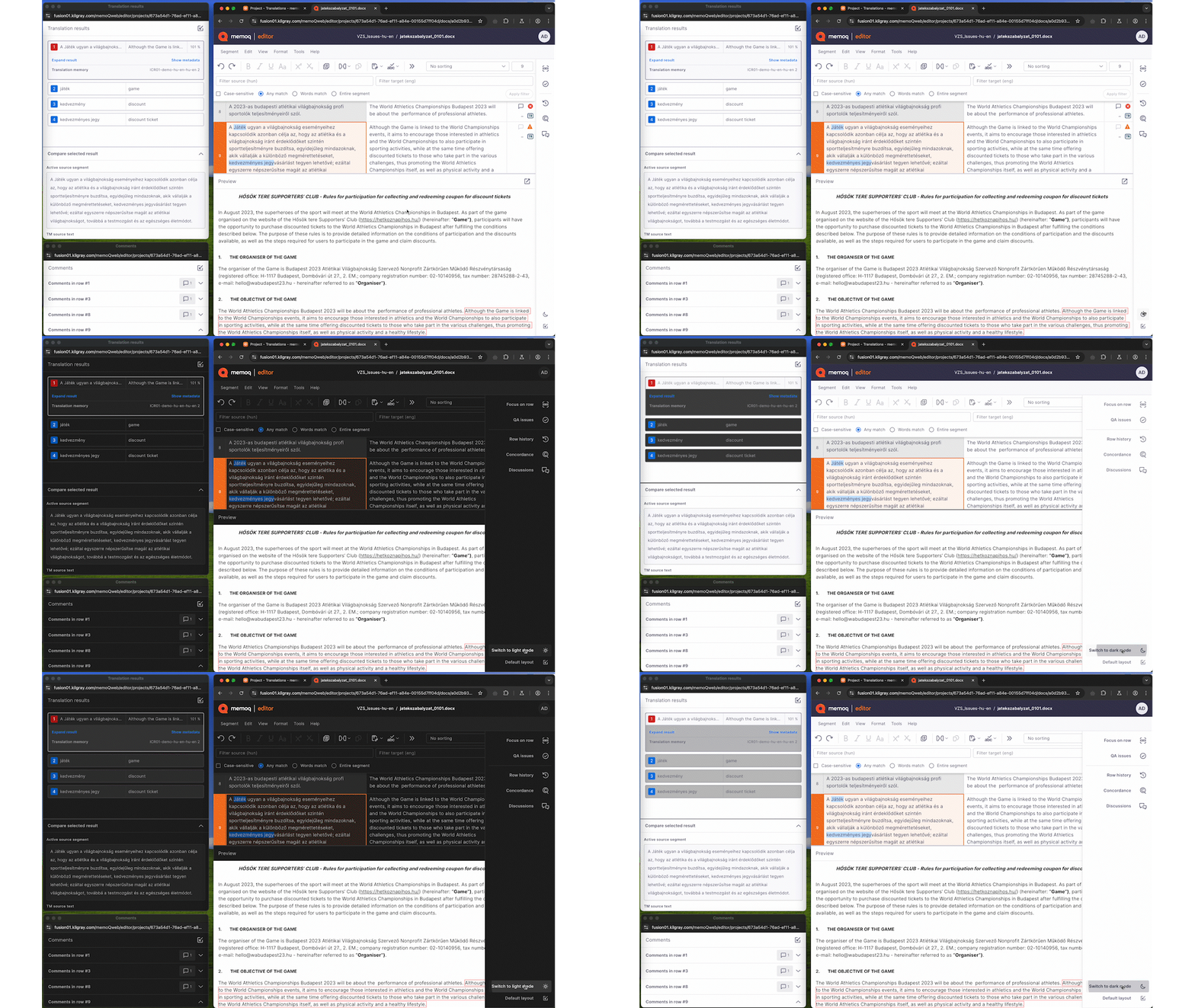
Details zu allen Funktionen, Vorteilen und zukünftigen Entwicklungen von memoQ editor finden Sie in unserem ausführlichen Blogpost.
Server-Überwachungsprotokoll: Verfolgen Sie den Verlauf Ihrer Projekte und Ressourcen
Übersetzungen in Projekten filtern
11.4.9
April 2, 2025
Bugfixes:
BUG-11295 – Term bases: Creating more than 1791 entries in a Qterm TB via Resources API makes the TB corrupted
BUG-13407 – Translation editor: In a filtered document or a view, ignoring all QA warnings might not always be available
BUG-13689 – PowerPoint filter: Can't export document when modern comments are added to a hidden slide or empty textbox
BUG-14537 – Multilingual Excel filter: In CSV files, memoQ could not import length limit information between quotes
BUG-14561 – Multilingual Excel filter: memoQ might ignores import color settings when multiple cell styles contain an indexed color
BUG-14647 – QA: Extra warnings might appear when target and source uses whitespace between number and measurement inconsistently
BUG-14691 – When importing a package with an empty LiveDocs corpus, "Import failed" warning appears
BUG-14707 – QA: Source containing alphanumeric code and target containing number (or vice versa) might cause false positive "extra number" and "missing number" warnings
BUG-14741 – WorldServer filter: New checkboxes for segmentation and formatting
BUG-14797 – memoQweb: Documents with subvendor assignments might not save deadline changes correctly
BUG-14830 – Regex text filter: In a rare case, memoQ cannot import a regex text filter as online resource and cannot import files into online project with a re-created online version of the filter
BUG-14844 – Machine translation: DeepL: Logging in with an API key might result in a "Quota Exceeded (456)" error message
BUG-14892 – memoQweb: Sorting by deadline might not work properly
BUG-14914 – QA: Words contaning numbers and dashes might cause false positive warnings
BUG-14931 – memoQ TMS: Timeout error might occur during automated memoQ TMS backup
BUG-14939 – QA: Having numbers and alphanumeric codes in the same segment might lead to false positive QA hits
BUG-14940 – Customer portal: Maximum upload file size needs to be configurable (CustomerPortalConfig.json)
BUG-14945 – Content connector: A "nullref" error might occur when importing memoQ bilingual documents
BUG-14948 – TM+: Under rare conditions, items might disappear from the list of TMs
BUG-14958 – Language handing concurrency issue
BUG-14960 – Customer portal: Users can't upload files larger than 128 MB
BUG-14971 – Markdown filter: Fenced code block content under a list item is not exported correctly
BUG-14978 – QA: Superscript numbers might cause false positive warnings
BUG-14986 – Qterm: Users with Lookup access can print the whole TB
BUG-14993 – Deliver/Return button does not work on slices
BUG-14998 – memoQ editor: "Spell check" option in menu does not always change
BUG-15006 – Cascading filters: If a bilingual filter in the chain requests locking segments, the filters after it ignore the request
BUG-15007 – XLIFF 1 filter: Target's state value might be lost at export if the trans-unit with translate="no" attribute has not been imported
BUG-15008 – memoQweb: Loading a translation result from the Tilde MT plugin might crash webtrans
BUG-15019 – WS API: Security issue related to passwords and logging
BUG-15039 – WorldServer filter: New checkboxes for importing empty and whitespace-only segments
BUG-15068 – memoQ TMS: Timeouts might happen in the communication with the custom code execution service
BUG-15095 – Listing a large number of online TMs might happen slower than expected
BUG-15099 – QA: Mathematical symbols next to numbers might cause false positive warnings
BUG-15113 – Markdown filter: Export may be incorrect when there is text after a link
The Inverted Color Scheme introduced in memoQ 11.2 has received major updates. For a detailed overview, check out our blog post.
11.3.9
February 25, 2025
Bugfixes:
BUG-10944 – Business Analytics: Cannot install/enable Business Analytics API on memoQ TMS
BUG-13724 – Project templates: When a TM is missing, editing a project template's Translation memories tab results in an unhandled exception
BUG-14001 – Translation memory: In certain cases, pre-translation/statistics memory usage can go very high when using TM+ resources
BUG-14472 – Exporting segmented XLIFF 1 files might omit translations of certain "trans-unit" elements if there is a space before a line break tag
BUG-14623 – TM: Cannot create projects from templates where Thai is a target language and the template should create a classic TM
BUG-14624 – ICML: Tabs might be missing in exported ICML files
BUG-14647 – QA: Extra warnings might appear when target and source uses whitespace between number and measurement inconsistently
BUG-14676 – QA: Extra warnings might appear when target and source uses different punctuation before of after an alphanumeric code
BUG-14682 – MXLIFF filter: memoQ might not recognize Phrase-specific inline tags if Phrase inline tag markers (<,>,{,}) are used right before the actual inline tag
BUG-14683 – WS API: FirstAccept users cannot preview documents that were assigned via WS API
BUG-14689 – memoQWeb: Access issue when FirstAccept user can only take project manager license from memoQ TMS
BUG-14718 – SDLXLIFF filter: After translating an SDLXLIFF file in memoQ, the final DOCX file exported from Trados Studio may lose all text formatting (italics, underline, superscript, etc.)
BUG-14789 – Markdown filter: Content in a Markdown file might be messed up if the file contains a Markdown table right after a multi-line HTML comment
BUG-14819 – Translation editor: Locked row icon not visible in inverted color scheme
BUG-14820 – Translation editor: Translation result's metadata are not visible in inverted color scheme until turning inverted colors off and on againp
BUG-14857 – QA: Running QA on a document containing special numeric characters might cause unhandled exceptions
BUG-14877 – memoQ wrongly mentions MT pre-translation during pre-translate and statistics
BUG-14878 – TM+: When upgrading memoQ TMS from version 10.2 to 11.2, some TM+ resources might become corrupted
BUG-14881 – Qterm: Issue with TBX import when picklist values contain spaces or underscores
BUG-14888 – Machine translation: memoQ AGT: Only users with admin rights can access online MT settings resources where the AGT plugin is configured
BUG-14902 – In very rare cases, some projects show negative progress values
11.3.6
February 4, 2025
Bugfixes
BUG-14339 – memoQweb: Loading a document list page might lead to internal server error
memoQ 10.2 (LTS) endet am 31. Januar 2025
Unterstützung für memoQ 10.2 (LTS) endet am 31. Januar 2025 Die neue LTS-Version, memoQ 11.2, wird mindestens bis zum 31. Januar 2026 unterstützt. Benutzer, die memoQ 10.2 verwenden, sollten das Upgrade so bald wie möglich durchführen, um einen reibungslosen Übergang zu gewährleisten.
11.2.65
March 18, 2026
Installer: Improved version visibility in Control Panel
Machine translation: DeepL authentication now works reliably in memoQ
memoQ TMS: Email settings now keep your sender name on hosted servers
memoQ TMS: Subvendor users now appear as Project Managers and can assign tasks
memoQweb: All assigned MT languages are now visible in memoQWeb project templates
11.2.45
January 15, 2026
Bug fixes:
CMS improvements: Clearer logging when importing content from the CMS gateway
Import, Export: Improved stability during file imports by reducing SQL deadlocks
Machine Translation: A clearer message displayed when DeepL glossary import isn’t possible
Markdown: Improved support for MathBlocks during file import
memoQ TMS: Resolved a launch error that occasionally caused memoQ TMS to stop with a null reference
Setup improvements: More robust handling of performance counters
TM+: Improved pre-translation for content with spaces, non-breaking spaces, and numbers
11.2.38
November 13, 2025
Bugfixes:
BUG-15639 – QA: Symbols immediately after numbers might cause false positive warnings
BUG-15933 – Machine Translation: Pre-translation with the DeepL plugin may trigger inline tag errors and block workflows
BUG-15331 – Multilingual Excel filter: Documents with number-only source segments may cause export issues
BUG-15619 – Edit distance report shows 0 values when the Reports page’s language selector is set to All languages
BUG-16114 – Performance optimization: Improved speed when loading online TMs, TBs, and Muses in memoQ desktop app
BUG-15839 – Machine Translation: The Systran MT plugin now correctly detects Chinese language codes (“zh”, “zt”)
BUG-16109 – Upgrade fix: memoQ TMS upgrade from 10.6 to 11.2 backup error fixed
BUG-16127 – Usability fix: memoQweb is now accessible on a memoQ TMS, previously connected to Language Terminal
BUG-15941 – memoQ TMS now loads TM lists properly and restores TM+ access
BUG-15659 – TM+: memoQ might copy the value of tag attributes incorrectly
BUG-16036 – Translation editor: Corrected QA warning message translation in Hungarian interface
BUG-15914 – Translation memories: TM+ temporarily inaccessible on the server
11.2.34
June 26, 2025
Bugfixes:
BUG-12699 – SDLXLIFF filter: ‘NMT-origin’ status mapping is missing from the default SDLXLIFF filter
BUG-15297 – Multilingual Excel filter: memoQ doesn’t import ending whitespaces correctly when language-based segmentation is turned on
BUG-15373 – XLIFF 2 filter: Export might fail if <unit> element’s “id” attribute contains a comma
BUG-14459 – Translation editor: Concordance doesn’t return results in rare cases when search phrase contains wildcards
BUG-15528 – QA: memoQ returns spelling suggestions even if the QA setting “Skip spelling suggestions” is on
BUG-15445 – Multilingual Excel filter: memoQ might not import the document if a target cell contains a “zero-width whitespace” character
BUG-14373 – Microsoft Excel filter: In a project with a CCJK source and a non-CCJK target language, an extra space might appear after line breaks in Excel cells when exporting a document
BUG-15410 – XLIFF 2 filter: memoQ might not apply XLIFF states settings when exporting the document
BUG-15118 – Qterm: Term base synchronization with Kalcium terminology system might lead to “500 Internal server error”
BUG-15190 – Markdown filter: Unescaped right square bracket (“]”) in the exported file might break Markdown links
BUG-15507 – memoQWeb: Confirming segments in webtrans might lead to an unhandled exception
BUG-15185 – After checking out an online project, translators don’t have template-based LiveDocs corpora in the local copy
BUG-15405 – Qterm: When adding/editing a term to a term base in the translation editor, the Qterm window opens as blank
BUG-15461 – memoQweb: Random code execution vulnerability
BUG-15449 – Microsoft Excel filter: memoQ can’t import document when a cell’s content starts with a line break
BUG-15269 – Java .properties filter: “Treat placeholder <ph> tags as required” checkbox resets to enabled state
BUG-15128 – TM+: Cannot import a TMX with very long (100k+ characters) segments
BUG-15319 – TM+: Large numbers ending in 0s and using thousands separators are not substituted correctly
BUG-14028 – Tweak: Optimized TM listing to access a memory cache and not to the TM database directly.
BUG-14820 – Translation editor: Translation result’s metadata are not visible in inverted color scheme until turning inverted colors off and on again
BUG-15439 – XLIFF 1 filter: memoQ might skip segmentation if there is content in a target segment
11.2.31
May 27, 2025
Bugfixes:
BUG-14565 – IDML filter: memoQ cannot import the document if it contains processing instructions
BUG-14581 – Microsoft Office filters: The anchor at the end of hyperlink is not imported
BUG-14620 – Multilingual Excel filter: When importing a multi-sheet Excel file, some sheets might be missing if some resources are corrupt in the file
BUG-14740 – Multilingual XML filter: memoQ shows a “directory not found” exception when trying to save an XPath rule if the preview document doesn’t exist anymore
BUG-15076 – memoQweb: webtrans might show an “Invalid Operation” exception when joining segments in a sliced document
BUG-15186 – Dashboard: Filter conditions containing “Reviewer 1” or “Reviewer 2” don’t work on the French UI
BUG-15211 – Translation memories: Optimization: TM listing now reads a memory cache, not directly the TM database
BUG-15223 – IDML filter: memoQ might show a “Collection was modified” exception when trying to import the IDML file
BUG-15289 – TM+: Statistics might fail when a project has translatable tags and reverse TM lookup is enabled
BUG-15294 – Translation memories: Optimization: TM listing now reads a memory cache, not directly the TM database
BUG-15349 – Translation memories: Optimization: TM listing now reads a memory cache, not directly the TM database
BUG-15381 – QA: Number check might show false positive “missing number” and “extra number” warnings for CCJK languages
BUG-15385 – Translation memories: Optimization: TM listing now reads a memory cache, not directly the TM database
BUG-15402 – Translation memories: Optimization: TM listing now reads a memory cache, not directly the TM database
BUG-15410 – XLIFF 2 filter: memoQ might not apply XLIFF states settings when exporting the document
BUG-15419 – QA: Full-width (two-byte) comma between numbers might cause false positive warnings
BUG-15435 – Translation memories: Optimization: TM listing now reads a memory cache, not directly the TM database
11.2.30
May 8, 2025
Bugfixes
BUG-13407 – Translation editor: In a filtered document or a view, ignoring all QA warnings might not always be available
BUG-13689 – PowerPoint filter: Can’t export document when modern comments are added to a hidden slide or empty textbox
BUG-14537 – Multilingual Excel filter: In CSV files, memoQ could not import length limit information between quotes
BUG-14561 – Multilingual Excel filter: memoQ might ignores import color settings when multiple cell styles contain an indexed color
BUG-14647 – QA: Extra warnings might appear when target and source uses whitespace between number and measurement inconsistently
BUG-14665 – Cascading filters: Using a HTML filter after the Excel filter the “Import markup as memoQ {tags}” option might fail with an error
BUG-14707 – QA: Source containing alphanumeric code and target containing number (or vice versa) might cause false positive “extra number” and “missing number” warnings
BUG-14741 – WorldServer filter: New checkboxes for segmentation and formatting
BUG-14797 – memoQweb: Documents with subvendor assignments might not save deadline changes correctly
BUG-14844 – Machine translation: DeepL: Logging in with an API key might result in a “Quota Exceeded (456)” error message
BUG-14914 – QA: Words contaning numbers and dashes might cause false positive warnings
BUG-14958 – Language handing concurrency issue
BUG-14971 – Markdown filter: Fenced code block content under a list item is not exported correctly
BUG-14978 – QA: Superscript numbers might cause false positive warnings
BUG-14993 – Deliver/Return button does not work on slices
BUG-15006 – Cascading filters: If a bilingual filter in the chain requests locking segments, the filters after it ignore the request
BUG-15007 – XLIFF 1 filter: Target’s state value might be lost at export if the trans-unit with translate=”no” attribute has not been imported
BUG-15008 – memoQweb: Loading a translation result from the Tilde MT plugin might crash webtrans
BUG-15019 – WS API: Security issue related to passwords and logging
BUG-15039 – WorldServer filter: New checkboxes for importing empty and whitespace-only segments
BUG-15068 – memoQ TMS: Timeouts might happen in the communication with the custom code execution service
BUG-15095 – Listing a large number of online TMs might happen slower than expected
BUG-15099 – QA: Mathematical symbols next to numbers might cause false positive warnings
BUG-15113 – Markdown filter: Export may be incorrect when there is text after a link
11.2.8
November 7, 2024
Buxfixes:
BUG-10177 – LiveDocs: Importing content from one LiveDocs corpus into another does not retain metadata
BUG-12252 – QA give false positive results about numbers both being and missing in the same entry if numbers are after a slash or before a full stop.
BUG-13578 – Multilingual XLSX: Import may fail if the source side’s ending/starting whitespace is different from the target side’s ending/starting whitespace
BUG-13622 – Preview: Links that open a new window in the preview pane were not working
BUG-13753 – Multilingual XML filter: XPath is not working if the path elements contain namespace specification
BUG-13773 – TM+: Adding an entry to a TM+ may fail when the translatable document has non-Latin characters and the Store document name option is turned on
BUG-13821 – Phrase XLIFF filter: memoQ could not import .mxliff files that had empty “group” elements
BUG-13840 – Issues with installing memoQ 11.0 on Mac using Parallels
BUG-13846 – Translation editor: The preview pane’s WebView2 plugin might cause memoQ 11 to crash at startup or during translation
BUG-13857 – Improve memoQ AGT’s warning text for “no translation returned”
BUG-13858 – When a document is opened for translation, locking segments during pre-translation might cause an error
BUG-13859 – Translation editor: filtering with the “Only whole words” option does not return results when a word is next to a memoQ tag
BUG-13874 – LiveDocs: Alignment might merge additional lines
BUG-13885 – In some cases, memoQ Terminal Server Configuration Tool fails to install
BUG-13892 – Transit package import may fail with cultureID-related message
BUG-13942 – PowerPoint filter: Import may fail if there are elements in the file which are not in memoQ’s schema validator files
BUG-13986 – Translation editor: Document progress might not appear correctly when working in views
BUG-14023 – memooQweb: For security reasons, AutoComplete is now turned off by default in webtrans
BUG-14057 – In some cases, memoQ Terminal Server Configuration Tool fails to install
BUG-14078 – memoQWeb doesn’t start if the memoQ TMS server is not connected to the internet
BUG-14092 – Automated actions: Sequenced automated actions may not wait for each other to finish
BUG-14098 – Under rare conditions, statistics creation can take significantly more time than expected
BUG-14154 – memoQweb: webtrans shows extra tags on the target side as “*”
BUG-14281 – Machine translation: Cannot edit an online MT resource which configures a plugin that is unavailable in the memoQ TMS
BUG-14326 – XLIFF1 filter: memoQ-specific extra tag (<mmq-notelocation>) inserted when exporting an XLIFF 1 document
BUG-14354 – Business Analytics: Configuration might fail with error while collecting reports
BUG-14365 – WebTrans: Terminology-related QA issues might not appear for specific change-tracked target segments
BUG-14371 – Pre-translate: TM crashes for some entries with unusual characters like “³” when followed by numbers.
BUG-14386 – memoQweb: webtrans might not show formatting and track changes correctly after scrolling
BUG-14395 – memoQweb: Copy next tag sequence in webtrans keeps inserting the first tag in the segment
BUG-14402 – Unable to create new TBs if the UI language is Traditional Chinese
11.2.8
November 7, 2024
Buxfixes:
BUG-10177 – LiveDocs: Importing content from one LiveDocs corpus into another does not retain metadata
BUG-12252 – QA give false positive results about numbers both being and missing in the same entry if numbers are after a slash or before a full stop.
BUG-13578 – Multilingual XLSX: Import may fail if the source side’s ending/starting whitespace is different from the target side’s ending/starting whitespace
BUG-13622 – Preview: Links that open a new window in the preview pane were not working
BUG-13753 – Multilingual XML filter: XPath is not working if the path elements contain namespace specification
BUG-13773 – TM+: Adding an entry to a TM+ may fail when the translatable document has non-Latin characters and the Store document name option is turned on
BUG-13821 – Phrase XLIFF filter: memoQ could not import .mxliff files that had empty “group” elements
BUG-13840 – Issues with installing memoQ 11.0 on Mac using Parallels
BUG-13846 – Translation editor: The preview pane’s WebView2 plugin might cause memoQ 11 to crash at startup or during translation
BUG-13857 – Improve memoQ AGT’s warning text for “no translation returned”
BUG-13858 – When a document is opened for translation, locking segments during pre-translation might cause an error
BUG-13859 – Translation editor: filtering with the “Only whole words” option does not return results when a word is next to a memoQ tag
BUG-13874 – LiveDocs: Alignment might merge additional lines
BUG-13885 – In some cases, memoQ Terminal Server Configuration Tool fails to install
BUG-13892 – Transit package import may fail with cultureID-related message
BUG-13942 – PowerPoint filter: Import may fail if there are elements in the file which are not in memoQ’s schema validator files
BUG-13986 – Translation editor: Document progress might not appear correctly when working in views
BUG-14023 – memooQweb: For security reasons, AutoComplete is now turned off by default in webtrans
BUG-14057 – In some cases, memoQ Terminal Server Configuration Tool fails to install
BUG-14078 – memoQWeb doesn’t start if the memoQ TMS server is not connected to the internet
BUG-14092 – Automated actions: Sequenced automated actions may not wait for each other to finish
BUG-14098 – Under rare conditions, statistics creation can take significantly more time than expected
BUG-14154 – memoQweb: webtrans shows extra tags on the target side as “*”
BUG-14281 – Machine translation: Cannot edit an online MT resource which configures a plugin that is unavailable in the memoQ TMS
BUG-14326 – XLIFF1 filter: memoQ-specific extra tag (<mmq-notelocation>) inserted when exporting an XLIFF 1 document
BUG-14354 – Business Analytics: Configuration might fail with error while collecting reports
BUG-14365 – WebTrans: Terminology-related QA issues might not appear for specific change-tracked target segments
BUG-14371 – Pre-translate: TM crashes for some entries with unusual characters like “³” when followed by numbers.
BUG-14386 – memoQweb: webtrans might not show formatting and track changes correctly after scrolling
BUG-14395 – memoQweb: Copy next tag sequence in webtrans keeps inserting the first tag in the segment
BUG-14402 – Unable to create new TBs if the UI language is Traditional Chinese
11.2.8
November 7, 2024
Buxfixes:
BUG-10177 – LiveDocs: Importing content from one LiveDocs corpus into another does not retain metadata
BUG-12252 – QA give false positive results about numbers both being and missing in the same entry if numbers are after a slash or before a full stop.
BUG-13578 – Multilingual XLSX: Import may fail if the source side’s ending/starting whitespace is different from the target side’s ending/starting whitespace
BUG-13622 – Preview: Links that open a new window in the preview pane were not working
BUG-13753 – Multilingual XML filter: XPath is not working if the path elements contain namespace specification
BUG-13773 – TM+: Adding an entry to a TM+ may fail when the translatable document has non-Latin characters and the Store document name option is turned on
BUG-13821 – Phrase XLIFF filter: memoQ could not import .mxliff files that had empty “group” elements
BUG-13840 – Issues with installing memoQ 11.0 on Mac using Parallels
BUG-13846 – Translation editor: The preview pane’s WebView2 plugin might cause memoQ 11 to crash at startup or during translation
BUG-13857 – Improve memoQ AGT’s warning text for “no translation returned”
BUG-13858 – When a document is opened for translation, locking segments during pre-translation might cause an error
BUG-13859 – Translation editor: filtering with the “Only whole words” option does not return results when a word is next to a memoQ tag
BUG-13874 – LiveDocs: Alignment might merge additional lines
BUG-13885 – In some cases, memoQ Terminal Server Configuration Tool fails to install
BUG-13892 – Transit package import may fail with cultureID-related message
BUG-13942 – PowerPoint filter: Import may fail if there are elements in the file which are not in memoQ’s schema validator files
BUG-13986 – Translation editor: Document progress might not appear correctly when working in views
BUG-14023 – memooQweb: For security reasons, AutoComplete is now turned off by default in webtrans
BUG-14057 – In some cases, memoQ Terminal Server Configuration Tool fails to install
BUG-14078 – memoQWeb doesn’t start if the memoQ TMS server is not connected to the internet
BUG-14092 – Automated actions: Sequenced automated actions may not wait for each other to finish
BUG-14098 – Under rare conditions, statistics creation can take significantly more time than expected
BUG-14154 – memoQweb: webtrans shows extra tags on the target side as “*”
BUG-14281 – Machine translation: Cannot edit an online MT resource which configures a plugin that is unavailable in the memoQ TMS
BUG-14326 – XLIFF1 filter: memoQ-specific extra tag (<mmq-notelocation>) inserted when exporting an XLIFF 1 document
BUG-14354 – Business Analytics: Configuration might fail with error while collecting reports
BUG-14365 – WebTrans: Terminology-related QA issues might not appear for specific change-tracked target segments
BUG-14371 – Pre-translate: TM crashes for some entries with unusual characters like “³” when followed by numbers.
BUG-14386 – memoQweb: webtrans might not show formatting and track changes correctly after scrolling
BUG-14395 – memoQweb: Copy next tag sequence in webtrans keeps inserting the first tag in the segment
BUG-14402 – Unable to create new TBs if the UI language is Traditional Chinese
memoQ AGT als Online-Ressource
memoQ AGT kann jetzt als Online-Ressource konfiguriert werden, was eine zentrale Verwaltung des API-Schlüssels ermöglicht. Linguisten können nun auf dieselben MT-Einstellungen zurückgreifen, wobei der AGT-API-Schlüssel von einem PM konfiguriert wird. Dieses optimierte Verfahren verbessert die Sicherheit und vereinfacht das Projektmanagement, was einen effizienteren Workflow ermöglicht.
memoQ AGT in Online-Projekten in WebPM
memoQ AGT unterstützt jetzt Online-Projekte. Bislang konnte memoQ AGT nur in lokalen Projekten oder in ausgecheckten Online-Projekten benutzt werden. Übersetzungen können direkt in webPM initiiert werden, sodass es nicht mehr notwendig ist, das Projekt manuell auszuchecken. Projekt-Manager können AGT jetzt für die Vorübersetzung benutzen, bevor sie Projekte für die Nachbearbeitung an Linguisten weitergeben.
• Kanada: Atikamekw, Babine-Witsuwit’en, Blackfoot, Dene, Dogrib, Innu, Michif, Mohawk, Plautdietsch, Stoney
• USA: Apache (westlich), Hopi, Lakota
Verbesserungen des In-Country Review-Tools
· ICR-Benutzer müssen Tags nicht mehr kopieren und im Zielsegment einfügen, sondern können dafür den neuen Befehl in der Symbolleiste verwenden.
· ICR-Benutzer können jetzt ihre
Überprüfungsaufgaben nicht nur nach Status (z. B. Geliefert, In Bearbeitung) filtern, sondern auch nach Projekten (Alle Projekte oder ein bestimmtes Projekt), was sich bei großen Projekten oder Ausführung von Aufgaben in mehreren Projekten gleichzeitig als besonders praktisch erweist.
memoQ-Termdatenbanken mit einem Klick löschen
· Benutzer mit den entsprechenden Berechtigungen können Termdatenbank-Einträge jetzt mit einem einzigen Klick über das neue Kontextmenüelement in der Ergebnisspalte löschen, anstatt die Ausgangs- und Zielbenennungen einzeln zu löschen oder den Termdatenbank-Editor zu öffnen.
Effizientes Aufräumen der E-Mails
· Als memoQ-Server-Administrator hat man jetzt die Option, alle E-Mail-Benachrichtigungsdaten ohne Archivierung zu löschen.
LQA-Berichte über API
· Projekt-Manager können jetzt LQA-Berichte über die API erstellen.
TM-Erstellung
· Der Optimierungsregler wurde entfernt.
11.1.13
September 5, 2024
Bugfixes
BUG-13259 – Export: Under rare circumstances, a previously translated and exported file cannot be exported from a new project
BUG-13325 – memoQweb: Deadline date might appear as overdue for completed documents
BUG-13469 – Preview: HTML content in the second target language in a Multilingual XML file was not visible in the preview pane
BUG-13578 – Multilingual XLSX: Import may fail if the source side’s ending/starting whitespace is different from the target side’s ending/starting whitespace
BUG-13609 – Online projects: Mixed up labels in the Notes window’s Discussion tab
BUG-13622 – Preview: Links that open a new window in the preview pane were not working in the preview pane
BUG-13753 – Multilingual XML filter: XPath is not working if the path elements contain namespace specification
BUG-13807 – Machine Translation: Systran MT plugin: Warning about language support when using Systran MT with the Serbian language
BUG-13814 – XLSX filter: Import of Excel files with hidden sheets and big images might be very slow
BUG-13986 – Translation editor: Document progress might not appear correctly when working in views
BUG-14030 – User without Admin permission can delete translation memory entries through TM concordance
BUG-14038 – Multilingual Delimited Text filter: Import of a document may fail with “There was no XML start tag open”
BUG-14057 – memoQ Terminal server configuration tool didn’t install correctly
BUG-14078 – memoQWeb doesn’t start if the server is in an environment without internet
BUG-14081 – Machine Translation: DeepL MT plugin: Glossary terms appear in quotation marks
BUG-14092 – Automated actions: Sequenced automated actions may not wait for each other to finish
BUG-14098 – Under rare conditions, statistics creation can take significantly more time than expected
BUG-14151 – Keyboard shortcuts: LF line breaks entered by user become CRLF
11.1.13
September 5, 2024
Bugfixes
BUG-13259 – Export: Under rare circumstances, a previously translated and exported file cannot be exported from a new project
BUG-13325 – memoQweb: Deadline date might appear as overdue for completed documents
BUG-13469 – Preview: HTML content in the second target language in a Multilingual XML file was not visible in the preview pane
BUG-13578 – Multilingual XLSX: Import may fail if the source side’s ending/starting whitespace is different from the target side’s ending/starting whitespace
BUG-13609 – Online projects: Mixed up labels in the Notes window’s Discussion tab
BUG-13622 – Preview: Links that open a new window in the preview pane were not working in the preview pane
BUG-13753 – Multilingual XML filter: XPath is not working if the path elements contain namespace specification
BUG-13807 – Machine Translation: Systran MT plugin: Warning about language support when using Systran MT with the Serbian language
BUG-13814 – XLSX filter: Import of Excel files with hidden sheets and big images might be very slow
BUG-13986 – Translation editor: Document progress might not appear correctly when working in views
BUG-14030 – User without Admin permission can delete translation memory entries through TM concordance
BUG-14038 – Multilingual Delimited Text filter: Import of a document may fail with “There was no XML start tag open”
BUG-14057 – memoQ Terminal server configuration tool didn’t install correctly
BUG-14078 – memoQWeb doesn’t start if the server is in an environment without internet
BUG-14081 – Machine Translation: DeepL MT plugin: Glossary terms appear in quotation marks
BUG-14092 – Automated actions: Sequenced automated actions may not wait for each other to finish
BUG-14098 – Under rare conditions, statistics creation can take significantly more time than expected
BUG-14151 – Keyboard shortcuts: LF line breaks entered by user become CRLF
11.1.13
September 5, 2024
Bugfixes
BUG-13259 – Export: Under rare circumstances, a previously translated and exported file cannot be exported from a new project
BUG-13325 – memoQweb: Deadline date might appear as overdue for completed documents
BUG-13469 – Preview: HTML content in the second target language in a Multilingual XML file was not visible in the preview pane
BUG-13578 – Multilingual XLSX: Import may fail if the source side’s ending/starting whitespace is different from the target side’s ending/starting whitespace
BUG-13609 – Online projects: Mixed up labels in the Notes window’s Discussion tab
BUG-13622 – Preview: Links that open a new window in the preview pane were not working in the preview pane
BUG-13753 – Multilingual XML filter: XPath is not working if the path elements contain namespace specification
BUG-13807 – Machine Translation: Systran MT plugin: Warning about language support when using Systran MT with the Serbian language
BUG-13814 – XLSX filter: Import of Excel files with hidden sheets and big images might be very slow
BUG-13986 – Translation editor: Document progress might not appear correctly when working in views
BUG-14030 – User without Admin permission can delete translation memory entries through TM concordance
BUG-14038 – Multilingual Delimited Text filter: Import of a document may fail with “There was no XML start tag open”
BUG-14057 – memoQ Terminal server configuration tool didn’t install correctly
BUG-14078 – memoQWeb doesn’t start if the server is in an environment without internet
BUG-14081 – Machine Translation: DeepL MT plugin: Glossary terms appear in quotation marks
BUG-14092 – Automated actions: Sequenced automated actions may not wait for each other to finish
BUG-14098 – Under rare conditions, statistics creation can take significantly more time than expected
BUG-14151 – Keyboard shortcuts: LF line breaks entered by user become CRLF

Mit memoQ 11.0 führen wir viele grundlegende Änderungen am In-Country Review-Tool ein.
Bisher unterlag das In-Country Review-Tool (ICR) bestimmten Einschränkungen, die Projekt Manager daran hinderten, ICR-Benutzer zu bestimmten Workflows und Auftragstypen zuzuweisen. Um dies zu lösen, haben wir in memoQ 11.0 mehrere umfassende Änderungen am ICR-Tool vorgenommen.

Höhere Genauigkeit von AIQE dank benutzerdefinierter, von TAUS in memoQ trainierten Modelle
TAUS bietet sowohl generische als auch benutzerdefinierte Modelle für AIQE (Artificial Intelligence-based Quality Estimate). Ab sofort können Benutzer in memoQ ihre von TAUS trainierten benutzerdefinierten Modelle verwenden. Durch die Verwendung von benutzerdefinierten Modellen kann die Genauigkeit von AIQE erhöht werden.
Mehr erfahren
memoQs neuer Markdown-Filter unterstützt die Kernfunktionalität des Markdown-Dateiformats.
Markdown ist eine einfache Markup-Sprache mit simpler Textformatierungssyntax. Sie ist so konzipiert, dass sie leicht zu schreiben und zu lesen ist und in das HTML-Format für Webseiten konvertiert werden kann. Markdown wird häufig für Dokumentationsseiten sowie für Blogging- und kollaborative Software genutzt.
Der neue Markdown-Filter, der ab memoQ 11.0 verfügbar ist, unterstützt die Kernfunktionalität des Markdown-Dateiformats. In kommenden memoQ-Versionen werden noch weitere Funktionen hinzugefügt.

Aktualisierte Hunspell-Rechtschreibprüfung in memoQ TMS.
Die Hunspell-Rechtschreibprüfung und die integrierten Wörterbücher mussten aktualisiert werden. Daher wurde Hunspell von Version 1.3.2 auf Version 1.7.2 aktualisiert und wir haben künftige Hunspell-Aktualisierungen in memoQ TMS automatisiert.
Mehr erfahren
Die Fortschrittsinformationen pro Rolle werden jetzt beim Desktop-Client sowohl bei Projekten als auch bei Dokumenten angezeigt.
Bislang zeigte die Statusleiste des Übersetzungseditors im Desktop-Client nur den prozentualen Fortschritt für Projekt/Dokument für bestätigte Segmente an. Bei einem Benutzer mit der Rolle ÜP1 wurde beispielsweise ein Dokument, das zu 100 % übersetzt und bestätigt war, mit einem Fortschritt von 100 % angezeigt.
Dieses Problem wird nun behoben, indem Fortschrittsinformationen pro Rolle angezeigt werden. Hierbei wird nicht nur der Prozentwert angezeigt, sondern auch die tatsächlichen Zahlenwerte (z. B. 20/200 (10 %)) für die Segmente/Worte/Zeichen, wie sie vom Benutzer eingestellt wurden. Darüber hinaus zeigt memoQ jetzt die Gesamtzahl der Zeilen im Dokument sowie die Anzahl der gesperrten Zeilen an, so dass der tatsächliche Fortschritt des Benutzers in der jeweiligen Rolle bei der Arbeit am Dokument vollständig angezeigt und klar ersichtlich ist. Sowohl der Dokumenten- als auch der Projektfortschritt werden nun angezeigt.
Mehr erfahren
Diese Version beinhaltet mehrere kleinere Funktionen und Verbesserungen, die auf dem Feedback und den Anfragen unserer Benutzer basieren.
Bei der Installation der Desktop-Anwendung können die Benutzer nun zwischen vereinfachtem und traditionellem Chinesisch wählen.
LQA-Berichte (Statistiken & Fehlerlisten) sind ab jetzt über die API verfügbar.
Wir haben eine UX-Verbesserung eingeführt, um den Projekt-/Dokumentenfortschritt sowohl im Desktop-Client als auch in memoQweb klar ersichtlich zu machen. Benutzer können den Fortschritt in den einzelnen Rollen sofort sehen, ohne mit der Maus über die jeweiligen Fortschrittsbalken fahren zu müssen.
Fragmenteinfügung ist jetzt sowohl in memoQweb als auch im Desktop-Client während der Vorübersetzung standardmäßig inaktiv.
In memoQ ist ein neues Update für das TexTra-MT-Plugin verfügbar.
Mehr erfahren
11.0.16
June 27, 2024
Bugfixes
BUG-13144 – TM+: Inline tag attribute differences are not adjusted correctly from TM+ matches
BUG-13688 – PM Workflow: Cannot restore an archived project if it contains empty documents with version history
BUG-13708 – XLIFF1 filter: memoQ may be unable to export an XLIFF1 file if it has more than two <sub> elements inside a <ph> element
BUG-13710 – Term bases: When filtering for duplicate entries, the setting "more metadata" is ignored
BUG-13797 – Content Connector: Cannot import XLF files into content-connected online projects
BUG-13812 – WS API: In certain cases, Plunet might not be able to export a translated document from memoQ TMS
BUG-13818 – TM+: Cannot rename a TM+ if its name contains Japanese or Chinese characters
BUG-13840 – Issues with installing memoQ 11.0 on Mac using Parallels
11.0.13
June 18, 2024
Improvements
BUG-13522: The UI language selector in memoQ and memoQweb now shows each language in that language
Bugfixes
BUG-12616: WebTrans: “This is a duplicate (repeated) error” checkbox is missing from the LQA error dialog
BUG-13151: WS API: Document import might fail with SQL transaction error message
BUG-13231: OIDC SSO: Could not sign in to memoQ TMS with the OKTA Org ID Provider
BUG-13451: In-country review: Renamed Settings to Options in the ICR tool
BUG-13480: DeepL MT plugin: After MT pre-translation, spaces might be missing before or after tags
BUG-13507: Microsoft Word (DOC, DOCX) filter: Cannot export DOCX files that have memoQ comments on segments from SmartArt texts
BUG-13508: TM+ / TM Editor: The ‘Only whole words’ setting on the Advanced find and replace dialog might not work correctly
BUG-13548: Statistics might not finish on a document slice in an online project
BUG-13663: TM+ / TM Editor: Advanced find and replace might incorrectly highlight the expression that would be replaced
BUG-13712: XML filter: memoQ may be unable to create preview if there is an XSLT and a DTD file specified for visualizing data
BUG-13732: Statistics might show incorrect counts on a document slice in an online project
11.0.13
June 18, 2024
Improvements
BUG-13522: The UI language selector in memoQ and memoQweb now shows each language in that language
Bugfixes
BUG-12616: WebTrans: “This is a duplicate (repeated) error” checkbox is missing from the LQA error dialog
BUG-13151: WS API: Document import might fail with SQL transaction error message
BUG-13231: OIDC SSO: Could not sign in to memoQ TMS with the OKTA Org ID Provider
BUG-13451: In-country review: Renamed Settings to Options in the ICR tool
BUG-13480: DeepL MT plugin: After MT pre-translation, spaces might be missing before or after tags
BUG-13507: Microsoft Word (DOC, DOCX) filter: Cannot export DOCX files that have memoQ comments on segments from SmartArt texts
BUG-13508: TM+ / TM Editor: The ‘Only whole words’ setting on the Advanced find and replace dialog might not work correctly
BUG-13548: Statistics might not finish on a document slice in an online project
BUG-13663: TM+ / TM Editor: Advanced find and replace might incorrectly highlight the expression that would be replaced
BUG-13712: XML filter: memoQ may be unable to create preview if there is an XSLT and a DTD file specified for visualizing data
BUG-13732: Statistics might show incorrect counts on a document slice in an online project
11.0.13
June 18, 2024
Improvements
BUG-13522: The UI language selector in memoQ and memoQweb now shows each language in that language
Bugfixes
BUG-12616: WebTrans: “This is a duplicate (repeated) error” checkbox is missing from the LQA error dialog
BUG-13151: WS API: Document import might fail with SQL transaction error message
BUG-13231: OIDC SSO: Could not sign in to memoQ TMS with the OKTA Org ID Provider
BUG-13451: In-country review: Renamed Settings to Options in the ICR tool
BUG-13480: DeepL MT plugin: After MT pre-translation, spaces might be missing before or after tags
BUG-13507: Microsoft Word (DOC, DOCX) filter: Cannot export DOCX files that have memoQ comments on segments from SmartArt texts
BUG-13508: TM+ / TM Editor: The ‘Only whole words’ setting on the Advanced find and replace dialog might not work correctly
BUG-13548: Statistics might not finish on a document slice in an online project
BUG-13663: TM+ / TM Editor: Advanced find and replace might incorrectly highlight the expression that would be replaced
BUG-13712: XML filter: memoQ may be unable to create preview if there is an XSLT and a DTD file specified for visualizing data
BUG-13732: Statistics might show incorrect counts on a document slice in an online project
11.0.13
June 18, 2024
Improvements
BUG-13522: The UI language selector in memoQ and memoQweb now shows each language in that language
Bugfixes
BUG-12616: WebTrans: “This is a duplicate (repeated) error” checkbox is missing from the LQA error dialog
BUG-13151: WS API: Document import might fail with SQL transaction error message
BUG-13231: OIDC SSO: Could not sign in to memoQ TMS with the OKTA Org ID Provider
BUG-13451: In-country review: Renamed Settings to Options in the ICR tool
BUG-13480: DeepL MT plugin: After MT pre-translation, spaces might be missing before or after tags
BUG-13507: Microsoft Word (DOC, DOCX) filter: Cannot export DOCX files that have memoQ comments on segments from SmartArt texts
BUG-13508: TM+ / TM Editor: The ‘Only whole words’ setting on the Advanced find and replace dialog might not work correctly
BUG-13548: Statistics might not finish on a document slice in an online project
BUG-13663: TM+ / TM Editor: Advanced find and replace might incorrectly highlight the expression that would be replaced
BUG-13712: XML filter: memoQ may be unable to create preview if there is an XSLT and a DTD file specified for visualizing data
BUG-13732: Statistics might show incorrect counts on a document slice in an online project

Vier indigene Sprachen Kanadas wurden zu memoQ hinzugefügt.
In Kanada wird eine Vielzahl an verschiedenen indigenen Sprachen gesprochen. Wir haben vier von ihnen zu memoQ hinzugefügt: Inuktitut, Cree, Ojibwe und Mi’kmaq. Neben der lateinischen Schrift haben wir außerdem die Silbenschrift für Inuktitut, Cree und Ojibwe hinzugefügt.
Mehr erfahren
Passen Sie Ihre Übersetzungsergebnisse von memoQ AGT mit der neuen Förmlichkeitskonfiguration und der TD-Priorisierung an.
memoQ AGT unterstützt Sie nun dabei, den gewünschten Ton Ihrer Übersetzung zu ändern oder zu präzisieren. Der Umgang mit Förmlichkeiten unterscheidet sich von Sprache zu Sprache. Manche Sprachen verzichten gänzlich auf Förmlichkeiten, während es in anderen verschiedene Abstufungen gibt. Der Ton der Ausgangssprache kann demnach vom erwünschten Ton der Zielsprache abweichen.
Die Förmlichkeitseinstellungen helfen Ihnen dabei, den erwünschten Grad an Förmlichkeit genau festzulegen. Dank der LLM- und MT-Technologie ist memoQ AGT im besonderen Maße dazu geeignet, Ihre Anweisungen in Bezug auf den Ton des Zieltextes umzusetzen.
Die sofortige Domänenadaptierung in memoQ AGT bietet Ihnen die Möglichkeit, qualitativ unübertroffene maschinelle Übersetzungen zu erstellen. memoQ AGT arbeitet mit den neuesten Domänendaten, die auf linguistischer Grundlage generiert werden. So verwendet es zum Beispiel erstklassige Übersetzungen, die von memoQ verifiziert wurden, um die Ergebnisse aus maschineller Übersetzung zur Verfügung zu stellen.
Mitunter sind diese linguistischen Daten (Termdatenbanken, Translation Memories und LiveDocs) nicht synchronisiert. Manche dieser Daten sind vielleicht aktueller als andere und mitunter können sie sich sogar widersprechen.
LLMs neigen außerdem dazu, die Gewichtung der Daten zu berücksichtigen. Wenn eine Benennung sowohl als TD- als auch als TM-Treffer auftritt, dann bestimmt der TM-Treffer letztlich das Ergebnis. Von nun an bieten wir Ihnen die Möglichkeit zu bestimmen, welche Informationsquelle priorisiert werden soll, wenn Sie mit memoQ AGT an Übersetzungen arbeiten. Mithilfe der TD-Priorisierung können Sie TD-Treffer gegenüber TM- oder LiveDocs-Treffern vorziehen.

Die Förmlichkeitseinstellung der Amazon-MT bietet Ihnen mehr Kontrolle über den Ton und Stil des Zieltextes.
Amazon unterstützt Sie nun dabei, den gewünschten Ton Ihrer Übersetzung zu ändern. Manche Sprachen bedienen sich verschiedener Abstufungen an Förmlichkeit; die Ausgangssprache entspricht also nicht unbedingt dem Ton, den Sie in der entsprechenden Zielsprache erreichen wollen. Die Förmlichkeitseinstellung hilft Ihnen dabei, genauestens den gewünschten Grad an Förmlichkeit für Übersetzungen mit Amazon-MT festzulegen.
Mehr erfahren
Dazu zählen einige kleinere Funktionen und Verbesserungen, die wir auf der Grundlage von Feedback und Anfragen unserer Benutzer hinzugefügt haben.
Wir haben nicht nur Verbesserungen an der Leistung der maschinellen Übersetzung während der Vorübersetzung vorgenommen, wir haben außerdem Chinesisch (Taiwan) als UI-Sprache in der Desktop-App, memoQweb, Customer Portal und dem ICR-Tool hinzugefügt.
10.6.12
May 22, 2024
Bugfixes
BUG-13326: webtrans does not work with Antidote Corrector’s updated plugin
BUG-13380: Java properties filter: Wrong unicode character may appear in the exported document
BUG-13425: memoQWeb: WebTrans licence revoked after switching back from other browser tabs
BUG-13586: memoQ may crash when trying to run Regex tagger with a specific rule
BUG-13687: Pre-translation fails if the scope contains segments that are not to be pre-translated
10.6
May 8, 2024
Bugfixes
BUG-12644: XLIFF 2 filter: Whitespaces between XML tags don’t appear correctly in memoQ
BUG-12722: TM+: In some cases, ID-based context information was stored incorrectly, TM offered no 101% matches
BUG-13044: XLIFF filter: Cannot import specific files where source is empty and target is not (error message: Invalid structural labels)
BUG-13152: XLIFF 2 Filter: Exporting specific XML files leads to a “Nullable object” error message
BUG-13228: XLIFF2 filter: Specific XLF files do not export correctly
BUG-13264: Multilingual Excel filter: Segments missing after import when color scheme configuration contains more than 4 colors to import
BUG-13383: webtrans might freeze when quickly saving translations to an attached TM in a specific project with auto-propagation turned on
BUG-13420: XLIFF 2 filter: Exporting specific XLF files leads to an “Index out of range” error
BUG-13464: memoQ TMS private cloud: Timeout of the DatabaseCleanup function allows the PerfMeasurement database table grow large
BUG-13486: Content connector: Temporary folder’s path was too long
BUG-13501: Multilingual Excel filter: Certain line break tags are not visible in the translator editor
BUG-13531: QA: False positive warnings appear for term base entries
BUG-13551: Qterm: Performing a terminology QA check on a specific document using a Qterm TB leads to an “IndexOutOfRangeException” error message
BUG-9697: XLIFF 2 filter: Cannot import a specific document import if the “Segment source based on language rules when there is no target” option is enabled
10.6
April 17, 2024
Bugfixes:
BUG-12991: Machine Translation: DeepL MT: When translating from Korean, DeepL returns sentences that begin with a lowercase letter.
BUG-13158: Exporting a Transit package containing specific inline tags may fail
BUG-13349: Multilingual Delimited Text (CSV, XLSX) filter: When importing a file, an incorrectly worded warning message might appear
BUG-13445: When a project template has 2 or more ignore lists for the same language, you cannot edit those ignore lists
10.6
April 3, 2024
Improvements
BUG-12441: Storage space occupied by Customer Portal is not shown in the Storage window of Server Administrator
BUG-12999: Improved error message about failed lookup attempts in a TB that is being edited
BUG-13124: Improvement: Decreased memory consumption of TM+
BUG-13137: Improvement: You can disable spellcheck suggestions in QA to increase performance
Bugfixes:
BUG-10969: DOCX filter: Track changes causes additional tags to appear when importing with the Accept all changes option
BUG-12349: In some cases, pre-translating a local project or a checked-out online project with TM-driven segmentation enabled might result in “Refining split/joins regions failed” error
BUG-12631: TM+: In some cases, full file path is stored in the TM+ even if the TM is set to store only document names
BUG-12889: TM+: Lookup/Pre-translate might encounter errors due to hits’ format adjustment
BUG-12903: Pressing Insert on the Concordance dialog may delete the segment and replace it with the selected text
BUG-12976: TM+: The memoQ desktop app might not be able to start if a TM is corrupted
BUG-12999: Improved error message about failed lookup attempts in a TB that is being edited
BUG-13078: QA: memoQ doesn’t warn about missing or incorrect target term if it is between text or space.
BUG-13089: The Pre-translate automated action does not generate weighted word counts
BUG-13090: TM+: TM configured with double context or simple context doesn’t return 102% or 101% matches
BUG-13129: Server outages caused by failed server update
BUG-13139: TM+: In some cases, formatting information is shifted three characters to the right
BUG-13187: Business Analytics: In rare cases, the exported CSV file doesn’t include recent changes
BUG-13201: MXLIFF import fails when the segment length limit is not a number
BUG-13220: Qterm: Clicking the Import button resets term base filtering
BUG-13230: Qterm: Exporting a moderated term base into TBX format might lead to an error
BUG-13248: WSAPI: Import via API deletes history of the file
BUG-13251: Translation editor: Keyboard shortcuts don’t work in the preview pane
BUG-13273: TM+: Importing a Transit package may fail if the project’s translation memory is a TM+
BUG-13287: XLSX filter: Japanese text encoding may become corrupted in the Preview pane
BUG-13295: webtrans: Translation results does not highlight differences in the compare box
BUG-13297: Cannot assign users to views imported into online projects
BUG-13308: Resources: Minimum threshold in LiveDocs settings resources does not work
BUG-13324: Machine Translation: Custom.MT plugin: bugfix update
BUG-13326: Antidote Corrector does not work with webtrans
BUG-13337: TM+: When converting a batch of classic TMs to TM+, memoQ does not properly warn about read-only TMs
BUG-13355: memoQ does not import files without translatable characters into projects created in earlier versions
BUG-13375: In some cases memoQ does not find strings inside longer words
BUG-13386: Machine Translation: Google Advanced plugin: memoQ cannot list legacy models if there are no native models on the account
BUG-13390: Machine Translation: ModernMT plugin: bugfix update (1.9.2)
BUG-13412: ICR: QA hits are shown even when QA is turned off in the ICR configuration
BUG-13413: Creating a templated-based project results in error if the option “Create minor version snapshot after pre-translation” is enabled in the template and the related Note field is empty.
BUG-13442: ICR: Unexpected behavior after pressing Enter when the Filter text box is empty
BUG-4794: MSG filter: Importing with default filter may result in ‘Object reference not set to an instance of an object’ error

Das In-Country Review (ICR) Tool von memoQ wird ständig aktualisiert, damit die Überprüfung durch Fachexperten in memoQ so flüssig wie möglich abläuft.
Bislang konnten Benutzer nur die integrierte Rechtschreibprüfung ihres Browsers nutzen, sofern diese richtig eingestellt war. Jetzt beinhaltet das In-Country Review (ICR) in der Symbolleiste die Einstellung „Rechtschreibung prüfen und Vorschläge anzeigen“. Diese Option ist standardmäßig aktiviert, sodass das ICR-Tool Rechtschreibfehler in der Übersetzungsspalte sofort unterkringelt. Wenn man mit der Maus über diese Markierung fährt, werden Verbesserungsvorschläge angezeigt, die bei Bedarf auch mit „Alle überspringen“ im gesamten Text ignoriert werden können. Diese Rechtschreibprüfung benutzt die Hunspell-Funktion, die für memoQweb im Server-Administrator konfiguriert wurde.
Wenn Benutzer die Filteroption in der App benutzen, werden nicht nur alle relevanten Zeilen gefiltert, sondern der gesuchte Text wird auch noch in jeder Zeile hervorgehoben, damit er leichter zu finden ist.
Die neue Schaltfläche „Zu Zeile springen“ in der Symbolleiste erlaubt es dem Überprüfer, direkt die Zeilennummer einzugeben, zu der er springen möchte. Dadurch muss zum Erreichen einer bestimmten Zeile nicht mehr manuell gescrollt werden. Außerdem ist es jetzt mithilfe einer Tastenkombination möglich, von überall in der App direkt zum aktiven Zielsegment zu springen.
Diese Verbesserungen sind vor allem für die barrierefreie Nutzung wichtig, da das visuelle Scrollen und Zurückspringen für manche Benutzer unabhängig von der Verwendung einer Screenreader-Software schwierig sein kann.
Es ergab sich aus der Nutzeridee, nicht mehr zwischen drei Tabs (Benennungen/Kommentare/Probleme) wechseln zu müssen, um alle relevanten Informationen für eine bestimmte Zeile zu sehen. Das Ergebnis:
Um die Oberfläche übersichtlicher zu machen, wird nur der Kommentar/das Problem der ausgewählten Karte im aktiven Bearbeitungsfeld hervorgehoben.
Durch den Tooltip „Kommentar hinzufügen“ über einen ausgewählten Textabschnitt ist es jetzt leichter, gezielt Kommentare hinzuzufügen.
Der Barrierefreiheit wegen sind Tooltips und ARIA-Label jetzt Bestandteil von Tab-Kopfzeilen, Kommentarkarten und Problemkarten.
Mehr erfahren
Wir haben die Funktion TM+ aktualisiert, um den Workflow und die Benutzerfreundlichkeit zu optimieren.
Bislang war die Funktion TM+ beim Erstellen eines neuen Translation Memory (TM) oder bei der Durchführung eines TM-Batch-Imports nicht der Standard. Ab memoQ 10.5 ist das Kontrollkästchen TM+ standardmäßig für diese beiden Optionen in der Benutzeroberfläche vorausgewählt. Diese Verbesserung sorgt dafür, dass TMs automatisch als TM+ erstellt werden, sofern Benutzer das Kontrollkästchen nicht selbst in der Benutzeroberfläche deaktivieren. Wir glauben, dass diese Änderung Ihren Workflow optimiert und dadurch die Benutzerfreundlichkeit verbessert.

Für Microsoft MT und Intento wurden einige Updates implementiert.
Für diejenigen, die besonders auf Sicherheit und Datenschutz achten, ist die Arbeit mit MT nun nicht mehr mit den Risiken von übertragungsempfindlichen Daten im öffentlichen Internet verbunden. Azure & Microsoft MT bieten jetzt den Zugriff auf MT-Dienstleistungen über ein privates Netzwerk, und das MS-MT-Plugin von memoQ ist nun damit kompatibel. Benutzer, die Zugriff auf benutzerdefinierte Endpunkte in MS-MT haben, können diese jetzt im MT-Plugin konfigurieren und damit ebenso flüssig arbeiten wie mit dem allgemeinen MS-MT-Dienst.
Ab memoQ 10.5 können Benutzer die Quelle von MT-Übersetzungen aus Intento genau prüfen. Dadurch können Benutzer ihre MT-Nutzung analysieren und nachverfolgen, welche Engine über Intento verwendet wurde.

LiveDocs in memoQweb als Projekt-Manager erstellen und löschen
Die LiveDocs-Funktionen von memoQweb wurden verbessert. Ab memoQ 10.5 können Sie als Projekt-Manager LiveDocs in memoQweb erstellen und löschen. Außerdem können Sie die Eigenschaften von LiveDocs bearbeiten. Diese neue Funktion ist im Tab Ressourcen in der Projektansicht sowie unter Ressourcen verfügbar.

LiveDocs in memoQweb als Projekt-Manager erstellen und löschen
Standard-Browser von IE zu Edge geändert
Wenn sie in der Dokumentvorschau auf einen Link klicken, öffnet memoQ diesen nun mit Microsoft Edge als Standard-Browser anstatt mit dem Internet Explorer.
LiveDocs-Benutzeroberfläche aktualisiert
Die Befehle „Teilen“ und „Zusammenfügen“ werden für eine bessere Sichtbarkeit jetzt im Kontextmenü sowie im Tab Alignment des memoQ-Menübands angezeigt. Das sorgt dafür, dass das Kontextmenü sowie das memoQ-Menüband dieselben relevanten Elemente für das LiveDocs-Alignment anzeigen.
• Alle Auto-Links entfernen
• Alle Auto-Links bestätigen
• Export zu TM
• Benennung hinzufügen
• Schnelleintrag in Termdatenbank
• Non-Translatable hinzufügen.
10.5.7
February 26, 2024
Bugfixes
BUG-11457 QA: The “Verify well-formedness against source” check might falsely report segments
BUG-12839 TMX import: When trying to import multiple TMX files to a TM with a different language code, Resource Console closes
BUG-12959 TM+: In some cases, analysis fails when using a TM+
BUG-12981 Templates: If defined in the import filter settings, the “*.*” expression doesn’t appear in the Include files field when importing a folder structure
BUG-13054 Project management: Error when using the Assign window as a lightweight PM
BUG-13067 Deployment Tool: Scheduled backup may not work on a remote database with SQL authentication
BUG-13072 ICML import may fail with “Base style not found” message
BUG-13154 TM+: Engine crashes when TM contains special characters like ⓪ ① ②
BUG-13157 Term extraction: memoQ may crash when adding extracted terms to a stop word list
BUG-13160 Online projects: Misleading text in the Settings – Ignore lists window
BUG-13162 Importing packages into existing template-based projects fails with an error message.
BUG-13198 Translation editor: In very rare cases, typing a hyphen on the translation grid or in the term base entry dialog may result in an error message
BUG-13232 TM: Increase the maximum number of opened legacy TM from 4096 to 16384
BUG-13279 Multilingual Delimited Text (CSV, XLSX) filter: When source is segmented on line breaks, line break characters may be duplicated on export
BUG-13280 Multilingual Delimited Text (CSV, XLSX) filter: export may fail in memoQ 10.2 if you used a filter configuration created in memoQ 10.4 or newer
BUG-13281 Systran MT plugin’s NFA feature may cause memoQ TMS cloud to crash if used translation memories are removed.
BUG-13341 Language lists appear in English on non-English UI
10.5.5
January 31, 2024
Improvements:
BUG-13124: Improvement: Decreased memory consumption of TM+
BUG-13137: Improvement: You can disable spellcheck suggestions in QA to increase performance
Bugfixes
BUG-13107 Cascading filter: Tabulator characters may be imported as tags and may be lost upon export
BUG-12986 Machine Translation: Systran MT: Quotes may by replaced with " HTML entities during pre-translation
BUG-13161 Machine Translation: Google Cloud Translation Advanced plugin: You may receive an error about unsupported language for the Serbian (Latin) and English (United States) language pair
BUG-11254 Multilingual Delimited Text (CSV, XLSX) filter: When such a filter is combined with a regex filter, some translations may not appear in exported documents under rare circumstances
BUG-12940 You may not be able to open the Admin menu through the legacy memoQWeb interface after applying certain vulnerability fixes
BUG-13088 [TM+]: Converting a Translation Memory to TM+ removes Tags from Fuzzy matches
BUG-12938 Error saving rows and failed translation lookups if certain types of translation results are enabled on memoQWeb
BUG-13132 Microsoft Excel (XLS, XLSX) filter: Under rare circumstances some source text may remain in exported documents when you apply in-place translation
BUG-13053 Machine Translation: Google Cloud Translation Advanced plugin: Custom model settings may not be retained
BUG-12441 Storage space occupied by Customer Portal is not shown in the Storage window of Server Administrator
BUG-13081 Microsoft Excel (XLS, XLSX) filter: Some source text may remain in exported documents under rare circumstances
BUG-13068 XLIFF filter: An error in handling whitespaces around comments added in memoQ may cause line breaks and whitespaces to disappear in exported documents
BUG-13059 memoQWeb: You may not be able to view the Concordance window if previously it has been closed in a screen location that is outside the coordinates of your current screen estate
BUG-12232 Phrase (Memsource) XLIFF (MXLIFF) filter: An error with preview creation may prevent importing a document
BUG-13077 Regex text filter: You may be able to save an invalid regular expression, and doing so may result in your existing (correct) part of the regular expression be cleared
BUG-12758 Microsoft Word (DOC, DOCX) filter: Soft line-break characters in text boxes may not ne imported as inline tags
BUG-12988 QTerm: Values may not be added to custom QTerm fields when importing data from a CSV file
BUG-13117 memoQWeb: Only up to 5 translation results originating from TMs are displayed

Visualisieren Sie Ihre Übersetzungsprojekte und treffen Sie datengestützte Entscheidungen mit den umfassend anpassbaren Berichten von memoQ
Eine datenbasierte Lokalisierung ist für Unternehmen, die ihre Vorgänge optimieren und einen höheren ROI erzielen möchten, unerlässlich. Mit Business Analytics, unserer einzigartigen analytischen Lösung für memoQ TMS-Kunden, bringen wir Sie genau diesem Ziel einen Schritt näher. Sie können mit Business Analytics erweiterte und umfassend anpassbare Berichte für Ihre Lokalisierungsprojekte erstellen und visualisieren. Noch nie war es so einfach nachzuvollziehen, wie viel Arbeit in einem Projekt geleistet wurde und wie viel Arbeit man mit memoQ TMS einsparen konnte.
Mehr erfahren
Die Moderation (bisher nur in memoQ-Termdatenbanken verfügbar) ist nun auch in Qterm möglich
Wenn eine Termdatenbank von mehreren Übersetzern in einem Projekt verwendet wird, können Benutzer der Termdatenbank über den memoQ-Übersetzungseditor neue Benennungen hinzufügen. Diese neuen Terminologieeinträge müssen jedoch von einem Terminologen genehmigt oder abgelehnt werden, bevor sie endgültig in die Termdatenbank aufgenommen werden. Bislang war diese Funktion nur in memoQ-Termdatenbanken verfügbar. Mit memoQ 10.2 ist die Moderation auch in Qterm-Termdatenbanken möglich. Um eine moderierte Termdatenbank zu erstellen, müssen Sie nur das Kontrollkästchen „Moderierte Termdatenbank“ aktivieren. Die Funktionsweise der moderierten Qterm-Termdatenbank entspricht den memoQ-Termdatenbanken, einschließlich verzögerter Mitteilung. Wenn die Option Verzögerte Mitteilung aktiviert ist, werden neu hinzugefügte Einträge den anderen Übersetzern erst nach Genehmigung durch den Terminologen angezeigt. Wenn diese Option deaktiviert ist, kann jeder die neuen Benennungen sehen, noch bevor irgendeine Art von Moderation stattfindet. Beachten Sie, dass der Terminologe zu einem späteren Zeitpunkt entscheiden kann, die Benennung abzulehnen. Die Benennung verschwindet dann aus der Termdatenbank und ist in den Übersetzungsergebnissen nicht mehr aufgeführt.
Mehr erfahren
Projektvorlagen in memoQ ermöglichen das Hinzufügen von Translation Memories mit einem umgekehrtem Sprachpaar
Als memoQ-Server-Administrator oder -Projekt-Manager können Sie TMs mit einem umgekehrten Sprachpaar zu Projektvorlagen hinzufügen, damit sie automatisch in jedem Projekt erscheinen, das mit dieser Vorlage erstellt wird. Beim Konfigurieren einer Vorlage können Sie das Kontrollkästchen Reverse-TMs inkludieren aktivieren. Dadurch werden auch TMs mit einem umgekehrten Sprachpaar und den benötigten Metadaten in das Projekt aufgenommen.
Mehr erfahren
Sie können Segmente nun nicht mehr nur in Online-Projekten sperren/entsperren, sondern auch in lokalen Projekten
Wenn Sie mit lokalen Projekten arbeiten, können Sie Segmente sperren (sobald ein Segment gesperrt ist, kann es nicht mehr bearbeitet oder geändert werden) oder memoQ automatisch Segmente auf der Grundlage ausgewählter Kriterien sperren lassen, z. B. „durch Überprüfer 2 bestätigt“ usw. Mit memoQ 10.2 ist das Sperren und Entsperren von Segmenten in Online-Projekten, in der Desktop-Version und in WS-API ebenfalls möglich. Mit dieser Aktualisierung wird der Übergang zwischen lokalen und Online-Projekten noch einfacher.
Mehr erfahren
memoQ 10.2 bietet einige praktische Funktionen und kleinere Verbesserungen, die von unseren Nutzern vorgeschlagen wurden, wie z. B. das Entfernen von allgemeinen Ressourcen im Batch, den einfacheren Import von „zu großen“ Segmenten und mehr.
Eingebettete Dateien, wie z. B. eine Excel-Datei, die in eine PPTX- oder ZIP-Datei eingebettet ist, werden in memoQ als separate Dokumente angezeigt. In automatischen Workflows werden eingebettete Dokumente zusammen mit dem Hauptdokument verarbeitet (z. B. erhalten sie so erst dann den Status „überprüft“, wenn alle eingebetteten Dokumente übersetzt wurden).
Allgemeine Ressourcen (wie z. B. Filterkonfigurationen), die bei der Arbeit mit mehreren Kunden und Projekten sehr umfangreich sein können, können jetzt in großen Mengen gelöscht werden.
Wenn ein Segment in der XLIFF-Datei eines anderen Tools das von memoQ unterstützte Limit (4.000 Zeichen) überschreitet, wird es beim Import nicht mehr ausgelassen, sondern in kleinere Teile aufgeteilt und mit den übrigen Segmenten importiert.
Bei der Arbeit mit Paketen in memoQ TMS werden TM+ beim Exportieren nicht mehr in klassische TMs umgewandelt, sondern sie behalten ihren Status als TM+ und können als solche erneut importiert werden. So können sie von allen Projektteilnehmern einheitlich verwendet werden und werden in Ihren Statistiken identisch dargestellt.
Als Projekt-Manager können Sie jetzt den Platzhalter {deadline} in die E-Mail-Vorlage Projekt mit Subvendor-Gruppen-Zuweisung einfügen, damit Sie Subvendoren über den Liefertermin informieren können.
Die Einstellungen für Schriftartenersetzung von memoQ ermöglichen die Verwendung einer anderen Schriftart im übersetzten Dokument – ab memoQ 10.2 kann die Schriftartenersetzung auch den Wechsel von einem Schriftsystem zu einem anderen (z. B. von lateinischen Zeichen zu japanischen Zeichen) verarbeiten.
Durch die Definition regulärer Ausdrücke können Teile des Textes in Inline-Tags umgewandelt werden. Sie können zwar nachträglich reguläre Ausdrücke erstellen, doch bisher wurden die nachträglich erstellten RegEx-Regeln auf den Text angewandt, der bereits von vorherigen regulären Ausdrücken umgewandelt wurde. Diese neue Funktionsweise ermöglicht es Ihnen, reguläre Ausdrücke mit Lookahead- und Lookbehind-Komponenten zu schreiben und den Originaltext für spätere RegEx-Regeln verfügbar zu machen.
10.2.20
May 30, 2024
10.2.20
April 15, 2024
Bugfixes
BUG-10969: DOCX filter: Track changes causes additional tags to appear when importing with the Accept all changes option
BUG-12349: In some cases, pre-translating a local project or a checked-out online project with TM-driven segmentation enabled might result in “Refining split/joins regions failed” error
BUG-12889: TM+: Lookup/Pre-translate might encounter errors due to hits’ format adjustment
BUG-12976: TM+: The memoQ desktop app might not be able to start if a TM is corrupted
BUG-13078: QA: memoQ doesn’t warn about missing or incorrect target term if it is between text or space.
BUG-13089: The Pre-translate automated action does not generate weighted word counts
BUG-13090: TM+: TM configured with double context or simple context doesn’t return 102% or 101% matches
BUG-13129: Server outages caused by failed server update
BUG-13187: Business Analytics: In rare cases, the exported CSV file doesn’t include recent changes
BUG-13220: Qterm: Clicking the Import button resets term base filtering
BUG-13230: Qterm: Exporting a moderated term base into TBX format might lead to an error
BUG-13248: WSAPI: Import via API deletes history of the file
BUG-13273: TM+: Importing a Transit package may fail if the project’s translation memory is a TM+
BUG-13297: Cannot assign users to views imported into online projects
BUG-13308: Resources: Minimum threshold in LiveDocs settings resources does not work
BUG-13326: Antidote Corrector does not work with webtrans
BUG-13337: TM+: When converting a batch of classic TMs to TM+, memoQ does not properly warn about read-only TMs
BUG-13355: memoQ does not import files without translatable characters into projects created in earlier versions
BUG-13375: In some cases memoQ does not find strings inside longer words
BUG-13386: Machine Translation: Google Advanced plugin: memoQ cannot list legacy models if there are no native models on the account
BUG-13390: Machine Translation: ModernMT plugin: bugfix update (1.9.2)
BUG-13413: Creating a templated-based project results in error if the option “Create minor version snapshot after pre-translation” is enabled in the template and the related Note field is empty.
BUG-13472: Classic TM: When a TM is opened for repair, using Concordance might cause memoQ TMS to crash
10.2.20
February 22, 2024
Bugfixes
BUG-11457 QA: The “Verify well-formedness against source” check might falsely report segments
BUG-12631 TM+: In some cases, full file path is stored in the TM+ even if the TM is set to store only document names
BUG-12839 TMX import: When trying to import multiple TMX files to a TM with a different language code, Resource Console closes
BUG-12959 TM+: In some cases, analysis fails when using a TM+
BUG-12981 Templates: If defined in the import filter settings, the “*.*” expression doesn’t appear in the Include files field when importing a folder structure
BUG-13054 Project management: Error when using the Assign window as a lightweight PM
BUG-13067 Deployment Tool: Scheduled backup may not work on a remote database with SQL authentication
BUG-13072 ICML import may fail with “Base style not found” message.
BUG-13139 TM+: In some cases, formatting information is shifted three characters to the right
BUG-13154 TM+: Engine crashes when TM contains special characters like ⓪ ① ②
BUG-13157 Term extraction: memoQ may crash when adding extracted terms to a stop word list
BUG-13160 Online projects: Misleading text in the Settings – Ignore lists window
BUG-13198 Translation editor: In very rare cases, typing a hyphen on the translation grid or in the term base entry dialog may result in an error message.
BUG-13232 TM: Increase the maximum number of opened legacy TM from 4096 to 16384
BUG-13279 Multilingual Delimited Text (CSV, XLSX) filter: When source is segmented on line breaks, line break characters may be duplicated on export.
BUG-13280 Multilingual Delimited Text (CSV, XLSX) filter: export may fail in memoQ 10.2 if you used a filter configuration created in memoQ 10.4 or newer
10.2.20
January 29, 2024
Bugfixes
BUG-11254 Multilingual Delimited Text (CSV, XLSX) filter: When such a filter is combined with a regex filter, some translations may not appear in exported documents under rare circumstances
BUG-12232 Phrase (Memsource) XLIFF (MXLIFF) filter: An error with preview creation may prevent importing a document
BUG-12237 Multilingual Delimited Text (CSV, XLSX) filter: Excel file containing a drop-down list may not be imported
BUG-12441 Storage space occupied by Customer Portal is not shown in the Storage window of Server Administrator
BUG-12932 For the Antidote loader dialog remaining open, the corrections you make in Antidote may not be applied in the translation grid of memoQ WebTrans in certain scenarios
BUG-12938 Error saving rows and failed translation lookups if certain types of translation results are enabled on memoQWeb
BUG-12986 Machine Translation: Systran MT: Quotes may by replaced with " HTML entities during pre-translation
BUG-12988 QTerm: Values may not be added to custom QTerm fields when importing data from a CSV file
BUG-13053 Machine Translation: Google Cloud Translation Advanced plugin: Custom model settings may not be retained
BUG-13059 memoQWeb: You may not be able to view the Concordance window if previously it has been closed in a screen location that is outside the coordinates of your current screen estate
BUG-13077 Regex text filter: You may be able to save an invalid regular expression, and doing so may result in your existing (correct) part of the regular expression be cleared
BUG-13081 Microsoft Excel (XLS, XLSX) filter: Some source text may remain in exported documents under rare circumstances
BUG-13088 Converting a translation memory to a TM+ translation memory may remove tags from fuzzy matches
BUG-13107 Cascading filter: Tabulator characters may be imported as tags and may be lost upon export
BUG-13117 memoQWeb: Only up to 5 translation results originating from TMs are displayed
BUG-13124 Improvement: Decreased memory consumption of TM+
BUG-13132 Microsoft Excel (XLS, XLSX) filter: Under rare circumstances some source text may remain in exported documents when you apply in-place translation
BUG-13137 Improvement: You can disable spellcheck suggestions in QA to increase performance
BUG-13161 Machine Translation: Google Cloud Translation Advanced plugin: You may receive an error about unsupported language for the Serbian (Latin) and English (United States) language pair
10.2.16
November 27, 2023
Bugfixes
BUG-4794: MGS file import with default filter may fail with ‘Object reference not set to an instance of an object’.
BUG-12883: Quick confirm and update actions from WebTrans sometimes insert the content of the previous action into the next segment.
BUG-12900: WPML filter: preview may not show all segment contents when segment has structural tags.
BUG-12903: Concordance Insert function deletes the segment and replace it with the selected text.
BUG-12921: All WordArt segments might be filled with the contents of the first segment in the exported file.
BUG-12942: Preview IDs might be lost when reimporting multilingual Excel or CSV file.
BUG-12971: Changing the QA settings in the project from memoQ desktop to the one imported might prevent the document from loading in the In-country review tool.
BUG-12975: Exceptions can leak out from ServerJobManager.StartJob started threadpool thread causing memoQ Server crashes
10.2.16
November 17, 2023
Bugfixes:
BUG-12892: An issue with entity substitution exhibited under rare circumstances may cause pre-translation to fail and memoQ TMS to crash
BUG-12759: An issue with entity substitution exhibited under rare circumstances may cause SQL deadlock issues in the database of memoQ TMS
BUG-12824: Insufficient amount of RAM may cause the main process of MemoQ TMS to be suspended by Windows
BUG-12282: memoQWeb: Having an unpublished online project template may cause the project creation page to get stuck in loading phase
BUG-12902: Microsoft Word (DOC, DOCX) filter: You may be unable to import documents with certain empty or hidden hyperlinks in it
BUG-12855: Multilingual Delimited Text (CSV, XLSX) filter: If some text is formatted as bold in a cell, the whole cell may be formatted as bold in the exported document
BUG-12851: Preview SDK: A named pipe is closed when the main window is closed, even though memoQ is still running
BUG-12888: QTerm: The stemming | character is not displayed in a term when you search for it in QTerm’s Home page
BUG-12355: Really huge numbers of alerts may cause memoQ TMS to crash and to report database-related errors
BUG-12878: Trying to display multiple LSC hits in termbases may cause memoQ to freeze under special circumstances
BUG-12179: WPML: translation is missing from exported file if the target language code of the project is not exactly same as the target language code of the project
BUG-12952: XLIFF filter: An issue in cleaning up superfluous whitespaces may prevent exporting documents
BUG-12867: You may not be able to edit specific TM+ translation memory resources for an error claiming for an unknown metadata field
10.2.16
October 25, 2023
Bugfixes:
BUG-12679: A wrong help topic opens when you click the Help icon in the Image transcriptions page
BUG-12419: Adobe InDesign (IDML, INDD) filter: memoQ tries to invoke Language Terminal for conversion when importing an IDML file if the file name also contains the INDD extension somewhere before IDML
BUG-12684: CMS API: For an inconsistency in handling dates and times, local times are converted to the time zone of memoQ TMS, while dates specified as UTC are left intact
BUG-12701: Creation of projects and QA reports may fail under heavy load for an error in how strict file exclusion policy the light resource manager employs
BUG-12686: For an issue with managing language settings in project templates, you may not be able to configure translation memories belonging to sublanguages as additional translation memories
BUG-12369: HTML filter: When importing PHP strings is turned on, the opening angle bracket is converted to the < HTML entity during export
BUG-12784: If track changes is turned off for the translator during project creation, but turned on for Reviewer 1, it will not be available for Reviewer 1 either.
BUG-12392: If you convert a legacy translation memory to TM+ with Korean source, you won’t get expected hits when performing a lookup
BUG-11393: If you insert a concordance search result while tracking changes is turned on, the insertion won’t get tracked
BUG-12694: Machine Translation: Google Cloud Translation Advanced plugin: Custom models are not available in the plugin
BUG-12719: Machine Translation: ModernMT: An update to the MT provider’s language codes caused a mismatch between memoQ and ModernMT when negotiating Farsi language
BUG-10758: memoQ may inadvertently keep running in the background even when no windows are left visible
BUG-12655: memoQ may report a communication issue with memoQ TMS when you try to add new entries to a TM+ translation memory in the Translation Memory Editor
BUG-4773: memoQ reverts to not look for updates automatically after installing and update
BUG-12714: memoQ TMS: An error reading properties of TM+ translation memories may cause memoQ TMS to crash during pre-translation
BUG-12767: memoQ TMS: If you have a multilingual project, auto-translation for the same segment for a specific language is invoked as many times as many target languages in your project have an auto-translation rule configured
BUG-12596: memoQWeb: Clicking Deliver a package may not have any effects
BUG-12761: memoQWeb: Confirming a segment into a double-context TM saves the pre-context and post-context to the document
BUG-12728: memoQWeb: Data stored in meta fields of LiveDocs corpora are not shown for LiveDocs hits in the Concordance window as those of TM hits are
BUG-11187: memoQWeb: If you select and overwrite a word to which a comment has been added, the comment gets deleted rather than staying attached to the first letter of the new word as in memoQ desktop clients
BUG-12776: memoQWeb: When you add a comment to a segment, the time and date on the dialog is recorded according to your local time, however it is saved using the server’s local time and this value is displayed later
BUG-11382: memoQWeb: When you run QA and it finishes without finding any issues, a misleading dialog may appear with a blank issue list
BUG-12634: memoQWeb: You may see an error in the Concordance window if a TM+ translation memory is attached to the project
BUG-12594: QTerm: Closed discussions may be displayed in the Translation results pane for the related term when the current source segment contains that term
BUG-12707: Regex Tagger filter: An error in saving the values of the Tags and entities filter configuration page may corrupt the filter configuration file
BUG-12725: Regex tagger filter: Tagging may behave differently in different memoQ versions
BUG-12845: Regex Tagger filter: You may receive an error when you try to edit a filter configuration and have an example text containing one or more tab characters
BUG-12538: Regex Tagger filter: You may receive an error when you try to edit a previously created filter configuration for a faulty change in handling new line constructs
BUG-12750: The Customize smart quotes dialog uses a font type different from what is set in Options > Appearance > Editor fonts > Font family and size, and this difference may mislead you to think memoQ applies wrong smart quotes in the translation grid
BUG-11017: When the operation of editing a LiveDocs corpus times out after an idle time of 5 minutes, you may lose your selection in your alignment pair
BUG-11094: When you resize the Concordance window, the Meta information column is not resized, while the others are
BUG-12848: XLIFF 2 filter: An issue with whitespace management may prevent you from exporting documents to JA, ZH and TW
BUG-12190: XLIFF 2 filter: You may not be able to import a document if multiple note attributes have the same ID
BUG-12038: XLIFF filter: You may be unable to import a document if it contains a trans-unit element with empty source element
BUG-12780: You may be unable to get search results from a termbase if the results would include an entry with an empty target term
BUG-12771: You may not be able to activate simplified spectre processing for TM+ translation memories
BUG-12743: You may not receive search results from a termbase for an issue with ordering hits
BUG-12715: You may receive a “Range’s end must not be beyond plain text’s end” error when you navigate to a segment and wait for fragments to appear in lookup results
10.2.13
September 11, 2023
Improvements:
Improvement: Microsoft PowerPoint (PPT, PPTX) filter: Added support for extracting translatable contents from lnk-c tags
Improvement: memoQWeb: Enhanced the usability of the Add an LQA Error dialog in WebTrans
Bugfixes:
BUG-12025: A custom auto translation rule defined using a regular expression may capture a wrong number group
BUG-12638: Creating an analysis report or running pre-translation may fail for template-based projects with sublanguages if the Details by source or the Create project TM option is turned on
BUG-12527: Customer Portal: Even though your action is confirmed, you may not be able to actually change role of users in the customer role
BUG-12651: Documentation: A hyperlink in the Microsoft MT plugin settings documentation redirects to a website that no longer exists.
BUG-12272: Localization: Hungarian: The label of a checkbox on the Edit QA settings dialog is truncated
BUG-12590: memoQ TMS Resources API: Concordance search against a TM+ translation memory may return an InvalidArgument error (400 Bad Request) as guessing translation is not yet supported in TM+
BUG-12269: memoQ XLIFF (MQXLIFF, MQXLZ) filter: You may receive a “The given key was not present in the dictionary” error when trying to import a document
BUG-12595: memoQWeb: The “Show changes” drop-down menu and the “Toggle track changes” button may stay inactive
BUG-12216: Microsoft PowerPoint (PPT, PPTX) filter: If a document contains merged cells in a table, you may find unidentified text in some source segments actually coming from the merged cells other than the first merged cell
BUG-12374: Multilingual Delimited Text (CSV, XLSX) filter: If an Excel document or a CSV file contains a cell or value with an inline line break consisting only of a single r (CR) character, memoQ may fail to place quotes around the cell’s contents in the exported document
BUG-12635: QTerm: If you convert an online memoQ termbase to a QTerm termbase, local copies of affected projects checked out before the conversion may no longer be able to access the termbase
BUG-12528: Security: memoQWeb: Users can see all unassigned projects when starting a discussion topic in WebTrans
BUG-12536: When you apply a filter to your translation grid, memoQ does not ignore deleted comments and displays a segment even if only its deleted comments match your filter criteria
BUG-12534: When you perform manual term lookup, memoQ fails to observe the “Treat sublanguages as separate languages in TB lookup” setting and shows sublanguages in alphabetical order
BUG-12617: WPML WordPress XLIFF (XLIFF) filter: Document import may fail for specially crafted documents with multiple part labels
BUG-10912: XLIFF filter: You may find redundant spaces added after line break tags in XLIFF documents with a CCJK source and a non-CCJK target language for an error in how whitespaces are normalized upon export
BUG-12549: You may find TM+ translation memory hits being inconsistent in using lowercase and uppercase letters for the Chinese (PRC) to English language pair
BUG-12448: You may not be able to convert TMX files created from corrupt legacy TMs containing zero length attributes to TM+ translation memories
BUG-12333: You may not be able to register locally a TM+ translation memory created from a corrupt legacy TM containing zero length attributes, and you may not be able to launch memoQ after experiencing this issue
BUG-12271: You may receive an “Object reference not set to an instance of an object” error while creating an analysis report or running pre-translation for a template-based project with sublanguages if the Create project TM option is turned on
10.2.9
August 22, 2023
Improvement: Machine Translation: Modern MT: The plugin has been updated
Bugfixes:
BUG-12135: An issue related to naming log files may cause memoQ TMS to crash while converting legacy TMs to TM+ translation memories
BUG-12215: An issue with accessing log files due to an error in how log files are named may cause memoQ TMS to crash
BUG-12477: An issue with handling license files may cause activation issues when trying to use licenses obtained from a memoQ TMS
BUG-12281: Faulty documents containing tags with empty names may prevent you from opening a memoQ project file in pre-10.1 versions of memoQ
BUG-12308: If you haven’t used memoQWeb before and try to set up an ICR workflow from the memoQ desktop client, you are prompted with a setup window that you can’t skip
BUG-12213: Listing a huge number of legacy translation memories may exhibit poor performance
BUG-12554: Machine Translation: DeepL MT: When you try to import a glossary for Chinese, an empty list element is shown instead of the Chinese language in the list of source languages
BUG-12445: Machine Translation: Systran MT: A change in the language codes sent by the plugin may cause an error when you try to configure or use the plugin with a Chinese or Hausa source or target language
BUG-12314: Machine Translation: Tilde MT: memoQ may crash when the Tilde MT plugin receives a Client ID from the Tilde service
BUG-12500: memoQ may ignore default settings you set up for new terms in a QTerm termbase using the “CTRL + Q” (Quick add term) keyboard shortcut
BUG-11530: memoQ TMS WS-API: Creating projects from templates may take longer than expected
BUG-12490: memoQWeb: The view pane may fail to follow the translation grid’s segment selection
BUG-12326: Microsoft Word (DOC, DOCX) filter: You may be unable to export specific documents containing box plot elements
BUG-12376: Microsoft Word (DOC, DOCX) filter: You may be unable to export specific documents if “Export all types of comments” is enabled in the filter configuration
BUG-12325: Multilingual Delimited Text (CSV, XLSX) filter: If the translation results of multiple columns do not follow the order of the source segments, preview results may become incorrect
BUG-12535: XLIFF filter: Preview information embedded in XLIFF files may be ignored by memoQ causing no default preview to be displayed
BUG-12439: XLIFF2 filter: An error in whitespace corrections and normalizations performed upon export may prevent you from exporting certain XLIFF files to CCJK target languages
BUG-11370: XML filter: memoQ may be unable to create preview if there is an XSLT and a DTD file specified for visualizing data
BUG-12084: You may receive an error while document synchronization is taking place about exceeding a quota while reading XML data
10.2.9
July 25, 2023
BUG-12393: A clash with names of log files created by memoQ may cause exceptions related to TM+ translation memories
BUG-12296: Microsoft Word (DOC, DOCX) filter: Some of the comments may not get exported
BUG-12144: Strict filters are not applied correctly on TM matches and you may receive hits expected to be discarded due to an error in how match rate calculations are ordered
BUG-12410: When you import a TBX file to a memoQ termbase, the values from the Definition field are not imported
BUG-12485: You may not be able to upgrade MemoQ Server to 10.2.9 if the language of Microsoft SQL Server is set to German
10.2.9
July 13, 2023
Bugfixes
BUG-11717: If you create a TM+ translation memory by importing a TMX file, and another by converting a legacy TM created by importing the same TMX file, you may find the former contains less segments
BUG-12365: If you filter for some text in the translation grid and activate both highlighting matches as well as searching in comments, matches in segments won’t be highlighted if there is also a match in the comments attached to that segment
BUG-11757: memoQWeb: A failure to meet ARIA 1.2 specification in supporting accessibility may cause certain sections of the UI to not render properly or at all when configuring a project
BUG-12350: memoQWeb: For a keyboard shortcut conflict, pressing Options+A in a browser running on a Mac computer turns on the Accessibility mode and you cannot type the Polish diacritic ą
BUG-12259: memoQWeb: If you filter the translation grid and move to a filtered segment, the Translation results pane may still reflect the hits for the segment you’ve been right before activating the filter instead of the one you are in now
BUG-11766: memoQWeb: When you move up and down between segments in Accessibility mode, screen readers keep reading “source segment” or “target segment” even if you just want to get over a segment, overwhelming you with irrelevant information
BUG-12352: memoQWeb: When you try to open a document for the second time, you are taken to the “Active projects” page instead of the document opened for editing
BUG-10907: The Clear Comments button of the Preparation menu tab does not clear comments created in memoQ by contributors
BUG-9779: Trying to delete an LQA error set for a segment may cause an error
BUG-10084: WorldServer document (XLF, XLZ) filter: You may find duplicated segments in exported documents if the original file is not segmented and contains a trans unit with a source, but without translatable contents, yet featuring one or more tags
BUG-9766: XLIFF 2 filter: Import fails if a document has no source and no target language specified
BUG-12062: You may face degraded performance when converting a legacy TM created during a TMX import operation to TM+ format if the translation memory contains lots of tag-only segments or segments differing only in tags
BUG-11238: You may not be able to add custom fields to existing local translation memories
BUG-11250: You may not be able to type in the Forbidden characters text box within the QA settings dialog
BUG-11739: You may receive a TM lookup error if you try to use a TM+ translation memory created by converting a legacy TM
BUG-12315: You may receive an error if you run pre-translation using a LiveDocs corpus containing documents by the same name but for different languages
BUG-12368: You may receive an error under rare circumstances when trying to run QA against a corpora
10.2.9
July 13, 2023
Bugfixes
BUG-11717: If you create a TM+ translation memory by importing a TMX file, and another by converting a legacy TM created by importing the same TMX file, you may find the former contains less segments
BUG-12365: If you filter for some text in the translation grid and activate both highlighting matches as well as searching in comments, matches in segments won’t be highlighted if there is also a match in the comments attached to that segment
BUG-11757: memoQWeb: A failure to meet ARIA 1.2 specification in supporting accessibility may cause certain sections of the UI to not render properly or at all when configuring a project
BUG-12350: memoQWeb: For a keyboard shortcut conflict, pressing Options+A in a browser running on a Mac computer turns on the Accessibility mode and you cannot type the Polish diacritic ą
BUG-12259: memoQWeb: If you filter the translation grid and move to a filtered segment, the Translation results pane may still reflect the hits for the segment you’ve been right before activating the filter instead of the one you are in now
BUG-11766: memoQWeb: When you move up and down between segments in Accessibility mode, screen readers keep reading “source segment” or “target segment” even if you just want to get over a segment, overwhelming you with irrelevant information
BUG-12352: memoQWeb: When you try to open a document for the second time, you are taken to the “Active projects” page instead of the document opened for editing
BUG-10907: The Clear Comments button of the Preparation menu tab does not clear comments created in memoQ by contributors
BUG-9779: Trying to delete an LQA error set for a segment may cause an error
BUG-10084: WorldServer document (XLF, XLZ) filter: You may find duplicated segments in exported documents if the original file is not segmented and contains a trans unit with a source, but without translatable contents, yet featuring one or more tags
BUG-9766: XLIFF 2 filter: Import fails if a document has no source and no target language specified
BUG-12062: You may face degraded performance when converting a legacy TM created during a TMX import operation to TM+ format if the translation memory contains lots of tag-only segments or segments differing only in tags
BUG-11238: You may not be able to add custom fields to existing local translation memories
BUG-11250: You may not be able to type in the Forbidden characters text box within the QA settings dialog
BUG-11739: You may receive a TM lookup error if you try to use a TM+ translation memory created by converting a legacy TM
BUG-12315: You may receive an error if you run pre-translation using a LiveDocs corpus containing documents by the same name but for different languages
BUG-12368: You may receive an error under rare circumstances when trying to run QA against a corpora
10.2.9
July 13, 2023
Bugfixes
BUG-11717: If you create a TM+ translation memory by importing a TMX file, and another by converting a legacy TM created by importing the same TMX file, you may find the former contains less segments
BUG-12365: If you filter for some text in the translation grid and activate both highlighting matches as well as searching in comments, matches in segments won’t be highlighted if there is also a match in the comments attached to that segment
BUG-11757: memoQWeb: A failure to meet ARIA 1.2 specification in supporting accessibility may cause certain sections of the UI to not render properly or at all when configuring a project
BUG-12350: memoQWeb: For a keyboard shortcut conflict, pressing Options+A in a browser running on a Mac computer turns on the Accessibility mode and you cannot type the Polish diacritic ą
BUG-12259: memoQWeb: If you filter the translation grid and move to a filtered segment, the Translation results pane may still reflect the hits for the segment you’ve been right before activating the filter instead of the one you are in now
BUG-11766: memoQWeb: When you move up and down between segments in Accessibility mode, screen readers keep reading “source segment” or “target segment” even if you just want to get over a segment, overwhelming you with irrelevant information
BUG-12352: memoQWeb: When you try to open a document for the second time, you are taken to the “Active projects” page instead of the document opened for editing
BUG-10907: The Clear Comments button of the Preparation menu tab does not clear comments created in memoQ by contributors
BUG-9779: Trying to delete an LQA error set for a segment may cause an error
BUG-10084: WorldServer document (XLF, XLZ) filter: You may find duplicated segments in exported documents if the original file is not segmented and contains a trans unit with a source, but without translatable contents, yet featuring one or more tags
BUG-9766: XLIFF 2 filter: Import fails if a document has no source and no target language specified
BUG-12062: You may face degraded performance when converting a legacy TM created during a TMX import operation to TM+ format if the translation memory contains lots of tag-only segments or segments differing only in tags
BUG-11238: You may not be able to add custom fields to existing local translation memories
BUG-11250: You may not be able to type in the Forbidden characters text box within the QA settings dialog
BUG-11739: You may receive a TM lookup error if you try to use a TM+ translation memory created by converting a legacy TM
BUG-12315: You may receive an error if you run pre-translation using a LiveDocs corpus containing documents by the same name but for different languages
BUG-12368: You may receive an error under rare circumstances when trying to run QA against a corpora
10.2.9
July 13, 2023
Bugfixes
BUG-11717: If you create a TM+ translation memory by importing a TMX file, and another by converting a legacy TM created by importing the same TMX file, you may find the former contains less segments
BUG-12365: If you filter for some text in the translation grid and activate both highlighting matches as well as searching in comments, matches in segments won’t be highlighted if there is also a match in the comments attached to that segment
BUG-11757: memoQWeb: A failure to meet ARIA 1.2 specification in supporting accessibility may cause certain sections of the UI to not render properly or at all when configuring a project
BUG-12350: memoQWeb: For a keyboard shortcut conflict, pressing Options+A in a browser running on a Mac computer turns on the Accessibility mode and you cannot type the Polish diacritic ą
BUG-12259: memoQWeb: If you filter the translation grid and move to a filtered segment, the Translation results pane may still reflect the hits for the segment you’ve been right before activating the filter instead of the one you are in now
BUG-11766: memoQWeb: When you move up and down between segments in Accessibility mode, screen readers keep reading “source segment” or “target segment” even if you just want to get over a segment, overwhelming you with irrelevant information
BUG-12352: memoQWeb: When you try to open a document for the second time, you are taken to the “Active projects” page instead of the document opened for editing
BUG-10907: The Clear Comments button of the Preparation menu tab does not clear comments created in memoQ by contributors
BUG-9779: Trying to delete an LQA error set for a segment may cause an error
BUG-10084: WorldServer document (XLF, XLZ) filter: You may find duplicated segments in exported documents if the original file is not segmented and contains a trans unit with a source, but without translatable contents, yet featuring one or more tags
BUG-9766: XLIFF 2 filter: Import fails if a document has no source and no target language specified
BUG-12062: You may face degraded performance when converting a legacy TM created during a TMX import operation to TM+ format if the translation memory contains lots of tag-only segments or segments differing only in tags
BUG-11238: You may not be able to add custom fields to existing local translation memories
BUG-11250: You may not be able to type in the Forbidden characters text box within the QA settings dialog
BUG-11739: You may receive a TM lookup error if you try to use a TM+ translation memory created by converting a legacy TM
BUG-12315: You may receive an error if you run pre-translation using a LiveDocs corpus containing documents by the same name but for different languages
BUG-12368: You may receive an error under rare circumstances when trying to run QA against a corpora
10.2.9
July 13, 2023
Bugfixes
BUG-11717: If you create a TM+ translation memory by importing a TMX file, and another by converting a legacy TM created by importing the same TMX file, you may find the former contains less segments
BUG-12365: If you filter for some text in the translation grid and activate both highlighting matches as well as searching in comments, matches in segments won’t be highlighted if there is also a match in the comments attached to that segment
BUG-11757: memoQWeb: A failure to meet ARIA 1.2 specification in supporting accessibility may cause certain sections of the UI to not render properly or at all when configuring a project
BUG-12350: memoQWeb: For a keyboard shortcut conflict, pressing Options+A in a browser running on a Mac computer turns on the Accessibility mode and you cannot type the Polish diacritic ą
BUG-12259: memoQWeb: If you filter the translation grid and move to a filtered segment, the Translation results pane may still reflect the hits for the segment you’ve been right before activating the filter instead of the one you are in now
BUG-11766: memoQWeb: When you move up and down between segments in Accessibility mode, screen readers keep reading “source segment” or “target segment” even if you just want to get over a segment, overwhelming you with irrelevant information
BUG-12352: memoQWeb: When you try to open a document for the second time, you are taken to the “Active projects” page instead of the document opened for editing
BUG-10907: The Clear Comments button of the Preparation menu tab does not clear comments created in memoQ by contributors
BUG-9779: Trying to delete an LQA error set for a segment may cause an error
BUG-10084: WorldServer document (XLF, XLZ) filter: You may find duplicated segments in exported documents if the original file is not segmented and contains a trans unit with a source, but without translatable contents, yet featuring one or more tags
BUG-9766: XLIFF 2 filter: Import fails if a document has no source and no target language specified
BUG-12062: You may face degraded performance when converting a legacy TM created during a TMX import operation to TM+ format if the translation memory contains lots of tag-only segments or segments differing only in tags
BUG-11238: You may not be able to add custom fields to existing local translation memories
BUG-11250: You may not be able to type in the Forbidden characters text box within the QA settings dialog
BUG-11739: You may receive a TM lookup error if you try to use a TM+ translation memory created by converting a legacy TM
BUG-12315: You may receive an error if you run pre-translation using a LiveDocs corpus containing documents by the same name but for different languages
BUG-12368: You may receive an error under rare circumstances when trying to run QA against a corpora
10.2.9
July 13, 2023
Bugfixes
BUG-11717: If you create a TM+ translation memory by importing a TMX file, and another by converting a legacy TM created by importing the same TMX file, you may find the former contains less segments
BUG-12365: If you filter for some text in the translation grid and activate both highlighting matches as well as searching in comments, matches in segments won’t be highlighted if there is also a match in the comments attached to that segment
BUG-11757: memoQWeb: A failure to meet ARIA 1.2 specification in supporting accessibility may cause certain sections of the UI to not render properly or at all when configuring a project
BUG-12350: memoQWeb: For a keyboard shortcut conflict, pressing Options+A in a browser running on a Mac computer turns on the Accessibility mode and you cannot type the Polish diacritic ą
BUG-12259: memoQWeb: If you filter the translation grid and move to a filtered segment, the Translation results pane may still reflect the hits for the segment you’ve been right before activating the filter instead of the one you are in now
BUG-11766: memoQWeb: When you move up and down between segments in Accessibility mode, screen readers keep reading “source segment” or “target segment” even if you just want to get over a segment, overwhelming you with irrelevant information
BUG-12352: memoQWeb: When you try to open a document for the second time, you are taken to the “Active projects” page instead of the document opened for editing
BUG-10907: The Clear Comments button of the Preparation menu tab does not clear comments created in memoQ by contributors
BUG-9779: Trying to delete an LQA error set for a segment may cause an error
BUG-10084: WorldServer document (XLF, XLZ) filter: You may find duplicated segments in exported documents if the original file is not segmented and contains a trans unit with a source, but without translatable contents, yet featuring one or more tags
BUG-9766: XLIFF 2 filter: Import fails if a document has no source and no target language specified
BUG-12062: You may face degraded performance when converting a legacy TM created during a TMX import operation to TM+ format if the translation memory contains lots of tag-only segments or segments differing only in tags
BUG-11238: You may not be able to add custom fields to existing local translation memories
BUG-11250: You may not be able to type in the Forbidden characters text box within the QA settings dialog
BUG-11739: You may receive a TM lookup error if you try to use a TM+ translation memory created by converting a legacy TM
BUG-12315: You may receive an error if you run pre-translation using a LiveDocs corpus containing documents by the same name but for different languages
BUG-12368: You may receive an error under rare circumstances when trying to run QA against a corpora

Das In-Country Review-Tool von memoQ erleichtert In-Country Reviewern die Arbeit
Einige Übersetzungen werden nicht nur von Sprachdienstleistern, sondern auch von Experten auf dem jeweiligen Fachgebiet überprüft, die üblicherweise im jeweiligen Land der Zielsprache leben. Um In-Country Reviewern die Arbeit zu erleichtern, führen wir in memoQ das In-Country Review-Tool ein. Über einen Link, der vom Projekt-Manager und/oder dem memoQ-Server bereitgestellt wird, können In-Country Reviewer die zugewiesene Übersetzung in einem Browser überprüfen. Das bedeutet, dass sie memoQ nicht auf ihren Computern installieren und auch keine anderen Optionen – wie WebTrans, das primär für Sprachdienstleister entwickelt wurde – verwenden müssen. In memoQ 10.1 können In-Country Reviewer überall in der Übersetzung Kommentare einfügen sowie die Kommentare anderer Projektteilnehmer lesen, Referenzdateien herunterladen, Wörter und Ausdrücke suchen und vieles mehr tun. In künftigen memoQ-Versionen werden wir weitere Funktionen und Verbesserungen hinzufügen.

Projekt-Manager profitieren von einer verbesserten Benutzerverwaltung und Projekterstellung für In-Country Reviews
Von der Einführung des neuen In-Country Review-Tools profitieren nicht nur In-Country Reviewer, sondern auch Projekt-Manager. Projekt-Manager können unter anderem festlegen, was In-Country Reviewer sehen und bearbeiten können, Referenzdateien, Termdatenbanken und nicht zu übersetzende Dateien aus den bereits zum Projekt hinzugefügten Ressourcen für sie auswählen sowie eine Nachricht mit Anweisungen hinzufügen. Insgesamt profitieren sie somit von einer verbesserten Benutzerverwaltung und Projekterstellung. In künftigen memoQ-Versionen werden wir weitere Funktionen und Verbesserungen hinzufügen.

Schöpfen Sie mit Qualitätsschätzungen das volle Potenzial maschinell übersetzter Inhalte aus
Dank AIQE können Sprachdienstleister und Unternehmen die Risiken, die mit der unzuverlässigen Qualität der maschinellen Übersetzung verbunden sind, effizient mindern. memoQ kann in Verbindung mit unzähligen MT-Engines verwendet werden. Damit unsere Benutzer das Potenzial maschineller Übersetzungen voll und effektiv ausschöpfen können, führen wir KI-basierte Qualitätsschätzungen (AIQE; Artificial Intelligence-based Quality Estimate) ein, die über TAUS und ModelFront integriert werden können. In memoQ 10.1 liefert AIQE eine hilfreiche Einschätzung der Qualität maschinell übersetzter Inhalte, sodass Sprachdienstleister und Unternehmen mehr von der MT-Technologie profitieren und gleichzeitig Kosten und Zeit sparen können. AIQE wird kontinuierlich weiterentwickelt; dies ermöglicht nicht nur qualitätsgesicherte, vollautomatisierte Lokalisierungsworkflows, sondern bietet Ihnen auch die Möglichkeit, durch die Verringerung der Risiken der MT-Nutzung Ihre Effizienz zu steigern, die Effektivität verschiedener MT-Engines schnell zu vergleichen und weniger Zeit für die Nachbearbeitung aufwenden zu müssen.
Mehr erfahren
WebTrans unterstützt jetzt Bildschirmlesesoftware, um die Arbeit für Sprachdienstleister mit Seheinschränkungen zu erleichtern
Translation-Management-Systeme sollten jedem Übersetzer die Arbeit erleichtern. Daher möchten wir memoQ allen zugänglich machen – das gilt insbesondere auch für Übersetzer mit Seheinschränkungen. In memoQ 10.1 wollen wir mit dem Zugriffsmodus in WebTrans genau dieses Ziel erreichen.
Wenn Sie den Zugriffsmodus aktivieren, werden Texteingabefelder mitsamt ihren Inhalten über die Übersetzungsspalten gelegt, sodass Sie die Segmente mit einer Bildschirmlesesoftware wie JAWS lesen und bearbeiten können.
Inline-Tags und Formatierungs-Tags werden in diesen Texteigabefeldern als einfacher Text dargestellt. So können Bildschirmlesesoftwares diese Tags vorlesen, wodurch sie von normalem Text unterschieden werden können.
Mehr erfahren
DeepLs Terminologie-Funktion wurde verbessert, um Sprachdienstleistern, die mit Sprachvarianten arbeiten, das Leben zu erleichtern
Aktuell ist die Glossarfunktion von DeepL nur für bestimmte Sprachen und nicht für Sprachvarianten verfügbar. Für unsere Benutzer, die mit solchen Sprachvarianten arbeiten, bedeutete dies eine erhebliche Einschränkung. In memoQ 10.1 wird dieses Problem umgangen, indem nur die Hauptsprache an die Terminologieanfrage von DeepL weitergeleitet wird. Die Sprachvariante hingegen bleibt für die Übersetzungsanfrage in memoQ (da DeepL die Sprachvarianten während der Übersetzung verarbeitet).

Werden Sie veraltete Daten los und verbessern Sie die Serverleistung, indem Sie alte E-Mail-Benachrichtigungen löschen
Die memoQ-Server speichern eine enorme Menge an Daten aus alten E-Mails und Benachrichtigungen, die vom Server an Projektteilnehmer gesendet wurden. Dies kann zu einer schlechteren Serverleistung führen.
Jetzt können Sie mit einer einzigen Aktion veraltete Daten loswerden und die Serverleistung verbessern. Serveradministratoren und Projekt-Manager können nun alte E-Mail-Benachrichtigungen löschen. Dadurch werden alle einzelnen E-Mails gelöscht, die mit allen Serverprojekten verknüpft sind. Gleichzeitig werden aber das Datum und der Betreff der E-Mails als inaktive Benachrichtigungen beibehalten.
Dies kann als einmalige Aktion durchgeführt werden, Sie können aber auch eine tägliche Datenbereinigung einstellen.

Moderne Kommentare in PPTX werden nun als übersetzbare Segmente importiert
Vor ein paar Jahren führte Microsoft die modernen Kommentare als Erweiterung der traditionellen Kommentare in PowerPoint ein. Seitdem wird diese Funktion immer häufiger genutzt.
Bislang konnten diese Kommentare in memoQ (wie auch in anderen Translation-Management-Systemen) nicht importiert werden – sie mussten manuell kopiert und eingefügt werden. In memoQ 10.1 werden diese modernen Kommentare nun als Segmente importiert. Sie können sie nun also in memoQ übersetzen und im Übersetzungsergebnis anzeigen lassen.

10.1.9
June 13, 2023
Bugfixes:
BUG-12045: An error in handling tags may cause generation of statistics using a TM+ type translation memory to fail
BUG-12218: An issue in performing lookup in TM+ translation memories may cause cloud server instances to crash
BUG-12127: An issue with pre-translation using TM+ translation memories may result in an error "Parameter name: Segment contains more placeholders than actual available tags." or may cause memoQ to crash
BUG-12056: Customer Portal: Localization: The Japanese UI has an issue
BUG-11755: For an error in an XML conversion, a TM+ type translation memory created by converting a legacy translation memory may become inaccessible
BUG-12093: memoQ desktop clients may repeatedly disconnect from your cloud server with an error about checking alert conditions
BUG-11714: memoQ may crash when you click into specific target segments and TM lookup is performed accordingly, either with a translation memory lookup error or referring to an object reference not set to an instance of an object
BUG-12254: memoQWeb: An issue with names of certain types of files may prevent you from accessing WebTrans and return you a blank page
BUG-11383: memoQWeb: Coloring of some progress bars are not in sync with respective numeric progress values
BUG-12129: QTerm: Merging termbase entries may cause existing attributes of those entries to disappear
BUG-11487: When you try to perform a batch TMX import, sublanguages of TMX files may not be recognized if the language of the target TM doesn’t include a sublanguage (locale)
BUG-12049: You may not be able to restore a project archive if it includes an XLIFF-based file containing a tag with an anonymous attribute and an empty value, such as <tag ="">
10.1.9
May 22, 2023
Bugfixes:
BUG-11629: An issue with storing context information may cause exporting a TM+ translation memory to TMX to fail
BUG-12203: Rejecting or accepting one or more segments unintentionally makes them confirmed, and you can accept or reject locked/read-only segments as well
BUG-3431: Video Preview Tool: The reading speed measured in chars/second may be underestimated for multiline subtitles
BUG-12090: XLIFF2 filter: An issue with whitespace normalization for CCJK languages may cause memoQ to change certain segment IDs upon exporting a document
BUG-12226: You may not be able to open a project for management if you have users originating from Active Directory or Windows SAM assigned to the project
BUG-11611: You may receive a false positive QA warning claiming the translation of a source term is missing from the target when you have a source term with multiple target terms and you include more target terms in the translation
BUG-12173: You may receive an error when you try to select a fragment assembly hit on the Translation results pane
10.1.9
May 10, 2023
Improvement
Improvement: Added paginated loading of alerts in memoQ desktop clients to improve startup performance for scenarios with 10k+ alerts
Improvement: memoQ TMS is restarted only once in the course of a backup operation
Improvement: Microsoft PowerPoint (PPT, PPTX) filter: Support added for importing modern comments
Improvement: Predictive typing suggestion includes closing brackets when reasonable
Bugfixes
BUG-12061: A forbidden term may show up as a suggestion in the Translation pane if it's the longest suggestion, too
BUG-10957: A side effect of new security measurements in Microsoft Office Word prevents memoQ from using Word's spell checker because the location used by memoQ and Word to communicate can no more be considered trusted
BUG-12056: Customer Portal: Localization: The Japanese UI has an issue
BUG-11755: For an error in an XML conversion, a TM+ type translation memory created by converting a legacy translation memory may become inaccessible
BUG-12185: For an error in an XML conversion, you may be unable to export a translation memory converted to TM+ format to a TMX file
BUG-11785: Machine Translation: DeepL MT: You may receive an error message when you try to use DeepL in a project with Norwegian (Bokmål) target language
BUG-11589: memoQWeb: If you deliver a document, the "Deliver document" dialog may look the same as if you were not delivering it
BUG-11769: memoQWeb: Instead of a single click, you have to double-click the Warning icon to open the corresponding dialog in Accessibility mode in WebTrans
BUG-11772: memoQWeb: JAWS cannot properly handle the selected tab of dialog boxes in Accessibility mode in WebTrans
BUG-11768: memoQWeb: Keyboard shortcuts are missing from accessibility labels in WebTrans
BUG-11770: memoQWeb: Label missing for the Recycle bin icon in WebTrans
BUG-11764: memoQWeb: The label of the Comment icon does not reflect the icon's state in Accessibility mode in WebTrans
BUG-11773: memoQWeb: The status bar stays enabled in Accessibility mode in WebTrans
BUG-10402: PHP filter: memoQ is not able to properly interpret the opening <?php tag if it doesn't come with a closing ?> pair
BUG-11709: Phrase (Memsource) XLIFF (MXLIFF) filter: You may not be able to import a document if the source part of a segment has a metadata attribute that the target segment doesn't have
BUG-11719: Phrase (Memsource) XLIFF (MXLIFF) filter: You may not be able to import a document with comments consisting of multiple paragraphs
BUG-12099: Phrase (Memsource) XLIFF (MXLIFF) filter: You may not be able to import documents with formatted line breaks
BUG-10737: Predictive typing suggestion does not include closing brackets
BUG-12136: Special characters in folder names may cause memoQ upgraded to version 10.0.10 to fail to open with a message referring to an error in initializing the NGTM engine
BUG-12095: The "Restore" and "Back up" buttons are not visible on the "memoQ backup wizard" window on low display resolution or with high DPI scaling
BUG-11784: The same language code is used for Bosnian (Cyrillic) and Bosnian (Latin) when exporting a memoQ termbase to a MultiTerm XML termbase
BUG-12044: WPML WordPress XLIFF (XLIFF) filter: Exported documents may miss img tags present in the source documents
BUG-11623: XML filter: If you try to import a document with preview and with an associated XSL file, and the size of the preview file exceeds 10 MB, the process may get stuck for a very long time instead of the operation being terminated with an appropriate warning
BUG-11720: YAML filter: Keys containing colons aren't parsed correctly and only the part after the last colon is kept
BUG-11782: You may not be able to add a remote termbase to a project originating from your customer's memoQ TMS when your and their TMS instances are interconnected
BUG-10970: You may receive an error about System.NullReferenceException when you hit "Skip all" in the "Spell checking" dialog

In memoQ 9.13 führen wir den memoQ-Sicherungsassistenten ein, mit dem Sie ein Backup Ihrer memoQ-Projekte und aller zugehörigen Ressourcen machen können. Man kann Backups entweder manuell ausführen oder sie entsprechend einplanen. So können Sie sicher sein, dass alle wichtigen Daten gesichert sind. Sie können sogar Ihre gesamte memoQ-Desktopanwendung auf ein anderes Gerät übertragen und Ihre Arbeit dort fortsetzen.
Beim Übersetzen können viele unerwartete Situationen vorkommen. Ihr Computer stürzt ab, Sie verlieren Daten oder Sie kaufen einen neuen Computer und möchten Ihre Arbeit dort wieder aufnehmen, wo Sie aufgehört haben. Ab jetzt müssen Sie sich um diese Herausforderungen nicht mehr kümmern. memoQ erledigt das für Sie.
Mit dem memoQ-Sicherungsassistenten können Sie Ihre lokalen Projekte und alle lokalen Ressourcen sichern. Sie können auch Ihre personalisierten Einstellungen, z.B. Erscheinungsbild, Tastenkürzel usw., und sogar Ihre gesamte memoQ-Desktopanwendung sichern, sie auf einem anderen Computer wiederherstellen und Ihre Arbeit dann auf diesem Gerät fortsetzen.
Sie können Inhalte nicht nur so oft wie nötig manuell sichern, sondern auch Backups planen, so dass alle benötigten Ressourcen automatisch und regelmäßig gesichert werden. Sie können selbst entscheiden, nach welchem Zeitplan die Backups erfolgen sollen, welche Ressourcen Sie benötigen und sogar, ob Sie Ihre alten Backups aufbewahren möchten (und wenn ja, wie viele davon).

Sie fragen, wir liefern. Wie immer haben wir Funktionen hinzugefügt, die unserem Produktteam von memoQ-Benutzern vorgeschlagen wurden. Dazu gehören: die Möglichkeit, automatische Anführungszeichen zu ändern, die Fähigkeit, TTML-Untertitel mithilfe der SDK-Vorschau anzuzeigen, und die Möglichkeit, die Speicheroptionen auf allen Bildschirmen des Dialogfeldes Zweisprachiger Exportassistent zu aktualisieren. Neue Funktionen sind auch in WebTrans verfügbar – MT-Treffer sind jetzt unter den Ergebnissen sichtbar.
Intelligente Anführungszeichen ändern
Als Teil von Autokorrektur bietet memoQ intelligente Anführungszeichen – das in der Zielsprache gängige Format wird automatisch erkannt und angewandt. Wenn Ihr Text eine andere Typografie erfordert, können Sie jetzt das Standardformat der Anführungszeichen für jede Sprache mit dem neuen Dialogfeld Intelligente Anführungszeichen anpassen ändern.
Das TTML-Untertitelformat wird jetzt vom Preview Tool unterstützt
Untertitel kommen in vielen Dateiformaten vor – jetzt wird auch TTML von memoQ unterstützt und kann im Video Preview Tool angezeigt werden. Start-/End-Zeitstempel werden beim Import von TTML-Dateien (und ähnlichen) erkannt, so dass Sie sich das zugehörige Video in Echtzeit über das Video Preview Tool ansehen können.
Anpassung des Zweisprachigen Exportassistenten
Wenn Sie eine zweispaltige RTF-Datei oder eine memoQ-XLIFF-Datei mithilfe des Zweisprachigen Exportassistentenexportieren, müssen Sie die Exporteinstellungen manuell ändern, wenn Sie mit den Standardeinstellungen nicht zufrieden sind. memoQ merkt sich jetzt Ihre letzten Einstellungen und verwendet sie automatisch, wenn der Assistent das nächste Mal benutzt wird. Weniger Klicks, schnellerer Export!
Ergebnisse der maschinellen Übersetzung in WebTrans verfügbar
Ergebnisse der maschinellen Übersetzung werden jetzt unter den Übersetzungsergebnissen in WebTrans angezeigt, so wie im Desktop-Client. Auch hier können Sie die Reihenfolge der verschiedenen Treffer (TM, TB, automatische Konkordanz usw.) festlegen.
9.13.7
October 27, 2022
Improvements:
Improvement: Improved memory management in certain scenarios
Improvement: memoQ servers switch to use a server-optimized memory maintenance algorithm to improve server performance
Improvement: Performance improvements made to determining unambiguity of TM hits during pretranslation
Improvement: The term “master entry” has been replaced with “main entry” for translation memories and termbases
Bugfixes:
BUG-10850: A closing bracket is missing in the Task overview window
BUG-10111: Adobe InDesign (IDML, INDD) filter: You may not be able to import IDML documents under specific conditions when two styles could be collapsed to save tags, but an interim element in the middle causes the operation to fail
BUG-10736: Automatic lookup and insertion may not fill all subsequent repetition segments if automatic jump is enabled in “Go to next settings”
BUG-9941: Background tasks occasionally may get stuck and complete only after 30 minutes instead of normally completing in just a few minutes.
BUG-9796: Bilingual Table RTF filter: If you export a document with superscripts to a bilingual Table RTF, the table may become corrupt
BUG-10625: Bilingual Table RTF filter: If you export a document with track changes to a bilingual Table RTF, the table may become corrupt
BUG-10906: Business Analytics may fail to work if you wish to configure it with a memoQ server database running on a different machine
BUG-10616: Business Analytics: Message is not clear when you set up BA on a machine different then the one running memoQ server’s database, and the required permissions cannot be granted automatically to the local user of another computer
BUG-10998: CMS API: When delivery to the CMS fails, and the CMS Dashboard shows “Delivery failed” status, API calls may still return “TranslationReady” status
BUG-10718: Content Connector: You may be unable to connect to a repository using an URI with a space in it
BUG-10931: Default weights for match classes are shown in analysis reports after restoring a project instead of the values currently in effect
BUG-10637: Discovering more than 10,000 QA warnings or errors may cause severe performance issues
BUG-4800: If network connection is intermittently lost while you are working in an online project, you cannot reopen its documents until you restart memoQ even if network is back
BUG-10889: If the name of your termbase ends in a dot, and you try to rename it by just deleting this last dot, you receive an error that a termbase with this name already exists
BUG-10780: If you assign users assigned to a document in an online project to a subvendor group, they may become unable to open the project
BUG-4553: If you change the deadline of a FirstAccept assignment after expiry for a document already checked out by someone, you may face an invalid FirstAccept assignment status
BUG-10894: If you import a document from and MQXLIFF or MQXLZ file, and your memoQ is switched to a different UI language than that of those who created the document, previously ignored QA warnings becomes non-ignored the first time you run QA
BUG-9397: If you try to import a TMX file to a translation memory on a memoQ server, you get no detailed report on the issues experienced
BUG-10804: Incorrectly spelled words may not be underlined right after you open a document, and if you choose Skip All for a word, remaining instances may keep the red underline for a while
BUG-10657: Localization: The Pre-translate and Concordance dialog of the Japanese UI contains English text
BUG-10760: Machine Translation: DeepL MT: You may receive tag errors when the engine splits a phrase surrounded by a pair of specific tags into multiple parts, all surrounded with copies of the original tag pair
BUG-10708: Machine Translation: Google Cloud Translation Advanced plugin: After implementing regional endpoints, some custom models may not be visible
BUG-10295: Machine Translation: If you add languages to a project after selecting a specific MT plugin for the project or for pre-translation, the plugin won’t automatically be turned on for these additional languages even if you choose to turn it on for all languages
BUG-10762: Machine Translation: Systran MT: The plugin does not support the EN to ZH (TW) language pair
BUG-10606: memoQWeb: Calculation of 0% and 100% progress of work done on documents and projects is not always consistent with progress figures shown in memoQ desktop
BUG-10787: memoQWeb: If the unit of the project progress indicator in the status bar is set to Words, and both TR and R1 progress approach 100%, the TR progress is indicated as 200%
BUG-10977: memoQWeb: If there’s no free PM licenses available on a memoQ server, users may be unable to load the Project Overview page and a message indicates failure when loading notifications
BUG-10982: memoQWeb: If you want to insert the required tags in a segment after you deleted wrong tags, memoQ re-inserts the wrong one, and you may be unable to export the document unless you clear all tags and re-insert them all
BUG-10818: memoQWeb: Inline tags may become corrupted, preventing you to export documents until you fix the tags in a local copy of a project using memoQ desktop clients
BUG-9664: Microsoft Word (DOC, DOCX) filter: The translation of the first comment from the original document may be missing from the translated document
BUG-4246: Microsoft Word (DOC, DOCX) filter: Under some circumstances you may not be able to import a document if you select to import comments as well
BUG-10764: Microsoft Word (DOC, DOCX) filter: You may be unable to export a document if it contains tracked changes and you choose to import markups as memoQ tags during import
BUG-9957: Microsoft Word (DOC, DOCX) filter: You may not be able to import a document if it contains hidden text unless you choose to import hidden text, too
BUG-10665: Microsoft Word (DOC, DOCX) filter: You may not be able to import a document if the author inserted a hyperlink and they afterwards formatted the paragraph containing the hyperlink with a style in which text is set to hidden
BUG-4366: Multilingual Delimited Text (CSV, XLSX) filter: Import may experience performance issues for Excel worksheets with extremely large number of rows or columns, even if most of the cells are empty
BUG-10878: Multilingual Delimited Text (CSV, XLSX) filter: Some numbers (like timestamps) are converted to scientific format in exported documents, even if those numbers have not been imported to memoQ
BUG-10022: No file path is displayed in exported HTML and CSV statistics reports even if you select “Reflecting displayed results” and “Per-file, Trados-compatible” options for documents without extension
BUG-2472: QTerm: If memoQWeb’s language is set to German and you try to save a QTerm filter specifying dates, dates are not saved
BUG-10156: SDL Trados Document (SDLXLIFF) filter: You cannot import a document with Punjabi target language for a difference between the language codes of Trados SDL Studio and memoQ
BUG-10729: Server Administrator shows the storage space on the C: drive even if memoQ is installed on another
BUG-10650: Track changes in sliced documents may be reported as not enabled even though it actually is enabled
BUG-10938: Trying to replace text in a view may cause application error
BUG-10885: Users may lose their CAL licenses during QA checks and when working in views
BUG-10161: When someone is editing a translation memory, and you are about to edit it too, you get no warning that the TM is currently locked
BUG-10959: Wrong text may be highlighted for terms with fuzzy matching set
BUG-9691: XLIFF 2 filter: You may be unable to import a document if it contains trailing spaces
BUG-10756: XLIFF 2 filter: You may be unable to import a document if it contains trailing spaces
BUG-3741: XLIFF filter: The exported document may miss the state and state-qualifier attributes of trans-unit tags
BUG-10576: You cannot edit confirmed segments under rare circumstances in a view created from a sliced document
BUG-3693: You may not receive results for wildcard concordance searches against LiveDocs corpora
BUG-9911: You may receive “Range’s end must not be beyond plain text’s end” and “Value must be non-negative and < the length of the segment's plain text" errors when you try to type in a segment if you received a hit from certain sources, such as the EuroTermBank plugin
BUG-9733: You may receive a “Value cannot be null” error when you try to launch an online project equipped with multiple translation memories having different meta fields
BUG-4153: You may receive a System.ObjectDisposedException during pre-translation when memoQ needs to check a high number of TM hits to judge unambiguity

Wir führen unser AutoMaintenance Tool für memoQ-Server ein. Seine Hauptfunktion ist, die SQL-Datenbank auf einem hohem Leistungsniveau zu halten,durch eine regelmäßige Indexdefragmentierung. Die Verwendung von Indizes und die Aufrechterhaltung der guten Qualität sind für die Datenbanken von zentraler Bedeutung, da eine Fragmentierung zu Leistungseinbußen der SQL-Datenbank führen kann.

Plugins für die maschinelle Übersetzung werden von vielen memoQ Benutzern eingesetzt und so ist es für uns selbstverständlich, dass wir sie gemäß den Anregungen und Anforderungen unserer Benutzer kontinuierlich optimieren.In memoQ 9.12 führen wir NiuTrans und Globalese als integrierte Plugins ein. Wir führen auch einige Upgrades für die Plugins von Google Cloud Translation Advanced MT und SYSTRAN ein.
Neue integrierte MT-Plugins: NiuTrans und Globalese
NiuTrans ist eine cloudbasierte Engine für maschinelle Übersetzung.
Es wurde 2012 gegründet und wird für mehr als 300 Sprachkombinationen verwendet (mit Schwerpunkt Chinesisch ). Es wurde bis vor kurzem als privates Plugin unterstützt, ist aber jetzt ein public Plugin.
Für die Einrichtung benötigen Sie lediglich ein Profil auf der Website, um einen API-Schlüssel zu bekommen.
Sobald Sie mit der Arbeit an Ihrem Lokalisierungsprojekt beginnen, gehen Sie in memoQ zu den MT-Einstellungen und geben Sie die Service-URL, Ihren API-Schlüssel, die Ausgangs- und Zielsprache sowie den Profilnamen ein.
Globalese ist kein traditionelles Plugin für maschinelle Übersetzung.
Engines. Globalese wurde bis memoQ 9.10 als privates Plugin unterstützt, ist aber seit Version 9.12 als öffentliches Plugin in memoQ verfügbar (d.h. als Bestandteil der memoQ-Installation). Sie können Globalese-Module direkt in memoQ konfigurieren.
Es gibt zwei neue Funktionen für Google Cloud Translation Advanced.
Zum Einen können Benutzer auf der Grundlage der aktuellen DSGVO-Anforderungen jetzt jeden der regionalen Endpunkte auswählen, die ihr Google-Cloud-Konto verwendet, einschließlich des regionalen EU-Endpunkts der Google Translate Advanced API. Zum Anderen wurden Änderungen an der Glossar-Funktionalität des Plugins vorgenommen.
Bisher mussten Sie ein Glossar auf der Google Cloud Platform konfigurieren und in das MT-Plugin laden, um auf die entsprechenden Quellen zugreifen zu können. Um das Glossar im Google-Advanced-MT-Plugin von memoQ verwenden zu können, waren technische Vorkenntnisse erforderlich und es mussten einige zusätzlichen Aufgaben im Hintergrund erledigt werden.
In memoQ 9.12 haben wir den Prozess vereinfacht, so dass selbst diejenigen unter Ihnen, die keinen technischen Hintergrund haben, direkt über das Plugin auf die Glossare zugreifen können, indem sie das Dialogfeld Glossar-Ressource erstellen öffnen und darin Einstellungen konfigurieren sowie Glossardaten eingeben.
Beim Einrichten des SYSTRAN-Plugins für maschinelle Übersetzung müssen Sie in dem memoQ-Projekt ein Profil auswählen (ähnlich einem benutzerdefinierten Modell für maschinelle Übersetzung). Diese Profile werden normalerweise für bestimmte Sprachpaare erstellt.
In früheren memoQ-Versionen gab es nur die Möglichkeit, ein einzelnes Profil aus einem Dropdown-Menü auszuwählen, häufig ohne das mit Ihrem Profil verknüpfte Sprachpaar zu kennen. Sie mussten genau wissen, welches Profil Sie suchen, um es einzurichten.
In memoQ 9.12 haben wir das vereinfacht, indem wir Ausgangs- und Zielsprachenoptionen in den Plugin-Einstellungsdialog eingeführt haben.

Alle neuen Funktionen von memoQ 9.12 wurden entwickelt, um die Übersetzungszeit zu verkürzen und die Benutzerfreundlichkeit zu erhöhen, damit Sie produktiver werden. Von nun an können Sie in QTerm neue Standardsbegriffe festlegen, Segmente von der Auto-Propagation ausschließen, bei der Konkordanz automatisch erkennen lassen, ob ein Treffer aus dem Ausgangs- oder dem Zieltext stammt, und Sie können Non-Translatables in der QA ignorieren sowie Zahlen in kurzen Inline-Tags sehen.
Neue Funktionalität in QTerm-Termdatenbanken
Im memoQ-Desktop-Client können Sie die Standardeinstellungen für den Präfix-Treffer und die Berücksichtigung der Groß-/Kleinschreibung für alle neuen Einträge in einer Termdatenbank im Fenster „Standardwerte für neue Begriffe“ auswählen. In Zukunft können Sie das auch QTerm tun, und Benutzer mit entsprechenden Berechtigungen können die Eigenschaften der Termdatenbank ändern (d.h. mit Adminrechten für die spezifische TDB können Standardwerte für neue Begriffe festgelegt werden).
Segment von der Auto-Propagation ausschließen
Die Auto-Propagation von Wiederholungen ist eine nützliche Funktion, mit der man Zeit sparen kann.Manchmal muss ein Segment jedoch an einer bestimmten Stelle des Textes anders übersetzt werden, obwohl alle anderen Instanzen desselben Segments identisch sind. Dies kann zu Fehlübersetzungen führen, die übersehen werden können. In memoQ 9.12 können Sie eine oder mehrere Stellen in einer bestimmten Übersetzung auswählen, die von der Auto-Propagation ausgeschlossen werden sollen. Nachdem Sie eine Ausnahme festgelegt haben, wird der Hinweis angezeigt, dass dieses Segment von der Auto-Propagation ausgeschlossen ist. Alle Projektbeteiligten, die an demselben Dokument arbeiten, sehen den neuen Hinweis, sodass Sie sich keine Gedanken über die Verwendung der entsprechenden Übersetzung in diesem speziellen Fall machen müssen, und andere Projektbeteiligte können die Ausnahme entfernen oder neue Ausnahmen an anderen Stellen hinzufügen.
Konkordanz: Quelle/Ziel werden automatisch im Editor erkannt
Wenn Sie auf die Konkordanz von Editor aus zugreifen, erkennt memoQ jetzt automatisch, ob das spezifische Segment im Ausgangs- oder im Zieltext vorkommt. Darüber hinaus wurde Suche in Zieltext durch die Optionen Quelle und Ziel ersetzt, die ebenfalls automatisch umschalten, wenn Sie die Konkordanz vom Editor aus öffnen, so dass es eindeutig wird, wo genau die Suche erfolgt.
Ignorieren von Non-Translatables während der Rechtschreibprüfung und QA
Wenn Sie für Ihr Übersetzungsprojekt Non-Translatables (z.B. Abkürzungen oder Markennamen) festlegen, können diese bei der Rechtschreibprüfung immer noch als Fehler identifiziert und bei der Durchführung des Qualitätssicherungsprozesses bearbeitet werden. In memoQ 9.12 führen wir eine neue Funktion ein, mit der Sie Non-Translatables während der Rechtschreibprüfung ignorieren und so Zeit und Aufwände reduzieren können. Sie finden die Einstellung im Fenster QA-Einstellungen oder im Dialogfeld für die Rechtschreibprüfung.
Zahlen in kurzen Inline-Tags anzeigen
Es gibt Fälle, in denen die Quelldateien lange Inline-Tags enthalten, die manchmal auch ineinander verschachtelt sind.
Einige dieser Tags müssen in bestimmten Projekten (z.B. bei Lokalisierung von Spielen) ebenfalls übersetzt werden.
Es kann zum Problem für den Übersetzer werden, da die Inline-Tags den Text unterbrechen und es schwierig ist, die Segmente im Kontext zu sehen. In memoQ gab es bereits eine Option für kurze Inline-Tags, und mit der Version 9.12 haben wir diese so optimiert, dass die Inline-Tags auch Zahlen enthalten. So kann der Nutzer trotzdem den ganzen Text sehen, ohne dass die langen Inline-Tags die Übersicht stören, und auf einen Blick erkennen, welche Anfangs- und Schlusstags zusammengehören.
9.12.19
September 27, 2023
Improvements:
Improvement: memoQWeb: Enhanced the usability of the Add an LQA Error dialog in WebTrans
Improvement: Microsoft PowerPoint (PPT, PPTX) filter: Added support for extracting translatable contents from lnk-c tags
Bugfixes:
BUG-12025: A custom auto translation rule defined using a regular expression may capture a wrong number group
BUG-12638: Creating an analysis report or running pre-translation may fail for template-based projects with sublanguages if the Details by source or the Create project TM option is turned on
BUG-12701: Creation of projects and QA reports may fail under heavy load for an error in how strict file exclusion policy the light resource manager employs
BUG-12651: Documentation: A hyperlink in the Microsoft MT plugin settings documentation redirects to a website that no longer exists.
BUG-12369: HTML filter: When importing PHP strings is turned on, the opening angle bracket is converted to the < HTML entity during export
BUG-12272: Localization: Hungarian: The label of a checkbox on the Edit QA settings dialog is truncated
BUG-12554: Machine Translation: DeepL MT: When you try to import a glossary for Chinese, an empty list element is shown instead of the Chinese language in the list of source languages
BUG-12314: Machine Translation: Tilde MT: memoQ may crash when the Tilde MT plugin receives a Client ID from the Tilde service
BUG-12500: memoQ may ignore default settings you set up for new terms in a QTerm termbase using the “CTRL + Q” (Quick add term) keyboard shortcut
BUG-12728: memoQWeb: Data stored in meta fields of LiveDocs corpora are not shown for LiveDocs hits in the Concordance window as those of TM hits are
BUG-12490: memoQWeb: The view pane may fail to follow the translation grid’s segment selection
BUG-11382: memoQWeb: When you run QA and it finishes without finding any issues, a misleading dialog may appear with a blank issue list
BUG-12216: Microsoft PowerPoint (PPT, PPTX) filter: If a document contains merged cells in a table, you may find unidentified text in some source segments actually coming from the merged cells other than the first merged cell
BUG-12326: Microsoft Word (DOC, DOCX) filter: You may be unable to export specific documents containing box plot elements
BUG-12376: Microsoft Word (DOC, DOCX) filter: You may be unable to export specific documents if “Export all types of comments” is enabled in the filter configuration
BUG-12374: Multilingual Delimited Text (CSV, XLSX) filter: If an Excel document or a CSV file contains a cell or value with an inline line break consisting only of a single \r (CR) character, memoQ may fail to place quotes around the cell’s contents in the exported document
BUG-12325: Multilingual Delimited Text (CSV, XLSX) filter: If the translation results of multiple columns do not follow the order of the source segments, preview results may become incorrect
BUG-12594: QTerm: Closed discussions may be displayed in the Translation results pane for the related term when the current source segment contains that term
BUG-12635: QTerm: If you convert an online memoQ termbase to a QTerm termbase, local copies of affected projects checked out before the conversion may no longer be able to access the termbase
BUG-12528: Security: memoQWeb: Users can see all unassigned projects when starting a discussion topic in WebTrans
BUG-11017: When the operation of editing a LiveDocs corpus times out after an idle time of 5 minutes, you may lose your selection in your alignment pair
BUG-12536: When you apply a filter to your translation grid, memoQ does not ignore deleted comments and displays a segment even if only its deleted comments match your filter criteria
BUG-12534: When you perform manual term lookup, memoQ fails to observe the “Treat sublanguages as separate languages in TB lookup” setting and shows sublanguages in alphabetical order
BUG-11094: When you resize the Concordance window, the Meta information column is not resized, while the others are
BUG-12617: WPML WordPress XLIFF (XLIFF) filter: Document import may fail for specially crafted documents with multiple part labels
BUG-12190: XLIFF 2 filter: You may not be able to import a document if multiple note attributes have the same ID
BUG-12535: XLIFF filter: Preview information embedded in XLIFF files may be ignored by memoQ causing no default preview to be displayed
BUG-12038: XLIFF filter: You may be unable to import a document if it contains a trans-unit element with empty source element
BUG-10912: XLIFF filter: You may find redundant spaces added after line break tags in XLIFF documents with a CCJK source and a non-CCJK target language for an error in how whitespaces are normalized upon export
BUG-11370: XML filter: memoQ may be unable to create preview if there is an XSLT and a DTD file specified for visualizing data
BUG-12448: You may not be able to convert TMX files created from corrupt legacy TMs containing zero length attributes to TM+ translation memories
BUG-12333: You may not be able to register locally a TM+ translation memory created from a corrupt legacy TM containing zero length attributes, and you may not be able to launch memoQ after experiencing this issue
BUG-12271: You may receive an “Object reference not set to an instance of an object” error while creating an analysis report or running pre-translation for a template-based project with sublanguages if the Create project TM option is turned on
9.12.19
August 2, 2023
Bugfixes:
BUG-12393: A clash with names of log files created by memoQ may cause exceptions related to TM+ translation memories
BUG-12135: An issue related to naming log files may cause memoQ Server to crash while converting legacy TMs to TM+ translation memories
BUG-12215: An issue with accessing log files due to an error in how log files are named may cause memoQ Server to crash
BUG-12365: If you filter for some text in the translation grid and activate both highlighting matches as well as searching in comments, matches in segments won’t be highlighted if there is also a match in the comments attached to that segment
BUG-12213: Listing a huge number of legacy translation memories may exhibit poor performance
BUG-12445: Machine Translation: Systran MT: A change in the language codes sent by the plugin may cause an error when you try to configure or use the plugin with a Chinese or Hausa source or target language
BUG-11383: memoQWeb: Coloring of some progress bars are not in sync with respective numeric progress values
BUG-12259: memoQWeb: If you filter the translation grid and move to a filtered segment, the Translation results pane may still reflect the hits for the segment you’ve been right before activating the filter instead of the one you are in now
BUG-12355: Really huge numbers of alerts may cause memoQ Server to crash and to report database-related errors
BUG-12203: Rejecting or accepting one or more segments unintentionally makes them confirmed, and you can accept or reject locked/read-only segments as well
BUG-3431: Video Preview Tool: The reading speed measured in chars/second may be underestimated for multiline subtitles
BUG-12410: When you import a TBX file to a memoQ termbase, the values from the Definition field are not imported
BUG-11487: When you try to perform a batch TMX import, sublanguages of TMX files may not be recognized if the language of the target TM doesn’t include a sublanguage (locale)
BUG-10084: WorldServer document (XLF, XLZ) filter: You may find duplicated segments in exported documents if the original file is not segmented and contains a trans unit with a source, but without translatable contents, yet featuring one or more tags
BUG-9766: XLIFF 2 filter: Import fails if a document has no source and no target language specified
BUG-12439: XLIFF2 filter: An error in whitespace corrections and normalizations performed upon export may prevent you from exporting certain XLIFF files to CCJK target languages
BUG-12090: XLIFF2 filter: An issue with whitespace normalization for CCJK languages may cause memoQ to change certain segment IDs upon exporting a document
BUG-12049: You may not be able to restore a project archive if it includes an XLIFF-based file containing a tag with an anonymous attribute and an empty value, such as <tag =””>
BUG-11250: You may not be able to type in the Forbidden characters text box within the QA settings dialog
BUG-11611: You may receive a false positive QA warning claiming the translation of a source term is missing from the target when you have a source term with multiple target terms and you include more target terms in the translation
BUG-12368: You may receive an error under rare circumstances when trying to run QA against a corpora
9.12.18.
May 16, 2023
Improvement:
Predictive typing suggestion includes closing brackets when reasonable
Bugfixes
BUG-12061: A forbidden term may show up as a suggestion in the Translation pane if it’s the longest suggestion, too
BUG-12056: Customer Portal: Localization: The Japanese UI has an issue
BUG-11791: If you change entry-level fields such as Note of a term in Termbase editor, and then you add a new term to the termbase, your changes to said fields get lost
BUG-11785: Machine Translation: DeepL MT: You may receive an error message when you try to use DeepL in a project with Norwegian (Bokmål) target language
BUG-11669: Machine Translation: Microsoft MT: The plugin incorrectly reports the Norwegian to English language pair as unsupported
BUG-11692: Machine Translation: Tilde MT: You may receive an error stating the plugin does not support certain languages
BUG-11589: memoQWeb: If you deliver a document, the “Deliver document” dialog may look the same as if you were not delivering it
BUG-12102: memoQWeb: memoQ TMS may crash when you try to create a project from memoQWeb and an unexpected error occurs in a job management facility
BUG-10402: PHP filter: memoQ is not able to properly interpret the opening pair
BUG-12043: QTerm: An inconsistency in what order languages are displayed in various views and exports may make you believe wrong languages are listed
BUG-11718: QTerm: If you export a termbase from QTerm to Microsoft Excel format, the Excel workbook does not include the entries from the Examples column
BUG-11558: Star Transit Project (PPF, PXF) filter: memoQ may change language codes when exporting a TPF package, rendering Transit unable to update its project from the package
BUG-11649: The option to filter documents in a project by progress percentage may not work as expected
BUG-11784: The same language code is used for Bosnian (Cyrillic) and Bosnian (Latin) when exporting a memoQ termbase to a MultiTerm XML termbase
BUG-12044: WPML WordPress XLIFF (XLIFF) filter: Exported documents may miss img tags present in the source documents
BUG-11623: XML filter: If you try to import a document with preview and with an associated XSL file, and the size of the preview file exceeds 10 MB, the process may get stuck for a very long time instead of the operation being terminated with an appropriate warning
BUG-11720: YAML filter: Keys containing colons aren’t parsed correctly and only the part after the last colon is kept
BUG-11782: You may not be able to add a remote termbase to a project originating from your customer’s memoQ TMS when your and their TMS instances are interconnected
BUG-12173: You may receive an error when you try to select a fragment assembly hit on the Translation results pane
9.12.17.
March 22, 2023
Bugfixes:
BUG-11282: A placeholder is displayed instead of the newly created OIDC/SSO user’s email address in the email notification sent to them about registration
BUG-10108: All sublanguages in a LiveDocs corpus contribute to pre-translation even if you select your desired sublanguage
BUG-11597: Certain connection issues under rare circumstances may cause memoQ TMS to crash
BUG-9338: If you export a change tracked document with specific change ranges, such as deletions at the end or beginning of a segment, a space may be missing between two segments (sentences)
BUG-11580: Localization: Machine Translation: Systran MT: Profile name in Japanese is corrupted in the Profiles drop-down list
BUG-11616: Localization: The German UI in memoQWeb’s PM UI says “terminologe” for a typo error
BUG-11514: Machine Translation: Crosslang MT: You may get an exception when trying to open the plugin’s configuration dialog
BUG-10653: Machine Translation: Google Cloud Translation Basic plugin: Translations to Central Kurdish (Kurdish Sorani) language contain Latin letters instead of Arabic MT matches
BUG-11540: memoQ TMS Resources API: The UI-based and API-based search features of Qterm behave inconsistently for searching exact matches and when returning forbidden terms
BUG-11508: memoQWeb: Translation results from LiveDocs for a different sublanguage are shown in WebTrans
BUG-10315: Microsoft Word (DOC, DOCX) filter: You may be unable to export documents containing both LTR and RTL segments in document fields
BUG-11497: Microsoft Word (DOC, DOCX) filter: You may not be able to import specific Word documents with the “Import alternative text of images” option turned on
BUG-9689: SRT filter: You may receive an “Index was out of range” error and fail to import a document if you turn on “Convert to inline tags and break segment” and “Language segmentation rules” for an error in how end of empty target segments is handled during segmentation
BUG-11605: The “Verify well-formedness against source” option in QA settings may generate QA errors for actually correct extra tag pairs
BUG-4548: The Export (Stored Path) action returns with an error and claims that a directory cannot be found when memoQ tries to export only one document in a multilingual online project with custom code execution enabled
BUG-11551: XLIFF filter: Improper configuration of the import filter may result in the exported document to contain misplaced segments if the source contained space-only segments
9.12.16
February 8, 2023
Improvements:
Improvement: A clearer message will inform you if you want to create a CMS project or a CC-connected project from a project template with package workflow enabled, which is not supported
Improvement: Content Connector: The list of deleted documents is only downloaded on demand to improve the performance and the experience of opening CC-connected projects
Improvement: Date filters on the Projects dashboard (such as Deadline and Created on) supports spaces in dates (such as “01. 03. 2023”) even if the strict standard defines the date format without spaces
Improvement: Machine Translation: Google Cloud Translation Advanced plugin: memoQ remembers the glossary you select and will select it by default the next time
Improvement: WPML WordPress XLIFF (XLIFF) filter: All legitimate XLIFF elements such as or are supported
Improvement: You can govern how you want automatic jump to work after confirming a segment
Improvement: You can tell memoQ to perform concordance search always in the source language, always in the target language, or in the language belonging to the segment in which you invoked the function
Bugfixes:
BUG-11282: [Nintendo]New OIDC/SSO user placeholder displayed instead of the user’s email address
BUG-11356: A caching issue may cause memoQ to think a remote TM does not belong to the project when you try to import an update package to an online project on a memoQ TMS connected to another memoQ TMS instance
BUG-11331: Ampersands (&) are not displayed in TM entry meta fields in the TM Editor
BUG-11420: An error in the LQA model editor dialog could make you think memoQ does not apply your changes to the LQA settings
BUG-11362: Deployment: No certificates are displayed in the parent server’s “Registered child certificates” window within Deployment Tool
BUG-10805: HTML filter: Preview may get stuck at the “Loading” phase for documents containing
9.12.9
November 23, 2022
Improvement:
The fragment assembly and “Populate number-only segments” feature recognizes numbers in superscript and subscript positions
Bugfixes:
BUG-11071: Adobe FrameMaker (MIF2) filter: Values of marker tag attributes are not imported
BUG-10781: An “Inline tag not allowed in this context” error message may appear and it may block you from restoring an archived project if it contains XML documents with illegal whitespace characters
BUG-10785: Document history incorrectly shows the “Only unambiguous TM or corpus matches data” option was turned on when an auto-action performed pre-translation
BUG-11179: If you clear the filter in the translation grid by pressing Ctrl+Shift+F, you are taken to the first segment instead of remaining on the selected one
BUG-10724: If you filter for projects with all documents delivered, the list of projects becomes empty
BUG-9417: If you try to look up a term in a termbase created in a pre-9.7 version of memoQ, a message may wrongly warn you there are uncommitted changes to the term
BUG-11029: If you try to look up a term in a termbase using CTRL+P, you may receive a message about uncommitted changes even if you did not change anything for termbases created in a pre-9.7 version of memoQ
BUG-10935: LiveDocs structural alignment fails for the rest of the document if a context ID does not have a match, even though there are matching IDs for every other string pairs
BUG-10788: Localization: A word got trimmed in the German version of the “Add new length information rule” dialog box accessible from the Length tab of the “Edit QA settings” dialog
BUG-11106: Localization: Error in the Chinese translation of the word Final menu label in the Track Changes drop-down menu of the Tracking tab group
BUG-10846: Localization: The German translation of the “Find different numbers, too” checkbox of the Concordance window is incorrect
BUG-11086: Machine Translation: DeepL MT: You may receive a false warning about exceeding size limit when importing a glossary
BUG-11183: Machine Translation: Microsoft MT: The list of supported languages before the pre-translation is read wrongly for an issue during checking access tokens
BUG-11162: Machine Translation: Systran MT: Not all supported languages may be listed for a profile
BUG-10641: Machine Translation: Tilde MT: You may receive an error when you try to configure the Tilde MT plugin in online MT settings resource
BUG-11109: memoQ may hang up for a longer time if you try to edit an online document filter configuration with reference files specified, and the reference files do not exist anymore
BUG-11117: memoQWeb: Penalties defined in the attached TM settings are applied when the filter conditions are not met (instead of being applied when met)
BUG-11178: Microsoft PowerPoint (PPT, PPTX) filter: If a document has been imported with a pre-9.12 memoQ and you attempt to export it in memoQ 9.12 or later, a compatibility issue due to an improvement in handling alternative texts of images may prevent you from exporting the document
BUG-10890: Microsoft PowerPoint (PPT, PPTX) filter: If a document has been imported with a pre-9.12 memoQ and you attempt to export it in memoQ 9.12 or later, a compatibility issue due to an improvement in handling alternative texts of images may prevent you from exporting the document with an exception of MemoQ.DocConverters.OpenXML.SchemataCreator.InputNotValidException
BUG-11091: Multilingual Delimited Text (CSV, XLSX) filter: You may get an “Index was out of range. Must be non-negative and less than the size of the collection.” error if you try to import Microsoft Office Excel files with unexpected newline characters present in an XML file within the XLSX package
BUG-11103: Star Transit Project (PPF, PXF) filter: You may fail to export packages containing documents with unsupported custom language codes
BUG-11167: Star Transit Project (PPF, PXF) filter: You may fail to export packages containing documents with unsupported language codes
BUG-10076: Star Transit Project (PPF, PXF) filter: You may not be able to import documents from Transit projects with Thai as the target language
BUG-10983: The “Users can request password reset” checkbox of the “Configuration and logging” tab of the “Server administrator” console gets ticked off after you close and re-open the dialog
BUG-5132: The Files page of the Online PM window the Archived project page of the main Dashboard do not convert the UTC creation dates to the local timezone of the current memoQ desktop client
BUG-10297: The Sign in button of the SSO OIDC login page has duplicated text
BUG-10915: Wrong characters may be highlighted among the results of a Japanese Concordance search because of an error in recalculating highlight positions for segments with tags
BUG-10821: You may receive a false QA error claiming for the absence of non-translatable words if they are written using a different alphabet and are not surrounded by spaces
BUG-11207: You may receive an error if you try to perform QA on a view for an error in how memoQ tries to identify the assignment role of the current user for a segment in an effort to determine the enabled state of the change tracking feature
9.12.9
October 18, 2022
Improvements:
Improvement: Improved memory management in certain scenarios
Improvement: memoQ servers switch to use a server-optimized memory maintenance algorithm to improve server performance
Improvement: Performance improvements made to determining unambiguity of TM hits during pretranslation
Improvement: The term “master entry” has been replaced with “main entry” for translation memories and term bases
Bugfixes:
BUG-10850: A closing bracket is missing in the Task overview window
BUG-10111: Adobe InDesign (IDML, INDD) filter: You may not be able to import IDML documents under specific conditions when two styles could be collapsed to save tags, but an interim element in the middle causes the operation to fail
BUG-10736: Automatic lookup and insertion may not fill all subsequent repetition segments if automatic jump is enabled in “Go to next settings”
BUG-9941: Background tasks occasionally may get stuck and complete only after 30 minutes instead of normally completing in just a few minutes.
BUG-9796: Bilingual Table RTF filter: If you export a document with superscripts to a bilingual Table RTF, the table may become corrupt
BUG-10625: Bilingual Table RTF filter: If you export a document with track changes to a bilingual Table RTF, the table may become corrupt
BUG-10906: Business Analytics may fail to work if you wish to configure it with a memoQ server database running on a different machine
BUG-10616: Business Analytics: Message is not clear when you set up BA on a machine different then the one running memoQ server’s database, and the required permissions cannot be granted automatically to the local user of another computer
BUG-10998: CMS API: cannot update job status
BUG-10718: Content Connector: You may be unable to connect to a repository using an URI with a space in it
BUG-10931: Default weights for match classes are shown in analysis reports after restoring a project instead of the values currently in effect
BUG-10637: Discovering more than 10,000 QA warnings or errors may cause severe performance issues
BUG-10913: Google Cloud Translation Advanced MT plugin doesn’t support Chinese (PRC) language.
BUG-10988: Help: You may not be able to get to the installation and activation guide
BUG-4800: If network connection is intermittently lost while you are working in an online project, you cannot reopen its documents until you restart memoQ even if network is back
BUG-10889: If the name of your termbase ends in a dot, and you try to rename it by just deleting this last dot, you receive an error that a termbase with this name already exists
BUG-10780: If you assign users assigned to a document in an online project to a subvendor group, they may become unable to open the project
BUG-4553: If you change the deadline of a FirstAccept assignment after expiry for a document already checked out by someone, you may face an invalid FirstAccept assignment status
BUG-10894: If you import a document from and MQXLIFF or MQXLZ file, and your memoQ is switched to a different UI language than that of those who created the document, previously ignored QA warnings becomes non-ignored the first time you run QA
BUG-10882: If you switched to short inline tag view and use predictive typing, memoQ may crash
BUG-9397: If you try to import a TMX file to a translation memory on a memoQ server, you get no detailed report on the issues experienced
BUG-10804: Incorrectly spelled words may not be underlined right after you open a document, and if you choose Skip All for a word, remaining instances may keep the red underline for a while
BUG-10657: Localization. The Pre-translate and Concordance dialog of the Japanese UI contains English text
BUG-10760: Machine Translation: DeepL MT: You may receive tag errors when the engine splits a phrase surrounded by a pair of specific tags into multiple parts, all surrounded with copies of the original tag pair
BUG-10708: Machine Translation: Google Cloud Translation Advanced plugin: After implementing regional endpoints, some custom models may not be visible
BUG-10295: Machine Translation: If you add languages to a project after selecting a specific MT plugin for the project or for pre-translation, the plugin won’t automatically be turned on for these additional languages even if you choose to turn it on for all languages
BUG-10762: Machine Translation: Systran MT: The plugin does not support the EN to ZH (TW) language pair
BUG-10606: memoQWeb: Calculation of 0% and 100% progress of work done on documents and projects is not always consistent with progress figures shown in memoQ desktop
BUG-10787: memoQWeb: If the unit of the project progress indicator in the status bar is set to Words, and both TR and R1 progress approach 100%, the TR progress is indicated as 200%
BUG-10982: memoQWeb: If you want to insert the required tags in a segment after you deleted wrong tags, memoQ re-inserts the wrong one, and you may be unable to export the document unless you clear all tags and re-insert them all
BUG-10818: memoQWeb: Inline tags may become corrupted, preventing you to export documents until you fix the tags in a local copy of a project using memoQ desktop clients
BUG-9664: Microsoft Word (DOC, DOCX) filter: The translation of the first comment from the original document may be missing from the translated document
BUG-4246: Microsoft Word (DOC, DOCX) filter: Under some circumstances you may not be able to import a document if you select to import comments as well
BUG-10764: Microsoft Word (DOC, DOCX) filter: You may be unable to export a document if it contains tracked changes and you choose to import markups as memoQ tags during import
BUG-9957: Microsoft Word (DOC, DOCX) filter: You may not be able to import a document if it contains hidden text unless you choose to import hidden text, too
BUG-10665: Microsoft Word (DOC, DOCX) filter: You may not be able to import a document if the author inserted a hyperlink and they afterwards formatted the paragraph containing the hyperlink with a style in which text is set to hidden
BUG-4366: Multilingual Delimited Text (CSV, XLSX) filter: Import may experience performance issues for Excel worksheets with extremely large number of rows or columns, even if most of the cells are empty
BUG-10878: Multilingual Delimited Text (CSV, XLSX) filter: Some numbers (like timestamps) are converted to scientific format in exported documents, even if those numbers have not been imported to memoQ
BUG-10022: No file path is displayed in exported HTML and CSV statistics reports even if you select “Reflecting displayed results” and “Per-file, Trados-compatible” options for documents without extension
BUG-2472: QTerm: If memoQWeb’s language is set to German and you try to save a QTerm filter specifying dates, dates are not saved
BUG-10156: SDL Trados Document (SDLXLIFF) filter: You cannot import a document with Punjabi target language for a difference between the language codes of Trados SDL Studio and memoQ
BUG-10729: Server Administrator shows the storage space on the C: drive even if memoQ is installed on another
BUG-10650: Track changes in sliced documents may be reported as not enabled even though it actually is enabled
BUG-10938: Trying to replace text in a view may cause application error
BUG-10885: Users may lose their CAL licenses during QA checks and when working in views
BUG-10161: When someone is editing a translation memory, and you are about to edit it too, you get no warning that the TM is currently locked
BUG-10959: Wrong text may be highlighted for terms with fuzzy matching set
BUG-9691: XLIFF 2 filter: You may be unable to import a document if it contains trailing spaces
BUG-10756: XLIFF 2 filter: You may be unable to import a document if it contains trailing spaces
BUG-3741: XLIFF filter: The exported document may miss the state and state-qualifier attributes of trans-unit tags
BUG-10576: You cannot edit confirmed segments under rare circumstances in a view created from a sliced document
BUG-3693: You may not receive results for wildcard concordance searches against LiveDocs corpora
BUG-9911: You may receive “Range’s end must not be beyond plain text’s end” and “Value must be non-negative and < the length of the segment’s plain text” errors when you try to type in a segment if you received a hit from certain sources, such as the EuroTermBank plugin
BUG-9733: You may receive a “Value cannot be null” error when you try to launch an online project equipped with multiple translation memories having different meta fields
BUG-4153: You may receive a System.ObjectDisposedException during pre-translation when memoQ needs to check a high number of TM hits to judge unambiguity
9.12.9
July 26, 2022
Improvement:
memoQWeb: Performance improvement for listing alerts
Bugfixes:
BUG-9698: Changing the name or some properties of a translation memory resets the Last modified and Last used fields to N/A
BUG-10611: Documentation: The description of the IFileManagerService interface in memoQ Server’s WS-API contains wrong information about a parameter
BUG-9848: Help: More detailed explanation added about how to prevent memoQ to import alternate text generated for art in Microsoft Word files
BUG-10575: Localization: (German) The term “Master” is used instead of “Haupt-” in TM and filtering duplicate context
BUG-10507: Microsoft PowerPoint (PPT, PPTX) filter: You may be unable to import documents containing the new type of comments introduced in presentations
BUG-10698: Microsoft Word (DOC, DOCX) filter: You may not be able to import documents with the Import index entries option under specific circumstances
BUG-9323: The label of the Ctrl+Shift+F shortcut mentions searching instead of filtering
BUG-10699: WorldServer Project Package (WSXZ) filter: You may receive a “WorldServer extension architecture was missing for a trans-unit” error during export under specific circumstances

Mit unserer neuen Business-Analytics-Funktion können Sie mehr Informationen über Ihre Übersetzungsprojekte abrufen. Erstellen Sie mühelos Berichte und laden Sie sie mit einem einzigen Klick herunter. Die so erstellte .csv-Datei enthält detaillierte Informationen über Ihre memoQ-Projekte (z. B. Quelle, Kunde, Übersetzer, Filter, Liefertermine und mehr). Sie können die .csv-Datei in Ihrem eigenen Analyse-Tool öffnen, um genau die Auswertung durchzuführen, die Sie benötigen.
Die Business-Analytics-Funktion ist nur für Benutzer des memoQ-Servers verfügbar. Berichte können über die memoQWeb-Schnittstelle erstellt und heruntergeladen werden. Um Berichte zu erstellen oder darauf zuzugreifen, gehen Sie zur Registerkarte Berichte auf der linken Seite des Bildschirms. Sollten Sie bereits Berichte erstellt haben, werden diese hier angezeigt.
Wenn Sie einen Bericht erstellen, müssen Sie einen Namen, eine Beschreibung und den gewünschten Zeitraum, angeben. Sobald der Bericht fertig ist, wird er unter Ihren Berichten angezeigt und Sie können ihn als .csv-Datei herunterladen. Der Bericht enthält Informationen zu Ihren memoQ-Projekten, wie beispielsweise:
Sobald ein Bericht erstellt ist, bezieht er sich auf einen bestimmten Zeitpunkt. Bei Aktualisierung müssen Sie später einen neuen Bericht erstellen. Auf dem Business Analytics Dashboard können Sie auch das Erstelldatum jedes Berichts sehen, so dass Ihre Berichte nach Bedarf organisiert und durchsucht werden können.
Sobald Sie einen Bericht von Business Analytics heruntergeladen haben, können Sie ihn in das von Ihnen gewählte Analysetool (z. B. Excel oder PowerBI) laden, um mit ihm weiterzuarbeiten und die gesuchten Ergebnisse zu erhalten.

Gute Nachrichten für alle, die für ihre Projekte maschinelle Übersetzung nutzen! Unser DeepL-Plugin wurde um zwei neue Funktionen (Einstellung der Anrede und die Verwendung von Glossaren) erweitert. Außerdem gibt es für memoQ nun ein Plugin für die eTranslation-MT-Engine.
Unser DeepL-Plugin hat zwei neue Funktionalitäten.
Die erste steuert die Anrede: Sie können wählen, ob die Übersetzung im formellen oder informellen Ton gehalten sein soll. Diese Einstellung ist nur für bestimmte Sprachen verfügbar.
Die zweite ist die Glossarfunktion. Wenn Sie das DeepL-Plugin einrichten, werden Ihre Glossare im Panel aufgelistet und können in Ihr Projekt importiert werden. Sie können nur ein Glossar pro Sprachpaar verwenden. Um ein Glossar zu aktualisieren, müssen Sie es löschen und die aktualisierte Version importieren. memoQ (oder andere CAT-Tools) können keine Glossare verwenden, die auf der DeepL-Website erstellt wurden, und umgekehrt.
Bei der Bearbeitung grenzüberschreitender EU-Projekte (beispielsweise formale Dokumente für den öffentlichen Sektor oder den juristischen Bereich) – sei es in Form von formatierten Dokumenten oder als reine Textdateien – vertrauen zahlreiche EU-Fachleute auf eTranslation, ein Modul für die maschinelle Übersetzung. Ab memoQ 9.10 zählt eTranslation der Europäischen Union zu den unterstützten Plugins. eTranslation ist in allen EU-Sprachen und einer wachsenden Zahl weiterer Sprachen verfügbar.

Zu guter Letzt bietet memoQ 9.10 auch eine Reihe kleiner, aber feiner Funktionalitäten, die durch unsere Benutzer inspiriert wurden. Ab Version 9.10 können Begriffe innerhalb eines Termdatenbank-Eintrags sortiert werden. Und ab sofort können Sie sogar einen zuvor exportierten LiveDocs-Korpus in einem Schritt importieren oder die zu importierenden Dokumente aus der exportierten .zip-Datei auswählen.
Wir stellen zwei praktische Komfortfunktionen für Termdatenbanken vor:
Innerhalb eines TB-Eintrags finden sich Quell- und Zielbegriffe. Manchmal hat ein Quellbegriff mehrere Zielbegriffe oder umgekehrt. In diesem Fall werden die Begriffe in der Reihenfolge gespeichert, in der Sie sie hinzugefügt haben. Ab sofort können Sie die Reihenfolge, in der diese Begriffe gespeichert werden, ändern. Klicken Sie dazu einfach auf einen Begriff und verwenden Sie die Pfeile auf der rechten Seite, um ihn auf die erforderliche Position zu verschieben.
Einer unserer Benutzer schildert: „Wenn ich viel zu tun habe, vergesse ich schon mal, auf Hinzufügen zu klicken, nachdem ich mit Strg+E einen Begriff hinzugefügt habe, bevor ich den Bereich schließe. Die Änderung ist dann nicht gespeichert, und ich muss von vorne anfangen.“ Jetzt warnt memoQ aber beim Schließen des Bereichs, solange ungespeicherte Änderungen vorliegen.
Beim Export von LiveDocs-Korpora aus memoQ als .zip-Datei war es bisher nicht möglich, die .zip-Datei wieder in memoQ zu importieren, ohne sie vorher zu entpacken. Ab 9.10 können Sie den kompletten Inhalt der exportierten .zip-Datei importieren oder bestimmte Korpusdokumente auswählen, die Sie importieren möchten.

memoQ 9.10 is here, and it’s all about helping you become more productive.
Veronika Pándi – Product Manager at memoQ, Zsolt Varga – Product Manager at memoQ
January 19, 2022 5:00 pm
9.10.12
June 27, 2022
Improvements:
Improve “Verify well-formedness against source” QA option for inline tags to catch …
Project listing for memoQ desktop client is suboptimal
Project listing for memoQWebNext is suboptimal
Bugfixes:
BUG-10337: A memory leak occurs when creating statistics with homogeneity in online projects
BUG-10585: Creating a view in a local copy of a project for both unlocked segments and non-repetitions includes the repetitions
BUG-10490: If saving a document during import takes longer time than expected multiple times, a deadlock may prevent completing document import tasks
BUG-10607: If you ignore a word marked by the spell checker in the translation grid via the context menu, the red underline will not be removed
BUG-10547: Machine Translation: Microsoft MT: Tigrigna and Tatar may be reported as unsupported languages
BUG-10674: Machine Translation: ModernMT: Various tag issues fixed by the plugin’s provider
BUG-10623: memoQWeb: Marked text with comment disappears from the source segment when you edit the target segment in WebTrans
BUG-10618: memoQWeb: Row history may display wrong author and timestamp for segments the current user did not edit, as well as ordering of changes may be reversed
BUG-9723: memoQWeb: You may be unable to change deadline for parts of sliced documents
BUG-9966: Microsoft PowerPoint (PPT, PPTX) filter: You may be unable to import a document along with master slides
BUG-10049: Microsoft Word (DOC, DOCX) filter: You may not receive a warning during document import if memoQ cannot create a preview for your document as its size would exceed the 10 MB limit
BUG-10559: Normalized edit distance is accidentally called average edit distance in Edit distance reports made via Statistics
BUG-10692: QTerm: If you import terms to a termbase which has a previous version of entries, the wildcards (asterisk and stem pipe) are kept even if they are not present in the file to import, and match type is also kept
BUG-10392: QTerm: If you try to search and replace metadata, memoQ may ignore some meta-fields, such as the entry-level Note and the term-level Example field
BUG-10504: QTerm: You cannot properly import SDL Multiterm termbases with multiple images added to a single term
BUG-10570: The Web search window may not respond when you invoke it from the translation grid
BUG-10469: When you import a project package with embedded termbases containing entries with empty Creator field, memoQ may end up creating empty termbases
BUG-10630: XLIFF 2 filter: You may not be able to import files with zh present as a language code
BUG-10600: You may not be able to create an online project using a template unless all target sublanguages matches the languages in the manually added termbases
BUG-10465: You may not be able to create an online project using a template unless all target sublanguages matches the sublanguages in the manually added termbases
BUG-9839: You may not be able to perform pre-translation unless you select a TM/corpora (for example, you cannot pre-translate documents with leveraging only fragment assemblies)
BUG-10655: You may not be able to register local TMs
9.10.12
April 25, 2022
Improvements:
Improvement: Machine Translation: Google Cloud Translation Advanced plugin: You can now configure which regional service endpoint to use
Improvement: More history timespan options made available for Business Analytics reports
Improvement: SRT filter: You can specify a custom shortcut to insert a line break in a segment when you need a multiline translation
Improvement: Performance and reliability improved for auto-translation features
Improvement: memoQ remembers the options you select on the Bilingual export wizard dialog to streamline subsequent exports with the same settings
Improvement: If you click a link shown for an entry in a QTerm termbase, memoQ opens the default browser instead of forcing Microsoft Internet Explorer to launch
Improvement: The preview of the Web search feature uses the same web browser technology that the document preview uses instead of Microsoft Internet Explorer
Bugfixes:
BUG-10266: Machine Translation: DeepL MT: An issue in the MT provider service may cause pre-translation or lookup to fail for certain segments
BUG-10198: XLIFF filter: You may not be able to import XLIFF documents with sublanguage codes not supported and not recognized by memoQ
BUG-9877: Help: The Help button in Content Connector client takes you to a wrong page
BUG-10326: Machine Translation: DeepL MT: You may receive incomplete translations for long segments
BUG-10166: You may receive an error if you add an abbreviation and then re-segment the document while a filter is in effect
BUG-10247: Content Connector: Git connector: You may receive an error claiming that the remote branch called ‘translation’ specified in the localBranchName parameter cannot be found
BUG-10453: Machine Translation: DeepL MT: If you remove a glossary and import a new one for the same language pair, you may not be able to use the new one
BUG-10348: WorldServer Project Package (WSXZ) filter: Files in the package will have the name of the package instead of the original file names
BUG-9973: Customer Portal: memoQ may ignore the “Include spaces” setting specified for an analysis reports as automated actions in project templates to be used by Customer Portal, and the default “Yes” value is assumed
BUG-10258: You may not be able to import Outlook Mail (msg) files for alignment to a LiveDocs resource
BUG-10350: Machine Translation: eTranslation MT: You may receive a false warning about an unsupported language
BUG-10218: Multilingual Delimited Text (CSV, XLSX) filter: If a field value starts with a space and a newline (” n”), the new-line tags are moved to the end of the fields or are removed
BUG-4541: If a top-level domain (TLD) consists of 4 or more characters, the “Populate number-only segments” feature will only insert part of the TLD to the target segment
BUG-10144: TM-driven segmentation in pre-translation may cause an error if statistics is disabled
BUG-10214: memoQ Server WS-API: Project history does not show document history in the History panel if the project has been created via WS-API using a template, and the document name contains special characters
BUG-3490: A project manager holding membership in the “Project managers” group may be unable to clone a package-based online project for access denial, even if the project has been created by that user
BUG-10288: You may run into an error when trying to perform a QA check, and an item in the active non-translatables list contains an “ß” character, and the same word is written with “ss” characters in the document
BUG-10172: QTerm: You cannot add a termbase to a project unless it contains all of the project’s languages
BUG-10153: Regex text filter: You may be unable to export exceptionally large (100+ MB) files
BUG-10216: Some sublanguages are not recognized or are wrongly mapped when you try to import an SDL Multiterm XML file into a memoQ or QTerm termbase
BUG-10273: Web search uses a deprecated version of the web browser control, which may be refused by some IT Security departments
BUG-10117: memoQWeb: You cannot open a document for translation from the memoQ PM desktop client if the connected memoQ server has only PM licenses available, and does not have available Translator Pro or Web licenses
9.10.12
February 16, 2022
Improvements:
Improvement: If you have a non-translatable term and a source segment contains a word beginning with that term and some numbers, the “Populate number-only segments” command considers it as a number-only segment and inserts the non-translatable in the target segment
Improvement: ModernMT plugin upgraded from version 1.7.4 to 1.7.6
Improvement: The auto-pick list observes term sorting settings
Bugfixes:
BUG-10217: Help: There’s an incorrect link in the German help pages
BUG-10114: If a user is not member of the Project Managers group, but is set as project manager in a specific project, the user is not able to assign documents within that project to project members in the desktop client
BUG-10075: Inconsistent warning shown in the Advanced find and replace dialog concerning case sensitivity and regular expression status
BUG-10029: Language Terminal: You may be unable to synchronize LT users to memoQ server
BUG-10175: Machine Translation: DeepL MT: You may not be able to import glossary files containing ampersand characters
BUG-9856: memoQ may become unresponsive when you display the View pane and switch to preview
BUG-9726: memoQWeb: A short timeout in WebTrans may cause the user to lose some translations
BUG-10140: memoQWeb: An obsolete compatibility error message suggests using legacy browsers
BUG-10174: memoQWeb: Copying source tags to the target may result in wrong or seemingly wrong tag order
BUG-10046: memoQWeb: For an incorrect time zone handling, you may not be able to open and deliver a document shortly before the deadline
BUG-10070: memoQWeb: Update may fail if .NET Core Hosting Bundle v3.1 is installed and v2.2 is not installed
BUG-9600: memoQWeb: You cannot define different Hunspell dictionaries for different sublanguages and have memoQ remember your choices
BUG-9919: Microsoft Excel (XLS, XLSX) filter: New line tags may become x000D characters in exported Excel documents
BUG-10031: Microsoft Word (DOC, DOCX) filter: Some special characters may cause the export to fail when tracked changes is enabled
BUG-10109: Regular expressions containing the itag or mtag tokens are considered invalid by the Regex Assistant
BUG-10167: RTL/LTR markers cannot be inserted with shortcut or from custom ribbon group
BUG-10170: SDL Trados Studio Package (SDLPPX) filter: You may be unable to export an SDL package to an SDLRPX file
BUG-10176: Security: Members of the Project Managers group may change the password of the admin user
BUG-9956: The “Longest source term hides shorter matches” option hides the longer matches in favor of shorter ones
BUG-10123: Translated segments may not be auto-propagated properly to segments with different formatting
BUG-10128: Words you’ve just added to an ignore list may keep the red underline suggesting they contain an error for a while
BUG-9963: Wrong target text is highlighted for warnings on non-translatables missing in the HTML version of the QA report
BUG-10142: XLIFF 2 filter: You may fail to import documents with segments containing only non-breaking spaces
BUG-10165: You can inadvertently update a project’s translation memory if you confirm changes made to the local copy of an already archived or deleted online project
BUG-9386: Your license file may render invalid even if you don’t change or don’t significantly change your computer’s hardware
9.10.10
January 26, 2022
Improvement: Optimized how package task lists are read from the database
Bugfixes:
BUG-9875: Cannot resize all grid columns in the “TM settings” dialog
BUG-9981: Content Connector: CC may be unable to deliver translations to GitHub after the repository changed
BUG-9468: Content Connector: Files may not arrive back to the GitHub content source after delivering them in memoQ
BUG-10098: Content Connector: You may receive a “Failed to store translation. Cannot push non-fastforwardable reference” error when memoQ tries to delete a file via the Git Connector
BUG-9883: Documents exported to Table RTF format may become corrupted under special circumstances
BUG-9881: Figures in statistics reports/tables fail to exhibit proper local decimal separator, and always use the dot
BUG-9855: If a project is created via Customer Portal, memoQ does not observe the configured document import filter settings
BUG-10025: If you import documents via Customer Portal with default settings, embedded images are also imported
BUG-9823: memoQ fails to export an MQXLIFF document from an online project to a location in the course of an automated action defined in a project template if the same document has already been exported there previously
BUG-4219: memoQ server may report timeout while looking up translation memory entries
BUG-9700: memoQ Server: An issue with XLIFF export may prevent you from archiving a project
BUG-10005: memoQWeb: If you click a link in a discussion, you are taken to a wrong segment in the translation grid
BUG-9978: memoQWeb: The URL to a segment in a translation document associated with a link in a discussion is wrong
BUG-4937: Microsoft Visio (VSD, VSDX) filter: An error in a 3rd party library may prevent you from importing or exporting certain Visio documents
BUG-9913: Microsoft Word (DOC, DOCX) filter: You may find Microsoft Office Word struggling to open a document exported from memoQ if it contained imported charts and alternate chart text
BUG-9778: Project progress indicator may not be correct for empty projects
BUG-9940: QTerm: If you export a multilingual termbase to Multiterm format, the exported file may miss some languages and the corresponding terms
BUG-9786: QTerm: Trying to delete multiple terms in an entry, all displayed on the same page, may result in an error
BUG-9747: SDL Trados Document (SDLXLIFF) filter: memoQ may fail to import groups of translation units if more than one of them at the same level are non-empty
BUG-9970: Some of the settings for find and replace operations were not saved and were therefore reset to their defaults when you closed memoQ
BUG-4791: Terminal Server Config Tool: You may receive an error when you try to change the spell-checker from Hunspell to Word, or when you visit the Auto-update tab in the Terminal Server Configuration Tool
BUG-9891: The filter named “Projects that need your attention” for online projects failed to show active projects
BUG-9849: XLIFF2 filter: You may receive an error during export, even though the exported document is created
BUG-9724: You may be unable to import an update package for a language added to the project later for missing segmentation rules
BUG-9916: You may be unable to open a project created using Customer Portal in memoQ TPro or PM
BUG-4083: You may receive unexpected results when importing terms to a termbase from an Excel file containing forbidden terms if the term separator is formatted red just like the forbidden terms themselves

Die Automatisierung von Übersetzungen ist nun auch für Inhalte aus Jira, einer der weltweit beliebtesten Anwendungen zur Vorgangs- und Projektverwaltung, verfügbar. Dank der Verbindung von Projekten in Jira und memoQ kann man mit nur wenigen Klicks Vorgänge zur Übersetzung einreichen, und zwar direkt von der Stelle aus, an der sie gerade arbeiten. Das Ergebnis? Voll automatisierte Datenübermittlung, geringere Fehleranzahl und mehr effiziente Import- und Exportprozesse.

Monday.com wird für seine Benutzerfreundlichkeit und Anpassbarkeit geschätzt und von ca. 100.000 Unternehmen eingesetzt, um Aufgaben, Projekte und Teamarbeit einfach und zuverlässig zu verwalten. Mit dem neuen Connector synchronisieren Sie Daten und Workflows zwischen memoQ und monday.com – so verwalten und verfolgen Sie komplexe Übersetzungsworkflows, ohne monday.com zu verlassen.

Profitieren Sie von optimierten Inhaltsaktualisierungen und verbesserter Zusammenarbeit zwischen Projektteams, verschiedenen Rollen und Vendoren. Steigern Sie Ihre Effizienz mit Lokalisierung über Brücken-Sprachen, rufen Sie Text-, Audio- und Videoinhalte (auch als Vorschau) direkt aus dem Grid ab und senden Sie Strings mit einem eingebauten Add-On zur Übersetzung an memoQ.
Mit dem Connector können Sie memoQ mit AEM verbinden und so Website- und Asset-Übersetzungen direkt aus Adobe Experience Manager, dem führenden Content- und Digital-Asset-Management-System von Adobe, einrichten und verwalten. Sie können dafür ganz einfach denselben AEM-Arbeitsbereich wie für Ihre täglichen Asset-Management-Aktivitäten verwenden – dank memoQs AEM-nativem Plugin bleibt die Benutzererfahrung gleich.

Ohne ausgeprägte technische Kenntnisse oder einen Hintergrund in Sprachtechnologie war das Erstellen und Anwenden von regulären Ausdrücken (RegEx) für die meisten unserer Benutzer bisher nicht wirklich praxistauglich. Bisher. Mit memoQ 9.8 führen wir den RegEx-Assistenten ein, Ihren neuen Schnellzugriff auf memoQs leistungsstarke Suchen-und-Ersetzen-Funktion zur Definition von Segmentierungs-, Auto-Übersetzungs- oder RegEx-Tagger-Regeln – für noch mehr Produktivität.

Antidote, eine ausgereifte, robuste Alternative zu den eingebauten Korrekturfunktionen von MS Word, verfügt über ein leistungsstarkes Analysemodul, das Texte zunächst in Hauptabschnitte unterteilt und dann jedes Wort prüft, um Fehler in Rechtschreibung, Grammatik, Zeichensetzung und Typografie zu erkennen. Das führende Softwarepaket zur Schreibkorrektur für Englisch und Französisch ist jetzt verfügbar zur Integration in die webbasierte Übersetzungsumgebung von memoQ.

BeLazy automatisiert Empfang, Verwaltung und Lieferung von Übersetzungsprojekten und gibt Zugang zu vorgefertigten Integrationen verschiedener Systeme – Anbieterportale, Business Management Systeme und Translation Management Systeme – um Sprachdienstleistern bei der Optimierung ihrer Workflows zu helfen. Mit der neuen Integration können Sie Projekte nicht nur vom memoQ-Server oder der Cloud Ihres Kunden, sondern auch von Ihrem eigenen Server bzw. Ihrer eigenen Cloud abrufen.

Installation von Content Connector und Verbindungsmanagement beim Git-Connectors sind nun einfacher geworden. Jeder Benutzer mit Zugriff auf den Server-Computer, an dem Content Connector Server und Client installiert sind, kann Verbindungen einrichten und verwalten. Wir haben auch neue Export- und Tag-Handling-Optionen für XML- und XLIFF-2-Filter hinzugefügt.

memoQ 9.8 arrives with a set of new connectors and integrations to help streamline workflows and make the lives of translation professionals easier on every level. The most recent developments cover: – integration with Gridly to help deliver seamless localization workflow for developers of digital products. This integration speeds up the localization process and facilitates low-friction collaboration with translation teams and partners. – integration with Belazy to help language service providers streamline their translation workflows. – memoQ WebTrans integration with Antidote, the market-leading writing assistance software suite for English and French. – Regex Assistant, a new fast track to memoQ’s regex-powered find-and-replace functionality and greater productivity. – a Jira Connector, which allows seamless integration between the system that stores the source content and the translation management system
Zsolt Varga – Product Owner, Ádám Gaugecz – Product Manager
June 23, 2021 10:00 am
9.8.8
August 10, 2021
Bugfixes:
BUG-9478: An error in Microsoft Word’s spell checker may cause communication errors between Microsoft Word and memoQ, potentially leading to generation of many huge log files
BUG-9484: If you lock or unlock a segment in the local copy of an online project, your changes may not be synchronized immediately, potentially causing segments to be reverted to a previous version
BUG-9426: If you try to type a capital letter as the first of a word you want to look for, and you’ve already searched for the lowercase version of that word recently, you may not be able to do so
BUG-9390: memoQ Server Resources API: memoQ server may crash if you try to perform a concordance or TM search with reverse lookup disabled in that TM
BUG-9389: memoQ Server Resources API: memoQ server may crash if you try to search in a termbase for terms in language that is not part of that termbase
BUG-9464: memoQWeb: You may not be able to find spaces using the “Find and replace” dialog
BUG-3462: Microsoft Word (DOC, DOCX) filter: You may receive an error when trying to export a document with a comment at the end
BUG-3685: Microsoft Word (DOC, DOCX) filter: You may receive an error when trying to export a document with a comment at the end
BUG-4630: Microsoft Word (DOC, DOCX) filter: You may receive an error when trying to export a document with a comment at the end
BUG-9447: Microsoft Word (DOC, DOCX) filter: You may receive an error when trying to export a document with a comment at the end
BUG-9498: Subvendor project managers cannot reassign documents to single users if GroupSourcing was previously used
BUG-9452: The “Find term” dialog within the Term Base Editor does not list previously searched terms
BUG-9494: You may encounter an error when you try to use “Find and replace” in a document after applying a filter using the Filter bar on top of the translation grid
BUG-9427: You may see memoQ to crash to Desktop when you try to use “Find and replace” after you filtered the document using the Filter bar on top of the translation grid
BUG-9404: You’ll see question marks if you paste simplified Chinese or Arabic text to the “Quick find and replace” dialog’s fields
9.8.6
July 12, 2021
Bugfixes:
BUG-9381: Highlighting matches in filtered segments may disregard the case-sensitivity option you set in the filter
BUG-9385: If you press CTRL+A in the filter field on top of the translation grid, memoQ selects the contents of the current segment instead of the field’s contents
BUG-9375: Localization: Hungarian UI may show wrong units of measurement for time in grids related to license usage
BUG-5150: Machine Translation: You may get a translation from your configured MT plugin as a suggestion even if you have a good/exact match from a translation memory
BUG-5198: memoQWeb: When you edit an inline anchor () tag, the href attribute and its value may be removed
BUG-9343: memoQWeb: You may be unable to change an administrator’s email address
BUG-5124: Microsoft Word (DOC, DOCX) filter: You may be unable to export documents containing emojis
BUG-9325: The “Find numbers only segments” built-in regular expression of Regex Assistant does not matches all numbers-only segments
BUG-5109: XLIFF filter: CDATA tags may not be preserved during export
BUG-5158: XML filter: When part of a cascading filter, you may get an error if you try to select a tag in the filter’s configuration dialog for occurrence checking
BUG-9342: You may be unable to select an item in the Filter configuration dropdown list on the “Language-independent resources” tab of the project template editor, or may not be able to save your changes
BUG-9347: You’ll get question marks if you paste simplified Chinese or Arabic text to the Quick Find dialog’s field
Improvement: You can now control how the QA feature checks non-translatables
9.8.6
June 9, 2021
Bugfixes:
BUG-4044: Adobe InDesign (IDML, INDD) filter: You may be unable to import an INDD document with a dash in its file name via Language Terminal
BUG-4950: Adobe InDesign (IDML, INDD) filter: You may not be able to import certain documents with nested paragraph styles
BUG-4922: Customer Portal: You may be unable to upload reference files larger than 4 MB
BUG-5102: Localization: Font styles are not localized in the Appearance tab of the Options dialog
BUG-5100: Localization: Some text in Keyboard shortcuts is left unlocalized
BUG-5101: Localization: The Chinese UI may show English text in the Reports window
BUG-5065: Machine Translation: Intento MT: The plugin may fail to work for an XML conversion error
BUG-5076: Machine Translation: Intento MT: You may not be able to open the plugin’s configuration dialog using 9.6.x or older memoQ clients if the plugin is configured as part of an online resource hosted on a memoQ server newer than 9.7.7
BUG-5153: Machine Translation: Some legacy plugins may not work for XML or HTML conversion errors
BUG-5144: Machine Translation: Some MT plugins don’t support XML format and may report errors
BUG-4873: memoQ disregards subfolders you specify as exclusions in the Import folder structure dialog
BUG-4830: memoQ TM Search Tool: The tool appears to be broken after upgrading to memoQ 9.7.5 client
BUG-5081: memoQ TM Search Tool: The tool may not work in memoQ 9.7 and newer versions
BUG-4809: memoQWeb: If you click “Accept/Reject this change and move to next”, you are taken to the next segment instead of next change
BUG-5067: memoQWeb: Progress information may be inaccurate if you filter the list of documents
BUG-4986: memoQWeb: The project info box may not show the Customer Portal Quote ID
BUG-4909: memoQWeb: You may be falsely advised an export operation succeeded when it actually failed completely or partially
BUG-4943: QTerm: Filters may be missing
BUG-4821: Smart quotes in Turkish show the wrong character
BUG-5046: Some post-export scripts run as part of custom code execution may report errors in Task tracker when exporting ZIP files, even though the operation succeeds
BUG-5083: Source segment editing doesn’t support the toggle case feature
BUG-4157: Star Transit Project (PPF, PXF) filter: Some sublanguages are not mapped properly
BUG-4262: XLIFF filter: Whitespace and punctuation characters may be placed outside of the target tags in exported documents
BUG-5119: You may be unable to import a TBX file to memoQ that you created by exporting a QTerm termbase
BUG-4941: You may get an error on the “Create term base entry” window when you try to select multiple termbases with the same name
BUG-4706: You may not be able to convert Language Terminal users to standard memoQ server users
Improvements:
Improvement: Oversized preview files out of use are removed to save space
Improvement: XML filter: You can now protect the xml:lang attribute from changes
You spoke, we listened: memoQ’s new import filter tackles some of the biggest pain points faced by XLIFF users. Translate segment status information into memoQ statuses with ease, revise XLIFF segmentation and resegment texts as you see fit, and benefit from advanced whitespace and meta tag handling options when importing content from XLIFF 2 files.

Google Cloud Translation API Advanced can now be integrated with memoQ for better-quality machine translations. The new plugin allows users to select one custom NMT model per language pair and a glossary to make sure that domain-specific terms and phrases are used correctly and consistently across translated texts.
Read more
Get ready to spend less time managing your term bases and more time being productive. Our latest product version includes a new Toggle case button that allows users to change the letter case of one or multiple term base entries in a selected language with a single click.
Read more
Thanks to memoQ 9.7’s improved single sign-on functionality, enterprise users who were logging in to their memoQ workspace with their Windows Active Directory accounts can now use OpenID Connect and multi-factor authentication for added safety, convenience and flexibility.
Read more
Smoother term base file exports and imports, Git Connector with repository sync and enhanced performance, more control over user access to term base filters, fragment assembly for in-browser translations and more: here are six small improvements coming to memoQ 9.7 with big payoffs.
Read more
9.7.22
October 20, 2022
Improvements:
Improvement: Improved memory management in certain scenarios
Improvement: memoQ servers switch to use a server-optimized memory maintenance algorithm to improve server performance
Improvement: Performance improvements made to determining unambiguity of TM hits during pretranslation
Bugfixes:
BUG-10111: Adobe InDesign (IDML, INDD) filter: You may not be able to import IDML documents under specific conditions when two styles could be collapsed to save tags, but an interim element in the middle causes the operation to fail
BUG-9941: Background tasks occasionally may get stuck and complete only after 30 minutes instead of normally completing in just a few minutes.
BUG-10998: CMS API: When delivery to the CMS fails, and the CMS Dashboard shows “Delivery failed” status, API calls may still return “TranslationReady” status
BUG-10931: Default weights for match classes are shown in analysis reports after restoring a project instead of the values currently in effect
BUG-10637: Discovering more than 10,000 QA warnings or errors may cause severe performance issues
BUG-10913: Google Cloud Translation Advanced MT plugin doesn’t support Chinese (PRC) language.
BUG-4800: If network connection is intermittently lost while you are working in an online project, you cannot reopen its documents until you restart memoQ even if network is back
BUG-10889: If the name of your termbase ends in a dot, and you try to rename it by just deleting this last dot, you receive an error that a termbase with this name already exists
BUG-10780: If you assign users assigned to a document in an online project to a subvendor group, they may become unable to open the project
BUG-4553: If you change the deadline of a FirstAccept assignment after expiry for a document already checked out by someone, you may face an invalid FirstAccept assignment status
BUG-10894: If you import a document from and MQXLIFF or MQXLZ file, and your memoQ is switched to a different UI language than that of those who created the document, previously ignored QA warnings becomes non-ignored the first time you run QA
BUG-9397: If you try to import a TMX file to a translation memory on a memoQ server, you get no detailed report on the issues experienced
BUG-9417: If you try to look up a term in a termbase created in a pre-9.7 version of memoQ, a message may wrongly warn you there are uncommitted changes to the term
BUG-11029: If you try to look up a term in a termbase using CTRL+P, you may receive a message about uncommitted changes even if you did not change anything for termbases created in a pre-9.7 version of memoQ
BUG-10804: Incorrectly spelled words may not be underlined right after you open a document, and if you choose Skip All for a word, remaining instances may keep the red underline for a while
BUG-10982: memoQWeb: If you want to insert the required tags in a segment after you deleted wrong tags, memoQ re-inserts the wrong one, and you may be unable to export the document unless you clear all tags and re-insert them all
BUG-4366: Multilingual Delimited Text (CSV, XLSX) filter: Import may experience performance issues for Excel worksheets with extremely large number of rows or columns, even if most of the cells are empty
BUG-10878: Multilingual Delimited Text (CSV, XLSX) filter: Some numbers (like timestamps) are converted to scientific format in exported documents, even if those numbers have not been imported to memoQ
BUG-10022: No file path is displayed in exported HTML and CSV statistics reports even if you select “Reflecting displayed results” and “Per-file, Trados-compatible” options for documents without extension
BUG-10156: SDL Trados Document (SDLXLIFF) filter: You cannot import a document with Punjabi target language for a difference between the language codes of Trados SDL Studio and memoQ
BUG-10729: Server Administrator shows the storage space on the C: drive even if memoQ is installed on another
BUG-10938: Trying to replace text in a view may cause application error
BUG-10161: When someone is editing a translation memory, and you are about to edit it too, you get no warning that the TM is currently locked
BUG-10959: Wrong text may be highlighted for terms with fuzzy matching set
BUG-4153: You may receive a System.ObjectDisposedException during pre-translation when memoQ needs to check a high number of TM hits to judge unambiguity
9.7.21
August 23, 2022
Improvement: The “Verify well-formedness against source” QA option for inline tags catches … situations (closing tags before opening tags)
Bugfixes:
BUG-9349: As a consequence of some user preference and GUI layout files becoming corrupt, you may see a red X symbol in the translation grid and cannot work
BUG-10736: Automatic lookup and insertion may not fill all subsequent repetition segments if automatic jump is enabled in “Go to next settings”
BUG-9796: Bilingual Table RTF filter: If you export a document with superscripts to a bilingual Table RTF, the table may become corrupt
BUG-10625: Bilingual Table RTF filter: If you export a document with track changes to a bilingual Table RTF, the table may become corrupt
BUG-10585: Creating a view in a local copy of a project for both unlocked segments and non-repetitions includes the repetitions
BUG-10490: If saving a document during import takes longer time than expected multiple times, a deadlock may prevent completing document import tasks
BUG-10607: If you ignore a word marked by the spell checker in the translation grid via the context menu, the red underline will not be removed
BUG-10760: Machine Translation: DeepL MT: You may receive tag errors when the engine splits a phrase surrounded by a pair of specific tags into multiple parts, all surrounded with copies of the original tag pair
BUG-10708: Machine Translation: Google Cloud Translation Advanced plugin: After implementing regional endpoints, some custom models may not be visible
BUG-10295: Machine Translation: If you add languages to a project after selecting a specific MT plugin for the project or for pre-translation, the plugin won’t automatically be turned on for these additional languages even if you choose to turn it on for all languages
BUG-10547: Machine Translation: Microsoft MT: Tigrigna and Tatar may be reported as unsupported languages
BUG-10674: Machine Translation: ModernMT: Various tag issues fixed by the plugin’s provider
BUG-10762: Machine Translation: Systran MT: The plugin does not support the EN to ZH (TW) language pair
BUG-10606: memoQWeb: Calculation of 0% and 100% progress of work done on documents and projects is not always consistent with progress figures shown in memoQ desktop
BUG-10818: memoQWeb: Inline tags may become corrupted, preventing you to export documents until you fix the tags in a local copy of a project using memoQ desktop clients
BUG-10623: memoQWeb: Marked text with comment disappears from the source segment when you edit the target segment in WebTrans
BUG-10618: memoQWeb: Row history may display wrong author and timestamp for segments the current user did not edit, as well as ordering of changes may be reversed
BUG-10507: Microsoft PowerPoint (PPT, PPTX) filter: You may be unable to import documents containing the new type of comments introduced in presentations
BUG-9664: Microsoft Word (DOC, DOCX) filter: The translation of the first comment from the original document may be missing from the translated document
BUG-4246: Microsoft Word (DOC, DOCX) filter: Under some circumstances you may not be able to import a document if you select to import comments as well
BUG-10764: Microsoft Word (DOC, DOCX) filter: You may be unable to export a document if it contains tracked changes and you choose to import markups as memoQ tags during import
BUG-9957: Microsoft Word (DOC, DOCX) filter: You may not be able to import a document if it contains hidden text unless you choose to import hidden text, too
BUG-10665: Microsoft Word (DOC, DOCX) filter: You may not be able to import a document if the author inserted a hyperlink and they afterwards formatted the paragraph containing the hyperlink with a style in which text is set to hidden
BUG-10698: Microsoft Word (DOC, DOCX) filter: You may not be able to import documents with the Import index entries option under specific circumstances
BUG-10049: Microsoft Word (DOC, DOCX) filter: You may not receive a warning during document import if memoQ cannot create a preview for your document as its size would exceed the 10 MB limit
BUG-2472: QTerm: If memoQWeb’s language is set to German and you try to save a QTerm filter specifying dates, dates are not saved
BUG-10692: QTerm: If you import terms to a termbase which has a previous version of entries, the wildcards (asterisk and stem pipe) are kept even if they are not present in the file to import, and match type is also kept
BUG-9323: The label of the Ctrl+Shift+F shortcut mentions searching instead of filtering
BUG-10570: The Web search window may not respond when you invoke it from the translation grid
BUG-10650: Track changes in sliced documents may be reported as not enabled even though it actually is enabled
BUG-10699: WorldServer Project Package (WSXZ) filter: You may receive a “WorldServer extension architecture was missing for a trans-unit” error during export under specific circumstances
BUG-9691: XLIFF 2 filter: You may be unable to import a document if it contains trailing spaces
BUG-10756: XLIFF 2 filter: You may be unable to import a document if it contains trailing spaces
BUG-3741: XLIFF filter: The exported document may miss the state and state-qualifier attributes of trans-unit tags
BUG-10576: You cannot edit confirmed segments under rare circumstances in a view created from a sliced document
BUG-10600: You may not be able to create an online project using a template unless all target sublanguages matches the languages in the manually added termbases
BUG-10465: You may not be able to create an online project using a template unless all target sublanguages matches the sublanguages in the manually added termbases
“BUG-9911: You may receive “”Range’s end must not be beyond plain text’s end”” and “”Value must be non-negative and < the length of the segment’s plain text”” errors when you
try to type in a segment if you received a hit from certain sources, such as the EuroTermBank plugin”
BUG-9733: You may receive a “Value cannot be null” error when you try to launch an online project equipped with multiple translation memories having different meta fields
9.7.20
May 19, 2022
Improvements:
Improvement: Performance improved for listing projects in memoQ desktop clients
Bugfixes:
BUG-10337: A memory leak occurs when creating statistics with homogeneity in online projects
BUG-9723: memoQWeb: You may be unable to change deadline for parts of sliced documents
BUG-9966: Microsoft PowerPoint (PPT, PPTX) filter: You may be unable to import a document along with master slides
BUG-10559: Normalized edit distance is accidentally called average edit distance in Edit distance reports made via Statistics
BUG-10504: QTerm: You cannot properly import SDL Multiterm termbases with multiple images added to a single term
BUG-10469: When you import a project package with embedded termbases containing entries with empty Creator field, memoQ may end up in creating empty termbases
9.7.18.
April 20, 2022
Improvements:
Improvement: Machine Translation: Google Cloud Translation Advanced plugin: You can now configure which regional service endpoint to use
Improvement: SRT filter: You can specify a custom shortcut to insert a line break in a segment when you need a multiline translation
Improvement: memoQWeb: Performance improvement for listing projects
Improvement: Performance and reliability improved for auto-translation features
Improvement: memoQ remembers the options you select on the Bilingual export wizard dialog to streamline subsequent exports with the same settings
Improvement: If you click a link shown for an entry in a QTerm termbase, memoQ opens the default browser instead of forcing Microsoft Internet Explorer to launch
Improvement: The preview of the Web search feature uses the same web browser technology that the document preview uses instead of Microsoft Internet Explorer
Bugfixes:
BUG-10266: Machine Translation: DeepL MT: An issue in the MT provider service may cause pre-translation or lookup to fail for certain segments
BUG-10198: XLIFF filter: You may not be able to import XLIFF documents with sublanguage codes not supported and not recognized by memoQ
BUG-10326: Machine Translation: DeepL MT: You may receive incomplete translations for long segments
BUG-10166: You may receive an error if you add an abbreviation and then re-segment the document while a filter is in effect
BUG-10247: Content Connector: Git connector: You may receive an error claiming that the remote branch called ‘translation’ specified in the localBranchName parameter cannot be found
BUG-9973: Customer Portal: memoQ may ignore the “Include spaces” setting specified for an analysis reports as automated actions in project templates to be used by Customer Portal, and the default “Yes” value is assumed
BUG-10258: You may not be able to import Outlook Mail (msg) files for alignment to a LiveDocs resource
BUG-10218: Multilingual Delimited Text (CSV, XLSX) filter: If a field value starts with a space and a newline (” n”), the new-line tags are moved to the end of the fields or are removed
BUG-4541: If a top-level domain (TLD) consists of 4 or more characters, the “Populate number-only segments” feature will only insert part of the TLD to the target segment
BUG-10144: TM-driven segmentation in pre-translation may cause an error if statistics is disabled
BUG-10214: memoQ Server WS-API: Project history does not show document history in the History panel if the project has been created via WS-API using a template, and the document name contains special characters
BUG-3490: A project manager holding membership in the “Project managers” group may be unable to clone a package-based online project for access denial, even if the project has been created by that user
BUG-10288: You may run into an error when trying to perform a QA check, and an item in the active non-translatables list contains an “ß” character, and the same word is written with “ss” characters in the document
BUG-10392: QTerm: If you try to search and replace metadata, memoQ may ignore some meta-fields, such as the entry-level Note and the term-level Example field
BUG-10216: Some sublanguages are not recognized or are wrongly mapped when you try to import an SDL Multiterm XML file into a memoQ or QTerm termbase
BUG-10178: memoQ may keep the red underline under a previously unrecognized word even after you add it to your ignore list
BUG-10273: Web search uses a deprecated version of the web browser control, which may be refused by some IT Security departments
BUG-10117: memoQWeb: You cannot open a document for translation from the memoQ PM desktop client if the connected memoQ server has only PM licenses available, and does not have available Translator Pro or Web licenses
9.7.17
February 23, 2022
Improvements:
Improvement: ModernMT plugin upgraded from version 1.7.4 to 1.7.6
Improvement: The auto-pick list observes term sorting settings
Bugfixes:
BUG-9877: Help: The Help button in Content Connector client takes you to a wrong page
BUG-10114: If a user is not member of the Project Managers group, but is set as project manager in a specific project, the user is not able to assign documents within that project to project members in the desktop client
BUG-10140: memoQWeb: An obsolete compatibility error message suggests using legacy browsers
BUG-10174: memoQWeb: Copying source tags to the target may result in wrong or seemingly wrong tag order
BUG-10172: QTerm: You cannot add a termbase to a project unless it contains all of the project’s languages
BUG-10153: Regex text filter: You may be unable to export exceptionally large (100+ MB) files
BUG-10167: RTL/LTR markers cannot be inserted with shortcut or from custom ribbon group
BUG-10176: Security: Members of the Project Managers group may change the password of the admin user
BUG-10123: Translated segments may not be auto-propagated properly to segments with different formatting
BUG-10128: Words you’ve just added to an ignore list may keep the red underline suggesting they contain an error for a while
BUG-10142: XLIFF 2 filter: You may fail to import documents with segments containing only non-breaking spaces
BUG-10165: You can inadvertently update a project’s translation memory if you confirm changes made to the local copy of an already archived or deleted online project
BUG-9386: Your license file may render invalid even if you don’t change or don’t significantly change your computer’s hardware
9.7.15
January 26, 2022
Improvment:If you have a non-translatable term and a source segment contains a word beginning with that term and some numbers, the “Populate number-only segments” command considers it as a number-only segment and inserts the non-translatable in the target segment.
Bugfixes:
BUG-10031: Microsoft Word (DOC, DOCX) filter: Some special characters may cause the export to fail when tracked changes is enabled
BUG-10075: Inconsistent warning shown in the Advanced find and replace dialog concerning case sensitivity and regular expression status
BUG-9981: Content Connector: CC may be unable to deliver translations to GitHub after the repository changed
BUG-9856: memoQ may become unresponsive when you display the View pane and switch to preview
BUG-10025: If you import documents via Customer Portal with default settings, embedded images are also imported
BUG-4083: You may receive unexpected results when importing terms to a termbase from an Excel file containing forbidden terms if the term separator is formatted red just like the forbidden terms themselves
BUG-10098: Content Connector: You may receive a “Failed to store translation. Cannot push non-fastforwardable reference” error when memoQ tries to delete a file via the Git Connector
BUG-4791: Terminal Server Config Tool: You may receive an error when you try to change the spell-checker from Hunspell to Word, or when you visit the Auto-update tab in the Terminal Server Configuration Tool
BUG-9468: Content Connector: Files may not arrive back to the GitHub content source after delivering them in memoQ
BUG-9956: The “Longest source term hides shorter matches” option hides the longer matches in favor of shorter ones
BUG-10029: Language Terminal: You may be unable to synchronize LT users to memoQ server
BUG-10070: memoQWeb: Update may fail if .NET Core Hosting Bundle v3.1 is installed and v2.2 is not installed
BUG-9600: memoQWeb: You cannot define different Hunspell dictionaries for different sublanguages and have memoQ remember your choices
BUG-9726: memoQWeb: A short timeout in WebTrans may cause the user to lose some translations
BUG-9963: Wrong target text is highlighted for warnings on non-translatables missing in the HTML version of the QA report
BUG-9919: Microsoft Excel (XLS, XLSX) filter: New line tags may become x000D characters in exported Excel documents
BUG-10046: memoQWeb: For an incorrect time zone handling, you may not be able to open and deliver a document shortly before the deadline
9.7.14
December 13, 2021
Improvement: Optimized how package task lists are read from the database
Bugfixes:
BUG-9875: Cannot resize all grid columns in the “TM settings” dialog
BUG-9970: Some of the settings for find and replace operations were not saved and were therefore reset to their defaults when you closed memoQ
BUG-9891: The filter named “Projects that need your attention” for online projects failed to show active projects
BUG-9881: Figures in statistics reports/tables fail to exhibit proper local decimal separator, and always use the dot
BUG-10005: memoQWeb: If you click a link in a discussion, you are taken to a wrong segment in the translation grid
BUG-9883: Documents exported to Table RTF format may become corrupted under special circumstances
BUG-9913: Microsoft Word (DOC, DOCX) filter: You may find Microsoft Office Word struggling to open a document exported from memoQ if it contained imported charts and alternate chart text
BUG-9724: You may be unable to import an update package for a language added to the project later for missing segmentation rules
BUG-9916: You may be unable to open a project created using Customer Portal in memoQ TPro or PM
BUG-9695: You may receive an NGTM initialization error missing an NGTM folder upon launching memoQ
BUG-9823: memoQ fails to export an MQXLIFF document from an online project to a location in the course of an automated action defined in a project template if the same document has already been exported there previously
BUG-9978: memoQWeb: The URL to a segment in a translation document associated with a link in a discussion is wrong
BUG-9940: QTerm: If you export a multilingual termbase to Multiterm format, the exported file may miss some languages and the corresponding terms
BUG-4219: memoQ server may report timeout while looking up translation memory entries
BUG-9747: SDL Trados Document (SDLXLIFF) filter: memoQ may fail to import groups of translation units if more than one of them at the same level are non-empty
9.7.13
November 12, 2021
Improvement: Optimized project listing performance
Bugfixes:
BUG-9852: Extremely high CPU usage by memoQ Server.exe on Nintendo’s UAT server
BUG-9855: Filter configured in a template won’t apply if the project was created through Customer Portal.
BUG-9820: Hunspell dictionaries for Norwegian do not appear in Server Administrator
BUG-9774: If you export a termbase from memoQ with Spanish (Latin America) in MultiTerm format, SDL MultiTerm may not see terms in this language
BUG-9806: If you try to enter a non-breaking space into the filter bar on top of the translation grid, it gets inserted in the target segment
BUG-9720: Improvement: Some database queries on project and document data for alert generation have been optimized to avoid timeouts
BUG-9811: Machine Translation: Kantan MT: The plugin may not work in the English to Chinese (Singapore) language pair
BUG-4433: memoQ Server does not recognize Hunspell dictionaries for Norwegian
BUG-9754: Microsoft PowerPoint (PPT, PPTX) filter: Some characters may change to Wingdings in preview and in the exported documents
BUG-9470: Microsoft PowerPoint (PPT, PPTX) filter: Some characters may change to Wingdings in preview and in the exported documents for PPTM files
BUG-9767: Multilingual Delimited Text (CSV, XLSX) filter: If you import an Excel document using a cascading filter composed of a Multilingual Delimited Text filter and a Regex tagger filter, the exported document may lose some of the inline (in-cell) formattings
BUG-9799: New secure HTTP headers in memoQWeb
BUG-2470: PDF Preview tool: An error in an external component may cause specific PDF files to fail to be opened
BUG-9778: Project progress indicator may not be correct for empty projects
BUG-9786: QTerm: Trying to delete multiple terms in an entry, all displayed on the same page, may result in an error
BUG-9809: QTerm: You may receive an error when you try to add a term to a termbase with custom date fields
BUG-9731: Some keyboard shortcuts, like CTRL+C and CTRL+E do not work in the Concordance window
BUG-9737: The Add term command’s shortcut, CTRL+E does not work in the Concordance window
BUG-9804: The copy command’s shortcut, CTRL+C does not work in the Concordance window
BUG-9467: XLIFF2 filter: Document export may fail if some tu elements have different number of source and target rows
BUG-9849: XLIFF2: Export throws index out of reach error, but still generates exported file
BUG-9755: You may not be able to restore a project archive for an error in handling dates
BUG-9410: You may not be able to restore a project archive for an error in handling special date values
BUG-9846: You may receive an out of memory export when you try to export a document and font substitution was applied previously
9.7.12
October 12, 2021
Improvement: memoQWeb: Track changes are also displayed on tags, and support is added for nested changes within tags
Bugfixes:
BUG-9725: A superfluous scrollbar may appear in the Sort dropdown above the translation grid, even though all items are visible
BUG-9684: If a user is not member of the Project Managers group, but is set as project manager in a specific project is not able to assign documents within that project to project members
BUG-9624: Machine Translation: MT SDK: Fixed HTML entity conversions
BUG-9610: Machine Translation: Tilde MT: You may receive a false warning about a network error or an improper source string if the MT produces a translation with extra space within a tag
BUG-2897: Microsoft Excel (XLS, XLSX) + Multilingual Delimited Text (CSV, XLSX) filters: Unicode characters stored as text in an Excel file (cell) are not escaped and unescaped correctly
BUG-4826: Multilingual Delimited Text (CSV, XLSX) filter: Adjacent line breaks appear as one in the Preview pane
BUG-9550: Multilingual Delimited Text (CSV, XLSX) filter: Adjacent
tags are merged into one
BUG-9734: QTerm: Clicking on the Related entries link takes you to the login page
BUG-4458: QTerm: Translators may be able to change QTerm filters in their local copies of online projects
BUG-9716: Restoring a project archive may fail for an error importing a bilingual document from the archived project
BUG-9638: SDL Trados Document (SDLXLIFF) filter: You may not be able to import a document into SDL Trados Studio if it contains cascaded locked translation units
BUG-9504: The progress indicator of a project displays incorrect (lower) values if all of the segments in a document within that project are locked
BUG-9455: TM hits for segments consisting of a # character and a number show up as 100% matches instead of 101% matches as they used to
BUG-9611: You cannot change whether to use TM-driven segmentation and machine translation or not when pre-translating a view, and you are stick to the settings you used the last time you performed pre-translation on a document
BUG-9454: You may be unable to change filter and configuration settings at document import with certain regional settings applied in Windows
BUG-9479: You may receive a timeout error if you try to launch a project with a large number of documents and role assignments
BUG-9651: You may receive an error if you try to launch a project with a large number of documents and role assignments
9.7.10
September 9, 2021
Bugfixes:
BUG-9445: Adobe InDesign (IDML, INDD) filter: You may be unable to import certain documents for an error related to compressing empty folders within the IDML package
BUG-9520: Adobe Photoshop (PSD) filter: You may be unable to import documents under rare circumstances
BUG-5084: Changing shortcut for the Add new term command doesn’t have any effect in the Concordance window
BUG-9557: Deployment Tool: There’s a typo in a message box
BUG-3579: If you add a note containing a URL to a term’s definition, and if you select the term on the Translation results pane, and if the URL contains a URI element starting with a capital letter (e.g. /Foo), then the link ends at the slash
BUG-9601: Machine Translation: Google Cloud Translation Advanced plugin: You may receive a warning about an unsupported language when adding a valid language
BUG-9594: memoQWeb: Ctrl+NUMBER keyboard shortcuts for inserting translation results have no effect in specific workflow statuses
BUG-5074: memoQWeb: If you copy or select text from a segment with tracked changes to perform some operation like paste or concordance search, deleted text is also copied or selected
BUG-9628: memoQWeb: If you open a document from the new UI, you may be unable to change the unit to measure your progress
BUG-9621: memoQWeb: If you perform a find and replace operation with track changes on, replacements are not marked as changes
BUG-9531: Microsoft Visio (VSD, VSDX) filter: You may fail to import documents under rare circumstances involving formatted lists
BUG-9480: Multilingual Delimited Text (CSV, XLSX) filter: You may have issues exporting documents containing formulas
BUG-5056: The status bar may become empty if you open a memoQ document by clicking a hyperlink that is intended to check out a project and open a specific document
BUG-9499: XLIFF 2 (XLIFF) filter: Some segments may not be exported under rare conditions
BUG-9457: XLIFF filter: memoQ does not save your settings specified in the Tags section of the General tab of the Document import settings dialog
BUG-9553: XLIFF filter: You cannot import documents containing sub elements
BUG-9379: You may be unable to export documents with unaccepted or unrejected tracked changes present in tag values
BUG-5135: You may not be able to delete a subvendor user on a memoQ server for an error in removing them from projects
Improvement: The tooltip to warn you to make sure your tracked changes reflect those in the source side will only be shown once per document when you turn track changes on
9.7.7
August 16, 2021
Bugfixes:
BUG-9478: An error in Microsoft Word’s spell checker may cause communication errors between Microsoft Word and memoQ, potentially leading to generation of many huge log files
BUG-9484: If you lock or unlock a segment in the local copy of an online project, your changes may not be synchronized immediately, potentially causing segments to be reverted to a previous version
BUG-9389: memoQ Server Resources API: memoQ server may crash if you try to search in a termbase for terms in language that is not part of that termbase
BUG-9390: memoQ Server Resources API: memoQ server may crash if you try to perform a concordance or TM search with reverse lookup disabled in that TM
BUG-9513: memoQWeb: If you import a document with WPML WordPress XLIFF (XLIFF) filter, you may receive an img/alt tag error whereas memoQ desktop shows no error
BUG-9418: memoQWeb: You cannot select the “External files” radio button when delivering documents to Customer Portal
BUG-9464: memoQWeb: You may not be able to find spaces using the “Find and replace” dialog
BUG-3462: Microsoft Word (DOC, DOCX) filter: You may receive an error when trying to export a document with a comment at the end
BUG-3685: Microsoft Word (DOC, DOCX) filter: You may receive an error when trying to export a document with a comment at the end
BUG-4630: Microsoft Word (DOC, DOCX) filter: You may receive an error when trying to export a document with a comment at the end
BUG-9447: Microsoft Word (DOC, DOCX) filter: You may receive an error when trying to export a document with a comment at the end
BUG-9486: QTerm: You may be unable to save conditions for multi-value pick list fields
BUG-9498: Subvendor project managers cannot reassign documents to single users if GroupSourcing was previously used
Improvement: The Toggle case button of the Add/Change/Delete term dialog is moved to the far right
9.7.6
July 20, 2021
Bugfixes:
BUG-9336: Adobe InDesign (IDML, INDD) filter: Import may fail for some documents with change elements under rare circumstances
BUG-9376: Displaying certain tracked changes is not consistent across memoQ’s translation grid and two-column RTF files
BUG-5126: Files in project file storage are not archived
BUG-9385: If you press CTRL+A in the filter field on top of the translation grid, memoQ selects the contents of the current segment instead of the field’s contents
BUG-4574: If you want to use Microsoft Word’s spell checker in memoQ, and you don’t currently hold a valid license for Microsoft Word, you cannot switch to using Hunspell for an error
BUG-5150: Machine Translation: You may get a translation from your configured MT plugin as a suggestion even if you have a good/exact match from a translation memory
BUG-5198: memoQWeb: When you edit an inline anchor () tag, the href attribute and its value may be removed
BUG-9343: memoQWeb: You may be unable to change an administrator’s email address
BUG-5124: Microsoft Word (DOC, DOCX) filter: You may be unable to export documents containing emojis
BUG-5160: Microsoft Word (DOC, DOCX) filter: You may be unable to export documents containing emojis
BUG-5173: Microsoft Word (DOC, DOCX) filter: You may be unable to export documents containing emojis
BUG-9327: Segmentation rules may be corrupted after editing, even if you undo your edits before saving
BUG-5014: The Confirm and “Confirm without update” commands of the context menu are unavailable when the translation grid is filtered by the source segments
BUG-9371: WorldServer Project Package (WSXZ) filter: You may be unable to import a document from a WorldServer package to an online project
BUG-5109: XLIFF filter: CDATA tags may not be preserved during export
BUG-5158: XML filter: When part of a cascading filter, you may get an error if you try to select a tag in the filter’s configuration dialog for occurrence checking
BUG-9342: You may be unable to select an item in the Filter configuration dropdown list on the “Language-independent resources” tab of the project template editor, or may not be able to save your changes
BUG-9422: You may receive an error when you try to run QA with a set of settings making use of regular expressions
Improvements:
Improvement: XML filter: You can now protect the xml:lang attribute from changes
Improvement: You can now control how the QA feature checks non-translatables
9.7.5
June 16, 2021
Bugfixes:
BUG-4044: Adobe InDesign (IDML, INDD) filter: You may be unable to import an INDD document with a dash in its file name via Language Terminal
BUG-4950: Adobe InDesign (IDML, INDD) filter: You may not be able to import certain documents with nested paragraph styles
BUG-4922: Customer Portal: You may be unable to upload reference files larger than 4 MB
BUG-5102: Localization: Font styles are not localized in the Appearance tab of the Options dialog
BUG-5100: Localization: Some text in Keyboard shortcuts is left unlocalized
BUG-5101: Localization: The Chinese UI may show English text in the Reports window
BUG-5065: Machine Translation: Intento MT: The plugin may fail to work for an XML conversion error
BUG-5076: Machine Translation: Intento MT: You may not be able to open the plugin’s configuration dialog using 9.6.x or older memoQ clients if the plugin is configured as part of an online resource hosted on a memoQ server newer than 9.7.7
BUG-5153: Machine Translation: Some legacy plugins may not work for XML or HTML conversion errors
BUG-5144: Machine Translation: Some MT plugins don’t support XML format and may report errors
BUG-4873: memoQ disregards subfolders you specify as exclusions in the Import folder structure dialog
BUG-4830: memoQ TM Search Tool: The tool appears to be broken after upgrading to memoQ 9.7.5 client
BUG-5081: memoQ TM Search Tool: The tool may not work in memoQ 9.7 and newer versions
BUG-4809: memoQWeb: If you click “Accept/Reject this change and move to next”, you are taken to the next segment instead of next change
BUG-5067: memoQWeb: Progress information may be inaccurate if you filter the list of documents
BUG-4986: memoQWeb: The project info box may not show the Customer Portal Quote ID
BUG-4909: memoQWeb: You may be falsely advised an export operation succeeded when it actually failed completely or partially
BUG-4943: QTerm: Filters may be missing
BUG-4821: Smart quotes display wrong quote characters for Turkish
BUG-5046: Some post-export scripts run as part of custom code execution may report errors in Task tracker when exporting ZIP files, even though the operation succeeds
BUG-5083: Source segment editing doesn’t support the toggle case feature
BUG-5138: The Add and Remove buttons may be missing on the Assigned groups tab of the Group Properties dialog accessible from Server Administrator
BUG-5023: You may be unable to export a document if all types of comments and tracked changes are enabled
BUG-5119: You may be unable to import a TBX file to memoQ that you created by exporting a QTerm termbase
BUG-4941: You may get an error on the “Create term base entry” window when you try to select multiple termbases with the same name
BUG-4706: You may not be able to convert Language Terminal users to standard memoQ server users
Improvements:
Improvement: memoQ Server Resources API: You can retrieve metadata about images attached to QTerm entries
Improvement: Oversized preview files out of use are removed to save space
Improvement: XML filter: You can now protect the xml:lang attribute from changes
9.7.5
May 6, 2021
Bugfixes:
BUG-4222: Adobe InDesign (IDML, INDD) filter: Language Terminal may be unable to convert Adobe InDesign 16.0+ documents
BUG-3456: An ignore list is always added to online projects
BUG-3274: CMS: If you submit an order from a CMS connector to the CMS Gateway, memoQ may create projects for all workflows defined for the given CMS connection, regardless of specific language pairs
BUG-4540: Contents may be lost if you import edits as track changes from a bilingual RTF file
BUG-4399: Emoji and other special characters may cause the export of a translation memory to a TMX file to fail or succeed only partially
BUG-4769: Help: It is incorrectly stated that lightweight PMs don’t need to have permissions for the resources to be used by the project they are going to create
BUG-4846: If you click the Toggle Case button when adding a new target term to an entry which already has some target terms, memoQ may replace an existing target term with the new instead of adding the new term
BUG-4871: If you sort translations by Translator on the Translations pane in the checked-out local copy of an online project, all translation documents may disappear
BUG-3888: If you split or join segments in a slice of a document, slice boundaries may change, and people working on the same document may suddenly lose some segments or see new segments in their slices
BUG-4916: Localization: The Chinese translation contained an error on the Filter configuration dialog
BUG-4910: Localization: The Spanish version contains a typo in the status bar of the project list
BUG-4874: LQA results (pass/fail) on the Statistics tab contradicts with results shown on the Error lists tab
BUG-4836: Machine Translation: Google Cloud Translation Advanced MT: memoQ may not accept the configuration JSON file you created
BUG-4889: Machine Translation: Kantan MT: An issue with how Chinese language codes are mapped between systems may cause the plugin to not work with Chinese
BUG-4848: Machine Translation: ModernMT: No translations received for Norwegian (Bokmål) to Swedish
BUG-3969: Machine Translation: Systran MT: If your source segment contains a tag, you only receive translation for the part of the segment before the tag
BUG-4501: memoQ may include reference TMs in pre-translation in addition to the master and working TMs even if you request it to not do so
BUG-3749: memoQ Server WS-API: Importing a document may result in SQL deadlock errors
BUG-4845: memoQWeb: You may receive an error if you reject a segment with an LQA error while track changes is enabled
BUG-4626: Microsoft PowerPoint (PPT, PPTX) filter: If you enable both the “Import sections” and the “Import markup as MemoQ {tags}” options, the first won’t be observed
BUG-4712: Microsoft Word (DOC, DOCX) filter: Hidden text may be imported from documents even if the Import hidden text option is disabled
BUG-3597: Pre-translation with TM-driven segmentation may fail in specific rare cases
BUG-4828: QTerm: After upgrading memoQ Server with existing QTerm termbases to memoQ 9.7, you may be unable to edit filter permissions
BUG-4875: QTerm: If you clear the “Available filters” option for a user or group, they must be removed from the termbase and re-added to it in order to grant permission to filters
BUG-4724: The U+FFFF Unicode character may cause memoQ to incorrectly report a pair tagging issue upon document export
BUG-4915: XLIFF 2 filter: You may be unable to export XLIFF 2 documents under rare circumstances
BUG-4891: XLIFF filter: You may be unable to export some documents for a compatibility issue with the XLIFF 2 filter
BUG-4921: You can type a filter configuration name over 50 characters when creating a filter for embedded documents
BUG-4742: You may be unable to restore an archived file
Improvements:
1. memoQ Server WS-API: Information on weighted word and character count is now exposed via the ServerProjectTranslationDocSliceInfo class
2. memoQ will try to apply the export path rule for folders you add in the first step of the project creation wizard if possible, and will let you know if it’s not
9.7.5
April 6, 2021
Bugfixes:
BUG-4836: Machine Translation: Google Cloud Translation Advanced MT: memoQ may not accept the configuration JSON file you created
9.7.5
March 30, 2021
Bugfixes:
BUG-4828: QTerm: After upgrading memoQ Server with existing QTerm termbases to memoQ 9.7, you may be unable to edit filter permissions
9.7.5
March 24, 2021
BUGFIXES
BUG-3370: Content Connector: You may receive a connection termination error when you try to clone a GIT repository
BUG-4746: Customer Portal: The email notification a PM receives about a quote may contain a wrong link
BUG-4595: If you create a project from a project template, the name of a TM created in response to that template’s settings may have a name longer than the allowed 50 characters
BUG-1532: If you import a document after a monolingual review session, segments with no alignment pairs are missing instead of being marked as inserted or deleted segments
BUG-4755: Localization: A label is truncated on the German version of memoQ
BUG-4668: Localization: There’s a translation error in the Chinese version of memoQ
BUG-4564: memoQ Server Resources API: Calls to search terms in moderated termbases don’t return results
BUG-4631: memoQ Server WS-API: You may receive an error when trying to use the Confirm and Update feature through the API
BUG-4638: memoQ XLIFF (MQXLIFF, MQXLZ) filter: If you export multiple files in this format, you may find incorrect file extensions in the file names
BUG-4687: memoQWeb: Email notifications sent for a discussion may contain wrong discussion topic links
BUG-4653: memoQWeb: If preview data of a document exceeds the 10 MB size limit, and the preview therefore becomes disabled, memoQWeb may become unresponsive or may crash when you enter a segment
BUG-4598: memoQWeb: If the target segment contains more tags than the source, tags may look messed up in the web editor even if they look good in memoQ desktop and the exported documents
BUG-4664: memoQWeb: You cannot paste “{” and “<” characters from the Clipboard to the segment editor
BUG-4362: memoQWeb: You don’t have preview for Microsoft PowerPoint (PPT, PPTX) documents
BUG-4090: Multilingual Delimited Text (CSV, XLSX) filter: Emoji characters may prevent exporting documents
BUG-4504: QTerm: You may be unable to export termbases if you have previously created and also deleted custom meta fields
BUG-4691: Scripts running as part of custom code execution after export may fail if documents are exported using the “Export (choose path)” command
BUG-4340: SDL Trados Document (SDLXLIFF) filter: You may receive an error if you try to export a document with track changes and special whitespace characters
BUG-4431: The terminology checker QA feature may return an error if there are no termbases specified
BUG-4528: XLIFF filter: You may be unable to import documents with processing instructions included
BUG-4758: You may be unable to change the default settings for a server-based online termbase
BUG-4792: You may be unable to update an online project with an update package for a synchronization error
BUG-3276: You may not receive a warning about a conflict if you confirm a segment that has just been confirmed by someone else
IMPROVEMENTS
BUG-2944: Improvement: Added clearer message that you cannot launch a project while one of the project’s termbases is open for editing
BUG-4761: Improvement: If you click a column header to sort a table by date, you’ll see the most recent items on top
Das erstklassige Modul für maschinelle Übersetzungen ModernMT ist jetzt Teil unserer wachsenden memoQ MT-Plugin-Familie! Das Modul unterstützt über 2.000 Sprachkombinationen und verfügt über Selbstlerntechnologie für eine genauere Übersetzung. Das ist aber noch nicht alles! Einige unserer langjährigen Mitglieder, wie Amazon Translate, Tilde MT und Kantan MT, bieten schnellere Workflows, mehr Sicherheit und eine bessere Handhabung von Tags.

In memoQ 9.6 ist unsere browserbasierte Übersetzungsumgebung in der Lage, QA-Prüfungen für das gesamte Dokument durchzuführen und verfügt über erweiterte Filter und intelligente Sortieroptionen. Ganz zu schweigen von einigen leistungsstarken Produktivitätsboostern, wie Auto-Propagation und Statusleisteeinblicke, die bislang nur für Desktop-Benutzern verfügbar waren. Es ermöglicht auch eine bessere Verwaltung von Tags und bietet Mac-Benutzern eine umfassende Unterstützung.
Mehr erfahren
Die Vorübersetzungsfunktion von memoQ ermöglicht es den Projektmanagern, Segmente in Vorbereitung auf ein Projekt zu übersetzen oder teilweise zu übersetzen. Sie wird mit memoQ 9.6 eingeführt, und ist somit Teil von memoQWeb! Erhalten Sie genaue, detaillierte Informationen über den Projektumfang und welche linguistischen Ressourcen Sie auswählen und mit Übersetzern teilen können, ohne Ihren Browser verlassen zu müssen. Außerdem profitieren Sie von einer genaueren Angebotserstellung und einem effizienteren Ressourcenmanagement.
Mehr erfahren
Wer sagt, dass Sicherheit und Effizienz nicht Hand in Hand gehen können? Für Unternehmen mit ausgefeilten Sicherheitsprotokollen kann das Registrieren und Verwalten externer Benutzer ein ziemlicher Zeitaufwand und eine enorme Sicherheitsbedrohung sein. Unsere neue Produktversion ermöglicht es Vendoren, Subvendoren und Freiberuflern, sich in ihrem memoQ-Arbeitsbereich mit ihren Google- oder Microsoft-Zugangsdaten und einer Multi-Faktor-Authentifizierung anzumelden, was für zusätzliche Sicherheit sorgt.
Mehr erfahren
Als neueste Erweiterung unseres Angebots bezüglich BMS-Integration ermöglicht FlowFit den Benutzern, von den Vorteilen der Automatisierung zu profitieren und die Effizienz des Projektteams zu steigern. Mit einer virtuellen Koordinatorfunktion bietet das webbasierte Geschäftsmanagementsystem einen Mehrwert in allen Bereichen des Übersetzungsprojektmanagements, von der automatisierten Projekterstellung über die Workfloworganisation bis hin zur Leistungsanalyse.
Mehr erfahren

Veronika Pándi – Product Owner, Zsolt Varga – Product Owner
December 14, 2020 4:00 pm
9.6.16
March 4, 2021
Bugfixes:
BUG-4531: As a Project Manager, you may be unable to edit the email address of users holding membership in a custom group
BUG-4549: Auto-assignment may calculate wrong deadlines if deadlines are tied to executing an action, and the execution occurs out of business hours
BUG-3335: If you add a new term, memoQ may ignore the default Matching setting configured for the termbase
BUG-3322: If you have multiple subvendors configured in a project, each may receive an instance of communication intended to be delivered to only one
BUG-3048: Localization: Some text overlap in French and German UIs
BUG-4607: Machine Translation: Microsoft MT: The plugin running on memoQ server may crash when trying to get translation for segments containing non-breaking spaces
BUG-4341: memoQ Server WS-API: The SetProjectTranslationDocumentUserAssignments method may change the status of other documents to “Not started”
BUG-4533: memoQ Server WS-API: You may be able to create a project with a source language that can only appear as a target language
BUG-4509: memoQWeb: You may experience renumbered tags and QA errors if you change tag order in target segments
BUG-4617: memoQWeb: You may receive an error when confirming a segment in documents with multiple translatable attributes present in the same paragraph
BUG-4432: memoQWeb: You may see a strange tag on the target side if you try to insert a tag from the source
BUG-4633: SDL Trados Document (SDLXLIFF) filter: You may experience import errors if a document contains range comments with the same ID on both the source and target sides
BUG-3656: The pre-set URL for Termium Plus Canadian web search resource is not well-formed
BUG-3624: When you double-click “The Eye” on top of the Translation results pane to open the Translation results settings dialog, memoQ also invokes the action that you can activate by single-clicking the eye
BUG-4685: XLIFF filter: You may not be able to export documents with a re-defined namespace in the source file
BUG-4476: You may fail to restore a project archive if there’s a missing RowID in one of the archived documents
BUG-4704: You may not be able to access translation memories after upgrading to memoQ 9.6.14 if you previously enabled hybrid TMs
BUG-4437: You may not be able to open specific projects under rare circumstances for a corpus-related discrepancy
BUG-4616: You may receive an error if you want to undo a change right after switching to another segment
Improvements:
BUG-4149: Documentation: A warning was added to let you know the new memoQWeb requires an HTTPS connection
BUG-3819: Improvement: Forbidden terms are exported at term level instead of language level into SDL MultiTerm from now on for increased compatibility
9.6.6
February 8, 2021
Bugfixes:
BUG-4205: You cannot filter for empty target segments using regular expressions
BUG-3194: You may not be able to import term definitions downloaded from Microsoft Language Portal as a TBX file to memoQ
BUG-4373: You may receive an error if you try to attach a TM settings resource to a translation memory
BUG-4298: You may receive an error if you try to close a LiveDocs document you previously opened for editing in a project
BUG-3647: You may see different results in analysis reports created on a server and on a memoQ client for an inconsistency in how fragment assembly is calculated when running Statistics without pre-translation in memoQ and on a server
Improvements:
BUG-4401: Improvement: memoQWeb: You can now resize the Translation results pane to reveal more results without scrolling
BUG-4474: Improvement: Microsoft Word (DOC, DOCX) filter: The DOTM extension is added to the list of known file types
BUG-3724: Improvement: Resources API: You can now enforce memoQ to only grant those members of the “Resource lookup/update via API/plugins” groups access to TM and TB resources who were explicitly granted permissions to access or update those resources
9.6.9
January 11, 2021
Bugfixes:
BUG-4015: An error in managing access to online resources in checked out local copies of online projects may prevent you from having your local copy synchronized automatically
BUG-2852: An interference between the predictive typing feature and the Input Method Editor (IME) used for CCJK target languages could cause an exception to appear while you try to enter translations
BUG-4124: Archiving large projects may fail under rare circumstances in case of exceeding some numeric ranges for different parameters or for timeout in some operations
BUG-4282: Having the “Create offline copies of TMs and TBs at checkout” option turned on may prevent you from checking out a project if the name of an online TM to make available offline matches the name of a local TM
BUG-3896: If you set up simultaneous workflow for a translator and a reviewer for a document, and the translator is still working, memoQ may incorrectly inform the reviewer they can not yet start working on the document
BUG-4243: Machine Translation: Amazon MT, Google MT, Microsoft MT, Modern MT: Machine translation may not work as expected for Serbian for the ambiguity in providers’ documentation as to which script(s) they support and by what language codes
BUG-4117: Machine Translation: Amazon MT: You may receive a “Translation error” message with the Chinese (PRC) target language
BUG-3726: Machine Translation: DeepL MT: Obsolete language code is used for non-Brazilian Portuguese target language
BUG-4121: Machine Translation: Microsoft MT: The plugin may report it does not support Serbian with Latin script, while actually it does, because of unaligned communication of Serbian sublanguages
BUG-4158: Machine Translation: MT SDK: memoQ does not convert special characters to HTML entities when submitting source contents for machine translation, and this may cause problems in some MT providers
BUG-4405: memoQ may crash during TM lookup if a source segment only contains tracked-changed text
BUG-4050: memoQ Server Deployment Tool: You may not receive a warning if the required version of the Microsoft .NET Framework is not installed
BUG-4380: memoQWeb: If track changes is turned on in a document, non-printing characters, such as space or tab indicators, may be converted to printing ones and may appear in exported documents
BUG-4151: memoQWeb: You may run into export issues if you add extra tags to a target segment which do not exist in the source segment
BUG-3993: memoQWeb: Your custom logo of your translation agency may appear distorted
BUG-4002: Multilingual Delimited Text (CSV, XLSX) filter: You may be unable to export documents with wrongly edited tags and memoQ may not warn you of detecting such tags
BUG-4225: QTerm: Performing fragment assembly during pre-translation may result in the appearance of “Session is not available” errors in memoQ server logs with regards to QTerm
BUG-3633: Regex Tagger filter: You may lose formatting like subscript and superscript in the exported document if you import a Word document using the combination of a Word filter configuration and a Regex Tagger filter configuration as a cascading filter
BUG-4266: Searching for dates in memoQ is not working as expected, because of the date format.
BUG-3586: XLIFF filter: You may create a custom filter configuration that inadvertently changes statuses of x-machine-translated segments to x-leveraged in the exported XLIFF documents
BUG-4358: You may be unable to launch memoQ TM search tool
BUG-4363: You may receive an error if you try to invoke the Find and replace dialog from the Translations list with no documents opened
BUG-4357: You may receive an error if you try to select specific items from the floating drop-down list of the auto-pick feature
BUG-4361: You may receive an error if you try to select specific items other than terms from the floating drop-down list of the auto-pick feature
Improvements:
BUG-3275: Improvement: Adobe FrameMaker (MIF) filter: Underlines are removed when exporting the document
BUG-3897: Improvement: Content Connector: Option added to configure request timeout
BUG-4011: Improvement: Project archives are saved to the server’s default archive location to protect from download issues even if you choose the option to download them instantly in the “memoQ archive projects wizard”
9.6.6
December 14, 2020
Bugfixes:
BUG-4380: memoQWeb: If track changes is turned on in a document, non-printing characters, such as space or tab indicators, may be converted to printing ones and may appear in exported documents
BUG-4358: You may be unable to launch memoQ TM search tool
BUG-4363: You may receive an error if you try to invoke the Find and replace dialog from the Translations list with no documents opened
BUG-4357: You may receive an error if you try to select specific items from the floating drop-down list of the auto-pick feature
BUG-4361: You may receive an error if you try to select specific items other than terms from the floating drop-down list of the auto-pick feature
9.6.6
December 2, 2020
Bugfixes:
BUG-4015: An error in managing access to online resources in checked out local copies of online projects may prevent you from having your local copy synchronized automatically
BUG-2852: An interference between the predictive typing feature and the Input Method Editor (IME) used for CCJK target languages could cause an exception to appear while you try to enter translations
BUG-4124: Archiving large projects may fail under rare circumstances in case of exceeding some numeric ranges for different parameters or for timeout in some operations
BUG-4282: Having the “Create offline copies of TMs and TBs at checkout” option turned on may prevent you from checking out a project if the name of an online TM to make available offline matches the name of a local TM
BUG-3896: If you set up simultaneous workflow for a translator and a reviewer for a document, and the translator is still working, memoQ may incorrectly inform the reviewer they can not yet start working on the document
BUG-4243: Machine Translation: Amazon MT, Google MT, Microsoft MT, Modern MT: Machine translation may not work as expected for Serbian for the ambiguity in providers’ documentation as to which script(s) they support and by what language codes
BUG-4117: Machine Translation: Amazon MT: You may receive a “Translation error” message with the Chinese (PRC) target language
BUG-3726: Machine Translation: DeepL MT: Obsolete language code is used for non-Brazilian Portuguese target language
BUG-4121: Machine Translation: Microsoft MT: The plugin may report it does not support Serbian with Latin script, while actually it does, because of unaligned communication of Serbian sublanguages
BUG-4158: Machine Translation: MT SDK: memoQ does not convert special characters to HTML entities when submitting source contents for machine translation, and this may cause problems in some MT providers
BUG-4050: memoQ Server Deployment Tool: You may not receive a warning if the required version of the Microsoft .NET Framework is not installed
BUG-4151: memoQWeb: You may run into export issues if you add extra tags to a target segment which do not exist in the source segment
BUG-3993: memoQWeb: Your custom logo of your translation agency may appear distorted
BUG-4002: Multilingual Delimited Text (CSV, XLSX) filter: You may be unable to export documents with wrongly edited tags and memoQ may not warn you of detecting such tags
BUG-4225: QTerm: Performing fragment assembly during pre-translation may result in the appearance of “Session is not available” errors in memoQ server logs with regards to QTerm
BUG-3633: Regex Tagger filter: You may lose formatting like subscript and superscript in the exported document if you import a Word document using the combination of a Word filter configuration and a Regex Tagger filter configuration as a cascading filter
BUG-4266: Searching for dates in memoQ is not working as expected, because of the date format.
BUG-3586: XLIFF filter: You may create a custom filter configuration that inadvertently changes statuses of x-machine-translated segments to x-leveraged in the exported XLIFF documents
Improvements:
BUG-3275: Improvement: Adobe FrameMaker (MIF) filter: Underlines are removed when exporting the document
BUG-3897: Improvement: Content Connector: Option added to configure request timeout
BUG-4011: Improvement: Project archives are saved to the server’s default archive location to protect from download issues even if you choose the option to download them instantly in the “memoQ archive projects wizard”
Begrüßen Sie die optimierte Benutzerverwaltung und die superschnelle und sichere Anmeldung! Der Schutz von Sprachgut hat für unsere Kunden höchste Priorität, und somit auch für uns. Daher bietet unsere neueste Produktversion die Integration in Corporate Identity Management-Lösungen, die das OpenID Connect (OIDC)-Protokoll verwenden. Benutzer können nun ihre Microsoft Azure- oder Okta-Anmeldeinformationen für die Single Point-Authentifizierung eingeben und den schnellen, einfachen Zugriff auf ihre memoQ-Arbeitsumgebung genießen.

Müssen Sie zu übersetzende Dokumente schnell zuweisen? Betrachten Sie es als erledigt. In memoQ 9.5 verfügt memoQWeb über erweiterte Zuweisungsfunktionen, die Übersetzungsprojektmanagern dabei helfen, jederzeit den Überblick über Projektdetails zu behalten.
Mehr erfahren
Unser MT Plugin-Angebot ist jetzt noch größer – und intelligenter!
Das brandneue Plugin für maschinelle Übersetzung von Alexa Translations A.I. wurde speziell für die kanadischen Rechts- und Finanzmärkte entwickelt und hilft auf juristische, geschäftliche und behördliche Übersetzungen spezialisierten englischen und kanadisch-französischen Übersetzern besser und schneller zu arbeiten. In anderen Nachrichten wurde TexTra, das bevorzugte System für neuronale maschinelle Übersetzung für Übersetzer asiatischer Sprachen, gerade überarbeitet. Nunmehr eine ausgefeiltere Benutzerschnittstelle (UI), optimierte Sicherheit und mehr Funktionen, die Sie lieben sollten.
Mehr erfahren
Projektmanager für Lokalisierung sind zunehmend an der Verwendung von memoQ im Web-Browser interessiert. Wir haben deshalb fleißig daran gearbeitet, Ihre Erfahrung immer weiter zu optimieren.
Benutzerfreundliche Oberfläche und Funktionalität, optimierte Dateiverwaltungsfunktionen, mehr Möglichkeiten für Terminologie und Wissensaustausch sowie ein umfassendes Toolset für das Projektmanagement für eine effizientere Aufgabenverteilung – schauen Sie sich in memoQ 9.5 an, was Sie in Ihrem Browser erwartet sowie einige der größten Hits in memoQWeb in aktuellen Versionen.
Mehr erfahren
Verabschieden Sie sich von falschen Warnungen oder durchsuchen Sie exportierte Dokumente nach Rechtschreibfehlern.
Mit memoQ 9.5 können Sie das MS-Word-Wörterbuch für die genaue Sprachvariante auswählen, die Sie für gründlichere Rechtschreibprüfungen und intelligentere Vorschläge benötigen. Darüber hinaus können Sie mit der aktualisierten Export (Pfad auswählen)-Funktion Zeit sparen und 2 bis 5 Segmente sowohl in Online- als auch in lokalen Projekten verbinden, um die Genauigkeit und Effizienz der Vorübersetzung zu erhöhen. Und das ist noch nicht alles.
Mehr erfahren

Get to know the new features and improvements of memoQ 9.5 right from the Production team!
Veronika Pándi – Product Owner, Zsolt Varga – Product Owner
September 23, 2020 5:00 pm
9.5.11
November 18, 2020
Bugfixes:
BUG-3463: Adobe InDesign (IDML, INDD) filter: InDesign thinks the text in the translated file is written in the source language
BUG-3568: Adobe InDesign (IDML, INDD) filter: The exported document may not reflect the formatting of the source accurately in some cases
BUG-3822: Cascading filters: The combination of a JSON and a Regex Text filter may produce corrupted structure in the exported documents in special cases, when one produces a segment, and the other does not
BUG-3688: Content Connector: Documents completed for a single language out of multiple ones may inadvertently be delivered to the content source before the document is completed for all languages in template-based content connected projects
BUG-3921: Customer Portal: Relative path values are not retained for files when importing a ZIP file with embedded folder structure
BUG-3225: If you add a new value to the set of predefined values for the Subject field configured with predefined values in a project template by hitting Enter, it may not be highlighted in the list of items you added so far
BUG-3652: If you change a target language in a project template and save your changes, memoQ incorrectly states the source language has been changed
BUG-4113: If you delete the user who is the manager of a subvendor group that is assigned to some documents in a project, you may not be able to make any assignment changes in the given project
BUG-4036: If you turn on track changes, memoQ may skip warning you the target term is missing from a segment if it’s only present in the deleted part of a segment
BUG-3694: If you want to ignore just one instance of a QA warning related to non-translatables, memoQ sets them all to ignored in the Resolve errors and warnings tab
BUG-3722: Machine Translation: DeepL MT: Whitespaces around tags may be wrong in inserted translations
BUG-4172: memoQ may perform fragment assembly in the course of pre-translation configured in project templates even if you choose to not perform it
BUG-4092: memoQ XLIFF (MQXLIFF, MQXLZ) filter: Empty matches inserted during import may cause the bilingual export to fail
BUG-4106: memoQWeb: If you want to reimport a document, and the file you choose has a different file name than that on which you want to perform the reimport, memoQ imports it as a new document
BUG-2337: memoQWeb: You may find changed tags in a source segment of a document after you edit its target segment in memoQWeb, and open the project’s local copy
BUG-3952: memoQWeb: You may not be able to see images linked from a URL in the Preview pane
BUG-4027: memoQWeb: You may see different progress for a document in memoQWeb and in memoQ TPro/PM due to differences in how locked segments are taken into account when determining progress
BUG-4018: Microsoft Word (DOC, DOCX) filter: Macro buttons with formatting not spanning from their starting tag to their closing tag may cause export to fail with an error claiming for improperly paired inline tags
BUG-2441: Multilingual Delimited Text (CSV, XLSX) filter: Cannot import 3rd-party XLSX documents missing cell location information
BUG-2946: Multilingual Delimited Text (CSV, XLSX) filter: You may be unable to import CSV files containing values separated with line breaks if the last part contains only whitespaces
BUG-3670: Multilingual XML filter: memoQ may incorrectly lock empty segments in CDATA sections
BUG-3742: Multilingual XML filter: Translatable contents in CDATA sections are saved as escaped non-CDATA contents in target documents
BUG-4017: QTerm: The French localization of QTerm’s TB definition window contains some poor translations
BUG-3991: Regex Tagger: You can select this filter in the Filter & configuration column of the Document import options window, and doing so returns an error
BUG-3293: SDL Trados Document (SDLXLIFF) filter: If track changes is turned on and you only delete contents from a segment without modifying it any other way, this deletion is not recognized and shown in the exported document
BUG-4022: Security: memoQ Server WS-API: A vulnerability may allow attackers to gain access to system resources by exploiting the mechanism how asynchronous WS-API operations are run
BUG-3705: The Help button on the Edit font list dialog of the Font substitution dialog leads to a wrong page
BUG-3054: The Populate number-only segments feature may yield in duplicated numbers
BUG-3838: TIPP Package (TIP) filter: You may be unable to import XLIFF files from a package if they contain UTF-16 surrogate characters, such as emojis
BUG-3970: Users can change MT settings even if doing so is disabled in the project’s workflow settings
BUG-3828: When you want to assign a subvendor to all roles at once in a workflow, the assignment may be set only for the Translator role
BUG-3878: XLIFF filter: You may be unable to export improperly formatted XLIFF documents with target tags placed before seg-source tags in the source document
BUG-4030: You cannot invoke the Find abbreviations feature in document views
BUG-3327: You may be unable to backup a LiveDocs resource if you renamed it and added a special character to its name
BUG-4016: You may be unable to open documents for translation in memoQWeb PM running on a pre-9.5 memoQ Server
BUG-4130: You may be unable to perform X-Translation on documents with tracked changes and segments applied on each other in a previous major version of that document
BUG-3424: You may not be able to download project archives after a couple of hours from its creation
BUG-3857: You may receive an error when you click the “WorldServer filter” command in the online project management window
BUG-3946: You may receive false positive QA warnings regarding spaces for rules phrased in forms of regular expressions
Improvements:
BUG-3690: Improvement: Added support for SRX 2.0 used to import segmentation rules
BUG-3938: Improvement: Machine Translation: IQVIA MT: The plugin is not properly configured for the supported memoQ versions
9.5.8
September 22, 2020
Bugfixes:
BUG-3555: An extra hotkey indicator & character is displayed in front of the “Tovább” button of the TM import wizard in Hungarian
BUG-1407: Archiving online projects may fail silently
BUG-3933: CMS: Job creation fails if the content type of the file in the job is not specified
BUG-3482: Content Connector: You may be unable to configure certain export paths in an export path rule due to a faulty validation not properly handling path separator characters
BUG-3906: Content Connector: You may receive a “Failed to store translation” error when you attempt to send a file to an SVN content source
BUG-3894: Corrupted setting files may prevent you from removing duplicates in a translation memory
BUG-3727: If you assign someone to Reviewer 2 role before assigning someone to Translator role for a document, it may get stuck in Review 2 step instead of reverting to the Translation step in the workflow
BUG-3941: JSON filter: You may be unable to add new keys to a filter configuration after populating the list of keys from a sample file
BUG-3797: Localization error in the German version: The telemetry setup dialog reads “Speicherort” instead of “Region”
BUG-3748: Machine Translation: Amazon MT: You may be unable to add the MT provider to projects with a Chinese source language
BUG-3765: Machine Translation: The dynamic learning (self-learning) feature may not work for supporting plugins with no translation memory attached to the project
BUG-3559: Machine Translation: You may be warned that an MT plugin is busy even if you did not add any to your project
BUG-3794: memoQWeb: A security issue may enable users with insufficient privileges to see properties of a TM
BUG-3762: Microsoft Excel (XLS, XLSX) filter: You may be unable to export some documents with Vietnamese target language under rare circumstances
BUG-3813: Microsoft PowerPoint (PPT, PPTX) filter: Export might take too long making the user to think it won’t succeed if the document contains lots of images and textboxes nested in each other
BUG-3608: Microsoft Word (DOC, DOCX) filter: Tracked change may not be exported if a word in the range has a comment added to it
BUG-3575: Microsoft Word (DOC, DOCX) filter: You may be unable to export documents with track changes under rare conditions
BUG-3942: Microsoft Word (DOC, DOCX) filter: You may see different formatting in exported files at around locations with a lots of different formatting and other tags
BUG-3755: Multilingual Delimited Text (CSV, XLSX) filter: An error in import may prevent you from exporting documents under rare circumstances
BUG-3763: QTerm: If you try to import a MultiTerm termbase to a read-only QTerm termbase, its entries may all get deleted
BUG-3900: Unclear help page about the project overview panes
BUG-3785: When a member of the memoQ server administrators group does not have explicit permission (at least lookup permission) to a TM/TB, then the resource cannot be added to an online project
BUG-3758: WPML WordPress XLIFF (XLIFF) filter: QA error 02009 may prevent you from delivering or exporting a translation if the document contains img tags with translatable alt attribute
Improvements:
BUG-3744: Improvement: Document name metadata is now available for the Concordance Search API
BUG-3934: Improvement: EntryId, Modified and Modifier metadata are now available for the Concordance Search API
BUG-3791: Improvement: The “Last modified”, “Last used” and “Used in project” properties of TMs, TBs and LiveDocs are now available through the memoQ Server WS-API and Resources API

Translation Memories (TMs), Termdatenbanken (TBs), LiveDocs – diese Ressourcen sind das Herzblut für Lokalisierungsteams. Jeden Tag greifen memoQ-Benutzer auf Hunderte, sogar Tausende dieser Ressourcen zu, erstellen sie, tauschen sie aus, importieren, archivieren und/oder löschen sie. Es kann schwierig sein, dabei den Überblick zu behalten. Dank der neuesten Verbesserungen, können die mit diesen Ressourcen am meisten in Anspruch genommenen Vorgänge als Batchverfahren gehandhabt werden, um Ihnen das Leben ein bisschen zu erleichtern.
Mit memoQ 9.4 können Sie:
mehrere LiveDocs-Korpora zu Projekten hinzufügen/aus diesen entfernen.
Benutzergruppen „Ressourcen in Batchverfahren löschen“-Berechtigungen im Server-Administrator bereitstellen (Desktop und Browser).
mehrere TMs, TBs und LiveDocs-Korpora löschen (und optional exportieren).
mehrere TMs, TBs und LiveDocs-Korpora in Batchverfahren exportieren.
mehrere TM-Dateien importieren.
über die neue Kontextmenü-Option „Alle auswählen“.
Unternehmen und Sprachdienstleister verlassen sich immer häufiger auf maschinelle Übersetzungen (MT), insbesondere bei großen Projekten. Deshalb sucht memoQ stets nach neuen Möglichkeiten, um die Leistung und Verlässlichkeit von MT-Plugins zu verbessern.
Wir stellen Ihnen einige Verbesserungen von memoQ 9.4 vor:
Microsoft-MT-Plugin. Der Segmentausschluss ist jetzt möglich.
Intento-MT-Plugin. Es wurden nicht nur Probleme bezüglich der Übersetzung von Dokumenten mit Tags gelöst, sondern es wurden auch kleine Fehler von Smart Routing eliminiert. Außerdem unterstützt dieses Plugin HTTP-Proxies für Benutzer mit speziellen Sicherheitsanforderungen oder Netzwerkeinschränkungen.
Die Integration privater MT-Plugins ist viel einfacher geworden.
Tilde. Eine kleine, aber umso bedeutendere Aktualisierung erfolgte im Bereich Code-Behandlung, hauptsächlich für Norwegisch.

Es kann anstrengend sein, Ressourcen zu warten und den Überblick über sie zu behalten. Ist das Translation Memory (TM) noch aktiv? Wurde die Termdatenbank (TB) kürzlich geändert? Welche davon sind „Zombies“, die nicht mehr benutzt werden und nur wertvollen Serverplatz belegen?
All diese Fragen sind dank der aufpolierten Ressourcenkonsole Schnee von gestern. Alles ist eindeutiger, klarer und smarter geworden.
Neue Filterfelder, neue Sortieroptionen und neue Spalten für die Anzeige von Meta-Daten sorgen dafür, dass Sie stets den Überblick über Ihre Ressourcen behalten.
Der Liefertermin Ihres Projektes wurde geändert. Schon wieder.
Aber keine Bange – mit memoQ 9.4 sind Sie auch auf das Unerwartete vorbereitet. Sie können jetzt mehrere Dokumente auf der Seite „Übersetzungen“ in memoQWeb auswählen und die zugewiesenen Personen, Liefertermine sowie den Status auf einmal ändern. Ein Kinderspiel.

Bei Content Connector dreht sich alles um Integration. Ferner ist diese Integration anpassbar. Die Liste der integrierbaren Elemente ist fast unendlich lang: Content-Management-System (CMS), Produktinformationssystem (PIMS), Component-Content-Management-System (CCMS), Marketingautomatisierungssysteme und vieles mehr. Mit der fachkundigen Unterstützung des memoQ Business Services Teams können wir maßgeschneiderte Integrationen auf Ihre spezifischen Bedürfnisse zuschneiden.
In memoQ 9.4 nehmen wir im Content Connector Änderungen vor, um die Arbeit des memoQ Business Services Teams zu fördern. Diese Änderungen zielen darauf ab, dem Team zu ermöglichen, unseren Kunden die entsprechenden Lösungen für ihre branchen- oder teamspezifischen, einzigartigen Anforderungen zu bieten. Der geänderte Content Connector wird mit den Content-Management-Systemen eine einfachere Entwicklung und eine umfassendere Funktionalität für automatisierte Integrationen ermöglichen.
Um dies zu erreichen, wird die Bereitstellung der Content-Connector-Konnektoren unabhängig vom memoQ-Freigabezyklus und seinen Lizenzprotokollen erfolgen. Das bedeutet, dass dem memoQ Business Services Team noch viele weitere Optionen zur Verfügung stehen werden, um Benutzer bei der Suche nach Integrationen zu unterstützen.

Wir freuen uns, Ihnen mitteilen zu dürfen, dass Protemos und memoQ nun integriert sind.
Diese Integration haben sich viele Benutzer gewünscht, und sie wird die reibungslose Übertragung von Projekten zwischen beiden Systemen sicherstellen. Während die Benutzer früher viel Zeit und Mühe mit manuellem Kopieren und Einfügen verbringen mussten, optimiert diese neue Integration den gesamten Prozess.
Mit nur einem Klick können Projekte in Protemos mit den Details über Sprachpaare, Liefertermine, Kundeninformationen und Dateien aus memoQ reproduziert werden. Es geht auch umgekehrt: Benutzer können Projekte aus Protemos einfach und problemlos in memoQ importieren.
Noch überzeugender an dieser Integration ist, wie einfach sie zu bedienen und einzurichten ist. Die Integration erfolgt ohne spezifisches Training in nur wenigen Minuten.

Sie hier einige zusätzliche Verbesserungen von memoQ 9.4:
Grammatikprüfung: Einmal ignorieren. Bislang übersprang diese Funktion ein ganzes Segment, und nicht nur einen einzigen Fehler. Dieses Update wird denjenigen, die die Grammatikprüfung in memoQ verwenden, sicherlich eine große Hilfe sein.
Trados Studio TM-Direktimport. SDLTM-Dateien können jetzt direkt ohne Pakete in memoQ TMs importiert werden, was Benutzern, die mit Partnern zusammenarbeiten, die SDL Trados verwenden, das Leben erleichtert.

Get to know the new features and improvements of memoQ 9.4 right from the Production team!
Veronika Pándi – Product Owner, Zsolt Varga – Product Owner
June 17, 2020 3:00 pm
9.4.11
July 29, 2020
Bugfixes:
BUG-813: Adobe PDF filter: An error in the Aspose library causes out of memory exception when importing a document
BUG-3660: An incorrectly formatted currency code can make quotes on Customer Portal unreachable
BUG-3697: An issue related to the login process of Active Directory users may cause memoQ Server to not provide CAL licenses to such users for the false reason of unsuccessful login attempt
BUG-3443: Machine Translation: Amazon MT: Poor information on terminology import failures
BUG-3619: Machine Translation: DeepL MT: Pre-translation may not work for Japanese
BUG-3646: Machine Translation: Kantan MT: The plugin may not work because of unaligned communication of supported languages
BUG-3631: memoQ Server WS-API: If you add a segment to a translation memory using the WSTM API, you may find its contained tags appearing in different order in the result of a corresponding lookup operation
BUG-3424: memoQ Server WS-API: Online projects created in Plunet may disappear in memoQ in rare errors related to document delivery
BUG-3686: memoQWeb: The status of a Customer Portal customer may be different in the new and the legacy PM application
BUG-3684: memoQWeb: The telemetry opt-in dialog contains a typo
BUG-3682: memoQWeb: The translation of “Admin” button is incorrect in German
BUG-3452: memoQWeb: You cannot log in to memoQ using your Active Directory or Windows credentials
BUG-3532: memoQWeb: You may see undefined language pairs in discussions under rare circumstances
BUG-2497: Microsoft Word (DOC, DOCX) filter: You may be unable to export a document for said incorrectly paired inline tags, though QA check doesn’t indicate any such issues
BUG-3297: Multilingual Delimited Text (CSV, XLSX) filter: A bug in the Aspose library results in the corruption of exported Excel XLSX workbooks
BUG-3745: Multilingual Delimited Text (CSV, XLSX) filter: The Unicode BOM marker may be changed in exported documents even if the option to keep the value found in the source document is turned on
BUG-3667: PHP filter: You may not be able to import documents containing comments inside arrays or text mixed with values in arrays as expected
BUG-3577: QTerm: If you click “Related topics” for a QTerm term in the legacy memoQWeb, you are taken to your project dashboard instead of the related discussion topic(s)
BUG-3522: QTerm: If you create or edit a filter, you cannot apply it straight, since results of the default filter are shown first
BUG-3696: QTerm: The icon of the “View/add/remove related entries” command may disappear
BUG-3548: Quotes are displayed instead of apostrophes in HTML QA reports with the “Check translation memory” option selected
BUG-3565: SDL Trados Document (SDLXLIFF) filter: Exporting a document may fail if a segment contains unpaired closing tags in a track change range
BUG-2727: SDL Trados Document (SDLXLIFF) filter: The status of a segment which was populated using machine translation may change to suggest it’s a manual translation, instead of preserving the MT origin
BUG-3545: The “Custom” label is shown instead of the custom filter’s real name on the “Document import options” dialog
BUG-3501: The “Store full path” translation memory option is not observed for Confirm and Update operations performed on memoQ servers
BUG-3677: The telemetry opt-in dialog contains a typo
BUG-3651: XLIFF filter: An error in state mapping logic might prevent you from successfully configuring xliff:doc filter configurations
BUG-2651: XLIFF filter: If you export a document right after importing it, you may receive warnings about empty trans-unit elements, and the exported document may become corrupted
BUG-3553: You can create projects from templates with duplicate target languages, rendering those projects unable to be opened
BUG-3661: You cannot add new target languages to online projects running on memoQ 9.0 or 9.3 servers using memoQ 9.4 clients
BUG-3525: You may be unable to edit a remote MT settings resource under rare circumstances
BUG-768: You may receive a false QA warning claiming for missing numbers when only the order of date parts is different
BUG-3643: You may receive an error when you try to export the results of a term extraction session to a termbase in a scenario where two memoQ Servers are connected and the vendor’s child server only has a reference to a termbase instead of having a full copy of it
BUG-3596: You may receive an error when you try to perform term extraction in a scenario where two memoQ Servers are connected, and the vendor’s child server only has a reference to a termbase instead of having a full copy of it
BUG-3589: You may spot negative values for database size in the Storage tab of Server Administrator
Improvements:
BUG-3290: Improvement: Damaged version histories of documents might have caused memoQ servers to become unresponsive or unreachable
BUG-3472: Improvement: Machine Translation: Microsoft MT: You can configure your service location (region) when configuring the plugin
94.8
June 30, 2020
BUG-3617: memoQ crashes to desktop on specific segments when both the EuroTermBank and MyMemory plugins are enabled
BUG-3609: DeepL: memoQ returns MT match with Unicode decimal code
BUG-3588: Statistics: Cannot run statistics in an online project on server 9.3 with 9.4 client
BUG-3587: Deepl MT throws back unsupported language error although DeepL supports the language pair.
BUG-3570: Cannot synchronize offline TM nor creating an offline TM from an online TM when using 9.4 client on a 9.3 server.
9.4.7
June 15, 2020
Bugfixes:
BUG-3236: Custom code execution performed at export in API-generated projects may cause crash
BUG-3367: FindAndReplace utility: Running the FindAndReplace script causes the encoding of the processed files to change to UTF-8-BOM
BUG-886: Importing the same TMX file to a local and an online translation memory may result in different number of imported segments containing no text or containing only a single entity with identical source and translation
BUG-3164: Machine Translation: DeepL MT: You may not be able to connect to the MT provider using a TLS security protocol older than TLS 1.2
BUG-3300: memoQWeb: If you want to edit a term via the context menu of the term in WebTrans, you are redirected to your home page
BUG-3420: memoQWeb: The “Deliver to Customer Portal” command may be missing
BUG-3308: Microsoft Outlook (MSG) filter: An error in the Aspose code library may cause an error when you try to import an email message file
BUG-3120: Pre-translation may fail for specific segments in Korean to Russian projects
BUG-3481: QTerm: If you generate a PDF document from the glossary or the pretty print view of a termbase, you may be able unable to download the file if the name of the termbase contains characters with umlauts
BUG-3492: QTerm: You may be unable to open a termbase as an admin user if there is no permission granted for the admin user explicitly
BUG-2902: The message informing the user about the expected length of the server administrator’s password contains an invalid condition on the maximum length
BUG-3267: Whitespaces may be displayed incorrectly when you view compared document versions with tracked changes
BUG-3183: YAML filter: “n” characters may be exported as actual line breaks instead of “n” strings
BUG-3471: You may not be able to configure project templates to use LiveDocs and TMs, as well as MT plugins in the course of pre-translation auto actions
Improvements:
BUG-3489: Improvement: If you reassign a document previously assigned with FirstAccept to a specific user, that user won’t be invited for FirstAccept automatically
BUG-3256: Improvement: If you select multiple translation memories or termbases in a project, you can quickly add/remove all of them by clicking one of the Use/Remove checkboxes
BUG-2779: Improvement: memoQ Server Resources API: The Created, Creator, Modified and Modifier fields required for term creation are observed
BUG-2643: Improvement: memoQWeb: Manual changes to the document filter configurations of documents for which template-based filter configurations apply are observed
BUG-3255: Improvement: Supported languages for Google, DeepL and Amazon MT plugins can change dynamically
BUG-3259: Improvement: Use/Remove All checkbox added for adding/removing all translation memories or termbases to/from a project
BUG-3126: Improvement: User-specific unsigned private MT plugins can be deployed on memoQ server instances
BUG-3484: Improvement: You can add QTerm termbases to projects even if the set of languages are not exactly the same in the two

Feature requests, direct communication, and the ever popular User Strikes back sessions at memoQfests are just some examples of how we learn about features our users want. This time we responded to a frequent request for a more streamlined workflow for selecting resources for pre-translation. In memoQ 9.2, you will have a separate option to select which TMs/LiveDocs to be used for pre-translation without having to deselect and re-add them all prior to translation.

Until now, if the grammar checker detected a mistake in a segment, it underlined the whole segment. Not anymore! In memoQ 9.2, the grammar checker works like a charm, highlighting all the words involved in the grammatical error, rather than the whole segment. This feature will significantly facilitate your work as the highlighted range will provide hints about the nature of the grammatical errors.

Integration with Git and Git-based repositories, machine translation related improvements, and enhanced password security are also featured in memoQ 9.2.

Get to know the new features and improvements of memoQ 9.2 right from the Production team!
Veronika Pándi – Product owner, Zsolt Varga – Product owner
December 5, 2019 5:00 pm
9.2.7
February 10, 2020
BUG-2774: Adobe FrameMaker (MIF) filter: Some text contents are not imported from a specific document even if they are not hidden
BUG-2888: Adobe InDesign (IDML, INDD) filter: Could not import a specific IDML file
BUG-2968: Language Terminal: Cannot create LT-connected online project if your source/target language is “Spanish (Latin America)”
BUG-2403: Listing TMs in Resource Console, the online project management window and template editor may take too long if you have thousands of TMs even if the list will contain a few items
BUG-2820: memoQ Server WS-API: TranslationDocumentUserRoleAssignmentDetails returns “multiple” for accepted documents instead of assignee’s name
BUG-2585: memoQ shows the “No period. Are you sure?” message under the Abbreviation field in projects with German source language when you select the “Word after number” option in the “Add abbreviation” window
BUG-2912: Multilingual Delimited Text (CSV, XLSX) filter: Can not export Excel file with one member of an rpr tag pair missing in the target
BUG-2938: Some mistakes in help
BUG-2454: SSO: Synchronization of Active Directory groups with no members or with only one member may fail
BUG-3018: SSO: Synchronization of Active Directory groups with no members or with only one member may fail
BUG-2967: SSO: Synchronization of Active Directory groups with only one member may fail
BUG-1386: Under very rare circumstances, including specially crafted segment content, you may be unable to run Statistics with homogeneity on some documents
BUG-2949: WPML WordPress XLIFF (XLIFF) filter: Line breaks aren’t preserved when translating between language pairs with different LTR-RTL property
BUG-2168: You may receive 101% matches for number-only segments when you expect a lower match rate
9.2.6
January 15, 2020
BUG-2656: Adobe InDesign (IDML, INDD) filter: memoQ changes hyphenation language of contents placed on hidden InDesign layers and not imported to memoQ
BUG-2822: Help button for the Edit search provider dialog not working
BUG-2854: memoQ doesn’t recognize installed MS Word Romanian dictionary
BUG-2654: memoQ handback package can’t be returned if some actors used external preview tools while working on the included documents
BUG-2737: memoQWeb: Pre/post context information may be saved into double-context TMs even when they should not be
BUG-2650: Microsoft PowerPoint (PPT, PPTX) filter: Chart labels may be imported from hidden slides even if you don’t want hidden contents to be imported
BUG-2787: Microsoft PowerPoint (PPT, PPTX) filter: Files where the layout masters already contain drawings can not be imported
BUG-2910: More memoQ server crashes due to TM Engine exceptions
BUG-2877: specific PPT fails to upload to memoQWeb
BUG-2485: The Advanced Find and replace dialog shows unlocalized items
BUG-2780: The Japanese version of the Auto Pick menu contains a mistranslation
BUG-2335: Unable to get match in the Concordance window for Hebrew
BUG-2295: You may receive a false QA error for CCJK target languages claiming for the absence of non-translatable words if they are written using a different alphabet and are not surrounded by spaces
9.2.5
December 5, 2019
BUG-2364: Help improperly states it’s possible to chain an HTML filter after a Multilingual Delimited Text filter in cascading filters
BUG-2741: Microsoft Excel (XLS, XLSX) filter: You may be unable to import documents with cells containing invisible values
BUG-2696: Microsoft PowerPoint (PPT, PPTX) filter: You may not be able to export documents with XML namespaces not defined in the root node
BUG-2681: Microsoft Word (DOC, DOCX) filter: You may be unable to import documents under rare circumstances if styles to exclude are specified

Um verschiedenen Benutzerbedürfnissen gerecht zu werden und um unsere neu eröffnete Zentrale für Nordamerika in Toronto zu feiern, verkünden wir mit Stolz, dass memoQ 9.1 nun Antidote integriert hat.
Antidote ist die führende Schreibkorrektur-Software für französische und englische Sprachen. Sie müssen jetzt nicht mehr länger Ihre Dokumente aus memoQ exportieren und diese dann wieder in Word importieren, um Antidote laufen zu lassen und dann die Datei in memoQ reimportieren. In memoQ 9.1 ist die Korrekturhilfe von Antidote mit einem Mausklick verfügbar.
memoQ 9.1 stellt eine Integration mit Intento vor, der ersten Gateway für maschinelle Übersetzung in memoQ, ein einziges Plugin mit dem Zugang zu mehr als 20 MT-Anbietern geschaffen wird.
Intento ist ein Informationstechnologieunternehmen, das über eine einzige API Zugang zu mehreren Anbietern ermöglicht. Das neue Plugin arbeitet auf die gleiche Weise wie das Plugin für eine einzelne maschinelle Übersetzung. Freuen Sie sich auf die MT-Module wie Google Cloud AutoML, Amazon Translate und Baidu Translate.

Mit jeder neuen memoQ-Version führen wir neue und aktualisierte Funktionen ein, um unseren Benutzern die Arbeit weiter zu erleichtern. Haben Sie eine schön bearbeitete und gestaltete PDF-Datei, die Sie in memoQ übersetzen möchten? Um den Bedürfnissen unserer Benutzer nachzukommen, führen wir das PDF-Vorschau-Tool in memoQ 9.1 ein.
Wenn Sie einen bestimmten Satz in der Ausgangsdatei in memoQ übersetzen, findet das PDF-Vorschau-Tool den Satz und hebt ihn gleichzeitig in der PDF-Datei in einem separaten Fenster hervor.

memoQ 9.1 brings an integration with Antidote for quality assurance, a new Intento machine translation gateway that provides access to 20+ MT engines, as well as a new PDF preview tool, among many other features!
Veronika Pandí – Product Owner at memoQ, Zsolt Varga – Product Owner at memoQ
September 19, 2019 5:00 pm
9.1.9
November 21, 2019
BUG-2050: An issue with a performance counter for memoQ Server might render it inaccessible for some time
BUG-2445: Content Connector: You may find intermittent errors when trying to deliver documents to an SVN source
BUG-2226: Filtering for a specific file format in a project’s Translations list may show non-matching or hide matching items
BUG-2411: If you delete a user in subvendor manager role from memoQ Server, email notifications keep going to their email address
BUG-1964: Links may be extended beyond what is actually intended to be the text of that particular link in the Preview pane under special circumstances
BUG-1399: memoQ may not recognize all types of Chinese colons
BUG-2475: memoQ Server WS-API: Documentation of the RunQAGetReportOptions entity is deficient
BUG-2554: memoQWeb: Project name placeholders defined in project templates may not be resolved on the project creation screen
BUG-2400: Microsoft Excel (XLS, XLSX) filter: You may be unable to import a specific file unless you first open and resave it in Microsoft Excel for invalid surrogate characters
BUG-2496: Microsoft Excel (XLS, XLSX) filter: You may be unable to export a document if worksheet labels are translated
BUG-2305: Microsoft Excel (XLS, XLSX) filter: You may not be able to import some specific documents created from macro-enabled Excel 2013+ files (XLSM) with the “Downgrade document to Office 2007” option
BUG-2457: Microsoft Excel (XLS, XLSX) filter: You may not be able to import textbox contents under special conditions
BUG-2509: Microsoft Visio (VSD, VSDX) filter: You may not be able to export corrupted documents with segment breaking tags placed after paragraph markers
BUG-2539: PO Gettext (PO) filter: You may not have preview for documents containing empty segment pairs
BUG-2435: Replace all may not work if you are looking for a regex search term with look-ahead or look-behind construct, and the replacement term contains a capturing group, even though you are informed all occurrences were replaced
BUG-1924: SDL Trados Studio Project Package (SDLPPX) filter: You may not be able to create SDLRPX return packages from SDL packages with specific segmentation logic and containing tracked changes
BUG-2242: Searching in QTerm termbases from memoQ desktop clients may take long under special circumstances
BUG-2325: Star Transit Project (PPF, PXF) filter: If you try to import a package with a source or target language code 1067 (Armenian), you receive an error the language code is not recognized
BUG-2485: The Advanced Find and replace dialog shows unlocalized items
BUG-1620: Video Preview: The font used in preview does not contain Chinese characters
BUG-2499: When you are working in the Regex Tagger’s configuration window and press Alt+O, memoQ selects the “Apply only selected rule” radio button instead of closing the window with the OK button
BUG-2418: XLIFF filter: You may be unable to import files with extremely large segments
BUG-2466: You may be unable to change filter and filter configuration if you import a document with options
BUG-2115: You may not be able to create edit distance report in multilanguage projects for all target languages at once
BUG-2409: You may not be able to import a Word DOCX document to your LiveDocs with the Binary import option
BUG-2552: You may not be able to import TBX files renamed to XML files
9.1.8
October 3, 2019
BUG-2238: An error during archiving a project may cause it to disappear from the list of projects and archives as well
BUG-2408: Cannot launch memoQ when the UI language is set to French
BUG-852: Concordance disregards the “Numeric equivalence” checkbox on the Concordance window
BUG-2059: Concordance search for exact phrases (quoted text) returns non-exact results as well
BUG-2294: File grouping on the “Document import options” dialog is case-sensitive for extensions
BUG-2241: If you try to import a folder structure into a project that contains documents imported from that folder structure, memoQ offers to import these documents as new instead of offering the option to reimport them
BUG-2404: If you try to reload the list of translation memories in the online project management window, you may not get visual indication on how it progresses
BUG-799: Joining two segments may take too long
BUG-2257: Machine Translation: Kantan MT: Applying settings may result in an error
BUG-2281: memoQ Cloud: An error during archiving a project may cause it to disappear from the list of projects and archives as well
BUG-2432: memoQ Server WS-API: The ITMService.CreateAndPublish method does not validate properly the languages of the TM to be created
BUG-2154: memoQWeb: Customer Portal service doesn’t accept decimal symbol in pricing
BUG-2304: memoQWeb: Full names of contributors are revealed in discussion items, conflicting with GDPR policies
BUG-2203: memoQWeb: Images may be missing in the preview of Microsoft PowerPoint (PPTX) documents
BUG-2259: memoQWeb: memoQWeb may hang up while trying to load the project list of the Recycle Bin
BUG-2140: memoQWeb: Only members of the Administrators and Project Managers groups can access the Discussion page, others are redirected to WebTrans
BUG-2262: memoQWeb: Security: memoQWeb is vulnerable to a certain kind of XSS (cross-site scripting) attack
BUG-2396: memoQWeb: You may be unable to export files with names containing characters used in Middle East languages
BUG-2232: memoQWeb: You may be unable to open assigned documents for editing if you log in to memoQ using an Active Directory account
BUG-2185: memoQWeb: You may lose your license after 5 minutes of inactivity after navigating to a document for translation from the new PM interface
BUG-2234: memoQWeb: You may not be able to import a TMX file exported from SDL Trados for unexpected language codes
BUG-1209: Microsoft Excel (XLS, XLSX) filter: memoQ imports some of the contents from the second sheet despite that only one range on the first sheet is specified to import
BUG-2352: Microsoft Excel (XLS, XLSX) filter: memoQ may not download images located on the internet and linked in worksheets, and may, therefore, not show them in the preview
BUG-2019: Microsoft Word (DOC, DOCX) filter: Cannot export a specific document if the source file is missing
BUG-2356: Microsoft Word (DOC, DOCX) filter: You may not be able to export a document from memoQ if it was exported to MQXLIFF and paid a visit to SDL Trados Studio, for an error in SDL Trados Studio making the exported bilingual document corrupt
BUG-1432: Predictive typing suggestions may get stuck on-screen if you use smart quotes and type a quote with the prediction list open
BUG-2324: QTerm: Forbidden terms are not marked as forbidden in Print/Glossary view
BUG-1378: QTerm: Forbidden terms are not shown properly in printed downloadable PDF and RTF documents
BUG-2231: QTerm: If you try to import a TBX file, you may receive an undefined error during file upload
BUG-2075: QTerm: Text direction of the “Term text” text box is right-to-left (RTL) while the selected language is a left-to-right (LTR) language
BUG-2163: QTerm: You may be directed to a non-existing page when clicking on an image attached to a term
BUG-2240: QTerm: You may not be able to import termbases saved to CSV from Microsoft Excel in invalid format
BUG-2291: SDL Trados Document (SDLXLIFF) filter: memoQ may add extra tags to exported SDLXLIFF files if you choose to display formatted text instead of displaying the appropriate tags
BUG-2221: Search keywords “Created by” and “Created on” are left unlocalized in the project filter on the memoQ PM dashboard
BUG-1980: Star Transit Project (PPF, PXF) filter: Cannot export a specific PPF package for wrong path values in the package
BUG-2144: Table RTF filter: You may be unable to export a document to Table RTF format from online projects
BUG-2444: The link in email notifications about changes in discussions may be broken
BUG-866: Transit Package (PPF, PXF) filter: The “Users can join split segments” checkbox gets selected in online projects created from Transit packages even if the setting was not selected during project creation
BUG-1701: XML filter: Choosing the Required value from the Required drop-down list for tag import settings produces multiple QA hits
BUG-2024: YAML (YML) filter: Cannot import files with child elements not sorted alphabetically
BUG-2147: YAML (YML) filter: Multi-line segments are not imported properly
BUG-2012: You may not be able to properly filter for files with names consisting of digits and dashes only in the Translations tab of projects
BUG-2042: You may not receive QA warning when the number of the brackets in the source differs from that in the target
BUG-2274: You may receive a false QA warning if two or more auto-translation rules apply to the same number
BUG-2276: You may receive an error in Antidote if track changes is turned on in memoQ and the Final view is active
BUG-2271: You may receive an error when you try to import documents from a SharePoint location
9.1.7
September 12, 2019
BUG-2238: An error during archiving a project may cause it to disappear from the list of projects and archives as well
BUG-2276: Error in Antidote when Track Changes is on in memoQ and Final TC view is selected
BUG-2257: Machine Translation: Kantan MT: Applying settings may result in an error
BUG-2281: memoQ Cloud: An error during archiving a project may cause it to disappear from the list of projects and archives as well
BUG-2141: memoQWeb: Cannot add new termbase entries to memoQ termbases on cloud servers running in Microsoft Azure
BUG-2081: memoQWeb: Cannot switch to the Discussions page of the new memoQWeb PM app in specific infrastructures involving a combination of HTTP and HTTPS connections
BUG-2154: memoQWeb: Customer Portal service doesn’t accept decimal symbol in pricing
BUG-2304: memoQWeb: Full names of contributors are revealed in discussion items, conflicting with GDPR policies
BUG-2376: memoQWeb: You may be unable to export QTerm termbases from the new memoQWeb
BUG-2232: memoQWeb: You may be unable to open assigned documents for editing if you log in to memoQ using an Active Directory account
BUG-2185: memoQWeb: You may lose your license after 5 minutes of inactivity after navigating to a document for translation from the new PM interface
BUG-2234: memoQWeb: You may not be able to import a TMX file exported from SDL Trados for unexpected language codes
BUG-2163: QTerm: You may be directed to a non-existing page when clicking on an image attached to a term
BUG-2148: The filter “binary” has been replaced with an import option reading “import as is”, and this may be misleading for some users
BUG-2083: The German translation of the label “Cancel” is truncated on the filter selector dialog

Project managers especially will find much to like in the new and improved features in memoQWeb, the browser-based working environment that comes with memoQ server.
The most spectacular change in the 9.0 release is a brand new web interface for the Administration and the Project management modules! You can see how the new interface looks like in the short video below.
memoQ 9.0 now supports the latest version of Microsoft’s machine translation service, Translator Text API v3.0. This version is based solely on neural machine translation, and supports more than three dozen languages
It also includes an additional feature, Custom Translator, that you can use to build your own custom NMT system! You train Microsoft’s MT with your own resources, such as translation memories and term bases. Custom Translator guarantees full privacy. Your training data is shared only with those you choose, and you can revoke sharing at any time.
Do you use DeepL, Kantan, Crosslang or Systran? All their plugins have been updated in memoQ 9.0 so you can enjoy the benefits of their latest releases.
Mirai TranslatorTM is a cloud-based machine translation service integrated with a neural machine translation engine developed in collaboration with the National Institute of Information and Communications Technology (NICT). The available language pairs are Japanese <> English and Japanese <> Chinese (Simplified).
Finally, memoQ 9.0 comes with a painstakingly updated Machine Translation SDK (software development kit). We made requirements more transparent to make it easier for third-party developers to create MT plugins for memoQ. This update also has new content and a more comprehensive, better commented dummy plugin.
New in memoQ 9.0, you can now set severity levels for all QA options, whether they are turned on or off in your current QA settings.
If you are one of those translators who like to use a single QA settings file and tweak it on the go, then you will appreciate the new check box on the Severity tab.
Does your price calculation include extra work that might be needed to resolve problems identified in the translation memory you receive to work with? Is the translation memory in line with the term base? Use the objective information in memoQ’s QA report to start a discussion with your client about pricing based on the scope of work entailed. Exporting QA reports of translation documents is one of the most popular features in memoQ’s Quality Assurance module. In memoQ 9.0, the QA reports are even more useful. Now you can also export QA reports about translation memories!

Streamlined document importing in memoQ 9.0! You have various options when importing documents to memoQ. To reduce the number of clicks when doing so, we have now united “filter” and “configuration” into one column to make it easier for you to find custom filters. “Action” and “languages” are now also in one column.
Learn more about what 9.0 offers in this webinar!
Ágnes Varga
June 12, 2019 5:00 pm
9.0.24
August 5, 2020
Bugfixes:
BUG-3631: memoQ Server WS-API: If you add a segment to a translation memory using the WSTM API, you may find its contained tags appearing in different order in the result of a corresponding lookup operation
BUG-3424: memoQ Server WS-API: Online projects created in Plunet may disappear in memoQ in rare errors related to document delivery
BUG-3686: memoQWeb: The status of a Customer Portal customer may be different in the new and the legacy PM application
BUG-2146: Microsoft Word (DOC, DOCX) filter: An error in the Aspose code library may cause the import to take extremely long
BUG-2497: Microsoft Word (DOC, DOCX) filter: You may be unable to export a document for said incorrectly paired inline tags, though QA check doesn’t indicate any such issues
BUG-3745: Multilingual Delimited Text (CSV, XLSX) filter: The Unicode BOM marker may be changed in exported documents even if the option to keep the value found in the source document is turned on
BUG-3667: PHP filter: You may not be able to import documents containing comments inside arrays or text mixed with values in arrays as expected
BUG-3696: QTerm: The icon of the “View/add/remove related entries” command may disappear
BUG-3548: Quotes are displayed instead of apostrophes in HTML QA reports with the “Check translation memory” option selected
BUG-3565: SDL Trados Document (SDLXLIFF) filter: Exporting a document may fail if a segment contains unpaired closing tags in a track change range
BUG-2727: SDL Trados Document (SDLXLIFF) filter: The status of a segment which was populated using machine translation may change to suggest it’s a manual translation, instead of preserving the MT origin
BUG-3501: The “Store full path” translation memory option is not observed for Confirm and Update operations performed on memoQ servers
BUG-3651: XLIFF filter: An error in state mapping logic might prevent you from successfully configuring xliff:doc filter configurations
BUG-3643: You may receive an error when you try to export the results of a term extraction session to a termbase in a scenario where two memoQ Servers are connected and the vendor’s child server only has a reference to a termbase instead of having a full copy of it
BUG-3596: You may receive an error when you try to perform term extraction in a scenario where two memoQ Servers are connected, and the vendor’s child server only has a reference to a termbase instead of having a full copy of it
BUG-3589: You may spot negative values for database size in the Storage tab of Server Administrator
9.0.23
July 1, 2020
Bugfixes:
BUG-813: Adobe PDF filter: An error in the Aspose library causes out of memory exception when importing a document
BUG-3236: Custom code execution performed at export in API-generated projects may cause crash
BUG-3290: Damaged version histories of documents may cause memoQ servers to become unresponsive or unreachable
BUG-3367: FindAndReplace utility: Running the FindAndReplace script causes the encoding of the processed files to change to UTF-8-BOM
BUG-3619: Machine Translation: DeepL MT: Pre-translation may not work for Japanese
BUG-3587: Machine Translation: DeepL MT: The plugin incorrectly reports it does not support a specific language
BUG-3164: Machine Translation: DeepL MT: You may not be able to connect to the MT provider using a TLS security protocol older than TLS 1.2
BUG-3617: memoQ may crash when you approach specific segments if both the EuroTermBank and the MyMemory TM plugins are enabled
BUG-3300: memoQWeb: If you want to edit a term via the context menu of the term in WebTrans, you are redirected to your home page
BUG-3532: memoQWeb: The language pair may become undefined in discussions
BUG-3452: memoQWeb: You cannot log in to memoQ using your Active Directory or Windows credentials
BUG-3308: Microsoft Outlook (MSG) filter: An error in the Aspose code library may cause an error when you try to import an email message file
BUG-3297: Multilingual Delimited Text (CSV, XLSX) filter: A bug in the Aspose library results in the corruption of exported Excel XLSX workbooks
BUG-3577: QTerm: If you click “Related topics” for a QTerm term in the legacy memoQWeb, you are taken to your project dashboard instead of the related discussion topic(s)
BUG-3522: QTerm: If you create or edit a filter, you cannot apply it straight, since results of the default filter are shown first
BUG-3481: QTerm: If you generate a PDF document from the glossary or the pretty print view of a termbase, you may be able unable to download the file if the name of the termbase contains characters with umlauts
BUG-3492: QTerm: You may be unable to open a termbase as an admin user if there is no permission granted for the admin user explicitly
BUG-3545: The “Custom” label is shown instead of the custom filter’s real name on the “Document import options” dialog
BUG-2869: Too many resources may become open because a TM-related performance counter may cause memoQ to not unload unused TMs if the server is not running low on RAM, yielding in pre-translation errors
BUG-3267: Whitespaces may be displayed incorrectly when you view compared document versions with tracked changes
BUG-2651: XLIFF Filter: If you export a document right after the import, you may receive warnings about empty trans-unit elements and the target document may be corrupted
BUG-3183: YAML filter: “n” characters may be exported as actual line breaks instead of “n” strings
BUG-3553: You can create projects from templates with duplicate target languages, rendering those projects unable to be opened
BUG-3525: You may be unable to edit a remote MT settings resource under rare circumstances
Improvements:
BUG-3489: Improvement: If you reassign a document previously assigned with FirstAccept to a specific user, that user won’t be invited for FirstAccept automatically
BUG-3472: Improvement: Machine Translation: Microsoft MT: You can configure your service location (region) when configuring the plugin
BUG-2779: Improvement: memoQ Server Resources API: The Created, Creator, Modified and Modifier fields required for term creation are observed
BUG-3255: Improvement: Supported languages for Google, DeepL and Amazon MT plugins can change dynamically
BUG-3126: Improvement: User-specific unsigned private MT plugins can be deployed on memoQ server instances
BUG-3453: Improvement: You can control whether memoQ should attach QTerm termbases to project packages via API calls when such parameters are not specified
9.0.20
May 6, 2020
BUG-3209 Content Connector: When you try to deliver more than one files to the content source, the confirmation prompt may wrongly state you only selected one document
BUG-2512 Hey memoQ: The Hey MemoQ button cannot be removed from the Quick Access Toolbar
BUG-3296 If you reassign the project manager role to a different user in online memoQ projects, that user may not actually receive permissions to manage that project
BUG-2528 memoQWeb: You may be logged out from WebTrans after 90 minutes for alleged inactivity even if you were continuously working on a translation
BUG-3318 Multilingual Delimited Text (CSV, XLSX) filter: Importing Excel files with hundreds of thousands of formulas may be slow
BUG-3166 Star Transit Project (PPF, PXF) filter: Wrong language is selected for the Finnish LCID language code 1035
BUG-3210 The German UI contains some incorrect terms on the “Filter for duplicates” dialog
BUG-3028 The name of Libya is misspelled in language lists
BUG-3266 YAML filter: The option to import lines from multiline scalar blocks into the same segment may not work
9.0.19
April 8, 2020
BUG-3140: Adobe InDesign (IDML, INDD) filter: Some of the formatting may be lost in exported documents under certain circumstances
BUG-2898: An error in exporting documents to memoQ XLIFF bilingual format with skeleton and preview included may prevent memoQ to archive online projects
BUG-1602: Choosing to use TM-driven segmentation may cause pre-translation to fail
BUG-2810: Customer Portal: You may be unable to reach the translation server when you try to request a quote or a translation
BUG-1679: If you check the “Perform fragment assembling” checkbox on the “Pre-translate” or “Pre-translate and statistics” dialog, pre-translation may take forever and memoQ may deny deleting duplicates from translation memories
BUG-886: Importing the same TMX file to a local and an online translation memory may result in different number of imported segments containing no text or containing only a single entity with identical source and translation
BUG-2251: Joining 100+ documents, with preview generated for all, in a view may cause performance degradation
BUG-3205: JSON filter: memoQ may not populate the Keys list on the “Key options” tab of the “Document import settings” dialog after you add a sample file and click Populate
BUG-3218: JSON filter: memoQ may not populate the Keys list on the “Key options” tab of the “Document import settings” dialog after you add a sample file and click Populate if the file contains arrays based on JSON objects
BUG-3086: Machine Translation: Microsoft MT: You may not receive any translation results for the Chinese (PRC) to English (US) language pair
BUG-3167: memoQ Server WS-API: Importing a document may result in SQL deadlock errors
BUG-2872: memoQWeb: The custom logo you set may not be displayed on the login page
BUG-2933: memoQWeb: The list of projects may not be displayed under rare circumstances
BUG-2900: memoQWeb: You may receive a server error when you try to view the history of a discussion
BUG-3170: Microsoft PowerPoint (PPT, PPTX) filter: memoQ may fail to keep displaying the preview after you split or join some segments
BUG-3237: Microsoft Word (DOC, DOCX) filter: Exporting a document with tracked changes may fail if there is a single-character insertion range preceded by another insertion
BUG-3058: Multilingual Delimited Text (CSV, XLSX) filter: memoQ can not export documents containing emojis with text formatting (such as bold face) applied
BUG-3176: OpenDocument (ODT) filter: memoQ may only import headers and footers from documents with empty change tracking ranges
BUG-3120: Pre-translation may fail for specific segments in Korean to Russian projects
BUG-560: Pre-translation may fail if you check the “Automatically join and split segments for best match” checkbox on the “Pre-translate” or “Pre-translate and statistics” dialog
BUG-3020: QTerm: Deleting entries makes history (ChangeLog) files grow
BUG-2655: QTerm: memoQ may fail to convert specific characters to XML-compliant entities, preventing you from exporting a termbase to SDL MultiTerm or Excel (XLSX) format
BUG-2972: QTerm: You may be unable to export your termbase if its name contains characters considered invalid by the file system according to regional settings
BUG-2871: QTerm: You may not be able to import specific TBX files in memoQWeb, while you can import them via memoQ desktop clients
BUG-3024: SDL Trados Studio Package (SDLPPX) filter: You may be unable to create an SDL return package under rare conditions
BUG-2961: Some labels on the New Online Project window may be heavily truncated on Microsoft Surface Book 2 devices using default display settings (resolution of 3000×2000 with a scaling of 200%)
BUG-3015: SVG filter: You may experience high memory consumption and memoQ may become unresponsive while importing certain SVG files containing unrecognized translatable tags
BUG-1125: The “Treat sublanguages as different languages in TB lookup” and “Show terminology hits that have no target term” options are not observed
BUG-2813: Trying to open a view made of about 1000 or more documents may cause memoQ to go non-responsive and lose CAL licenses
BUG-1277: Typing in the Final view of the change tracking mode when the drop-down list of predictive typing is open may result in text inserted before the cursor
BUG-1422: WPML WordPress XLIFF (XLIFF) filter: Exported documents don’t contain translations in segments which did not have a target element in the original file
BUG-2563: You cannot tell memoQ there’s no digit grouping symbol for a language, and the last set value will be restored upon saving such a QA settings resource
BUG-2951: You may be unable to import TBX files to memoQ under special circumstances
BUG-3049: You may be unable to restore an archived project if the document history of a translation document is corrupted
BUG-3063: You may not use spell and grammar checker for Irish target language since memoQ may not recognize the Irish language pack for Microsoft Word is installed
BUG-728: You may receive an error if you try to run pre-translation with the “Automatically join and split segments for best match” option on the “Pre-translate” or “Pre-translate and statistics” dialog enabled
BUG-2956: You may receive internal application error when trying to open a specific TMX document imported to a LiveDocs corpus by clicking “View/edit”
BUG-2269: You receive an error when you try to create a project from a template in which the working or the master TM name is calculated from placeholders and the value to populate the placeholder includes unsupported characters
9.0.18
February 10, 2020
BUG-2774: Adobe FrameMaker (MIF) filter: Some text contents are not imported from a specific document even if they are not hidden
BUG-2888: Adobe InDesign (IDML, INDD) filter: Could not import a specific IDML file
BUG-2968: Language Terminal: Cannot create LT-connected online project if your source/target language is “Spanish (Latin America)”
BUG-2403: Listing TMs in Resource Console, the online project management window and template editor may take too long if you have thousands of TMs even if the list will contain a few items
BUG-2820: memoQ Server WS-API: TranslationDocumentUserRoleAssignmentDetails returns “multiple” for accepted documents instead of assignee’s name
BUG-2585: memoQ shows the “No period. Are you sure?” message under the Abbreviation field in projects with German source language when you select the “Word after number” option in the “Add abbreviation” window
BUG-2912: Multilingual Delimited Text (CSV, XLSX) filter: Can not export Excel file with one member of an rpr tag pair missing in the target
BUG-1386: Under very rare circumstances, including specially crafted segment content, you may be unable to run Statistics with homogeneity on some documents
BUG-2949: WPML WordPress XLIFF (XLIFF) filter: Line breaks aren’t preserved when translating between language pairs with different LTR-RTL property
BUG-2168: You may receive 101% matches for number-only segments when you expect a lower match rate
9.0.17
January 15, 2020
BUG-2656: Adobe InDesign (IDML, INDD) filter: memoQ changes hyphenation language of contents placed on hidden InDesign layers and not imported to memoQ
BUG-2822: Help button for the Edit search provider dialog not working
BUG-2654: memoQ handback package can’t be returned if some actors used external preview tools while working on the included documents
BUG-2737: memoQWeb: Pre/post context information may be saved into double-context TMs even when they should not be
BUG-2741: Microsoft Excel (XLS, XLSX) filter: You may be unable to import documents with cells containing invisible values
BUG-2650: Microsoft PowerPoint (PPT, PPTX) filter: Chart labels may be imported from hidden slides even if you don’t want hidden contents to be imported
BUG-2787: Microsoft PowerPoint (PPT, PPTX) filter: Files where the layout masters already contain drawings can not be imported
BUG-2696: Microsoft PowerPoint (PPT, PPTX) filter: You may not be able to export documents with XML namespaces not defined in the root node
BUG-2681: Microsoft Word (DOC, DOCX) filter: You may be unable to import documents under rare circumstances if styles to exclude are specified
BUG-2877: specific PPT fails to upload to memoQWeb
BUG-2780: The Japanese version of the Auto Pick menu contains a mistranslation
BUG-1520: The Train Muse dialog is cropped on displays set to high DPI settings
BUG-2335: Unable to get match in the Concordance window for Hebrew
BUG-2295: You may receive a false QA error for CCJK target languages claiming for the absence of non-translatable words if they are written using a different alphabet and are not surrounded by spaces
9.0.16
November 21, 2019
BUG-2554: memoQWeb: Project name placeholders defined in project templates may not be resolved on the project creation screen
BUG-2352: Microsoft Excel (XLS, XLSX) filter: memoQ may not download images located on the internet and linked in worksheets, and may, therefore, not show them in the preview
BUG-2496: Microsoft Excel (XLS, XLSX) filter: You may be unable to export a document if worksheet labels are translated
BUG-2400: Microsoft Excel (XLS, XLSX) filter: You may be unable to import a specific file unless you first open and resave it in Microsoft Excel for invalid surrogate characters
BUG-2305: Microsoft Excel (XLS, XLSX) filter: You may not be able to import some specific documents created from macro-enabled Excel 2013+ files (XLSM) with the “Downgrade document to Office 2007” option
BUG-2457: Microsoft Excel (XLS, XLSX) filter: You may not be able to import textbox contents under special conditions
BUG-2509: Microsoft Visio (VSD, VSDX) filter: You may not be able to export corrupted documents with segment breaking tags placed after paragraph markers
BUG-2019: Microsoft Word (DOC, DOCX) filter: Cannot export a specific document if the source file is missing
BUG-2356: Microsoft Word (DOC, DOCX) filter: You may not be able to export a document from memoQ if it was exported
to MQXLIFF and paid a visit to SDL Trados Studio, for an error in SDL Trados Studio making the exported bilingual document corrupt
BUG-2539: PO Gettext (PO) filter: You may not have preview for documents containing empty segment pairs
BUG-2324: QTerm: Forbidden terms are not marked as forbidden in Print/Glossary view
BUG-2240: QTerm: You may not be able to import termbases saved to CSV from Microsoft Excel in invalid format
BUG-2435: Replace all may not work if you are looking for a regex search term with look-ahead or look-behind construct, and the replacement term contains a capturing group, even though you are informed all occurrences were replaced
BUG-2291: SDL Trados Document (SDLXLIFF) filter: memoQ may add extra tags to exported SDLXLIFF files if you choose to display formatted text instead of displaying the appropriate tags
BUG-1924: SDL Trados Studio Project Package (SDLPPX) filter: You may not be able to create SDLRPX return packages from SDL packages with specific segmentation logic and containing tracked changes
BUG-2242: Searching in QTerm termbases from memoQ desktop clients may take long under special circumstances
BUG-2325: Star Transit Project (PPF, PXF) filter: If you try to import a package with a source or target language code 1067 (Armenian), you receive an error the language code is not recognized
BUG-2485: The Advanced Find and replace dialog shows unlocalized items
BUG-2444: The link in email notifications about changes in discussions may be broken
BUG-1620: Video Preview: The font used in preview does not contain Chinese characters
BUG-2499: When you are working in the Regex Tagger’s configuration window and press Alt+O, memoQ selects the “Apply only selected rule” radio button instead of closing the window with the OK button
BUG-2418: XLIFF filter: You may be unable to import files with extremely large segments
BUG-2466: You may be unable to change filter and filter configuration if you import a document with options
BUG-2115: You may not be able to create edit distance report in multilanguage projects for all target languages at once
BUG-2409: You may not be able to import a Word DOCX document to your LiveDocs with the Binary import option
BUG-2552: You may not be able to import TBX files renamed to XML files
BUG-2274: You may receive a false QA warning if two or more auto-translation rules apply to the same number
9.0.15
September 23, 2019
BUG-2029: Microsoft Word (DOC, DOCX) filter: Cannot export some documents due to misplaced opening or closing track-change tags
BUG-2097: Microsoft Word (DOC, DOCX) filter: You may not be able to exclude content based on style during import if the style is a linked style
BUG-971: Microsoft Word (DOC, DOCX) filter: You may not be able to import a document with the “Import changes as such” option if it contains a textbox inside a track-changed content part
BUG-2028: Multilingual Delimited Text (CSV, XLSX) filter: Cannot import CSV documents with length limit enabled under certain circumstances
BUG-1978: Multilingual Delimited Text (CSV, XLSX) filter: Colors in the preview may be confusing in some situations if you want to tell source, target and other kinds of cells apart
BUG-2040: Multilingual Delimited Text (CSV, XLSX) filter: Under special conditions, Excel may report the exported document is damaged and you lose formatting during recovery
BUG-1569: PO Gettext (PO) filter: Extra line breaks may appear after certain comments, and line wrapping may change in exported files under special circumstances
BUG-1432: Predictive typing suggestions may get stuck on-screen if you use smart quotes and type a quote with the prediction list open
BUG-2231: QTerm: If you try to import a TBX file, you may receive an undefined error during file upload
BUG-2075: QTerm: Text direction of the “Term text” text box is right-to-left (RTL) while the selected language is a left-to-right (LTR) language
BUG-2117: Regex Text filter: Backslash characters next to parts marked for translation by the filter may cause the exported documents to look strange as if they were wrongly encoded, and may miss contents
BUG-2087: RESX filter configuration: Cannot import specific files
BUG-2221: Search keywords “Created by” and “Created on” are left unlocalized in the project filter on the memoQ PM dashboard
BUG-1980: Star Transit Project (PPF, PXF) filter: Cannot export a specific PPF package for wrong path values in the package
BUG-2144: Table RTF filter: You may be unable to export a document to Table RTF format from online projects
BUG-2148: The filter “binary” has been replaced with an import option reading “import as is”, found misleading by some
BUG-2083: The German translation of the label “Cancel” is truncated on the filter selector dialog
BUG-1311: Translation memories with reverse language pairs may be set as Master and Working for template-based projects
BUG-1701: XML filter: Choosing the Required value from the Required drop-down list for tag import settings produces multiple QA hits
BUG-2024: YAML (YML) filter: Cannot import files with child elements not sorted alphabetically
BUG-2147: YAML (YML) filter: Multi-line segments are not imported properly
BUG-2119: You can’t display final version of a document by clicking “Show final” if you turn on track changes
BUG-2042: You may not receive QA warning when the number of the brackets in the source differs from that in the target
BUG-2105: You may receive 100% match from an empty TM for segments containing only punctuation characters
BUG-2271: You may receive an error when you try to import documents from a SharePoint location
9.0.13
July 15, 2019
BUG-2039: memoQWeb: A specific corrupted translation memory could not be added to a project
BUG-1975: memoQWeb: Cannot switch from the PM interface to some legacy pages in specific infrastructures involving a combination of HTTP and HTTPS connections
BUG-2080: memoQWeb: Cannot switch from the PM interface to the Translations or the People page in specific infrastructures involving a combination of HTTP and HTTPS connections
BUG-2005: memoQWeb: Cannot switch from the PM interface to the Translations or the QTerm page in specific infrastructures involving a combination of HTTP and HTTPS connections
BUG-1571: Microsoft Excel (XLS, XLSX) filter: Cannot import a specific file using the default filter
BUG-2066: Microsoft Visio (VSD, VSDX) filter: Cannot import a specific document
BUG-1867: Microsoft Visio (VSD, VSDX) filter: Exporting a document in memoQ 8.7.11+ may fail if it was imported using memoQ 8.7.10
BUG-1979: Microsoft Visio (VSD, VSDX) filter: You could not export certain VSDX files under some specific circumstances
BUG-1567: Microsoft Word (DOC, DOCX) filter: Formatting changes and unexpected double quotes around fields appear in a specific exported document
9.0.10
July 1, 2019
BUG-1912: Adobe InDesign (IDML, INDD) filter: Translation of some segments may be missing from exported files under special circumstances
BUG-1200: Cannot effectively change values of built-in meta fields using only the keyboard when creating an online project from a template
BUG-1184: Cannot jump to the affected segment from the Resolve errors and warnings window if QA was run on a view
BUG-1538: Can’t login to TAUS via the TAUS TM plugin in memoQ
BUG-1913: Can’t login to TAUS via the TAUS TM plugin in memoQ
BUG-1515: Changes in translations made while the Review pane was active instead of the Preview pane are not reflected in the preview
BUG-1276: Customer Portal: Internet Explorer claims for invalid certificate when you try to open the login page
BUG-1609: Deleting an Active Directory user located in an external trusted organizational unit may cause SSO-related synchronization errors in memoQ
BUG-1860: EuroTermBank: Error message during translation
BUG-604: False QA warning about duplicated words received for duplicated numbers
BUG-1902: Having an unfinished monolingual review session may cause error preventing you from opening a project or document
BUG-1197: Hey memoQ: Finnish language unavailable, and Meänkieli language not working
BUG-618: High fuzzy match not shown with default TM settings
BUG-1541: Inserting an ampersand (&) symbol makes the subsequent character underlined in a term field of term editor windows
BUG-1898: JSON filter: Failed to import a file containing syntax errors
BUG-573: Loading the list of many translation memories may take long for non-administrator users
BUG-1517: Local copy of an online project may come with a termbase for users having no assigned documents in that project
BUG-872: Machine Translation: Google MT: Pre-translate and lookup doesn’t work for Uzbek languages
BUG-1616: Machine Translation: Microsoft MT: No translation results received for Chinese (PRC) target
BUG-1589: Machine Translation: Tilde MT: Tilde doesn’t return results for if the source or target language is a sublanguage
BUG-2016: memoQ 9 crashes when it attempts to connect to memoQ Server 8.7.8 (8.7.MR2)
BUG-1976: memoQ Server WS-API: The CreateProjectFromTemplate method does not return detailed error info if the termbase to be assigned is corrupt
BUG-1494: memoQ Server WS-API: The GetAnalysisReportData request returns tag counts instead of source word counts, and does not return the number of repetitions
BUG-1777: memoQ Server WS-API: The ILiveDocsService.ImportReferenceDocuments method returns a misleading error in response to calls with parameters containing 2+2-letter language codes
BUG-1551: memoQ Server WS-API: The ITMService.LookupSegment method does not observe context info when there’s no whitespace between the mq:context-pre and mq:context-post XML tags
BUG-1036: memoQWeb: Some documents with 100% translation progress cannot be delivered for a false warning on existence unconfirmed segments
BUG-1540: memoQWeb: Subvendor managers are unintentionally able to invoke commands of the PM menu by directly navigating to the relevant URL address
BUG-1337: memoQWeb: Translators may not be able to edit translation memory entries
BUG-1513: Microsoft Outlook Email (MSG) filter: Cannot export a specific document
BUG-1530: Microsoft Visio (VSD, VSDX) filter: Importing specific documents may produce empty segments
BUG-1574: Microsoft Visio (VSD, VSDX) filter: Some corrupted documents cannot be imported until re-saving them in Visio
BUG-1403: Microsoft Word (DOC, DOCX) filter: Documents with specific multi-level numbered lists may not be imported
BUG-1885: Microsoft Word (DOC, DOCX) filter: Improper handling of tags inside index markers might cause export errors
BUG-1808: Microsoft Word (DOC, DOCX) filter: You may not be able to export documents containing multiple embedded legacy (binary) Office documents
BUG-1836: Microsoft Word (DOC, DOCX) filter: You may not be able to import DOCX documents containing custom XML files with an encoding other than UTF-8
BUG-1882: Non-translatables do not show up as separate category in QA reports
BUG-1809: PHP filter: Importing huge PHP files may take a lot, making users think the progress get stuck
BUG-1188: Regular expression-based replacements in documents fail to work properly with lookahead and lookbehind constructs
BUG-1524: Searching for a term while a new term is being created, but not yet saved, causes error
BUG-1977: Some labels in the “Import with options dialog” use too small fonts and unfortunate colour
BUG-1688: Some permission options are not saved for online termbases upon closing the resource’s dialog
BUG-1033: Source and target language is switched in the TMX file exported from the project TM created while running statistics
BUG-1321: Subtitles (SRT) filter: The “Base URL for preview” field is not properly saved
BUG-1601: Switching automatically or manually to full synchronization from quick synchronization in memoQWeb while the translation grid has a filter applied on it might cause some content to get lost
BUG-660: Terminologist gets an error instead of access denial message during termbase import
BUG-1984: The splash screen of memoQ 9.0 displays 8.7 as the version number
BUG-1106: TIPP Package (TIP) filter: Export a package to stored path saves files to a path different from what is shown in memoQ
BUG-1592: Track changes doesn’t work for segments containing tags
BUG-1942: Users with Administrator privileges cannot edit documents created by another administrator
BUG-1865: Wrong tooltips appear for Workflow status icons on Japanese UI
BUG-1527: XLIFF Filter: A specific XLIFF file cannot be exported
BUG-1548: XLIFF filter: Leading and trailing whitespaces are added to empty target segments upon export
BUG-1343: XML filter: A specific file can only be imported to one target language in a multilingual online project due to warnings
BUG-1412: XML filter: XML entities may not be converted back correctly upon export when using the “When exporting, restore numeric character references resolved during import” option for importing documents
BUG-1674: YAML (YML) filter: Unable to import corrupted YML files
BUG-1897: You cannot change the size of some columns in the Termbase editor
BUG-1940: ZIP filter: Adobe InDesign INX filter option is available instead of IDML in the “Embedded object filters” section in the “Create new filter configuration” when you select the ZIP filter as the file filter
BUG-1531: ZIP filter: memoQ imports Excel templates (XLTX files) using the ZIP filter by default
9.0.8
June 12, 2019
BUG-1865: Wrong tooltips for Workflow status icons on Japanese UI
BUG-1808: Unable to export DOCX with latest version
BUG-1616: Machine Translation: Microsoft MT: No translation results received for Chinese (PRC) target
BUG-1538: Can’t login to TAUS via its TM plugin
BUG-1531: ZIP filter: memoQ imports Excel templates (XLTX files) using the ZIP filter by default
BUG-1513: Microsoft Outlook Email (MSG) filter: Cannot export a specific document
BUG-1403: Microsoft Word (DOC, DOCX) filter: Documents with specific multi-level numbered lists may not be imported
BUG-1361: Microsoft Word (DOC, DOCX) filter: Can’t export file with all kinds of comments enabled
BUG-1297: Names of default project templates on the Dashboard are not localized
BUG-722: Microsoft Word (DOC, DOCX) filter: Word reports file corruption when trying to open document exported from memoQ

Innovation ist eine der Säulen unserer Technologiestrategie. Hier stellen wir Ihnen unser jüngstes Projekt vor.
„Hey memoQ“ ist eine von memoQ Ltd entwickelte iOS-Applikation, die auf der Spracherkennungstechnologie von Apple basiert, damit Sie Ihre Übersetzung ganz einfach in mehr als 30 Sprachen als Diktat und mit Sprachbefehlen vornehmen können.
Learn more about what 9.0 offers in this webinar!
Ágnes Varga
June 12, 2019 5:00 pm
8.7.19
January 15, 2020
BUG-2656: Adobe InDesign (IDML, INDD) filter: memoQ changes hyphenation language of contents placed on hidden InDesign layers and not imported to memoQ
BUG-2822: Help button for the Edit search provider dialog not working
BUG-2654: memoQ handback package can’t be returned if some actors used external preview tools while working on the included documents
BUG-2741: Microsoft Excel (XLS, XLSX) filter: You may be unable to import documents with cells containing invisible values
BUG-2650: Microsoft PowerPoint (PPT, PPTX) filter: Chart labels may be imported from hidden slides even if you don’t want hidden contents to be imported
BUG-2787: Microsoft PowerPoint (PPT, PPTX) filter: Files where the layout masters already contain drawings can not be imported
BUG-2696: Microsoft PowerPoint (PPT, PPTX) filter: You may not be able to export documents with XML namespaces not defined in the root node
BUG-2681: Microsoft Word (DOC, DOCX) filter: You may be unable to import documents under rare circumstances if styles to exclude are specified
BUG-2780: The Japanese version of the Auto Pick menu contains a mistranslation
BUG-2335: Unable to get match in the Concordance window for Hebrew
BUG-2295: You may receive a false QA error for CCJK target languages claiming for the absence of non-translatable words if they are written using a different alphabet and are not surrounded by spaces
8.7.18
November 21, 2019
BUG-2050: An issue with a performance counter for memoQ Server might render it inaccessible for some time
BUG-2445: Content Connector: You may find intermittent errors when trying to deliver documents to an SVN source
BUG-2226: Filtering for a specific file format in a project’s Translations list may show non-matching or hide matching items
BUG-1964: Links may be extended beyond what is actually intended to be the text of that particular link in the Preview pane under special circumstances
BUG-1399: memoQ may not recognize all types of Chinese colons
BUG-2496: Microsoft Excel (XLS, XLSX) filter: You may be unable to export a document if worksheet labels are translated
BUG-2305: Microsoft Excel (XLS, XLSX) filter: You may not be able to import some specific documents created from macro-enabled Excel 2013+ files (XLSM) with the “Downgrade document to Office 2007” option
BUG-2509: Microsoft Visio (VSD, VSDX) filter: You may not be able to export corrupted documents with segment breaking tags placed after paragraph markers
BUG-2539: PO Gettext (PO) filter: You may not have preview for documents containing empty segment pairs
BUG-2435: Replace all may not work if you are looking for a regex search term with look-ahead or look-behind construct, and the replacement term contains a capturing group, even though you are informed all occurrences were replaced
BUG-1924: SDL Trados Studio Project Package (SDLPPX) filter: You may not be able to create SDLRPX return packages from SDL packages with specific segmentation logic and containing tracked changes
BUG-2242: Searching in QTerm termbases from memoQ desktop clients may take long under special circumstances
BUG-2325: Star Transit Project (PPF, PXF) filter: If you try to import a package with a source or target language code 1067 (Armenian), you receive an error the language code is not recognized
BUG-2485: The Advanced Find and replace dialog shows unlocalized items
BUG-2499: When you are working in the Regex Tagger’s configuration window and press Alt+O, memoQ selects the “Apply only selected rule” radio button instead of closing the window with the OK button
BUG-2418: XLIFF filter: You may be unable to import files with extremely large segments
BUG-2115: You may not be able to create edit distance report in multilanguage projects for all target languages at once
BUG-2552: You may not be able to import TBX files renamed to XML files
8.7.17
October 21, 2019
BUG-2193: A label in German for cross-file repetitions is truncated
BUG-2238: An error during archiving a project may cause it to disappear from the list of projects and archives as well
BUG-2411: If you delete a user in subvendor manager role from memoQ Server, email notifications keep going to their email address
BUG-2404: If you try to reload the list of translation memories in the online project management window, you may not get visual indication on how it progresses
BUG-799: Joining two segments may take too long
BUG-2281: memoQ Cloud: An error during archiving a project may cause it to disappear from the list of projects and archives as well
BUG-2475: memoQ Server WS-API: Documentation of the RunQAGetReportOptions entity is deficient
BUG-2432: memoQ Server WS-API: The ITMService.CreateAndPublish method does not validate properly the languages of the TM to be created
BUG-2352: Microsoft Excel (XLS, XLSX) filter: memoQ may not download images located on the internet and linked in worksheets, and may, therefore, not show them in the preview
BUG-2400: Microsoft Excel (XLS, XLSX) filter: You may be unable to import a specific file unless you first open and resave it in Microsoft Excel for invalid surrogate characters
BUG-2457: Microsoft Excel (XLS, XLSX) filter: You may not be able to import textbox contents under special conditions
BUG-2019: Microsoft Word (DOC, DOCX) filter: Cannot export a specific document if the source file is missing
BUG-2324: QTerm: Forbidden terms are not marked as forbidden in Print/Glossary view
BUG-1378: QTerm: Forbidden terms are not shown properly in printed downloadable PDF and RTF documents
BUG-2240: QTerm: You may not be able to import termbases saved to CSV from Microsoft Excel in invalid format
BUG-2291: SDL Trados Document (SDLXLIFF) filter: memoQ may add extra tags to exported SDLXLIFF files if you choose to display formatted text instead of displaying the appropriate tags
BUG-1983: The third word of the label “DateiĂĽbergreifende Wiederholungen deaktivieren” on the Statistics window is truncated in the German UI
BUG-866: Transit Package (PPF, PXF) filter: The “Users can join split segments” checkbox gets selected in online projects created from Transit packages even if the setting was not selected during project creation
BUG-1620: Video Preview: The font used in preview does not contain Chinese characters
BUG-2012: You may not be able to properly filter for files with names consisting of digits and dashes only in the Translations tab of projects
BUG-2274: You may receive a false QA warning if two or more auto-translation rules apply to the same number
8.7.16
September 5, 2019
BUG-2114: CMS license name is displayed with legacy term and reads “Wordpress Integration” instead of “CMS API” on the “memoQ server activation” dialog
BUG-852: Concordance disregards the “Numeric equivalence” checkbox on the Concordance window
BUG-2059: Concordance search for exact phrases (quoted text) returns non-exact results as well
BUG-1499: Creating Edit distance report with Fuzzy algorithm fails for a specific language for invalid characters (tab or zero) inside a segment
BUG-2110: Java Properties: memoQ tags potential content with curly brackets
BUG-2203: memoQWeb: Images may be missing in the preview of Microsoft PowerPoint (PPTX) documents
BUG-2262: memoQWeb: Security: memoQWeb is vulnerable to a certain kind of XSS (cross-site scripting) attack
BUG-1209: Microsoft Excel (XLS, XLSX) filter: memoQ imports some of the contents from the second sheet despite that only one range on the first sheet is specified to import
BUG-2158: Microsoft Outlook (MSG) filter: Names in the CC, BCC, and To fields may not be properly encoded in exported e-mail messages for Far-East source languages
BUG-2097: Microsoft Word (DOC, DOCX) filter: You may not be able to exclude content based on style during import if the style is a linked style
BUG-971: Microsoft Word (DOC, DOCX) filter: You may not be able to import a document with the “Import changes as such” option if it contains a textbox inside a track-changed content part
BUG-1569: PO Gettext (PO) filter: Extra line breaks after may appear after certain comments, and line wrapping may change in exported files under special circumstances
BUG-1432: Predictive typing suggestions may get stuck on-screen if you use smart quotes and type a quote while the prediction list open
BUG-2231: QTerm: If you try to import a TBX file you may receive an undefined error during file upload
BUG-2075: QTerm: Text direction of Term text box is right-to-left (RTL) while selected language is left-to-right (LTR) language
BUG-2117: Regex Text filter: Backslash characters next to parts marked for translation by the filter may cause the exported documents to look strange as if they were wrongly encoded, and may miss contents
BUG-2221: Search keywords “Created by” and “Created on” are left unlocalized in the project filter on the memoQ PM dashboard
BUG-1980: Star Transit Project (PPF, PXF) filter: Cannot export a specific PPF package for wrong path values in the package
BUG-2144: Table RTF filter: You may be unable to export a document to Table RTF format from online projects
BUG-1311: Translation memories with reverse language pairs may be set as Master and Working for template-based projects
BUG-1701: XML filter: Choosing the Required value from the Required drop-down list for tag import settings produces multiple QA hits
BUG-2024: YAML (YML) filter: Cannot import files with child elements not sorted alphabetically
BUG-2147: YAML (YML) filter: Multi-line segments are not imported properly
BUG-2119: You can’t display final version of a document by clicking “Show final” if you turn on track changes
BUG-2042: You may not receive QA warning when the number of the brackets in the source differs from that in the target
BUG-2105: You may receive 100% match from an empty TM for segments containing only punctuation characters
BUG-2271: You may receive an error when you try to import documents from a SharePoint location
8.7.14
July 29, 2019
BUG-2045: Adobe FrameMaker (MIF) filter: Additional content might be inserted to tags during export
BUG-1912: Adobe InDesign (IDML, INDD) filter: Translation of some segments may be missing from exported files under special circumstances
BUG-2107: Archiving an online project with a target file path longer than the maximum causes the project to be removed from the project list
BUG-1860: EuroTermBank TB plugin: Error message claiming argument error received during translation
BUG-1898: JSON filter: Failed to import a file containing syntax errors
BUG-573: Loading the list of many translation memories may take long for non-administrator users
BUG-1976: memoQ Server WS-API: The CreateProjectFromTemplate method does not return detailed error info if the termbase to be assigned is corrupt
BUG-1571: Microsoft Excel (XLS, XLSX) filter: Cannot import a specific file using the default filter
BUG-2066: Microsoft Visio (VSD, VSDX) filter: Cannot import documents containing shapes with text with leading whitespaces
BUG-1867: Microsoft Visio (VSD, VSDX) filter: Exporting a document in memoQ 8.7.11+ may fail if it was imported using memoQ 8.7.10
BUG-1979: Microsoft Visio (VSD, VSDX) filter: You could not export certain VSDX files under some specific circumstances
BUG-2029: Microsoft Word (DOC, DOCX) filter: Cannot export some documents due to misplaced opening or closing track-change tags
BUG-1567: Microsoft Word (DOC, DOCX) filter: Formatting changes and unexpected double quotes around fields appear in a specific exported document
BUG-1836: Microsoft Word (DOC, DOCX) filter: You may not be able to import DOCX documents containing custom XML files with an encoding other than UTF-8
BUG-2028: Multilingual Delimited Text (CSV, XLSX) filter: Cannot import CSV documents with length limit enabled under certain circumstances
BUG-1978: Multilingual Delimited Text (CSV, XLSX) filter: Colors in the preview may be confusing in some situations if you want to tell source, target and other kinds of cells apart
BUG-2040: Multilingual Delimited Text (CSV, XLSX) filter: Under special conditions, Excel may report the exported document is damaged and you lose formatting during recovery
BUG-1809: PHP filter: Importing huge PHP files may take a lot, making users think the progress get stuck
BUG-2087: RESX filter configuration: Cannot import specific files
BUG-1106: TIPP Package (TIP) filter: Export a package to stored path saves files to a path different from what is shown in memoQ
BUG-1412: XML filter: XML entities may not be converted back correctly upon export when using the “When exporting, restore numeric character references resolved during import” option for importing documents
BUG-1674: YAML (YML) filter: Unable to import corrupted YML files
BUG-1897: You cannot change the size of some columns in the Termbase editor
BUG-1940: ZIP filter: Adobe InDesign INX filter option is available instead of IDML in the “Embedded object filters” section in the “Create new filter configuration” when you select the ZIP filter as the file filter
8.7.12
June 24, 2019
BUG-1490: A specific project manager cannot edit project templates for an error
BUG-1538: Can’t login to TAUS via its TM plugin
BUG-1913: Can’t login to TAUS via its TM plugin
BUG-1601: Content lost from a specific document of a specific online project
BUG-1609: Deleting an Active Directory user located in an external trusted organizational unit causes SSO-related synchronization errors in memoQ
BUG-1902: Having an unfinished monolingual review session may cause error preventing you from opening a project or document
BUG-1197: Hey memoQ: Finnish language unavailable, and Meänkieli language not working
BUG-1541: Inserting an ampersand (&) symbol makes the subsequent character underlined in a term field of term editor windows
BUG-872: Machine Translation: Google MT: Pre-translate and lookup doesn’t work for Uzbek languages
BUG-1616: Machine Translation: Microsoft MT: No translation results received for Chinese (PRC) target
BUG-1777: memoQ Server WS-API: The ILiveDocsService.ImportReferenceDocuments method returns a misleading error in response to calls with paramteres containing 2+2-letter language codes
BUG-1574: Microsoft Visio (VSD, VSDX) filter: Some corrupted document cannot be imported untile re-saving them in Visio
BUG-1403: Microsoft Word (DOC, DOCX) filter: Documents with specific multi-level numbered lists may not be imported
BUG-1885: Microsoft Word (DOC, DOCX) filter: Improper handling of tags inside index markers might cause export errors
BUG-1808: Microsoft Word (DOC, DOCX) filter: You may not be able to export documents containing multiple embedded legacy (binary) Office documents
BUG-1882: Non-translatables do not show up as separate category in QA reports
BUG-1188: Regular expression-based replacements in documents fail to work properly with lookahead and lookbehind constructs
BUG-1524: Searching for a term while a new term is being created, but not yet saved, causes error
BUG-1688: Some permission options are not saved for online termbases upon closing the resource’s dialog
BUG-1033: Source and target language is switched in the TMX file exported from the project TM created while running statistics
BUG-660: Terminologist gets an error instead of access denial message during termbase import
BUG-817: TM lookup error related to meta-data fields and strict filter in TM settings
BUG-1592: Track changes doesn’t work for segments containing tags
BUG-1942: Users with Administrator privileges cannot edit documents created by another administrator
BUG-1865: Wrong tooltips appear for Workflow status icons on Japanese UI
BUG-1548: XLIFF filter: Leading and trailing whitespaces are added to empty target segments upon export
BUG-1880: You can not export empty QA reports when there are no errors/warnings to list
BUG-1531: ZIP filter: memoQ imports Excel templates (XLTX files) using the ZIP filter by default
8.7.11
May 16, 2019
BUG-1231: A “Loading” message appears in the Preview pane each time after you confirm a segment
BUG-1246: An error in number transformation AT rule crashes memoQ when scrolling down in a sliced document
BUG-1468: Cannot create view from XLZ documents, imported either manually or via memoQ Server WS-API
BUG-1200: Cannot effectively change values of built-in meta fields using only the keyboard when creating an online project from a template
BUG-1184: Cannot jump to the affected segment from the Resolve errors and warnings window if QA was run on a view
BUG-1359: Can’t display non-printing characters after using concordance and re-opening the project
BUG-1515: Changes in translations made while the Review pane was active instead of the Preview pane are not reflected in the preview
BUG-1293: Content Connector: Cannot export summary content report for multilingual projects
BUG-1276: Customer Portal: Internet Explorer claims for invalid certificate when you try to open the login page
BUG-974: EuroTermBank plugin: Match highlight shifted by tags
BUG-604: False QA warning about duplicated words produced for duplicated numbers
BUG-618: High fuzzy match not shown with default TM settings
BUG-1426: If you export a changed-track document, or want two view a document’s history, the result may not appear properly in some browsers
BUG-1025: Importing and update package makes light resources used in the project corrupted
BUG-1517: Local copy of an online project may come with a termbase for users having no assigned documents in that project
BUG-1589: Machine Translation: Tilde MT: Tilde doesn’t return results for if the source or target language is a sublanguage
BUG-1494: memoQ Server WS-API: The GetAnalysisReportData request returns tag counts instead of source word counts, and does not return the number of repetitions
BUG-1551: memoQ Server WS-API: The ITMService.LookupSegment method does not observe context info when there’s no whitespace between the mq:context-pre and mq:context-post XML tags
BUG-1437: memoQ Server WS-API: The RunAnalysis method returns unexpected error for empty projects
BUG-1036: memoQWeb: Some documents with 100% translation progress cannot be delivered for a false warning on existence unconfirmed segments
BUG-1540: memoQWeb: Subvendor managers are unintentionally able to invoke commands of the PM menu by directly navigating to the relevant URL address
BUG-1337: memoQWeb: Translators may not be able to edit translation memory entries
BUG-1168: Microsoft PowerPoint (PPT, PPTX) filter: Cannot export a specific document imported via Aspose
BUG-1530: Microsoft Visio (VSD, VSDX) filter: Importing specific documents may produce empty segments
BUG-1409: Microsoft Word (DOC, DOCX) filter: An error in the Aspose code library may prevent importing DOCX files with embedded Visio (VSD) files
BUG-1317: Microsoft Word (DOC, DOCX) filter: VSD Visio objects embedded in a document exported from memoQ don’t open in Visio
BUG-1442: Multilingual Delimited Text (CSV, XLSX) filter: Importing millions of cells from an Excel workbook may take long
BUG-761: New project from template doesn’t resolve the {MuseTrglang} placeholder
BUG-1162: QA SDK: MqXliffRequestVersion is missing from the documentation
BUG-1527: XLIFF Filter: A specific XLIFF file cannot be exported
BUG-1343: XML filter: A specific file can only be imported to one target language in a multilingual online project due to warnings
8.7.10
April 3, 2019
BUG-1273: Adobe InDesign (IDML, INDD) filter: Endnotes are not imported under specific circumstances
BUG-754: Auto-translated items like measuring units translated to Hebrew may generate QA errors and appear in wrong order
BUG-1355: Cannot merge duplicates in moderated termbases
BUG-1358: Can’t launch projects with multiple termbases and empty documents
BUG-1383: Clicking the “Do not press this button” button may open a profiler window
BUG-1274: Concordance may not return results with the “Add wildcards to selected text” option turned off in English to Chinese (Taiwan) projects
BUG-1193: Could not export some documents containing both tracked changes and joined segments
BUG-1094: Dragging-and-dropping a selected word to the next segment hides the caret
BUG-1324: Edit distance report with fuzzy distance measurement option shows 0 segments/words in the “Machine translated” category
BUG-1306: Edit distance statistics created using the Fuzzy and the Levenshtein distance reports yields in different word counts
BUG-1139: Error when running pre-translate on slices in multilingual project
BUG-1041: Error when wrapping up an opened online project
BUG-976: Exporting with version comparison on adds/deletes spaces around edited words
BUG-1259: False QA error “Wrong sequence of punctuation marks” received when a specific punctuation mark is defined both as left and right bracket/quote
BUG-1022: False warning about missing non-translatable word if it was added to a Non-translatable list with a tailing space
BUG-1348: Generating a “Document ready for export” alert twice may cause some documents to fail to export from the online project management window, while you can export them from a local copy
BUG-1275: Importing termbases exported from SDL MultiTerm in XML format may fail for unexpected data in the XML file
BUG-1316: LiveDocs alignment may not store context information, yielding in no 101% matches
BUG-1173: LQA model is not applied to documents upon import, and the availability of the project-level LQA model is not communicated clearly
BUG-1362: Machine Translation: Altlang MT: Credentials are not saved
BUG-1003: memoQ Server Resources API: The TB search method returns exception for missing QTerm license
BUG-1376: memoQ Server WS-API: Cannot set default LiveDocs settings for projects
BUG-1309: memoQ Server WS-API: The ImportTranslationDocumentsWithFilterConfigResource method does not observe filter configuration parameter in a special case
BUG-1191: memoQWeb: Cannot accept and reject sections of tracked changes in documents
BUG-1323: memoQWeb: For Korean target language, if you click another segment while entering Korean text to one, the text appears in this other segment
BUG-830: Microsoft PowerPoint (PPTX) filter: Some contents are imported from hidden slides in spite of the option to import hidden slides is disabled
BUG-1327: Microsoft Visio (VSD, VSDX) filter: Cannot import a particular VSDX file for an error saying “The character we try to remove is not the removable starting whitespace character”
BUG-943: PDF filter: The TransPDF import process incorrectly displays error message for password-protected files claiming storage space run out
BUG-1313: Plain Text filter: Horizontal tab (ASCII 09) is converted to internal memoQ tag {1}
BUG-647: Progress of current action and total progress moves in sync when exporting alignments from a LiveDocs to a TM
BUG-1192: Project creation from template prompts about changed source language even if the template has no language configured
BUG-1194: QTerm: Match type and stemming pipe character lost on TBX import
BUG-1377: QTerm: Some fields may not be imported from XCS files
BUG-960: Reference TMs are selected for only one target language for template-based projects
BUG-1339: Regex Text filter: Horizontal tab (ASCII 09) is converted to internal memoQ tag {1}
BUG-1220: Reimporting many files at once may cause memoQ to freeze before opening the status window
BUG-1330: SDL Trados Document (SDLXLIFF) filter: Cannot import a specific SDLXLIFF document for a missing argument
BUG-1264: SDL Trados Studio Package (SDLPPX) filter: Cannot create an SDL return package because of a corruption
BUG-1310: SDL Trados Studio Package (SDLPPX) filter: Termbases containing a language more than once cannot be imported from SDL packages
BUG-1272: Star Transit Project (PPF, PXF) filter: Target language is set to Meänkieli instead of Finnish
BUG-1314: The “Selected scope” label on the Pre-translate dialog shows all the characters in a document even if a smaller Scope (such as Selection) radio button is selected
BUG-520: The “Users cannot deliver documents with QA errors” project creation option is not observed
BUG-1284: The figures for normalized edit distance are different when running Edit Distance report from the ribbon and when taking a look at the generated report under project overview page
BUG-1204: Unexpected “Index out of range” error returned when running QA on a particular SDL document
BUG-1172: Unit conversion specified in an auto-translation rules setting fails if a non-breaking space separates the number and the unit
BUG-775: You may receive an error when a forbidden term is part of another term in the target segment
8.7.8
February 20, 2019
BUG-1158: A translation memory in a multilingual project ceases to be a working TM if one of the other TMs attached to that project has the same major language
BUG-1196: Cannot restore a specific project archive if LT-connected users worked on it and their data changed
BUG-1126: CMS API: Job status update requests from CMS Connectors could cause incomplete jobs to enter Delivered status
BUG-1109: CMS: memoQ does not list CMS jobs in the “Add CMS jobs to project” dialog if the project’s languages include languages with sublanguages
BUG-1245: Deletion of default MT resource files prevents users from creating template-based online projects relying on those default MT resources
BUG-1216: Exported QA report contains only placeholders for QA warnings/errors raised against segments with insertions or deletions
BUG-597: FirstAccept fails for users synchronized from an Active Directory group if they were later removed from that group in AD
BUG-771: Greek accented characters incorrectly keep accents when capitalized
BUG-773: Inconsistent QA warnings received for all-uppercase words in Greek
BUG-631: Joining consecutive segments in the course of TM-driven segmentation may cause errors in preview
BUG-686: Machine Translation: Tilde MT: Setting up the plugin fails on memoQ Server
BUG-863: memoQ does not handle invalid regular expressions in QA replacement rules gracefully
BUG-1179: memoQ fails to start if the pinned Keyboard shortcut settings is not available
BUG-958: memoQ Server WS-API: Custom weights for weighted counts are not observed in projects created via memoQ Server’s WS-API
BUG-1218: memoQ Server WS-API: The ReimportTranslationDocument method does not remember the previously stored import path
BUG-965: memoQWeb: Cancelling the LQA window rejects the current segment, unlike in desktop memoQ clients
BUG-1170: Microsoft Word (DOC, DOCX) filter: Failed to export a specific document because of an error reporting inline tags are paired incorrectly in the document
BUG-981: Multilingual Delimited Text (MuLi CSV, MuLi XLSX) filter: A cell is imported even if it has a background color that should prevent it from being imported
BUG-1007: Multilingual Delimited Text (MuLi CSV, MuLi XLSX) filter: Cannot import some Excel files with the “Segment on line break” option turned on
BUG-778: Number recognition does not apply superscript and subscript formatting in measurements
BUG-1048: Opening a project or a document after you enable the “Check spelling as you type” option may make memoQ unresponsive for some seconds
BUG-1165: SDL Trados Document (SDLXLIFF) filter: Cannot export some documents if a tag was deleted and then re-inserted
BUG-1185: Segment count may increase in statistics with homogeneity enabled
BUG-1182: Switching back and forth between the “Resolve errors and warnings” window and a filtered translation document may cause memoQ to crash
BUG-612: Switching back to the “QA results and warning” tab from a document after filtering it causes memoQ to crash
BUG-1153: The description of QA warnings are missing from the “Resolve Errors and Warnings” window’s top pane
BUG-1183: The well-formedness tag check of QA settings improperly warns for an extra tag pair for segments with no tags in the source
BUG-1144: Under very rare circumstances, tag definitions may be lost from documents, preventing users from checking out the containing projects
BUG-1129: Upon package creation, TM entries are saved to a TM configured for a different sublanguage in memoQ 8.5 than in 8.7
BUG-961: User assignment is not changed according to settings when reimporting document in a template-based project as part of a workflow using FirstAccept for translation
8.7.6
January 15, 2019
BUG-915: Adobe InDesign (INDD, IDML) filter: Endnote section is not imported from IDML files.
BUG-852: Concordance disregards the “Numeric equivalence” checkbox on the Concordance window.
BUG-844: Confirming segments containing traditional East-Asian numbers recognized by memoQ as numbers might corrupt the target translation memory.
BUG-1029: Content Connector: XLIFF documents are not exported correctly in multilingual content-connected projects.
BUG-983: Customer Portal ID is not shown on the Projects tab of memoQ’s Dashboard.
BUG-1038: If you invoke the “Import with option” command in the French version of memoQ, an error is displayed.
BUG-1012: Improper delimiters appear between components of Context IDs instead of the pipe character.
BUG-742: Inconsistent UI behavior for deletion of TM entries from the translation grid.
BUG-657: Last modified won’t change when confirming a segment in memoQweb.
BUG-1057: Machine Translation: DeepL MT: The plugin doesn’t return any translation for Portuguese and Russian target.
BUG-1040: Machine Translation: Pre-translation using MT fails if you previously run pre-translation without using MT.
BUG-756: MatchPatch causes excessive memory usage in a specific segment.
BUG-987: memoQ fails to create project report if the “Separate lines for each major (reimported) version of documents” option is turned on.
BUG-905: memoQ Package (MQOUT) filter: Unable to import a specific MQOUT package on a memoQ Server for a failure to import light resources.
BUG-1049: memoQ Server Resources API: Documentation is deficient for WildText member.
BUG-831: memoQ Server WS-API: The WS-API documentation for memoQ 8.6 is incomplete.
BUG-903: memoQWeb: Inactivity timeout is disregarded and users stay logged in.
BUG-944: Microsoft Word (DOCX) filter: Cannot import specific document previously exported from memoQ due to duplicate attribute name.
BUG-956: Misleading error message reads there are no segments to show when you run QA on a document with no QA issues.
BUG-1070: No TM matches retrieved from the master TM for certain segments despite there being several
BUG-854: Predictive typing stops working when tag insertion is enabled.
BUG-1005: Pre-translation fails for a specific segment with Latin-based source and target language containing East-Asian characters.
BUG-1072: SDL Trados Studio Package (SDLPPX) filter: Cannot import a specific SDLPPX package if the “Import term bases” option is enabled.
BUG-986: SDL Trados Studio XLIFF (SDLXLIFF) filter: Cannot export files after performing a segment split operation resulting in multiple consecutive empty target segments.
BUG-651: Security: QTerm’s Browse Terms screen is vulnerable to Stored XSS attacks.
BUG-879: Slicing a document makes some previously editable segments non-editable by translators.
BUG-968: Some translation memories with specific conditions cannot be set as Working TM in online projects unless these TMs are synchronized for offline use.
BUG-1075: Subtitles (SRT) filter: If an SRT file contains an empty subtitle, the next one is formatted wrong in the exported file.
BUG-957: Synchronization resets MT settings in online projects.
BUG-1043: TB search is slow through Resources API.
BUG-999: Terms with red formatting in Excel are not imported as forbidden terms while importing the worksheet to a memoQ termbase.
BUG-934: The Assign command doesn’t add the user to the project due to failure to save project settings.
BUG-938: Transit Package (PPF, PXF) filter: Translation memories contained in the packages do not show up in memoQ.
BUG-741: Unnecessary font style applied to spaces inserted by regex replacement.
BUG-998: WS-API: ListProjects is not efficient enough.
8.7.3
December 6, 2018
BUG-914: DeepL MT: If DeepL cannot provide translation for a segment, that of the subsequent segment is inserted.
BUG-905: memoQ Package (MQOUT) filter: Unable to import a specific MQOUT package on a memoQ Server for a failure to import light resources.
BUG-883: Microsoft PowerPoint (PPTX) filter: Specific documents with embedded images cannot be exported.
BUG-939: Microsoft Visio (VSDX) filter: Unable to import specific files containing shapes with empty text block.
BUG-944: Microsoft Word (DOCX) filter: Cannot import specific document previously exported from memoQ due to duplicate attribute name.
BUG-879: Slicing a document makes some previously editable segments non-editable by translators.
BUG-798: Specific documents may cause a memory leak in memoQweb WebTrans.
BUG-957: Synchronization resets MT settings in online projects.
BUG-934: The Assign command doesn’t add the user to the project due to failure to save project settings.
BUG-904: TIPP Package (TIP) filter: Some TIPP packages cannot be exported for an overflow.
BUG-938: Transit Package (PPF, PXF) filter: Translation memories contained in the packages do not show up in memoQ.
BUG-933: WordPress WPML XLIFF (XLIFF) filter: The first meta of a section should start with a strictly bigger label error when importing specific documents.
BUG-857: Wrong telemetry server address is set in memoQ.
BUG-998: WS-API: ListProjects is not efficient enough.
BUG-928: ZIP filter: File extensions of the contained files get duplicated in the Export path field on the Details pane of the Translations list.

By improving our integration with content management systems and other third-party technology, we continue to create a more open and reliable translation environment.
API & SDK improvements
You can now query weighted word counts through the Web Services API, so integrators like Plunet and XTRF can have access to those.
Machine Translation
We are adding two new machine translation (MT) plugins, especially important for those who work with Japanese or Chinese. TMXmall is a Chinese MT “aggregator”. The TMXmall MT Plugin provides convenient access to neural machine translation services such as Google, Baidu, and more. Textra MT is a powerful tool primarily created for Japanese patent translation work. It supports Japanese, English, Chinese and Korean languages.
Integration support for Content Management Systems (CMS)
Until now, the Content Management Systems (CMS) Connector only supported WordPress. From now on, its capable of supporting any CMS brands through custom-developed CMS connectors. How does it work? To take advantage of this new functionality, you will need to develop a CMS connector for the memoQ CMS API. Once developed, you can connect your client’s CMS to memoQ as easy as you do with WordPress.

Proper terminology management is essential to guarantee translation quality. It also affects productivity just as much as translation memory does, and it is equally important.
Missing languages in term bases
When creating a project from a template, you now can decide whether to add the missing project languages to the term bases selected for the project. Up until version 8.6, all missing languages were added automatically to term bases attached to projects via templates. This improvement is another example of how our frequent release policy allows for an incremental evolution of memoQ.
Term extraction improvements
memoQ’s term extraction editor now has a context menu item for adding the selected target-side text on the Occurrences panel directly to the current term candidate as Target term.
Term base improvements
memoQ 8.6 introduces improvements to memoQ term bases: You can now copy term pairs and even full entries from the term base entry details pane to the clipboard and paste them in other applications like Microsoft Word as plain or formatted text. memoQ now supports right-to-left (RTL) languages (like Arabic and Hebrew) when editing terms and when these terms are listed in term term base. This functionality is also available in QTerm.

The items listed below are productivity boosters for translation work and user experience enhancements.
Quality Assurance Improvements
memoQ 8.6 enhances the way you can work with quality assurance (QA). In this version, you will experience the following benefits: Separate control for non-translatables under QA settings. Display suggested translation of auto-translatables on the Resolve Errors and Warnings screen and in the QA report.
Responsive Task Tracker
Improvements to the QA report to provide more relevant and accurate information about the QA process: List the term bases used for QA at the time the QA report was created. List the number and names of documents checked during QA. List target language(s) in the QA report. “Invert selection” options in the Filter section of the QA report. Adjust your task tracker any way you like! Version 8.6 allows resizing the Task Tracker window so now you can adjust the window according to your needs. memoQ will now remember the settings for the next time you open the Task Tracker.
memoQ server backup
memoQ server now also backs up and restores translation files belonging to CMS jobs.

Getting documents into and out of memoQ might not sound like the most exciting topic, but these capabilities are essential and can make or break a translation tool.
Visio files
With Visio 2013, Microsoft introduced a new format, VSDX. We implemented support for VSDX as a new file format filter. memoQ’s composite filters now also handle Visio files, so a Visio chart embedded in a DOCX can be imported just as an embedded Excel sheet.

Improving software performance is one way to make memoQ more user-friendly. The math is simple: the more powerful and faster the software becomes, the better for you.
Usage Data Collection
We launched the Usage Data Collection program earlier this year, with memoQ 8.4, but until now, only memoQ clients could share data. With memoQ 8.6, memoQ server and the deployment tool are now included in the program. This way, we can start gathering metrics on usage data from server environments.
What are we going to measure first?
At first, we aim to gather data regarding memoQ server backups. We want to understand how much storage space and how many files each server uses for different data types like translation projects, translation memories and term bases.
This will allow us to get insights on the required backup time and total backup size, and make fact-based improvements that can lead to faster backups.
Learn more about what 9.0 offers in this webinar!
Ágnes Varga
June 12, 2019 5:00 pm
8.6.6
November 15, 2018
BUG-584: A specific online project fails to open for management.
BUG-630: Adobe Photoshop (PSD) filter: PSD files created with a newer version of Adobe Photoshop and missing an expected internal structural element fail to import.
BUG-856: An issue with custom lists or translation pairs defined in auto-translation rules prevents checking out projects from memoQ Server.
BUG-746: Cannot add entries to a termbase for a language added after pinning the termbase.
BUG-712: Composite filter: Filter configurations cannot be edited.
BUG-637: Customer Portal: Automatic project requests always fail with access denied to project template.
BUG-693: Customer Portal: Quote creation gets stuck when requesting a quote.
BUG-672: Help contains the wrong shortcut for the “Delete to end of segment” command.
BUG-575: Match patch does not work in conjunction with machine translation for CCJK languages, where the difference is shorter than 3 characters.
BUG-665: memoQ misses DTD file while importing a TBX file to a memoQ termbase.
BUG-532: memoQ stops responding while filtering/merging duplicates in a termbase.
BUG-762: memoQWeb: Cannot delete text with track changes enabled.
BUG-690: Microsoft Outlook Email (MSG) filter: Closing inline tag for formatting missing from the source.
BUG-545: Microsoft Outlook Email (MSG) filter: memoQ doesn’t export changes made to the document attached to the email message.
BUG-663: Microsoft Outlook Email (MSG) filter: Question marks appear in the exported message instead of Japanese characters in the address fields of the main email thread.
BUG-909: Microsoft Visio (VSDX) filter: The filter configuration dialog displays some English strings on the German UI.
BUG-602: Microsoft Word (DOCX) filter: Cannot import a specific document with the “Import changes as such (source segments will have change tracking)” option.
MAN-29017: Microsoft Word (DOCX) filter: Comment assigned to multiple paragraphs is lost on export.
MAN-29018: Microsoft Word (DOCX) filter: Comment assigned to multiple paragraphs is skipped on import.
BUG-859: Microsoft Word (DOCX) filter: Comments are not imported as memoQ comments.
BUG-613: Microsoft Word (DOCX) filter: A specific document cannot be exported from memoQ 7.8 if it was imported with memoQ 8.5.
BUG-589: Multilingual Delimited Text (CSV, XLSX) filter: CSV files with variable number of columns fail to import.
BUG-633: Multilingual Delimited Text (CSV, XLSX) filter: In some cases, the exported XLSX file cannot be opened.
BUG-783: Multilingual Delimited Text (CSV, XLSX) filter: Multilingual XML filter does not work as defined in cascading filters.
BUG-608: PO Gettext (PO) filter: Entries not followed by new line were ignored.
BUG-777: QTerm: “Any” language setting not working as expected during a search.
BUG-688: QTerm: Linking behavior is inconsistent in QTerm metadata entries.
BUG-574: Regex text filter: Some files are imported partially only.
BUG-662: Resources API: TermbaseController.Update throws if the entry contains more than one new term.
BUG-557: Rigi preview: In some cases, wrong strings are updated in Rigi.
BUG-739: SDL Trados Studio XLIFF (SDLXLIFF) filter: An error stating “comment is missing from catalog” causes export to fail.
BUG-546: Server Administrator window is not refreshed after switching to a different server.
BUG-675: TIPP Package (TIP) filter: Exporting with “Export (stored path)” causes memoQ to not respond.
BUG-550: Two-column RTF filter: Multiple instances of WINWORD.EXE are kept open until memoQ is closed.
BUG-558: WordPress WPML XLIFF (XLIFF) filter: WPML XLIFF files exported from WPML with Chinese target language fails to import into memoQ.
BUG-611: Working/Master TM reverts to Master role only when adding a TM to a different target language in a multilingual project.
BUG-715: XML filter: Some XML entities embedded in CDATA wrappers are not escaped.
8.6.5
October 31, 2018
BUG-584: A specific online project fails to open for management.
MAN-29122: Additional auto-spaces when using tracked changes.
MAN-29027: Adobe FrameMaker (MIF) filter: Paragraph formatting imported regardless of filter configuration.
BUG-630: Adobe Photoshop (PSD) filter: PSD files created with a newer version of Adobe Photoshop and missing an expected internal structural element fails to import.
MAN-29223: Automated actions defined in project templates do not run when a slice finishes its workflow.
MAN-29138: Cannot synchronize translation memories offline, and offline synchronization permissions are forgotten.
MAN-29267: Changing settings in the Font substitution tab of the Resource Console dialog minimizes the window.
MAN-29340: Concordance search for Korean language results in error.
MAN-29237: Confirming a segment causes error if Compare versions is activated.
MAN-29131: Crash when switching from the filtered view of a document to the Resolve errors and warning window.
MAN-29169: Cummins Allison QA Plugin: Error in XLIFF response validator.
MAN-2560: Customer Portal: Clicking on the scroll bar to select a service closes the pull-down menu in Microsoft Internet Explorer 11.
BUG-530: Customer Portal: Failed to import some specific files.
BUG-693: Customer Portal: Quote creation gets stuck when requesting a quote.
MAN-29253: Date format YYYY/MM/DD is 99% match for any number.
MAN-29276: DeepL: Machine translation does not work with sublanguages (variants).
BUG-280: DLL filter: Context ID is picked up incorrectly.
MAN-29025: Document shows 100% progress when only one slice is completed.
MAN-28997: DTD validation error while importing a TBX file to a memoQ termbase.
MAN-29254: False “Uniform formatting of the source () not matched in target” QA warnings for target segments beginning with an inline tag.
MAN-29246: File paths are case-sensitive.
MAN-29257: Filtering for locked segments doesn’t work in sliced files.
MAN-29055: Find and replace always reports there are 10.000 matches.
BUG-533: Find and replace operation launched from the Project Dashboard throws an error.
MAN-29187: Fragments not always inserted in specific pre-translation configurations.
BUG-672: Help contains the wrong shortcut for the “Delete to end of segment” command.
MAN-29279: HTML filter: Failed to import HTML files with malformed input tags.
MAN-29184: Interference with Hunspell causes segments confirmation to take long in case of large dictionaries.
MAN-29213: Machine translation is disabled when you want to pre-translate a view.
MAN-29159: memoQ crashes if you open an online project’s Overview tab.
MAN-29244: memoQ Pseudo-translation MT plugin: No pseudo-translation is inserted for certain segments.
MAN-29252: memoQ Pseudo-translation MT plugin: Tags are not copied to target during pre-translation.
BUG-239: memoQ server CAL license signing is slow under certain circumstances.
BUG-397: memoQ Server integrations: The Pre-translation and Statistics features cannot use the remote translation memories in the local copy of child projects.
BUG-398: memoQ Server integrations: Trying to view or edit a remote translation memory in the local copy of a child project throws an error.
MAN-29054: memoQ Server reached timeout during delivery.
MAN-2568: memoQWeb: Segments cannot be edited after applying a filter.
MAN-29278: Microsoft Office Word (DOCX) filter: Cannot import documents containing self-closing w:commentRangeStart tags.
MAN-29265: Microsoft Office Word (DOCX) filter: Failed to import documents with tracked changes having no timestamp specified.
MAN-29292: Microsoft Office Word (DOCX) filter: False warning occurs while importing files to a corpus with the Add alignment pair option.
MAN-29222: Microsoft Office Word (DOCX) filter: Font of some of the text in tables changes to Calibri in exported files.
BUG-545: Microsoft Outlook Email (MSG) filter: memoQ doesn’t export changes made to the document attached to the email message.
MAN-29284: Multilingual Delimited Text (CSV, XLSX) filter: An error in how cell formatting is processed causes that workbooks cannot be imported using a cascading filter consisting of a combination of a MuLi filter and a Regex Tagger.
MAN-29185: Multilingual Delimited Text (CSV, XLSX) filter: Bug CELLSNET-46293 in the Aspose library prevents certain Excel workbooks from importing.
MAN-29281: Multilingual Delimited Text (CSV, XLSX) filter: Cannot join segments imported from a specific workbook cell.
BUG-589: Multilingual Delimited Text (CSV, XLSX) filter: CSV files with a variable number of columns fail to import.
MAN-29297: Multilingual Delimited Text (CSV, XLSX) filter: Error when trying to export a document with formatted emoticon character.
MAN-29287: Multilingual Delimited Text (CSV, XLSX) filter: Failed to import Excel workbook with empty sheets.
MAN-29022: Multilingual Delimited Text (CSV, XLSX) filter: Failure to import CSV files with improperly configured tab separator.
MAN-29255: Multilingual Delimited Text (CSV, XLSX) filter: Horizontal alignment of text is changed in the exported Excel workbook.
MAN-29350: Multilingual Delimited Text (CSV, XLSX) filter: Unexpected bold and normal formatting in imported Excel workbooks.
MAN-29238: Online muse is missing from memoQ Server’s backup.
MAN-29220: OpenDocument (ODT) filter: Import fails for some particular files.
BUG-526: Preview may fail to show contents in large blocks of text without a new line.
MAN-29158: Project-level LQA report considers only the first document’s word count for score normalization.
MAN-2561: QTerm: Cannot import a specific Excel file into a QTerm termbase.
MAN-2546: QTerm: Entries contain unexpected wildcard characters.
MAN-2567: QTerm: Entry from CSV import misplaced.
BUG-688: QTerm: Linking behavior is inconsistent in QTerm metadata entries.
MAN-2557: QTerm: The “Browse term base” link generates an error in Safari.
MAN-2562: QTerm: With the “English (Any)” option, QTerm does not return entries from all language variants (sublanguages).
BUG-662: Resources API: TermbaseController.Update throws if the entry contains more than one new term.
BUG-485: Resources API: The tbs method returns all TBs instead of just one.
MAN-29032: Reviewer 2 progress is not updated on the Project Dashboard.
BUG-534: Rigi: Changing translation has no effect in Rigi viewer.
BUG-557: Rigi: In some cases, wrong strings are updated in Rigi.
MAN-29296: SDL Trados Studio Project Package (SDLPPX) filter: Failed to import packages containing corrupted nested termbases.
MAN-29259: SDL Trados Studio Project Package (SDLPPX) filter: Improper white space handling around comments causes exporting SDLXLIFF files from SDLPPX packages to fail.
MAN-29260: SDL Trados Studio XLIFF (SDLXLIFF) filter: Failed to import corrupted files containing comments but lacking the comment catalog.
MAN-29301: SDL Trados Studio XLIFF (SDLXLIFF) filter: Failed to import file with tracked changes.
MAN-2555: Security: memoQWeb is vulnerable to Reflected XSS attacks via maliciously formed filenames.
MAN-2554: Security: memoQWeb PM vulnerable to Stored XSS attacks via Logo URL.
MAN-2573: Security: memoQWeb vulnerable to Stored XSS attacks via payload script.
MAN-2544: Security: memoQWebTrans vulnerable to Stored XSS attacks.
MAN-29214: Security: ZIP file import is vulnerable to Zip Slip attacks.
MAN-29294: Selection in the “Resolve errors and warnings” window jumps back to the first fixed segment when using the “Hide Ignored Items” option.
BUG-546: Server Administrator window is not refreshed after switching to a different server.
MAN-29323: Some translation memories and termbases are lost from the checked-out local copy of an online project.
MAN-29242: Subvendor cannot launch the project.
MAN-29295: Switching back to a filtered document with zero results causes memoQ to crash.
MAN-29304: Task tracker does not open the result of the change-tracked report.
MAN-29020: The Auto-Assign automated action fails if the user did not want to assign anyone to a specific role.
MAN-29023: The Cancel and Finish buttons are misaligned on the “Check for updates” window.
MAN-29256: The Details pane of documents does not show Regex Tagger in the Filter configuration field.
MAN-29245: Timer for editing time doesn’t stop on some PCs when the user moves to the next segment without confirming the current one.
MAN-29012: TM-driven segmentation is not working as expected.
MAN-29258: Two-column RTF filter: Importing edits from Two-column RTF with track changes enabled ignores formatting.
MAN-29338: Unable to restore archived project after deleting one of its termbases.
BUG-455: Unlocking a row on Resolve Errors and Warnings prevents the warning to be ignored.
MAN-2543: With track changes enabled, pressing Backspace always deletes text from the beginning.
MAN-29343: WordPress WPML (XLIFF) filter: HTML entities within segments caused WordPress shortcode contents to be imported.
BUG-611: Working/Master TM reverts to Master role only when adding a TM to a different target language in a multilingual project.
MAN-29251: WorldServer Project Package (WSXZ) filter: No file names in statistics exported to CSV format.
MAN-29262: WS-API: ConfirmAndUpdateResultInfo.DocErrors would be an empty array if there was no error during the C&U.
BUG-580: WS-API: The ExportTranslationDocument method exports the wrong language variant in a special case.
MAN-29275: XLIFF filter: Cannot import memoQ XLIFF files containing version history.
MAN-29016: XLIFF filter: Fail to import files in which split segments belonging together shall be skipped but could be joined.
MAN-29243: XLIFF filter: HTML entities may cause errors and block importing documents.
BUG-562: XLIFF filter: Warning about missing pictures upon export.
MAN-29351: XML filter: Embedded JSON blocks with invalid comment syntax produces error about insufficient memory during import.
MAN-29344: ZIP filter: Composite filters of ZIP and MuLi Text filters shouldn’t be allowed.
By improving our integration with content management systems and other third-party technology, we continue to create a more open and reliable translation environment.
DeepL Machine Translation
You asked for it, you go it! memoQ 8.5 introduces the DeepL plugin, which allows you to connect memoQ to this neural machine translation engine.
You asked for it, you go it! memoQ 8.5 introduces the DeepL plugin, which allows you to connect memoQ to this neural machine translation engine.
The plugin works both for memoQ translator pro and memoQ server, and supports formatting and tags.
Terminology functionality in the Web Service API
We have capitalized on the new Use in QA feature for term bases (see Terminology improvements) and have made this option available through the Web Service API.
SDK for third party translation previews
memoQ 8.5 brings an SDK that enables third parties to develop custom translation previews. This comes handy for those localizing text for devices such as smartphones, smartwatches, screens in cars or any other smart electronic appliance.
This adds up to existing real-time previews offered by memoQ: Microsoft Office formats, XML and HTML.
Proper terminology management is essential to guarantee translation quality. It also affects productivity just as much as translation memory does, and it is equally important.
Overall improvements in the memoQ termbase
memoQ 8.5 features improvements that will facilitate the way you work with terminology while boosting efficiency:
With memoQ 8.4 we introduced a feature that allows you to determine which of the term bases assigned to the project you want to use for quality assurance in a specific project. memoQ 8.5 now extends the use of this functionality to project packages.
Version 8.5 also adds a setting to project packages that was available only for project managers previously: the one that allows treating sub-languages as separate languages during term base lookup. If you do not select this option, term base lookups will come from all sublanguages of the same language as well as the main language.
You can now copy information from the term base entry detail pane and paste it into any document.
The items listed below are productivity boosters for translation work and user experience enhancements.
Toggle Case
First of all, what do we mean by Toggle Case? Actually it is quite simple, it is when you toggle between first cap, all caps and small caps mode for the selected part of the target segment. You usually do this by using the keyboard shortcut “Shift+F3”.
So, what happened with this feature?
The same way it happened with ‘Compare and control’, memoQ 8.5 now allows you to switch between the old and the current toggle case functionality (another improvement requested by many users) at any time.
New video preview for subtitles
memoQ 8.5 features a preview plugin for subtitling videos.
The preview opens the video file exactly at the part that is being translated, and displays the translated text so you can check it live. It can also show the number of words per minute, characters per second or characters per line.
Compare Control
It is a feature that allows comparing source text with results coming from the TM and show where they differ.
Many of you expressed that you found the ‘Compare and control’ feature more user-friendly in the earlier versions of memoQ (before 8.0). Your feedback is very valuable to us and we strive to improve memoQ based on these – this is why memoQ 8.5 now allows you to switch between the old and the current style at any time.
What is more, the current version also introduces a number of improvements in the field of user-experience to enable you to make the most out of this feature.
Getting documents into and out of memoQ might not sound like the most exciting topic, but these capabilities are essential and can make or break a translation tool.
Improvements in the SRT and ZIP filters
You might remember that version 8.4 introduced two new power filters to memoQ. Version 8.5 has just made them even more powerful! Some of the improvements include:
The possibility to import bigger ZIP files
You can import ZIP files that end with a different extension
The ZIP filter now also features two filter configurations to handle COTI packages
New options to handle segmentation when importing SRT filters
Now you have a new import option that gives you full control of encoding for SRT files.

Improving software performance is one way to make memoQ more user-friendly. The math is simple: the more powerful and faster the software becomes, the better for you.
Performance enhancements 8.5
We continue to work in the overall performance of the software. When you download memoQ 8.5, you will experience improvements on:
Project opening,
The TM and TB editor,
The Resolve Errors and Warnings screen,
The translation controls on the grid (scrolling the grid, selecting every row, confirm every row, clearing translations, copying source to segment),
Switching between project settings pages.
Note: The degree of these performance improvements will vary depending on the user’s hardware.

Server-to-server workflows is the start of numerous improvements on the memoQ server.
Lookup in Enterprise TB
With memoQ 8.4, we launched a new effort to improve communication between memoQ servers.
Back then we launched a functionality we named “Look up in parent TM”. This time we introduce “Look in parent TB”: projects created from packages now have direct access to the parent TBs. It is done through the child server, so firewalls can be configured to let the traffic through.
Learn more about what 9.0 offers in this webinar!
Ágnes Varga
June 12, 2019 5:00 pm
8.5.8
September 11, 2018
BUG-239: memoQ server CAL license signing is slow in specific environments
MQ-1159: Toggle case suggestions not showing under rare conditions
MT-0031879: Idiom WorldServer package (WSXZ) filter: File names are not included in statistics exported to CSV format
MT-0032182: Automated action failure message sent by design if you run automatic assignment but did not want to assign users for all roles
MT-0032294: Security: Vulnerability to Reflected XSS via malicious filenames
MT-0032448: Online muses are missing from memoQ Server backups
MT-0032523: QTerm: Entries contain random wildcard characters
MT-0032552: Microsoft Word (DOCX) filter: Table text font sometimes changed to Calibri in exported files
MT-0032563: memoQ sometimes warns that a custom configuration is in use when you select the default configuration for a filter via the [Change filter and configuration] command during document import
MT-0032583: Unclear message shown when subvendors want to launch projects in a Subvendor workflow
MT-0032591: Open Document Format (ODT) filter: Import failure for some particular files
MT-0032593: DTD validation error occurs during TBX file import
MT-0032619: Adobe FrameMaker (MIF) filter: Paragraph formatting is imported regardless of filter configuration
MT-0032626: XML filter: Preview creation fails for some files
MT-0032629: Confusing message is displayed when you add a QTerm termbase to a project, and the termbase contain less languages than the project
MT-0032641: Preview stuck if a document contains a block of text without new lines
MT-0032642: Confirming segments on specific computer takes about 5-10 seconds
MT-0032643: Automated actions do not run when document slices complete their workflow
MT-0032644: XLIFF (XLF) filter: Files imported with EasyLing preview might not be imported if target segments are not properly crafted
MT-0032645: WS-API: ConfirmAndUpdateResultInfo.DocErrors is an empty array if there was no error during the Confirm and Update operation
MT-0032649: Internal application error when importing document for monolingual review
MT-0032656: Security: QTerm Pretty Print is prone to Stored XSS attacks
MT-0032657: Security: memoQWebTrans is prone to Stored XSS attacks
MT-0032661: memoQ crashes if you open an online project’s Overview tab
MT-0032666: TMs with reverse language pair can be set as Working/Master TMs
MT-0032667: Machine translation is disabled when you want to pre-translate a view
MT-0032668: Multilingual Delimited Text (XSLX/CSV) filter: Document import fails when using the multilingual delimited text filter
MT-0032669: Custom lists/translation pairs not working after lookahead/lookbehind in auto translation rule settings
MT-0032671: Server timeout occurs during delivery in a specific case
MT-0032679: Permission denied for exporting XLF file from an online project’s documents
MT-0032680: Reviewer 2 progress is not updated on the Project Dashboard
MT-0032682: memoQ froze when connecting to a specific server
MT-0032683: Extra spaces left in document with tracked changes
MT-0032692: MemoQ crashes when changing from filtered view to QA view
MT-0032696: Multilingual Delimited Text (XSLX/CSV) filter: A bug in Aspose prevents importing some Excel files
MT-0032698: Security: QTerm’s Browse Terms Screen is prone to Stored XSS attacks
MT-0032701: Fragments not always inserted in specific pre-translation configurations
MT-0032702: Project-level LQA report considers only the first document’s word count for score normalization
MT-0032708: WS-API: Online documentation has outdated links and a few typos
MT-0032713: Find and replace always reports there are 10.MT-000 matches
MT-0032717: Localization issue: truncated German text on a UI
MT-0032721: Cannot synchronize TMs offline and offline synchronization permissions are forgotten
MT-0032727: Online project settings are not saved in specific cases
MT-0032728: TM-driven segmentation is not working in some cases
MT-0032734: With track changes enabled, pressing Backspace always deletes text from the beginning
MT-0032742: The [Cancel] and the [Finish] button is misaligned on the auto-update window
8.5.7
August 7, 2018
0031785: Translation memories and termbases might have gone missing from local copies of online projects because of rare synchronization issues
0031878: Reports for statistics run on online projects by the progress hidden by the user displayed default weight figures (WWC) instead of custom ones
0031879: 0031879: Idiom WorldServer package (WSXZ) filter: File names are now included in statistics exported to CSV format
0032250: Combo boxes containing checkboxes could inadvertently minimize some windows to the Taskbar
0032290: Dates in YYYY/MM/DD format yielded in 99% matches
0032291: Security fix: The Logo URL property left room for malicious Stored XSS (cross-site scripting) attacks based on Angular Expression Injection
0032300: Multilingual Delimited Text (MuLi XLSX/CSV) filter: Horizontal alignment of text changed after export in specific cases due to ambiguous definition of default cell style calculation in the standard
0032498: SDL Trados XLIFF (SDLXLIFF) filter: Could not export files with segment comments in specific cases when spaces were inadvertently trimmed from the comments and considered white spaces
0032501: The memoQ Pseudo-translation plugin did not insert anything for certain segments
0032504: memoQ did not stop measuring the editing times of segments if the user moved to the next segment without confirming first
0032505: SDL Trados Studio package (SDLPPX) filter: memoQ failed to import SDLPPX packages with corrupt termbases in them, and will just ignore the corrupted entries from now on
0032507: WS-API: memoQ did not apply configured TM penalties for operations performed via the WS-API
0032510: The Structured view of the Document list in the Translations tab calculated folder names to display in a case-sensitive way, yielding in displaying the same folder name multiple times if they were specified using different lowercase-uppercase combinations during import
0032517: XLIFF filter: Importing reviewed memoQ XLIFF files containing version history using this filter instead of the native one failed
0032520: XLIFF filter: Some characters contained in the XLIFF files were inadvertently exported as HTML entities in memoQ, misleading other CAT tools
0032527: Customer Portal: Clicking on the scroll bar to select a service closed the pull-down menu in Microsoft Internet Explorer 11 due to a bug in the browser
0032532: In LiveDocs, the default sort-by option of the filter was the alphabetically first project name instead of [Show all]
0032536: memoQ Server administration & deployment: Scheduled backups could be configured without specifying a file name
0032537: QTerm: You could not import Excel files into QTerm from specially crafted ZIP packages
0032539: Filtering for locked segments did not work in sliced files
0032540: Analysis with and without the homogeneity option differed in 1 segment
0032543: HTML filter: Improvements made to try to fix errors in invalid HTML markup code to try to not fail with the import
0032545, 0031777: Statistics run on online projects by the progress hidden by the user considered default weight figures (WWC) instead of custom ones
0032548: SDL Trados Studio package (SDLPPX) filter: memoQ failed to import files from Studio packages containing uncatalogued comments instead of ignoring these comments
0032552: Microsoft Word (DOCX) filter: Table text font sometimes changed to Calibri in exported files
0032558: QTerm: The [Browse term base] link generated error in Safari
0032560: Multilingual Delimited Text (MuLi XLSX/CSV) filter: Failed to import files with empty inner sheets
0032563: memoQ sometimes displayed a custom configuration will be in use when you selected the default configuration for a filter via the [Change filter and configuration] command during document import
0032565: False [Uniform formatting of the source () not matched in target] warnings reported by the QA engine for segments starting with an inline tag
0032570: For online projects, not all elements of cascading filters were shown on the Details pane by design, making users to think they used a wrong filter
0032571: Confirming segment with compare versions (such as Against Last Received Version) activated caused a general error in some cases
0032573: An error preventing custom QA plugins to access translation documents to check have been fixed
0032575: Cascading filters: A bug prevented uses to join segments which belong to the same cell in Excel documents imported using the combination of a Multilingual Delimited Text (MuLi XLSX/CSV) filter and a Regex tagger filter
0032578: Security fix: memoQ is now protected against the Zip Slip attack to which it was vulnerable via the ZIP filter
0032580: Rich Text Format (RTF) filter: The [Import edits as track changes] option properly ignored formatting changes from being reported as changed, however, it failed to display the changed formatting
0032581: Remote projects with their names beginning with a dollar sign ($) caused a general error
0032582: Microsoft Word (DOCX) filter: Could not import documents using the [Import changes as such] option if the documents contained comments without a timestamp
0032583: Unclear message is shown when subvendors wanted to launch projects in a Subvendor workflow
0032585: Machine translation: The DeepL MT plugin did not return results for sublanguages (such as en-US)
0032586: Selection jumped back to the first fixed segment after clicking the [Hide ignored items] command in the [Resolve errors and warnings] window
0032590: Cascading filters: The combination of a Multilingual Delimited Text (MuLi XLSX/CSV) filter and a Regex tagger filter failed to import documents with the [Maintain formatting] option
0032595: Spell-checking via Microsoft Word did not always work for the Serbian (Latin) language
0032596: The Assign function was not disabled on the Details pane of the Documents tab when the selection contained both documents and slices
0032597: Microsoft Word (DOCX) filter: memoQ could not export documents containing corrupted code for comments
0032601: memoQ crashed when switching back to a filtered document with the empty result list
0032607, 0032587, 0032604, 0032606: Microsoft Word (DOCX) filter: False warning displayed during the import process in some cases
0032610: Cascading filters: The combination of a Multilingual Delimited Text (MuLi XLSX/CSV) filter and a Regex tagger filter caused the import process to hang up
0032617: memoQ did not copy tags during pseudo-translation with the memoQ Pseudo-translation plug-in to Chinese and Japanese
8.5.6
July 12, 2018
0031902: Fixed a general error that appeared when you invoked concordance search for Korean language
0031939: The Structure button was missing from the toolbar of the Translations list of online projects under specific conditions
0032276: Multilingual Delimited Text (MuLi XLSX/CSV) filter: A specially crafted Microsoft Excel (XLSX) workbook lost its styles on export
0032278: memoQ Server Deployment Tool installed Hunspell files in a wrong folder
0032356: Online projects could not be deleted from the Recycle Bin or be archived on memoQ Server in specific cases
0032359: You received a general error or lost the ribbon in memoQ desktop clients after changing user for a memoQ Server
0032361: Reviewer 1 progress saw no increase while working on slices
0032395: The link for Installation Guide in memoQ’s help pointed to an inexistent web page
0032402: memoQ Cloud: Could not view the latest analysis report in WebTrans of memoQ Cloud instances
0032403: Auto-propagation settings weren’t always saved when exiting memoQ
0032405: Microsoft Outlook Mail Message (MSG) filter: Export failed for files containing tags with translatable attributes
0032409: XLIFF filter: Export failed with a “Closing tag mismatch” error for some files due to a namespace handling issue
0032411: WordPress (WPML) filter: Export failed for files containing HTML entities inside WPML tag attributes
0032413: Multilingual Delimited Text (MuLi XLSX/CSV) filter: Bold and normal formatting was mixed up in imported XLSX files containing escaped new line characters in source or target language cells
0032426: The [Allow multiple translations] option did not have its intended effect when importing TMX files to TMs, yielding in ignored TMX segments
0032431: WS-API: UpdateTranslationDocumentFromBilingual did not take the last Changed timestamp and Modifier user into consideration
0032435: Microsoft Word (DOCX) filter: Import failed for some specially crafted files
0032438: You could not view some change-tracking reports from Task tracker
0032440: Multilingual Delimited Text (MuLi XLSX/CSV) filter: Export failed for documents containing formatted emoticon characters
0032444: memoQWeb: Project templates used by Customer Portal services could not be modified
0032446: Improved behavior to prevent memoQ Translator Pro to try to create an online project, even if you are connected to a memoQ Server, when you double-click a file in Windows Explorer associated with memoQ as a translatable file
0032448: Online muses were missing from memoQ Server backups
0032449: Composite filter: memoQ listed multilingual filters as possible compartments of composite filter combining a ZIP filter and some another one, even though those files could not be imported this way
0032450: ZIP filter: Trying to edit a previously created ZIP filter configuration with a sample file set on a different computer or removed from its original location caused an error
0032452: JSON filter: The Populate command in the filter config dialog to load sample files only loaded the sample files that were currently selected in the list of such files
0032455: Changes were sometimes marked improperly after importing reviewed documents
0032456: The Resolve errors and warnings window did not show target language code of the files listed
0032457: Removing duplicate terms from a termbase could result in an error
0032458: Composite filter: Damaged cascading filters with zero elements located on remote memoQ Servers prevented user from creating new filters on those servers
0032459: SDL Trados Studio package (SDLPPX) filter: Importing corrupted TMs from SDL packages failed; from now on only corrupted entries will be skipped
0032460: ZIP filter: Exported ZIP files had incorrect filenames if the names of the imported files contained non-ASCII characters
0032465: The Import Transit package window of the online project creation process had some resizing glitches
0032468: If you changed the source language in the project creation wizard, you could still use the previously selected template even if it had a different source language
0032469: XML filter: Invalid XML files caused insufficient memory error during import
0032475: QTerm: Performing two searches very quickly could cause QTerm to display the search conditions of the second search, while displaying the results of the first one
0032488: QA: Ambiguous error message displayed for improperly defined regular expressions aimed at capturing length limit for pixel-based length check from source files
0032489: Pressing CTRL+C in the Concordance window when the selection is not visible caused a general error
0032497: Restoring an archived project after deleting one of its termbases failed
0032511: Cascading filters: Import in specific cases completed with 0 imported segments if the filter chain contained a multilingual filter as the first in the chain
0032534: memoQWeb: Segments could not be edited when a filter was in effect
Making good software requires understanding users’ needs, behavior, and challenges.
Customer Insights Program
Customer Insights Program We are happy to announce the new memoQ Customer Insights Program, an effort to collect quantitative and qualitative user feedback to further improve memoQ.
The memoQ Customer Insights program will feature two major initiatives:
Usage Data Collection: When you work with memoQ, you are given the choice to enable sending data about how you use the software.
The Design Lab: A loosely knit community where you can share your insights, opinions and knowledge. In exchange, we will evolve memoQ to be a user-friendly tool that meets your needs and solves your problems.
Comments in online projects
Comments in online projects We have re-worked the way comments work in online projects. To explain the changes in this matter, check the table below:
Previous Comments
memoQ 8.4
From the Comment dialog, Project Managers could only delete their own comments. Project Managers can now delete any comments anywhere. From the View pane and Clear comments, anyone could delete any comments. Non-PM users can only delete their own comments. In the client’s View pane anyone could edit any comments. Users can only edit their own comments.
Task Tracker Progress
Messages In memoQ 8.4, Task Tracker progress messages are shown more consistently. From now on, the Task Tracker will display proper progress messages whenever TMs and TBs are exported. When you export a TM or TB, the message “In progress…” will be displayed as soon as the export begins, and “Done.” when the export completes.
In addition, you will be able to open the location where the export was saved by using the Open folder icon.
Proper terminology management is essential to guarantee translation quality. It also affects productivity just as much as translation memory does, and it is equally important.
Import & export term bases with images
With memoQ 8.4, you can now import and export term bases with images:
Export and import entries with images to/from memoQ term bases.
Export and import entries with images between memoQ and MultiTerm term bases.
memoQ will now remember the user’s last term base export settings, so you do not have to select the specific fields and values each time you run a new TB export.
Note: Importing and exporting term bases with images was already available in QTerm. This new functionality now also makes it easier to export-import TBs between memoQ and QTerm.
Forbidden terms in the spotlight
Forbidden terms in the spotlight memoQ 8.4 adds new functionality to work with forbidden terms more effectively and -transparently:
Forbidden terms are now marked in the term base editor for easy identification.
Forbidden terms will appear in red when you export to xlsx format to warn the non-CAT user which terms not to use in their work.
memoQ will import terms marked in red in an Excel file as forbidden terms, which is ideal when receiving client validated terminology.
There is now a filter option to quickly find and review forbidden terms in your memoQ term base.
Filters & QA settings
memoQ 8.4 features small improvements that will facilitate the way you work with terminology while boosting efficiency:
You can now filter for entries with/without notes or with a specific note.
Users can now view the number of entries in a term base on the TB Properties dialog, without having to open a term base for editing. This behavior is consistent with that of the TM Properties dialog.
You can now determine which of the term bases assigned to the project you want to use for quality assurance in a specific project. Until now, all term bases assigned to a project were used for QA. This new feature allows you to fine-tune your QA options both in manual and template-based projects, even down to the individual language pairs used in a multilingual project.
More effective stop word lists
memoQ 8.4 improves stop word list functionality to make term extraction sessions more productive. By improving your stop word lists you can reduce the number of term candidates you need to process in a term extraction session.
The improved functionality includes:
Adding not only selections as stop words, but also single candidates, multiple candidates or all dropped terms. This should improve the quality of your stop word lists and cut down the processing time of your future term extraction sessions.
Now you can define or even create a new stop word list after you start your term extraction session.
You can now add/export stop words to a stop word list other than the one selected at the beginning of the term extraction session. This might come handy if you want to avoid changing the content of a default stop word list.
If you forgot to add stop words during the term extraction session, memoQ will now offer the chance to add all dropped terms within the session as stop words after you click the Export to Term base option.
Other enhancements to stop word lists include:
Adding default stop words in Spanish, Portuguese, Hungarian, Polish and Russian. Previously memoQ only offered default stop word lists in English, German, French and Italian.
memoQ will prevent you from adding phrases as stop words (this was possible in earlier versions; memoQ did not handle those phrases as stop words). For industry standards, stop words are single words.
Filter field in term extraction
memoQ 8.4 introduces a more user-friendly filter field on the term extraction screen featuring the following:
The term extraction session’s filter history is now automatically displayed (no more drop-down to select from).
Eliminated filter input errors caused by previous application behavior.
A new clear filter icon for quickly changing your filter input.
Smart search settings in QTerm From
now on, when you log into QTerm, you will see the same settings you used the last time on the search page (term bases to search, view, languages, term matching). This is particularly useful if you typically use QTerm for term lookup in a specific language combination and/or with specific term bases.
Entry relationships in QTerm
If you establish a symmetrical (homonym, synonym, antonym, cohyponym) or an anti-symmetrical (hyponym, hypernym) entry relationship in one entry with another, the corresponding relationship is also created in the other entry. This means you no longer need to establish the relationship on the other end as well. Removing a relationship on one end, of course, will also remove it on the other end.
Easy Term Search
memoQ 8.4 now offers memoQWeb external users simple and easy access to QTerm term bases for lookup.
From now on, when members of the memoQWeb external users group without any active memoQ assignment log into memoQWeb, they will start on QTerm’s custom easy term search page, with the same settings as last time.
This is particularly useful for those memoQ users who normally do not work on memoQ projects but still want to use QTerm to look up terms for their various work activities.
Filtering Options
The “Begins with” filter condition and search option has been revamped and it now features a more user-friendly term matching interface.
“Last modified” timestamp in RESAPI TB data
Improving software performance is one way to make memoQ more user-friendly. The math is simple: the more powerful and faster the software becomes, the better for you.
Improvements in responsiveness
When you download memoQ 8.4, you will experience performance improvements in the following areas:
Opening the memoQ dashboard,
Opening projects,
Opening translation documents,
Scrolling through resources,
Faster rendering of various screens.
Note: The degree of improvements in performance you experience depends on your hardware configuration.
memoQ server back-up
Creating a backup of your memoQ Server can take a significant amount of time, especially if your server holds large amounts of data.
With memoQ 8.4, backing up your server should be faster. We have improved the performance of this task by decreasing back-up time by up to 50%.
Note: The improvement in backup duration may not be significant for memoQ Servers running on SSD drives.
Getting documents into and out of memoQ might not sound like the most exciting topic, but these capabilities are essential and can make or break a translation tool.
Import filter for subtitles and dubbing script
The new import filter in memoQ 8.4 can handle two subtitle formats:
.srt files
custom-made .xlsx.
The preview displaying live video will be a plugin based on Preview SDK.
ZIP Filter
There are different format standards that correspond to archives containing different files.
Currently, users have to unpack, translate, and repack the files. The new filter offers a generic option for handling ZIP packages. It will display the files of the archive as embedded documents. It will also be possible to import only some of them.
Server-to-server workflows is the start of numerous improvements on the memoQ server.
Lookup on Enterprise TM
Until now, memoQ servers around the world resemble big powerful giants that are unable of “talking to each other”. This is now going to change.
We are investing effort in developing this new technology that will add significant value to customers using the following workflows:
Client + Vendor
Making use of several memoQ servers.
The projects created from packages now have direct access to the parent TMs. It is done through the child server, so firewalls can be configured to let the traffic through. Project Managers can deliver with one click.
Learn more about what 9.0 offers in this webinar!
Ágnes Varga
June 12, 2019 5:00 pm
8.4.12
July 4, 2018
J:MQ-996: As a security measure, a new configuration switch enables you to control whether memoQWeb shall perform import operations in memoQWeb or on memoQ server.
M:0032482: An issue with the license checker prevented memoQ from being installed under specific conditions.
8.4.10
May 22, 2018
0031957: Cursor jumped to the start of the segment when using AutoCorrect.
0031993: qTerm: General error caused by importing Excel files larger than 28MB to QTerm termbases.
0032039: AutoCorrect exhibited unexpected behaviour in specific cases.
0032104: Selecting too many termbases caused an error.
0032255: For edit distance statistics, 100% was shown in the total row, while all rows below were zero.
0032278: Deployment tool put Hunspell files in the wrong folder.
0032302: Security fix – Authenticated Reflected XSS.
0032311: Pinned resources could not be used locally.
0032313: Regex text filter: Space characters were not preserved in the preview.
0032315: SRT filter: Specially crafted files failed to import.
0032332: Checking out a project with thousands of analysis reports might have taken very long.
0032335: Truncated text appeared in the AutoCorrect window.
0032336: XLIFF filter: Export failure fixed.
0032338: Archiving projects sometimes caused errors.
0032340: Server URL choice was not remembered when memoQ is restarted.
0032341: The CAL activation control caused exception in a special case.
0032342: Pinning a resource broke permissions.
0032343: Could not open a specific document in WebTrans.
0032346: Server migration failed in a specific case.
0032347: QTerm: No such entry warning shown when changing an entry status in qTerm with an active filter.
0032348: SRT filter: Empty source sections were not allowed during import.
0032349: [Store job details in Language Terminal] option was disabled when importing a document.
0032361: Reviewer 1 progress was not increasing in a slice.
0032362: QA error report: Some highlights were at wrong locations.
0032364: Accessing the Finances area of certain LT-connected projects consistently resulted in a general error.
0032365: An ignore list were added to projects by default.
0032367: memoQWeb: A translatable file had a long loading time.
0032372: Incorrect word count was showing up in situations involving sliced files.
0032373: Adobe FrameMaker (MIF) filter: Fixed an export failure.
0032377: Adobe InDesign (IDML) filter: Fixed an import failure.
0032378: Segments confirmed in a sliced document received incorrect segment status.
0032389: QTerm: Reducing initial polling time for server jobs caused performance issue.
0032396: CMS: CMS notification sender and CMS Gateway services for memoQ Server did not dispose of their dependencies.
0032397: The ServerProjectTM->ServerProject foreign key was missing from the database.
0032400: Systran MT module expects language code without locale, while memoQ submitted a locale, causing an error.
0032404: Microsoft Word (ODT) filter: A specific file failed to export.
0032408: The [Confirm and update] command in PM view caused errors.
0032414: Microsoft PowerPoint (PPTX) filter: Unchecking [Import hidden slides] caused an error.
0032415: Different word counts were reported depending on tag weight and scope.
0032416: Could not download the deleted file from a content-connected project.
0032417: RTF Update: Formatting changes after the bilingual update was wrong.
0032419: Multilingual delimited text (MuLi XLSX) filter: Could not export a specially crafted document.
8.4.9
May 2, 2018
SECURITY FIXES M:0032291: Security fix: The Logo URL property left room for malicious Stored XSS (cross-site scripting) attacks based on Angular Expression Injection M:0032292: Security fix: Vulnerability to arbitrary file read via XXE (XML External Entities) attacks fixed M:0032293: Security fix: Forum topic titles left room for malicious Stored XSS (cross-site scripting) attacks based on Angular Expression Injection M:0032303: Security fix: The Logo tooltip property left room for malicious Stored XSS (cross-site scripting) attacks based on Angular Expression Injection M:0032304: Security fix: The Profile page left room for malicious Stored XSS (cross-site scripting) attacks based on Angular Expression Injection M:0032305: Security fix: The Project Management page left room for malicious Stored XSS (cross-site scripting) attacks based on Angular Expression Injection M:0032324: Security fix: The Username property left room for malicious Stored XSS (cross-site scripting) attacks based on Angular Expression Injection M:0032325: Security fix: Document names left room for malicious Stored XSS (cross-site scripting) attacks based on Angular Expression Injection OTHER FIXES M:0030511: Microsoft Word (DOCX) filter: Hidden text picked up unintentionally by the filter M:0031030: Resources API: An API call made termbases corrupt on term update M:0031734: Selecting the default configuration for pseudo-translation caused an error M:0031835: Space character added after opening quotation mark in version comparison M:0031992: Adobe FrameMaker (MIF2) filter: Adjusted filter to changes in non-conditional markers inside conditional markers M:0032025: memoQWeb: The Discussion button exhibited different behavior at different places M:0032117: Custom metadata lost on publishing local project on memoQ Server M:0032125: Microsoft Word (DOCX) filter: Export fails for specific files M:0032144: Selection error on the User management list M:0032145: The text color in the Connection category of Server Administrator was wrong M:0032155: Regex comments broke auto-translation rules M:0032156: General error occurred if you tried to add very long user names in Server Administrator M:0032157: Invoking a project creation URI closed the opened project without asking the user M:0032159: The Terminologists group received Administrator rights on newly created online translation memories M:0032160: Trados-compatible CSV statistics export in multilingual projects did not contain the absolute paths and names of the documents M:0032161: Clicking on the No button on the Find/replace confirmation dialog caused an error M:0032164: WordPress WPML filter: The CMS Gateway failed to handle some special characters M:0032165: Legacy Microsoft Word (DOC) filter: Specially crafted files appeared to be corrupted and could not be exported M:0032167: HTML filter: Text is segmented along tags M:0032171: Multilingual Delimited Text (MuLi XLSX/CSV) filter: Some translations were not included in the export of specially crafted Microsoft Excel (XLSX) workbooks M:0032175: Changes made to documents on the [Find and replace results] dialog were lost if you closed a document without switching over to it first
M:0032176: XML filter: The Populate button of the Tags and attributes tab did not work when selecting UTF-16 BE encoding
M:0032179: Users could not check out a specific online project
M:0032181: Project names exceeding a certain length caused errors
M:0032183: Regex in QA settings produced errors for zero-length matches
M:0032187: Ignoring a QA warning in the [Resolve errors and warnings] window required superfluous mouse clicks
M:0032189: Placeholder displayed instead of [memoQ dashboard] for memoQ’s main window in the Taskbar
M:0032190: Some invalid characters blocked sending email notifications
M:0032191: Fixed an error preventing emails sending in one specific server
M:0032192: Active Directory users removed from memoQ Server are not shown when creating projects from templates
M:0032193: WS-API: Assigning a document with a deadline way into the past could produce errors
M:0032194: YAML+HTML filter: Backslash characters were duplicated in rn sequences
M:0032195: Resources API: Documentation regarding translation memory updates missed information on validation check
M:0032198: WS-API: The SetDocumentWorkflowStatus method could get into an SQL deadlock under special circumstances
M:0032199: SDL Trados XLIFF (SDLXLIFF) and SDL Trados Package (SDLPPX) filters: Failed to import a specially crafted document
M:0032200: Assigning thousands of documents in one step could result in SQL error
M:0032206: Idiom WorldServer package (WSXZ) filter: Translation memories were not imported from some packages
M:0032207: Multilingual Delimited Text (MuLi XLSX/CSV) filter: An extra tag appeared in memoQ for some target languages
M:0032254: SDL Trados XLIFF (SDLXLIFF) and SDL Trados Package (SDLPPX) filters: Improperly handled review markers in SDL XLIFF files caused opening errors for the exported files in SDL Trados Studio
M:0032259: Some communication settings were not available in templates
M:0032268: Multilingual package-enabled online projects with qTerm term bases could not be launched
M:0032269: WS-API: The IServerProjectService.Update method ignored the deadline
M:0032270: memoQWeb/webTrans: Split and join operations failed intermittently
M:0032274: An error occurred while importing an SDL Multiterm termbase into a QTerm termbase
M:0032276: Multilingual Delimited Text (MuLi XLSX/CSV) filter: A specially crafted Microsoft Excel (XLSX) workbook lost its styles on export
M:0032278: memoQ Server Deployment Tool installed Hunspell files in a wrong folder
M:0032279: Checking the QA checkbox in a list of online termbases resulted in poor responsiveness
M:0032282: memoQWeb/webTrans: Microsoft Internet Explorer could not open some documents
M:0032285: Multilingual Delimited Text (MuLi XLSX/CSV) filter: Failed to import some Microsoft Excel (XLSX) files not conforming to the XLSX specification
M:0032289: memoQWeb/webTrans: Ignored QA warnings were inadvertently shown as non-ignored ones in the translation grid
M:0032295: Manually clearing the source font list for font substitutions generated an error
M:0032298: Insufficient permissions prevented making statistics
M:0032306: memoQWeb/webTrans: Could not add terms with wildcards without QTerm license
M:0032307: Terms marked as forbidden (red color) in Microsoft Excel were not imported as forbidden terms from cells containing allowed terms, too
M:0032314: memoQ Server Deployment Tool stopped responding under very specific circumstances involving insufficient registry privilege levels coming from Active Directory policies and unsupported SQL Server version
M:0032317: CMS: Only a cancellation confirmation will be sent for CMS jobs after deleting their CMS connection
M:0032320: Failed to check out online project based on a wrongly configured project template
M:0032321: memoQWeb/webTrans: Document comments were not loaded
M:0032322: memoQ failed to save changed LQA settings
M:0032326: An error in track changes caused exported files to contain both the old and new terms
M:0032327: SDL Trados XLIFF (SDLXLIFF) and SDL Trados Package (SDLPPX) filters: Errors related to importing unsegmented files with source range comments and unsegmented translation units caused import failures
M:0032331: Multilingual Delimited Text (MuLi XLSX/CSV) filter: Using this filter resulted in more tags than what the Microsoft Excel (XLSX) filter produced
Proper terminology management is not only essential to guarantee translation quality; it also affects productivity just as much as translation memory does, and it is equally important.
Term base entry details pane
We have redesigned the memoQ term base entry details pane (under the translation results pane) for a better user experience. We have also included new commands that will help you work with your terms more effectively:
• Update term example from active segment
• Update term example from Concordance
These two options will provide a quick and easy way for users to add context to the source and target terms of an entry.
Managing term extraction
memoQ 8.3 improves the way you start and manage term extraction sessions:
• Session start/continue dialog
• Automatic numbering of sessions initiated on the same day
• Clickable and fully visible column headers with tooltips
• Two scrolling options, similar to the ones in the translation grid
• “Go to next” options, just like in the translations editor
Term extraction editor
Improvements to the term extraction editor include:
A new column to arrange candidates by length of characters in a term
Example sentences can be added for both source and target terms directly from the list of occurrences during the term extraction session
Statistics to estimate the amount of work before and during a term extraction session, which can be exported to HTML
Warning users when they are about to accept duplicate terms during a term extraction session
New export option
Easily export all accepted terms and their example sentences to an Excel workbook to enable your clients or terminologists validate terminology outside memoQ.
Exporting to a memoQ term base
You can now export example sentences along with the extracted terms to a memoQ term base.
Editable and customizable QTerm glossary
QTerm now offers a brand new glossary option:
You can select any entry, language or term level metadata to include in your glossary
The results can be downloaded in RTF or PDF format
The RTF glossary is fully editable and customizable, with new QTerm styles defined to speed up your work.
QTerm Terminology management
memoQ 8.3 improves the way you can manage terminology in QTerm: • Delete entries in batch instead of just terms in a specific language pair • Use the pipe characters to indicate the stem of the term on the “browse term base” screen, just like in memoQ term bases
Export & import in QTerm
Import–export is also enhanced in QTerm:
Export QTerm term bases to Excel (including metadata selection)
Import from Excel to QTerm to support external validation processes and facilitate integration with external terminology sources.
All metadata are now retained when you export or import a TBX file.
QTerm – better user experience
QTerm has also improved on user experience
Additional sorting options in the list of term bases: you can sort them by languages and the number of entries
Select/clear all checkboxes for these actions: delete entries, merge, search for text in specific entries etc
Options to display more items on a single page to support batch operations (previously you could only select up to 100 entries)
QTerm term bases can now be renamed
By improving our integration with content management systems and other third-party technology, we continue to create a more open and reliable translation environment.
The memoQ WordPress Connector
Automate localization of WordPress sites using the memoQ WordPress Connector.
The memoQ connector for WordPress offers a fully automated translation workflow between WPML (WordPress Plugin) and memoQ server. It provides an easy way to manage multilingual web content and translation projects within WordPress.
If you have a multilingual WordPress website, you can use this connector to automate your translation workflow. In order to get started, you will need to own a memoQ server license or find a translation agency working with memoQ server.
Note: this solution requires an up-to-date WPML plugin on the WordPress site. WPML is a commercial plugin. See more information about the plugin here.
If you would like to test-drive the WordPress connector, we will help you get started! Contact us clicking the button below.
Getting documents into and out of memoQ might not sound like the most exciting topic, but these capabilities are essential and can make or break a translation tool.
Multilingual Excel: formatting
Enhances the handling of format and content in multilingual files when the source format is XLSX. If an XLSX file has formatting inside cells, the Multilingual Excel filter will now display the formatting as inline tags.
XLIFF: mrk tags
The XLIFF filter can now be configured to import mrk tags inside segments and display them as inline
DOCX, XLSX: ignore local formatting to facilitate chained import
You will be able to chain other filters after DOCX and XLSX files even when the files contain problematic formatting. These two filters can now remove any formatting-related inline tags that do not span a full paragraph. Other inline tags (tables, footnotes, etc…) will remain in the document.
JSON: translatable, comment, context import
Until now, options for the JSON filter were restricted to selecting the encoding and configuring a simple context. With the enhanced JSON filter in memoQ 8.3, you will be able to:
mark content as translatable or non-translatable in a flexible way
import comment and context from the values in the file, not just the key structure
Even though memoQ 8.3 focuses on terminology, we have also been working on some other improvements to boost productivity for translation work.
Online Muse
With memoQ 8.3, Muses can be shared on memoQ servers. A Muse can now be an online heavy resource; it is not restricted to one’s local copy of memoQ. With online Muses, you can do the following:
Manage the list of Muses
Assign Muses to online projects
Assign online Muses to local projects
Search for text in a Muse
Train an online Muse, the same way as in the memoQ desktop program. Training will happen on the memoQ server
Restore selected version button
A new “Restore selected version” button is now available on the Row history window. You can easily restore an earlier version of a row in a document.
Comments on reviews
With memoQ 8.3, translators can now comment on rows confirmed in the “Reviewer 2” role.
This is useful when a translator is a field expert, while the reviewer is a native speaker who is editing the translation only. If the translator notices a factual or technical error in a segment confirmed by “Reviewer 2”, they can warn “Reviewer 2” or the project manager to take corrective action before the translation is delivered to the client.
High DPI for 8.3
We are continually working to ensure that users with very high-resolution displays receive a positive user experience without user interface issues.

We are working to make memoQWeb as competitive as the memoQ desktop application. Check the new functionality and expect more radical improvements for next year!
No more paging in WebTrans
When you edit a large document, you do not need “page” anymore. You can freely scroll through the document, just like in the memoQ desktop program.
Filtering and sorting in WebTrans
Just like memoQ, WebTrans now also features filtering and sorting of translation document segments.
Learn more about what 9.0 offers in this webinar!
Ágnes Varga
June 12, 2019 5:00 pm
8.3.8
March 27, 2018
The installers of memoQ and memoQ server are available from the Downloads section of our website. The latest memoQ client is also available via AutoUpdate.
This new build provides optimal compatibility with the new version, memoQ 8.4.
8.3.7
February 20, 2018
We have fixed a bug that prevented segment filtering and “Go to Next” from working.
8.3.6
February 19, 2018
J/MQ-456: WordPress WPML XLIFF filter: Improved filter to segment along
tags. J/MQ-226: WS-API: Renamed some asynchronous WS-API operations. M/0032084: CMS: Fixed an error for what languages with sublanguage codes were not interpreted by the CMS API. M/0032079: Fixed an error preventing users to type into the Web Search window in some cases. M/0032077: Fixed an error when synchronization broke and caused inconsistent progress and workflow status between the local copy and online version of a document. M/0032076: memoQ Server Deployment: memoQWeb installer’s error icon overlapped the Create New Pool command. M/0032075: Access denied error on Server Administrator’s Configuration and Logging tab. M/0032069: The Finish button of the New memoQ project wizard had a different color tone. M/0032067: Advanced filtering: Fixed an inconsistency between “and” and “or” relationship. M/0032066: Reports were not ordered by creation time on the “Overview” tab of projects. M/0032063: CMS: Resetting the column layout on the CMS Dashboard yielded in an exception. M/0032055: WS-API: Added documentation and fixing some bugs with regards to the MTSettings resource type. M/0032054: Confirm and update in a local project created from a package caused an error. M/0032053: CMS: Unlocalized column names appeared in the context menu of the CMS Dashboard’s Jobs tab. M/0032050: Exporting a termbase to XLSX format generated corrupt files in some cases. M/0032049: Fixed an issue preventing custom code from running on project creation. M/0032048: X-translate did not properly process specific segments. M/0032040: WordPress WPML XLIFF filter: Segments were imported in wrong order under special conditions. M/0032036: CMS: memoQ Server failed to request for delivery of completed jobs. M/0032029: CMS: Help button on the [Add CMS jobs to CMS project] window pointed to an invalid location.
M/0032027: QA warning icons disappeared in specific cases.
M/0032026: CMS: Fixed layout and overlapping problems affecting some windows.
M/0032023: Removed superfluous QA warning 02012 and 02013 for inline img tags with translatable attribute not present in the source.
M/0032016: memoQWeb: Some locked rows remained editable.
M/0032011: Multilingual Delimited Text (MuLi TXT/Excel) filter: An error caused extra content to be imported.
M/0032009: Could not switch category in Server Administrator using URI commands.
M/0032006: CMS: Trying to sort items by target languages caused an error on the CMS dashboard.
M/0032005: CMS: The tooltip for content connected projects were displayed for CMS projects.
M/0032000: Export to TM command was not available in the management window of LiveDocs.
M/0031999: CMS: Improved user experience for adding multiple workflows for a CMS Connection on the CMS Dashboard.
M/0031998: CMS: Items could not be sorted by date on the [Add CMS jobs to CMS project] window.
M/0031997: CMS: Some new CMS-related placeholders for resource names did not work as expected
M/0031995: CMS: Truncated columns made visible for CMS projects on the [Create new project from template] wizard’s window.
M/0031994: CMS: Help button on the [Add new CMS connection] window pointed to an invalid location.
M/0031991: Comparing two versions of a document in an online project generated an error.
M/0031989: Google MT was not working with the Uzbek language.
M/0031988: WS-API: Fixed a project creation failure.
M/0031984: Custom fields are not selectable in Confirm and update rows window for document slices.
M/0031983: Multilingual Delimited Text (MuLi TXT/Excel) filter: Export failed for XLS files with empty column headers.
M/0031981: Specific segments were not updated from two-column RTF documents due to source difference.
M/0031980: An error caused audit log for TM time to reset after server restart.
M/0031975: A corrupted corpus prevented memoQ server from starting up with performance counters enabled.
M/0031958: XLIFF filter: The [Only import segmented content inside mrk elements] option did not work properly.
M/0031954: SDL Trados Studio XLIFF (SDLXLIFF) filter: SDLXLIFF files processed in memoQ using track-changes were imported incorrectly in SDL Trados Studio in specific cases.
M/0031948: Exported report on tracked changes read placeholders instead of actual data.
M/0031926: Multilingual Delimited Text (MuLi TXT/Excel) filter: Excel displayed cell contents in translated documents without proper line wrapping until double-clicking such cells.
M/0031848: QTerm: A line was missing on the Search page.
M/0031364: MIF filter: Cross-references were not working in exported files.
M/0031353: Filter configuration could not be opened from the details panel of the Translations list in specific cases.
8.3.5
February 5, 2018
0031359: Adobe InDesign (IDML) filter: Some contents were not imported.
0031395: Microsoft Outlook Email (MSG) filter: Incorrect segmentation around email field names (To, Cc, Subject, Sent etc.) in HTML and plain-text email fixed.
0031432: Pseudo-translation: Prefixes and postfixes are nor placed after leading and before trailing tags.
0031741: Fixed an error experienced when exporting specific IDML files.
0031759: Fixed an error during Studio package import in specific cases.
0031762: Handling 1% matches from LiveDocs.
0031767: Fixed an error preventing preview creation for XML files.
0031795: SDL Trados Project Package (SDLPPX) filter: Fixed an error preventing the import.
0031796: QTerm: Microsoft Edge supported for opening QTerm term bases for browsing.
0031808: Fixed an inconsistent behavior around deleting comments.
0031825: Archiving failed for some specific projects.
0031853: QTerm: QTerm did not open TBs with incorrect terms (pipe or asterisk characters at wrong positions).
0031879: Idiom WorldServer package (WSXZ) filter: File names are now included in statistics exported to CSV format.
0031880: Fixed an error yielding memoQ Web Search window to not appear.
0031881: An error rendered text search unavailable in Web Search.
0031887: Fixed wrong timestamps in reports.
0031889: memoQ did not open files after export when no custom name was provided for the export file
0031890: QTerm: Fixed an error preventing deleting QTerm TB entries.
0031891: Missing collapse option fixed in Lookup Term window.
0031893: The “Apply Auto Correction” button/function had improper behavior.
0031894: No QA warning was made for an extra number if the number on one side started with a 0.
0031897: Multilingual Delimited Text (MuLi TXT/Excel) filter: Exported file contained the source instead of translation in a few specific cases.
0031901: Fixed an error preventing the import of monolingual CSV files into LiveDocs.
0031904: Adobe InDesign (IDML) filter: Fixed an error when the exported file could not be opened with adobe InDesign.
0031905: MemoQ Auto Update Helper does not overwrite itself.
0031910: Fixed an error when a Finnish transit package was imported as Meänkieli.
0031913: Terminologist could not open a pinned TB for editing.
0031915: Multilingual Delimited Text (MuLi TXT/Excel) filter: memoQ incorrectly imported inline formatting from Excel cells
0031917: WS-API: ListPostTranslationAnalysisReports returned non-PTA reports, too.
0031923: Fixed an error when quotation marks were not escaped in term base export files.
0031926: Multilingual Delimited Text (MuLi TXT/Excel) filter: Excel displayed cell contents in translated documents without proper line wrapping until double-clicking such cells.
0031928: QTerm: Filters displayed unexpected entries.
0031930: memoQWeb: Fixed a checkbox issue on the Languages and roles page.
0031931: Clicking the Help button closed the Deliver document dialog.
0031934: Wrong user name displayed after editing a discussion.
0031936: QTerm: The “Clear file name from field” button did not work on the Browse term page, full edit view in Firefox.
0031938: WS-API: Some methods on ELM endpoints did not update the cache if CAL licensing model were used.
0031940: An error caused machine-translated segments to appear locked and shown as confirmed by the reviewer
0031943: MadCap Flare: Some incorrectly interpreted tags resulted in incorrect segmentation.
0031945: An error prevented some email notifications to be sent.
0031946: Confirming a segment confirmed the previous one when QA was running on a TM.
0031947: JSON filter: Some JSON files failed to be imported.
0031950: Some projects could not be restored from MQBKF packages on specific computers.
0031951: Fixed an error preventing editing project templates on memoQ Servers greater than 7.8 with memoQ 7.8 client.
0031952: XLIFF filter: Protected mrd tags were not handled properly.
0031953: MQXLIFF: Some tag pairs were not connected with the rid attribute.
0031955: Track changes: Exported files showed deleted changes.
0031956: Single sign-on failed if the admin user could not read an attribute for a user in a group.
0031969: WS-API: Support for marking reviewer changes as with tracked change markers when updating from Bilingual (‘table’) RTF documents.
8.3.4
January 18, 2018
>’ are not unescaped by the XML filter
M/0031816: Active Directory groups only synchronize partially with memoQ Server when using Single Sign-On (SSO)
M/0031807: Templates: The project template editor misses the [Do not allow users to change MT settings in their local copies] option
M/0031739: Multilingual Delimited Text filter: Cannot export translation with comma used for the decimal separator
M/0031662: Resizing problem with the Concordance popup window
M/0031640: Reimporting a document three times causes the Online Project Management window to not refresh and to get stuck
M/0031604: Customer Portal: Error message is missing from info pane when a duplicate customer for Customer Portal is created
M/0031510: memoQWeb: [Same as display language] in profile settings does not work as expected>’ are not unescaped by the XML filter
M/0031816: Active Directory groups only synchronize partially with memoQ Server when using Single Sign-On (SSO)
M/0031807: Templates: The project template editor misses the [Do not allow users to change MT settings in their local copies] option
M/0031739: Multilingual Delimited Text filter: Cannot export translation with comma used for the decimal separator
M/0031662: Resizing problem with the Concordance popup window
M/0031640: Reimporting a document three times causes the Online Project Management window to not refresh and to get stuck
M/0031604: Customer Portal: Error message is missing from info pane when a duplicate customer for Customer Portal is created
M/0031510: memoQWeb: [Same as display language] in profile settings does not work as expected

The items listed below are productivity boosters for translation work and user experience enhancements.
X-translate can now detect full blocks of text that have moved around in the source document.
X-translate has traditionally worked segment by segment, and was unable to cope with changes where full paragraphs of text moved around in the source document. The improved algorithm can now cope with this scenario, saving you much extra work when in fact little or no content has actually changed.
Use multiple regex tagger in cascading filters in memoQ! Until now, the regex tagger was a memoQ feature users could only run after importing a file. The user needed to create and apply a single regex tagger to each file. Now, users can create taggers for specific cases and choose which one to use depending on the file.
Imagine you have 3 files with different kind of tags.
FileType1: r n and < tags >
FileType2: r n and %%TAG_TEXT%%
FileType3: %%TAG_TEXT%% %s %d (these are also sw elements, so would be in the same tagger as r n)
Until now, you could only create and apply taggers to files after import this way:
For FT1: Create a single RT with two expressions, 1 for r n, the other for < tags >.
For FT2: Create a single RT with two expressions, 1 for r n, the other for %%TAG_TEXT%%.
For FT3: Create a single RT with two expressions, 1 for %s %d, the other for %%TAG_TEXT%%.
Now, you can create (and actually name) 3 different taggers you can use as filters before import:
SW elements: r n %s %d
Standard tags: < tags >
Double% tags: %%TAG_TEXT%%
Now you will end up with 3 different filters you can apply to different files indistinctively based on the file needs:
FT1: BaseFilter.RT1.RT2
FT2: BaseFilter.RT1.RT3
FT3: BaseFilter.RT1.RT3
You can now re-import multilingual document files (Excel, XML) and X-translate them. We have also made improvements for number and formula handling.
Because it is a special format, until now, re-importing multilingual excel files was not possible in memoQ. We have changed that! You can now re-import updated files and X-translate them.
Until now, if you started a project over memoQ’s web-based project management interface, there was no way to import a TM you received along with the source files. We have now remedied this.
Drop TMX file into memoQ WebTrans.
memoQ detects source documents and TMX files
Review memoQ’s choices and proceed with the import
Until now, the “Confirm and Update” command confirmed the selected rows and immediately updated the ‘Master TM’. memoQ 8.2 allows you to confirm translation segments without updating your TM. Moreover, the new functionality lets you choose which TM you want to update (Working or Master) when confirming a segment with an update.
Select a package on your computer, right click it and select the option “translate with memoQ”. memoQ now automatically reads the source and target languages from the files, and suggests a project name.
This is an improvement to an existing feature in memoQ. This feature did not work effectively for packages, as memoQ opened package files as if they were document files. Additionally, it worked only for creating local projects.
Now memoQ opens package files correctly and can create either an online or a local project (it will automatically choose this based on the previous status of before).
You can now easily categorize quality assurance checks as warnings or errors.
Open the resource console.
Select a QA setting and click edit.
Go to the severity pane in the “Edit QA settings” window.
The display of the relative path of documents is now visible also on memoQ Web.
This can be useful when dealing with projects with many duplicate file names (for example, when localizing large web sites), where the only way to differentiate document files is by their relative path.
We replaced Internet Explorer with Chrome in the popular WebSearch window. Not only does it solve the notorious memory leak with sites like Linguee, but it has become a lot faster too!
When loading a long list of projects or TMs from a server, the user will see a “loading” message instead of a non-responsive user interface.
This is one of the many user experience improvements made in memoQ.
memoQ now features more explanatory tooltips to help you figure out new and existing features.

Here you can check new integrations with memoQ or improvements to existing ones.
Easily localize WordPress-based websites with memoQ’s new filter for the WPML plugin’s XLIFF files.
WPML’s XLIFF files are somewhat peculiar, so until now, if you imported them normally, your text had a lot of HTML code and similar markup in memoQ. With the new, dedicated XLIFF filter, you can enjoy translating clean and properly segmented content.
Localize web applications with a high-quality in-context preview.
The Rigi integration is another improvement that Kilgray makes to further develop memoQ’s live preview. Valuable progress had been made with our previous release, memoQ 8.1. See here.
Find out more on the rigi integration with memoQ here.
Read more about other improvements to the live preview in memoQ in this blog post.
memoQ 8.2 brings about additional functionality to the memoQ server Web Services API. There are new possibilities for existing integrations:

The improvements listed below are specific to online workflows and collaborative projects.
Until now, when you assigned work to a vendor through online project packages, the vendor was limited to the 1, 2 or 3 workflow steps from the originating project. Vendors can now perform a full three-stage workflow in a single step within the master project.
Workflow type: Server to server
memoQ’s powerful project templates have so far only supported direct assignment and FirstAccept. We have now opened up the subvendor workflow and GroupSourcing for full automation.
Workflow: Project templates
You can now manually export a change-tracked document with reviewers’ changes.
The track changes review is a two-column report that includes source and target text as well as tracked-changes notations. Previously it could only be created as an automated action in a template; we have now added a manual command to do the same.
When creating a package for a project that contains a QTerm term base, memoQ will always use a reference to the term base.
In some scenarios, QTerm’s rich metadata was lost when you created project packages for vendors because the offline term base stripped all custom fields. memoQ server now recognizes this situation and always includes a reference to the online QTerm term base instead.
Workflow type: Server to server.
More efficient File export in Content Connected projects
In content connected projects, files can now be exported manually into the same folder structure to the one they were imported from.
Sort online projects by the name of the user who created them.
Imagine a memoQ Server with many projects created by different PMs. You can now easily check who created each project. There are now two columns: one for “(project) Created by” and the other one for “(project) Created on”. This has been an addition to the “Last modified” column introduced with memoQ 8.1.
We continue to bring you improvements on Machine Translation. See the list below!
Tauyou’s MT service will be the first to offer self-learning MT with memoQ.
For online projects, you can control the users that can feed the MT engine. For example, you can allow reviewers and disallow translators.
Project managers now get full control when setting up machine translation in translation projects.
Until now, each user had to configure machine translation (on collaborative projects) individually. With memoQ 8.2, project managers can configure MT for everyone in the project.
Project Managers can choose and control the machine translation provider, adding consistency to a project.
Translators save time, as they do not need to worry about machine translation settings.
It is more realistic to use machine translation on a TM.
Create and save different MT settings for different types of work, just like with QA or segmentation.
1) MT Providers
2) Global options of MT
Choosing a machine translation provider can depend largely on your language pair, domain and content type. You can now centralize and reuse these fine-tuned settings across similar projects.
Microsoft and Google MT services in memoQ now support inline tags and formatting, saving you much tedious manual work to insert them in the right places.
MatchPatch now incorporates machine translation to fix fuzzy matches.
Imagine you are translating a segment and your TM hit on the translation results pane only differs by just a few words, but these are missing from your term base. memoQ can now use the machine translation service to provide/correct the missing part.
You can see that a fuzzy match has been “patched,” but there’s no indication which parts come from the MT.
It is now possible to select a phrase and quickly have it machine translated.
Until now, machine translation worked only on full segments. Now, you can select text within a segment and have only that part machine translated.
Select something on the source text.
Look it up on your MT provider.
The translation shows up in the Translation Results pane, similar to a term base match.
Customer Portal was introduced earlier this year and it keeps evolving. Check out the new functionality!
Customer Portal is now also available for memoQ cloud server. If you would like to get started with Customer Portal on your memoQ cloud server, please click on the button below and fill out the form.
Introduce an external step to your Customer Portal document before delivering the file to your customer (they all take place outside of memoQ). You can now perform QA, editing, and testing on the documents once the translation workflow is finished.
Previously, the customer was delivered the result of the memoQ translation and review. Now, project managers will be able to upload externally finalized files instead.
Whenever a quote is canceled, the associated project on memoQ is moved automatically to the recycle bin.
A quote can also be canceled if the project manager puts the project into the recycle bin. In any case, relevant information about canceled quotes remains available to both the customer and the PM.
Customer Portal now features better notifications around the life cycle of translation jobs.
If by any case the automation of quoting or translation project creation fails, the PM will be notified automatically.
Quote your translation jobs directly from Customer Portal.
Previously, your customer could only receive word counts from the quotes they requested. Now, quotes will feature pricing information.

We keep working on making memoQ a more secure translation environment. The following are enhancements to system security.
When we initially introduced HTTPS for secure client-server communication, that option meant disabling the live chat in online projects. We have now removed this limitation: project participants can chat away again, even over HTTPS.
Communication with content connectors is now more secure. Channels can be encrypted, and we have introduced an API key with authentication for the management of the content connector.
Learn more about what 9.0 offers in this webinar!
Ágnes Varga
June 12, 2019 5:00 pm
8.2.6
November 23, 2017
We have fixed a bug which prevented you from adding Muses to your projects.
We have fixed a bug that prevented you from creating content-connected projects and storing the project details in Language Terminal.
8.2.5
November 6, 2017
0027666: Multilingual delimited text (Excel) filter: Import failed claiming a column was mapped but contains value. 0030214: Weighted counts were off in reports even if corresponding option was set. 0030226: PO filter: formatting issues in exported file. 0030875: “Quote requests” button had display issues in memoQWeb in some cases. 0030877: QTerm: Custom metadata field with date format could not handle wrong dates/time formats correctly. 0030905: WebTrans: no tooltip displayed for rows locked because of mismatch between package role and row status. 0030962: Wrong file name in “Tracked changes in documents” reports. 0031079: QA failed with error when a specific autotrans rule was selected. 0031082: Editing time report truncated editing time above 24 hours. 0031085: Automated actions defined in template were executed in reverse order for content connected projects. 0031091: Document import into online project could result in SQL deadlock in case of many parallel operations on the server. 0031099: MIF: index entries were not exported in some cases. From now, additional information is saved for index entries, with its help memoQ can match index entries to sections exactly. 0031128: Created time appeared with an offset in the Broadcast message history (wrong time zone calculation). 0031176: XLSX: preview creation failed for specific embedded xlsx. 0031189: “Automatic lookup and insertion” was not working on specific projects. 0031190: X-Translate did not work on specific document and major version. 0031198: Error occurred when deleting all the segments in a TM in the TM editor, in specific cases. 0031200: Multilingual delimited text (Excel) filter: Some of the content was not imported in specific cases. 0031204: WebSearch in memoQ: ProZ.com term search did not work anymore (URL needed to be changed to https prefix to work again). 0031218: RTF: Error occurred when updating a document with “Import edits as tracked changes” enabled. 0031223: Deleting a TB did not remove stored image directory. 0031226: Error occurred in number recognizer when comparing number hits, in some cases. 0031234: WebTrans: Document preview did not jump to the first segment after it was selected. 0031240: Changing the user assignment of a slice of a document also changed its deadline in some cases (timezone issue). 0031244: Trying to start a new project using drag and drop led to memOQ trying to create an online project instead of a local one. 0031245: After closing a project with the X next to Project home, reopening the project did not open the last accessed document. 0031247: JSON: additional characters were added to the exported file in some cases. 0031248: “Let’s MT” machine translation plugin: “login succeeded” dialog appears without providing any login details. 0031250: Opening a local project copy offline caused error message and no more projects could be opened. 0031254: When viewing the Recycle Bin, the “Create New Project” ribbon item was available. 0031257: WPML filter: specific xliff file failed to import. 0031264: memoQWeb: ‘Clear’ command did not remove subvendors from assigned roles. 0031265: When exporting a bilingual file from a local project, the “Export document” report window did not appear. 0031266: In the “Export document report” window, the long paths and long file names were not wrapped. 0031268: Importing a specific CSV file with a specific cascading filter configuration failed. 0031269: Automatic insertion did not work for MT matches. 0031270: Auto-assigning a subvendor group to a sliced document caused a general error. 0031272: MSG email filter: Japanese text appeared as ? characters in exported file. 0031278: The manually created Track changes report file used the assigned person login name, instead of the server account name. 0031284: Auto-translation did not properly calculate numeric values in some cases. 0031285: In some cases, error occurred after deleting a tag from a source segment. 0031288: Error occurred about missing localization files when clicking on various tabs in memoQWeb GUI or trying to edit QTerm entries in memoQ. 0031289: There was a grammatical error in text shown in the “Package import error” window. 0031292: memoQ became unresponsive after switching to a different project and back, in some cases. 0031295: memoQ produced false positive “Duplicate words” QA warning for hyphenated words. 0031296: SDLXLIFF: tab and line feed character was missing after export in specific cases. 0031301: WorldServer failed to importing WSXZ file exported from memoQ, in specific cases. 0031306: WebTrans: Tags turned into numbers with track changes enabled. 0031309: AuthToken login: do not show login screen if previous server session has expired 0031314: The exported two-column view of changes html file did not contain the major version number, and date. 0031315: Some translated content was not present in an exported .xlsx document (unreadable content). 0031322: XLSX: File containing formulas could not be opened after exporting from memoQ. 0031325: The Deployment tool could not register the certificate for content connector server. 0031327: Template automated action configuration was not reflected in project overview. 0031329: Synchronizing working TM offline added it as reference TM. 0031332: MT services were not receiving TM hits during lookup, so correction (MatchPatch) of close TM matches did not work. 0031335: When reopening the WebSearch window, it did not open the last search page. 0031336: When pressing Space in WebSearch settings, a general error occurred. 0031338: WebSearch: some Search providers were not working anymore: Moneyterms, TAUS, UN Term, Buyers’ Guide, Clusty. 0031346: Multilingual delimited (Excel) filter failed to use the condition column. 0031354: DOCX: Error occurred when importing a specific docx file. 0031362: Terminology hits from a term base shared on Language Terminal were shifted by tags. 0031369: Very large QTerm TB could not be opened for browsing. 0031374: Resources API denied deleting term base entry deletion when only TPro licence was available. 0031380: We’ve fixed some issues in the .svg filter (for files were text was segmented into elements character by character). 0031382: FrameMaker MIF: encoding was wrong in exported files in specific cases. 0031383: For LT-connected online projects, the management window Finances pane contained garbled tooltips for the assigned users. 0031387: In some cases, MT pre-translation inserted wrong translations. 0031390: In the translation document lists of projects, the language nodes were visible even if the project has only a single target language. 0031391: DOCX: some links were not translated in footnotes. 0031392: No non-translatable result was provided when using an imported non-translatable resource. 0031406: Monolingual review: some segments were not connected, manual link resulted in cross-review link. 0031422: FrameMaker MIF files: First element after header comment was exported as part of comment. J:CP-299 The new quote page does not respect the maximum file size setting MT plugins on memoQ server: MT plugin icons with transparent background did not display correctly.
8.2.4
October 2, 2017
0027666: [Multilingual delimited text (Excel) filter] Import failed claiming a column is mapped but contains value.
0031189: Automatic lookup and insertion did not work in a specific case.
0031099: [FrameMaker MIF] index entries were not exported in a specific case. From now, additional information is saved for index entries, with its help we can match index entries to sections exactly (matching was string based until now).
0031186: For ALL UPPERCASE SELECTION, Shift+F3 did not bring up “Sentence Case”.
0031192: For pseudo-translation configurations, the “Save As” function did not work as expected.
0031166: Resources API: create TB/TM entry did not return the identifier of the new entry.
0031160: Unable to import TTX file in some cases.
0031199: XLSX: Exported file was corrupt according to Excel in some cases, repairing it could lead to data loss.
0030650: In the “User management” window the tooltip was not displayed.
0031026: Silent installer failed to activate memoQ after installation with “MemoQInstallPath78 key not found” error.
0031184: Multilingual delimited text (Excel) filter: reimporting specific CSV document failed.
0031157: In memoQWebTrans, on “Translation results settings”, the filter settings tabs were not editable in Firefox .
0031175: Opening a view caused memoQ to become unresponsive, and corrupted DockLayoutConfigs.bin file, in specific cases.
0031180: An error occurred in some cases with LT connected account with certain project templates.
0031181: Powerpoint (PPTX) imported from Content Connector left attached images when the PPTX was removed.
0031090: SDLPPX, Transit package import – TB was not added to a project if the locale was different (i.e. UK or US English).
0031177: On the Packages page, the Commands tooltip did not appear.
0031182: Resources API was disabled in memoQ cloud instances by default due to a programming error.
0031159: Resources API: TB term and language metadata command always picked the first items.
0031153: In WebTrans, text selection across rows with Shift + UP key didn’t work as expected.
0031118: In WebTrans, when the user selected text on both sides to add a comment, the information was not correctly added to the comment.
0031172: Multilingual delimited text (Excel) filter: Context was not imported if the Comment column was the same as Context.
0031173: Deployment tool errors occurred after fresh server installation in specific cases.
0030962: Wrong file name in “Tracked changes in documents” reports – add {compared} section.
0031131: LQA update preview failed in specific cases.
0031124: ‘Language selector’ dropdown didn’t work as expected in opened qTerm term base
0030449: PowerPoint PPTX: centered text of SmartArt was left aligned in exported document
0031149: XML comment caused a segment break.
0031139: Multilingual delimited text (Excel) filter: importing specific CSV file failed.
0030719: Server-side import (with content connector or WSAPI) did not work for PPT files (old binary PowerPoint format).
0031123: XLIFF: export failed in specific cases.
0031119: With document versioning disabled, the Review pane did not display the “version history is not available” message.
0030783: QTerm – User with ‘Modify’ permission had only ‘Guest’ permission if inherited to a discussion .
0031096: In Customer Portal, the X button beside the duplicate file on the CP quote creation site deleted the first file by the given name from the list regardless of its status.
0031094: Error occurred when configuring custom code execution in specific cases.
0031106: We have removed the non-functional performance counter “Total KB of data used on disk”.
0031116: On platforms that don’t support websockets, memoQ server didn’t start if HTTPS client <> server communication was enabled.
0031107: Edit distance statistics produced different values on the user interface and in exported csv, in specific cases.
0031112: Document’s content connector timestamp was stored in TM entry’s x-document property.
0031092: Creating a new qTerm TB didn’t show any languages in Firefox.
0030557: General error occurred while importing a WorldServer package in specific cases.
0031105: Exporting difference as change-tracked word file failed in specific cases.
0031097: Content connector: pushing changes from CC to memoQ server did not work in some cases if an API key was configured.
0031098: Content connector: it was impossible to create a connection (close its properties window) without entering an authID.
0031093: .doc files (old binary Word format): specific file failed to import with track changes.
0031086: PowerPoint pot, ppt, pps, pptx, ppsx, potx file formats had no Preview, if Office 2010 was installed.
0031029: WebTrans: there was No text wrapping in the translation results pane.
0030997: QTerm picklist values with spaces of term-level fields imported into other TB incorrectly.
0030751: Find and replace feature malfunctioned in specific cases when user replaced text near tags.
0031087: ‘MT Settings’ tab could be shown if the Resource Console’s window size is the minimum.

The HTML-based preview pane in memoQ has long been one of the software’s strongest assets. We have made it even better! See what is new in the memoQ preview pane here
Limit on the preview’s size is a thing of the past. No matter how big the Word file, memoQ can now handle the preview.
Experience a performance boost for the preview creation phase of translation document imported for Office formats. PowerPoint presentations can be previewed without having to rely on the installation of PowerPoint on your machine.
Are you doing software localization or translating Excel files? From now on, you can jump to the right part of a document by searching for bits of external information that are not imported for translation, but are visible in the preview.

New integrations, increased compatibility with other tools, and much more!
memoQ is now integrated with the state-of-the-art TransPDF service. You can translate PDF files without leaving memoQ, with minimum loss of formatting, and without having to do tedious manual preparation. (You need to have a valid TransPDF subscription).
In the newest version of memoQ you can import and export tracked changes in Studio formats, just like in the case of Word documents. In addition, memoQ is now compatible with the Translation Quality Assurance feature of Studio. Translation errors identified by reviewers will be imported and exported along with quality metrics and scoring.
If you need to quickly find a text, now you can easily get there with a new, simple and clear Quick find window. What’s more, Advanced search has excellent features like comment searching and context identifiers.
Very high-resolution displays are becoming increasingly common. If you are one of these users, you can now experience the same quality that memoQ already provides on a smaller resolution. Translation grid and ribbon icons are just some of the few elements we have made improvements on.
Language Terminal’s pricing strategies now allow the definition of unit rates with the precision of four decimal places.

memoQ 8.1 makes project management easier and provides integration with the neural MT engines from Google and Bing.
From now on memoQ server users can keep track when a memoQ online project was last modified. This enables the sorting of team projects in a way that the most active ones are on the top, and also makes it possible to (even automatically) archive projects that have become inactive by not getting modified for a given number of days.
You can now select the option within memoQ to connect to the neural MT engines of Google and Microsoft. Requirement: You need to have a valid subscription for the 3rd party services to utilize this function.
The powerful scripting framework in memoQ project templates now receives a built-in sample script that you can utilize to convert your nasty file formats into file formats you can easily process with memoQ. In case of “nasty” text based (e.g. UTF8) file formats, this sample pre- and post-processing script can prepare files for translation and when the translation is finished, it can convert files back to their original “unusual” formats.
There are now even more options regarding text length, special or accented characters, etc., to set up pseudo-translation exactly as needed e.g. in complex software localization projects.
With the new memoQ version you can use TBs with fewer languages than your project has.
The memoQ server deployment tool (used for installing, upgrading, or backing up a memoQ server) now has its own shortcut that makes launching and uninstallation much easier.

Customer Portal was introduced earlier this year and is now improved!
Customer Portal now allows company-specific branding by replacing the main logo and the application color scheme.
Deadline handling has been revamped to better serve both customers and project managers: requests with impossible deadlines can now be identified and corrected. Deadline changes by either customers or PMs will result in notifications for the other party.
Learn more about what 9.0 offers in this webinar!
Ágnes Varga
June 12, 2019 5:00 pm
8.1.7
August 14, 2017
0030226: PO: formatting issues in exported file.
0030270: Weighted counts cannot be changed.
0030278: Advanced Find and Replace: “Find All” does not list matches from source if replace text is given.
0030280: Filename is incorrect in statistics result if the import path comes from Content Connector or WSAPI.
0030358: PPT fails to export in memoQ Web in special cases.
0030385: Non-breaking space character is added to empty QTerm fields during CSV import, empty fields are shown in memoQ pretty-print.
0030389: TM Settings: Inline tag strictness setting ignored.
0030397: Pseudo-Translation: Expansion mode shortens the target in some cases.
0030404: Cannot deliver handoff packages via memoQWeb.
0030479: Server Administrator: Clicking on Windows SSO gives error.
0030482: PO: content is missing after export.
0030492: XLF: trans-unit is empty after export.
0030498: Images are not visible in preview in memoQ WebTrans.
0030501: PDF: Prepared TransPDF file shows no text if special characters are in the filename.
0030503: From now on, memoQ client installer will not do the license eligibility check when performing a silent install.
0030506: DOCX: Index markers are not exported correctly.
0030507: DOCX: Error occurs during export with joined, change-tracked segments.
0030510: Export difference as change-tracked Word file always sets the Word file language to Hungarian.
0030517: Issue with opening mqout file while memoQ is closed.
0030518: Sort LiveDocs keyword dropdown alphabetically.
0030520: Advanced Find and Replace: Preview and replace > Replace This – not changing segment status as Edited.
0030523: Advanced Find and Replace: Friendly label for summary of a search scope missing.
0030536: QA: Running QA threw an error message in specific cases under Windows 7.
0030544: SSO: Cannot add/remove users in online projects and cannot assign users to documents after a user is removed from a project.
0030545: LiveDocs: Importing an specific file into Livedocs fails.
0030547: XLIFF: import fails when adjusting states in some cases.
0030567: Advanced Find and Replace: Replacing in a view produces General Error when launched from Find and Replace Results.
0030587: Unable to synchronize offline copy of a resource.
0030593: Non-translatables are recognized within long words, which produces false QA warnings.
0030597: Automated actions defined in a template are executed in reverse order.
0030602: MIF: Text is omitted on export in some cases.
0030607: Cannot publish local project on memoQ server if the same TB is assigned to more than one language.
0030616: Sort projects on the dashboard doesn’t work when using Two-Row View.
0030622: MultiTerm XML: entries are ignored if language code is same but case differs.
0030624: Clarification on the “Preview is not available” page.
0030627: Cannot re-import XLIFF in a multilingual project.
0030630: SSO: not possible to edit AD or SAM user fields from memoQ client 8.1.
0030631: Multilingual delimited text + Regex Tagger: some content is not exported.
0030636: Update package import fails if only document assignment changes.
0030644: DOCX: Export fails with specific document.
0030646: General error when extracting terms to an ENG(US)-GER term base from an ENG-GER project.
0030648: XLF: Unable to export the document.
0030655: Publishing a project with missing resources fails.
0030667: Restoring a project from archive fails.
0030682: No project permission for TB in some cases.
0030689: Visual indication of deadline misses on system time change not updated in some cases.
0030690: Hide deadline spinner in Translations list.
0030691: TB not imported from handoff package.
0030713: WSXZ: Exporting a Trados Studio WSXZ file from memoQ creates two SDLXLIFF files in the package.
0030714: Using pin option on default templates cause General error.
0030720: Filter users arrow points oppositely in availability calendar.
0030723: Error when clicking on the pop-up alert in the manage project window.
0030744: Earlier start date warning while creating an LT connected online project.
0030748: Can’t open the detailed progress in memoQ Web from Language Terminal.
0030752: Project becomes unmanageable after trying to import an older update package.
0030760: Subvendor PM can move an online project into the recycle bin.
0030764: Internal application error when lowering rank of TB.
8.1.5
July 10, 2017
0030462: “New” Find and replace: We’ve added a hotkey for “Replace all”.
0030472: “New” Find and replace: Settings summary disregarded tag search setting.
0030353: “New” Find and replace: We’ve made minor UI changes based on user feedback: tab order, Enter, hotkeys.
0030354: “New” Find and replace: We’ve added a “Replace and next” button.
0030388: “New” Find and replace: We’ve reorganized the “Find and Replace” ribbon group.
0030390: “New” Find and replace: Ribbon always reverted to the “Quick Access” tab after using Find (next).
0030391: “New” Find and replace: We’ve added an option for default “Find where” options.
0030392: “New” Find and replace: When defining custom keyboard shortcuts, the Find/Replace functions were erroneously labeled “Advanced”.
0027518: When upgrading a server, the database changes could time out in some cases.
0028880: TM settings soft filter was not applied in specific case.
0029417: Some Help buttons did not work.
0029761: Trados Studio packages – TM was not visible when importing the package in specific case.
0030074: QA: “Verify segment ends with the same punctuation mark as source” check did not consider full width/half width question marks.
0030102: Searching in Korean TM failed in specific case.
0030140: WorldServer: exported file was different when imported with cascading and non-cascading filters.
0030175: Spellchecker gave false warnings for abbreviations at the end of segments.
0030200: Right-to-left target languages (Arabic, etc): after inserting a suggestion from translation results, it was first aligned to the left instead of right.
0030223: TM Editor: Find and replace did not work for source texts.
0030313: SDLPPX: Import failed in specific case.
0030331: Customer Portal: Translatable document of quote wasn’t imported to the manually PM-created project.
0030345: Exporting Trados-compatible bilingual doc failed in a specific case with a DOCX original file.
0030348: TransPDF: the memoQ user interface was unresponsive while downloading final PDF.
0030350: Disabling a Subvendor group had no effect on user access from the subvendor.
0030352: Reassigning a job from a subvendor did not work in specific case.
0030356: Adding a language pair to a user did not work if the user was in an Active Directory group.
0030363: MuliXML: Export failed for specific file with empty source node.
0030366: QA check failed in specific case when the Target to Source Translation Consistency check was enabled.
0030367: Find replace failed in specific case in a LiveDocs alignment document.
0030369: False grammar check underlining appeared in segments with tags in specific cases.
0030371: Second “Replace all” command failed in LiveDocs if no project was opened.
0030374: DOCX: Cannot export document with Export (Dialog) and Export bilingual.
0030375: Resources API (TM): Lookup always returned fragment hits.
0030386: Hitting Enter after filling Name in “New term base” made the page unresponsive.
0030394: Error occurred when creating LQA report for filtered rows.
0030396: There were two different icons for project checkout at the two locations.
0030399: With more than one occurrence of the same non-translatable in a segment, only the first hit was highlighted.
0030403: DOCX: export failed in some cases with an error saying “Close tags should be structural” .
0030407: WSXZ package: TMs were not imported properly in specific case.
0030411: Clicking on “View result” in Task Tracker closed the window instead of showing the report’s result.
0030414: Dashboard did not show after opening the memoQ client with memoq:// URIs.
0030417: Header width adjusting did not work properly in the recycle bin.
0030419: GUI: Changing the layout to “Results on Top” was not saved.
0030420: Discussions at document level were treated as project level and generated an error.
0030421: Offline help file is available again.
0030423: Automatic project archival scheduling produced an error with certain frequency values.
0030424: With certain settings, the “Save” button remained disabled in the Archiving category in Server administrator.
0030426: Import got stuck when trying import a TM in a specific case.
0030427: Tracked changes were not imported when the “import comments” function was also enabled.
0030429: Term extraction: accepted items did not provide lookup results.
0030430: A custom XML-HTML cascading filter failed with a specific file.
0030434: The new “Last modified” header wasn’t visible by default on the dashboard.
0030438: Server update failed with error in a specific case.
0030442: DOCX: import failed if track changes was enabled and applied to footnotes.
0030443: Toggling spellcheck via installing new dictionary from file did not enable ‘Curly underlines’ feature immediately.
0030445: The highlight got shifted for LSC results in the translation results pane.
0030446: Restoring a server project archive on a different server will from now on work to the extent that it is possible.
0030447: Track changes underlining and strike-through were not properly reflecting the change in the text in some cases.
0030448: In the Advanced Filters window, keyboard shortcuts didn’t work after opening because the window didn’t receive the focus.
0030452: Navigation between textboxes in “Edit project template” window didn’t work as expected with the Tab key.
0030469: Importing terminology into an online term base with different languages caused errors.
0030470: DOCX: Exporting a specific document failed with unnecessary tag in translation.
0030493: Restoring an 8.0 project archive (with TB assignments) failed in specific case.
0030499: Find and replace in the TM editor resulted in an error after clean install.
memoQWeb fixes:
0030290: Graphical glitch at the bottom of the WebTrans grid.
0030306: When assigning documents to translators on the Web PM interface, the bottom part of some characters was not visible.
0030440: “Limit favorite languages” option was not working on Profile page in memoQWeb.
0030467: memoQweb became unresponsive on “loading” status when opening a document to translate, in a specific case.
0030475: We’ve fixed a typo in the “Archive project” confirmation dialogue in memoQweb.
0030245: In place of an Image in a QTerm termbase entry, a part of the memoQWeb user interface was shown.
8.1.4
June 19, 2017
0029697: Customer Portal could not be installed on Windows Server 2008 R2 SP1 even if ASP.NET role service was added for IIS.
0029761: SDLPPX: TM was not visible after importing the package.
0029852: MIF: missing font in variable definition.
0029858: TB could not be created with some newly added languages: Albanian, Spanish (Latin A.), French (Afr, Morocco).
0029914: When deleting a term base, the temporary “Live backup” folders created by a previous repair operation were not deleted.
0029995: memoQ showed extra tags at the start and end of segments in sdlxliff files in some cases.
0030002: Server Administrator, Customer Portal: Adding languages to “Languages to offer” list did not work properly by double click.
0030004: memoQ become unresponsive when confirming segment in large view (“Collection was modified”).
0030057: Customer Portal automatic quote and project creation failed if the project template contained “launch” action for the “project created” trigger.
0030114: For a user working on a memoQ package, permission was not granted for TMs unless the user had explicit permission.
0030122: Customer Portal automatic projects always imported embedded images.
0030167: Upgrading server to 8.x failed with an error in some cases.
0030192: Truncated text in “Add target language” dialog.
0030202: User could not add term after the missing language was added to the TB.
0030203: Saving resource permissions didn’t work when the permission list was empty.
0030211: Picture and formatted text could be pasted to “command line arguments” edit box when editing file pre and post-processing scripts (before import and after export scripts).
0030213: Lookup errors occurred on specific memoQ server.
0030215: SDLXLIFF: import failed with German system locale settings because of some date format issue.
0030216: Missing localized string.
0030217: MQXLZ: Error when importing specific mqxlz file.
0030218: Online project – Using the Refresh button caused general error in some cases.
0030220: QTerm: Date values in filters were decremented by one day whenever a filter was saved.
0030221: Importing bilingual files in corpus failed.
0030222: General error occourred in the TM editor, when closing with unsaved changes.
0030223: TM Editor: Find and replace was not working for source text.
0030225: Filtering added extra empty rows in “Edit project template” window, Term bases tab.
0030228: Server upgrade to 8.1.3 failed in some cases.
0030236: memoQ became unresponsive during pre-translate in a specific case.
0030237: TransPDF files had paragraph based segmentation, from now they’ll be segmented according to project segmentation settings.
0030238: PPTX filter preview generated tag instead of actual text.
0030241: XLF: target trans-units were empty after exporting the document.
0030242: Importing an SDLPPX or Transit package imported term base but did not add it to the project in some cases.
0030243: Column headers shifted in “Resolve errors and warnings” and “Review changes and conflicts” tabs, in some cases.
0030250: Error occurred in QA if a target tag was not in the tag definition of the document
0030251: Layout issue on the “Project From Template” dialog .
0030259: Checking out a project with a 8.1 client from a 7.8 server failed in some cases.
0030261: Storing a term in Term Base failed in some cases.
0030262: Fixes for memoQ and Dragon Naturally Speaking compatibility.
0030263: Custom code executable with dependent files failed to execute in some cases.
0030264: DOCX file failed to export through API in a specific case.
0030266: DOCX: import did not recognize text in bubbles, arrows and WordArts.
0030268: WS-API: ApiKey header element had to have namespace reference.
0030270: Weighted counts could not be changed in a specific case.
0030273: Monolingual review: wrong number of segments were changed and also additional space was added at the beginning of certain segments.
0030278: Find All did not list matches from source if replace text was given.
0030280: Filename was incorrect in statistics result in a specific case.
0030285: General error occurred after opening an empty pdf.
0030287: DOCX: Unable to export specific document.
0030289: Turning off Autopilot in a project resulted in an error in a specific case.
0030291: Spellcheck: replacing a word with a suggestion didn’t respect formatting.
0030294: Displaying preview was slow after switching document tab.
0030295: Progress didn’t move while importing large pptx documents.
0030303: Muli: Import fails if there are more target languages in a project than in the filter.
0030304: Error details during server project archive restore were not preserved.
0030310: We’ve hidden the Scroll left/Scroll right/All open documents buttons when they were not required (not enough documents to require scrolling).
0030311: Error occurred when sorting projects based on last modification on the Dashboard.
0030318: Error occurred when unticking corpus from online project in project management window.
0030325: Import failed in specific case with custom filter set in template.
0030327: memoQ server used up system memory when it could not send email notification.
0030328: Project field in template showed predefined value.
0030330: “The specified path, file name, or both are too long error” occurred when opening specific project in 8.1.
0030342: Error occurred when clicking on filter configuration in specific case.
0030359: Connecting to content connector failed when creating content connected local or online projects.
0030365: Looking up in termbases with Ctrl + P did not return any result in specific case.
0030368: “Review change” report action’s label missing in History.
0030370: INDD: memoQ failed to add converted file to project in specific case.

